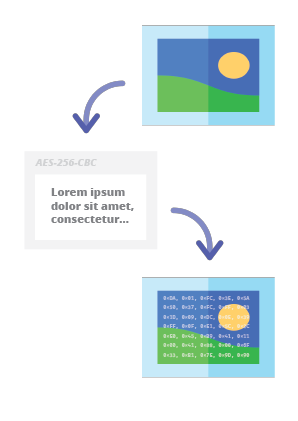
Steganographic Online Codec 允许您使用 AES 加密算法(采用 256 位 PBKDF2 派生密钥)将密码加密的消息隐藏在图像和照片中。
您可以免费使用它,访问地址:
https://www.pelock.com/products/steganography-online-codec
该 SDK 通过 WebAPI 接口提供对编解码器及其编码和解码功能的编程访问。
隐写术是一门描述通过将消息嵌入其他看似无害的图像文件中来隐藏信息的艺术和科学。
在这种情况下,加密隐藏消息的各个位被保存为所选图像像素中 RGB 颜色分量的最低有效位(LSB)。
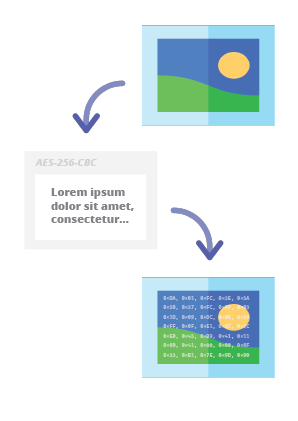
使用我们的隐写编码器,您将能够以安全的方式将任何文本消息隐藏在图像中,并且不会引起任何怀疑。只有在提供有效的解密密码后,才能读取该消息。
Web API SDK 的首选安装方式是通过 NPM(Node 包管理器)。
运行:
npm i steganography-online-codec
或者将以下条目:
"dependencies": {
"steganography-online-codec": "latest"
},
直接添加到您的 package.json 的 dependencies 部分。
安装包可在 https://www.npmjs.com/package/steganography-online-codec 获取
安装包已上传到几种流行编程语言的仓库,其源代码也已发布在 GitHub 上:
如果您不想使用 Python 模块,可以直接从文件导入:
from pelock.steganography_online_codec import *
"use strict";
/******************************************************************************
*
* Steganography Online Codec WebApi interface usage example.
*
* In this example shows how to hide an encrypted secret message in an image file.
*
* Version : v1.00
* Language : JavaScript
* Author : Bartosz Wójcik (original example)
* Project : https://www.pelock.com/products/steganography-online-codec
* Homepage : https://www.pelock.com
*
* @link https://www.pelock.com/products/steganography-online-codec
* @copyright Copyright (c) 2020-2025 PELock LLC
* @license Apache-2.0
*
/*****************************************************************************/
// include Steganography Online Codec module
import { SteganographyOnlineCodec, Errors } from 'steganography-online-codec';
// or if tested locally use:
//import { SteganographyOnlineCodec, Errors } from '../src/SteganographyOnlineCodec.mjs';
// create Steganography Online Codec class instance (we are using our activation key)
const mySteganographyOnlineCodec = new SteganographyOnlineCodec('YOUR-WEB-API-KEY');
// encode a hidden message (encrypted with your password) within an image file
(async () => {
const inputFile = 'input_file.jpg';
const secretMessage = 'Secret message';
const password = 'Pa$$word';
const outputFile = 'output_file_with_hidden_secret_message.png';
try {
const result = await mySteganographyOnlineCodec.encode(inputFile, secretMessage, password, outputFile);
// result object holds the encoding results as well as other information
console.log('Secret messaged encoded and saved to the output PNG file.');
} catch (err) {
console.error('Encoding failed:', err.error_message || err.message || String(err));
}
})();
"use strict";
/******************************************************************************
*
* Steganography Online Codec WebApi interface usage example.
*
* In this example, we will see how to hide an encrypted message in an
* image file using our codec.
*
* Version : v1.00
* Language : JavaScript
* Author : Bartosz Wójcik
* Project : https://www.pelock.com/products/steganography-online-codec
* Homepage : https://www.pelock.com
*
* @link https://www.pelock.com/products/steganography-online-codec
* @copyright Copyright (c) 2020-2025 PELock LLC
* @license Apache-2.0
*
/*****************************************************************************/
// include Steganography Online Codec module
import { SteganographyOnlineCodec, Errors } from 'steganography-online-codec';
// or if tested locally use:
//import { SteganographyOnlineCodec, Errors } from '../src/SteganographyOnlineCodec.mjs';
// create Steganography Online Codec class instance (we are using our activation key)
const mySteganographyOnlineCodec = new SteganographyOnlineCodec('YOUR-WEB-API-KEY');
// encode a hidden message within the source image file
(async () => {
// full version image size limit is set to 10 MB (demo 50 kB max)
// supported image formats are PNG, JPG, GIF, BMP, WBMP, GD2, AVIF, WEBP (mail me for more)
const inputFilePath = 'input_file.webp';
// full version message size is unlimited (demo 16 chars max)
const secretMessage = 'Secret message';
// full version password length is 128 characters max (demo 8 chars max)
const password = 'Pa$$word';
// where to save encoded image with the secret message
const outputFilePath = 'output_file_with_hidden_secret_message.png';
try {
// encode a hidden message (encrypted with your password) within an image file
const result = await mySteganographyOnlineCodec.encode(inputFilePath, secretMessage, password, outputFilePath);
// result object holds the encoding results as well as other information
const versionType = result.license && result.license.activationStatus ? 'full' : 'demo';
console.log(`You are running in ${versionType} version`);
console.log(`Secret messaged encoded and saved to ${outputFilePath}`);
if (result.license && result.license.usagesCount !== undefined) {
console.log(`Remaining number of usage credits - ${result.license.usagesCount}`);
}
} catch (err) {
const errorCode = err.error;
switch (errorCode) {
case Errors.INVALID_INPUT:
console.log(`Invalid input file ${inputFilePath} or file doesn't exist`);
break;
case Errors.MESSAGE_TOO_LONG:
console.log('Message is too long for the provided image file, use larger file');
break;
case Errors.IMAGE_TOO_BIG:
console.log(`Image file is too big, current limit is set to ${err.raw?.limits?.maxFileSize ?? 'unknown'}`);
break;
case Errors.LIMIT_MESSAGE:
console.log(`Message is too long, current limit is set to ${err.raw?.limits?.maxMessageLen ?? 'unknown'}`);
break;
case Errors.LIMIT_PASSWORD:
console.log(`Password is too long, current limit is set to ${err.raw?.limits?.maxPasswordLen ?? 'unknown'}`);
break;
case Errors.INVALID_PASSWORD:
console.log('Invalid password');
break;
default:
console.log(`An error occurred: ${err.error_message ?? `Error code ${errorCode}`}`);
}
}
})();
"use strict";
/******************************************************************************
*
* Steganography Online Codec WebApi interface usage example.
*
* In this example, we will see how to extract a previously encrypted & hidden
* secret message from an image file.
*
* Version : v1.00
* Language : JavaScript
* Author : Bartosz Wójcik
* Project : https://www.pelock.com/products/steganography-online-codec
* Homepage : https://www.pelock.com
*
* @link https://www.pelock.com/products/steganography-online-codec
* @copyright Copyright (c) 2020-2025 PELock LLC
* @license Apache-2.0
*
/*****************************************************************************/
// include Steganography Online Codec module
import { SteganographyOnlineCodec, Errors } from 'steganography-online-codec';
// or if tested locally use:
//import { SteganographyOnlineCodec, Errors } from '../src/SteganographyOnlineCodec.mjs';
// create Steganography Online Codec class instance (we are using our activation key)
const mySteganographyOnlineCodec = new SteganographyOnlineCodec('YOUR-WEB-API-KEY');
// extract a hidden message from the previously encoded image file
(async () => {
// full version image size limit is set to 10 MB (demo 50 kB max)
// supported image format is PNG and only PNG!
const inputFilePath = 'output_file_with_hidden_secret_message.png';
// full version password length is 128 characters max (demo 8 chars max)
const password = 'Pa$$word';
try {
// extract a hidden message from the image (PNG files only)
const result = await mySteganographyOnlineCodec.decode(inputFilePath, password);
// result object holds the decoding results as well as other information
console.log(`You are running in ${result.license?.activationStatus ? 'full' : 'demo'} version`);
console.log(`Secret message is "${result.message}"`);
if (result.license && result.license.usagesCount !== undefined) {
console.log(`Remaining number of usage credits - ${result.license.usagesCount}`);
}
} catch (err) {
switch (err.error) {
case Errors.INVALID_INPUT:
console.log(`Invalid input file ${inputFilePath} or file doesn't exist`);
break;
case Errors.IMAGE_TOO_BIG:
console.log(`Image file is too big, current limit is set to ${err.raw?.limits?.maxFileSize ?? 'unknown'}`);
break;
case Errors.LIMIT_MESSAGE:
console.log(`Extracted message is too long, current limit is set to ${err.raw?.limits?.maxMessageLen ?? 'unknown'}`);
break;
case Errors.LIMIT_PASSWORD:
console.log(`Password is too long, current limit is set to ${err.raw?.limits?.maxPasswordLen ?? 'unknown'}`);
break;
case Errors.INVALID_PASSWORD:
console.log('Invalid password');
break;
default:
console.log(`An error occurred: ${err.error_message ?? String(err)}`);
}
}
})();
"use strict";
/******************************************************************************
*
* Steganography Online Codec WebApi interface usage example.
*
* In this example we will verify our activation key status.
*
* Version : v1.00
* Language : JavaScript
* Author : Bartosz Wójcik
* Project : https://www.pelock.com/products/steganography-online-codec
* Homepage : https://www.pelock.com
*
* @link https://www.pelock.com/products/steganography-online-codec
* @copyright Copyright (c) 2020-2025 PELock LLC
* @license Apache-2.0
*
/*****************************************************************************/
// include Steganography Online Codec module
import { SteganographyOnlineCodec, Errors } from 'steganography-online-codec';
// or if tested locally use:
//import { SteganographyOnlineCodec, Errors } from '../src/SteganographyOnlineCodec.mjs';
// create Steganography Online Codec class instance (we are using our activation key)
const mySteganographyOnlineCodec = new SteganographyOnlineCodec('YOUR-WEB-API-KEY');
// login to the service
(async () => {
try {
const result = await mySteganographyOnlineCodec.login();
// result object holds the information about the license & current limits
const versionType = result.license && result.license.activationStatus ? 'full' : 'demo';
console.log(`You are running in ${versionType} version`);
// information about the current license
if (result.license && result.license.activationStatus) {
console.log(`Registered for - ${result.license.userName}`);
const licenseType = result.license.type === 0 ? 'personal' : 'company';
console.log(`License type - ${licenseType}`);
console.log(`Total number of purchased usage credits - ${result.license.usagesTotal}`);
console.log(`Remaining number of usage credits - ${result.license.usagesCount}`);
}
// current limits (different for DEMO and FULL versions)
if (result.limits) {
console.log(`Max. password length - ${result.limits.maxPasswordLen}`);
const msgLen = result.limits.maxMessageLen === -1 ? 'unlimited' : result.limits.maxMessageLen;
console.log(`Max. message length - ${msgLen}`);
console.log(`Max. input image file size - ${mySteganographyOnlineCodec.convert_size(result.limits.maxFileSize)}`);
}
} catch (err) {
console.error(`Login failed: ${err.error_message || String(err)}`);
}
})();
如果您对 Steganography Online Codec Web API 感兴趣,或者对 SDK 包、技术方面有任何疑问,或者某些内容不清楚,请与我联系。我将很乐意回答您的所有问题。
Bartosz Wójcik
| 仓库 | 语言 | 安装 | 包 | GitHub |
|---|
![]() | Python | 运行 pip install steganography-online-codec | PyPI | 源代码 |
![]() | JavaScript、TypeScript | 运行 npm i steganography-online-codec 或在 package.json 的 dependencies 下添加 "steganography-online-codec": "latest" | NPM | 源代码 |
![]() | Rust | 运行 cargo add steganography-online-codec 或将 steganography-online-codec = "1" 添加到 Cargo.toml(可选:对于未发布或本地构建,可使用 git / path) | crates.io | 源代码 |