多线程检测 URL 列表,支持 POST 和 GET 请求并附带参数。
大量灵感来源于 NortwaveSecurity 版本。
待检测的 URL 列表应采用以下格式(csv):
description,URL,method,parameters
production,example.com/login,POST,"username,password"
staging,example.com/search,GET,"q"
development,example.com/,GETNP,""
随后将在 example.com/login 上执行 POST 请求,请求体如下:
username={jndi:ldap...}&password={jndi:ldap...}
类似地,将执行以下 GET 请求:example.com/search?q={jndi:ldap...}。
或者,你可以指定 GETNP(GET No Parameters),即对 URL 追加 payload 后执行 GET:example.com/new/{jndi:ldap...}。
此外,payload 也会插入到 User-Agent、Referer、X-Forwarded-For、Authentication 请求头中,以增加命中几率。
如果需要对同一 URL 同时进行 GET、POST 或 GETNP 检测,请在 CSV 中复制该条目。
无需任何预先配置即可使用 https://canarytokens.org/generate 生成一个 Log4Shell CanaryToken:
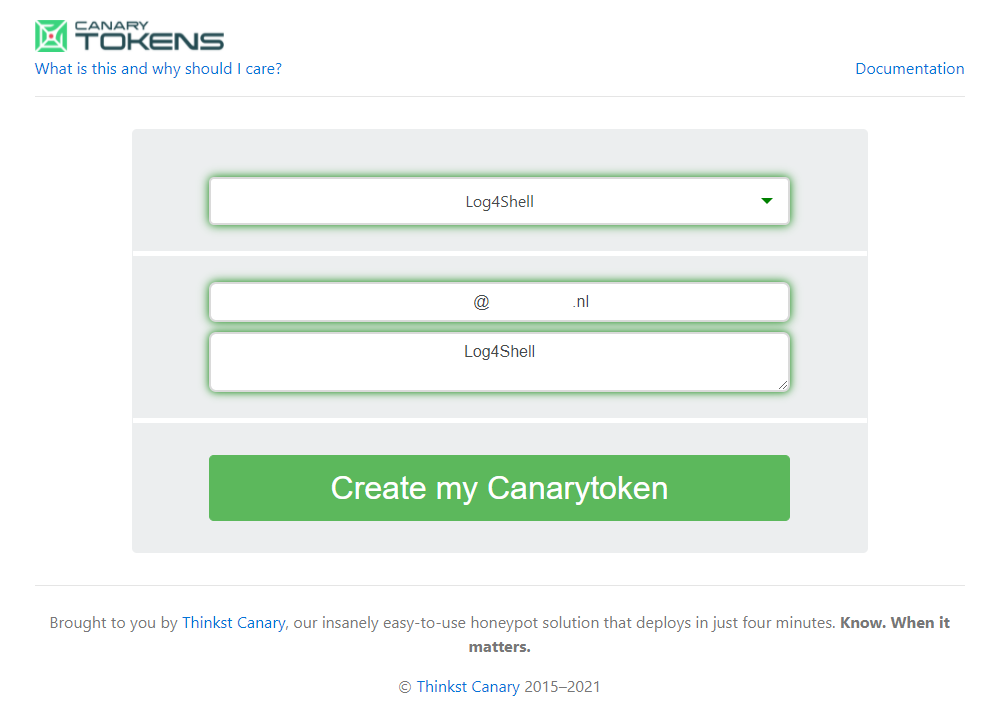
或者,你也可以搭建自己的 DNS 服务器。
使用 pip install -r requirements.txt 安装依赖。编辑脚本,将以下行修改为你偏好的 canary token:
usage: log4jcheck.py [-h] -f FILE -u URL [-w WAIT] [-t TIMEOUT] [-p PREFIX] [-q THREADS] [-d DONE]

optional arguments:
  -h, --help            show this help message and exit
  -f FILE, --file FILE  The CSV filename containing the URLs
  -u URL, --url URL     DNS subdomain URL on which th callback is performed
  -w WAIT, --wait WAIT  Number of seconds to wait before next request (default: 1)
  -t TIMEOUT, --timeout TIMEOUT
                        HTTP timeout in seconds to use (default: 5)
  -p PREFIX, --prefix PREFIX
                        Type of prefix, see prefixes_injects for options. (default: 0, options 0-3)
  -q THREADS, --threads THREADS
                        Number of threads to distribute the work
  -d DONE, --done DONE  File where we can keep track of items that are done
创建 /run/logs 目录用于输出日志。日志将记录在这里,不会输出到 stdout。
现在可以运行脚本,指定之前创建的 CSV 文件以及待检测的 URL。
python3 .\log4jcheck.py --file .\urls-example.csv --threads 2 --url "L4J.ujz5sgvgo7xuvn03ft9qrws5w.canarytokens.com/a" -w 0 -t 1
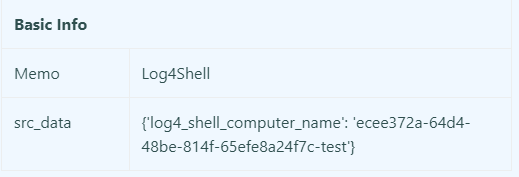
脚本执行完成后,检查 token 是否被触发。你可以根据生成的 UUID4 与注入参数进行交叉关联,例如:40852c3b-2d6b-4bd5-a91f-4416aa730619-username。
已针对 log4shell-vulnerable-app 进行测试。按如下方式修改 MainController.java:
package fr.christophetd.log4shell.vulnerableapp;


import org.springframework.web.bind.annotation.GetMapping;
import org.springframework.web.bind.annotation.PostMapping;
import org.springframework.web.bind.annotation.RequestHeader;
import org.springframework.web.bind.annotation.RequestBody;
import org.springframework.web.bind.annotation.RequestParam;
import org.springframework.web.bind.annotation.RestController;

import org.apache.logging.log4j.LogManager;
import org.apache.logging.log4j.Logger;

@RestController
public class MainController {

    private static final Logger logger = LogManager.getLogger("HelloWorld");

    @GetMapping("/")
    public String index(@RequestHeader("X-Api-Version") String apiVersion) {
        logger.info("Received a request for API version " + apiVersion);
        return "Hello, world!";
    }

    @GetMapping("/test")
    public String testGet(@RequestParam String test) {
        logger.info("Received a request for test " + test);
        return "Test world!";
    }

    @PostMapping("/test")
    public String test(@RequestBody String test) {
        logger.info("Received a request for test " + test);
        return "Test world!";
    }

}
编译并运行:
gradle bootJar --no-daemon
java -jar .\build\libs\log4shell-vulnerable-app-0.0.1-SNAPSHOT.jar
使用以下 urls.csv 文件运行 log4jcheck:
description,URL,method,parameters
test,http://localhost:8080/test,POST,"test"
test,http://localhost:8080/test,GET,"test"
在 canary token 日志中应看到如下信息:
覆盖以下 HTTP 请求头:
X-Api-VersionUser-AgentRefererX-Druid-CommentOriginLocationX-Forwarded-ForCookieX-Requested-WithX-Forwarded-HostAccept对于每次注入,可使用以下 JNDI 前缀:
jndi:dnsjndi:${lower:l}${lower:d}apjndi:rmijndi:ldap请注意,该脚本只检测:User-Agent 和你指定的 POST 或 GET 请求参数。如果漏洞需要通过其他请求头、遗漏的输入字段等才能触发,则会产生漏报。欢迎向脚本添加额外的检测。
Log4jcheck 基于 MIT 许可证开源。