Skip to content
KitploitKITPLOIT
工具博客
提交
工具博客
提交

黑客、渗透测试和网络安全工具,武装您的安全武器库!

Kitploit 是一个黑客、网络安全和渗透测试工具的目录。发现最新的项目更新,查找漏洞、分析系统、自动化测试并加强你的安全。

··订阅源·联系·隐私·© 2026 Kitploit

工具目录

分类

查看所有分类
Loading categories
CF-Hero — CF-Hero 是一款侦察工具,利用多种数据源来发现受 Cloudflare 保护的 Web 应用的真实 IP 地址。 | Kitploit
工具/GitHubGitHub/musana/cf-hero
OSINT (开源情报)侦察信息收集WAF绕过渗透测试子域名枚举指纹欺骗DNS 分析
GitHubmusana/cf-hero

CF-Hero

CF-Hero 是一款侦察工具,利用多种数据源来发现受 Cloudflare 保护的 Web 应用的真实 IP 地址。

查看仓库
2.6k252112个月前Kitploit 审核通过

最受欢迎

查看全部 →

发现我们社区最常用的工具。

探索所有工具

浏览我们的工具集合

查看所有工具 →
分享

CF-Hero

CF-Hero

它是什么? • 功能特性 • 背景 • 安装 • 使用方法 • 运行 cf-hero • ZoomEye(赞助商) • 待办事项

它是什么?

CF-Hero 是一款综合性侦察工具,旨在发现由 Cloudflare 保护的 Web 应用的真实 IP 地址。它通过各种方法执行多源情报收集。

DNS 侦察

  • 当前的 DNS 记录(A、TXT)
  • 历史 DNS 数据分析
  • 关联域名发现

情报来源

  • ZoomEye 搜索引擎
  • Censys 搜索引擎
  • Shodan 搜索引擎
  • SecurityTrails 历史记录
  • 主动 DNS 枚举
  • 关联域名相关性分析

该工具分析来自这些来源的数据,以识别受 Cloudflare 保护的目标的潜在源站 IP 地址。它通过响应分析验证发现结果,以最大限度减少误报。

该工具的简单流程图```

┌──────────┐
│ │ ┌─────────┐
│ Domain │───────►│ Check A │
│ │ │ Records │
└──────────┘ └────┬────┘
│
┌──────────────────┘
│
▼
┌─────────────┐
│Is it behind │ YES
│ CloudFlare │────────────────────────────────────────┐
└─────────────┘ │
│ │
│ │
│ ▼
│ ┌──────────────────────────┐
│ │ Check the domain from │
│ ┌─────────────────│ various sources │───────────────────┐
│ │ └──────────────────────────┘ │
│ │ │ │ │
│ │ │ │ │
│ │ │ │ │
│ ▼ ▼ ▼ ▼
│ ┌────────────────┐ ┌─────────────┐ ┌───────────┐ ┌─────────────┐
│ │ Historical DNS │ │ Current DNS │ ┌─┤ OSINT │ │ Sub/domains │
│ ┌──│ Records │ ┌─│ Records │ │ └───────────┘ ┌─│ │
│ │ └────────────────┘ │ └─────────────┘ │ ┌─────────┐ │ └─────────────┘
│ │ ┌──────────────┐ │ ┌───────────┐ ├──►│ ZoomEye │ │ ┌─────────────┐
│ ├───►│SecurityTrails│ ├──►│ TXT │ │ └─────────┘ │ │ sub(domains)│
│ │ └──────────────┘ │ └───────────┘ │ ┌─────────┐ └──►│ used by the │
│ │ ┌──────────────┐ │ ┌───────────┐ ├──►│ Shodan │ │ same company│
│ │ └───►│Completedns │ └──►│ A │ │ └─────────┘ └─────────────┘ │ │ │ └──────────────┘ └───────────┘ │ ┌─────────┐ │ │ │ └──►│ Censys │ │ │ │ └─────────┘ │ │ │ │ │ │ │ │ └────────────────────────────────────────────┬────────────────────────────────────────────┘ │ │
NO │ │
│ │ │ │ │ ▼ │ ┌──────────────────────────────────────┐ │ │ Establish direct HTTP connections to │ │ │ each discovered IP address │ │ └──────────────────────────────────────┘ │ │ │ │ │ │ │ ▼ │ ┌─────────────────────────────┐ │ │ Compare the HTML title with │ │ │ the target's title │ │ └─────────────────────────────┘ │ │ │ │ │ │ │ ▼ │ ┌─────────────────────┐ │ │ │ YES │ │ Are they the same ? │─────────────────────┐ │ │ │ │ │ └─────────────────────┘ ▼ │ │ ┌───────────────┐ │ │NO │ Real IP found │ │ │ └───────┬───────┘ │ ▼ │ │ ┌──────────┐ │ └───────────────────────────────────────────►│ FINISH │◄───────────────────────────┘ └──────────┘

root@kitploit:~
# 功能
### 功能

- DNS 侦察
  - 检查当前 DNS 记录(A、TXT)
  - 提取位于 Cloudflare 背后的域名
  - 提取未位于 Cloudflare 背后的域名
  - 用户提供的 HTML 标题(以防 CF 阻止你)
  - 智能着色

- 第三方情报
  - ZoomEye 集成
  - Censys 集成
  - Shodan 集成
  - SecurityTrails 集成
  - 关联域名的反向 IP 查询

- 高级功能
  - 自定义 JA3 指纹支持
  - 并发扫描能力
  - 标准输入支持(管道)
  - 用于验证的 HTML 标题比较
  - 代理支持
  - 自定义 User-Agent 配置

# 背景
## 当前 DNS 记录
让我们看一个 DNS 配置错误的用例。

如你所见,常规 DNS 查询会返回域名的 IP 地址。例如,musana.net 位于 Cloudflare(CF)之后,但有时该域名有多个 A 记录,其中一些可能并不对应与 CF 关联的 IP 地址。(此 DNS 输出仅为示例,可能并不代表 musana.net 的实际 DNS 应答。)```
;; ANSWER SECTION:
musana.net.	300	IN	A	104.16.42.102
musana.net.	300	IN	A	104.16.43.102
musana.net.	300	IN	A	123.45.67.89 (Real IP exposed)
musana.net.	300	IN	A	123.45.76.98 (Real IP exposed)

另一个情况与 TXT 记录有关。有时域名在 CF 后面,但域名的真实 IP 可能被用于 TXT 记录中。CF-Hero 会检查所有 TXT 记录,然后提取所有 IP 地址,最后尝试通过 HTTP 连接到它找到的 IP。

假设我们有这样的 DNS TXT 记录。正如在 TXT 记录中所见,其中有 SPF 记录。有些公司可能托管自己的邮件服务器,TXT 记录中可能包含指向目标域名的 IP。

正如你在下面的 DNS 应答中所看到的,SPF 记录包含一些 IP 地址。Cf-Hero 也会检查这些。``` ;; ANSWER SECTION: musana.net. 115 IN TXT "1password-site-verification=LROK6G5XFJG5NF76TE2FBTABUA" musana.net. 115 IN TXT "5fG-7tA-G4V" musana.net. 115 IN TXT "MS=ms16524910" musana.net. 115 IN TXT "OSSRH-74956" musana.net. 115 IN TXT "docker-verification=6910d334-a3fc-419c-89ac-57668af5bf0d" musana.net. 115 IN TXT "docusign=4c6d27bb-572e-4fd4-896c-81bfb0af0aa1" musana.net. 115 IN TXT "shopify-verification-code=1Ww5VsPpkIf32cJ5PdDHdguRk22K2R" musana.net. 115 IN TXT "shopify-verification-code=NM243t2faQbaJs8SRFMSEQAc4J9UQf" musana.net. 115 IN TXT "v=spf1 include:_spf.google.com include:cust-spf.exacttarget.com include:amazonses.com include:mail.zendesk.com include:servers.mcsv.net include:spf.mailjet.com ip4:216.74.162.13 ip4:216.74.162.14 ip4:153.95.95.86 ip4:18.197.36.5 -all"

root@kitploit:~
## OSINT

OSINT 是另一种查找位于 CF 后面任何域名真实 IP 的技术。有许多针对特定用途的专用搜索引擎。Shodan 和 Censys 就是其中两个。它们提供更详细、更技术性的信息。这些搜索引擎持续扫描整个互联网,发现新资产,或监控并记录资产的变化。当一个不在 CF 后面的域名上线时,这两个引擎都能记录该域名的真实 IP。过一段时间后,如果该域名被放入 Cloudflare 后面,仍然可以通过这些搜索引擎找到它们的 IP。

CF-Hero 也会检查 Censys 和 Shodan。(请注意,使用这些服务时,由于 API 配额限制,你会受到一些限制。)


## (子)域名
另一种技巧是(子)域名技术。实际上,它不一定是子域名,也可以是主域名。这里的关键点是:域名应该属于同一家公司。

假设我们有 2 个域名。其中一个在 CF 后面,另一个不在。在这种情况下,你连接到不在 CF 后面的域名,然后将 Host 头更改为在 CF 后面的域名。如果你得到了在 CF 后面的应用程序的响应,恭喜你,你已经绕过了 CF。你可以直接从 IP 访问 Web 应用了。(当然,这也取决于配置。)


让我们再仔细看一下。```

--> TCP --> blog.musana.net [123.45.67.89] ---> HTTPs -------------\
                                                                    \
--> TCP --> api.musana.net [123.67.45.98] ----> HTTPs -----------\   \ 
                                                                  \   \
--> TCP --> test.musana.net [123.89.44.88] ---> HTTPs -------------\   \
                                                                    \___\____________________
--> TCP --> tools.musana.net [123.44.55.66] --> HTTPs -------------> | GET / HTTP/2          |
                                                                     | Host: musana.net      | ====> Check & Compare Responses
--> TCP --> admin.musana.net [33.44.123.45] --> HTTPs -------------->|_______________________|
                                                                          /    /
--> TCP --> ... [...] ------------------------> HTTPs ------------------>/    /
                                                                        /    /
--> TCP --> ... [...] ------------------------> HTTPs ---------------->/    /
                                                                      /    /
--> TCP --> random-test.com [55.44.11.33] ----> HTTPs -------------->/    /
                                                                         /
--> TCP --> fsubsidiary.net [66.77.22.123] ---> HTTPs ----------------->/


历史 DNS 记录

历史 DNS 记录服务尝试发现互联网上的所有域名,并记录这些域名的 DNS 记录变化。其中最知名的服务是 securitytrails。如果一个域名曾以其真实 IP 地址在互联网上发布,这些服务的机器人可以记录其真实 IP 地址;之后如果该域名被置于 Cloudflare 之后,就可以通过这些服务找到真实 IP 地址。因此,我们可以找到一个过去曾通过真实 IP 地址广播过的域名的真实 IP 地址。

它使用 security trails 服务获取历史 DNS 记录。在 cf-hero.yaml 文件中输入 API 密钥后,你可以使用 -securitytrails 参数执行此扫描。

安装说明

cf-hero 需要 go1.18 才能成功安装。运行以下命令进行安装。``` go install -v github.com/musana/cf-hero/cmd/cf-hero@latest

root@kitploit:~
# 用法```


        ____         __
  _____/ __/        / /_  ___  _________
 / ___/ /__  ___   / __ \/ _ \/ ___/ __ \
/ /__/ ___/ (___) / / / /  __/ /  / /_/ /
\___/_/          /_/ /_/\___/_/   \____/

                                @musana
_____________________________________________

Unmask the origin IPs of Cloudflare-protected domains

Usage:
  cf-hero [flags]

Flags:
GENERAL OPTIONS:
   -w int         Worker count (default 16)
   -f string      Input file containing list of host/domain
   -v             Enable verbose output
   -title string  Specify HTML title to match (skip fetching from Cloudflare domain)

PRINT OPTIONS:
   -cf      Print domains behind Cloudflare
   -non-cf  Print domains not behind Cloudflare

SOURCES:
   -censys          Include Censys in scanning
   -securitytrails  Include SecurityTrails historical DNS records in scanning
   -shodan          Include Shodan historical DNS records in scanning
   -zoomeye         Include Zoomeye in scanning
   -dl string       Domain list for sub/domain scanning
   -td string       Target domain for sub/domain scanning

CONFIGURATION:
   -hm string   HTTP method. (default "GET")
   -ja3 string  JA3 String (default "772,4865-4866-4867-49195-49199-49196-49200-52393-52392-49171-49172-156-157-47-53,18-10-16-23-45-35-5-11-13-65281-0-51-43-17513-27,29-23-24,0")
   -ua string   HTTP User-Agent (default "Mozilla/5.0 (Macintosh; Intel Mac OS X 10.15; rv:109.0) Gecko/20100101 Firefox/113.0")
   -px string   HTTP proxy URL


运行 CF-Hero

最基本的运行命令。默认检查 A 和 TXT 记录。```

cat domains.txt | cf-hero

root@kitploit:~
或者你可以向它传递 "f" 参数。```
# cf-hero -f domains.txt

使用 zoomeye 参数将 ZoomEye 包含在扫描中```

cat domain.txt | cf-hero -zoomeye

root@kitploit:~
使用 **censys** 参数将 Censys 包含在扫描中```
# cat domain.txt | cf-hero -censys

使用 shodan 参数将 Shodan 包含在扫描中。```

cat domain.txt | cf-hero -shodan

root@kitploit:~
使用 **securitytrails** 参数将 SecurityTrails 包含在扫描中```
# cat domain.txt | cf-hero -securitytrails

使用 -td 和 -dl 参数,通过利用不在 Cloudflare 背后的域名或子域名列表,尝试查找目标域名的 IP 地址。通过使用 -dl 参数指定你已识别出的目标云或本地基础设施所使用的活动 IP 地址所在的网段,你可以找到目标域名的真实 IP 地址。```

cf-hero -td https://musana.net -dl sub_domainlist.txt

root@kitploit:~
获取 CF 背后的域名```
# cf-hero -f domains.txt -cf

获取不在 CF 后面的域名```

cf-hero -f domains.txt -non-cf

root@kitploit:~
其他选项 (自定义 ja3, 代理, 工作线程, 用户代理)```
# cf-hero -d https://musana.net -ua "Mozilla" -w 32 -ja3 "771,22..." -px "http://127.0.0.1:8080"

在 $HOME/.config/ 目录下创建 cf-hero.yaml 文件以设置 API 密钥```

touch ~/.config/cf-hero.yaml

// content of YAML file should be like;

zoomeye:

  • "api_key_here" # ZoomEye API v2 key (sent in the API-KEY header) securitytrails:
  • "api_key_here" shodan:
  • "api_key_here" # standard Shodan API key (the /dns/domain endpoint requires a paid Membership) censys:
  • "censys_pat_here" # Censys Platform Personal Access Token (PAT)
  • "organization_id_here" # optional: Censys Organization ID, required for paid plans
root@kitploit:~
> **关于 Censys 的说明:** CF-Hero 现使用 [Censys Platform API](https://docs.censys.com/reference/get-started)
> (旧版 `search.censys.io` API 将于 2026 年停止服务)。请在 Censys Platform 控制台生成个人访问令牌 (PAT)
> 并将其作为第一个 `censys` 条目。若您的账户为付费套餐,请将您的组织 ID(显示在 API Access 页面上)作为第二个条目 —— 如未提供,
> API 将返回 Free 套餐权限,并可能无结果返回(HTTP 403)。

## SS

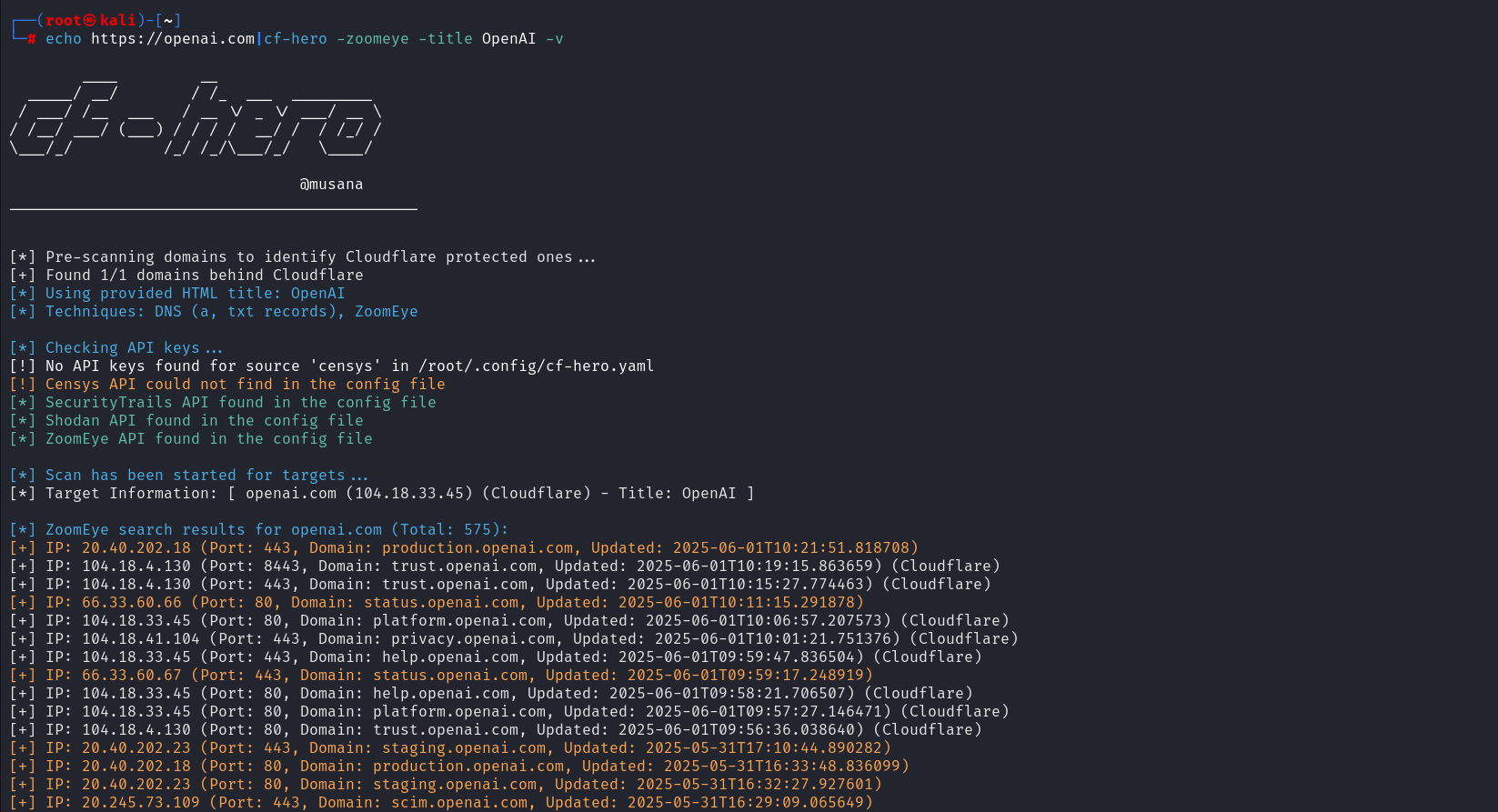
- 智能着色:黄色高亮表示非 Cloudflare IP,这些 IP 将仅接受检查。   
- 如果首次请求被 Cloudflare 拦截,可以设置 title 参数(该标题将为 'Just a moment...')。若未设置 title 参数,将自动获取 HTML 标题。
  
<p align="left">
  <img src="https://assets.kitploit.com/production/public/readmes/49199/e80b0d75e679cf55e02181d2af808f95830912a200c11a7c30427223bd7099cf.png">
</p>

<p align="left">
  <img src="https://assets.kitploit.com/production/public/readmes/49199/71d5a3a4afae8732b7a7f945260bf65cdd5b28599adc9677d601c9977a84bf0f.png">
</p>

## 🏆 赞助  
本项目由 [ZoomEye](https://www.zoomeye.ai) 鼎力支持。  

<p height="100" align="left">
  <a href="https://www.zoomeye.ai"><img height="100" src="https://www.zoomeye.ai/static/logo-CVnk4X2t.svg"></a>
</p>

## 待办事项
- favicon 搜索
- viewdns 集成
下载工具