Skip to content
KitploitKITPLOIT
工具博客
提交
工具博客
提交

黑客、渗透测试和网络安全工具,武装您的安全武器库!

Kitploit 是一个黑客、网络安全和渗透测试工具的目录。发现最新的项目更新,查找漏洞、分析系统、自动化测试并加强你的安全。

··订阅源·联系·隐私·© 2026 Kitploit

工具目录

分类

查看所有分类
Loading categories
ThreatHunting-Keywords — 威胁狩猎会话关键词与工件精选列表 | Kitploit
工具/GitHubGitHub/mthcht/threathunting-keywords
防御工具数字取证威胁情报事件响应精选资源日志分析
GitHubmthcht/threathunting-keywords

ThreatHunting-Keywords

威胁狩猎会话关键词与工件精选列表

查看仓库
669771年前Kitploit 审核通过

最受欢迎

查看全部 →

发现我们社区最常用的工具。

探索所有工具

浏览我们的工具集合

查看所有工具 →
分享
网站

ThreatHunting-Keywords

🎯 用于威胁狩猎(ThreatHunting)会话的关键词列表

image

目录

  • 什么是威胁狩猎
    • 威胁狩猎的优势
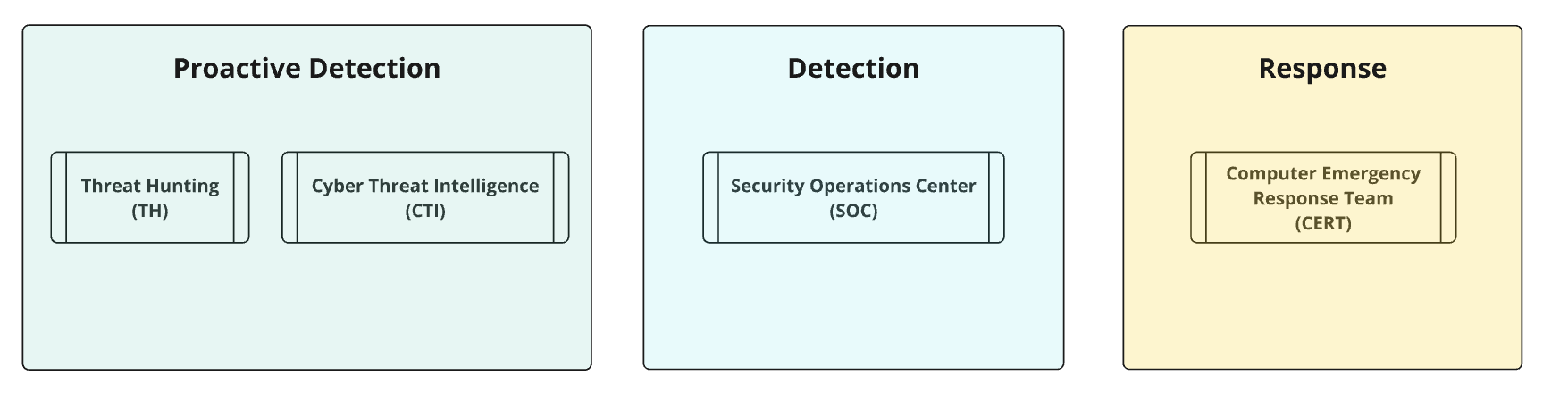
    • 将威胁狩猎与核心服务衔接
    • 检测成熟度等级
    • 情报收集的关键关注领域
    • 定向威胁狩猎流程
  • 文件
  • 供蓝队使用的 ThreatHunting-Keywords
  • 供红队使用的 ThreatHunting-Keywords
  • 威胁狩猎关键词文件的内容
  • 使用列表通过 Splunk 进行狩猎
    • 原始日志
    • 特定字段
    • 速度
    • 仪表盘示例
    • Splunk4DFIR
    • ELK 则有所不同
    • 其他用于检测的优秀列表
  • 无 SIEM 进行狩猎
    • DFIR 优化狩猎
    • YARA 规则
  • 网站
  • 预期误报
  • SIGMA 规则
  • 贡献

什么是威胁狩猎?

image

威胁狩猎是一种主动且迭代的方法,用于检测组织网络或系统中可能绕过自动化安全措施的恶意活动。与由安全警报触发的被动调查不同,威胁狩猎由威胁情报(TI)驱动的检查以及源于系统性和机会性分析的假设所驱动。这些假设 💡 帮助狩猎者发现未知威胁、潜在威胁或可能已逃避安全检测的已知威胁,以及自动化系统可能遗漏或排除的漏洞或入侵指标(IoC)。该过程还侧重于识别警报/仪表盘的前兆,改进 SOC/分诊工作流,同时为影子资产清单管理做出贡献,并升级需要进一步调查的低/中保真度事件。主要目标是识别威胁行为者使用的战术、技术和程序(TTP),增强组织预先检测和缓解潜在攻击的能力。
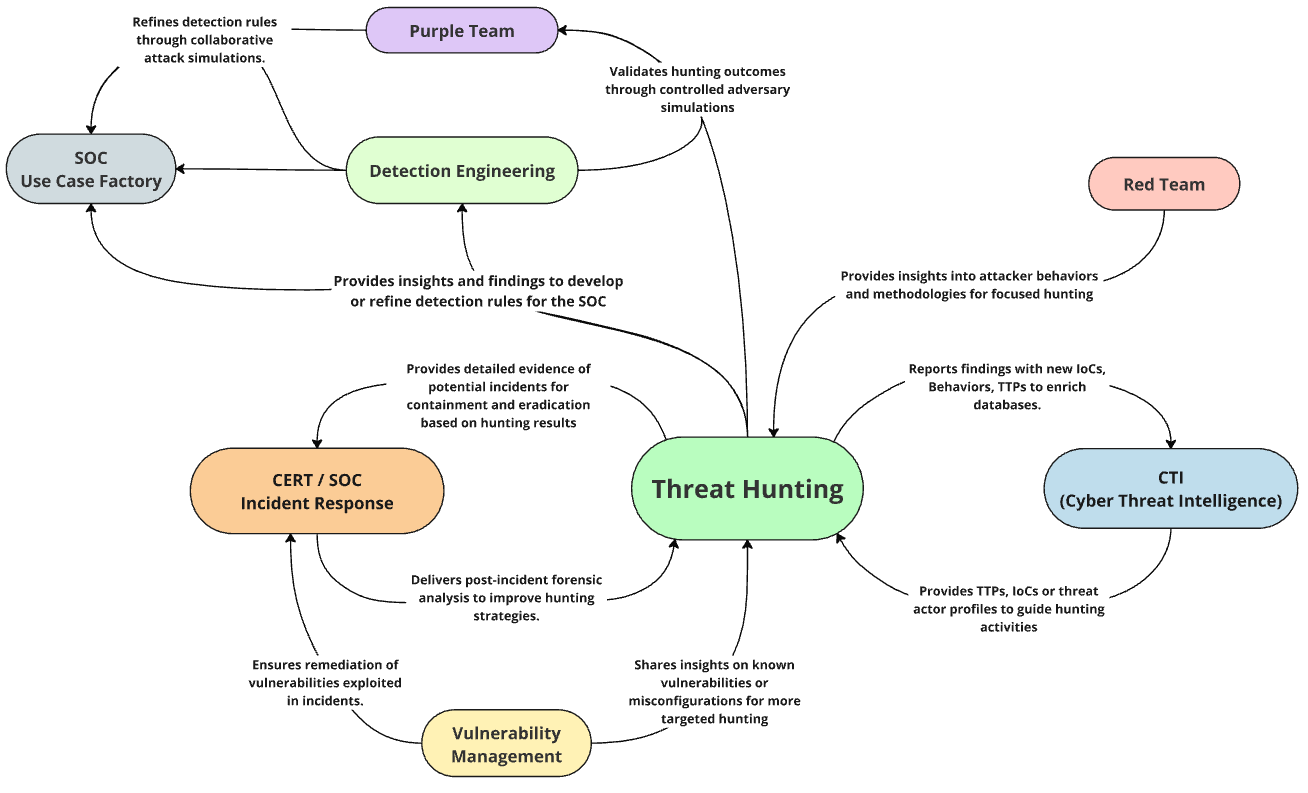
威胁狩猎的优势:

  • 🔍 识别可见性缺口
    • 检测监控和检测不足的区域,解决网络或系统中的盲点,以减轻隐藏威胁。
  • 🛠️ 填补检测缺口
    • 主动搜索可能不会触发警报的异常、前兆和 TTP
  • ⚙️ 提升 SOC 效率
    • 将威胁狩猎洞察整合到 SOC 工作流中,以发现静态检测可能遗漏的事件。通过减少误报并升级被忽视的事件,使 SOC 分析师能够专注于关键威胁,并完善检测逻辑以供将来使用。
  • 🚀 增强威胁检测并支持持续改进
    • 识别绕过自动化检测系统的高级、未知或隐藏威胁,并将有价值的数据反馈到 SOC 流程中,改进工具、培训和未来的检测能力
  • 🛡️ 缩小攻击面
    • 发现网络中未管理或未授权的系统、应用程序和影子 IT,使组织能够解决安全盲点并减少潜在威胁的暴露面。

将威胁狩猎与核心服务衔接

image

SOC 运营中的威胁狩猎生命周期

我建议的流程,用于组织部分自动化的威胁狩猎会话,以在 SOC 内保持高质量的检测规则
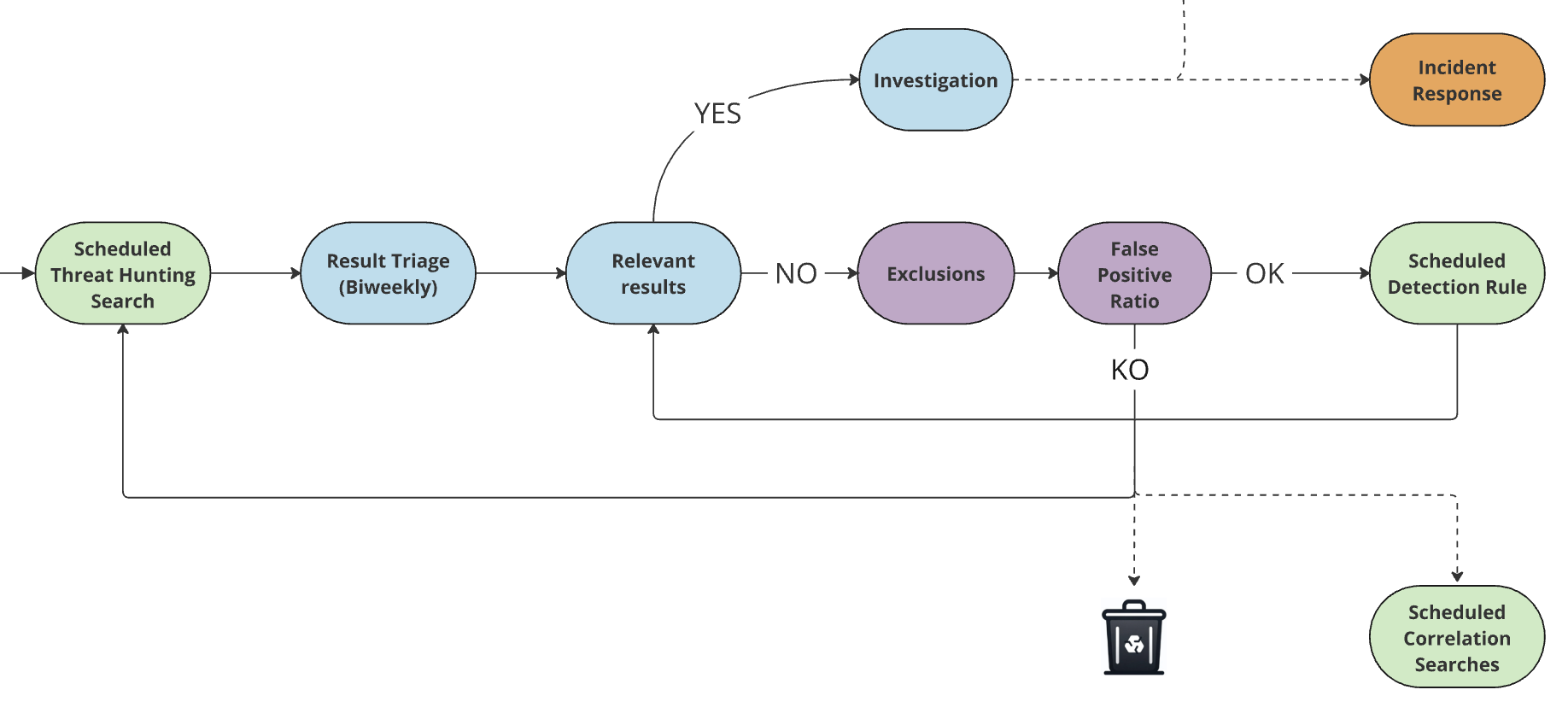
SOC_Process_Threat_Hunting_to_detection

检测成熟度等级

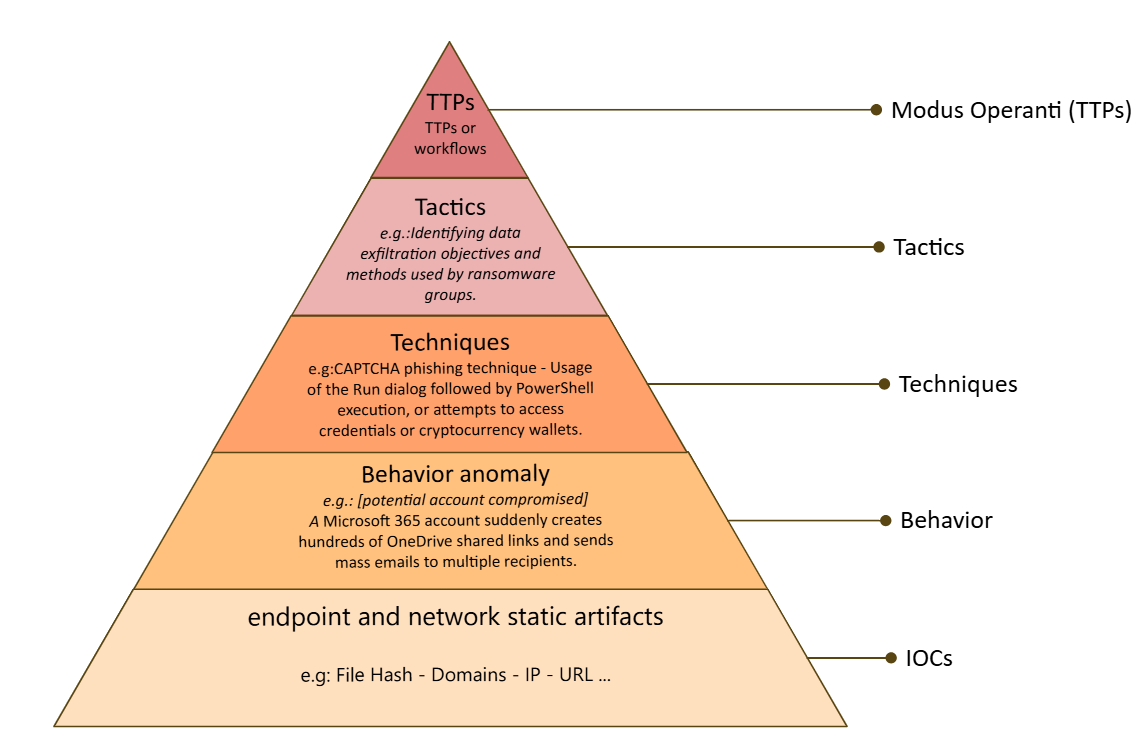
image SOC 团队专注于在检测成熟度金字塔的所有层级部署高保真度检测,以最低误报率针对已知威胁。威胁狩猎通过处理未知威胁、高级 TTP 和容易产生高误报率的异常来补充这一点,弥合差距并增强超出标准 SOC 能力的检测覆盖范围。
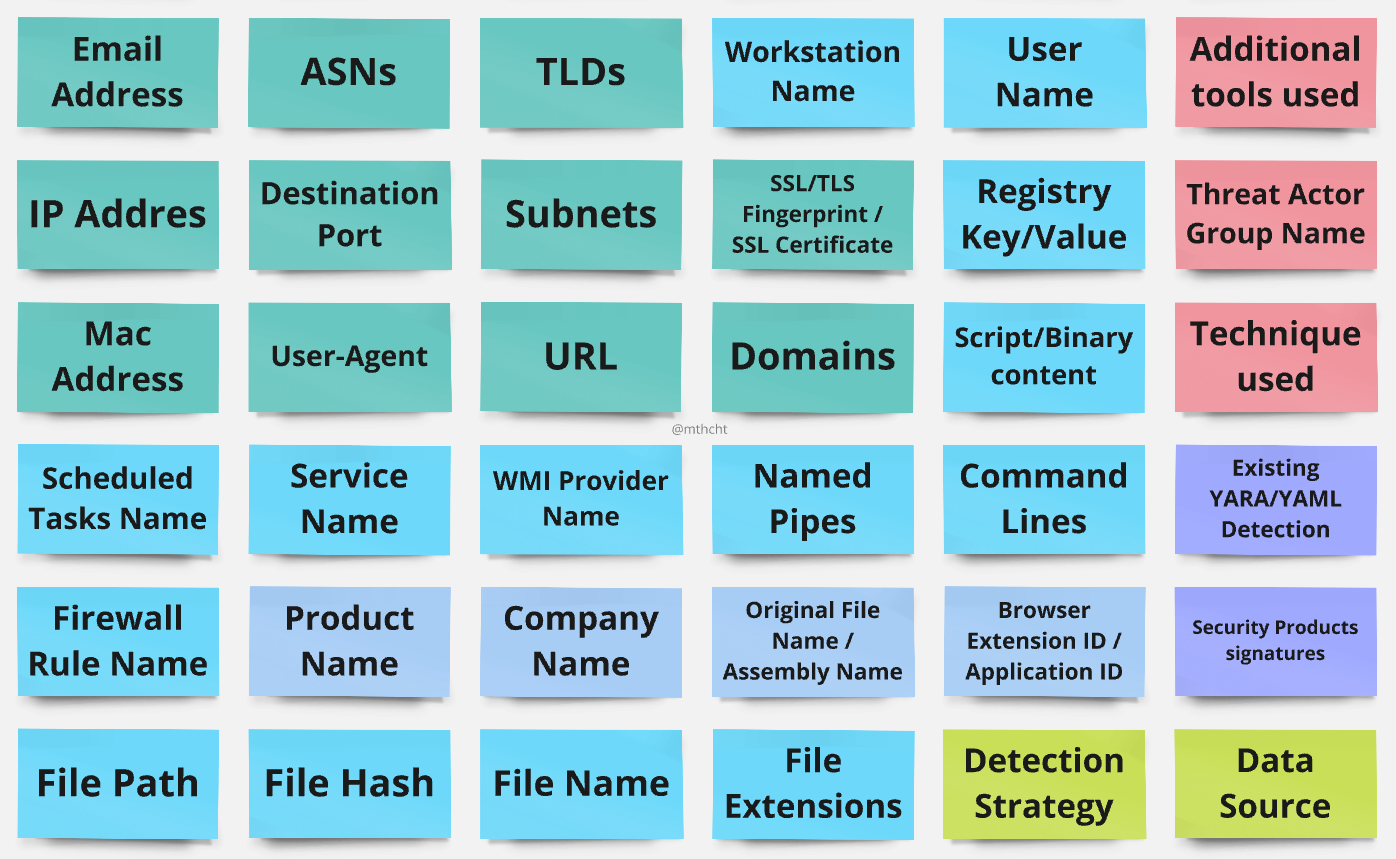
威胁狩猎检查清单 - 情报收集的关键关注领域

image

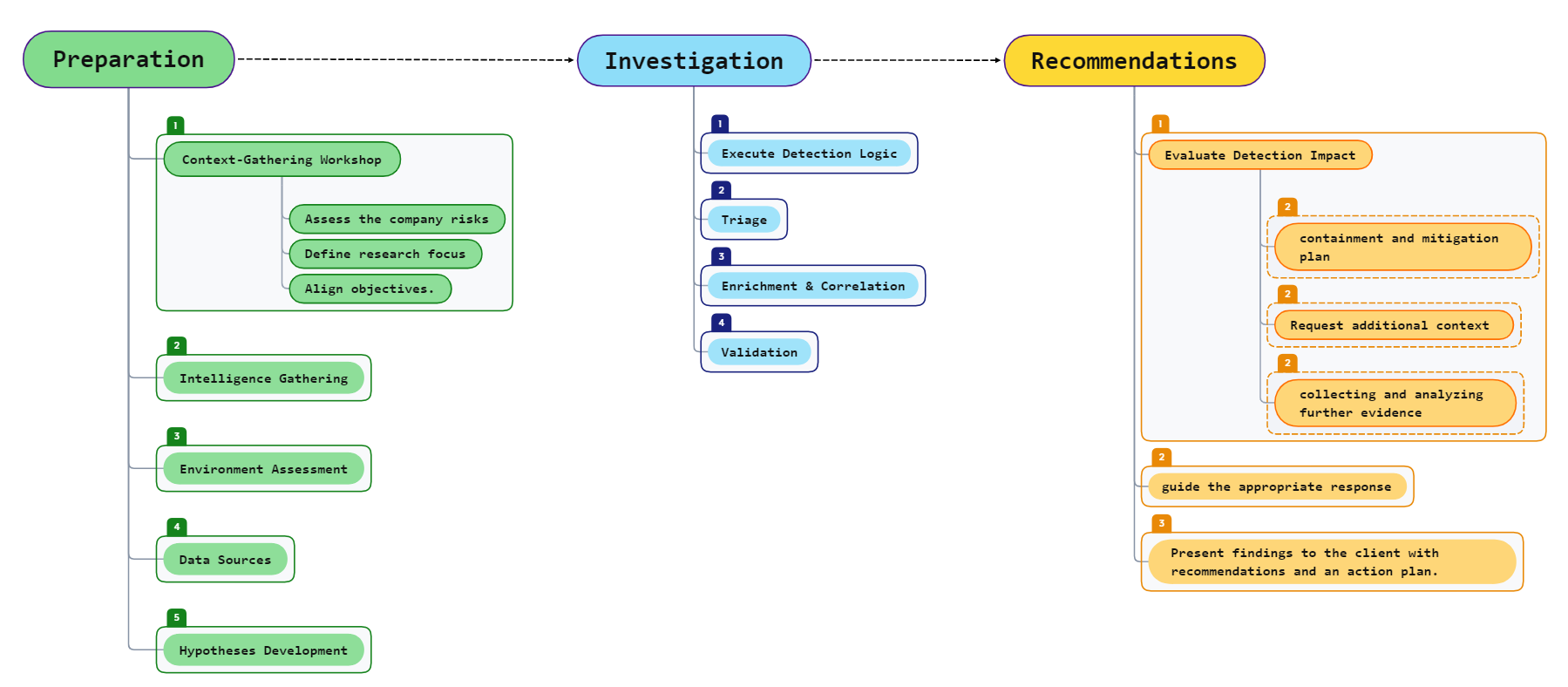
定向威胁狩猎方法论示例

image

理想情况下,每次威胁狩猎会话都应有明确的目标。此流程图提供了一种结构化的方法来指导您的流程,从准备和调查到可操作的建议。


🎯 用于威胁狩猎(ThreatHunting)会话的关键词列表

文件

  • ThreatHunting-Keywords
  • 灰色软件工具关键词
  • 攻击性工具关键词
  • 供应商签名关键词
  • 单个工具(每个工具一个 csv 文件)
  • 仅全部关键词
  • 仅全部关键词正则表达式
  • 仅全部关键词正则表达式(性能更佳)
  • 用于在文件中狩猎的 Powershell 脚本
  • Yara 规则
  • Sigma 规则

供蓝队使用:

ThreatHunting-Keywords 列表对威胁狩猎者、SOC 和 CERT 团队进行 SIEM 静态分析很有价值,因为它有助于识别在日志中使用知名利用工具默认配置的威胁行为者(或红队成员 😆)。它与 IOC 情报源的不同之处在于其持久的相关性:这里的关键词没有"过期日期",在收录多年后仍能检测威胁;它们灵活多变,支持通配符和不区分大小写的匹配,并且只专注于默认关键词。

该列表主要为威胁狩猎而设计,在复杂场景中也能发挥作用。无论您拥有无法管理且数据未解析的 SIEM,还是您属于拥有管理良好的 SIEM 的 SOC 团队,这里提供的示例都可以加快检测恶意活动的过程,而无需解析任何内容。如果您的日志已经解析,此列表可用于匹配数据中的字段,并有可能根据您选择的关键词类型类别转化为检测规则,前提是误报率足够低。

⚠️ 并非所有内容都可以添加到该列表中,我们在此不做复杂的行为检测,只做字段或原始日志中的简单关键词检测,旨在检测默认配置

⚠️ 列表中的许多工具都有专门的检测规则,用于将事件与阈值和独特的进程关系进行关联...我们不会在此涵盖某个工具所有可能的检测方式,只关注关键词检测

如果您是安全运营中心(SOC)的一员,并且管理者数百条仅依赖简单关键词检测而没有任何字段或事件关联的检测规则,请考虑重新审视您的方法。在我看来,这些不应构成单独的检测规则。相反,它们可能更适合像这样的整合列表,尽管如果您不使用像 Splunk 这样的平台,实施起来可能更具挑战性。

这种方法鼓励创建高质量、有目的的规则,同时将您的简单字段关键词检测集中组织和管理在一个地方。最终结果?一条覆盖所有内容的综合检测规则。这可以简化您的流程并优化您的检测能力。

对于事件响应人员,您可以在调查原始日志或文件时使用此列表,通过 Yara 规则、一个 powershell 脚本,或使用 Splunk4DFIR 快速将日志导入 Splunk,来快速识别已知的利用工具。

供红队使用:

要规避简单关键词检测的发现,重新编译并重命名所有自定义字符串、类或函数名、变量名、参数名、可执行文件名、默认用户代理、证书或任何其他可能在操作期间与您所用工具关联的字符串至关重要。对所有内容使用最常见的名称,以融入正常流量。位于此处的脚本可以帮助您识别其中一些字符串。

然而,如果您正在开发公开的"红队工具",请考虑通过使用独特的名称来帮助蓝队。采用带有特殊端口、自定义证书、独特用户代理、不常见的特定函数名和参数的默认配置。这有助于创建可用于简单关键词检测的清晰签名,使蓝队至少能够轻松检测到脚本小子。

威胁狩猎关键词文件的内容:

  • 表头:keyword,metadata_keyword_type,metadata_tool,metadata_description,metadata_tool_techniques,metadata_tool_tactics,metadata_malwares_name,metadata_groups_name,metadata_category,metadata_link,metadata_enable_endpoint_detection,metadata_enable_proxy_detection,metadata_tags,metadata_comment,metadata_severity_score,metadata_popularity_score,metadata_github_stars,metadata_github_forks,metadata_github_created_at,metadata_github_updated_at


  • keyword:此列中的条目代表用于威胁狩猎的不区分大小写的关键词。这些关键词灵活多变,允许使用通配符根据需要扩大或缩小搜索参数。

  • metadata_keyword_regex:此列中的条目代表关键词的正则表达式模式检测,这些模式经过优化以提供精确的检测能力,适合与 YARA、ripgrep 或类似的检测工具一起使用。

  • metadata_keyword_type:关键词的类型,目前有三种类型:

    • 🛠️ offensive tool keyword:这些关键词与攻击性工具相关,或表现出高度确定的恶意意图。这些术语在检测潜在威胁时保持相关性和可靠性至关重要(低误报率)
    • 🛠️ greyware tool keyword:此类别中的关键词对应于被恶意行为者滥用的"合法"工具。由于这些工具也有合法用途,误报的可能性天生就更高。要正确解读这些结果,需要理解并非所有检测都意味着恶意活动

使用列表通过 Splunk 进行狩猎:

  • 将列表 threathunting-keywords.csv 上传到 Splunk

  • 为查找表 threathunting-keywords.csv 创建一个名为 threathunting-keywords 的查找定义

    • 在高级选项中,添加匹配类型 WILDCARD(keyword),并确保未选中区分大小写匹配

    image

transforms.conf``` [threathunting-keywords] batch_index_query = 0 case_sensitive_match = 0 filename = threathunting-keywords.csv match_type = WILDCARD(keyword)

root@kitploit:~
- 现在我们可以使用我们的查找定义来狩猎 🏹
- :warning: 如果以下部分的搜索似乎无法正常工作,可能是由于 Splunk 资源限制设置所致,尤其是当您在默认配置下运行 Splunk 时。首先,您可能需要考虑增加 `[lookup]` 配置节中的 `max_memtable_bytes` 值。

## 使用 `threathunting-keywords` 的示例用例:
![image](https://assets.kitploit.com/production/public/readmes/48741/204eb8e71d12257660c7166cb5f050747877e1968d7ff1f21812967d64355ca0.png)


### 狩猎原始日志中的所有关键词 😱```
`myendpointslogs` 
| lookup threathunting-keywords keyword as _raw OUTPUT keyword as keyword_detection metadata_keyword_type metadata_tool metadata_description metadata_tool_techniques metadata_tool_tactics metadata_malwares_name metadata_groups_name metadata_category	metadata_link	metadata_enable_endpoint_detection metadata_enable_proxy_detection metadata_comment
| search metadata_description!="" AND metadata_enable_endpoint_detection=1
| stats count earliest(_time) as firsttime latest(_time) as lasttime values(_raw) as raw by metadata_keyword_type keyword_detection index sourcetype 
| convert ctime(*time)

Send the job to background and keep the job ID.

image

  • myendpointslogs 是一个宏,用于搜索所有端点日志,可以是 Windows 日志、EDR 遥测、sysmon、auditd、堡垒机会话、PowerShell 执行日志或任何其他用于监控进程活动或文件活动的日志。(如果你不使用宏,可以用你的索引、标签或数据模型替换宏)
    • 我特意在示例中加入了宏,以说明初始探索可以通过任何适合自己需求的方法完成,无论是数据模型、tstats、标签还是 index/sourcetype。虽然 tstats 与数据模型结合通常是最快的路径,但在 |lookup 之前,如有需要,请使用 TERM() 命令过滤特定搜索。
  • | lookup 这非常重要,对于像这样的大型查找,始终使用 |lookup 而不是 |inputlookup。|lookup 会使用在 bundle 复制时推送到索引器上的查找,而 |inputlookup 每次都会将包含所有查找内容的搜索发送到索引器。使用 |lookup 我们可以在这里获得巨大的性能提升(此搜索在大型环境中会执行数小时,所以最好优化我们的搜索)。
  • ... keyword as _raw OUTPUT keyword as keyword_detection 这部分我们将把名为 _raw 的字段与查找中的 keyword 字段进行匹配。在 Splunk 中,_raw 是未经任何解析的原始日志(我们的用例)。当关键字匹配时, 字段将显示查找中与该字段()匹配的关键字。

过滤结果``` | loadjob 1684146257.1495958 | search NOT (keyword_detection IN ("fixme","fixme","fixme")) NOT (metadata_keyword_type IN ("fixme","fixme")) NOT (raw IN ("fixme","fixme","fixme"))

root@kitploit:~
排除所需的关键字、原始文本或关键字类型。
如果我们决定排除 `greyware tool keyword` 类型(被攻击者滥用的合法工具关键字),因为此环境中此类工具的结果太多,我们有两个选项:

- 在初始搜索开始时进行过滤```
`myendpointslogs` 
| lookup threathunting-keywords keyword as _raw OUTPUT keyword as keyword_detection metadata_keyword_type metadata_tool metadata_description metadata_tool_techniques metadata_tool_tactics metadata_malwares_name metadata_groups_name metadata_category	metadata_link	metadata_enable_endpoint_detection metadata_enable_proxy_detection metadata_comment
| search metadata_description!="" metadata_keyword_type="offensive tool keyword" metadata_enable_endpoint_detection=1
| stats count earliest(_time) as firsttime latest(_time) as lasttime values(_raw) as raw by metadata_keyword_type keyword_detection index sourcetype 
| convert ctime(*time)

我添加了一个 metadata_keyword_type="offensive tool keyword",以便只关注那些我确信会被恶意行为者使用的攻击性工具

  • 或者在初始搜索之后进行过滤(以节省大量时间):``` | loadjob 1684146257.1495958 | search metadata_keyword_type="offensive tool keyword"
root@kitploit:~
以上就是在端点日志中搜索原始日志的用例。如果我们想搜索网络日志的关键词(任何可以记录查询或 URL 的内容),只需将其更改为:```
`mynetworklogs` 
| lookup threathunting-keywords keyword as _raw OUTPUT keyword as keyword_detection metadata_keyword_type metadata_tool metadata_description metadata_tool_techniques metadata_tool_tactics metadata_malwares_name metadata_groups_name metadata_category	metadata_link	metadata_enable_endpoint_detection metadata_enable_proxy_detection metadata_comment
| search metadata_description!="" AND metadata_enable_proxy_detection=1
| stats count earliest(_time) as firsttime latest(_time) as lasttime values(_raw) as raw by metadata_keyword_type keyword_detection index sourcetype 
| convert ctime(*time)

现在它与第一次搜索相同,但我将数据源改为 mynetworklogs,并添加了 metadata_enable_proxy_detection=1 以匹配网络日志的相关关键词(为此最好有代理和DNS日志)


在其他字段中搜索关键词 🙂 (url,process,commandline,query...):

仅匹配url字段:```

mynetworklogs url=* | lookup threathunting-keywords keyword as url OUTPUT keyword as keyword_detection metadata_keyword_type metadata_tool metadata_description metadata_tool_techniques metadata_tool_tactics metadata_malwares_name metadata_groups_name metadata_category metadata_link metadata_enable_endpoint_detection metadata_enable_proxy_detection metadata_comment | search metadata_description!="" AND metadata_enable_proxy_detection=1 | stats count earliest(_time) as firsttime latest(_time) as lasttime values(url) as url by src_ip metadata_keyword_type keyword_detection index sourcetype | convert ctime(*time)

root@kitploit:~
#### 仅匹配查询字段:```
`mynetworklogs` query=*
| lookup threathunting-keywords keyword as query OUTPUT keyword as keyword_detection metadata_keyword_type metadata_tool metadata_description metadata_tool_techniques metadata_tool_tactics metadata_malwares_name metadata_groups_name metadata_category	metadata_link	metadata_enable_endpoint_detection metadata_enable_proxy_detection metadata_comment
| search metadata_description!="" AND metadata_enable_proxy_detection=1
| stats count earliest(_time) as firsttime latest(_time) as lasttime values(query) as query by src_ip metadata_keyword_type keyword_detection index sourcetype 
| convert ctime(*time)

同时匹配多个字段,以端点日志为例:```

myendpointslogs | eval myfields=mvappend(service, process, process_command, parent_process, parent_process_command, grand_parent_process, grand_parent_process_command, file_path, file_name) | lookup threathunting-keywords keyword as myfields OUTPUT keyword as keyword_detection metadata_keyword_type metadata_tool metadata_description metadata_tool_techniques metadata_tool_tactics metadata_malwares_name metadata_groups_name metadata_category metadata_link metadata_enable_endpoint_detection metadata_enable_proxy_detection metadata_comment | search metadata_description!="" AND metadata_enable_endpoint_detection=1 | stats count earliest(_time) as firsttime latest(_time) as lasttime values(process) values(service) values(process_command) values(file_name) values(file_path) values(parent_process) values(parent_process_command) values(grand_parent_process) values(grand_parent_process_command) by metadata_keyword_type keyword_detection index sourcetype | convert ctime(*time)

root@kitploit:~
#### 速度:

如果对速度有要求,或者您计划将其作为计划检测规则实施,则可以考虑通过选择要使用的 metadata_keyword_type 或 metadata_tool 列,将 lookup 拆分为不同的 lookup。

请注意,在 `|lookup` 之后使用 search 命令进行过滤并不会加快搜索过程。如果您想在不对 lookup 进行拆分的情况下集中处理其中的特定部分,则应使用 `|inputlookup` 命令配合 where 子句。虽然此方法可能会消耗更多 CPU 资源,但通常执行速度更快。有关更多详细信息,请参阅 Splunk 关于 inputlookup 的文档:https://docs.splunk.com/Documentation/Splunk/latest/SearchReference/Inputlookup

#### 使用 ELK 时:

如果您正在使用 Elastic Stack,列表(lists)会有很多限制(不能使用特殊字符、空格等),您有 3 个选择:
- 使用同一仓库中提供的另一个列表 https://github.com/mthcht/ThreatHunting-Keywords/tree/main/elk (它不是 threathunting-keywords.csv 的直接提取,而是为 ELK 修改过的,并且不会更新)
- 使用 Sigma "hunting" 规则,这些规则直接从该项目 https://github.com/mthcht/ThreatHunting-Keywords-sigma-rules 提取,并使用 pysigma 进行转换
- 使用我的一些列表作为带通配符查询的 IOC 列表 https://www.elastic.co/guide/en/elasticsearch/reference/8.15/query-dsl-wildcard-query.html#wildcard-top-level-params
 
### 仪表盘示例
![image](https://assets.kitploit.com/production/public/readmes/48741/df177e7f2584b823c311a2b223eed8b237d8a72c05d0afb9d6b6f350e42ccda0.png)

### Splunk4DFIR
另一个使用项目 csv 文件与 splunk 在 DFIR 工件和日志中进行威胁搜寻的示例:https://github.com/mf1d3l/Splunk4DFIR
![image](https://assets.kitploit.com/production/public/readmes/48741/73d54c5b146c34685ebac4ed7ed2a9da11a3f90e6ae9ac0a4b17118d7895cbe3.png)

### 其他用于检测的精选列表
我将一些相关的工件保存在独立的列表中,这些列表更加精确,可用于检测规则,它们位于这个 [github repo](https://github.com/mthcht/awesome-lists/tree/main/Lists)
您将找到:

![intelligence gathering sheet](https://assets.kitploit.com/production/public/readmes/48741/498b188eaebabe5a7077300eeff16daee903ed30d0b1797b82c208a54ba1424d.png)


- 📋 列表:https://github.com/mthcht/awesome-lists/tree/main/Lists
- 🕵️‍♂️ 威胁狩猎指南:https://mthcht.medium.com/list/threat-hunting-708624e9266f
- 🚰 可疑命名管道:[suspicious_named_pipe_list.csv](https://github.com/mthcht/awesome-lists/blob/main/Lists/suspicious_named_pipe_list.csv)
- 🌐 可疑 TLD(自动更新):[[suspicious_TLDs]](https://github.com/mthcht/awesome-lists/tree/main/Lists/TLDs)
- 🌐 可疑 ASN(自动更新):[[suspicious ASNs]](https://github.com/mthcht/awesome-lists/tree/main/Lists/ASNs)
- 🔧 可疑 Windows 服务:[suspicious_windows_services_names_list.csv](https://github.com/mthcht/awesome-lists/blob/main/Lists/suspicious_windows_services_names_list.csv)
- ⏲️ 可疑 Windows 任务:[suspicious_windows_tasks_list.csv](https://github.com/mthcht/awesome-lists/blob/main/Lists/suspicious_windows_tasks_list.csv)
- 🚪 可疑目标端口:[suspicious_ports_list.csv](https://github.com/mthcht/awesome-lists/blob/main/Lists/suspicious_ports_list.csv)
- 🛡️ 可疑防火墙规则:[suspicious_windows_firewall_rules_list.csv](https://github.com/mthcht/awesome-lists/blob/main/Lists/suspicious_windows_firewall_rules_list.csv)
- 🆔 可疑 User-Agent:[suspicious_http_user_agents_list.csv](https://github.com/mthcht/awesome-lists/blob/main/Lists/suspicious_http_user_agents_list.csv)
- 📇 可疑 USB ID:[suspicious_usb_ids_list.csv](https://github.com/mthcht/awesome-lists/blob/main/Lists/suspicious_usb_ids_list.csv)
- 🔢 可疑 MAC 地址:[suspicious_mac_address_list.csv](https://github.com/mthcht/awesome-lists/blob/main/Lists/suspicious_mac_address_list.csv)
- 📛 可疑主机名:[suspicious_hostnames_list.csv](https://github.com/mthcht/awesome-lists/blob/main/Lists/suspicious_hostnames_list.csv)
- 🧮 元数据可执行文件:[executables_metadata_informations_list.csv](https://github.com/mthcht/awesome-lists/blob/main/Lists/Windows%20Metadata/executables_metadata_informations_list.csv)
- 🕸️ DNS over HTTPS 服务器列表:[dns_over_https_servers_list.csv](https://github.com/mthcht/awesome-lists/blob/main/Lists/dns_over_https_servers_list.csv)
- 📚 Hijacklibs(自动更新):[hijacklibs_list.csv](https://github.com/mthcht/awesome-lists/blob/main/Lists/Hijacklibs/hijacklibs_list.csv)
- 🌐 TOR 节点列表(自动更新):https://github.com/mthcht/awesome-lists/tree/main/Lists/TOR
- 🛠️ LOLDriver 列表(自动更新):[loldrivers_only_hashes_list.csv](https://github.com/mthcht/awesome-lists/blob/main/Lists/Drivers/loldrivers_only_hashes_list.csv)
- 🛠️ 恶意引导程序列表(自动更新):[malicious_bootloaders_only_hashes_list.csv](https://github.com/mthcht/awesome-lists/blob/main/Lists/Drivers/malicious_bootloaders_only_hashes_list.csv)
- 📜 恶意 SSL 证书列表(自动更新):[ssl_certificates_malicious_list.csv](https://github.com/mthcht/awesome-lists/blob/main/Lists/SSL%20CERTS/ssl_certificates_malicious_list.csv)
- 🖥️ RMM 检测:https://github.com/mthcht/awesome-lists/tree/main/Lists/RMM
- 👤🔑 AD/EntraID/AWS 的重要角色和组:[[permissions]](https://github.com/mthcht/awesome-lists/tree/main/Lists/permissions)
- 💻🔒 勒索软件已知文件扩展名:[ransomware_extensions_list.csv](https://github.com/mthcht/awesome-lists/blob/main/Lists/ransomware_extensions_list.csv)
- 💻🔒 勒索软件已知勒索信文件名:[ransomware_notes_list.csv](https://github.com/mthcht/awesome-lists/blob/main/Lists/ransomware_notes_list.csv)
- 📝 Windows ASR 规则:[windows_asr_rules.csv](https://github.com/mthcht/awesome-lists/blob/main/Lists/windows_asr_rules.csv)
- 🌐 DNSTWIST 列表(自动更新):[DNSTWIST 默认域名 + 脚本](https://github.com/mthcht/awesome-lists/tree/main/Lists/DNSTWIST)
- 🌍 VPN IP 地址列表(自动更新): 
  - 🛡️ NordVPN:[nordvpn_ips_list.csv](https://github.com/mthcht/awesome-lists/blob/main/Lists/VPN/NordVPN/nordvpn_ips_list.csv)
  - 🛡️ ProtonVPN:[protonvpn_ip_list.csv](https://github.com/mthcht/awesome-lists/blob/main/Lists/VPN/ProtonVPN/protonvpn_ip_list.csv)
- 🏢 公司 IP 范围列表(自动更新):[默认列表 + 脚本](https://github.com/mthcht/awesome-lists/tree/main/Lists/Ranges_IP_Address_Company_List/bgp.he.net)
- 🔗 其他关联列表:https://github.com/mthcht/awesome-lists/tree/main/Lists/Others
- 📋 需要完成的列表:https://github.com/mthcht/awesome-lists/tree/main/todo


查看这些 [指南](https://github.com/mthcht/awesome-lists/tree/main/Lists#how-to-use-the-lists) 以使用其中的一些列表: 
  - [Windows 服务搜索](https://detect.fyi/threat-hunting-suspicious-windows-service-names-2f0dceea204c)
  - [User-Agent 搜索](https://mthcht.medium.com/threat-hunting-suspicious-user-agents-3dd764470bd0)
  - [DNS Over HTTPS 搜索](https://mthcht.medium.com/detecting-dns-over-https-30fddb55ac78)
  - [可疑 TLD 搜索](https://mthcht.medium.com/threat-hunting-suspicious-tlds-a742c2adbf58)
  - [HijackLibs 搜索](https://mthcht.medium.com/detect-dll-hijacking-techniques-from-hijacklibs-with-splunk-c760d2e0656f)
  - [网络钓鱼与 DNSTWIST 搜索](https://detect.fyi/detecting-phishing-attempts-with-dnstwist-37c426b3bbb8)
  - [浏览器扩展搜索](https://mthcht.medium.com/detecting-browser-extensions-installations-e0ac2b45c46b)
  - [C2 隐藏于众目睽睽之下](https://mthcht.medium.com/c2-hiding-in-plain-sight-7a83963b9344)
  - [HTML Smuggling 工件](https://mthcht.medium.com/detecting-html-smuggling-phishing-attempts-15af824e60e4)
  - [PSEXEC 及类似工具搜索](https://mthcht.medium.com/detecting-psexec-and-similar-tools-c812bf3dca6c)
  - [时间滑动检测](https://mthcht.medium.com/event-log-manipulations-1-time-slipping-55bf95631c40)
  - [可疑命名管道](https://medium.com/detect-fyi/threat-hunting-suspicious-named-pipes-a4206e8a4bc8)
 
 ... 更多 [此处](https://github.com/mthcht/awesome-lists/tree/main/Lists#how-to-use-the-lists) 

## 在文件中进行 DFIR 关键词搜寻(无 SIEM)
在对各种工具进行彻底审查后,我发现 [ripgrep](https://github.com/BurntSushi/ripgrep) 在快速将大量正则表达式模式与大型日志文件甚至多个文件的每一行进行匹配方面,明显优于同类工具。事实证明,它是处理海量数据最高效的解决方案,提供了无与伦比的速度和灵活性。

### 使用 **Ripgrep** 和 'only_keywords_regex.txt' 列表在日志文件中搜寻恶意内容
#### `rg.exe -f .\only_keywords_regex.txt .\EvtxECmd_Output.csv --multiline --ignore-case`
- .\only_keywords_regex.txt 用作威胁狩猎关键字的源文件,已转换为正则表达式模式以实现精确匹配。这些模式源自 threathunting-keywords.csv 文件,该文件经过转换过程,以与正则表达式操作实现最佳兼容。
- .\EvtxECmd_Output.csv 表示将要执行搜索的目标文件。在此上下文中,它是 Windows 事件日志的 .csv 格式,通过导出 evtx 日志生成。但是,ripgrep 的灵活性允许您将其替换为您选择的任何文件,以进行详细的模式搜索操作。
- --multiline 选项使 ripgrep 能够有效处理并匹配跨越多行的模式,从而显著扩大搜索范围。
您将得到如下所示带有行号的匹配行(但不包含匹配的关键字)

![image](https://assets.kitploit.com/production/public/readmes/48741/d205ae3caf99906a03818c202e8811b669948e2f68b88cc137cba8cf0e43b69f.png)

![image](https://assets.kitploit.com/production/public/readmes/48741/e1b213fc63e1ec2914e0f1eb3263d17aa960eb50672fd18986a0f75d50e9c379.png)

#### 对于非常大的文件(在 Windows 上)的更好选择:
[DFIR_hunt_in_file.ps1](https://github.com/mthcht/ThreatHunting-Keywords/blob/main/DFIR_hunt_in_file.ps1)

`powershell -ep Bypass -File .\DFIR_hunt_in_file.ps1 -patternFile "only_keywords_regex.txt" -targetFile "C:\Users\mthcht\collection\20230406154410_EvtxECmd_Output.csv" -rgPath "C:\Users\mthcht\Downloads\ripgrep-13.0.0-x86_64-pc-windows-msvc\ripgrep-13.0.0-x86_64-pc-windows-msvc\rg.exe"`
- `-targetFile`:指定要搜索的文件(示例中为 DFIR-ORC 提取的日志)
- `-patternFile`:包含正则表达式模式的文件 `only_keywords_regex.txt`
- `-rgPath`:ripgrep 可执行文件的路径

PowerShell 脚本的内容(包含在仓库中):```powershell
param (
    [Parameter(Mandatory=$true)]
    [string]$patternFile,
    [Parameter(Mandatory=$true)]
    [string]$targetFile,
    [Parameter(Mandatory=$true)]
    [string]$rgPath
)

Start-Transcript -Path "$PSScriptRoot\result_search.log" -Append -Force -Verbose

$totalLines = (Get-Content $patternFile | Measure-Object -Line).Lines
$currentLine = 0
Get-Content $patternFile | ForEach-Object {
    $currentLine++
    Write-Host "Searching for pattern $currentLine of $totalLines : $_"  
    & $rgPath --multiline --ignore-case $_ $targetFile | Write-Output 
}

Stop-Transcript -Verbose

搜索结果将保存在与脚本相同目录下的 result_search.log 文件中。

image

超大文件的更好选择(在 Linux 上):

todo

仅使用 PowerShell 和 only_keywords.txt 列表在文件中搜寻恶意内容(较慢,不推荐)

在 PowerShell 中运行会慢很多,但如果你仍然想用这种方式,可以使用下面的脚本,它会告诉你匹配到的行号以及对应的关键字:

powershell.exe -ep Bypass -File .\hunt_keywords_windows.ps1 -k .\only_keywords.txt -f .\EvtxECmd_Output.csv

```powershell param( [Parameter(Mandatory=$true)] [string]$file,
root@kitploit:~
[Parameter(Mandatory=$true)]
[string]$kw

)

$Keywords = Get-Content $kw $result = @()

foreach ($Keyword in $Keywords) { $SearchTerm = $Keyword.Replace("", ".") $SearchTerm = [Regex]::Escape($SearchTerm).Replace(".*", ".*")

root@kitploit:~
$reader = New-Object System.IO.StreamReader($file)
$lineNumber = 0
while (($line = $reader.ReadLine()) -ne $null) {
    $lineNumber++
    if ($line -match $SearchTerm) {
        $result += New-Object PSObject -Property @{
            'Keyword' = $Keyword
            'LineNumber' = $lineNumber
            'Line' = $line
        }
    }
}
$reader.Close()

}

$result | Out-GridView Read-Host -Prompt "Press Enter to exit"

root@kitploit:~
</details>

### YARA 规则
![图片](https://assets.kitploit.com/production/public/readmes/48741/e1355c1b331e4e617189507532d5fc1045ae7eb085259c2e6a3c51338b88fcf2.png)

该项目的所有检测模式都会自动导出为 YARA 规则,见 [ThreatHunting-Keywords-yara-rules](https://github.com/mthcht/ThreatHunting-Keywords-yara-rules)

以下是一些使用 YARA 规则进行威胁狩猎的示例:
![2023-10-20 20_23_59-(1) mthcht on X_ _The #ThreatHunting Keywords project is slowly progressing, alm](https://assets.kitploit.com/production/public/readmes/48741/be09b835bf23d364e39cd4538a510d9f6f8d249396b3e8440cb1ce6e5f63ce82.png)
 
![2023-10-20 20_14_17-C__Users_Public_Pictures](https://assets.kitploit.com/production/public/readmes/48741/ad815de74d8983987eb38e1a7e63f1540216ff50163da319e82e0219c01dbd5a.png)

![2023-10-21 11_14_15-Editing ThreatHunting-Keywords-yara-rules_README md at main · mthcht_ThreatHunti](https://assets.kitploit.com/production/public/readmes/48741/6fa65b15d788cfe2790498294078225e7f4c004c193b69ed56acfca51ba6829c.png)
![2023-10-21 11_12_44-](https://assets.kitploit.com/production/public/readmes/48741/8b235e92d44bf445d7f47edd27b161a0d6cfbd58e5158386993541d53da31942.png)

## 用于搜索关键词的快速数据表
https://mthcht.github.io/ThreatHunting-Keywords/
![图片](https://assets.kitploit.com/production/public/readmes/48741/477608f39dee047778948ef170316f7d59e2fb0e2437b53e39e7de6900ecb900.png)

## 误报

欢迎贡献并将您的误报添加到预期误报[列表](https://github.com/mthcht/ThreatHunting-Keywords/blob/main/_false_positives/false_positives_offensive_keywords.md)中

## SIGMA 规则

请查看已转换为 [SIGMA 规则](https://github.com/mthcht/ThreatHunting-Keywords-sigma-rules) 的查找表,我通常会同步更新它 :) 

![图片](https://assets.kitploit.com/production/public/readmes/48741/298b4f42a0702b8a14376577a5fc2c670aa7a8246f9ee41cad9b39d573df0432.png)

## MITRE ATT&CK 技术映射

配合 splunk 附加组件 https://splunkbase.splunk.com/app/5742
![图片](https://assets.kitploit.com/production/public/readmes/48741/6605c5297f2d2536e18f593e2a3f5ec02ed5e66adbe4970247a3eccba0cbe31d.png)

覆盖 2242 个工具(更新于 2024/08/30):
![图片](https://assets.kitploit.com/production/public/readmes/48741/eafcd79072b45d2a583d286d9d03084c01dba1de233c7b77f208f6c379081d84.png)

splunk 搜索:

<details>```
| inputlookup threathunting-keywords.csv
| stats count by metadata_tool metadata_tool_techniques
| makemv delim=" - " metadata_tool_techniques
| mvexpand metadata_tool_techniques
| stats count by metadata_tool_techniques

工具矩阵

Splunk 仪表板(这只是一个示例;可以使用文件中的可用字段应用各种过滤器):

本项目中的工具对应的威胁行为者团体

splunk xml 仪表板示例:

``` tools matrix tools_matrix tool categories metadata_category metadata_category | inputlookup threathunting-keywords.csv | stats count by metadata_category | fields - count -24h@h now all metadata_category IN ( ) * " " , groups name ALL metadata_groups_name IN ( ) * " " , metadata_groups_name metadata_groups_name | inputlookup threathunting-keywords.csv | stats count by metadata_groups_name | fields - count | eval metadata_groups_name = split(metadata_groups_name, " - ") | mvexpand metadata_groups_name | dedup metadata_groups_name -24h@h now | inputlookup threathunting-keywords.csv | search metadata_groups_name!=N/A $category$ | stats count as detection_patterns by metadata_groups_name metadata_tool | eval metadata_groups_name = split(metadata_groups_name, " - ") | mvexpand metadata_groups_name | search $groups$ -24h@h now none 728 progressbar categorical #3fc77a #d93f3c 6 false true true false true false true ```

image

image

image

🤝 贡献

欢迎提交贡献、问题和功能请求!

如果你想让我将某个工具添加到列表中,请使用此模板创建一个 issue:


工具名称:

``

请提供工具的名称。

官方网站或源代码链接:

``

请提供工具官方网站或源代码仓库(GitHub、GitLab 等)的链接。如果已有文档,也请一并附上。

工具描述:

``

描述该工具的目的、功能以及显著特性。如果不确定,可以留空,我会更详细地查看该工具。

恶意行为者的已知用途(如适用):

``

如果你了解该工具被恶意行为者已知或潜在滥用的情况,请在此分享。

工具分类:

请为该工具选择最合适的类别:

  • 攻击性(主要由攻击者使用,不适用于一般合法用途)
  • 灰色软件(经常被恶意行为者滥用的合法工具)
  • 通用签名/关键词(安全产品检测到的与恶意软件相关的常见签名或术语)

通过 PR 提议对列表进行更改(如果可以,请提供误报反馈和日志样本),如果一个关键词在太多环境中产生过多误报,我们可以将其删除)

我将决定某个工具是否值得添加到列表中。与冷门或新工具相比,社区中广泛使用和认可的工具更有可能被收录。

下载工具
  • 🛠️ signature keyword:这些关键词可能不与工具直接关联,但可能包括安全产品签名名称、特定字符串或在威胁检测中具有重要意义的词汇。
  • metadata_tool:我们要检测的工具名称

  • metadata_description:我们要检测的工具的描述

  • metadata_tool_techniques:与我们想要检测的工具相关的 MITRE 技术

  • metadata_tool_tactics:与我们想要检测的工具相关的 MITRE 战术

  • metadata_malwares_name:使用相关工具的恶意软件变体名称

  • metadata_groups_name:与该工具相关联的威胁行为者组织名称

  • metadata_category:工具的全局类别名称。此类别以后可能会更改,欢迎提出建议。

  • metadata_link:工具的链接(源代码、文章、样本、博客...)

  • metadata_enable_endpoint_detection:指示该关键词是否可以有效地用于跨端点日志搜索的字段。这包括但不限于 Windows 事件日志、EDR、PowerShell 日志、auditd、堡垒机会话、Sysmon 或任何包含进程和文件活动字段的数据源。

    • 如果可以在端点日志中搜索该关键词,则值为 1(启用)。
    • 如果该关键词与端点日志不相关,则值为 0(禁用)。
  • metadata_enable_proxy_detection:指示该关键词是否适用于网络日志搜索的字段(代理、DNS 日志或任何包含来自内部网络的查询和 URL 的数据)

    • 如果可以在网络活动日志中搜索该关键词,则值为 1(启用)。
    • 如果该关键词与网络活动日志不相关,则值为 0(禁用)。
  • metadata_popularity_score:评分从 1 到 10(流行度从低到高)

  • metadata_severity_score:评分从 1 到 10(严重程度从低到高)

  • metadata_tags:用于识别特定产物的标签,一个关键词可以关联多个标签,当某些特定产物在没有更多检测上下文的情况下无法添加到列表时,它们会被添加到我的其他用于检测的优秀列表中

  • metadata_comment:此字段可能包含为该关键词添加的有用评论。

  • metadata_github_stars:github 项目上的星标数(如果该工具在 github 上,如果在其他地方则为 N/A),用于计算流行度评分

  • metadata_github_forks:github 项目上的复刻数(如果该工具在 github 上,如果在其他地方则为 N/A),可用于仪表盘统计最常用的工具

  • metadata_github_created_at:github 项目的创建日期(如果该工具在 github 上,如果在其他地方则为 N/A),可用于仪表盘统计

  • metadata_github_updated_at:github 项目的最后更新日期(如果该工具在 github 上,如果在其他地方则为 N/A),可用于跟踪重要的攻击性工具更新并调整关键词检测

  • keyword_detection
    _raw
  • | search metadata_description!="" AND metadata_enable_endpoint_detection=1 我们这里只关注端点日志,因此添加 metadata_enable_endpoint_detection=1 以仅匹配端点日志相关的关键字,以及 metadata_description!="" 以仅保留匹配到的关键字。
  • | stats count earliest(_time) as firsttime latest(_time) as lasttime values(_raw) as raw by metadata_keyword_type keyword_detection index sourcetype 这里我为了示例做了一个快速过滤,没有使用查找的所有字段(但如果你想有更多排除的可能性,也可以添加它们)。这让我们很容易了解哪些关键字匹配得多,这样如果某个类别或工具的误报太多,我们可以轻松排除它!
  • 当我的搜索完成时,我该如何分析结果?你将得到按关键字和关键字类型排序的原始日志,使用 |loadjob myjobid 我们现在可以操作相关日志的输出,而无需再次搜索所有日志。
  • and use this splunk visualization: https://splunkbase.splunk.com/app/5742

    image image