使用 ChatGPT API、Bard API 和 Llama2,集成 Python-Nmap、DNS 侦察、PCAP 和 JWT 侦察模块,并基于 GPT3 模型根据 Nmap 扫描数据和 DNS 扫描信息生成漏洞报告。它还能进行大规模的子域名枚举。
这是一个概念验证应用程序,演示了如何利用人工智能生成准确的漏洞分析结果,并能进一步利用已经非常实用的 ChatGPT。该程序基于 openai-api、python-nmap、dnsresolver 等 Python 模块构建,其 GUI 版本还使用了 customtkinter 和 tkinter。该项目同时提供 CLI 和 GUI 界面,能够执行网络漏洞分析、DNS 枚举以及子域名枚举。
cd package && pip3/pip install .
简单地导入这三个包中的任意一个,然后相应地定义变量。```python
from GVA.scanner import NetworkScanner
from GVA.dns_recon import DNSRecon
from GVA.geo import geo_ip_recon
from GVA.jwt import JWTAnalyzer
from GVA.menus import Menus
from GVA.packet_analysis import PacketAnalysis
from GVA.ai_models import NMAP_AI_MODEL
from GVA.ai_models import DNS_AI_MODEL
from GVA.ai_models import JWT_AI_MODEL
from GVA.assets import Assets
from GVA.subdomain import sub_enum
from GVA import gui
# The components defined
dns_enum = DNSRecon()
geo_ip = geo_ip_recon()
p_ai_models = NMAP_AI_MODEL()
dns_ai_models = DNS_AI_MODEL()
port_scanner = NetworkScanner()
jwt_analizer = JWTAnalyzer()
sub_recon = sub_enum()
asset_codes = Assets()
packet_analysis = PacketAnalysis()
# KEEP IT BLANK IF YOU HAVE NO CLUE THE MENU WILL ASK TO FILL IT ONCE ACTIVE
lkey = "LLAMA API KEY"
lendpoint = "LLAMA ENDPOINT"
keyset = "AI API KEY"
output_loc = "OUTPUT LOCATION FOR PCAP"
threads = 200 # Default INT 200 but can be increased.
target_ip_hostname_or_token = "TARGET IP, HOSTNAME OR TOKEN"
profile_num = "PROFILE FOR NMAP SCAN"
ai_set = "AI OF CHOICE"
akey_set = "OPENAI API KEY"
bkey_set = "BARD API KEY"
ai_set_args = "" # Keep it blank at any cost
llamakey = "LLAMA RUNPOD API KEY"
llamaendpoint = "LLAMA RUNPOD ENDPOINT"
Menus(
lamma_key=lkey,
llama_api_endpoint=lendpoint,
initial_keyset=keyset,
threads=threads,
output_loc=output_loc,
target=target_ip_hostname,
profile_num=profile_num,
ai_set=ai_set,
openai_akey_set=akey_set,
bard_key_set=bkey_set,
ai_set_args=ai_set_args,
llama_runpod_key=llamakey,
llama_endpoint=llamaendpoint
)
gui.application()
update for passcracker in the package and gui is still in progress.
.env 文件中代码的 OPENAI_API_KEY、GEOIP_API_KEY 和 BARD_API_KEY 部分,填入 OpenAI API 密钥和 IP 地理定位 API 密钥。llama-api 选项或特定的 llama runpod serverless 端点部署选项,需要输入 runpod 的 serverless endpoint ID 以及你的 RUNPOD API KEY。```python
GEOIP_API_KEY = ''
OPENAI_API_KEY = ''
BARD_API_KEY = ''
RUNPOD_ENDPOINT_ID = ''
RUNPOD_API_KEY = ''- 第二步安装软件包```bash
pip3 install -r requirements.txt
or
pip install -r requirements.txt
python gpt_vuln.py --help
python gpt_vuln.py --r help
python gpt_vuln.py --target <IP/hostname/token> --attack dns/nmap/jwt
python gpt_vuln.py --target <IP/hostname/token> --attack nmap --profile <1-13> (Default:1)
python gpt_vuln.py --target <IP/hostname/token> --attack dns
python gpt_vuln.py --target --attack sub
python gpt_vuln.py --target --attack sub --sub_list
python gpt_vuln.py --target --attack geo
python gpt_vuln.py --target --attack pcap --output --thread NUM of threads <200:default>
python gpt_vuln.py --target --attack nmap --profile <1-5> --ai llama /llama-api /bard / openai
python gpt_vuln.py --target --attack dns --ai llama /llama-api /bard / openai
python gpt_vuln.py --target --attack jwt --ai llama /llama-api /bard / openai
python gpt_vuln.py --password_hash --wordlist_file --algorithm --parallel --complexity
python gpt_vuln.py --menu True
#### CLI 接口选项```bash
________________________
| GVA Usage in progress... |
========================
\
\
^__^
(oo)\_______
(__)\ )\/\
||----w |
|| ||
┏━━━━━━━━━┳━━━━━━━━━━━━━━━━┓
┃ Options ┃ Utility ┃
┡━━━━━━━━━╇━━━━━━━━━━━━━━━━┩
│ 1 │ Nmap Enum │
│ 2 │ DNS Enum │
│ 3 │ Subdomain Enum │
│ 4 │ GEO-IP Enum │
| 5 | JWT Analysis |
| 6 | PCAP Analysis |
| 6 | Hash Cracker |
│ q │ Quit │
└─────────┴────────────────┘
Enter your choice:
CLI 界面需要注意几点。
.env 文件中定义的密钥与 args 选项配合使用。它与 OpenAI GPT3.5 相同但速度更快。它可以生成相同的答案,但速度快两倍。
配置文件:
配置文件是由 nmap 子进程执行的扫描类型。IP 或目标将通过 argparse 提供。首先,运行自定义的 nmap 扫描,该扫描包含所有关键的参数以继续扫描。接下来,扫描数据从 nmap 产生的大量数据中提取。"scan" 对象在 "tcp" 下有一个子数据列表,每个子数据根据打开的端口进行标记。一旦数据被提取,数据将通过提示发送给 openai API 的 Davinci 模型。该提示特别要求输出 JSON 格式,并且数据也要以某种方式使用。
必须发送给 openai API 的整个请求结构是在程序的完成部分设计的。```python class NetworkScanner(): profile_arguments = { 1: '-Pn -sV -T4 -O -F', 2: '-Pn -T4 -A -v', 3: '-Pn -sS -sU -T4 -A -v', 4: '-Pn -p- -T4 -A -v', 5: '-Pn -sS -sU -T4 -A -PE -PP -PY -g 53 --script=vuln', 6: '-Pn -sV -p- -A', 7: '-Pn -sS -sV -O -T4 -A', 8: '-Pn -sC', 9: '-Pn -p 1-65535 -T4 -A -v', 10: '-Pn -sU -T4', 11: '-Pn -sV --top-ports 100', 12: '-Pn -sS -sV -T4 --script=default,discovery,vuln', 13: '-Pn -F' }
def scanner(self, ip: Optional[str], profile: int, akey: Optional[str],
bkey: Optional[str], lkey, lendpoint, AI: str) -> str:
nm.scan(ip, arguments=self.profile_arguments.get(profile))
json_data = nm.analyse_nmap_xml_scan()
analyze = json_data["scan"]
try:
ai_methods = {
'openai': lambda: AIModels.GPT_AI(akey, analyze),
'bard': lambda: AIModels.BardAI(bkey, analyze),
'llama': lambda: AIModels.Llama_AI(analyze, "local", lkey, lendpoint),
'llama-api': lambda: AIModels.Llama_AI(analyze, "runpod", lkey, lendpoint)
}
if AI in ai_methods and (akey or bkey):
response = ai_methods[AI]()
else:
raise ValueError("Invalid AI type or missing keys")
except KeyboardInterrupt:
print("Bye")
quit()
return str(response)
# 正则表达式
我们使用正则表达式仅从提供的自定义提示中提取重要信息,这减少了不必要的数据总量。
AI代码定义了一个输出格式,并命令AI遵循一些预定的规则以提高准确性。
正则表达式提取代码执行提取,进一步地,主函数将它们排列成表格。
## 使用Bard AI
要使用Bard AI,您必须注册MakerSuit Palm API以获得开发者访问权限,并从那里生成您的API密钥。有关链接和其工作原理,您可以观看此视频 [MakerSuit](https://www.youtube.com/watch?v=Ce1AOchQMzA&t=128s)
一旦获取了API,只需将其添加到 `.env` 文件中即可开始使用。
## 旧的LLama2实现
使用LLama2是目前最好的离线免费选项之一。它目前正在改进中,我正在编写一个提示,以便更好地将网络安全视角融入AI中。
我要感谢 **@thisserand** 和他的 [llama2_local](https://github.com/thisserand/llama2_local) 仓库,以及他的YT视频 [YT_Video](https://youtu.be/WzCS8z9GqHw)。它们都是很好的资源。坦白说,llama2代码有95%是他的,我只是复制了代码并为其添加了Flask API功能。
AI在离线和代码测试之外的准确度很高,与openai或bard相当,但在代码内运行时由于提示等原因遇到了一些问题。我会尝试修复它。
速度取决于您的系统以及您拥有的GPU和CPU配置。目前它使用的是 `TheBloke/Llama-2-7B-Chat-GGML` 模型,可以通过 `portscanner` 和 `dnsrecon` 文件进行更改。
目前,llama代码和扫描是以不同方式处理的。经过一些测试后,我发现llama需要一点训练才能按照我预期的方式运行,所以需要一些时间。关于如何做到这一点的任何建议都可以添加到该仓库的讨论中 [Discussions Link](https://github.com/morpheuslord/GPT_Vuln-analyzer/discussions)。目前,输出将不是所有数据的划分列表,而是AI发现的漏洞或问题的解释。
模型使用的提示如下:```prompt
[INST] <<SYS>> {user_instruction}<</SYS>> NMAP Data to be analyzed: {user_message} [/INST]
指令看起来像这样:```prompt Do a NMAP scan analysis on the provided NMAP scan information. The NMAP output must return in a asked format accorging to the provided output format. The data must be accurate in regards towards a pentest report. The data must follow the following rules: 1) The NMAP scans must be done from a pentester point of view 2) The final output must be minimal according to the format given. 3) The final output must be kept to a minimal. 4) If a value not found in the scan just mention an empty string. 5) Analyze everything even the smallest of data. 6) Completely analyze the data provided and give a confirm answer using the output format. 7) mention all the data you found in the output format provided so that regex can be used on it. 8) avoid unnecessary explaination. 9) the critical score must be calculated based on the CVE if present or by the nature of the services open 10) the os information must contain the OS used my the target. 11) the open ports must include all the open ports listed in the data[tcp] and varifying if it by checking its states value. you should not negect even one open port. 12) the vulnerable services can be determined via speculation of the service nature or by analyzing the CVE's found. The output format: critical score: - Give info on the criticality "os information": - List out the OS information "open ports and services": - List open ports - List open ports services "vulnerable service": - Based on CVEs or nature of the ports opened list the vulnerable services "found cve": - List the CVE's found and list the main issues.
使用指令集和通过提示提供的数据,llama AI 生成其输出。
对于大多数使用场景,我建议您创建一个在 runpod 上部署的无服务器端点 llama,您可以参考本教程:[tutorial](https://www.youtube.com/watch?v=Ftb4vbGUr7U)。您可以跟随教程以获得更好的使用效果。
### Llama2 Ollama
这个最新更新使用了一个 ollama docker 镜像来实现本地化的 llama 系统,这在一定程度上提高了输出的准确性,可能是由于更好的配置或其他原因。关于这一点我不会过多赘述,但我将致力于此代码的 GPU 集成部分,以便我们能够将 GPU 的计算能力添加到处理中,使其更高效。感谢 @andr6 发起讨论,如果有人对这个实现有更好的理解,欢迎改进并创建一个 PR。
### 输出
#### JWT 输出:```
GVA Report for JWT
┏━━━━━━━━━━━━━━━━━━━━━┳━━━━━━━━━━━━━━━━━━━━━━━━━━━━━━━━━━━━━━━━━━━━━━━━━━━━━━━━━━━━━━━━━━━━━━━━━━━━━━━━━━┓
┃ Variables ┃ Results ┃
┡━━━━━━━━━━━━━━━━━━━━━╇━━━━━━━━━━━━━━━━━━━━━━━━━━━━━━━━━━━━━━━━━━━━━━━━━━━━━━━━━━━━━━━━━━━━━━━━━━━━━━━━━━┩
│ Algorithm Used │ HS256 │
│ Header │ eyJhbGciOiAiSFMyNTYiLCAidHlwIjogIkpXVCJ9 │
│ Payload │ eyJzdWIiOiAiMTIzNDU2Nzg5MCIsICJuYW1lIjogIkpvaG4gRG9lIiwgImlhdCI6IDE1MTYyMzkwMjJ9 │
│ Signature │ │
│ PossibleAttacks │ None identified │
│ VulnerableEndpoints │ Unable to determine without additional information │
└─────────────────────┴──────────────────────────────────────────────────────────────────────────────────┘
┏━━━━━━━━━━━━━━━━━━━━┳━━━━━━━━━━━━━━━━━━━━━━━━━━━━━━━━━━━━━━━━━━━━━━━━━━━━━┓ ┃ Elements ┃ Results ┃ ┡━━━━━━━━━━━━━━━━━━━━╇━━━━━━━━━━━━━━━━━━━━━━━━━━━━━━━━━━━━━━━━━━━━━━━━━━━━━┩ │ critical score │ High │ │ os information │ Microsoft Windows 11 21H2 │ │ open ports │ 80, 22, 445, 902, 912 │ │ open services │ http, ssh, microsoft-ds, vmware-auth, vmware-auth │ │ vulnerable service │ OpenSSH │ │ found cve │ CVE-2023-28531 │ └────────────────────┴─────────────────────────────────────────────────────┘
##### LLama2```table
╭───────────────────────────────────────────── The GVA LLama2 ──────────────────────────────────────────────╮
│ │
│ │
│ │
│ Based on the provided NMAP data, I have conducted a thorough analysis of the target system's open ports │
│ and services, vulnerabilities, and operating system information. Here is my findings: Critical Score: │
│ The critical score for this target system is 7 out of 10. The system has several open ports that could │
│ potentially be exploited, including port 80 (HTTP), port 135 (RPC), and port 445 (Microsoft DS). While │
│ These ports are not necessarily vulnerable, they do indicate that the system is running services that │
│ could be targeted by attackers. Additionally, the system has an outdated version of Microsoft IIS │
│ running on port 80, which could be a potential vulnerability. OS Information: The target system is │
│ running Microsoft Windows 10 1607. Open Ports and Services: The target system has the following open │
│ ports: │
│ │
│ • Port 80: HTTP (Microsoft IIS httpd) │
│ • Port 135: RPC (Microsoft Windows RPC) │
│ • Port 445: Microsoft DS │
│ • Port 8000: Splunkd httpd All of these ports are currently open and have a state of "open". │
│ Vulnerable Services: Based on the CVEs found in the NMAP data, there are several potential │
│ vulnerabilities in the target system's services. These include: │
│ • CVE-2019-1489: An elevation of privilege vulnerability in Microsoft IIS that could be exploited by │
│ an attacker to gain control of the system. This vulnerability is related to the outdated version of │
│ Microsoft IIS running on port 80. │
│ • CVE-2017-0143: A remote code execution vulnerability in Microsoft Windows RPC that could be │
│ exploited by an attacker to execute arbitrary code on the target system. This vulnerability is │
│ related to the outdated version of Microsoft Windows RPC running on port 135. │
│ • CVE-2020-1362: A remote code execution vulnerability in Microsoft DS that could be exploited by an │
│ attacker to execute arbitrary code on the target system. This vulnerability is related to the │
│ outdated version of Microsoft DS running on port 445. Found CVEs: The following C │
│ │
╰───────────────────────────────────────────────────────────────────────────────────────────────────────────╯
目标是 jainuniversity.ac.in```table ┏━━━━━━━━━━┳━━━━━━━━━━━━━━━━━━━━━━━━━━━━━━━━━━━━━━━━━━━━━━━━━━━━━━━━━━━━━━━━━━━━━━━━━━━━━━━━━━━━━━━━━━━━━━━━━━━━━━━━━━━━━━━━━━━┓ ┃ Elements ┃ Results ┃ ┡━━━━━━━━━━╇━━━━━━━━━━━━━━━━━━━━━━━━━━━━━━━━━━━━━━━━━━━━━━━━━━━━━━━━━━━━━━━━━━━━━━━━━━━━━━━━━━━━━━━━━━━━━━━━━━━━━━━━━━━━━━━━━━━┩ │ A │ 172.67.147.95", "104.21.41.132 │ │ AAA │ │ │ NS │ mia.ns.cloudflare.com.","paul.ns.cloudflare.com. │ │ MX │ 30 aspmx5.googlemail.com.","30 aspmx4.googlemail.com.","20 alt2.aspmx.l.google.com.","30 │ │ │ aspmx3.googlemail.com.","30 aspmx2.googlemail.com.","20 alt1.aspmx.l.google.com.","10 aspmx.l.google.com. │ │ PTR │ │ │ SOA │ mia.ns.cloudflare.com. dns.cloudflare.com. 2309618668 10000 2400 604800 3600 │ │ TXT │ atlassian-sending-domain-verification=5b358ce4-5ad3-404d-b4b4-005bf933603b","include:_spf.atlassian.net │ └──────────┴───────────────────────────────────────────────────────────────────────────────────────────────────────────────────┘
#### 地理定位输出:```table
┏━━━━━━━━━━━━━━━━━━━━━━━━━━━━━┳━━━━━━━━━━━━━━━━━━━━━━━━━━━━━━━━━━━━━━━━━━━━━━━━━━━━━━━━━━━━━━━━━━━━━━━━━┓
┃ Identifiers ┃ Data ┃
┡━━━━━━━━━━━━━━━━━━━━━━━━━━━━━╇━━━━━━━━━━━━━━━━━━━━━━━━━━━━━━━━━━━━━━━━━━━━━━━━━━━━━━━━━━━━━━━━━━━━━━━━━┩
│ ip │ █████████████ │
│ continent_code │ AS │
│ continent_name │ Asia │
│ country_code2 │ IN │
│ country_code3 │ IND │
│ country_name │ India │
│ country_capital │ New Delhi │
│ state_prov │ Haryana │
│ state_code │ IN-HR │
│ district │ │
│ city │ Gurugram │
│ zipcode │ 122003 │
│ latitude │ 28.44324 │
│ longitude │ 77.05501 │
│ is_eu │ False │
│ calling_code │ +91 │
│ country_tld │ .in │
│ languages │ en-IN,hi,bn,te,mr,ta,ur,gu,kn,ml,or,pa,as,bh,sat,ks,ne,sd,kok,doi,mni,… │
│ country_flag │ https://ipgeolocation.io/static/flags/in_64.png │
│ geoname_id │ 9148991 │
│ isp │ Bharti Airtel Limited │
│ connection_type │ │
│ organization │ Bharti Airtel Limited │
│ currency.code │ INR │
│ currency.name │ Indian Rupee │
│ currency.symbol │ ₹ │
│ time_zone.name │ Asia/Kolkata │
│ time_zone.offset │ 5.5 │
│ time_zone.current_time │ 2023-07-11 17:08:35.057+0530 │
│ time_zone.current_time_unix │ 1689075515.057 │
│ time_zone.is_dst │ False │
│ time_zone.dst_savings │ 0 │
└─────────────────────────────┴─────────────────────────────────────────────────────────────────────────┘
Collecting Json Data Extracting IP details... Extracting DNS details... Extracting EAPOL details... Extracting TCP STREAMS details... TCP streams can take some time.. Total Streams combination: 252 Number of workers in progress: 250 Completed GVA Report for PCAP ┏━━━━━━━━━━━━━━━━━━━━━━━━━━━━━━━━━━━━┳━━━━━━━━━━━━━━━━━━━━━━━━━━━━━━━━━━━━━━━━━━━━━━━━━━━━━━━━━━━━━━━━━━━━━━━━━━━━━━━━━━━━━━━━━━━━━━━━━━━━┓ ┃ Identifiers ┃ Data ┃ ┡━━━━━━━━━━━━━━━━━━━━━━━━━━━━━━━━━━━━╇━━━━━━━━━━━━━━━━━━━━━━━━━━━━━━━━━━━━━━━━━━━━━━━━━━━━━━━━━━━━━━━━━━━━━━━━━━━━━━━━━━━━━━━━━━━━━━━━━━━━┩ │ PacketAnalysis.Services │ ['49943', '49958', '49934', '49944', '49931', '443', '49957'] │ │ PacketAnalysis.TCP Streams │ ['1', '4', '5', '2', '0', '3'] │ │ PacketAnalysis.Sources Address │ ['█████████████', '1.1.1.1', '█████████████', '█████████████', '█████████████', '█████████████'] │ │ PacketAnalysis.Destination Address │ ['█████████████', '1.1.1.1', '█████████████', '█████████████', '█████████████', '█████████████'] │ │ PacketAnalysis.DNS Resolved │ [] │ │ PacketAnalysis.DNS Query │ ['oneclient.sfx.ms'] │ │ PacketAnalysis.DNS Response │ ['oneclient.sfx.ms.edgekey.net', 'e9659.dspg.akamaiedge.net', 'oneclient.sfx.ms'] │ │ PacketAnalysis.EAPOL Data │ [] │ │ PacketAnalysis. Total Streams Data │ 126 │ └────────────────────────────────────┴────────────────────────────────────────────────────────────────────────────────────────────────────┘
#### 密码破解器输出```
________________________
| GVA Usage in progress... |
========================
\
\
^__^
(oo)\_______
(__)\ )\/\
||----w |
|| ||
Cracking... ━━━━━━━━━━━━━━━━━━━━━━━━━━━━━━━━━━━━━━━━ 100% 0:00:00
╭────────────────────────────────────────────── The GVA Password Cracker ──────────────────────────────────────────────╮ │ │ │ │
│ Password Cracked! Password: legion │
│ │
╰───────────────────────────────────────────────────────────────────────────────────────────────────────────────────────╯
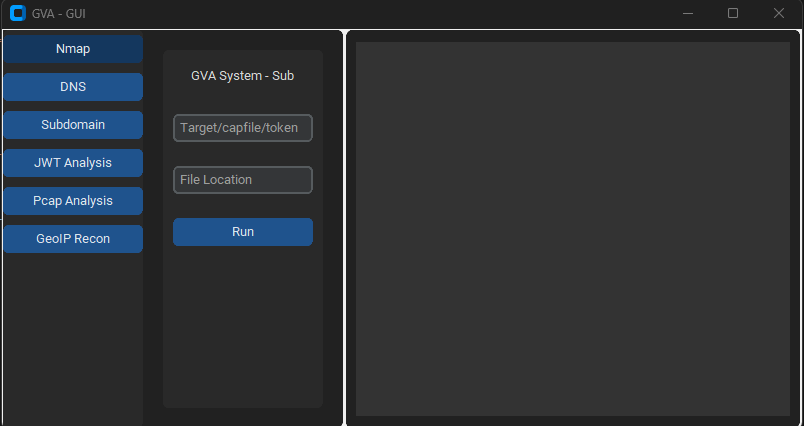
该 GUI 使用 customtkinter 来运行代码。界面非常直观,唯一需要记住的是:
### 初始窗口

### NMAP 窗口

### DNS 窗口

### GEOIP 窗口

### PCAP 窗口

### 子域名窗口

### JWT 窗口

| 预览 | 代码 | 名称 | 工作状态 | OpenAI 状态 | Bard 状态 | LLama2 状态 |
|---|
![]() | LIN | GNU/Linux | ✅ | ✅ | ✅ | ❌ [未测试] |
![]() | WIN | Windows | ✅ | ✅ | ✅ | ✅ |
| 参数 | 返回数据 | 描述 | Nmap 命令 |
|---|
p1 | json | 有效扫描 | -Pn -sV -T4 -O -F |
p2 | json | 简单扫描 | -Pn -T4 -A -v |
p3 | json | 低功耗扫描 | -Pn -sS -sU -T4 -A -v |
p4 | json | 部分高强度扫描 | -Pn -p- -T4 -A -v |
p5 | json | 完全高强度扫描 | -Pn -sS -sU -T4 -A -PE -PP -PY -g 53 --script=vuln |
p6 | json | 全面服务版本检测 | -Pn -sV -p- -A |
p7 | json | 带操作系统检测的激进扫描 | -Pn -sS -sV -O -T4 -A |
p8 | json | 常见漏洞脚本扫描 | -Pn -sC |
p9 | json | 高强度扫描,所有 TCP 端口 | -Pn -p 1-65535 -T4 -A -v |
p10 | json | UDP 扫描 | -Pn -sU -T4 |
p11 | json | 常用端口的服务和版本检测 | -Pn -sV --top-ports 100 |
p12 | json | 使用 NSE 脚本进行漏洞激进扫描 | -Pn -sS -sV -T4 --script=default,discovery,vuln |
p13 | json | 常用端口快速扫描 | -Pn -F |