<div align="center">
<img src="https://assets.kitploit.com/production/public/readmes/404/f0b8746a193b0f91cfb4fecc354ac19984c7d39a273c210c5591d6af6a972298.png" alt="hack-browser-data logo" width="440px" />
</div>
# HackBrowserData
[](https://github.com/moonD4rk/HackBrowserData/actions/workflows/lint.yml) [](https://github.com/moonD4rk/HackBrowserData/actions/workflows/build.yml) [](https://github.com/moonD4rk/HackBrowserData/actions/workflows/release.yml) [](https://github.com/moonD4rk/HackBrowserData/actions/workflows/test.yml) [](https://codecov.io/gh/moonD4rk/HackBrowserData)
`HackBrowserData` 是一款命令行工具,用于解密并导出浏览器数据(密码、历史记录、Cookie、书签、信用卡、下载历史、localStorage、sessionStorage 和扩展程序)。它支持 Windows、macOS 和 Linux 上最流行的基于 Chromium 的浏览器和 Firefox,以及 macOS 上的 Safari。
它还可以**跨机器和跨操作系统**解密数据:在源主机上导出主密钥,然后在任意其他主机上离线解密数据副本——即使分析主机所在的操作系统无法运行该浏览器(参见[跨主机解密](#cross-host-decryption))。
> 免责声明:本工具仅用于安全研究。用户需对使用本工具所产生的一切法律及相关责任负责。原作者不承担任何法律责任。
## 支持的数据类别
| 类别 | 基于 Chromium | Firefox | Safari |
|:---------------|:--------------:|:-------:|:------:|
| 密码 | ✅ | ✅ | ✅ |
| Cookie | ✅ | ✅ | ✅ |
| 书签 | ✅ | ✅ | ✅ |
| 历史记录 | ✅ | ✅ | ✅ |
| 下载 | ✅ | ✅ | ✅ |
| 信用卡 | ✅ | - | - |
| 扩展程序 | ✅ | ✅ | ✅ |
| LocalStorage | ✅ | ✅ | ✅ |
| SessionStorage | ✅ | - | - |
## 支持的浏览器
> 在 macOS 上,部分基于 Chromium 的浏览器**需要当前用户密码**才能解密。
>
> 在 macOS 26.4 或更高版本上,密码解密可能会失败。
| 浏览器 | Windows | macOS | Linux |
|:---------------|:-------:|:-----:|:-----:|
| Chrome | ✅² | ✅ | ✅ |
| Chrome Beta | ✅² | ✅ | ✅ |
| Chromium | ✅ | ✅ | ✅ |
| Edge | ✅² | ✅ | ✅ |
| Brave | ✅² | ✅ | ✅ |
| Opera | ✅ | ✅ | ✅ |
| OperaGX | ✅ | ✅ | - |
| Vivaldi | ✅ | ✅ | ✅ |
| Yandex | ✅ | ✅ | - |
| CocCoc | ✅² | ✅ | - |
| Arc | ✅ | ✅ | - |
| DuckDuckGo³ | ✅ | - | - |
| Browser from Vought³ | ✅ | - | - |
| QQ³ | ✅ | - | - |
| 360 Speed X³ | ✅ | - | - |
| 360 Speed³ | ✅ | - | - |
| DC³ | ✅ | - | - |
| Sogou³ | ✅ | - | - |
| Firefox | ✅ | ✅ | ✅ |
| Safari¹ | - | ✅ | - |
> ¹ Safari 需要“完全磁盘访问权限”;如果提取结果为空,请在“系统设置 → 隐私与安全性 → 完全磁盘访问权限”中启用该权限。
>
> ² 在 Windows 上,解密 Chromium 127+ 的 Cookie(Chrome / Chrome Beta / Edge / Brave / CocCoc)需要使用通过 `make build-windows` 构建的 App-Bound Encryption 载荷——请参阅下方的[从源码构建](#building-from-source)。
>
> ³ 这些浏览器仅在 Windows 上发布,但其数据**可在任何操作系统上解密**:使用 `archive` 提取文件,使用 `dumpkeys` 导出密钥,然后在 macOS 或 Linux 上使用 `restore` 进行解密——请参阅[跨主机解密](#cross-host-decryption)。
## 快速开始
### 安装
`HackBrowserData` 的安装非常简单,只需下载[适用于你系统的发行版](https://github.com/moonD4rk/HackBrowserData/releases)并运行二进制文件即可。
> 在某些情况下,此安全工具会被 Windows Defender 或其他杀毒软件视为病毒而无法执行。代码全部开源,你可以自行修改并编译。
### 从源码构建
需要 `Go 1.20+`。
```bash
git clone https://github.com/moonD4rk/HackBrowserData
cd HackBrowserData
go build ./cmd/hack-browser-data/
```
#### 跨平台构建
```bash
# For Windows (standard build, no Chromium 127+ ABE cookie support)
GOOS=windows GOARCH=amd64 go build ./cmd/hack-browser-data/
# For Linux
GOOS=linux GOARCH=amd64 go build ./cmd/hack-browser-data/
```
#### 带 App-Bound Encryption 的 Windows 构建(可选)
Chrome / Chrome Beta / Edge / Brave / CocCoc 127+ 使用 App-Bound Encryption 保护 cookie。解密这些 cookie 需要一个小型 C 载荷——推荐使用 [Zig](https://ziglang.org/)(0.13+)作为 C 工具链(Makefile 会调用 `zig cc`)。如果绕过 `make payload`,MinGW-w64 的 `gcc` 也可以手动构建这些源文件。
```bash
# 1. Install Zig
brew install zig # macOS
scoop install zig # Windows (scoop)
# or download from https://ziglang.org/download/
# 2. Build the payload (outputs internal/abe/payload/abe_extractor_amd64.bin)
make payload
# 3. Build hack-browser-data.exe with the ABE payload embedded
make build-windows
```
生成的 `hack-browser-data.exe` 包含对 Chromium 127+ 的完整 ABE cookie 解密功能。
## 用法
```
$ hack-browser-data -h
hack-browser-data decrypts and exports browser data from Chromium-based
browsers, Firefox, and Safari on Windows, macOS, and Linux.
GitHub: https://github.com/moonD4rk/HackBrowserData
Usage:
hack-browser-data [flags]
hack-browser-data [command]
Available Commands:
archive Pack decryption-relevant profile files into a zip for cross-host restore
dump Extract and decrypt browser data (default command)
dumpkeys Export Chromium master keys as JSON for cross-host decryption
help Help about any command
list List detected browsers and profiles
restore Decrypt copied profile data using exported master keys
version Print version information
Flags:
-b, --browser string target browser: all|chrome|firefox|edge|... (default "all")
-c, --category string data categories (comma-separated): all|password,cookie,... (default "all")
-d, --dir string output directory (default "results")
-f, --format string output format: csv|json|cookie-editor (default "json")
-h, --help help for hack-browser-data
--keychain-pw string macOS keychain password (visible in ps and shell history)
--keychain-pw-stdin read the macOS keychain password from the first line of stdin
-p, --profile-path string custom profile dir path, get with chrome://version
-v, --verbose enable debug logging
--zip compress output to zip
Use "hack-browser-data [command] --help" for more information about a command.
```
### `dump` - 提取并解密浏览器数据(默认)
在不带子命令的情况下运行 `hack-browser-data` 会默认执行 `dump`。
| 标志 | 短标志 | 默认值 | 描述 |
|------------------|-------|-----------|--------------------------------------------------------------------------------------------------------------------------------------------|
| `--browser` | `-b` | `all` | 目标浏览器(all\|chrome\|firefox\|edge\|...) |
| `--category` | `-c` | `all` | 数据类别,逗号分隔(all\|password\|cookie\|bookmark\|history\|download\|creditcard\|extension\|localstorage\|sessionstorage) |
| `--format` | `-f` | `json` | 输出格式(csv\|json\|cookie-editor) |
| `--dir` | `-d` | `results` | 输出目录 |
| `--profile-path` | `-p` | | 自定义配置文件目录路径,可通过 chrome://version 获取 |
| `--keychain-pw` | | | macOS 钥匙串密码(在 `ps` 和 shell 历史记录中可见) |
| `--keychain-pw-stdin` | | | 从 stdin 的第一行读取 macOS 钥匙串密码 |
| `--zip` | | `false` | 将输出压缩为 zip |
> `--format cookie-editor` 会将 cookie 写为与 Cookie-Editor 浏览器扩展导入格式匹配的 JSON 数组;其他所有类别均按 `json` 格式的写入方式原样写入。
### 跨主机解密
在**分析主机**上解密从不同**源主机**收集的浏览器数据——包括分析人员操作系统甚至无法安装其引擎的浏览器(例如在 macOS 上解密搜狗或 QQ 浏览器数据)。任何与平台绑定的内容(DPAPI、macOS 钥匙串、Chrome App-Bound Encryption)都无需离开源主机:主密钥只需导出一次,之后解密完全离线地从数据副本运行。
该工作流使用三个命令和两个可传输的产物:
| 步骤 | 主机 | 命令 | 产出 |
|------|------|---------|----------|
| 1 | 源主机 | `dumpkeys` | `keys.json` — 可移植的主密钥 |
| 2 | 源主机 | `archive` | `browser-data.zip` — 仅包含解密所需的文件 |
| 3 | 分析主机 | `restore` | 解密后的输出(csv / json / cookie-editor) |
```bash
# On the origin host (any OS) — export the keys and pack the data
hack-browser-data dumpkeys -o keys.json
hack-browser-data archive -o browser-data.zip
# Copy keys.json + browser-data.zip to the analyst host, then decrypt offline
hack-browser-data restore --keys keys.json --data-zip browser-data.zip
```
> `keys.json` 包含明文主密钥——请将其视为机密。`dumpkeys -o` 以 `0600` 权限写入;优先通过安全通道流式传输,而不是将其留在磁盘上。
#### `dumpkeys` - 导出主密钥以进行跨主机解密
在源主机上派生每个 Chromium 安装的主密钥,并将其写为 JSON(Firefox / Safari 没有可移植密钥,会被跳过)。默认输出到 stdout,因此可以通过 SSH 管道传输。
| 标志 | 短标志 | 默认值 | 描述 |
|-----------------|-------|----------|-------------------------------------------------|
| `--browser` | `-b` | `all` | 目标浏览器 (all\|chrome\|edge\|...) |
| `--output` | `-o` | *stdout* | 输出文件(以 `0600` 写入);省略则输出到 stdout |
| `--keychain-pw` | | | macOS 钥匙串密码(在 `ps` / 历史记录中可见) |
| `--keychain-pw-stdin` | | | 从 stdin 的第一行读取钥匙串密码 |
#### `archive` - 打包与解密相关的文件以便传输
仅收集恢复实际需要的文件(cookies、登录数据、历史记录等),通过提取时使用的同一锁定文件绕过机制,因此在 Windows 上可以安全读取活动 SQLite 文件。zip 的布局为 `<browser-key>/<User Data layout>`,因此一个归档可以携带多个浏览器,恢复时保持明确无歧义。条目名称始终使用正斜杠,因此在 Windows 上生成的归档可以在 macOS / Linux 上恢复。
| 标志 | 短标志 | 默认值 | 描述 |
|--------------|-------|--------------------|-----------------------------------------|
| `--browser` | `-b` | `all` | 目标浏览器 (all\|chrome\|edge\|...) |
| `--category` | `-c` | `all` | 数据类别,逗号分隔 |
| `--output` | `-o` | `browser-data.zip` | 输出归档路径 |
#### `restore` - 使用导出的密钥解密复制的数据
直接从 `keys.json` 重建每个 Chromium 引擎并解密提供的数据——它从不查询分析师的本地浏览器表,因此**你可以恢复的浏览器恰好是 `keys.json` 中的保险库**。以下两种方式之一提供数据(必须且只能提供一种):
- `--data-zip` — 由 `archive` 生成的 zip;解压到临时目录并在之后删除。
- `--data-dir` — 一个目录。可以是 `archive` 布局(`<browser-key>/...`,同时包含多个浏览器),也可以是单个浏览器手动复制的 `User Data` 根目录,后者仅在单个浏览器时无歧义——因此请与 `-b` 搭配使用。
`-b` 是对转储保险库的**可选过滤器**,不是必需的选择器。
| 标志 | 短标志 | 默认值 | 描述 |
|--------------|-------|------------|------------------------------------------------------------|
| `--keys` | | *必需* | 来自 `dumpkeys` 的密钥文件(使用 `-` 表示 stdin) |
| `--data-zip` | | | 来自 `archive` 的 zip(与 `--data-dir` 互斥) |
| `--data-dir` | | | 复制的数据目录(与 `--data-zip` 互斥) |
| `--browser` | `-b` | | 仅恢复此浏览器;必须与 `--keys` 中的保险库匹配 |
| `--category` | `-c` | `all` | 数据类别,逗号分隔 |
| `--format` | `-f` | `json` | 输出格式 (csv\|json\|cookie-editor) |
| `--dir` | `-d` | `results` | 输出目录 |
| `--zip` | | `false` | 将输出压缩为 zip |
#### 跨主机示例
```bash
# Stream keys over SSH (no keys.json on disk), data copied separately
ssh origin "hack-browser-data dumpkeys" | \
hack-browser-data restore --keys - --data-zip browser-data.zip
# Restore one browser from a hand-copied User Data folder (no archive)
hack-browser-data restore --keys keys.json --data-dir ./chrome-userdata -b chrome
```
### `list` - 列出检测到的浏览器和配置文件
| 标志 | 默认值 | 描述 |
|------------|---------|--------------------------------|
| `--detail` | `false` | 显示每个类别的条目数量 |
### `version` - 打印版本信息
```bash
hack-browser-data version
```
### 全局标志
| 标志 | 短标志 | 描述 |
|-------------|-------|----------------------|
| `--verbose` | `-v` | 启用调试日志 |
### 示例
```bash
# Extract all data from all browsers (default)
hack-browser-data
# Extract specific browser and categories
hack-browser-data dump -b chrome -c password,cookie
# Export in CSV format to a custom directory (JSON is the default)
hack-browser-data dump -b chrome -f csv -d output
# Export cookies in CookieEditor format
hack-browser-data dump -f cookie-editor
# Compress output to zip
hack-browser-data dump --zip
# List detected browsers and profiles
hack-browser-data list
# List with per-category entry counts
hack-browser-data list --detail
# Use custom profile path
hack-browser-data dump -b chrome -p "/path/to/User Data/Default"
```
## 贡献
我们欢迎并感谢社区做出的任何贡献(GitHub issue/pull request、邮件反馈等)。
在贡献之前,请参阅[贡献指南](https://github.com/moond4rk/hackbrowserdata/blob/main/CONTRIBUTING.md)。
## 贡献者
<!-- readme: collaborators,contributors -start -->
<table>
<tbody>
<tr>
<td align="center">
<a href="https://github.com/moonD4rk">
<img src="https://assets.kitploit.com/production/public/readmes/404/44d0b68669e8e0dacd488e292509a2402ab1e3aeab453bae2a46e4da488901a3.jpg" width="100;" alt="moonD4rk"/>
<br />
<sub><b>Roger</b></sub>
</a>
</td>
<td align="center">
<a href="https://github.com/Aquilao">
<img src="https://assets.kitploit.com/production/public/readmes/404/94641790bc68653d5da842b0398599dd8e2a0a066993af6746404eb4b7d4b6f1.jpg" width="100;" alt="Aquilao"/>
<br />
<sub><b>Aquilao Official</b></sub>
</a>
</td>
<td align="center">
<a href="https://github.com/uinfziuna8n">
<img src="https://assets.kitploit.com/production/public/readmes/404/91cadcfbf646473b0d2f0c963b1bb658fbd2a2caf0ad7fa7f0e26d33c1143666.png" width="100;" alt="uinfziuna8n"/>
<br />
<sub><b>uinfziuna8n</b></sub>
</a>
</td>
<td align="center">
<a href="https://github.com/slimwang">
<img src="https://assets.kitploit.com/production/public/readmes/404/ae95f6647c3edd0d1f7ff9fb61a914a66ee0a79d0c36ded1ad12f3b2387a762d.jpg" width="100;" alt="slimwang"/>
<br />
<sub><b>slimwang</b></sub>
</a>
</td>
<td align="center">
<a href="https://github.com/stevenlele">
<img src="https://assets.kitploit.com/production/public/readmes/404/78c1411a55b386a085c0ebb27d7715eaf2bc642e4be0cd28bcf2cb07ac47367a.png" width="100;" alt="stevenlele"/>
<br />
<sub><b>stevenlele</b></sub>
</a>
</td>
<td align="center">
<a href="https://github.com/VMpc">
<img src="https://assets.kitploit.com/production/public/readmes/404/dedd1e0a8c3ba30979212c1d12206e07afed790b08d046de87708fbd62afdc65.jpg" width="100;" alt="VMpc"/>
<br />
<sub><b>Cyrus</b></sub>
</a>
</td>
</tr>
<tr>
<td align="center">
<a href="https://github.com/camandel">
<img src="https://assets.kitploit.com/production/public/readmes/404/2cd6ad6f35039f82455b44c21138ef349f5c04726141d4abb6993626f1b5bf8a.png" width="100;" alt="camandel"/>
<br />
<sub><b>Carlo Mandelli</b></sub>
</a>
</td>
<td align="center">
<a href="https://github.com/drogers0">
<img src="https://assets.kitploit.com/production/public/readmes/404/cc070e92e126f3e82d8831a9e0c26a511632b31b26897e7e98873be3387826c2/d1fedaac10be0a3fed3c75b25f73f446bf14d3697062f00e74f00ad09a251d6c-display-v1.webp" width="100;" alt="drogers0"/>
<br />
<sub><b>David Rogers</b></sub>
</a>
</td>
<td align="center">
<a href="https://github.com/ac0d3r">
<img src="https://assets.kitploit.com/production/public/readmes/404/831a1177ca39196573915e9c432e99c23e4a2fe8395bb4a8c6fe5dce99854644.png" width="100;" alt="ac0d3r"/>
<br />
<sub><b>zznQ</b></sub>
</a>
</td>
<td align="center">
<a href="https://github.com/slark-yuxj">
<img src="https://assets.kitploit.com/production/public/readmes/404/de8491ad2c9b6f3c864e0184cc8d98a73d89e27e2d5eb259a0d91302ba774c42.jpg" width="100;" alt="slark-yuxj"/>
<br />
<sub><b>YuXJ</b></sub>
</a>
</td>
<td align="center">
<a href="https://github.com/mybonesaremorepowerful92">
<img src="https://assets.kitploit.com/production/public/readmes/404/0e1b00010603bbae39e5aee07788ae636770e32d571f2726a49c51ca333365dd/d527459a5c44c9cc7fde2e1e1adc43a70cd42703d531f18baf950266866cd762-display-v1.webp" width="100;" alt="mybonesaremorepowerful92"/>
<br />
<sub><b>mybonesaremorepowerful92</b></sub>
</a>
</td>
<td align="center">
<a href="https://github.com/mirefly">
<img src="https://assets.kitploit.com/production/public/readmes/404/9bd36661156b3f531d5b703596cbfc1164891fca3f2ce2d2c2b1a4e991328ce7.jpg" width="100;" alt="mirefly"/>
<br />
<sub><b>mirefly</b></sub>
</a>
</td>
</tr>
<tr>
<td align="center">
<a href="https://github.com/lc6464">
<img src="https://assets.kitploit.com/production/public/readmes/404/e8c2be1d51a2644bc333d057e60a35e6d8934cfac93081250f0e681c1fc2cba1.png" width="100;" alt="lc6464"/>
<br />
<sub><b>LC</b></sub>
</a>
</td>
<td align="center">
<a href="https://github.com/zhe6652">
<img src="https://assets.kitploit.com/production/public/readmes/404/d140e8c8234378ec844df52df91d4684fd9532ea60ce1e563de052b88e594251.jpg" width="100;" alt="zhe6652"/>
<br />
<sub><b>zhe6652</b></sub>
</a>
</td>
<td align="center">
<a href="https://github.com/testwill">
<img src="https://assets.kitploit.com/production/public/readmes/404/434c861151e222816c115a471ac69636528d4818c27ef8a58e9265334df234fc.jpg" width="100;" alt="testwill"/>
<br />
<sub><b>guoguangwu</b></sub>
</a>
</td>
<td align="center">
<a href="https://github.com/freddy77">
<img src="https://assets.kitploit.com/production/public/readmes/404/7b1b900b3204a0b52e1562ca4bbcd8307956cb69b75933a0569a79632a4c9219/3acfc56deea3590632895be65ed7dbe2c522ccdacfe78e209a154199151d173d-display-v1.webp" width="100;" alt="freddy77"/>
<br />
<sub><b>freddy77</b></sub>
</a>
</td>
<td align="center">
<a href="https://github.com/BeichenDream">
<img src="https://assets.kitploit.com/production/public/readmes/404/df06578b09534ec480577ee1dc43228a1ff97b6216bc35b5b263681e664675de.jpg" width="100;" alt="BeichenDream"/>
<br />
<sub><b>beichen</b></sub>
</a>
</td>
<td align="center">
<a href="https://github.com/SantiiRepair">
<img src="https://assets.kitploit.com/production/public/readmes/404/994c94cf7c8e36255a9924bd64292483aea59ead9aa2c049cc9f1bc4bd186d32.jpg" width="100;" alt="SantiiRepair"/>
<br />
<sub><b>Santiago Ramirez</b></sub>
</a>
</td>
</tr>
<tr>
<td align="center">
<a href="https://github.com/DUptain1993">
<img src="https://assets.kitploit.com/production/public/readmes/404/3066e87f21c2f95b3316654abab33de2ce3ec4deb54fb300477e35ff19c9395e/4f2b5f09768195f558d4d17c127436f4efaecdf96ce4fe8c4669a5b36c411735-display-v1.webp" width="100;" alt="DUptain1993"/>
<br />
<sub><b>Daniel Uptain </b></sub>
</a>
</td>
<td align="center">
<a href="https://github.com/dexhek">
<img src="https://assets.kitploit.com/production/public/readmes/404/af461a29481d3b1faa89114b694c25ab7ff660bb717f7cedc2f163b9f761d348.jpg" width="100;" alt="dexhek"/>
<br />
<sub><b>Ciprian Conache</b></sub>
</a>
</td>
<td align="center">
<a href="https://github.com/a-urth">
<img src="https://assets.kitploit.com/production/public/readmes/404/a36446eee23860c2470f068797747137fd30478b8c8caaa95cbc3f0804b91742.png" width="100;" alt="a-urth"/>
<br />
<sub><b>a-urth</b></sub>
</a>
</td>
<td align="center">
<a href="https://github.com/Amir-78">
<img src="https://assets.kitploit.com/production/public/readmes/404/97299a4d15c940a8addde4166c4448529efd16521a3aa2a900fb1413c2606990.png" width="100;" alt="Amir-78"/>
<br />
<sub><b>Amir.</b></sub>
</a>
</td>
</tr>
<tbody>
</table>
<!-- readme: collaborators,contributors -end -->
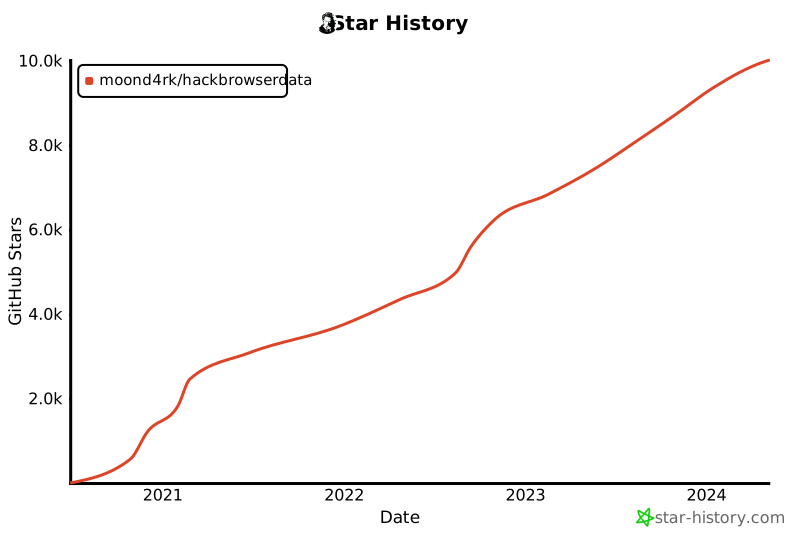
## 随时间变化的 Stargazers
[](https://github.com/moond4rk/HackBrowserData)
## 404StarLink 2.0 - Galaxy
`HackBrowserData` 是 404Team [StarLink-Galaxy](https://github.com/knownsec/404StarLink2.0-Galaxy) 的一部分,如果你对 `HackBrowserData` 有任何疑问,或想寻找伙伴交流,请参阅 [Starlink group](https://github.com/knownsec/404StarLink2.0-Galaxy#community)。
<a href="https://github.com/knownsec/404StarLink2.0-Galaxy" target="_blank"><img src="https://assets.kitploit.com/production/public/readmes/404/94f6cf110c996c1a92deed0930ecd46e3390562ce9a6e52cfb2526dab6b0c851.png" align="middle"/></a>
## JetBrains OS 许可证
`HackBrowserData` 一直是在 **JetBrains 免费开源许可证** 下使用 `GoLand` IDE 开发的,该许可证由 JetBrains s.r.o. 授予,因此我在此表达感谢。
<a href="https://www.jetbrains.com/?from=HackBrowserData" target="_blank"><img src="https://assets.kitploit.com/production/public/readmes/404/2612ef311d28a9e5b5f4fad1ba4ed0c9b37f8ba6803c384f92e5c6bbe1d7f4f8.png" width="256" align="middle"/></a>