无论你是想在日常管理工作中弄清楚某封特定电子邮件为何会进入垃圾邮件/垃圾邮件文件夹,还是为了红队钓鱼模拟的目的,这个脚本都能帮到你!
这个想法产生于一次针对配备 MS Defender for Office365 的 MS Office365 E5 环境开展商业钓鱼模拟演练的过程中。可以想象,从钓鱼模拟的角度来看,这是一个相当棘手的安全技术栈。
在手动翻阅所有这些 Office365 SMTP 邮件头并试图从中挑选出 SCL 值之后,是时候编写一个像样的 SMTP 邮件头解析器了。
时光荏苒,我不断为越来越多的 SMTP 邮件头添加支持——于是就有了它。这个工具现在已能理解几十种不同的邮件头。
该工具接受一个包含所有 SMTP 邮件头的 *.EML 或 *.txt 文件作为输入。然后,它会提取一组值得关注的邮件头,并使用 105+ 项测试尽可能地对它们进行解码。
该脚本还会提取所有 IPv4 地址和域名,并对它们执行完整的 DNS 解析。
输出结果将包含关于这封电子邮件为何可能被阻止的有用信息。
为了在将钓鱼 HTML 代码发送给客户之前对其进行润色,你可能还想把它输入到我的 phishing-HTML-linter.py 中。它能相当出色地发现 HTML 中会让你的电子邮件获得更高垃圾邮件评分的_坏味道_。
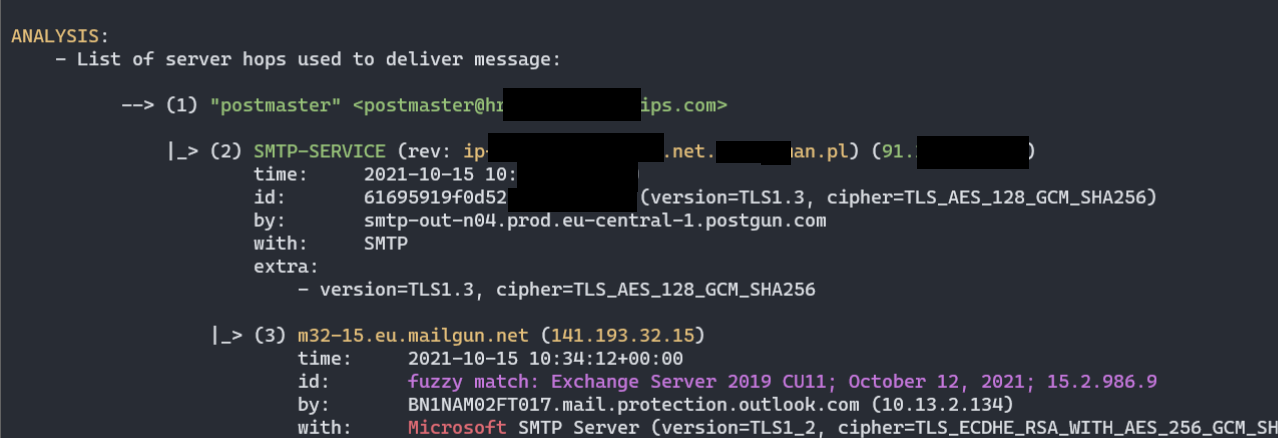
Received 邮件头):


py decode-spam-headers.py headers.txt -f html -o report.html ):
已处理的邮件头(解析了超过 85+ 个邮件头):
X-forefront-antispam-reportX-exchange-antispamX-exchange-antispam-mailbox-deliveryX-exchange-antispam-message-infoX-microsoft-antispam-report-cfa-testReceivedFromToSubjectThread-topicReceived-spfX-mailerX-originating-ipUser-agent这些邮件头大多没有完整的文档,因此该脚本无法确切指出所有细节,但至少它收集了所有我能找到的相关信息。
(5) Test: X-Forefront-Antispam-Report
HEADER: X-Forefront-Antispam-Report
VALUE: CIP:209.85.167.100;CTRY:US;LANG:de;SCL:5;SRV:;IPV:NLI;SFV:SPM;H:mail-lf1-f100.google.com;PTR:mail-l f1-f100.google.com;CAT:DIMP;SFTY:9.19;SFS:(4636009)(956004)(166002)(6916009)(356005)(336012)(19 625305002)(22186003)(5660300002)(4744005)(6666004)(35100500006)(82960400001)(26005)(7596003)(7636003)(554460 02)(224303003)(1096003)(58800400005)(86362001)(9686003)(43540500002);DIR:INB;SFTY:9.19;
[...]
- Message matched 24 Anti-Spam rules (SFS): <============ opaque anti-spam rules
- (1096003)
- (166002)
- (19625305002)
- (22186003)
- (224303003)
- (26005)
- (336012)
- (356005)
- (35100500006) - (SPAM) Message contained embedded image.
该过程完全手动,通过向 Office365 邮件服务器发送特制邮件,然后手动审查并关联收集到的规则。
目前已发送了 60 多封邮件,以下是我目前对 Microsoft 规则的了解:```py
#
# Below rules were collected solely in a trial-and-error manner or by scraping any
# pieces of information from all around the Internet.
#
# They do not represent the actual Anti-Spam rule name or context and surely represent
# something close to what is understood (or they may have totally different meaning).
#
# Until we'll be able to review anti-spam rules documention, there is no viable mean to map
# rule ID to its meaning.
#
Anti_Spam_Rules_ReverseEngineered = \
{
'35100500006' : logger.colored('(SPAM) Message contained embedded image.', 'red'),
# https://docs.microsoft.com/en-us/answers/questions/416100/what-is-meanings-of-39x-microsoft-antispam-mailbox.html
'520007050' : logger.colored('(SPAM) Moved message to Spam and created Email Rule to move messages from this particular sender to Junk.', 'red'),
# triggered on an empty mail with subject being: "test123 - viagra"
'162623004' : 'Subject line contained suspicious words (like Viagra).',
# triggered on mail with subject "test123" and body being single word "viagra"
'19618925003' : 'Mail body contained suspicious words (like Viagra).',
# triggered on mail with empty body and subject "Click here"
'28233001' : 'Subject line contained suspicious words luring action (ex. "Click here"). ',
# triggered on a mail with test subject and 1500 words of http://nietzsche-ipsum.com/
'30864003' : 'Mail body contained a lot of text (more than 10.000 characters).',
# mails that had simple message such as "Hello world" triggered this rule, whereas mails with
# more than 150 words did not.
'564344004' : 'HTML mail body with less than 150 words of text (not sure how much less though)',
# message was sent with a basic html and only one <u> tag in body.
'67856001' : 'HTML mail body contained underline <u> tag.',
# message with html,head,body and body containing simple text with no b/i/u formatting.
'579124003' : 'HTML mail body contained text, but no text formatting (<b>, <i>, <u>) was present',
# This is a strong signal. Mails without <a> doesnt have this rule.
'166002' : 'HTML mail body contained URL <a> link.',
# Message contained <a href="https://something.com/file.html?parameter=value" - GET parameter with value.
'21615005' : 'Mail body contained <a> tag with URL containing GET parameter: ex. href="https://foo.bar/file?aaa=bbb"',
# Message contained <a href="https://something.com/file.html?parameter=https://another.com/website"
# - GET parameter with value, being a URL to another website
'45080400002' : 'Something about <a> tag\'s URL. Possibly it contained GET parameter with value of another URL: ex. href="https://foo.bar/file?aaa=https://baz.xyz/"',
# Message contained <a> with href pointing to a file with dangerous extension, such as file.exe
'460985005' : 'Mail body contained HTML <a> tag with href URL pointing to a file with dangerous extension (such as .exe)',
#
# Message1: GoPhish -> VPS 587/tcp redirector -> smtp.gmail.com:587 -> target
# Message2: GoPhish -> VPS 587/tcp redirector -> smtp-relay.gmail.com:587 -> target
#
# These were the only differences I spotted:
# Message1 - FirstHop Gmail SMTP Received with ESMTPS.
# Message2 - FirstHop Gmail SMTP-Relay Received with ESMTPSA.
#
'121216002' : 'First Hop MTA SMTP Server used as a SMTP Relay. It\'s known to originate e-mails, but here it acted as a Relay. Or maybe due to use of "with ESMTPSA" instead of ESMTPS?',
# Triggered on message with <a> added to HTML: <a href="https://support.spotify.com/is-en/">https://www.reddit.com/</a>
'966005' : 'Mail body contained link tag with potentially masqueraded URL: <a href="https://attacker.com">https://example.com</a>',
#
# Message1: GoPhish EC2 -> another EC2 with socat to smtp.gmail.com:587 (authenticated) -> Target
# Message2: GoPhish EC2 -> Gsuite -> Target
#
# Subject, mail body were exactly the same.
#
# Below two rules were added to the second message. My understanding is that they're somehow referring
# to the reputation of the first-hop server, maybe reverse-DNS resolution.
#
'5002400100002' : "(GUESSING) Somehow related to First Hop server reputation, it's reverse-PTR resolution or domain impersonation",
'58800400005' : "(GUESSING) Somehow related to First Hop server reputation, it's reverse-PTR resolution or domain impersonation",
'19625305002' : '(GUESSING) Something to do with the HTML code and used tags/structures',
'43540500002' : '(GUESSING) Something to do with the HTML code and used tags/structures',
'460985005' : '(GUESSING) Something to do with either more-complex HTML code or with the <a> tag and its URL.',
# Triggered on an empty text message, subject "test" - that was marked with "Domain Impersonation", however
# ForeFront Anti-Spam headers did not support that Domain Impersonation. Weird.
'22186003' : '(GUESSING) Something to do with either Text message (non-HTML) or probable Domain Impersonation',
# Found by @ipSlav (https://github.com/mgeeky/decode-spam-headers/issues/15)
'42882007' : 'Missing Reply-To Address. Might be fixed by adding -ReplyTo flag to Send-MailMessage',
'78352004' : 'Missing Reply-To Address. Might be fixed by adding -ReplyTo flag to Send-MailMessage',
}
如果你了解任何其他 Office365 反垃圾邮件规则(或对上述规则有建议),请在本仓库的 issues 中告诉我,我会立即添加 :)
首次使用前安装所需的 Python3 依赖:``` bash$ pip3 install -r requirements.txt
帮助:```
PS> py .\decode-spam-headers.py --help
usage: decode-spam-headers.py [options] <file | --list tests>
optional arguments:
-h, --help show this help message and exit
Required arguments:
infile Input file to be analysed or --list tests to show available tests.
Options:
-o OUTFILE, --outfile OUTFILE
Output file with report
-f {json,text,html}, --format {json,text,html}
Analysis report format. JSON, text. Default: text
-N, --nocolor Dont use colors in text output.
-v, --verbose Verbose mode.
-d, --debug Debug mode.
-l, --list List available tests and quit. Use it like so: --list tests
Tests:
-i tests, --include-tests tests
Comma-separated list of test IDs to run. Ex. --include-tests 1,3,7
-e tests, --exclude-tests tests
Comma-separated list of test IDs to skip. Ex. --exclude-tests 1,3,7
-r, --resolve Resolve IPv4 addresses / Domain names.
-R, --dont-resolve Do not resolve anything.
-a, --decode-all Decode all =?us-ascii?Q? mail encoded messages and print their contents.
如果你只想运行一部分测试,首先需要了解应选择哪些测试的 Test ID。
使用 -l tests 运行脚本即可获取该列表。
列出可用测试及其对应的 ID:``` C:> py decode-spam-headers.py -l tests
[.] Available tests:
TEST_ID - TEST_NAME
--------------------------------------
1 - Received - Mail Servers Flow
2 - Extracted IP addresses
3 - Extracted Domains
4 - Bad Keywords In Headers
5 - Sender Address Analysis
6 - Subject and Thread Topic Difference
7 - Authentication-Results
8 - ARC-Authentication-Results
9 - Received-SPF
10 - Mail Client Version
11 - User-Agent Version
12 - X-Forefront-Antispam-Report
13 - X-MS-Exchange-Organization-SCL
14 - X-Microsoft-Antispam-Mailbox-Delivery
15 - X-Microsoft-Antispam Bulk Mail
16 - X-Exchange-Antispam-Report-CFA-Test
17 - Domain Impersonation
18 - SpamAssassin Spam Status
19 - SpamAssassin Spam Level
20 - SpamAssassin Spam Flag
21 - SpamAssassin Spam Report
22 - OVH's X-VR-SPAMCAUSE
23 - OVH's X-Ovh-Spam-Reason
24 - OVH's X-Ovh-Spam-Score
25 - X-Virus-Scan
26 - X-Spam-Checker-Version
27 - X-IronPort-AV
28 - X-IronPort-Anti-Spam-Filtered
29 - X-IronPort-Anti-Spam-Result
30 - X-Mimecast-Spam-Score
31 - Spam Diagnostics Metadata
32 - MS Defender ATP Message Properties
33 - Message Feedback Loop
34 - End-to-End Latency - Message Delivery Time
36 - X-IP-Spam-Verdict
37 - X-Amp-Result
38 - X-IronPort-RemoteIP
39 - X-IronPort-Reputation
40 - X-SBRS
41 - X-IronPort-SenderGroup
42 - X-Policy
43 - X-IronPort-MailFlowPolicy
44 - X-SEA-Spam
45 - X-FireEye
46 - X-AntiAbuse
47 - X-TMASE-Version
48 - X-TM-AS-Product-Ver
49 - X-TM-AS-Result
50 - X-IMSS-Scan-Details
51 - X-TM-AS-User-Approved-Sender
52 - X-TM-AS-User-Blocked-Sender
53 - X-TMASE-Result
54 - X-TMASE-SNAP-Result
55 - X-IMSS-DKIM-White-List
56 - X-TM-AS-Result-Xfilter
57 - X-TM-AS-SMTP
58 - X-TMASE-SNAP-Result
59 - X-TM-Authentication-Results
60 - X-Scanned-By
61 - X-Mimecast-Spam-Signature
62 - X-Mimecast-Bulk-Signature
63 - X-Forefront-Antispam-Report-Untrusted
64 - X-Microsoft-Antispam-Untrusted
65 - X-Mimecast-Impersonation-Protect
66 - X-Proofpoint-Spam-Details
67 - X-Proofpoint-Virus-Version
68 - SPFCheck
69 - X-Barracuda-Spam-Score
70 - X-Barracuda-Spam-Status
71 - X-Barracuda-Spam-Report
72 - X-Barracuda-Bayes
73 - X-Barracuda-Start-Time
74 - Similar to SpamAssassin Spam Level headers
75 - SMTP Header Contained IP address
76 - Other unrecognized Spam Related Headers
77 - Other interesting headers
78 - Security Appliances Spotted
79 - Email Providers Infrastructure Clues
80 - X-Microsoft-Antispam-Message-Info (use -a to show its results)
81 - Decoded Mail-encoded header values (use -a to show its results)
82 - Header Containing Client IP
83 - Office365 Tenant ID
84 - Organization Name
85 - MS Defender for Office365 Safe Links Version
86 - Suspicious Words in Headers
87 - AWS SES Outgoing
88 - IronPort-Data
89 - IronPort-HdrOrder
90 - X-DKIM
91 - DKIM-Filter
92 - X-SpamExperts-Class
93 - X-SpamExperts-Evidence
94 - X-Recommended-Action
95 - X-AppInfo
96 - X-Spam
97 - X-TM-AS-MatchedID
98 - MTA Hostname Exposed
99 - Office365 First Contact Safety Tip
100 - EOP - Bypass Focused Inbox
101 - EOP - Enhanced Filtering - SkipListedInternetSender
102 - EOP - Enhanced Filtering - ExternalOriginalInternetSender
103 - Cloudmark Analysis
104 - The Real Sender - via Authenticated-Sender
105 - Identified Sender Addresses
106 - Unsual SMTP headers
### HTML 报告
为了生成 HTML 报告 - 请使用以下参数:```
PS> py decode-spam-headers.py headers.txt -f html -o report.html
示例运行(输出结构和内容来自脚本的过时版本):``` PS> py decode-spam-headers.py headers.txt
(1) Test: Received - Mail Servers Flow
HEADER: Received
VALUE: ...
ANALYSIS: - List of server hops used to deliver message:
--> (1) "attacker" <[email protected]>
|_> (2) SMTP-SERVICE (44.55.66.77)
time: 01 Jan 2021 12:34:20
|_> (3) mail-wr1-f51.google.com (209.85.221.51)
time: 01 Jan 2021 12:34:20
version: fuzzy match: Exchange Server 2019 CU11; October 12, 2021; 15.2.986.9
|_> (4) SN1NAM02FT0061.eop-nam02.prod.protection.outlook.com (2603:10b6:806:131:cafe::e5)
time: 01 Jan 2021 12:34:20
version: fuzzy match: Exchange Server 2019 CU11; October 12, 2021; 15.2.986.9
|_> (5) SA0PR11CA0138.namprd11.prod.outlook.com (2603:10b6:806:131::23)
time: 01 Jan 2021 12:34:20
version: fuzzy match: Exchange Server 2019 CU11; October 12, 2021; 15.2.986.9
|_> (6) CP2PR80MB4114.lamprd80.prod.outlook.com (2603:10d6:102:3c::15)
time: 01 Jan 2021 12:34:23
|_> (7) "Victim Surname" <[email protected]>
[...]
(4) Test: Mail Client Version
HEADER: X-Mailer
VALUE: OEM
ANALYSIS: - X-Mailer header was present and contained value: "OEM".
(5) Test: X-Forefront-Antispam-Report
HEADER: X-Forefront-Antispam-Report
VALUE: CIP:209.85.167.100;CTRY:US;LANG:de;SCL:5;SRV:;IPV:NLI;SFV:SPM;H:mail-lf1-f100.google.com;PTR:mail-l f1-f100.google.com;CAT:DIMP;SFTY:9.19;SFS:(4636009)(956004)(166002)(6916009)(356005)(336012)(19 625305002)(22186003)(5660300002)(4744005)(6666004)(35100500006)(82960400001)(26005)(7596003)(7636003)(554460 02)(224303003)(1096003)(58800400005)(86362001)(9686003)(43540500002);DIR:INB;SFTY:9.19;
ANALYSIS: - Microsoft Office365/Exchange ForeFront Anti-Spam report
- CIP: Connecting IP address: 209.85.167.100
- CTRY: The source country as determined by the connecting IP address
- US
- LANG: The language in which the message was written
- de
- IPV: Ingress Peer Verification status
- NLI: The IP address was not found on any IP reputation list.
- SFV: Message Filtering
- SPM: The message was marked as spam by spam filtering.
- H: The HELO or EHLO string of the connecting email server.
- mail-lf1-f100.google.com
- PTR: Reverse DNS of the Connecting IP peer's address
- mail-lf1-f100.google.com
- CAT: The category of protection policy
- DIMP: Domain Impersonation
- SFTY: The message was identified as phishing
- 9.19: Domain impersonation. The sending domain is attempting to impersonate a protected domain
- DIR: Direction of email verification
- INB: Inbound email verification
- Message matched 24 Anti-Spam rules (SFS):
- (1096003)
- (166002)
- (19625305002)
- (22186003)
- (224303003)
- (26005)
- (336012)
- (356005)
- (35100500006) - (SPAM) Message contained embedded image.
- (43540500002)
- (4636009)
- (4744005)
- (55446002)
- (5660300002)
- (58800400005)
- (6666004)
- (6916009)
- (7596003)
- (7636003)
- (82960400001)
- (86362001)
- (956004)
- (9686003)
- SCL: Spam Confidence Level: 5
- SPAM: Spam filtering marked the message as Spam
More information: - https://docs.microsoft.com/en-us/microsoft-365/security/office-365-security/anti-spam-message-headers - https://docs.microsoft.com/en-us/exchange/antispam-and-antimalware/antispam-protection/antispam-stamps - https://docs.microsoft.com/en-us/microsoft-365/security/office-365-security/spam-confidence-levels - https://docs.microsoft.com/en-us/exchange/monitoring/trace-an-email-message/run-a-message-trace-and-view-results
(6) Test: X-Microsoft-Antispam-Mailbox-Delivery
HEADER: X-Microsoft-Antispam-Mailbox-Delivery
VALUE: ucf:0;jmr:1;auth:0;dest:J;ENG:(910001)(944506458)(944626604)(750132)(520011016);
ANALYSIS: - This header denotes what to do with received message, where to put it.
- auth: Message originating from Authenticated sender
- 0: Not Authenticated
- dest: Destination where message should be placed
- J: JUNK directory
- Message matched 6 Anti-Spam Delivery rules:
- (520011016)
- (750132)
- (910001)
- (944506458)
- (944626604)
(7) Test: X-Microsoft-Antispam Bulk Mail
HEADER: X-Microsoft-Antispam VALUE: BCL:0;
ANALYSIS: - BCL: BULK Confidence Level: 0 The message isn't from a bulk sender.
More information:
- https://docs.microsoft.com/en-us/microsoft-365/security/office-365-security/bulk-complaint-level-values
[...]
(10) Test: MS Defender ATP Message Properties
HEADER: X-MS-Exchange-AtpMessageProperties
VALUE: SA|SL
ANALYSIS: - MS Defender Advanced Threat Protection enabled following protections on this message: - Safe Attachments Protection - Safe Links Protection
(11) Test: Domain Impersonation
HEADER: From
VALUE: "attacker" [email protected]
ANALYSIS: - Mail From: [email protected]
- Mail Domain: attacker.com
--> resolves to: 11.22.33.44
--> reverse-DNS resolves to: ec2-11-22-33-44.eu-west-3.compute.amazonaws.com
(sender's domain: amazonaws.com)
- First Hop: SMTP-SERVICE (44.55.66.77)
--> resolves to:
--> reverse-DNS resolves to: host44-55-66-77.static.arubacloud.pl
(first hop's domain: arubacloud.pl)
- Domain SPF: "v=spf1 include:_spf.google.com ~all"
- WARNING! Potential Domain Impersonation!
- Mail's domain should resolve to: amazonaws.com
- But instead first hop resolved to: arubacloud.pl
---
### 致谢
- [ipSlav](https://github.com/ipSlav) - 感谢 [识别出两条 Office365 不透明规则](https://github.com/mgeeky/decode-spam-headers/issues/15):`42882007` 和 `78352004`
---
### 已知问题
- `getOffice365TenantNameById(tenantID)` 方法尚未完成,我了解几种将 Office365 租户 GUID 映射为租户名称的方法,但尚未找到稳定的实现方式。
- `Authentication-Results` 头尚未完全解析——需要根据 [Microsoft 文档](https://docs.microsoft.com/en-us/microsoft-365/security/office-365-security/anti-spam-message-headers?view=o365-worldwide) 加入 `reason` 处理及其他字段。
---
### ☕ 表示支持 ☕
本项目及其他项目都是无数不眠之夜和**大量辛勤工作**的成果。如果你喜欢我所做的事情,并感激我始终回馈社区,
[请考虑请我喝杯咖啡](https://github.com/sponsors/mgeeky) _(或者最好是一杯啤酒)_ 以此表达感谢!💪
---```
Mariusz Banach / mgeeky, (@mariuszbit)
<mb [at] binary-offensive.com>
X-forefront-antispam-reportX-microsoft-antispam-mailbox-deliveryX-microsoft-antispamX-exchange-antispam-report-cfa-testX-spam-statusX-spam-levelX-spam-flagX-spam-reportX-vr-spamcauseX-ovh-spam-reasonX-vr-spamscoreX-virus-scannedX-spam-checker-versionX-ironport-avX-ironport-anti-spam-filteredX-ironport-anti-spam-resultX-mimecast-spam-scoreSpamdiagnosticmetadataX-ms-exchange-atpmessagepropertiesX-msfblX-ms-exchange-transport-endtoendlatencyX-ms-oob-tlc-oobclassifiersX-ip-spam-verdictX-amp-resultX-ironport-remoteipX-ironport-reputationX-sbrsX-ironport-sendergroupX-policyX-ironport-mailflowpolicyX-remote-ipX-sea-spamX-fireeyeX-antiabuseX-tmase-versionX-tm-as-product-verX-tm-as-resultX-imss-scan-detailsX-tm-as-user-approved-senderX-tm-as-user-blocked-senderX-tmase-resultX-tmase-snap-resultX-imss-dkim-white-listX-tm-as-result-xfilterX-tm-as-smtpX-scanned-byX-mimecast-spam-signatureX-mimecast-bulk-signatureX-sender-ipX-forefront-antispam-report-untrustedX-microsoft-antispam-untrustedX-sophos-senderhistoryX-sophos-rescanX-MS-Exchange-CrossTenant-IdX-OriginatorOrgIronPort-DataIronPort-HdrOrdrX-DKIMDKIM-FilterX-SpamExperts-ClassX-SpamExperts-EvidenceX-Recommended-ActionX-AppInfoX-SpamX-TM-AS-MatchedIDX-MS-Exchange-EnableFirstContactSafetyTipX-MS-Exchange-Organization-BypassFocusedInboxX-MS-Exchange-SkipListedInternetSenderX-MS-Exchange-ExternalOriginalInternetSenderX-CNFS-AnalysisX-Authenticated-SenderX-Apparently-FromX-Env-SenderSender