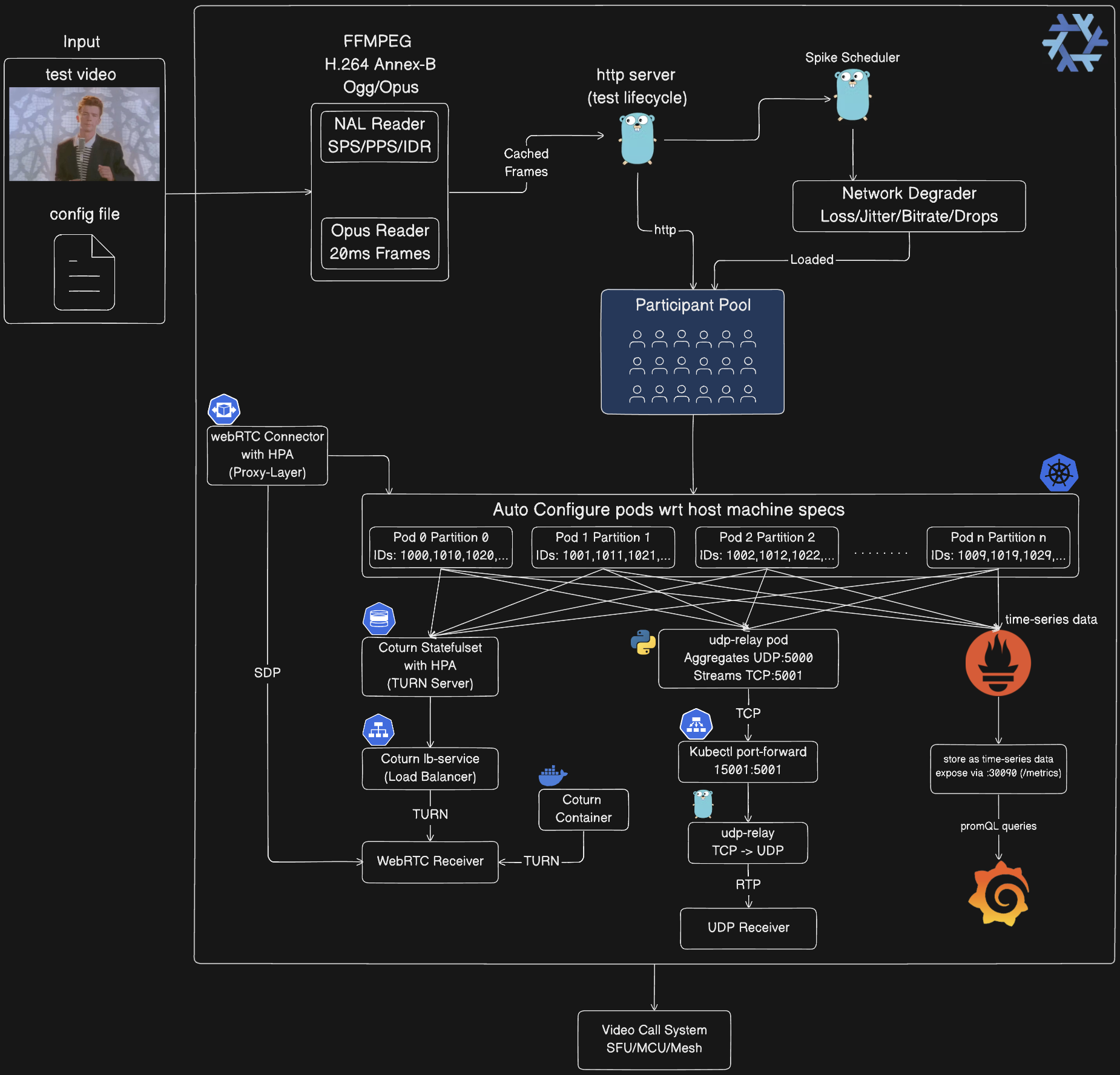
分布式混沌工程平台,用于对视频会议系统进行负载测试。模拟超过1500个WebRTC参与者,传输H.264/Opus流,并注入网络混沌尖峰,以验证系统在降级条件下的韧性
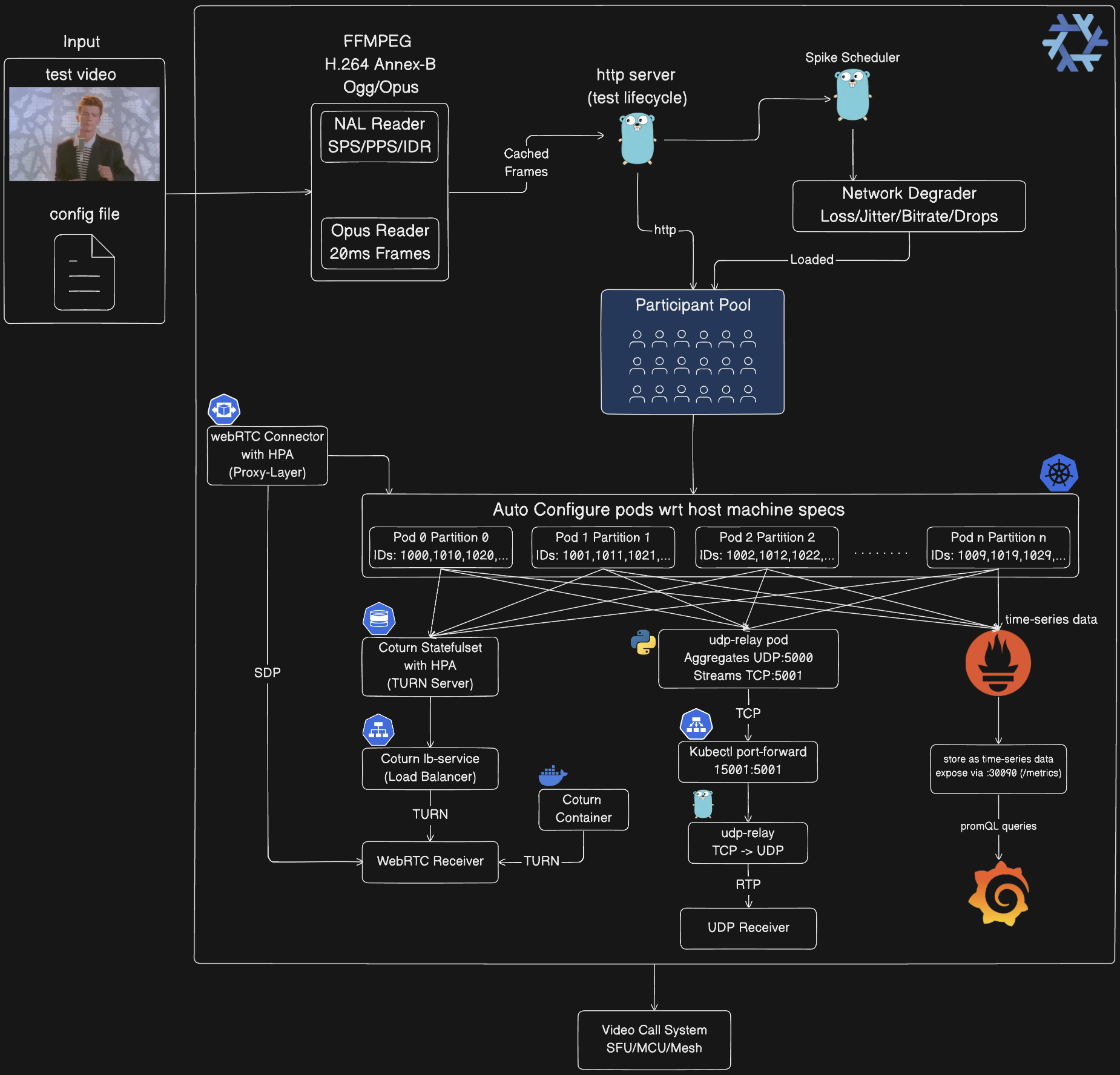
媒体处理管道:
控制平面:
参与者池:
participant_id % total_partitions = partition_id 自动跨 Pod 分区Kubernetes 自动配置:
orchestrator-3 → PARTITION_ID=3base_port + (partition_id × 10000) + participant_indexUDP 中继链(仅 Kubernetes):
Orchestrator Pods (10×) → UDP :5000 → udp-relay Pod (Python)
→ Length-Prefixed TCP :5001 → kubectl port-forward 15001:5001
→ tools/udp-relay (Go) → UDP :5002 → Your Receiver
WebRTC 基础设施:
客户端集成:
可观测性栈(可选):
/metrics 端点抓取数据prometheus.io/scrape: "true"每个虚拟参与者生成真实的媒体流:
五种尖峰类型模拟现实网络条件:
尖峰按可配置策略分布在测试持续时间内:
Kubernetes 部署使用参与者分区进行水平扩展:
participant_id % total_partitions == partition_idbase_port + (partition_id * 10000) + participant_index最佳用途:开发、调试、小规模测试(1-100 参与者)
# 启动编排器
go run cmd/main.go

# 另一个终端:启动 UDP 接收器
go run examples/go/udp_receiver.go 5002

# 编辑 config/config.json 设置 num_participants: 10
# 运行混沌测试
go run tools/chaos-test/main.go -config config/config.json
执行过程:
:8080127.0.0.1:5002 发送 UDP配置(config/config.json):
{
  "base_url": "http://localhost:8080",
  "media_path": "public/rick-roll.mp4",
  "num_participants": 10,
  "duration_seconds": 300,
  "spikes": {
    "count": 20,
    "interval_seconds": 5,
    "types": { "rtp_packet_loss": {...}, "network_jitter": {...} }
  },
  "spike_distribution": {
    "strategy": "random",
    "min_spacing_seconds": 5,
    "jitter_percent": 15
  }
}
最佳用途:隔离测试、CI/CD、中规模测试(100-500 参与者)
前提条件:
docker-compose# 构建并启动编排器容器
./scripts/start_everything.sh build
# 另一个终端:启动 UDP 接收器
go run examples/go/udp_receiver.go 5002
# 编辑 config/config.json 设置 num_participants: 100
# 运行混沌测试(目标为容器)
go run tools/chaos-test/main.go -config config/config.json
资源限制(编辑 docker-compose.yaml):
services:
  orchestrator:
    deploy:
      resources:
        limits:
          cpus: "14.0"
          memory: 6G  # 增加以容纳更多参与者
扩缩指南:
| Docker 内存 | 最大参与者数 | CPU 核心数 |
|---|---|---|
| 8 GB | ~100 | 4 |
| 16 GB | ~250 | 8 |
| 24 GB | ~400 | 12 |
| 32 GB | ~500 | 14 |
最佳用途:大规模测试(500-1500 参与者)、水平扩展、生产验证
前提条件:
# Nix 提供:Go、Docker、kubectl、kind、ffmpeg
nix develop

# 或使用 direnv 自动激活
echo "use flake" > .envrc
direnv allow
# 自动部署并优化设置(检测系统资源)
./scripts/start_everything.sh run -config config/config.json

# 或指定自定义媒体文件
./scripts/start_everything.sh run --media=path/to/video.mp4 -config config/config.json
执行过程:
kubectl port-forward选项 A:UDP 接收器(推荐用于 Kubernetes)
# 接收来自所有 1500 个参与者的聚合流
go run ./examples/go/udp_receiver.go 5002
选项 B:WebRTC 接收器(多个参与者)
# 通过 WebRTC 连接最多 150 个参与者
go run ./examples/go/webrtc_receiver.go http://localhost:8080 <test_id> 150
架构流程:
1500 个参与者分布在 10 个 Pod 上
  → 每个 Pod:150 个参与者
  → 按 participant_id % 10 分区
  → 全部向 udp-relay:5000 发送 UDP
  → UDP 中继聚合 → TCP :5001
  → kubectl port-forward 15001:5001
  → 本地中继转换 TCP → UDP :5002
  → 你的接收器获取全部 1500 个流
注意:start_everything.sh 脚本会自动设置:
# 构建并加载镜像
docker build -t chaos-monkey-orchestrator:latest .
kind load docker-image chaos-monkey-orchestrator:latest

# 部署
kubectl apply -f k8s/orchestrator/orchestrator.yaml
kubectl apply -f k8s/udp-relay/udp-relay.yaml

# 等待 Pod 就绪
kubectl wait --for=condition=ready pod -l app=orchestrator --timeout=300s

# 端口转发 UDP 中继
kubectl port-forward udp-relay 15001:5001 &

# 启动本地 TCP→UDP 中继
go run tools/udp-relay/main.go &

# 另一个终端:启动接收器
go run ./examples/go/udp_receiver.go 5002

# 另一个终端:运行混沌测试
go run tools/chaos-test/main.go -config config/config.json
# 删除 Kubernetes 资源
./scripts/cleanup.sh

# 或删除整个集群
kind delete cluster --name av-chaos-monkey
# 为 Linux x86_64 构建(最常见)
nix build .#packages.x86_64-linux.av-chaos-monkey

# 为 ARM64 构建(Raspberry Pi、AWS Graviton)
nix build .#packages.aarch64-linux.av-chaos-monkey

# 为 macOS Intel 构建
nix build .#packages.x86_64-darwin.av-chaos-monkey

# 为 macOS Apple Silicon 构建
nix build .#packages.aarch64-darwin.av-chaos-monkey

# 二进制文件位置
./result/bin/main
# 创建测试
POST /api/v1/test/create
{
  "test_id": "optional_id",
  "num_participants": 100,
  "video": {...},
  "audio": {...},
  "duration_seconds": 600,
  "spikes": [...],
  "spike_distribution": {
    "strategy": "even",
    "min_spacing_seconds": 5,
    "jitter_percent": 15
  }
}

# 启动测试
POST /api/v1/test/{test_id}/start

# 获取指标
GET /api/v1/test/{test_id}/metrics

# 停止测试
POST /api/v1/test/{test_id}/stop
# 获取 SDP 提议
GET /api/v1/test/{test_id}/sdp/{participant_id}

# 设置 SDP 应答
POST /api/v1/test/{test_id}/sdp/{participant_id}
{"sdp_answer": "v=0..."}
# 注入尖峰
POST /api/v1/test/{test_id}/spike
{
  "spike_id": "unique_id",
  "type": "rtp_packet_loss",
  "duration_seconds": 30,
  "participant_ids": [1001, 1002],
  "params": {"loss_percentage": "15"}
}