GoScan 是一个交互式网络扫描客户端,具有自动补全功能,为 nmap 提供抽象化和自动化。
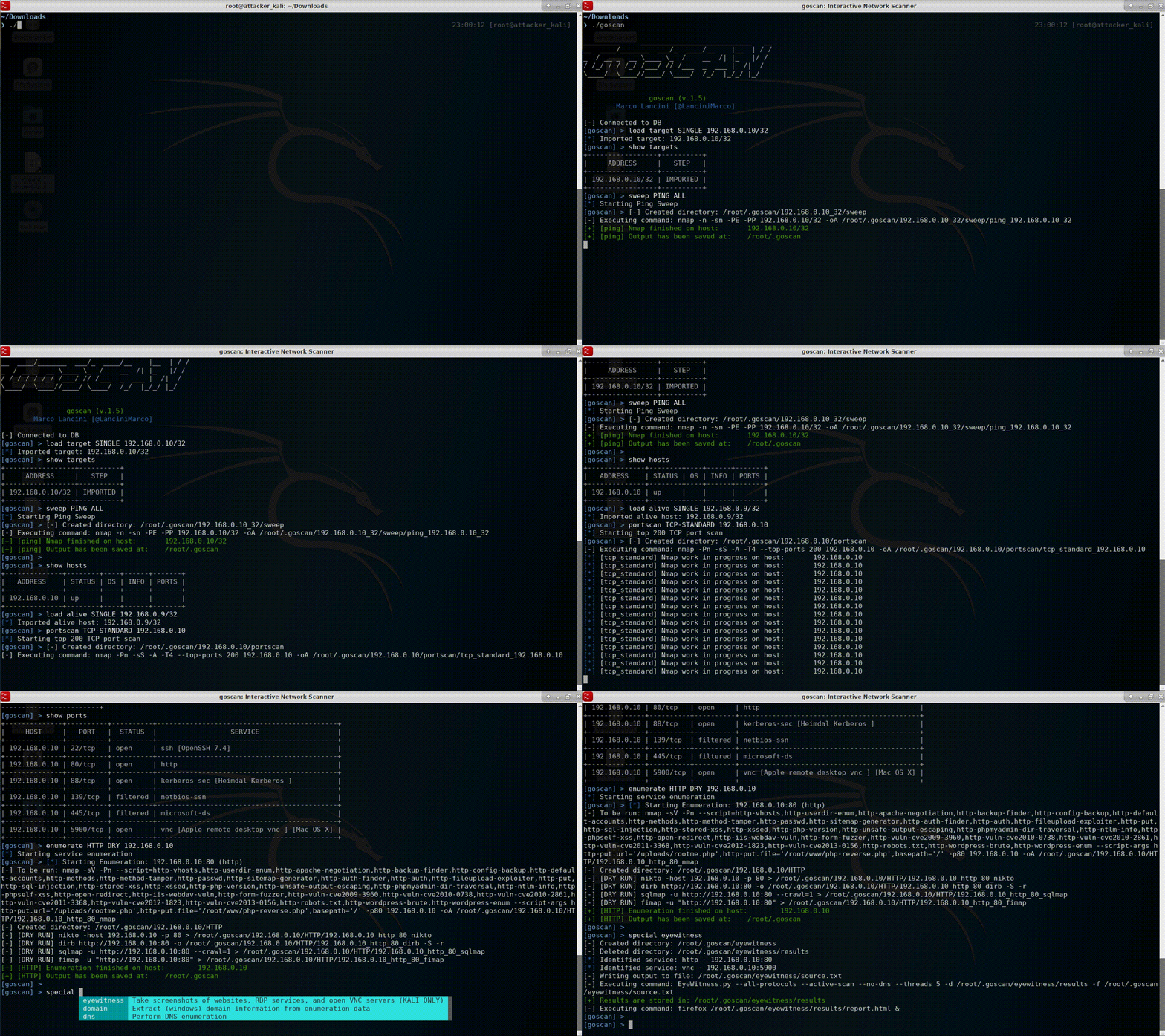
尽管最初我只是为了学习 @golang 而开发的一个小项目,但 GoScan 现在可用于执行主机发现、端口扫描和服务枚举,不仅适用于无需隐身且时间有限的情况(如 CTF、OSCP、考试等),而且通过少量配置调整,也可用于专业渗透测试。
GoScan 尤其适用于不稳定的环境(如不可靠的网络连接、没有 "screen" 等),因为它将扫描结果及其状态保存在 SQLite 数据库中。扫描在后台运行(与主线程分离),因此即使与运行 GoScan 的设备的连接丢失,也可以异步上传结果(下面会详细说明)。也就是说,可以在流程的不同阶段向 GoScan 导入数据,而不必在出现问题时从头重启整个流程。
此外,服务枚举阶段集成了其他一系列工具(如 EyeWitness、Hydra、nikto 等),每个工具都针对特定服务进行了定制。
二进制文件可从发布页面获取。
# Linux (64bit)
$ wget https://github.com/marco-lancini/goscan/releases/download/v2.4/goscan_2.4_linux_amd64.zip
$ unzip goscan_2.4_linux_amd64.zip

# Linux (32bit)
$ wget https://github.com/marco-lancini/goscan/releases/download/v2.4/goscan_2.4_linux_386.zip
$ unzip goscan_2.4_linux_386.zip

# After that, place the executable in your PATH
$ chmod +x goscan
$ sudo mv ./goscan /usr/local/bin/goscan
# Clone and spin up the project
$ git clone https://github.com/marco-lancini/goscan.git
$ cd goscan/
$ docker-compose up --build
$ docker-compose run cli /bin/bash

# Initialize DEP
root@cli:/go/src/github.com/marco-lancini/goscan $ make init
root@cli:/go/src/github.com/marco-lancini/goscan $ make setup

# Build
root@cli:/go/src/github.com/marco-lancini/goscan $ make build

# To create a multi-platform binary, use the cross command via make
root@cli:/go/src/github.com/marco-lancini/goscan $ make cross
GoScan 支持网络枚举的所有主要步骤:
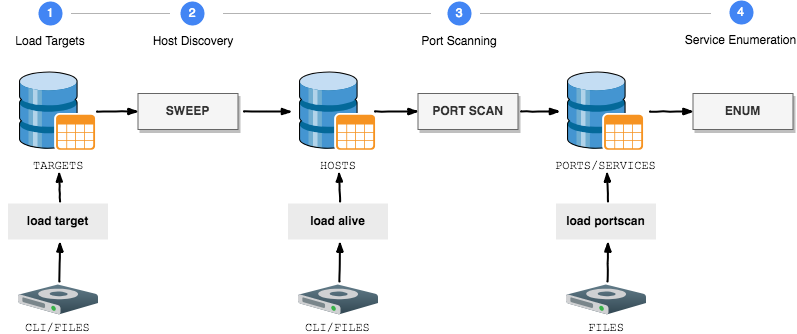
| 步骤 | 命令 |
|---|---|
| 1. 加载目标 |
|
| 2. 主机发现 |
|
| 3. 端口扫描 |
|
| 4. 服务枚举 |
|
| 5. 特殊扫描 |
|
| 工具 |
|
服务枚举阶段目前支持以下集成:
| 服务 | 集成工具 |
|---|---|
| ARP |
|
| DNS |
|
| FINGER |
|
| FTP |
|
| HTTP |
|
| RDP |
|
| SMB |
|
| SMTP |
|
| SNMP |
|
| SSH |
|
| SQL |
|
| VNC |
|
GoScan 基于 MIT 许可证发布。完整详情请参见 LICENSE 文件。