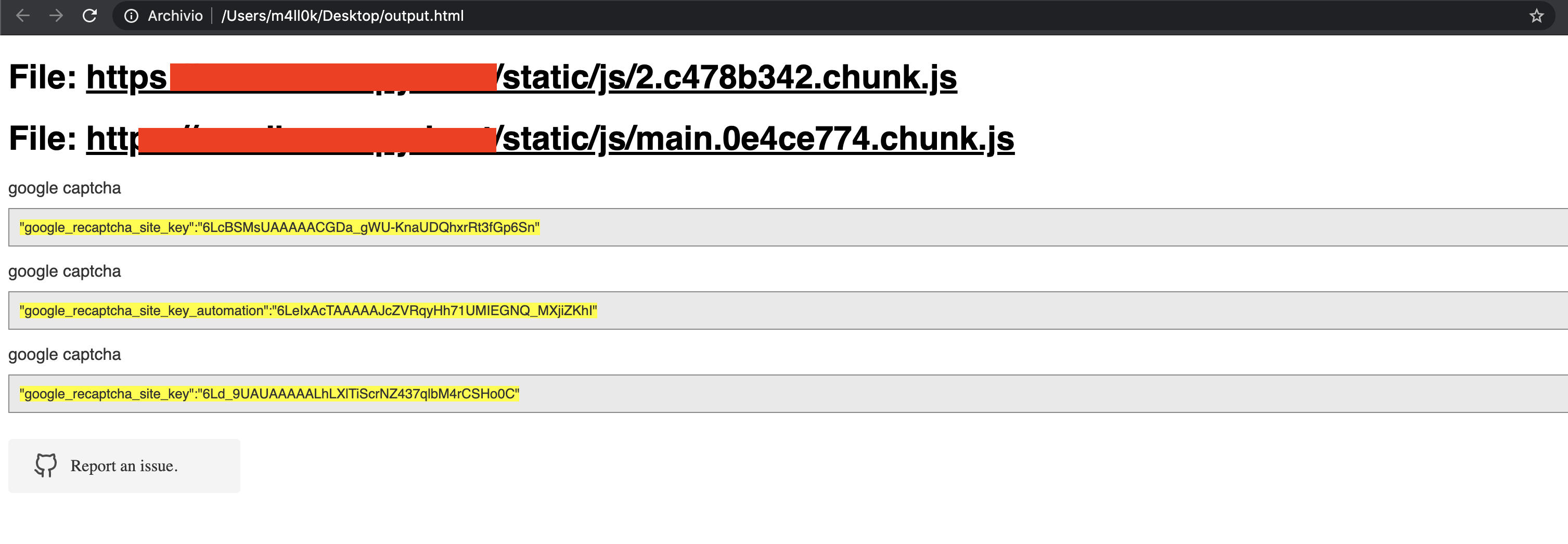
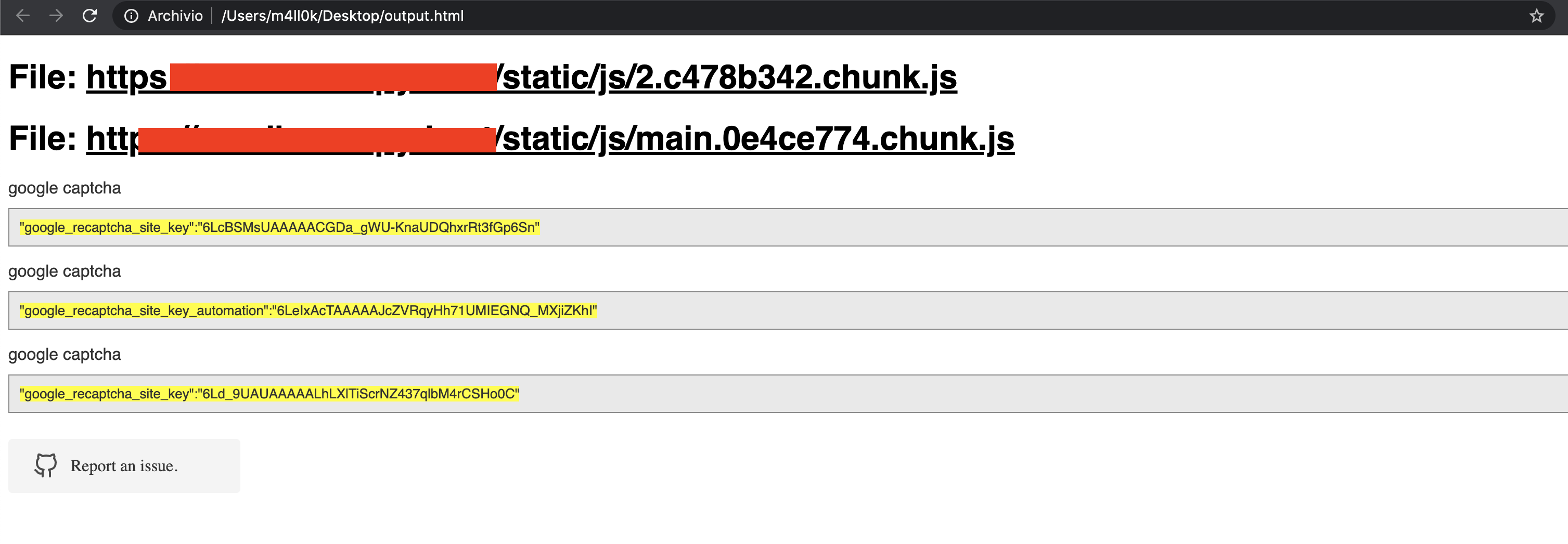
SecretFinder 是一个基于 LinkFinder 的 Python 脚本,用于发现 JavaScript 文件中的敏感数据,如 apikeys、accesstoken、authorizations、jwt 等。它通过使用 jsbeautifier for Python 结合一个相当大的正则表达式来实现。这个正则表达式由四个小的正则表达式组成。它们负责在 JS 文件中查找和搜索任何内容。
输出以 HTML 或纯文本形式呈现。
usage: SecretFinder.py [-h] [-e] -i INPUT [-o OUTPUT] [-r REGEX] [-b]
                       [-c COOKIE] [-g IGNORE] [-n ONLY] [-H HEADERS]
                       [-p PROXY]

optional arguments:
  -h, --help            show this help message and exit
  -e, --extract         Extract all javascript links located in a page and
                        process it
  -i INPUT, --input INPUT
                        Input a: URL, file or folder
  -o OUTPUT, --output OUTPUT
                        Where to save the file, including file name. Default:
                        output.html
  -r REGEX, --regex REGEX
                        RegEx for filtering purposes against found endpoint
                        (e.g: ^/api/)
  -b, --burp            Support burp exported file
  -c COOKIE, --cookie COOKIE
                        Add cookies for authenticated JS files
  -g IGNORE, --ignore IGNORE
                        Ignore js url, if it contain the provided string
                        (string;string2..)
  -n ONLY, --only ONLY  Process js url, if it contain the provided string
                        (string;string2..)
  -H HEADERS, --headers HEADERS
                        Set headers ("Name:Value\nName:Value")
  -p PROXY, --proxy PROXY
                        Set proxy (host:port)
SecretFinder 支持 Python 3。
$ git clone https://github.com/m4ll0k/SecretFinder.git secretfinder
$ cd secretfinder
$ python -m pip install -r requirements.txt or pip install -r requirements.txt
$ python3 SecretFinder.py
python3 SecretFinder.py -i https://example.com/1.js -o results.html
python3 SecretFinder.py -i https://example.com/1.js -o cli
python3 SecretFinder.py -i https://example.com/ -e
-g --ignore 提供:python3 SecretFinder.py -i https://example.com/ -e -g 'jquery;bootstrap;api.google.com'
-n --only 提供:python3 SecretFinder.py -i https://example.com/ -e -n 'd3i4yxtzktqr9n.cloudfront.net;www.myexternaljs.com'
python3 SecretFinder.py -i https://example.com/1.js -o cli -r 'apikey=my.api.key[a-zA-Z]+'
python3 SecretFinder.py -i https://example.com/ -e -o cli -c 'mysessionid=111234' -H 'x-header:value1\nx-header2:value2' -p 127.0.0.1:8080 -r 'apikey=my.api.key[a-zA-Z]+'
输入支持以下所有条目:
网址:例如 https://www.google.com/ 必需加 [-e]
JS 网址:例如 https://www.google.com/1.js
文件夹:例如 myjsfiles/*
本地文件:例如 /js/myjs/file.js
SecretFinder.py 并添加你的正则表达式:_regex = {
'google_api' : r'AIza[0-9A-Za-z-_]{35}',
'google_captcha' : r'6L[0-9A-Za-z-_]{38}|^6[0-9a-zA-Z_-]{39}$',
'google_oauth' : r'ya29\.[0-9A-Za-z\-_]+',
'amazon_aws_access_key_id' : r'A[SK]IA[0-9A-Z]{16}',
'amazon_mws_auth_toke' : r'amzn\\.mws\\.[0-9a-f]{8}-[0-9a-f]{4}-[0-9a-f]{4}-[0-9a-f]{4}-[0-9a-f]{12}',
'amazon_aws_url' : r's3\.amazonaws.com[/]+|[a-zA-Z0-9_-]*\.s3\.amazonaws.com',
'facebook_access_token' : r'EAACEdEose0cBA[0-9A-Za-z]+',
'authorization_basic' : r'basic\s*[a-zA-Z0-9=:_\+\/-]+',
'authorization_bearer' : r'bearer\s*[a-zA-Z0-9_\-\.=:_\+\/]+',
'authorization_api' : r'api[key|\s*]+[a-zA-Z0-9_\-]+',
'mailgun_api_key' : r'key-[0-9a-zA-Z]{32}',
'twilio_api_key' : r'SK[0-9a-fA-F]{32}',
'twilio_account_sid' : r'AC[a-zA-Z0-9_\-]{32}',
'twilio_app_sid' : r'AP[a-zA-Z0-9_\-]{32}',
'paypal_braintree_access_token' : r'access_token\$production\$[0-9a-z]{16}\$[0-9a-f]{32}',
'square_oauth_secret' : r'sq0csp-[ 0-9A-Za-z\-_]{43}|sq0[a-z]{3}-[0-9A-Za-z\-_]{22,43}',
'square_access_token' : r'sqOatp-[0-9A-Za-z\-_]{22}|EAAA[a-zA-Z0-9]{60}',
'stripe_standard_api' : r'sk_live_[0-9a-zA-Z]{24}',
'stripe_restricted_api' : r'rk_live_[0-9a-zA-Z]{24}',
'github_access_token' : r'[a-zA-Z0-9_-]*:[a-zA-Z0-9_\-]+@github\.com*',
'rsa_private_key' : r'-----BEGIN RSA PRIVATE KEY-----',
'ssh_dsa_private_key' : r'-----BEGIN DSA PRIVATE KEY-----',
'ssh_dc_private_key' : r'-----BEGIN EC PRIVATE KEY-----',
'pgp_private_block' : r'-----BEGIN PGP PRIVATE KEY BLOCK-----',
'json_web_token' : r'ey[A-Za-z0-9-_=]+\.[A-Za-z0-9-_=]+\.?[A-Za-z0-9-_.+/=]*$',
'name_for_my_regex' : r'my_regex',
# for example
'example_api_key' : r'^example\w+{10,50}'
}