
Logparser 提供了一套用于自动化日志解析的机器学习工具包和基准测试,这是结构化日志分析中的关键步骤。通过使用 logparser,用户可以自动从非结构化日志中提取事件模板,并将原始日志消息转换为一系列结构化事件。在文献中,日志解析过程也称为消息模板提取、日志键提取或日志消息聚类。
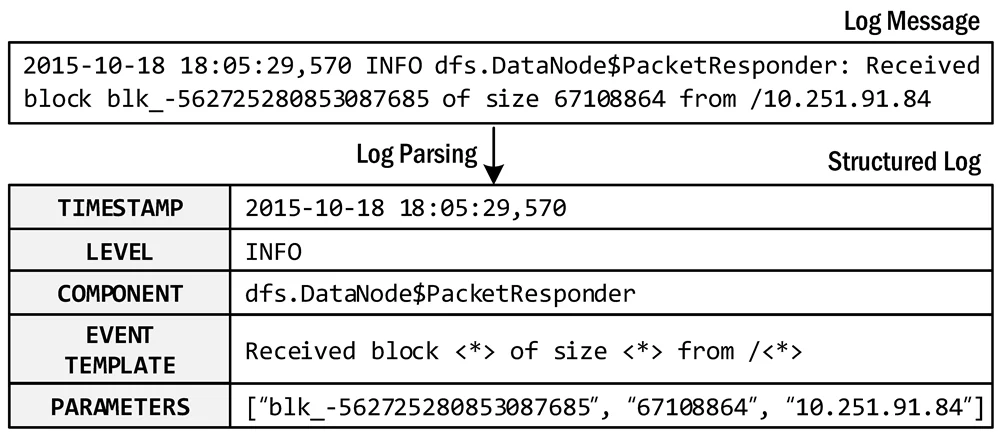
日志解析示例
pip install logparser3 安装。💡 欢迎提交 PR,将你的解析器代码加入 logparser,并将你的论文添加到表格中。
我们建议通过 pip install 安装 logparser 包及其依赖。``` pip install logparser3
具体来说,该软件包依赖以下要求。请注意,Python 中的 `regex` 匹配较为脆弱,因此我们建议将 regex 库固定为 2022.3.2 版本。
注意:如果您遇到 ``"Error: need to escape..."``,请按照[此处](https://github.com/logpai/logparser/issues/122)的说明操作。
+ python 3.6+
+ regex 2022.3.2
+ numpy
+ pandas
+ scipy
+ scikit-learn
条件要求:
+ 如果使用 MoLFI:`deap`
+ 如果使用 SHISO:`nltk`
+ 如果使用 SLCT:`gcc`
+ 如果使用 LogCluster:`perl`
+ 如果使用 NuLog:`torch`、`torchvision`、`keras_preprocessing`
+ 如果使用 DivLog:`openai`、`tiktoken`(需要 python 3.8+)
### 快速开始
1. 运行 demo:
对于每个日志解析器,我们都提供了一个 demo 来帮助您快速上手。每个 demo 展示了目标日志解析器的基本用法以及需要配置的超参数。例如,以下命令演示了如何运行 Drain 的 demo。
```
cd logparser/Drain
python demo.py
```
2. 运行基准测试:
对于每个日志解析器,我们都提供了一个基准测试脚本,用于在 [loghub_2k 数据集](https://github.com/logpai/logparser/tree/main/data#loghub_2k) 上运行日志解析,以评估解析准确率。您也可以使用[其他用于日志解析的基准数据集](https://github.com/logpai/logparser/tree/main/data#datasets)。
```
cd logparser/Drain
python benchmark.py
```
基准测试结果可在每个解析器的 readme 文件中找到,例如 https://github.com/logpai/logparser/tree/main/logparser/Drain#benchmark。
3. 解析您自己的日志:
将 logparser 应用于解析您自己的日志数据非常简单。为此,您需要先安装 logparser3 软件包。然后,您可以按照下面的代码片段开发自己的脚本,开始日志解析。完整的示例代码请参见 [example/parse_your_own_logs.py](https://github.com/logpai/logparser/blob/main/example/parse_your_own_logs.py)。
```python
from logparser.Drain import LogParser
input_dir = 'PATH_TO_LOGS/' # The input directory of log file
output_dir = 'result/' # The output directory of parsing results
log_file = 'unknow.log' # The input log file name
log_format = '<Date> <Time> <Level>:<Content>' # Define log format to split message fields
# Regular expression list for optional preprocessing (default: [])
regex = [
r'(/|)([0-9]+\.){3}[0-9]+(:[0-9]+|)(:|)' # IP
]
st = 0.5 # Similarity threshold
depth = 4 # Depth of all leaf nodes
parser = LogParser(log_format, indir=input_dir, outdir=output_dir, depth=depth, st=st, rex=regex)
parser.parse(log_file)
```
运行 logparser 后,您可以在输出文件夹中获得提取的事件模板和解析后的结构化日志。
+ `*_templates.csv`(参见示例 [HDFS_2k.log_templates.csv](https://github.com/logpai/logparser/blob/main/logparser/Drain/demo_result/HDFS_2k.log_templates.csv))
| EventId | EventTemplate | Occurrences |
|----------|------------------------------------------------|-------------|
| dc2c74b7 | PacketResponder <*> for block <*> terminating | 311 |
| e3df2680 | Received block <*> of size <*> from <*> | 292 |
| 09a53393 | Receiving block <*> src: <*> dest: <*> | 292 |
+ `*_structured.csv`(参见示例 [HDFS_2k.log_structured.csv](https://github.com/logpai/logparser/blob/main/logparser/Drain/demo_result/HDFS_2k.log_structured.csv))
| ... | Level | Content | EventId | EventTemplate | ParameterList |
|-----|-------|-----------------------------------------------------------------------------------------------|----------|---------------------------------------------------------------------|--------------------------------------------|
| ... | INFO | PacketResponder 1 for block blk_38865049064139660 terminating | dc2c74b7 | PacketResponder <*> for block <*> terminating | ['1', 'blk_38865049064139660'] |
| ... | INFO | Received block blk_3587508140051953248 of size 67108864 from /10.251.42.84 | e3df2680 | Received block <*> of size <*> from <*> | ['blk_3587508140051953248', '67108864', '/10.251.42.84'] |
| ... | INFO | Verification succeeded for blk_-4980916519894289629 | 32777b38 | Verification succeeded for <*> | ['blk_-4980916519894289629'] |
### 生产环境使用
logparser 的主要目标是用于研究和基准测试目的。研究人员可以将 logparser 作为代码库来开发新的日志解析器,而从业者可以通过我们的基准测试评估当前日志解析方法的性能和可扩展性。我们强烈建议从业者在您的生产环境中尝试 logparser。但请注意,logparser 的当前实现远未达到可用于生产环境的标准。尽管我们目前没有这样做的计划,但我们确实为想要构建智能生产级日志解析器的开发者提供了一些建议。
+ 请注意 logparser 所使用的[第三方库的许可证](https://github.com/logpai/logparser/blob/main/LICENSE.md)。我们建议只保留一个解析器,删除其他解析器,然后重新构建软件包 wheel。这不会影响 logparser 的使用。
+ 请通过多进程处理来增强 logparser 的效率和可扩展性,添加故障恢复,并增加磁盘持久化或 Kafka 消息队列支持。
+ [Drain3](https://github.com/logpai/Drain3) 为您提供了一个很好的参考示例,它针对生产场景进行了[实用性增强](https://github.com/logpai/Drain3#new-features)。
### 🔥 引用
如果您在出版物中使用了我们的 logparser 工具或基准测试结果,请引用以下论文。
+ [**ICSE'19**] Jieming Zhu, Shilin He, Jinyang Liu, Pinjia He, Qi Xie, Zibin Zheng, Michael R. Lyu. [Tools and Benchmarks for Automated Log Parsing](https://arxiv.org/pdf/1811.03509.pdf). *International Conference on Software Engineering (ICSE)*, 2019.
+ [**DSN'16**] Pinjia He, Jieming Zhu, Shilin He, Jian Li, Michael R. Lyu. [An Evaluation Study on Log Parsing and Its Use in Log Mining](https://jiemingzhu.github.io/pub/pjhe_dsn2016.pdf). *IEEE/IFIP International Conference on Dependable Systems and Networks (DSN)*, 2016.
### 🤗 贡献者
<!-- readme: zhujiem,contributors -start -->
<table>
<tbody>
<tr>
<td align="center">
<a href="https://github.com/zhujiem">
<img src="https://assets.kitploit.com/production/public/readmes/51023/471767126e4450e42b40b8e3f5437c2d9d0616f468675dde6feccac1976b18d0/ee334336551226b1483445bee71089fdf5e61115652a2a99375e54566f34c9bf-display-v1.webp" width="80;" alt="zhujiem"/>
<br />
<sub><b>Zhujiem</b></sub>
</a>
</td>
<td align="center">
<a href="https://github.com/PinjiaHe">
<img src="https://assets.kitploit.com/production/public/readmes/51023/e9f83f96ab3d84e92152317c8d85d54a12fb0b0baea267d29e7d317a5caff94b/5b4a6af1bda6245edbb5c40ea1467625828536aeb88e984716753945b6235da2-display-v1.webp" width="80;" alt="PinjiaHe"/>
<br />
<sub><b>Pinjia He</b></sub>
</a>
</td>
<td align="center">
<a href="https://github.com/JinYang88">
<img src="https://assets.kitploit.com/production/public/readmes/51023/7785c7974d5753fa21792097907be1e20efb5fc5bbf3aba61b0b4d2f4fe26fec/19a47a39c4db07a8a052ed05304e166cca4cf18683d89a1400688c576ae48b52-display-v1.webp" width="80;" alt="JinYang88"/>
<br />
<sub><b>LIU, Jinyang</b></sub>
</a>
</td>
<td align="center">
<a href="https://github.com/Siyuexi">
<img src="https://assets.kitploit.com/production/public/readmes/51023/fe7de7203a407b36e2f44a57603594e01266d124ef558b53cb95ba28afc6127c/f7a7173a142ced37b910b650e3ad957b27fcf2f13f4c828ff6a72fb87111435f-display-v1.webp" width="80;" alt="Siyuexi"/>
<br />
<sub><b>Junjielong Xu</b></sub>
</a>
</td>
<td align="center">
<a href="https://github.com/ShilinHe">
<img src="https://assets.kitploit.com/production/public/readmes/51023/c8b37cadfeb622c955b807776ab0fa19f058c8ad512ebb22eb98c79ad5e90c17/fc476296c1b1aa6b1dd7c3220a81a1b70838d5c113a65e6b2f98196d0615b8a3-display-v1.webp" width="80;" alt="ShilinHe"/>
<br />
<sub><b>Shilin HE</b></sub>
</a>
</td>
<td align="center">
<a href="https://github.com/JosephMeghanathD">
<img src="https://assets.kitploit.com/production/public/readmes/51023/c2036c74a3116c7de955cae32687ffae61d8be46868cbcc61f771a7e9be4fa33/011ea30ec30f0db362d75632b310850b2783bd2c2428dfee7dc0fff182dc1bf8-display-v1.webp" width="80;" alt="JosephMeghanathD"/>
<br />
<sub><b>Joseph</b></sub>
</a>
</td>
</tr>
<tr>
<td align="center">
<a href="https://github.com/jcordon5">
<img src="https://assets.kitploit.com/production/public/readmes/51023/a4f67dd9f820a1dc763ae05e6d66ec6418d7e70abad8a9b5906413ab909f709e/4c8dc9fc08525d6d3c2334983160c0c9a48077fcc22b3498fe658aa133a2da02-display-v1.webp" width="80;" alt="jcordon5"/>
<br />
<sub><b>José A. Cordón </b></sub>
</a>
</td>
<td align="center">
<a href="https://github.com/rustamtemirov">
<img src="https://assets.kitploit.com/production/public/readmes/51023/3690f9e2cd318e8555a586fb32e221080e59e5de8917d82584da1f69e00be8cc/95300504879ab023f96e1cd73ca726c6720367b23e0d476e9a0b6cc23b89ff4d-display-v1.webp" width="80;" alt="rustamtemirov"/>
<br />
<sub><b>Rustam Temirov</b></sub>
</a>
</td>
<td align="center">
<a href="https://github.com/gaiusyu">
<img src="https://assets.kitploit.com/production/public/readmes/51023/68c5eeea49f8a2ee2cd39b633ed1fb9765cde38399b12636dea0a3dd0920c86d/8faa00619c5b17d96e80dff1b124695997ece681c0931519346fa0e62407c578-display-v1.webp" width="80;" alt="gaiusyu"/>
<br />
<sub><b>Siyu Yu (Youth Yu)</b></sub>
</a>
</td>
<td align="center">
<a href="https://github.com/thomasryck">
<img src="https://assets.kitploit.com/production/public/readmes/51023/ad3710fbbe7106ffe560fe918f87e77a95a6bf7a21dbf65827f93138c96aca5a/ed736bf9ffd9aa54686cc7a3d404f7c0072ecaced2403ff467d112482255c2b3-display-v1.webp" width="80;" alt="thomasryck"/>
<br />
<sub><b>Thomas Ryckeboer</b></sub>
</a>
</td>
<td align="center">
<a href="https://github.com/IsuruBoyagane15">
<img src="https://assets.kitploit.com/production/public/readmes/51023/dca9ea34301dd9441404246eb535a39d034518fd1311bebd68f1725bc38ba6b3/57b77cdaafca63553a32d53d83f1859d971c1628ef640c36ab1125939bb43a00-display-v1.webp" width="80;" alt="IsuruBoyagane15"/>
<br />
<sub><b>Isuru Boyagane</b></sub>
</a>
</td>
</tr>
<tbody>
</table>
<!-- readme: zhujiem,contributors -end -->
### 讨论
欢迎加入我们的微信群,提出任何问题或进行讨论。或者,您可以[在此处提交 issue](https://github.com/logpai/logparser/issues/new)。

| 发表 | 解析器 | 论文标题 | 基准测试 |
|---|