

ghidraMCP 是一个模型上下文协议(Model Context Protocol,MCP)服务器,用于让 LLM 自主地对应用程序进行逆向工程。它将 Ghidra 核心功能中的众多工具暴露给 MCP 客户端。
https://github.com/user-attachments/assets/36080514-f227-44bd-af84-78e29ee1d7f9
MCP 服务器 + Ghidra 插件
首先,从本仓库下载最新的发布版本。其中包含 Ghidra 插件和 Python MCP 客户端。然后,你可以直接将插件导入 Ghidra。
File -> Install Extensions+ 按钮GhidraMCP-1-2.zip(或你选择的版本)File -> Configure -> Developer 中启用了 GhidraMCPPluginEdit -> Tool Options -> GhidraMCP HTTP Server 在 Ghidra 中配置端口视频安装指南:
https://github.com/user-attachments/assets/75f0c176-6da1-48dc-ad96-c182eb4648c3
理论上,任何 MCP 客户端都应能与 ghidraMCP 配合使用。下面给出三个示例。
要将 Claude Desktop 设置为 Ghidra MCP 客户端,请前往 Claude -> Settings -> Developer -> Edit Config -> claude_desktop_config.json,并添加以下内容:
{
  "mcpServers": {
    "ghidra": {
      "command": "python",
      "args": [
        "/ABSOLUTE_PATH_TO/bridge_mcp_ghidra.py",
        "--ghidra-server",
        "http://127.0.0.1:8080/"
      ]
    }
  }
}
或者,直接编辑此文件:
/Users/YOUR_USER/Library/Application Support/Claude/claude_desktop_config.json
服务器 IP 和端口是可配置的,应将其设置为指向目标 Ghidra 实例。如果未设置,两者均默认为 localhost:8080。
要将 GhidraMCP 与 Cline 配合使用,还需要手动运行 MCP 服务器。首先运行以下命令:
python bridge_mcp_ghidra.py --transport sse --mcp-host 127.0.0.1 --mcp-port 8081 --ghidra-server http://127.0.0.1:8080/
唯一必需的参数是传输方式。如果其他参数均未指定,它们将默认为上述值。MCP 服务器运行后,打开 Cline 并在顶部选择 MCP Servers。
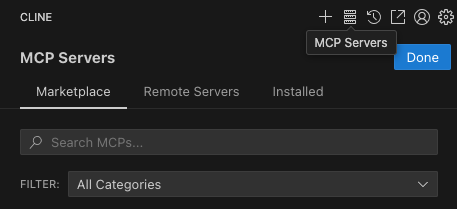
然后选择 Remote Servers,并添加以下内容,确保 URL 与 MCP 主机和端口匹配:
http://127.0.0.1:8081/sse另一个在后端支持多种模型的 MCP 客户端是 5ire。要设置 GhidraMCP,请打开 5ire,进入 Tools -> New,并设置以下配置:
python /ABSOLUTE_PATH_TO/bridge_mcp_ghidra.pylib/ 目录:Ghidra/Features/Base/lib/Base.jarGhidra/Features/Decompiler/lib/Decompiler.jarGhidra/Framework/Docking/lib/Docking.jarGhidra/Framework/Generic/lib/Generic.jarGhidra/Framework/Project/lib/Project.jarGhidra/Framework/SoftwareModeling/lib/SoftwareModeling.jarGhidra/Framework/Utility/lib/Utility.jarGhidra/Framework/Gui/lib/Gui.jarmvn clean package assembly:single
生成的 zip 文件包含构建好的 Ghidra 插件及其资源。这些文件是 Ghidra 识别新扩展所必需的。