ssh-audit 是一个用于 SSH 服务器和客户端配置审计的工具。
jtesta/ssh-audit(v2.0+)是 ssh-audit 的更新维护版本,由于原项目停止维护,从 arthepsy/ssh-audit(v1.x)分叉而来。
usage: ssh-audit.py [-h] [-4] [-6] [-b] [-c] [-d] [-g min1:pref1:max1[,min2:pref2:max2,...] / <x-y[:step]>] [-j] [-l {info,warn,fail}] [-L] [-M custom_policy.txt] [-m] [-n] [-P "Built-In Policy Name" / custom_policy.txt] [-p N] [-T targets.txt] [-t N] [-v] [--conn-rate-test N[:max_rate]] [--dheat N[:kex[:e_len]]] [--get-hardening-guide platform] [--list-hardening-guides] [--lookup alg1[,alg2,...]] [--skip-rate-test] [--socks5 host:port] [--threads N] [host]
positional arguments: host target hostname or IPv4/IPv6 address
optional arguments: -h, --help show this help message and exit -4, --ipv4 enable IPv4 (order of precedence) -6, --ipv6 enable IPv6 (order of precedence) -b, --batch batch output -c, --client-audit starts a server on port 2222 to audit client software config (use -p to change port; use -t to change timeout) -d, --debug enable debugging output -g min1:pref1:max1[,min2:pref2:max2,...] / <x-y[:step]>, --gex-test min1:pref1:max1[,min2:pref2:max2,...] / <x-y[:step]> conducts a very customized Diffie-Hellman GEX modulus size test. Tests an array of minimum, preferred, and maximum values, or a range of values with an optional incremental step amount -j, --json enable JSON output (use -jj to enable indentation for better readability) -l {info,warn,fail}, --level {info,warn,fail} minimum output level (default: info) -L, --list-policies list all the official, built-in policies. Combine with -v to view policy change logs -M custom_policy.txt, --make-policy custom_policy.txt creates a policy based on the target server (i.e.: the target server has the ideal configuration that other servers should adhere to), and stores it in the file path specified -m, --manual print the man page (Docker, PyPI, Snap, and Windows builds only) -n, --no-colors disable colors (automatic when the NO_COLOR environment variable is set) -P "Built-In Policy Name" / custom_policy.txt, --policy "Built-In Policy Name" / custom_policy.txt run a policy test using the specified policy (use -L to see built-in policies, or specify filesystem path to custom policy created by -M) -p N, --port N the TCP port to connect to (or to listen on when -c is used) -T targets.txt, --targets targets.txt a file containing a list of target hosts (one per line, format 'HOST[:PORT]'; for UNIX socket servers, use 'unix:///path/socket'). Use -p/--port to set the default port for all hosts. Use --threads to control concurrent scans -t N, --timeout N timeout (in seconds) for connection and reading (default: 5) -v, --verbose enable verbose output --conn-rate-test N[:max_rate] perform a connection rate test (useful for collecting metrics related to susceptibility of the DHEat vuln). Testing is conducted with N concurrent sockets with an optional maximum rate of connections per second --dheat N[:kex[:e_len]] continuously perform the DHEat DoS attack (CVE-2002-20001) against the target using N concurrent sockets. Optionally, a specific key exchange algorithm can be specified instead of allowing it to be automatically chosen. Additionally, a small length of the fake e value sent to the server can be chosen for a more efficient attack (such as 4). --get-hardening-guide platform retrieves the hardening guide for the specified platform name (use --list-hardening-guides to see list of available guides). --list-hardening-guides list all official, built-in hardening guides for common systems. Their full names can then be passed to --get-hardening-guide. Add -v to this option to view hardening guide change logs and prior versions. --lookup alg1[,alg2,...] looks up an algorithm(s) without connecting to a server. --skip-rate-test skip the connection rate test during standard audits (used to safely infer whether the DHEat attack is viable) --socks5 host:port connect via a SOCKS5 proxy (implies --skip-rate-test) --threads N number of threads to use when scanning multiple targets (-T/--targets) (default: 32)
* 如果同时使用 IPv4 和 IPv6,可以通过 `-46` 或 `-64` 设置优先级顺序。
* 批量标志 `-b` 将输出不带标题和空行的分区(隐含详细模式标志)。
* 详细模式标志 `-v` 将在每行前添加分区类型和算法名称前缀。
* 当所有算法均被视为安全(对于标准审计)或策略检查通过(对于策略审计)时,返回退出码 0。
基本服务器审计:```
ssh-audit localhost
ssh-audit 127.0.0.1
ssh-audit 127.0.0.1:222
ssh-audit ::1
ssh-audit [::1]:222
ssh-audit unix:///run/ssh-unix-local/socket
To run a standard audit against many servers (place targets into servers.txt, one on each line in the format of HOST[:PORT]):
要对多台服务器运行标准审计(将目标放入 servers.txt,每行一个,格式为 HOST[:PORT]):```
ssh-audit -T servers.txt
要审计客户端配置(默认监听 2222/tcp 端口;使用 `ssh -p 2222 anything@localhost` 连接):```
ssh-audit -c
要审计客户端配置,请在 4567/tcp 端口上使用监听器:``` ssh-audit -c -p 4567
若要 列出所有官方内置策略 (提示:将所得策略名称与 `-P`/`--policy` 配合使用):```
ssh-audit -L
要针对服务器运行策略审计:``` ssh-audit -P ["policy name" | path/to/server_policy.txt] targetserver
要针对客户端运行策略审计:```
ssh-audit -c -P ["policy name" | path/to/client_policy.txt]
要对许多服务器运行策略审计:``` ssh-audit -T servers.txt -P ["policy name" | path/to/server_policy.txt]
要根据目标服务器创建策略(可手动编辑):```
ssh-audit -M new_policy.txt targetserver
要使用 10 个并发套接字对目标运行 DHEat CPU 耗尽 DoS 攻击(CVE-2002-20001):``` ssh-audit --dheat=10 targetserver
要使用`diffie-hellman-group-exchange-sha256`密钥交换算法运行DHEat攻击:```
ssh-audit --dheat=10:diffie-hellman-group-exchange-sha256 targetserver
要使用 diffie-hellman-group-exchange-sha256 密钥交换算法以及非常小但非标准的数据包长度来运行 DHEat 攻击(这可能导致相同的 CPU 耗尽,但每秒发送的字节数要少得多):```
ssh-audit --dheat=10:diffie-hellman-group-exchange-sha256:4 targetserver
## Screenshots
### Server Standard Audit Example
Below is a screen shot of the standard server-auditing output when connecting to an unhardened OpenSSH v5.3 service:

### Server Policy Audit Example
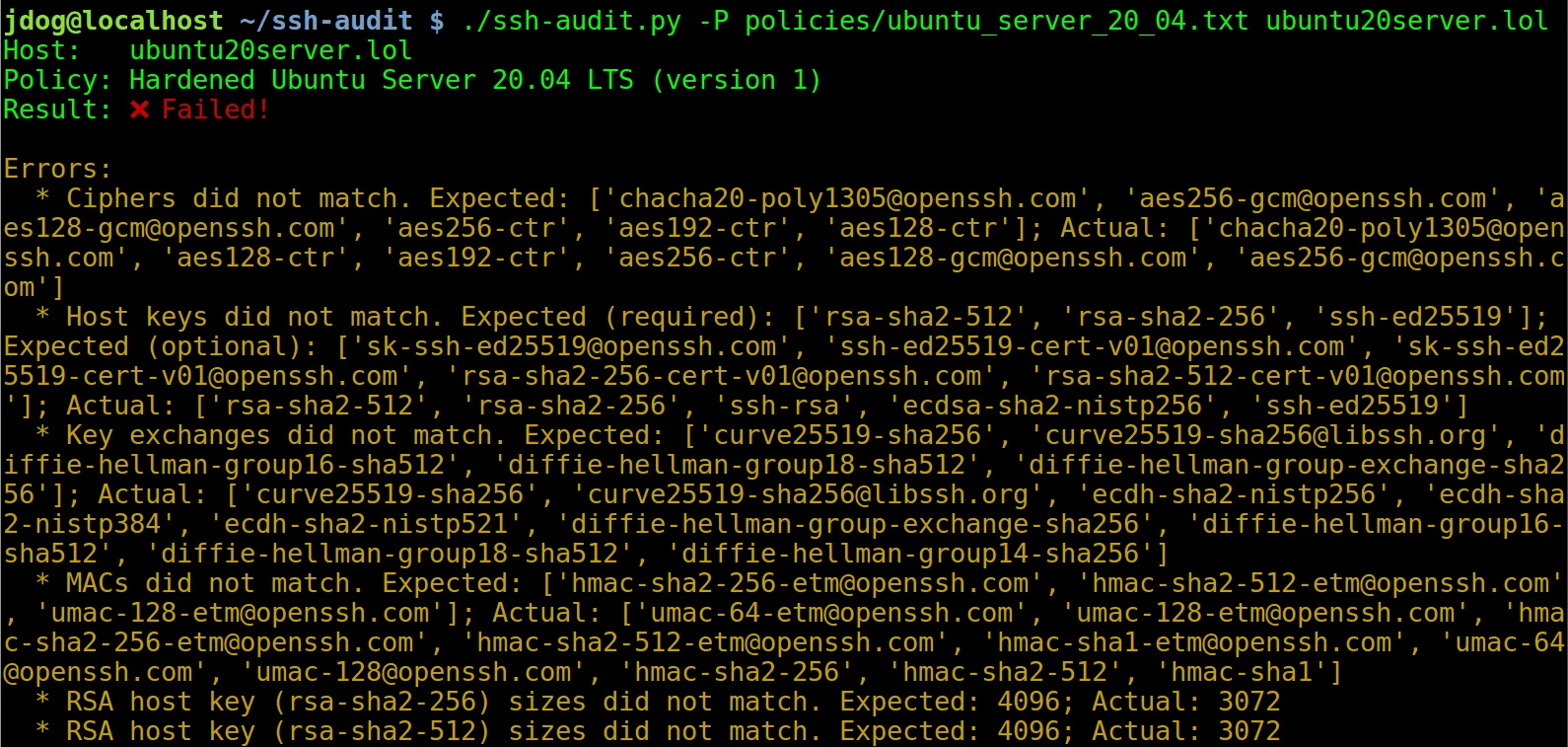
Below is a screen shot of the policy auditing output when connecting to an un-hardened Ubuntu Server 20.04 machine (hint: use `-L`/`--list-policies` to see names of built-in policies to use with `-P`/`--policy`):

After applying the steps in the hardening guide (see below), the output changes to the following:

### Client Standard Audit Example
Below is a screen shot of the client-auditing output when an unhardened OpenSSH v7.2 client connects:

## Hardening Guides
Guides to harden server & client configuration are built into the tool (see `--list-hardening-guides` and `--get-hardening-guide` options). Additionally, they are also available online at: [https://www.ssh-audit.com/hardening_guides.html](https://www.ssh-audit.com/hardening_guides.html)
## Pre-Built Packages
Pre-built packages are available for Windows (see the [Releases](https://github.com/jtesta/ssh-audit/releases) page), PyPI, Snap, and Docker:
To install from PyPI:```
$ pip3 install ssh-audit
要安装 Snap 包:``` $ snap install ssh-audit
要从 Dockerhub 安装:```
$ docker pull docker.io/positronsecurity/ssh-audit
(然后运行:docker run -it --rm -p 2222:2222 docker.io/positronsecurity/ssh-audit 10.1.1.1)
其他各种平台软件包的状态可在下方找到(通过 Repology):
为方便起见,在命令行工具之上提供了一个 Web 前端,可访问 https://www.ssh-audit.com/。
--list-hardening-guides 和 --get-hardening-guide)。以前,它们只在 https://ssh-audit.com/hardening_guides.html 上可用,但现在为了方便而内置;部分功劳归于 oam7575。allow_hostkey_subset_and_reordering 策略选项,以允许目标拥有更严格的主机密钥列表和/或不同的排序。getopt 模块迁移到 argparse;部分功劳归于 oam7575。-b)不再自动启用详细模式,因为有时会导致混淆结果;用户仍然可以使用 -v 标志显式启用详细模式。unix:///path/to/socket 指定目标)。-P 和 -T 选项运行时崩溃的问题。--conn-rate-test 功能。-T/--targets)时,-p/--port 选项现在将被用作默认端口(如果未给出 -p/--port,则设置为 22)。文件中指定的主机可以通过显式端口号覆盖此默认值(即:“host1:1234”)。例如,使用 时, 中所有未显式包含端口号的主机将默认使用 222;使用 (不带 )时,所有主机将默认使用 22。--dheat 选项;CVE-2002-20001)。ecdsa-sha2-nistp* CA 签名的解析。此外,它们现在与标准主机密钥一样被标记为可能存在后门。-m、--manual)现在除了 Windows 版本外,也可在 Docker、PyPI 和 Snap 版本中使用。python:3-slim 更改为 python:3-alpine,使镜像大小减少了 59%;功劳归于 Daniel Thamdrup。-L -v 查看)。allow_algorithm_subset_and_reordering 指令,允许目标通过主机密钥、kex、加密算法和 MAC 的子集和/或重新排序的列表。这允许创建基线策略,目标可选择实施更严格的控制;部分功劳归于 yannik1015。allow_larger_keys 指令,允许目标通过更大的主机密钥、CA 密钥和 Diffie-Hellman 密钥。这允许创建基线策略,目标可选择实施更严格的控制;部分功劳归于 Damian Szuberski。NO_COLOR 环境变量,则禁用彩色输出(见 [email protected] 和 ssh-ed25519 移到了所有证书类型的末尾。additional_notes 字段。ecdsa-sha2-curve25519、ecdsa-sha2-nistb233、ecdsa-sha2-nistb409、ecdsa-sha2-nistk163、ecdsa-sha2-nistk233、ecdsa-sha2-nistk283、ecdsa-sha2-nistk409、ecdsa-sha2-nistp224、ecdsa-sha2-nistp192、、、。[email protected] 的实验性警告标签。-g 和 --gex-test 用于细粒度的 GEX 模数大小测试;功劳归于 Adam Russell。[email protected]、[email protected]、[email protected]、[email protected]、[email protected]、[email protected]、、、、、、、、、、、、、、、、、、、、、、、、、、、。-jj 时现在打印带缩进的 JSON(对调试很有用)。-d/--debug 选项以获得调试输出;功劳归于 Adam Russell。rsa-sha2-512 和 rsa-sha2-256。gss-gex-sha1-eipGX3TCiQSrx573bT1o1Q==、gss-group1-sha1-eipGX3TCiQSrx573bT1o1Q== 和 gss-group14-sha1-eipGX3TCiQSrx573bT1o1Q==。hmac-ripemd160-96、AEAD_AES_128_GCM 和 AEAD_AES_256_GCM。-m/--manual);功劳归于 Adam Russell。[email protected]。[email protected] 和 [email protected] 主机密钥类型的公钥大小。[email protected] 标记为失败,原因是 SHA-1 哈希。--lookup)现在对相似算法执行不区分大小写的查找;功劳归于 Adam Russell。[email protected]。-L/--list-policies、-M/--make-policy 和 -P/--policy)。深入了解教程,请参阅 https://www.positronsecurity.com/blog/2020-09-27-ssh-policy-configuration-checks-with-ssh-audit/。ssh-audit.1 文件)。--lookup);功劳归于 Adam Russell。ssh-rsa1、[email protected]、ssh-gost2001、ssh-gost2012-256、、、、、、、。[email protected]、[email protected]。des、3des。-c / --client-audit 选项)。-j / --json 选项;致谢 Andreas Jaggi)。gss-group1-sha1-toWM5Slw5Ew8Mqkay+al2g==、gss-gex-sha1-toWM5Slw5Ew8Mqkay+al2g==、gss-group14-sha1-、gss-group14-sha1-toWM5Slw5Ew8Mqkay+al2g==、gss-group14-sha256-toWM5Slw5Ew8Mqkay+al2g==、gss-group15-sha512-toWM5Slw5Ew8Mqkay+al2g==、diffie-hellman-group15-sha256、ecdh-sha2-1.3.132.0.10 和 curve448-sha512。[email protected]、[email protected]、[email protected]、diffie-hellman-group16-sha256、diffie-hellman-group17-sha512。des-cbc-ssh1、blowfish-ctr、twofish-ctr。hmac-sha2-56、hmac-sha2-224、hmac-sha2-384、hmac-sha3-256、、、、、、。--socks5 host:port 指定代理);部分功劳归于 Michał Majchrowicz。mlkem768nistp256-sha256、mlkem1024nistp384-sha384。[email protected]、mldsa-44、[email protected]、mldsa-65、mldsa-87、ssh-mldsa-44、ssh-mldsa-65、ssh-mldsa-87、ssh-mldsa44、ssh-mldsa65、ssh-mldsa87。AEAD_CAMELLIA_128_GCM、AEAD_CAMELLIA_256_GCM。-T targets.txt -p 222targets.txt-T targets.txt-pgrasshopper-ctr128。mlkem768x25519-sha256、sntrup761x25519-sha512。gss-nistp384-sha384-*。[email protected]。ecdsa-sha2-nistt571ssh-dsax509v3-sign-rsa-sha256[email protected]、[email protected]、[email protected]、[email protected]、[email protected]、[email protected]、[email protected]、kexAlgoDH14SHA1、kexAlgoDH1SHA1、kexAlgoECDH256、kexAlgoECDH384、kexAlgoECDH521、sm2kep-sha2-nistp256、[email protected]、[email protected]。[email protected]、cast128-12-cbc、cast128-12-cfb、cast128-12-ecb、cast128-12-ofb、des-cfb、des-ecb、des-ofb。cbcmac-3des、cbcmac-aes、cbcmac-blowfish、cbcmac-des、cbcmac-rijndael、cbcmac-twofish、hmac-sha256-96、md5、md5-8、ripemd160、ripemd160-8、sha1、sha1-8、umac-128。nullpgp-sign-dsspgp-sign-rsaspki-sign-dssspki-sign-rsassh-rsa-sha2-256ssh-rsa-sha2-512x509v3-ecdsa-sha2-1.3.132.0.10x509v3-sign-dss-sha1x509v3-sign-rsa-sha1[email protected]、diffie-hellman_group17-sha512、[email protected]、[email protected]、ecdh-sha2-1.2.840.10045.3.1.1、ecdh-sha2-1.2.840.10045.3.1.7、ecdh-sha2-1.3.132.0.1、ecdh-sha2-1.3.132.0.16、ecdh-sha2-1.3.132.0.26、ecdh-sha2-1.3.132.0.27、ecdh-sha2-1.3.132.0.33、ecdh-sha2-1.3.132.0.34、ecdh-sha2-1.3.132.0.35、ecdh-sha2-1.3.132.0.36、ecdh-sha2-1.3.132.0.37、ecdh-sha2-1.3.132.0.38、ecdh-sha2-4MHB+NBt3AlaSRQ7MnB4cg==、ecdh-sha2-5pPrSUQtIaTjUSt5VZNBjg==、ecdh-sha2-9UzNcgwTlEnSCECZa7V1mw==、ecdh-sha2-D3FefCjYoJ/kfXgAyLddYA==、ecdh-sha2-h/SsxnLCtRBh7I9ATyeB3A==、ecdh-sha2-m/FtSAmrV4j/Wy6RVUaK7A==、ecdh-sha2-mNVwCXAoS1HGmHpLvBC94w==、ecdh-sha2-qCbG5Cn/jjsZ7nBeR7EnOA==、ecdh-sha2-qcFQaMAMGhTziMT0z+Tuzw==、ecdh-sha2-VqBg4QRPjxx1EXZdV0GdWQ==、ecdh-sha2-wiRIU8TKjMZ418sMqlqtvQ==、ecdh-sha2-zD/b3hu/71952ArpUG4OjQ==、ecmqv-sha2、gss-13.3.132.0.10-sha256-*、gss-curve25519-sha256-*、gss-curve448-sha512-*、gss-gex-sha1-*、gss-gex-sha256-*、gss-group14-sha1-*、gss-group14-sha256-*、gss-group15-sha512-*、gss-group16-sha512-*、gss-group17-sha512-*、gss-group18-sha512-*、gss-group1-sha1-*、gss-nistp256-sha256-*、gss-nistp384-sha256-*、gss-nistp521-sha512-*、[email protected]、[email protected]。3des-cfb、3des-ecb、3des-ofb、blowfish-cfb、blowfish-ecb、blowfish-ofb、[email protected]、[email protected]、[email protected]、[email protected]、[email protected]、[email protected]、cast128-cfb、cast128-ecb、cast128-ofb、[email protected]、idea-cfb、idea-ecb、idea-ofb、[email protected]、[email protected]、[email protected]、[email protected]、[email protected]、[email protected]、twofish-cfb、twofish-ecb、twofish-ofb[email protected]、[email protected]、[email protected]、[email protected]、hmac-whirlpool。ssh-gost2012-512spki-sign-rsassh-ed448x509v3-ecdsa-sha2-nistp256x509v3-ecdsa-sha2-nistp384x509v3-ecdsa-sha2-nistp521x509v3-rsa2048-sha256diffie-hellman-group1-sha256、kexAlgoCurve25519SHA256、Curve25519SHA256、gss-group14-sha256-、gss-group15-sha512-、gss-group16-sha512-、gss-nistp256-sha256-、gss-curve25519-sha256-。blowfish、AEAD_AES_128_GCM、AEAD_AES_256_GCM、[email protected]、[email protected]。[email protected]、hmac-sha3-224、[email protected]。### v2.2.0 (2020-03-11)ssh-rsa 标记为弱。ecdsa-sha2-1.3.132.0.10、x509v3-sign-dss、x509v3-sign-rsa、[email protected]、x509v3-ssh-dss、x509v3-ssh-rsa、[email protected]、[email protected]、[email protected] 和 [email protected]。[email protected]、[email protected]、[email protected]、[email protected]、[email protected]、[email protected]、ecdh-sha2-curve25519、ecdh-sha2-nistb233、ecdh-sha2-nistb409、ecdh-sha2-nistk163、ecdh-sha2-nistk233、ecdh-sha2-nistk283、ecdh-sha2-nistk409、ecdh-sha2-nistp192、ecdh-sha2-nistp224、ecdh-sha2-nistt571、gss-gex-sha1- 和 gss-group1-sha1-。camellia128-cbc、camellia128-ctr、camellia192-cbc、camellia192-ctr、camellia256-cbc、camellia256-ctr、aes128-gcm、aes256-gcm 和 chacha20-poly1305。aes128-gcm 和 aes256-gcm。ecdsa-sha2-1.3.132.0.10。idea-cbc、serpent128-cbc、serpent192-cbc、serpent256-cbc。[email protected]、[email protected]、hmac-ripemd、[email protected]、[email protected]、[email protected]。hmac-sha3-384hmac-sha3-512hmac-sha256hmac-sha512-t / --timeout)。