将C# EXE或DLL程序集注入到另一个进程的任何CLR运行时和AppDomain中。注入的程序集随后可以访问被注入进程类的静态实例,从而影响其内部状态。
clrinject-cli.exe -p <processId/processName> -a <assemblyFile>
打开ID为 <processId> 或名称为 <processName> 的进程,注入 <assemblyFile> EXE并执行Main方法。
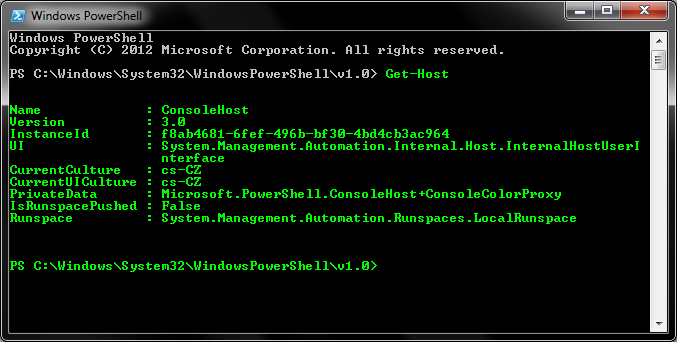
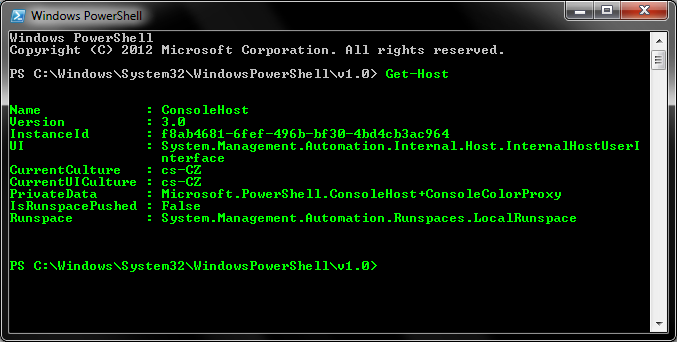
-e 枚举所有已加载的CLR运行时和已创建的AppDomain。-d <#> 只注入到第<#>个AppDomain。如果未指定数字或指定为0,程序集将注入到每个AppDomain。-i <namespace>.<className> 从命名空间<namespace>创建类<className>的实例。clrinject-cli.exe -p victim.exe -e (从victim.exe枚举运行时和AppDomain)clrinject-cli.exe -p 1234 -a "C:\Path\To\invader.exe" -d 2 (将invader.exe注入到ID为1234的进程的第二个AppDomain)clrinject-cli.exe -p victim.exe -a "C:\Path\To\invader.dll" -i "Invader.Invader" (在victim.exe的每个AppDomain中创建Invader实例)clrinject-cli64.exe -p victim64.exe -a "C:\Path\To\invader64.exe" (将x64程序集注入到x64进程)以下代码可作为C#可执行文件编译,然后注入到PowerShell进程中。该代码访问内部PowerShell类的静态实例,将控制台文本颜色更改为绿色。
using System;
using System.Reflection;

using Microsoft.PowerShell;
using System.Management.Automation.Host;

namespace Invader
{
    class Invader
    {
        static void Main(string[] args)
        {
            try
            {
                var powerShellAssembly = typeof(ConsoleShell).Assembly;
                var consoleHostType = powerShellAssembly.GetType("Microsoft.PowerShell.ConsoleHost");
                var consoleHost = consoleHostType.GetProperty("SingletonInstance", BindingFlags.Static | BindingFlags.NonPublic).GetValue(null);

                var ui = (PSHostUserInterface)consoleHostType.GetProperty("UI").GetValue(consoleHost);
                ui.RawUI.ForegroundColor = ConsoleColor.Green;
            }
            catch (Exception e)
            {
                Console.WriteLine(e.ToString());
            }
        }
    }
}
注入命令:
clrinject-cli64.exe -p powershell.exe -a "C:\Path\To\invader64.exe"
结果: