Privilege Escalation Enumeration Script for Windows
Quickly identify common Windows vulnerabilities and configuration issues that are not necessarily covered by public security standards, and collect useful information for exploitation and post-exploitation tasks.
[!IMPORTANT] A major aspect to be aware of when using this tool is that all access control checks are done in the context of the current user. Therefore, if it is run with administrator privileges, a lot of vulnerability checks are skipped to avoid generating incorrect findings.
Download the script here: PrivescCheck.ps1
[!TIP] The link above can also be used directly in a PowerShell terminal with
(New-Object Net.WebClient).DownloadString(...).
powershell -ep bypass -c ". .\PrivescCheck.ps1; Invoke-PrivescCheck -Report TXT,HTML"
powershell -ep bypass -c ". .\PrivescCheck.ps1; Invoke-PrivescCheck -Extended -Report TXT,HTML"
powershell -ep bypass -c ". .\PrivescCheck.ps1; Invoke-PrivescCheck -Extended -Audit -Report ALL"
Invoke-PrivescCheck [-Extended] [-Audit] [-Risky] [-Report <FORMAT>[,...]]
    [-FilePath <PREFIX>]  [-Silent] [-Force]

    -Extended
        Include all "extended" checks in the scan.

    -Audit
        Include all "audit" checks in the scan.

    -Risky
        Include all "risky" checks in the scan. Those are checks that are
        likely to trigger active EDR counter measures due to their behavior.

    -Report <FORMAT>[,...]
        Specify output report file formats (TXT, HTML, CSV, XML). Use alias
        'ALL' to generate all report files. By default, the output filename
        is automatically generated. Use option '-FilePath' to specify one
        explicitly.

    -FilePath <PREFIX>
        Specify the output report file name or directory. The file extension
        is automatically appended. If a directory path is supplied, the
        filename is automatically generated at runtime.

    -Silent
        Suppress terminal output. This can be useful if you want to run the
        script as part of a batch file, in a scheduled task for instance.

    -Force
        Force execution and ignore warnings. Typically, the script stops if
        it is executed with administrator privileges. Use this option to
        execute it anyway.
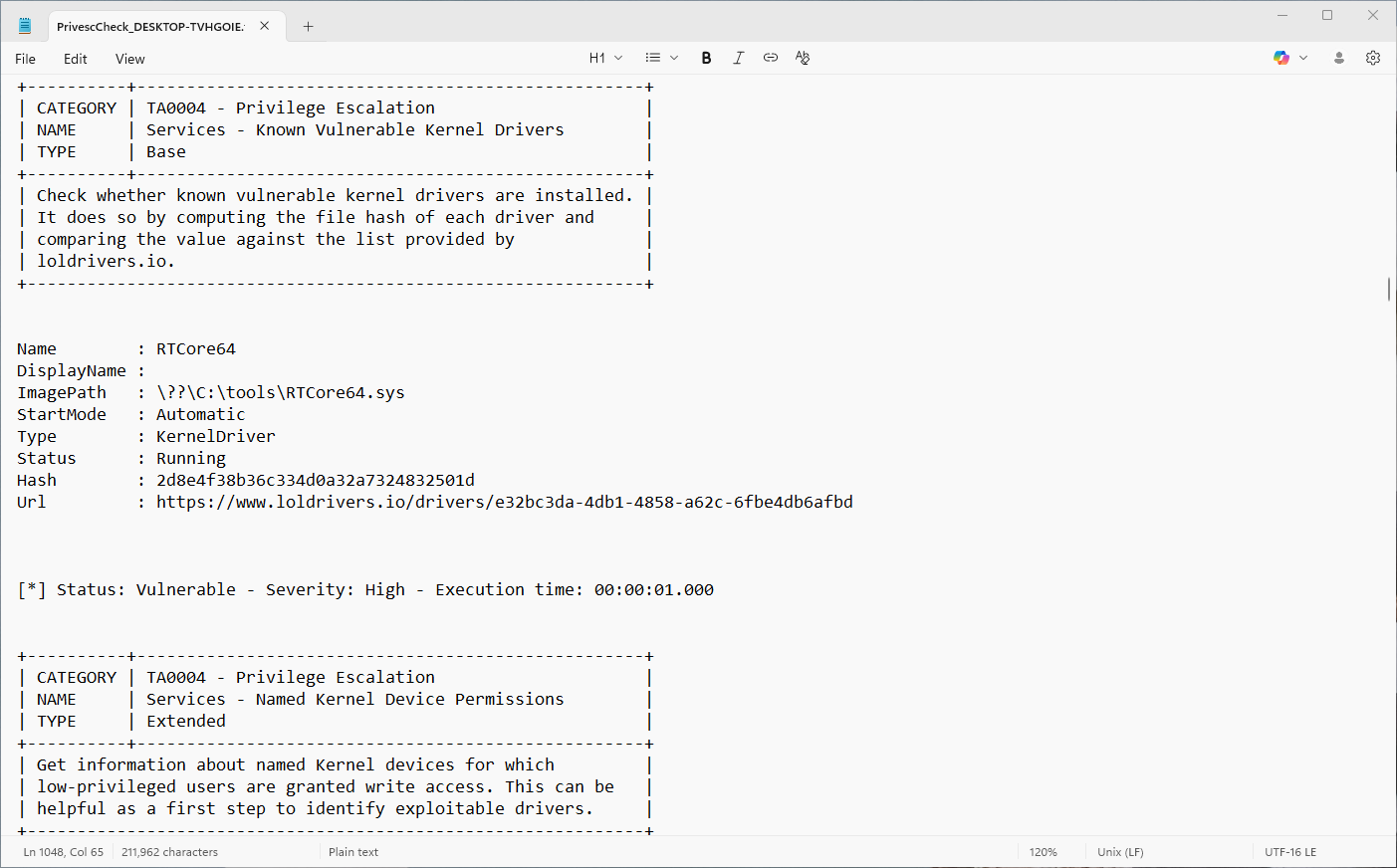
Use the option -Report TXT to generate a raw text report. The output is similar to the terminal output, except that it contains only ASCII characters for better compatibility will text editors.
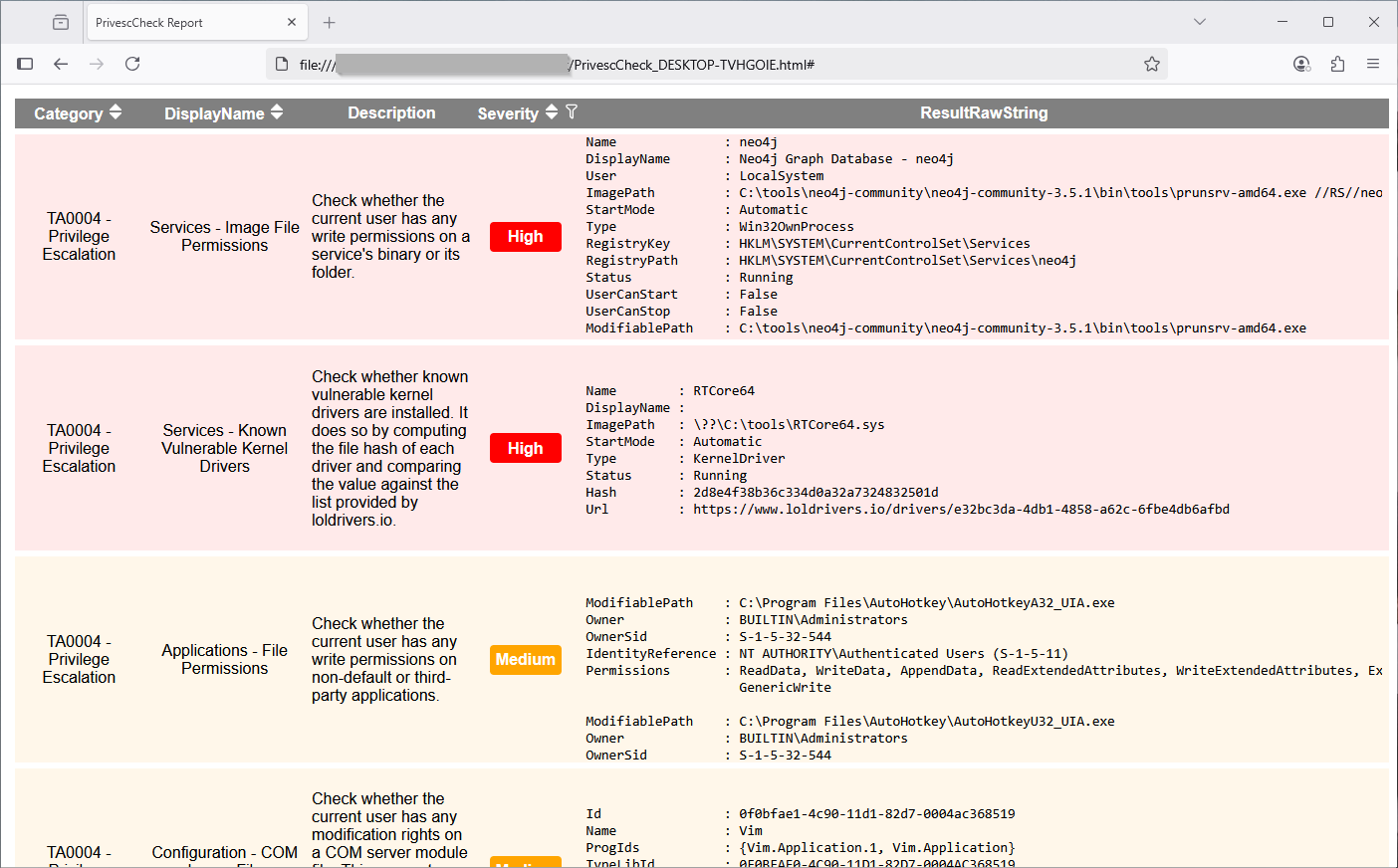
Use the option -Report HTML to generate an HTML report. The output file can be opened in a web browser. No Internet connection is required as it has no external dependencies. It is more convenient for visualizing the data than the raw text report. Additionally, it offers sorting and filtering capabilities!
Use the option -Report CSV or -Report XML to generate a CSV or XML report. The output file is intended to facilitate the parsing of the results by automated reporting tools.
[!NOTE] Although the output format is not documented (yet), you can easily figure it out by analyzing the structure of an already generated file. You can use the
Idvalue of each check as a unique identifier.
Checks of type Base will always be executed, unless the script is run as an administrator. They are mainly intended for identifying privilege escalation vulnerabilities, or other important issues.
Checks of type Extended can only be executed if the option -Extended is specified on the command line. They are mainly intended for providing additional information that could be useful for exploit development, or post-exploitation.
Checks of type Audit can only be executed if the option -Audit is specified on the command line. They are mainly intended for providing information that is relevant in the context of a configuration audit.
By default, the PowerShell execution policy is set to Restricted on clients, and RemoteSigned on servers, when a new powershell.exe process is started. These policies block the execution of (unsigned) scripts, but they can be overridden within the current scope as follows.
Set-ExecutionPolicy Bypass -Scope Process -Force
. .\PrivescCheck.ps1
However, this trick does not work when the execution policy is enforced through a GPO. In this case, after starting a new PowerShell session, you can load the script as follows.
Get-Content .\PrivescCheck.ps1 | Out-String | Invoke-Expression
A common way to bypass Constrained Language Mode consists in using PSv2 as it does not implement this protection. Therefore, a significant part of the development effort goes into maintaining this retro-compatibility.
[!NOTE] Although PowerShell version 2
is still enabled by default on recent versions of Windows(PowerShell 2.0 removal from Windows), it cannot run without the .Net framework version 2.0, which requires a manual install.
If you run this script within a Meterpreter session, you will likely get a "timeout" error. This is because Metasploit uses a default timeout value of 15 seconds, which is not enough for a typical execution of the script to complete.
meterpreter > load powershell
Loading extension powershell...Success.
meterpreter > powershell_import /local/path/to/PrivescCheck.ps1
[+] File successfully imported. No result was returned.
meterpreter > powershell_execute "Invoke-PrivescCheck"
[-] Error running command powershell_execute: Rex::TimeoutError Operation timed out.
It is possible to set a different timeout thanks to the -t option of the sessions command (documentation). In the following example, a timeout of 2 minutes is set for the session with ID 1, but you might want to set an even higher value.
msf6 exploit(multi/handler) > sessions -t 120 -i 1
[*] Starting interaction with 1...
meterpreter > powershell_execute "Invoke-PrivescCheck"
Some of the checks rely on online data (e.g. LOL drivers database), but the script is intended to work offline. To solve this issue, the data is embedded into the script, and therefore needs to be regularly updated. This process is fully automated in the official release, but if you want to build the script locally, you can optionally do this manually.
powershell -ep bypass ". .\build\Build.ps1; Update-LolDriverFile"
Building the script is as simple as running the command below. The output file will be saved in the .\dist\ folder.
powershell -ep bypass ". .\build\Build.ps1; Invoke-Build -Name PrivescCheck"