Authenticated Arbitrary File Upload leading to Remote Code Execution Technical analysis and controlled reproduction of CVE-2026-38526 in Webkul Krayin CRM 2.2.x.

Authenticated Arbitrary File Upload leading to Remote Code Execution Technical analysis and controlled reproduction of CVE-2026-38526 in Webkul Krayin CRM 2.2.x.
CVE-2026-38526 is an authenticated arbitrary file upload vulnerability affecting Webkul Krayin CRM 2.2.x.
The vulnerable functionality is exposed through the application's TinyMCE upload endpoint:
POST /admin/tinymce/upload
The application does not sufficiently restrict the type of file that can be uploaded. An authenticated user can submit a file with a server-side executable extension, such as .php. The application stores the uploaded file and returns its accessible URL.
When the deployment allows PHP execution from the upload location the uploaded file can subsequently be requested through the web server, resulting in remote code execution in the context of the web application process.
The published CVE record rates the vulnerability CVSS 3.1: 9.9 (Critical).
This repository contains my own technical analysis and controlled reproduction of the vulnerability.
The vulnerability was already publicly disclosed under CVE-2026-38526. This work does not claim discovery of the vulnerability. The purpose of this research was to understand the vulnerable implementation, reproduce the exploitation path in a controlled environment, and examine the conditions that turn the file-upload issue into remote code execution.
The vulnerability was also used in the Hack The Box GCSB 2026 Nexus machine, which provided a practical environment for studying the issue.
Product: Webkul Krayin CRM Affected versions: 2.2.x Vulnerability: Arbitrary File Upload Resulting impact: Remote Code Execution Authentication: Required Attack vector: Network CWE: CWE-434 — Unrestricted Upload of File with Dangerous Type CVSS: 9.9 Critical CVE: CVE-2026-38526
The vulnerable functionality is handled by:
/admin/tinymce/upload
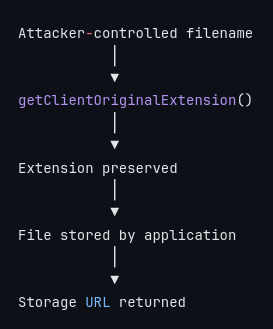
The endpoint accepts an uploaded file through the file parameter. The relevant application logic derives the stored filename from the original filename and preserves its original extension.
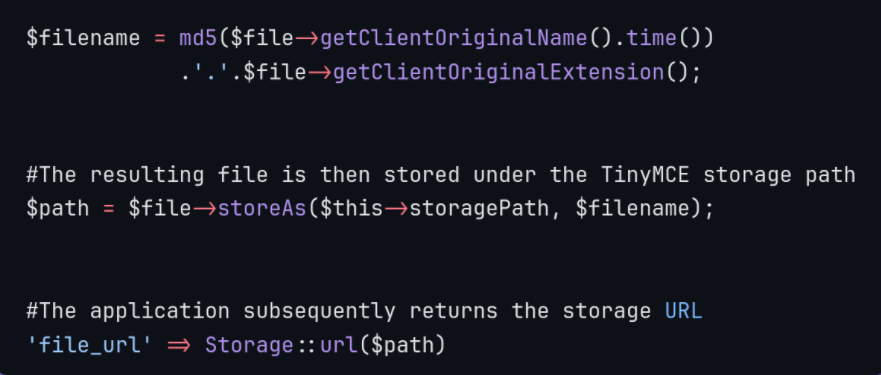
This behavior is important because the application is not simply accepting an uploaded object; it is retaining an attacker controlled executable extension and making the resulting object accessible through the application storage mechanism.
The primary issue is insufficient server-side validation of uploaded files.
The application uses the original client-supplied extension when constructing the stored filename. There is no sufficiently restrictive allowlist preventing executable file types from reaching the storage layer.
The relevant flow is
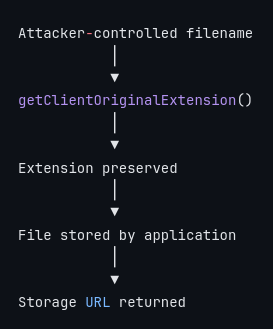
The use of a generated filename does not address the underlying problem.
For example, changing shell.php into a generated filename such as .php does not make the uploaded file safe if the server continues to interpret .php files as executable PHP code.
An unrestricted upload does not automatically mean remote code execution.
The execution path depends on the servers handling of the uploaded file.
In the vulnerable deployment scenario, the chain becomes
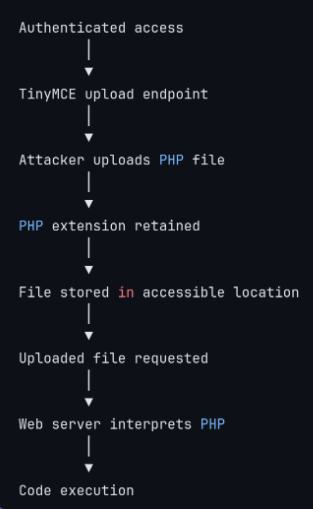
If PHP execution is disabled for the upload directory, the direct RCE path can be prevented even though the underlying arbitrary file-upload weakness remains.
wget:
wget https://raw.githubusercontent.com/Ish3ng0m4/CVE-2026-38526-KrayinCRM/main/poc/upload.py
wget https://raw.githubusercontent.com/Ish3ng0m4/CVE-2026-38526-KrayinCRM/main/poc/marker.php
curl:
curl -LO https://raw.githubusercontent.com/Ish3ng0m4/CVE-2026-38526-KrayinCRM/main/poc/upload.py
curl -LO https://raw.githubusercontent.com/Ish3ng0m4/CVE-2026-38526-KrayinCRM/main/poc/marker.php
2. Place the files in
    poc/
    ├── upload.py
    └── marker.php
3. Create a Python environment & Install the dependency
    python3 -m venv .venv
    source .venv/bin/activate
    pip install requests
4. Make the PoC executable
chmod +x poc/upload.py
6. Run it
    python3 poc/upload.py \
      --url http://[Lab_IP:PORT] \
      --email [email protected] \
      --password 'YOUR_PASSWORD'
The exploitation requires an authenticated account capable of reaching the vulnerable functionality.
At a high level:
The resulting execution context is determined by the underlying deployment. In a typical Linux deployment this may be the web-server service account, such as:
www-data
This does not automatically provide operating-system root privileges. Further impact depends on the permissions and configuration of the compromised environment.
The vulnerable behavior can be reduced to three important operations.
Obtain the uploaded file
$file = request()->file('file');
The application receives the file supplied by the client.
Preserve the client-controlled extension
 $filename = md5($file->getClientOriginalName().time())
             .'.'.$file->getClientOriginalExtension();
The filename itself is changed, but the original extension is retained. This is an important distinction: filename randomization is not file-type validation.
Store and expose the file
  $path = $file->storeAs($this->storagePath, $filename);
 return [
     'file' => $path,
     'file_name' => $file->getClientOriginalName(),
     'file_url' => Storage::url($path),
 ];
The application stores the file and provides its URL to the client.
Successful exploitation can provide an attacker with code execution under the privileges of the web application.
Depending on the deployment, this may allow an attacker to:
Read application files
Access application configuration
Obtain database credentials or other secrets
Modify application data
Deploy additional malicious code
Pivot toward other systems accessible from the compromised host
Attempt further privilege escalation
The actual impact depends on the privileges of the compromised application process and the security configuration of the underlying system.
A secure implementation should use multiple layers of protection rather than relying on a single extension check.