Skip to content
KitploitKITPLOIT
工具博客
提交
工具博客
提交

黑客、渗透测试和网络安全工具,武装您的安全武器库!

Kitploit 是一个黑客、网络安全和渗透测试工具的目录。发现最新的项目更新,查找漏洞、分析系统、自动化测试并加强你的安全。

··订阅源·联系·隐私·© 2026 Kitploit

工具目录

分类

查看所有分类
Loading categories
ciso-assistant-community — 用于风险管理、合规和审计的GRC平台,具备200多个框架、自动控制映射、漏洞管理和事件响应工作流。 | Kitploit
工具/GitHubGitHub/intuitem/ciso-assistant-community
防御工具漏洞分析配置审计隐私保护威胁情报身份与访问管理 (IAM)事件响应
GitHubintuitem/ciso-assistant-community

ciso-assistant-community

用于风险管理、合规和审计的GRC平台,具备200多个框架、自动控制映射、漏洞管理和事件响应工作流。

查看仓库
4.4k83741天前Kitploit 审核通过

最受欢迎

查看全部 →

发现我们社区最常用的工具。

探索所有工具

浏览我们的工具集合

查看所有工具 →
分享
网站

给项目点个星 🌟 以获取发布通知,并帮助社区成长!

intuitem%2Fciso-assistant-community | Trendshift
intuitem.com · SaaS 免费试用 · 路线图 · 文档 · 语言 · Discord · 框架
GitHub Release GitHub contributors GitHub Repo stars GitHub forks Discord

CISO Assistant 为网络安全管理与 GRC(治理、风险与合规)实践带来了全新视角:
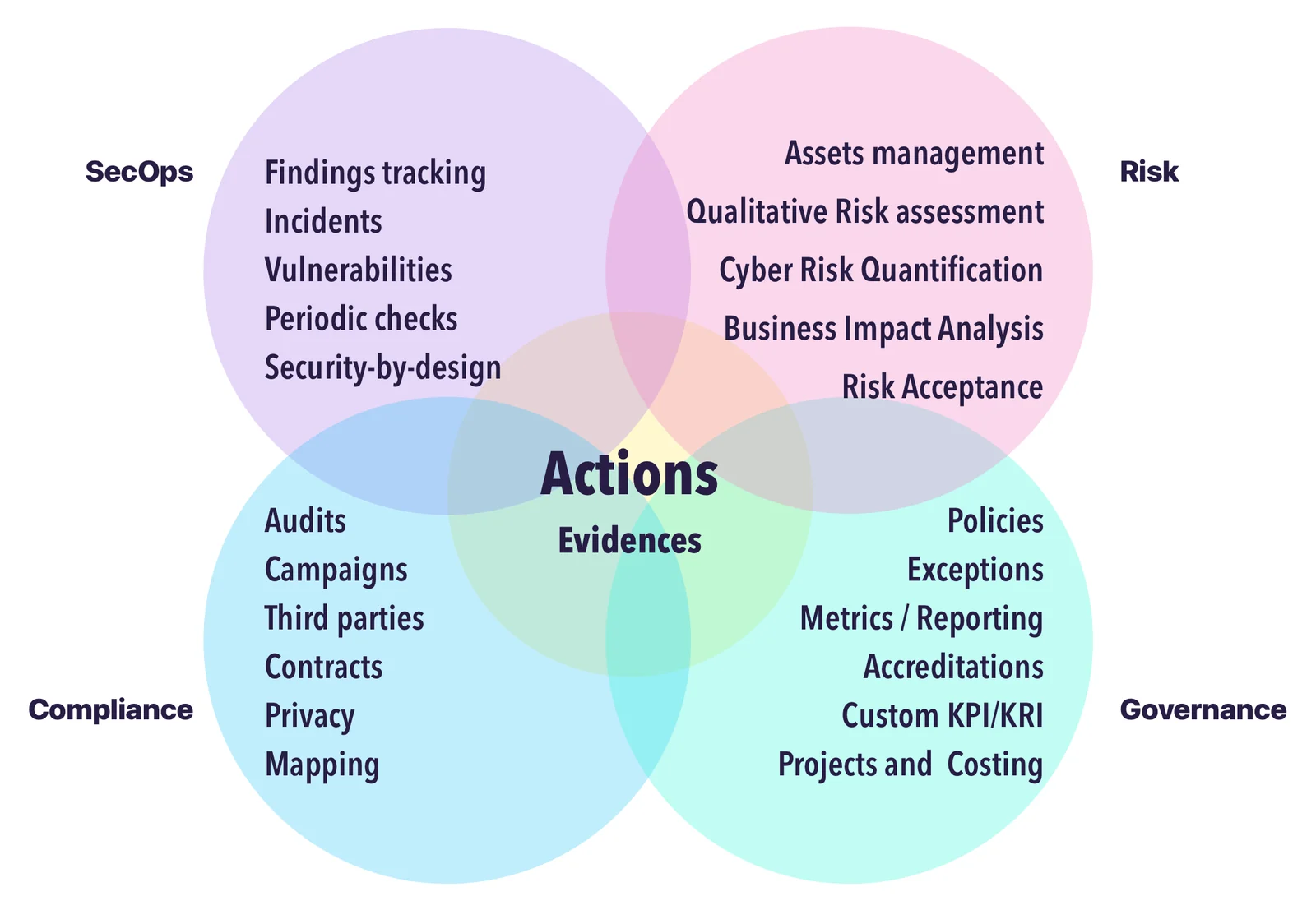
  • 设计为一个中心枢纽,通过对象之间的智能链接连接多个网络安全概念,
  • 构建为多范式工具,可适应不同的背景、方法和期望,
  • 明确地将合规与网络安全控制解耦,实现跨平台的可复用性,
  • 促进可复用性和相互链接,而非重复劳动,
  • 采用 API 优先的方法开发,以同时支持 UI 交互和外部自动化,
  • 内置大量标准、安全控制和威胁库,
  • 提供开放格式,以便自定义和复用你自己的对象和框架,
  • 包含内置的风险评估和修复跟踪工作流,
  • 通过简单的语法和灵活的工具支持自定义框架,
  • 提供丰富的导入/导出能力,覆盖多种渠道和格式(UI、CLI、Kafka、报告等)。

Single Hub

我们的愿景是打造网络安全管理的一站式解决方案——通过简化和互操作性实现 GRC 的现代化。

作为与网络安全和 IT 专业人士共事的从业者,我们曾面临同样的问题:工具碎片化、数据重复,以及缺乏直观、集成的解决方案。CISO Assistant 正是从这些经验教训中诞生的,我们正在围绕务实、常识原则构建一个社区。

我们在用户和客户的反馈中不断演进。就像章鱼 🐙 一样,CISO Assistant 不断长出新的触手——为网络安全团队带来清晰度、自动化和生产力,同时减少数据输入和输出的工作量。

CodeFactor API Tests Functional Tests FOSSA Status Plumber Score


快速开始 🚀

[!TIP] 最简单的入门方式是使用此处提供的云实例免费试用。

或者,在你的工作站或服务器上安装好 Docker 和 Docker-compose 后:

克隆仓库:```sh git clone --single-branch -b main https://github.com/intuitem/ciso-assistant-community.git

root@kitploit:~
并运行启动脚本```sh
./docker-compose.sh     # Linux/MacOS
./docker-compose.ps1    # Windows

如果你想寻找其他自托管安装选项,请查看配置构建器和文档。

[!NOTE] docker-compose 脚本使用预构建的 Docker 镜像,支持大多数标准硬件架构。 如果你使用的是 Windows,请确保已安装 Docker Desktop with WSL2,并触发 PowerShell 脚本。它会代你向 Docker Desktop 提供配置。

可以调整 docker compose 文件以传递额外参数来适配你的设置(例如邮件发送器设置)。

[!WARNING] 如果你收到关于镜像平台与主机平台不匹配的警告或错误,请提出 issue 并附上详细信息,我们会很快添加支持。你也可以改用 docker-compose-build.sh(见下文)来为你的特定架构进行构建。

[!CAUTION] 不要直接将 main 分支代码用于生产环境,因为它是上游合并分支,在我们的开发过程中可能会有破坏性变更。请使用 tags 获取稳定版本,或使用预构建镜像。


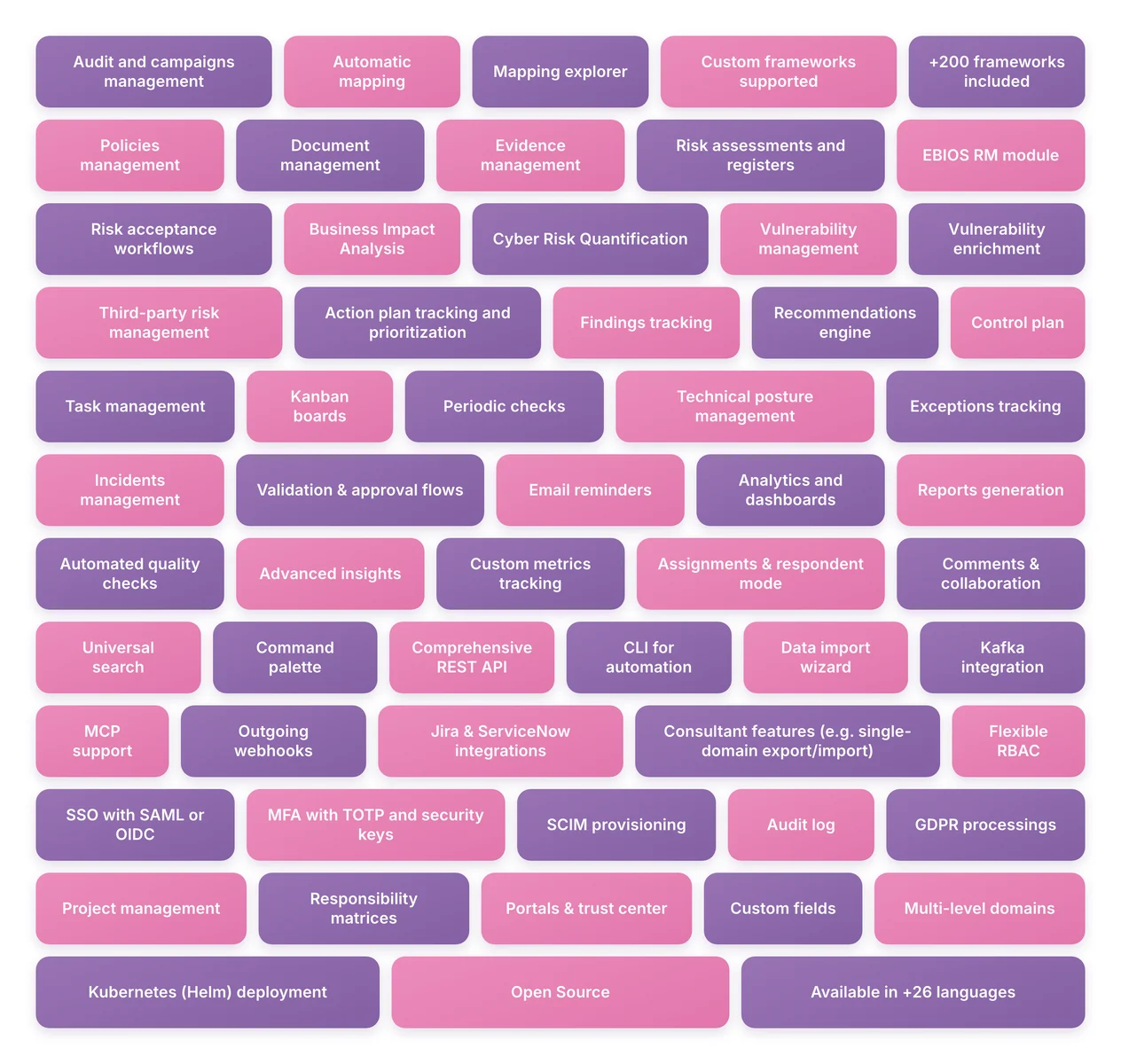
功能特性

当前功能

📋 完整功能列表 — 点击展开(可搜索,59 项功能)

合规与框架

  • 审计与活动管理
  • 自动映射
  • 映射浏览器
  • 支持自定义框架
  • 包含 200+ 框架
  • 策略管理
  • 文档管理
  • 证据管理

风险管理

  • 风险评估与登记册
  • EBIOS RM 模块
  • 风险接受工作流
  • 业务影响分析
  • 网络风险量化
  • 漏洞管理
  • 漏洞增强

第三方风险

  • 第三方风险管理

运营与修复

  • 行动计划跟踪与优先级排序
  • 发现项跟踪
  • 建议引擎
  • 控制计划
  • 任务管理
  • 看板
  • 定期检查
  • 技术态势管理
  • 例外跟踪
  • 事件管理
  • 验证与审批流程
  • 邮件提醒

报告与分析

  • 分析与仪表板
  • 报告生成
  • 自动化质量检查
  • 高级洞察
  • 自定义指标跟踪

协作与生产力

  • 分配与受访者模式
  • 评论与协作
  • 通用搜索
  • 命令面板

自动化与集成

  • 全面的 REST API
  • 用于自动化的 CLI
  • 数据导入向导
  • Kafka 集成
  • MCP 支持
  • 出站 Webhook
  • Jira 与 ServiceNow 集成
  • 顾问功能(例如单域导出/导入)

安全与访问

  • 灵活的 RBAC
  • 支持 SAML 或 OIDC 的 SSO
  • 支持 TOTP 和安全密钥的 MFA
  • SCIM 配置
  • 审计日志

隐私

  • GDPR 处理活动

项目管理

  • 项目管理
  • 责任矩阵

平台

  • 门户与信任中心
  • 自定义字段
  • 多级域
  • Kubernetes (Helm) 部署
  • 开源
  • 支持 26+ 种语言

即将推出的功能列在路线图中。

CISO Assistant 由 Intuitem 开发和维护,该公司专注于网络安全、云以及数据/AI。


核心概念

以下是 CISO Assistant 中一些构建模块的摘录,用于说明鼓励可复用性的解耦概念:
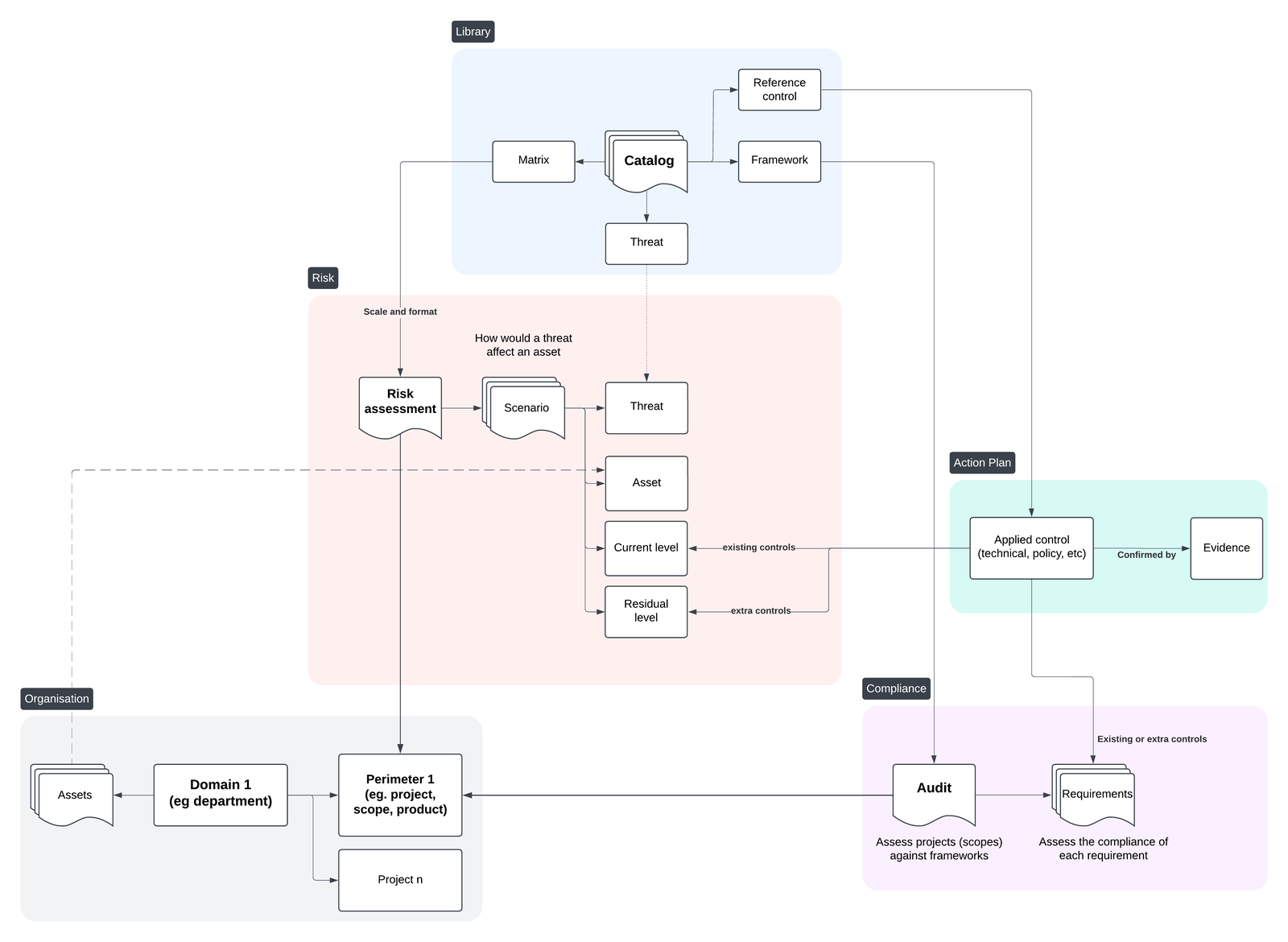
核心对象

完整详情请查看数据模型文档。


解耦概念

CISO Assistant 的核心是解耦原则,它能够实现强大的用例并大幅节省时间:

  • 跨范围或框架复用过去的评估,
  • 同时针对多个框架评估单个范围,
  • 让 CISO Assistant 处理报告和一致性检查,以便你专注于修复,
  • 将控制实施与合规跟踪分离。

以下是解耦原则及其优势的说明:

https://github.com/user-attachments/assets/87bd4497-5cc2-4221-aeff-396f6b6ebe62
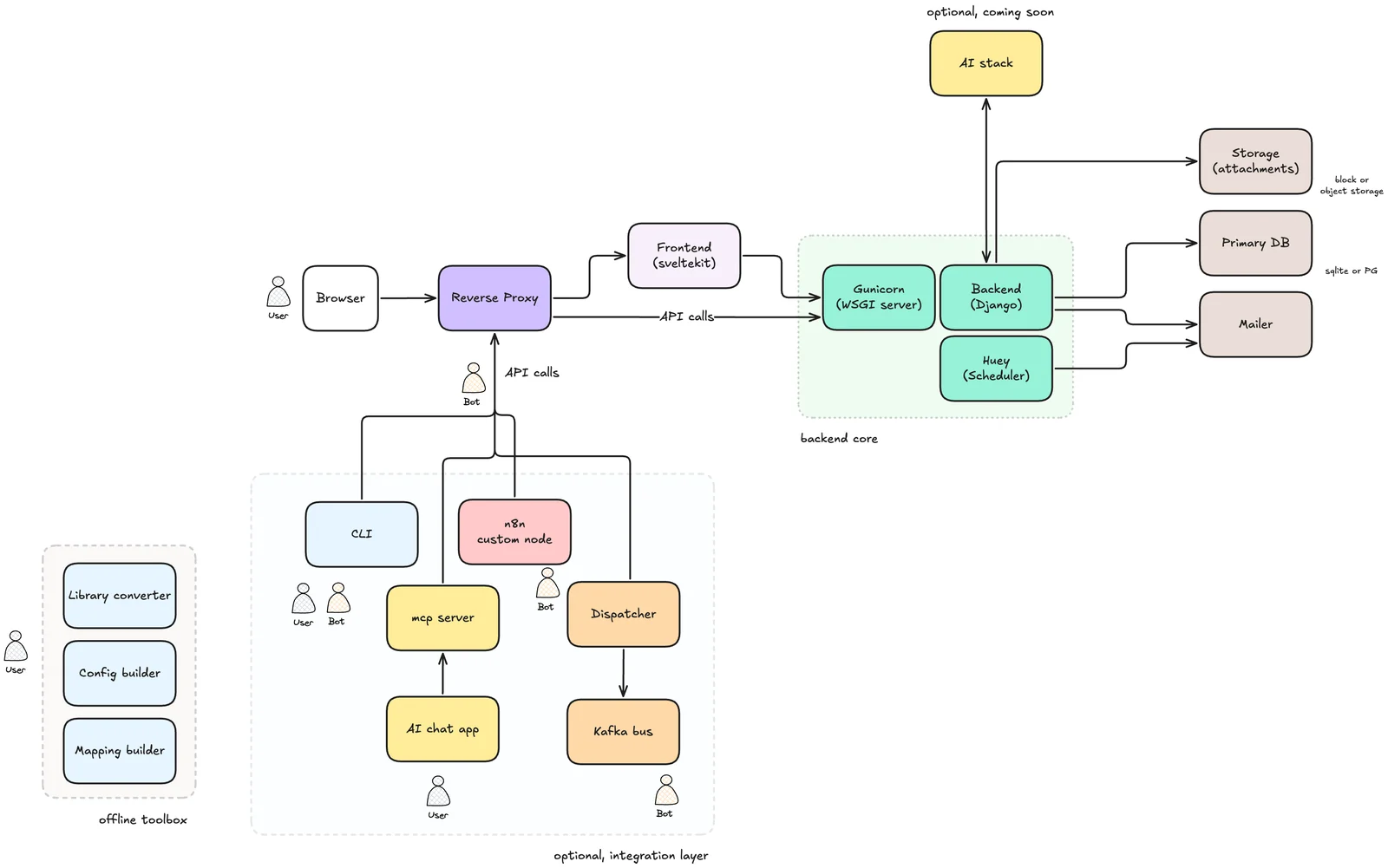
系统架构

最终用户文档

请查看在线文档:https://intuitem.gitbook.io/ciso-assistant。

设置本地 AI 引擎

在此阅读更多内容:AI 引擎

支持的框架 🐙

  1. ISO 27001:2013 & 27001:2022 🌐
  2. NIST Cyber Security Framework (CSF) v1.1 🇺🇸
  3. NIST Cyber Security Framework (CSF) v2.0 🇺🇸
  4. NIS2 🇪🇺
  5. SOC2 🇺🇸
  6. PCI DSS 4.0.1 💳
  7. CMMC v2 🇺🇸
  8. PSPF 🇦🇺
  9. General Data Protection Regulation (GDPR):来自 GDPR.EU 的全文和检查清单 🇪🇺
  10. Essential Eight 🇦🇺
  11. NYDFS 500 及 2023-11 修正案 🇺🇸
  12. DORA(Act、RTS、ITS 和 GL)🇪🇺
  13. NIST AI Risk Management Framework 🇺🇸🤖
  14. NIST SP 800-53 rev5 🇺🇸
  15. Règles OIV - Secteur « Activités civiles de l'Etat » (2019) 🇫🇷
  16. CCB CyberFundamentals Framework 🇧🇪
  17. NIST SP-800-66 (HIPAA) 🏥
  18. HDS/HDH 🇫🇷
  19. OWASP Application Security Verification Standard (ASVS) 4 🐝🖥️
  20. RGS v2.0 🇫🇷
  21. AirCyber ✈️🌐
  22. Cyber Resilience Act (CRA) 🇪🇺
  23. TIBER-EU 🇪🇺
  24. NIST Privacy Framework 🇺🇸
  25. TISAX (VDA ISA) v5.1、v6.0 和 v2027 🚘
  26. ANSSI hygiene guide 🇫🇷
  27. Essential Cybersecurity Controls (ECC) 🇸🇦
  28. CIS Controls v8* 🌐
  29. CSA CCM (Cloud Controls Matrix)* ☁️
  30. FADP (Federal Act on Data Protection) 🇨🇭
  31. NIST SP 800-171 rev2 (2021) 🇺🇸
  32. ANSSI : Recommandations de sécurité pour un système d'IA générative (v1.0) 🇫🇷🤖
  33. NIST SP 800-218: Secure Software Development Framework (SSDF) 🖥️
  34. GSA FedRAMP rev5 ☁️🇺🇸
  35. Cadre Conformité Cyber France (3CF) v1 (2021) ✈️🇫🇷
  36. ANSSI : SecNumCloud ☁️🇫🇷
  37. Cadre Conformité Cyber France (3CF) v2 (2024) ✈️🇫🇷
  38. ANSSI : outil d’autoévaluation de gestion de crise cyber 💥🇫🇷
  39. BSI: IT-Grundschutz-Kompendium 🇩🇪
  40. NIST SP 800-171 rev3 (2024) 🇺🇸
  41. ENISA: 5G Security Controls Matrix 🇪🇺
  42. OWASP Mobile Application Security Verification Standard (MASVS) 🐝📱
  43. Agile Security Framework (ASF) - baseline - by intuitem 🤗
  44. ISO 27001:2013 🌐(用于旧版和迁移)
  45. EU AI Act 🇪🇺🤖
  46. FBI CJIS 🇺🇸👮
  47. Operational Technology Cybersecurity Controls (OTCC) 🇸🇦
  48. Secure Controls Framework (SCF) 🇺🇸🌐
  49. NCSC - Cyber Assessment Framework (CAF) v3.2 🇬🇧
  50. California Consumer Privacy Act (CCPA) 🇺🇸
  51. California Consumer Privacy Act Regulations 🇺🇸
  52. NCSC Cyber Essentials 🇬🇧
  53. Directive Nationale de la Sécurité des Systèmes d'Information (DNSSI) Maroc 🇲🇦
  54. Part-IS (Consolidated 16-10-2025) ✈️🇪🇺

社区贡献

  1. PGSSI-S (Politique Générale de Sécurité des Systèmes d'Information de Santé) 🇫🇷
  2. ANSSI : Recommandations de configuration d'un système GNU/Linux (v2.0) 🇫🇷
  3. PSSI-MCAS (Politique de sécurité des systèmes d’information pour les ministères chargés des affaires sociales) 🇫🇷
  4. ANSSI : Recommandations pour la protection des systèmes d'information essentiels (v1.0) 🇫🇷
  5. ANSSI : Recommandations de sécurité pour l'architecture d'un système de journalisation (v2.0) 🇫🇷
  6. ANSSI : Recommandations de sécurité relatives à TLS (v1.2) 🇫🇷
  7. New Zealand Information Security Manual (NZISM) 🇳🇿
  8. Clausier de sécurité numérique du Club RSSI Santé 🇫🇷
  9. Référentiel National de Sécurité de l’Information (RNSI), MPT Algérie 🇩🇿
  10. Misure minime di sicurezza ICT per le pubbliche amministrazioni, AGID Italia 🇮🇹
  11. Framework Nazionale CyberSecurity v2, FNCS Italia 🇮🇹
  12. Framework Nazionale per la Cybersecurity e la Data Protection, ACN Italia 🇮🇹
  13. PSSIE du Bénin, ANSSI Bénin 🇧🇯
  14. IGI 1300 / II 901 - Liste des exigences pour la mise en oeuvre d'un SI classifié (ANSSI) 🇫🇷
  15. Référentiel Général de Sécurité 2.0 - Annexe B2 🇫🇷
  16. ANSSI : Recommandations sur la sécurisation des systèmes de contrôle d'accès physique et de vidéoprotection (v2.2) 🇫🇷
  17. ANSSI : Recommandations pour un usage sécurisé d’(Open)SSH (v1.3) 🇫🇷
  18. ANSSI : Recommandations de sécurité relatives à IPsec pour la protection des flux réseau (v1.1) 🇫🇷
  19. ANSSI : Recommandations relatives à l'interconnexion d'un système d'information à internet (v3.0) 🇫🇷
  20. Guides des mécanismes cryptographiques 🇫🇷
  21. Swift Customer Security Controls Framework (CSCF) v2025 🏦🌐
  22. OWASP Application Security Verification Standard (ASVS) 5 🐝🖥️
  23. NIST 800-82 (OT) - appendix 🏭🤖
  24. RBI Master Direction 2023 - india 🏦🇮🇳
  25. Loi 05-20 relative à la cybersécurité (Maroc) 🇲🇦
  26. Lithuanian NIS2 Cybersecurity Law (Kibernetinio saugumo įstatymas) 🇱🇹
  27. Prestataire d'audit de sécurité des systèmes d'information (PASSI) 🇫🇷
  28. ANS Programme CaRE - Domaine 2 (Continuité et reprise d'activité, sauvegarde) 🇫🇷🏥
  29. ANS HospiConnect HOP'EN2 (Sécurisation de l'accès au SIH) 🇫🇷🏥
  30. Loi n° 09-08 relative à la protection des personnes physiques 🇲🇦
  31. Checklist des exigences de la Loi n° 09-08 🇲🇦
  32. Référentiel des exigences de qualification des prestataires de services cloud ☁️🇲🇦
  33. AI Defense Matrix 🤖🌐
  34. Zero Trust for Operational Technology (ZT OT) 🇺🇸🏭
  35. T.C. CBDDO Bilgi ve İletişim Güvenliği Rehberi (BİGR) 🇹🇷

[!NOTE] 带有 * 的框架需要额外手动步骤,即通过其网站获取最新的 Excel 表格,因为其许可证禁止直接使用。你可以直接将 Excel 表格作为库加载。


查看库和工具,了解所使用的领域特定语言以及如何定义你自己的库。

即将推出

  • Indonesia PDP 🇮🇩

  • OWASP SAMM

  • COBAC R-2024/01

  • ICO Data protection self-assessment 🇬🇧

  • ASD ISM 🇦🇺

  • 以及更多:只需在 Discord 上询问。如果它是开放标准,我们会为你完成,免费 😉

添加你自己的自定义库

一个库可以代表一个框架、一个威胁目录、一组参考控制,甚至一个自定义风险矩阵。

现在可以直接从 Excel 文件加载库。无需事先手动将其转换为 YAML——上传 Excel 文件时会在内部处理转换。

请查看 tools 目录及其专用 README,其中描述了 Excel 中库源文件的预期格式。excel 子目录包含用作现有库来源的示例 XLSX 文件,可用作创建你自己库的模板。

要从 Excel 文件加载库,请转到 Governance → Library 页面,点击 Load,然后选择你的 Excel 源文件。任何验证或解析错误都会在导入过程中报告。

可选:将库转换为 YAML

虽然可以直接加载 Excel 文件,但仍然可以使用外部 Python 脚本将库源文件转换为 YAML:

  • convert_library_v2.py 可帮助你从简单的 Excel 文件生成库。一旦你的项目按预期格式组织好,运行该脚本即可生成相应的 YAML 文件。
  • tools 目录还包含针对特定框架的专用转换器(例如 CIS 或 CCM Controls)。

创建映射库

为了方便创建框架之间的映射,你可以使用 prepare_mapping_v2.py 工具。它会基于两个现有的 YAML 格式框架库生成一个 Excel 文件。填写映射后,生成的 Excel 文件可以:

  • 直接加载到应用程序中,或
  • 使用 convert_library_v2.py 转换为 YAML。

社区

加入我们的开放 Discord 社区,与团队和其他 GRC 专家互动。

测试云版本

最快、最简单的入门方式是使用此处提供的免费云实例试用。

本地测试 🚀

要以简单直接的方式在本地运行 CISO Assistant,你可以使用 Docker compose。

  1. 更新 docker

确保你拥有较新的 docker 版本(>= 27.0)。

  1. 克隆仓库```sh git clone --single-branch -b main https://github.com/intuitem/ciso-assistant-community.git cd ciso-assistant-community
root@kitploit:~
2. 启动预构建镜像的 docker-compose 脚本:```sh
./docker-compose.sh     # Linux/MacOS
./docker-compose.ps1    # Windows

或者,你可以使用此变体为你的特定架构构建 Docker 镜像:```sh ./docker-compose-build.sh # Linux/MacOS ./docker-compose-build.ps1 # Windows

root@kitploit:~
当系统要求时,请输入您的超级用户邮箱和密码。

然后,您可以通过网页浏览器访问 CISO Assistant:[https://localhost:8443/](https://localhost:8443/)

对于以下执行操作,请直接使用 "docker compose up"。

## 为开发设置 CISO Assistant

> [!WARNING]
>
> ### Windows 用户的重要说明
>
> 对于在 **Windows** 上进行开发的用户,最佳可行方案是使用安装在 [WSL2](https://apps.microsoft.com/detail/9p9tqf7mrm4r) 上的 [Ubuntu](https://apps.microsoft.com/detail/9pdxgncfsczv)(无需 Docker)。
>
> 现在也可以在没有 WSL2 和 Docker 的情况下,在 Windows 上原生运行和开发 CISO Assistant,但这需要一些额外步骤。
> 请注意,Windows 上的原生运行仍处于 **实验阶段**,如果您不确定自己在做什么,或者希望在整个开发过程中确保稳定性,则 **不应** 使用它。
> 尽管如此,我们非常乐意听取任何建议,以改善 Windows 用户的开发体验。请随时为此提交 Issue/PR!

### 要求

- Python 3.14+
- pip 25.3+
- uv 0.9+
- node 24+
- npm 10.2+
- pnpm 10.30+
- yaml-cpp(`brew install yaml-cpp libyaml` 或 `apt install libyaml-cpp-dev`)

<details>
<summary>[实验性] 在没有 WSL2 的 Windows 上进行开发的额外要求</summary>

如果您想在没有 WSL2 的情况下开发该项目,您需要安装 [MSYS2](https://www.msys2.org/),将 `MSYS2 UCRT64` 二进制文件添加到您的 [系统 PATH 环境变量](https://learn.microsoft.com/en-us/powershell/module/microsoft.powershell.core/about/about_environment_variables?view=powershell-7.6#set-environment-variables-in-the-system-control-panel) 中(通常,这些二进制文件位于 `C:\msys64\ucrt64\bin`),然后使用 `MSYS2 UCRT64` 通过 `pacman` 安装以下依赖项。```sh
pacman -S mingw-w64-ucrt-x86_64-file mingw-w64-ucrt-x86_64-pango

你还需要在安装依赖项后添加这两个系统环境变量:```conf MAGIC=Full path to the magic.mgc file (usually C:\msys64\ucrt64\share\misc\magic.mgc) WEASYPRINT_DLL_DIRECTORIES=Same path as your MSYS2 UCRT64 binaries

root@kitploit:~
鉴于 Windows 上的默认编码不是 `UTF-8` 而是 `cp1252`,某些打印 `UTF-8` 字符(如表情符号)的 Python 脚本在某些情况下可能导致后端崩溃或故障(例如库导入)。
为避免此项目出现此问题,请通过添加以下 2 个用户环境变量来强制使用 `UTF-8` 编码:```conf
PYTHONUTF8=1
PYTHONIOENCODING=utf-8:replace

[!NOTE]

已知问题

  • Windows 上的 libmagic 库(MIME 检测)在读取 Excel 文件(.xlsx)的前 2048 位时难以识别该文件,因为在导入 Excel 库时它大多数情况下返回 application/octet-stream(后端显示警告消息 [warning ] Invalid MIME type)。由于 backend/library/views.py:StoredLibraryViewSet.upload_library 中的回退方法,这并不会阻止 Excel 文件的导入。

运行后端

  1. 克隆仓库。```sh git clone [email protected]:intuitem/ciso-assistant-community.git cd ciso-assistant-community
root@kitploit:~
2. 在父文件夹中创建一个文件(例如 ../myvars),并通过复制和修改以下代码将环境变量存储在其中,将 `"<XXX>"` 替换为你的私有值。注意不要将此文件提交到你的 git 仓库中。

**必需变量**

后端中的所有变量都有便捷的默认值。

**推荐变量**```sh
export DJANGO_DEBUG=True

# Default url is set to http://localhost:5173 but you can change it, e.g. to use https with a caddy proxy
export CISO_ASSISTANT_URL=https://localhost:8443

# Setup a development mailer with Mailpit for example
export EMAIL_HOST_USER=''
export EMAIL_HOST_PASSWORD=''
export [email protected]
export EMAIL_HOST=localhost
export EMAIL_PORT=1025
export EMAIL_USE_TLS=True  # true for STARTTLS
export EMAIL_USE_SSL=False # true for SMTPS

其他变量```sh

CISO Assistant will use SQLite by default, but you can setup PostgreSQL by declaring these variables

export POSTGRES_NAME=ciso-assistant export POSTGRES_USER=ciso-assistantuser export POSTGRES_PASSWORD= export POSTGRES_PASSWORD_FILE= # alternative way to specify password export DB_HOST=localhost export DB_PORT=5432 # optional, default value is 5432

CISO Assistant will use filesystem storage backend by default.

Only one cloud storage backend can be active at a time (USE_S3 and USE_AZURE are mutually exclusive).

--- AWS S3 ---

You can use a S3 Bucket by declaring these variables

The S3 bucket must be created before starting CISO Assistant

export USE_S3=True export AWS_STORAGE_BUCKET_NAME= export AWS_S3_REGION_NAME= # optional, e.g., us-east-1

S3 Authentication Option 1: Access Key (for standalone deployments or S3-compatible services)

export AWS_ACCESS_KEY_ID= export AWS_SECRET_ACCESS_KEY= export AWS_S3_ENDPOINT_URL= # required for S3-compatible services (e.g., MinIO)

S3 Authentication Option 2: IRSA (for Kubernetes/EKS deployments)

When running on EKS with IAM Roles for Service Accounts (IRSA) enabled,

these environment variables are automatically injected by the pod's service account.

No explicit configuration is needed - just ensure USE_S3=True and AWS_STORAGE_BUCKET_NAME are set.

export AWS_WEB_IDENTITY_TOKEN_FILE=/var/run/secrets/eks.amazonaws.com/serviceaccount/token

export AWS_ROLE_ARN=arn:aws:iam::123456789012:role/ciso-assistant-s3-role

--- Azure Blob Storage ---

You can use an Azure Blob Storage container instead of S3.

The container must be created before starting CISO Assistant.

export USE_AZURE=True

export AZURE_CONTAINER= # default: ciso-assistant-container

export AZURE_CUSTOM_DOMAIN= # optional, e.g., cdn.example.com

export AZURE_LOCATION= # optional, path prefix within the container (e.g., "media")

Azure Authentication Option 1: Account Key

export AZURE_ACCOUNT_NAME=

export AZURE_ACCOUNT_KEY=

Azure Authentication Option 2: Connection String

export AZURE_CONNECTION_STRING=

Azure Authentication Option 3: Managed Identity (for Azure-hosted deployments)

Requires AZURE_ACCOUNT_NAME. The pod/VM's assigned managed identity is used automatically.

export AZURE_ACCOUNT_NAME=

export AZURE_USE_MANAGED_IDENTITY=True

Add a second backup mailer (will be deprecated, not recommended anymore)

export EMAIL_HOST_RESCUE= export EMAIL_PORT_RESCUE=587 export EMAIL_HOST_USER_RESCUE= export EMAIL_HOST_PASSWORD_RESCUE= export EMAIL_USE_TLS_RESCUE=True export EMAIL_USE_SSL_RESCUE=False

You can define the email of the first superuser, useful for automation. A mail is sent to the superuser for password initialization

export CISO_SUPERUSER_EMAIL=

By default, Django secret key is generated randomly at each start of CISO Assistant. This is convenient for quick test,

but not recommended for production, as it can break the sessions (see

this topic for more information).

To set a fixed secret key, use the environment variable DJANGO_SECRET_KEY.

export DJANGO_SECRET_KEY=...

Sandbox mode for running untrusted code (e.g. library excel files)

WARNING: Sandboxing must be enabled in production environments.

export ENABLE_SANDBOX=True # optional, default value is True in production enfironments (DJANGO_DEBUG=False) and False in development environments (DJANGO_DEBUG=True).

Logging configuration

export LOG_LEVEL=INFO # optional, default value is INFO. Available options: DEBUG, INFO, WARNING, ERROR, CRITICAL export LOG_FORMAT=plain # optional, default value is plain. Available options: json, plain

LOG_FORMAT=json emits one JSON object per line (timestamp, level, logger, event, ...),

which SIEMs (Splunk, Sentinel, ADX) ingest natively without custom parsing.

Set the same LOG_FORMAT=json on the frontend container to get structured JSON

from the SvelteKit SSR process (auth events, errors) on the same schema; the

backend and huey worker share this setting automatically.

Authentication options

export AUTH_TOKEN_TTL=3600 # optional, default value is 3600 seconds (60 minutes). It defines the time to live of the authentication token export AUTH_TOKEN_AUTO_REFRESH=True # optional, default value is True. It defines if the token TTL should be refreshed automatically after each request authenticated with the token export AUTH_TOKEN_AUTO_REFRESH_TTL=36000 # optional, default value is 36000 seconds (10 hours). It defines the time to live of the authentication token after auto refresh. You can disable it by setting it to 0.

root@kitploit:~
<details>
<summary>[实验性] 在 Windows 上不使用 WSL2 进行开发的其他变量</summary>

只能配置 PostgreSQL 自定义变量。

更多信息请参阅 [`tools/.windows/README.md`](https://github.com/intuitem/ciso-assistant-community/blob/main/tools/.windows/README.md) 中记录的辅助脚本。

</details>


3. 安装 uv

访问 uv 网站获取安装说明:<https://docs.astral.sh/uv/getting-started/installation/>

4. 切换到 backend 并安装所需依赖。```sh
cd backend
uv sync
  1. 推荐:安装 pre-commit 钩子。```sh pre-commit install
root@kitploit:~
6. 如果你想设置 Postgres:

- 启动以下命令之一以进入 Postgres:
  - `psql as superadmin`
  - `sudo su postgres`
  - `psql`
- 创建数据库 "ciso-assistant"
  - `create database ciso-assistant;`
- 创建用户 "ciso-assistantuser" 并授予其访问权限
  - `create user ciso-assistantuser with password '<POSTGRES_PASSWORD>';`
  - `grant all privileges on database ciso-assistant to ciso-assistantuser;`

<details>
<summary>[实验性] 在 Windows 上设置 PostgreSQL</summary>

更多信息,请参阅 [`tools/.windows/README.md`](https://github.com/intuitem/ciso-assistant-community/blob/main/tools/.windows/README.md) 中的文档。

</details>

7. 如果你想设置 s3 存储桶:

- 选择你的 s3 提供商,或使用以下命令通过 miniO 试用 s3 功能:
  - `docker run -p 9000:9000 -p 9001:9001 -e "MINIO_ROOT_USER=XXX" -e "MINIO_ROOT_PASSWORD=XXX" quay.io/minio/minio server /data --console-address ":9001"`
- 现在你可以在 <http://localhost:9001> 上检查你的存储桶
  - 使用你在 docker run 环境变量中填写的凭据进行登录
- 在后端目录中导出所有询问的关于 S3 的环境变量
  - 你可以在上面的推荐变量列表中看到该列表

8. 应用迁移。```sh
uv run python manage.py migrate
[实验性] 在 Windows 上应用迁移而无需 WSL2

更多信息,请参阅 tools/.windows/README.md 中的文档。

  1. 创建一个 Django 超级用户,该用户将成为 CISO Assistant 管理员。

如果您已设置邮件发送器并配置了 CISO_SUPERUSER_EMAIL 变量,则无需使用 createsuperuser 创建 Django 超级用户,因为它会在首次启动时自动创建。您应该会收到一封包含设置密码链接的电子邮件。```sh uv run python manage.py createsuperuser

root@kitploit:~
<details>
<summary>[实验性] 在 Windows 上无需 WSL2 创建 Django 超级用户</summary>

更多信息,请参阅 [`tools/.windows/README.md`](https://github.com/intuitem/ciso-assistant-community/blob/main/tools/.windows/README.md) 中的文档。

</details>

10. 运行开发服务器。```sh
uv run python manage.py runserver
[实验性] 如何在 Windows 上原生运行开发服务器?

在 Windows 上原生运行 Django 的开发服务器时,SvelteKit SSR 可能会打开足够多的并发 API 连接,从而触及服务器较小的默认监听积压队列。这可能会导致前端出现间歇性的 ECONNREFUSED / TypeError: fetch failed 错误。

请使用 tools/.windows/README.md 中记录的辅助脚本进行原生 Windows 开发环境设置。

  1. 对于 Huey(任务运行器)
  • 准备一个用于测试的邮件发送器。
  • 在单独的 shell 中运行 python manage.py run_huey -w 2 -k process 或等效命令。
  • 你可以使用 MAIL_DEBUG 将邮件输出到控制台以便于调试

运行前端

  1. cd 进入 frontend 目录```shell cd frontend
root@kitploit:~
2. 安装依赖```bash
npm install -g pnpm
pnpm install
  1. 启动开发服务器(确保 Django 应用正在运行)```bash pnpm run dev
root@kitploit:~
4. 在 <http://localhost:5173> 访问前端

> [!NOTE]
> 在此设置中 Safari 无法正常工作,因为它需要 https 才能使用安全 cookie。最简单的解决方案是使用 Chrome 或 Firefox。另一种方法是使用 caddy 代理。有关更多信息,请参阅前端目录中的 [readme 文件](https://github.com/intuitem/ciso-assistant-community/blob/main/frontend/README.md)。

5. 环境变量

前端中的所有变量都有便捷的默认值。

如果你将前端移动到另一台主机上,应设置以下变量:`PUBLIC_BACKEND_API_URL`。其默认值为 <http://localhost:8000/api>。

`PUBLIC_BACKEND_API_EXPOSED_URL` 对于 SSO 的正常运行是必需的。它指向浏览器所看到的 API 的 URL。它应等于 `CISO_ASSISTANT_URL`(在后端中)与 "/api" 的拼接。

当你启动 "node server" 而不是 "pnpm run dev" 时,你需要将 ORIGIN 变量设置为与后端中的 `CISO_ASSISTANT_URL` 相同的值(例如 <http://localhost:3000>)。

### 管理迁移

迁移由版本控制进行跟踪,<https://docs.djangoproject.com/en/4.2/topics/migrations/#version-control>

对于产品的第一个版本,建议从干净的迁移开始。

注意:要清理现有的迁移,请输入:```sh
find . -path "*/migrations/*.py" -not -name "__init__.py" -delete
find . -path "*/migrations/*.pyc"  -delete

在更改(或清理)之后,有必要重新生成迁移文件:```sh uv run python manage.py makemigrations uv run python manage.py migrate

root@kitploit:~
这些迁移文件应纳入版本控制。

### 测试套件

要在后端运行 API 测试,只需在后端文件夹的 shell 中输入 `uv run pytest`。

要在前端运行功能测试,请执行以下操作:

- 在前端文件夹中,运行以下命令:```shell
tests/e2e-tests.sh

测试框架的目标是防止任何回归,即所有测试都应成功,无论是后端还是前端。

API 与 Swagger

  • 交互式 API 文档(Swagger UI)仅在开发模式下可用。 要启用它,请在启动后端之前设置 export DJANGO_DEBUG=True。
  • 服务器运行后,文档将可通过 <backend_endpoint>/api/schema/swagger/ 访问, 例如:http://127.0.0.1:8000/api/schema/swagger/。

要通过 Swagger 或直接使用 HTTP 调用与 API 交互:

  1. 在应用程序中从你的用户配置文件创建个人访问令牌(PAT)。
  2. 在后续请求的标头中包含此令牌,格式为:Authorization: Token <token>

⚠️ 注意:使用 Token,而非 Bearer。

PAT 遵循 MFA:它们是从已认证的会话中签发的,因此受 MFA 保护的账户仍然受到保护。对于交互式/浏览器流程,身份验证通过标准登录进行(启用 MFA 时会强制执行 MFA)。

为生产环境设置 CISO Assistant

docker-compose.yml 突出显示了用于测试的相关配置,前端前面有一个 Caddy 代理。它暴露了完整的 API,目前尚不建议用于生产环境。

对于生产环境,可以使用配置构建器生成更强化且量身定制的 docker-compose.yml 文件,但仍需要执行若干强化步骤。

以下建议适用于生产环境:

  • 出于安全原因,设置 DJANGO_DEBUG=False。
  • 将所有镜像的版本固定为最新的生产版本(后端、前端、反向代理)
  • 强化网络配置,仅暴露相关端口,并过滤 URL,将完整 API 访问限制在受信任的 IP 范围内。 如果公共 API 访问受到限制且启用了 SSO,请保持以下端点可被浏览器或身份提供者访问:
    • /api/iam/sso/redirect/
    • /api/accounts/saml/0/acs/
    • /api/accounts/saml/0/acs/finish/
    • /api/accounts/oidc/openid_connect/login/callback/
    • /api/accounts/saml/0/sls/(仅在启用 SAML 单点注销时)
  • 使用非 root 部署,如下所述。
  • 为反向代理使用有效证书
  • 如果反向代理与后端和前端不在同一主机上运行,请在节点之间使用类似 wireguard 的 VPN。
  • 为数据库使用加密卷,并谨慎管理加密密钥。
  • 在环境变量中管理机密,而不是直接将其放入 docker-compose.yml 文件中。

[!NOTE] 前端无法自动推断主机,因此你需要设置 ORIGIN 变量,或者设置 HOST_HEADER 和 PROTOCOL_HEADER 变量。关于这个棘手问题,请参阅 sveltekit 文档。请注意,此方法不适用于 "pnpm run dev",但这对于生产环境来说应该不是问题。

[!NOTE] Caddy 需要接收 SNI 标头。因此,对于你的公共 URL(在 CISO_ASSISTANT_URL 中声明的那个),你需要使用 FQDN,而不是 IP 地址,因为如果主机是 IP 地址,浏览器不会传输 SNI。另一个棘手的问题!

[!NOTE] docker-compose 模板文件现在以非 root 模式启动后端、huey 和前端。如果你使用的是旧的 docker-compose.yml 文件,建议更新它。这些容器同时兼容 root 和非 root 模式。

非 root docker 容器

docker-compose.yml 现在依赖于镜像中可用的非 root 用户 1001:1001。较旧的部署使用 root 用户,这仍然受支持。要过渡到非 root,请在主机中执行以下步骤:

  • docker compose down
  • 更新 docker-compose.yml 文件
  • sudo chown -R 1001:1001 db
  • docker compose up -d

支持的语言 🌐

Translation progress

参考文件是 en.json;覆盖率 = 每个区域设置文件中存在的参考键的占比。每日自动刷新 — 完整明细见仪表板。

贡献者 🤝

构建于 💜

  • Django - Python Web 开发框架
  • SvelteKit - 前端框架
  • eCharts - 图表库
  • unovis - 补充图表库
  • Gunicorn - 用于 UNIX 的 Python WSGI HTTP 服务器
  • Caddy - 最酷的反向代理
  • Gitbook - 文档平台
  • PostgreSQL - 开源 RDBMS
  • SQLite - 开源 RDBMS
  • Docker - 容器引擎
  • inlang - 让你的软件全球化的生态系统
  • Huey - 一个轻量级任务队列

安全

我们非常谨慎地遵循安全最佳实践。请将任何问题报告至 [email protected]。

许可证

此仓库包含 CISO Assistant 开源版(社区版)的源代码,根据 AGPL v3 发布,以及 CISO Assistant 商业版(Pro 和 Enterprise 版)的源代码,根据 intuitem 商业软件许可证发布。采用这种单一仓库方式是为了简单起见。

顶层 "enterprise" 目录中的所有文件均根据 intuitem 商业软件许可证发布。

顶层 "enterprise" 目录之外的所有文件均根据 AGPLv3 发布。

有关详细信息,请参阅 LICENSE.md。有关商业版的更多详细信息,你可以通过 [email protected] 联系我们。

除非另有说明,所有文件均为 © intuitem。

活动

Alt

下载工具
  • ENS Esquema Nacional de seguridad 🇪🇸
  • Korea ISA ISMS-P 🇰🇷
  • Swiss ICT minimum standard 🇨🇭
  • Adobe Common Controls Framework (CCF) v5 🌐
  • BSI Cloud Computing Compliance Criteria Catalogue (C5) 🇩🇪
  • Référentiel d’Audit de la Sécurité des Systèmes d’Information, ANCS Tunisie 🇹🇳
  • ECB Cyber resilience oversight expectations for financial market infrastructures 🇪🇺
  • Mindeststandard-des-BSI-zur-Nutzung-externer-Cloud-Dienste (Version 2.1) 🇩🇪
  • Formulaire d'évaluation de la maturité - niveau fondamental (DGA) 🇫🇷
  • NIS2 technical and methodological requirements 2024/2690 🇪🇺
  • Saudi Arabian Monetary Authority (SAMA) Cybersecurity Framework 🇸🇦
  • Guide de sécurité des données (CNIL) 🇫🇷
  • International Traffic in Arms Regulations (ITAR) 🇺🇸
  • Federal Trade Commission (FTC) Standards for Safeguarding Customer Information 🇺🇸
  • OWASP's checklist for LLM governance and security 🌐
  • ANSSI : Recommandations pour les architectures des systèmes d’information sensibles ou à diffusion restreinte (v1.2) 🇫🇷
  • CIS Benchmarks — Kubernetes (v1.10, v2.0.1)、AWS、Azure、GCP、Microsoft 365、Google Workspace、GitHub、GitLab、Debian 12/13、Ubuntu 24.04 LTS、Windows 11 🌐
  • De tekniske minimumskrav for statslige myndigheder 🇩🇰
  • Google SAIF framework 🤖
  • ANSSI : Recommandations relatives à l'administration sécurisée des SI (v3.0) 🇫🇷
  • Prudential Standard CPS 230 - Operational Risk Management (APRA) 🇦🇺
  • Prudential Standard CPS 234 - Information Security (APRA) 🇦🇺
  • Vehicle Cyber Security Audit (VCSA) v1.1 🚘
  • Cisco Cloud Controls Framework (CCF) v3.0 ☁️🌐
  • FINMA - Circular 2023/01 - Operational risks and resilience - Banks 🇨🇭
  • Post-Quantum Cryptography (PQC) Migration Roadmap (May 2025) 🔐
  • Cloud Sovereignty Framework - 1.2.1 - Oct 2025 🇪🇺
  • ISO 22301:2019 outline - Business continuity management systems 🌐
  • CCB CyberFundamentals Framework 2025 🇧🇪
  • Prestataires de détection des incidents de sécurité (PDIS) - Référentiel d’exigences 🇫🇷
  • Vendor Due Diligence - simple baseline - intuitem 🌐
  • ANSSI : Points de contrôle Active Directory (AD) (Avril 2026) 🇫🇷
  • ISO 42001:2023 outline - Artificial Intelligence Management System, including Annex A 🤖🌐
  • India's Digital Personal Data Protection Act (DPDPA) - 2023 🇮🇳
  • E-ITS (Estonia's national cyber security standard) - 2024 🇪🇪
  • Microsoft cloud security benchmark v1 - ☁️🌐
  • Baseline informatiebeveiliging Overheid 2 (BIO2) 🇳🇱
  • ANSSI : Questionnaire MonAideCyber 🇫🇷
  • ITSP.10.171 - Protecting specified information in non-Government of Canada systems and organizations 🇨🇦
  • CISA Vendor Supply Chain Risk Management (SCRM) Template 🇺🇸
  • European Sustainability Reporting Standards (ESRS) 🇪🇺
  • ITIL 4 Management Practices 🌐
  • NOREA - DORA in Control Framework v3.0 🇪🇺
  • NIS-1 transposition FR 🇫🇷
  • PSSI État 🇫🇷
  • Checklist de dossier d'homologation 🇫🇷
  • Cahier des charges Label EBIOS RM v3.1 🇫🇷
  • SecNumCloud v3.2 Annexe 2 : Recommandations aux commanditaires ☁️🇫🇷
  • CCB CyberFundamentals Small - Self assessment 🇧🇪
  • Mitre ATT&CK v19.1 - Threats and Mitigations catalog 🌐
  • Mitre D3FEND - Reference controls 🌐
  • OWASP Top 10 Web - Threat catalog 🐝🌐
  • OWASP MAS Threat Modelling Guide - Threat catalog 🐝📱
  • CISA Cybersecurity Performance Goals (CPG) v2.0 🇺🇸
  • ANSSI : Référentiel Cyber France pour la réglementation NIS2 (ReCyF) 🇫🇷
  • Cadre Conformité Cyber France (3CF) v3.1 (2026) ✈️🇫🇷
  • Règles OIV - Secteur « Transport aérien » (2016) ✈️🇫🇷
  • IEC 62443 series — parts 2-1, 2-4, 3-2, 3-3, 4-1, 4-2 🏭🌐
  • CER Directive (Critical Entities Resilience) 🇪🇺
  • EUDI ARF — EU Digital Identity Wallet High-Level Requirements (Annex 2.02) 🇪🇺
  • UK Defence Standard 05-138 Issue 4 🇬🇧
  • Référentiel HAS - Certification des établissements de santé pour la qualité des soins 🇫🇷🏥
  • Personal Data Protection Law (PDPL) 🇸🇦
  • NCSC - Cyber Assessment Framework (CAF) v4.0 🇬🇧
  • Algemene Beveiligingseisen voor Rijksoverheidsopdrachten (ABRO) 2026 🇳🇱
  • Algemene Beveiligingseisen voor Defensieopdrachten (ABDO) 2019 🇳🇱
  • ANSSI : Cybersécurité des systèmes industriels - Mesures détaillées 🇫🇷🏭
  • Cbw (NIS2) Control Framework v1.2 🇳🇱
  • ENISA SME Cyber Resilience Maturity Assessment (CRA) 🇪🇺
  • ISO 27701:2025 outline - Privacy Information Management System, including Annex A 🌐
  • Plumber CI/CD Security Checks 🖥️
  • UNESCO AI Maturity Framework 🤖🌐
  • NCA NCNICC-1:2025 🇸🇦
  • NCA ECC-2:2024 🇸🇦
  • NCA CCC-1:2020 🇸🇦