OSINT 工具:从 LinkedIn 上的公司生成用户名列表。
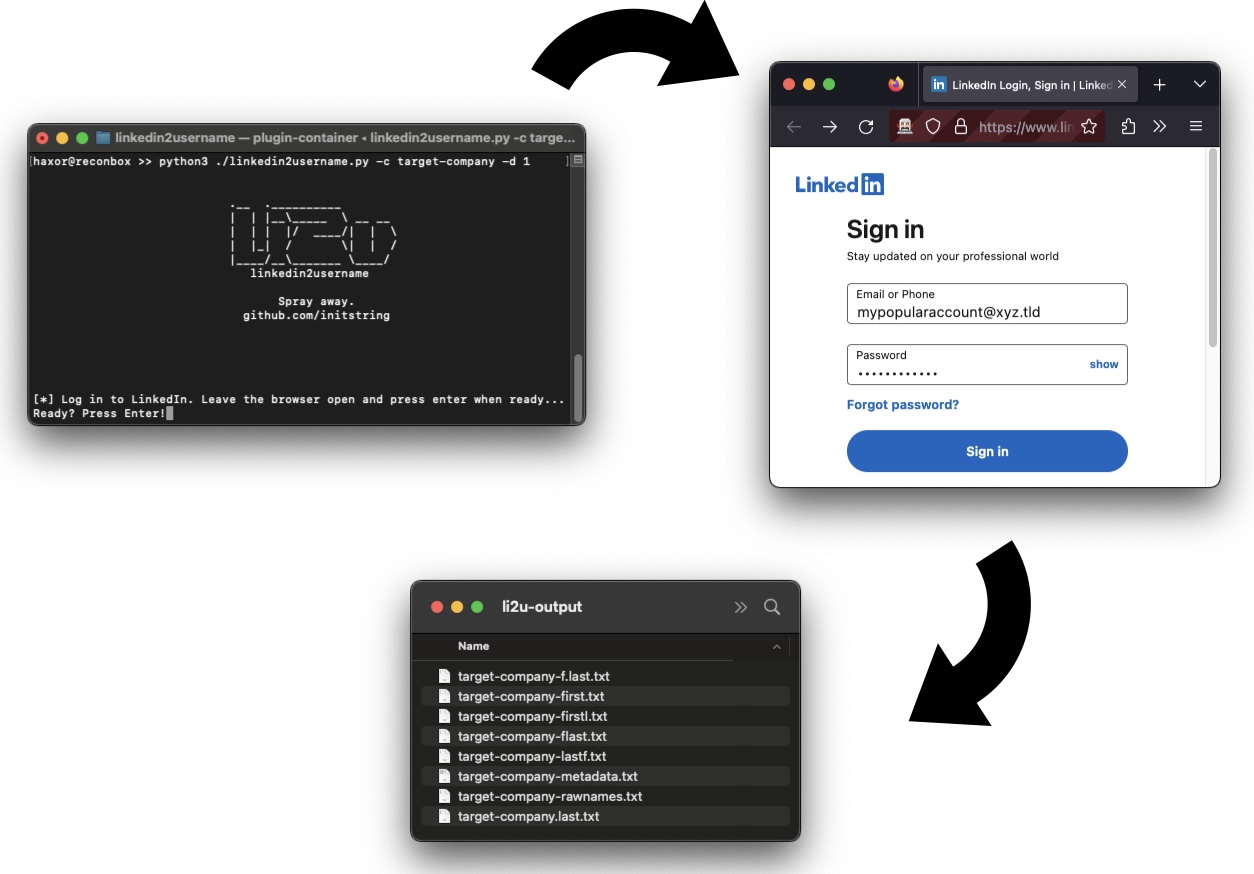
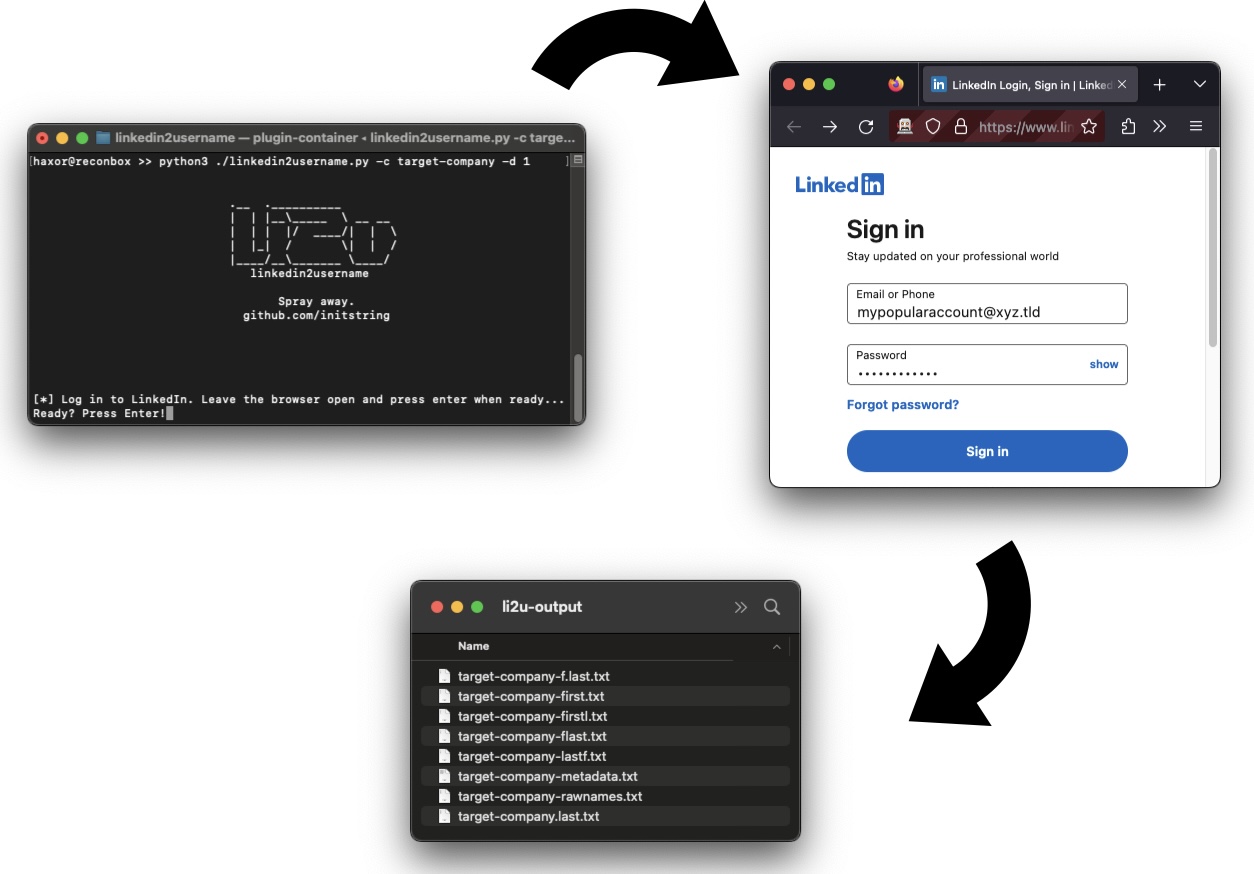
这是一个纯网页爬虫,无需 API 密钥。您使用有效的 LinkedIn 用户名和密码登录,它将为您指定的公司的所有员工生成多个可能的用户名格式列表。
以下是您将获得的内容:
可选地,该工具会将 @domain.xxx 附加到用户名后面。
如果您的 LinkedIn 账户受到速率限制甚至被封禁,请不要怪我。这是一个安全研究工具——只有在阅读代码并完全理解其作用后才能使用。
自该工具编写以来,我未听说过任何账户被封禁的情况,但当达到“商业搜索限制”时,偶尔会触发速率限制。到目前为止,这只是暂时的(按月计算)。
安装 uv,然后从仓库根目录运行:
uv sync
这会创建一个虚拟环境并自动安装所有依赖。使用以下命令运行工具:
uv run python linkedin2username.py -c targetco
您还需要在 Selenium 可以发现的典型路径中安装 Chrome、Chromium 或 Firefox。将临时生成一个 Web 浏览器来处理登录。
usage: linkedin2username.py [-h] -c COMPANY [-n DOMAIN] [-d DEPTH]
  [-s SLEEP] [-x PROXY] [-k KEYWORDS] [-g] [-o OUTPUT]

OSINT tool to generate lists of probable usernames from a given company's LinkedIn page.
This tool may break when LinkedIn changes their site.
Please open issues on GitHub to report any inconsistencies.

optional arguments:
  -h, --help            show this help message and exit
  -c COMPANY, --company COMPANY
                        Company name exactly as typed in the company linkedin profile page URL.
  -n DOMAIN, --domain DOMAIN
                        Append a domain name to username output.
                        [example: "-n targetco.com" would output [email protected]]
  -d DEPTH, --depth DEPTH
                        Search depth (how many loops of 25). If unset, will try to grab them
                        all.
  -s SLEEP, --sleep SLEEP
                        Seconds to sleep between search loops. Defaults to 0.
  -x PROXY, --proxy PROXY
                        Proxy server to use. WARNING: WILL DISABLE SSL VERIFICATION.
                        [example: "-p https://localhost:8080"]
  -k KEYWORDS, --keywords KEYWORDS
                        Filter results by a a list of command separated keywords.
                        Will do a separate loop for each keyword,
                        potentially bypassing the 1,000 record limit.
                        [example: "-k 'sales,human resources,information technology']
  -g, --geoblast        Attempts to bypass the 1,000 record search limit by running
                        multiple searches split across geographic regions.
  -o OUTPUT, --output OUTPUT
                        Output Directory, defaults to li2u-output
您需要向工具提供 LinkedIn 的公司名称。您可以通过查看公司页面的 URL 来找到它。它应该类似于 https://linkedin.com/company/targetco。它可能并不像公司的准确名称那么简单。
以下是一个拉取 targetco 所有员工的示例:
$ python linkedin2username.py -c targetco
以下是一个拉取较短列表并将域名 @targetco.com 附加到其上的示例:
$ python linkedin2username.py -c targetco -d 5 -n 'targetco.com'
使用拥有大量人脉的账户,否则您将获得糟糕的结果。在目标公司添加一些联系人应该会有所帮助——此工具可以处理到三度人脉。请注意,LinkedIn 会将搜索结果限制为最多 1000 名员工。您可以使用 '--geoblast' 或 '--keywords' 功能来绕过此限制。查看下面的帮助以获取更多详细信息。
当 LinkedIn 发生变化时,工具可能会失效。这里使用的 API 没有文档记录,可能需要一些调试才能使其再次工作。如果您发现异常,请提交问题。
您可以通过以下方式验证 Selenium 在您机器上是否正常工作:
$ python3

from selenium import webdriver
driver = webdriver.Firefox() # or webdriver.Chrome()
driver.get("https://linkedin.com/login")
您可以尝试使用 --proxy 标志通过 Burp 检查流量。目前,它没有检查 Selenium 浏览器的登录,因为您可以看到那里正在发生什么。
这是一个安全研究工具。仅在获得网络所有者明确许可的情况下使用。