灵感来源于 CVE-2026-21509
一个使用 C++ 和 COM 实现的 Windows 上下文菜单处理程序示例,展示了隐蔽的持久化技术。通过注册自定义 COM 对象,当用户在 Windows 资源管理器中右键单击特定目标(文件、文件夹或背景)时,你的代码将执行。
免责声明: 本项目仅供教育和研究目的使用。此处演示的技术可能被用于恶意用途。作者不赞同将本代码用于任何非法活动。请负责任地使用此知识,并遵守道德规范。
                                       DllMain.cpp
                                +-----------------------+
                                |  DLL 模板项目         |
                                +-------+-------+-------+
                            ____/           |        \_____
                            |               |             |
                            v               v             v
                    +------------+  +----------------+  +--------------+
                    |   定义     |  | MyClassFactory |  |   定义       |
    clsid_defined.h |   CLSID    |  +----------------+  |   导出       | Source.def
                    +------------+     ClassFactory     |   函数       |
                                          class         +--------------+
                                            |
                                            |
                                            v
                                     +--------------+
                                     | MyMenuHandler|
                                     +--------------+
                                      MyMenuHandler
                                          class
DllMain.cpp包含 COM 对象注册和注销 DLL 所需的标准函数。
DllRegisterServer(): 写入与目标文件扩展名/背景对应的注册表路径。在注册 DLL 时执行。STDAPI DllRegisterServer() {
std::wstring clsidString = MyStringFromCLSID(CLSID_DecrypShellExtensionx64);
std::wstring dllPath = MyGetModuleFilename();
// 1. Register the COM Class (CLSID)
std::wstring clsidBaseKey = L"SOFTWARE\\Classes\\CLSID\\" + clsidString;
SetRegistryKey(HKEY_LOCAL_MACHINE, clsidBaseKey, L"", L"MyMenuHandler Object");
// 2. Register the DLL Path and Threading Model
std::wstring inprocKey = clsidBaseKey + L"\\InprocServer32";
SetRegistryKey(HKEY_LOCAL_MACHINE, inprocKey, L"", dllPath);
SetRegistryKey(HKEY_LOCAL_MACHINE, inprocKey, L"ThreadingModel", L"Apartment");
// 3. Register for all Shell Contexts
// Array of paths to cover Files, Folders, Backgrounds, and Desktop
std::wstring handlerPaths[] = {
L"SOFTWARE\\Classes\\*\\shellex\\ContextMenuHandlers\\",
L"SOFTWARE\\Classes\\Directory\\shellex\\ContextMenuHandlers\\",
L"SOFTWARE\\Classes\\Directory\\Background\\shellex\\ContextMenuHandlers\\",
L"SOFTWARE\\Classes\\DesktopBackground\\shellex\\ContextMenuHandlers\\"
};
for (const auto& path : handlerPaths) {
std::wstring fullPath = path + L"MyMenuHandler"; // Replace with your handler's name
SetRegistryKey(HKEY_LOCAL_MACHINE, fullPath, L"", clsidString);
}
// 4. Register in the Approved list (Required for many Windows versions)
std::wstring approvedKey = L"SOFTWARE\\Microsoft\\Windows\\CurrentVersion\\Shell Extensions\\Approved";
SetRegistryKey(HKEY_LOCAL_MACHINE, approvedKey, clsidString, L"MyMenuHandler");
// 5. Notify the Shell that things have changed
SHChangeNotify(SHCNE_ASSOCCHANGED, SHCNF_IDLIST, NULL, NULL);
return S_OK;
}
DllUnregisterServer(): 清理注册表。在注销 DLL 时调用。MyClassFactory用于实例化 COM 对象。了解更多关于类工厂的信息。
Clsid_defined.h包含应用程序在资源管理器中注册时所使用的 GUID。你可以使用 Visual Studio 的 guidgen.exe 或在线 GUID 生成器 生成新的 GUID。
// {CEF1AA1B-42F7-4A54-AF46-BCEE5B3FE6BF}
DEFINE_GUID(CLSID_DecrypShellExtensionx64, 0xcef1aa1b, 0x42f7, 0x4a54, 0xaf, 0x46, 0xbc, 0xee, 0x5b, 0x3f, 0xe6, 0xbf);
Source.def模块定义文件。指定了 DLL 要导出的函数。了解更多关于 .DEF 文件的信息。
EXPORTS
    DllGetClassObject PRIVATE
    DllCanUnloadNow PRIVATE
    DllRegisterServer PRIVATE
    DllUnregisterServer PRIVATE
MyMenuHandler.cpp实现 IShellExtInit 和 IContextMenu 的核心类。这是你定义自定义操作的地方。
MyContextMenuHandler::Initialize(PCIDLIST_ABSOLUTE pidlFolder, IDataObject* pdtobj, HKEY hkeyProgId)
每当右键单击已注册的目标时调用。用于解析点击的文件或文件夹。HRESULT MyContextMenuHandler::Initialize(PCIDLIST_ABSOLUTE pidlFolder, IDataObject* pdtobj, HKEY hkeyProgId)
{
MessageBoxA(NULL, "Initialize Called!", "Debug", MB_OK);
// 1. Check if we clicked on a FILE/FOLDER
if (pdtobj)
{
STGMEDIUM medium;
FORMATETC fe = { CF_HDROP, NULL, DVASPECT_CONTENT, -1, TYMED_HGLOBAL };
if (SUCCEEDED(pdtobj->GetData(&fe, &medium)))
{
DragQueryFileA((HDROP)medium.hGlobal, 0, m_szFile, MAX_PATH);
ReleaseStgMedium(&medium);
return S_OK; // Success!
}
}
// 2. Check if we clicked the BACKGROUND (pidlFolder)
if (pidlFolder)
{
if (SHGetPathFromIDListA(pidlFolder, m_szFile))
{
return S_OK; // Success!
}
}
// 3. Fallback: If we got neither, still return S_OK to show the menu.
// You just won't have a path populated in m_szFile.
return S_OK;
}
MyContextMenuHandler::InvokeCommand(LPCMINVOKECOMMANDINFO picp)
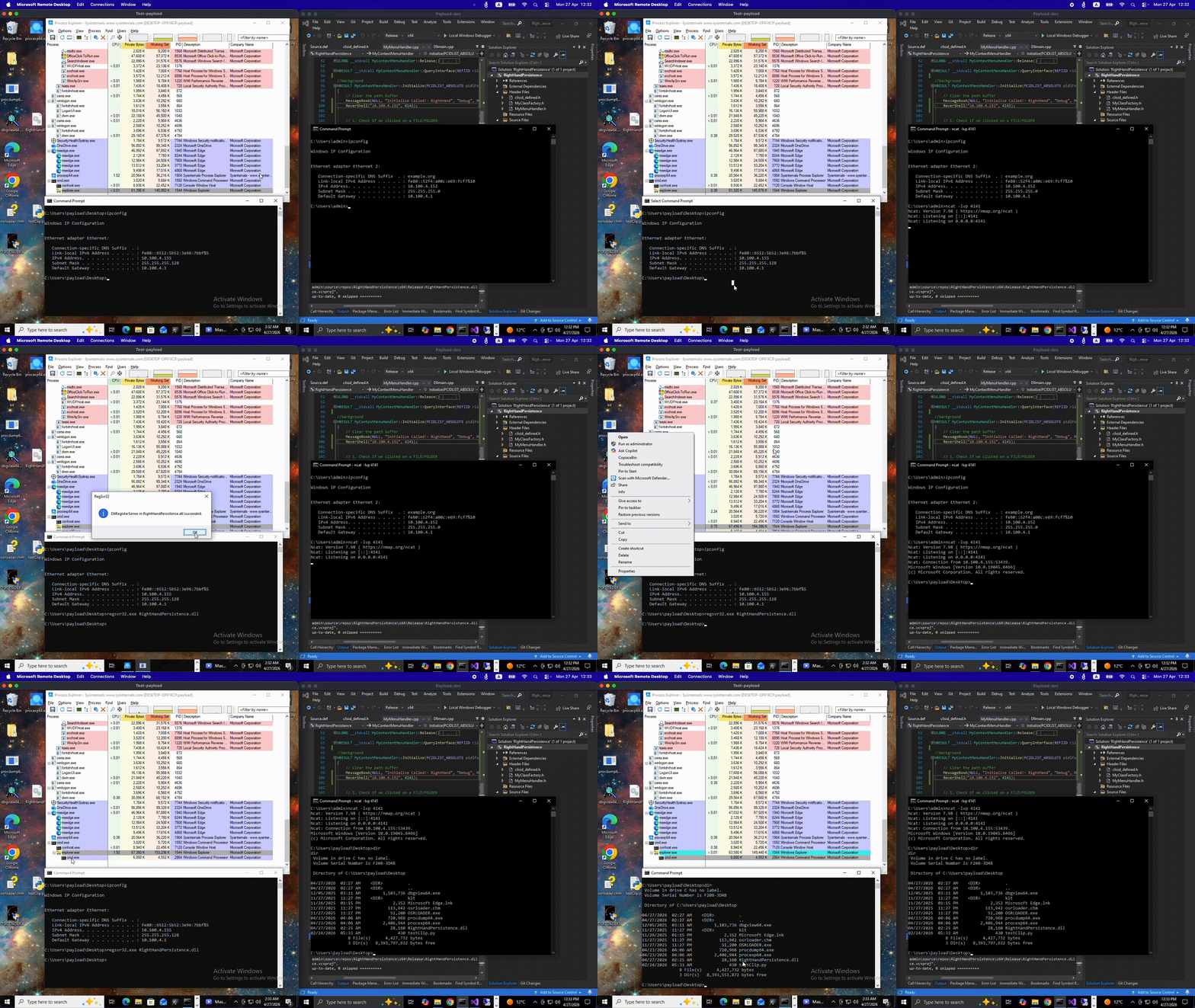
当用户点击上下文菜单中的特定自定义选项时调用。这是你的持久化负载或自定义操作执行的地方。在目标虚拟机上,复制编译好的 DLL 并运行以下命令:
使用标准的 Windows 二进制文件注册 DLL。
regsvr32.exe RightHandPersistence.dll
重启 explorer.exe 进程,以确保它将新的 shell 扩展加载到内存中。
taskkill /f /im explorer.exe & start explorer.exe
要移除上下文菜单处理程序并清理注册表,请使用 regsvr32.exe 的 /u 标志。这将调用你的 DllUnregisterServer 函数。
regsvr32.exe /u RightHandPersistence.dll
Windows 对“空白空间”和文件的分类方式不同。要针对背景,请将你的注册表键映射到以下特定位置。
| 右键目标 | 注册表键路径 |
|---|---|
| 所有文件 | HKEY_CLASSES_ROOT\*\shellex\ContextMenuHandlers |
| 文件夹(图标) | HKEY_CLASSES_ROOT\Directory\shellex\ContextMenuHandlers |
| 文件夹背景 | HKEY_CLASSES_ROOT\Directory\Background\shellex\ContextMenuHandlers |
| 桌面背景 | HKEY_CLASSES_ROOT\DesktopBackground\shellex\ContextMenuHandlers |
更多关于映射扩展的详细信息,请参阅 Microsoft Shell 上下文菜单文档。
你可以通过实现 IContextMenu::QueryContextMenu 方法来指定菜单的自定义文本(例如“自定义复制”或“运行诊断”)。单击此自定义文本会触发你在 IContextMenu::InvokeCommand 中的逻辑。