目前已有更多现代化方案可供您和您的项目使用。如果您希望接手该项目的维护工作,请随时与我联系。您可以在我的个人主页上找到我的联系方式。
.
.
.
.
.
.
Hawkeye scanner-cli 是一个项目安全、漏洞及通用风险突出工具。它旨在集成到您的预提交钩子和流水线中。
Hawkeye scanner-cli 假定您的目录结构将工具链的文件放在顶层。大致而言,它遵循以下原则:
package.jsonGemfilerequirements.txtcomposer.lockbuild(gradle)或 target(maven)文件夹,并包含 .java 和 .jar 文件build(gradle)或 target(maven)文件夹,并包含 .kt 和 .jar 文件target(使用 sbt-native-packager 或 sbt-assembly 插件的 sbt)文件夹,并包含 .scala 和 .jar 文件。请查看此仓库获取运行演示。Cargo.toml这并非详尽无遗,有时工具需要额外的文件才能存在。要了解模块如何决定是否能处理项目,请查看工作原理部分和 modules 文件夹。
Docker 镜像毫无疑问是使用扫描器最简单的方式。请注意,您的项目根目录(例如 $PWD)需要挂载到 /target。
docker run --rm -v $PWD:/target hawkeyesec/scanner-cli:latest
如果您使用扫描器生成 JSON(通过 -j 和 --json CLI 标志以及 .hawkeyerc 中的 json 设置),请确保通过 docker run -u $(id -u):$(id -g) 使用正确的 UID 和 GID。否则可能会导致无法删除的文件,例如在 Jenkins 中运行时。
Docker 构建也是在 CI 流水线中运行扫描器的推荐方式。以下是在 GoCD 中对一个项目运行 Hawkeye 的示例:
<pipeline name="security-scan">
  <stage name="Hawkeye" cleanWorkingDir="true">
    <jobs>
      <job name="scan">
        <tasks>
          <exec command="docker">
            <arg>pull</arg>
            <arg>hawkeyesec/scanner-cli</arg>
            <runif status="passed" />
          </exec>
          <exec command="bash">
            <arg>-c</arg>
            <arg>docker run --rm -v $PWD:/target hawkeyesec/scanner-cli:latest</arg>
            <runif status="passed" />
          </exec>
        </tasks>
      </job>
    </jobs>
  </stage>
</pipeline>
您可以在 Node.js 项目中安装并运行 hawkeye:
npm install --save-dev @hawkeyesec/scanner-cli
npx hawkeye scan
此方法推荐用于不需要其他工具链(例如 python、ruby)的 Node.js 项目。
使用此方法时,还建议在 git 预提交钩子中调用扫描器(例如通过 pre-commit 包),以便在发现问题时阻止提交。
您可以通过项目根目录下的 .hawkeyerc 和 .hawkeyeignore 文件配置扫描器。
.hawkeyerc 文件是一个 JSON 文件,允许您配置……
{
    "all": true|false,
    "staged": true|false,
    "modules": ["files-ccnumber", "java-owasp", "java-find-secbugs"],
    "sumo": "http://your.sumologic.foobar/collector",
    "http": "http://your.logger.foobar/collector",
    "json": "log/results.json",
    "failOn": "low"|"medium"|"high"|"critical",
    "showCode": true|false
}
.hawkeyeignore 文件是一个正则表达式集合,用于匹配要从扫描中排除的路径和模块错误码,相当于使用 --exclude 标志。以 # 开头的行被视为注释。
请注意,正则表达式中保留的特殊字符(-[]{}()*+?.,^$|#\s)在用作字面量时需要转义!
另请注意,模块错误码通常不显示,因为它们对用户而言并非主要相关。如果您想排除某个误报,可以使用 --show-code 标志或 .hawkeyerc 中的 showCode 属性来显示模块错误码。
^test/

# this is a comment

^README.md
使用 hawkeye modules 列出可用的模块及其状态。
> npx hawkeye modules
[info] Version: v1.4.0
[info] Module Status
[info] Enabled:   files-ccnumber
[info]            Scans for suspicious file contents that are likely to contain credit card numbers
[info] Enabled:   files-contents
[info]            Scans for suspicious file contents that are likely to contain secrets
[info] Disabled:  files-entropy
[info]            Scans files for strings with high entropy that are likely to contain passwords
[info] Enabled:   files-secrets
[info]            Scans for suspicious filenames that are likely to contain secrets
[info] Enabled:   java-find-secbugs
[info]            Finds common security issues in Java code with findsecbugs
[info] Enabled:   java-owasp
[info]            Scans Java projects for gradle/maven dependencies with known vulnerabilities with the OWASP dependency checker
[info] Enabled:   node-npmaudit
[info]            Checks node projects for dependencies with known vulnerabilities
[info] Enabled:   node-npmoutdated
[info]            Checks node projects for outdated npm modules
[info] Enabled:   node-yarnaudit
[info]            Checks yarn projects for dependencies with known vulnerabilities
[info] Enabled:   node-yarnoutdated
[info]            Checks node projects for outdated yarn modules
[info] Enabled:   php-security-checker
[info]            Checks whether the composer.lock contains dependencies with known vulnerabilities using security-checker
[info] Enabled:   python-bandit
[info]            Scans for common security issues in Python code with bandit.
[info] Enabled:   python-piprot
[info]            Scans python dependencies for out of date packages
[info] Enabled:   python-safety
[info]            Checks python dependencies for known security vulnerabilities with the safety tool.
[info] Enabled:   ruby-brakeman
[info]            Statically analyzes Rails code for security issues with Brakeman.
[info] Enabled:   ruby-bundler-scan
[info]            Scan for Ruby gems with known vulnerabilities using bundler
使用 hawkeye scan 启动扫描:
> npx hawkeye scan --help
[info] Version: v1.3.0
Usage: hawkeye-scan [options]

Options:
  -a, --all                                       Scan all files, regardless if a git repo is found. Defaults to tracked files in git repositories.
  -t, --target [/path/to/project]                 The location to scan. Defaults to $PWD.
  -f, --fail-on [low|medium|high|critical]        Set the level at which hawkeye returns non-zero status codes. Defaults to low.
  -m, --module [module name]                      Run specific module. Defaults to all applicable modules.
  -e, --exclude [pattern]                         Specify one or more exclusion patterns (eg. test/*). Can be specified multiple times.
  -j, --json [/path/to/file.json]                 Write findings to file.
  -s, --sumo [https://sumologic-http-connector]   Write findings to SumoLogic.
  -H, --http [https://your-site.com/api/results]  Write findings to a given url.
  --show-code                                     Shows the code the module uses for reporting, useful for ignoring certain false positives
  -g, --staged                                    Scan only git-staged files.
  -h, --help                                      output usage information
scanner-cli 响应以下退出码:
如果您希望重定向控制台日志输出,推荐的方法是挂接到 stdout。在此示例中,我们同时使用了 JSON 和 stdout 输出:
docker run --rm -v $PWD:/target hawkeyesec/scanner-cli:latest -j hawkeye-results.json -f critical 2>&1 | tee hawkeye-results.txt
默认情况下,扫描器以表格形式将结果输出到控制台。
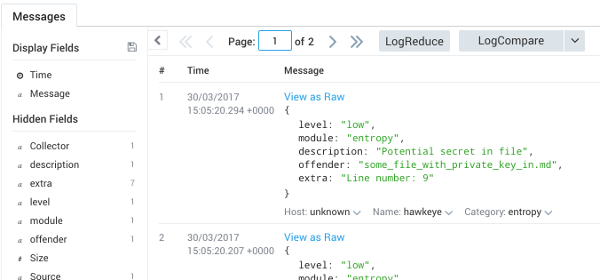
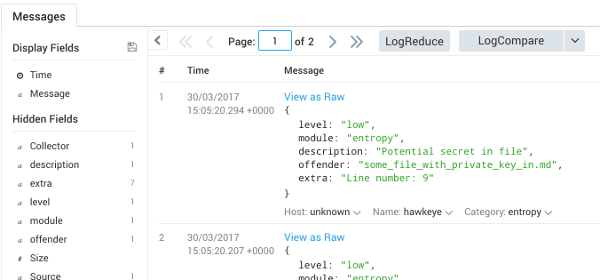
结果可以发送到您选择的 SumoLogic 收集器。在此示例中,我们有一个带有单个 HTTP 源的收集器。
hawkeye scan --sumo https://collectors.us2.sumologic.com/receiver/v1/http/your-http-collector-url
在 SumoLogic 中,搜索 _collector="hawkeye" | json auto:
与 SumoLogic 示例类似,扫描器可以将结果发送到任何接受 POST 消息的 HTTP 端点。
hawkeye scan --http http://your.logging.foobar/endpoint
结果将使用 User-Agent: hawkeye 发送。与控制台输出类似,每个发现将 POST 以下 JSON:
{
  "module": "files-contents",
  "level": "critical",
  "offender": "testfile3.yml",
  "description": "Private key in file",
  "mitigation": "Check line number: 3"
}
Hawkeye 被设计为可通过添加模块和输出器进行扩展。
模块本质上是实现自身逻辑或封装第三方工具并标准化输出的小段代码。它们仅在满足所需条件时运行。例如:npm outdated 模块仅当在扫描目标中检测到 package.json 时才会运行——因此,您无需告诉 Hawkeye 您正在扫描什么类型的项目。