<h1 align="center">Deep-Live-Cam 2.1.6</h1>
<p align="center">
只需单击一次且仅需一张图像,即可实现实时换脸和视频深度伪造。
</p>
<p align="center">
<a href="https://trendshift.io/repositories/11395" target="_blank"><img src="https://trendshift.io/api/badge/repositories/11395" alt="hacksider%2FDeep-Live-Cam | Trendshift" style="width: 250px; height: 55px;" width="250" height="55"/></a>
</p>
<p align="center">
<img src="https://raw.githubusercontent.com/hacksider/deep-live-cam/HEAD/media/demo.gif" alt="演示 GIF" width="800">
</p>
## 免责声明
这款深度伪造软件旨在成为 AI 生成媒体行业的生产力工具。它可以帮助艺术家为自定义角色制作动画、创作引人入胜的内容,甚至使用模型进行服装设计。
我们意识到其可能被用于不道德用途,并致力于采取预防措施。内置检查可防止程序处理不当媒体(裸体、血腥内容、战争影像等敏感材料)。我们将继续负责任地开发此项目,遵守法律和道德规范。如有法律要求,我们可能会关闭项目或添加水印。
- 道德使用:用户应以负责任且合法的方式使用本软件。如果使用真实人物的面部,请获得其同意,并在在线分享时明确标注任何输出为深度伪造。
- 内容限制:软件包含内置检查,以防止处理不当媒体,如裸体、血腥内容或敏感材料。
- 法律合规:我们遵守所有相关法律和道德准则。如有法律要求,我们可能会关闭项目或为输出添加水印。
- 用户责任:我们不对最终用户的行为负责。用户必须确保其对软件的使用符合道德标准和法律要求。
使用本软件即表示您同意这些条款,并承诺以尊重他人权利和尊严的方式使用它。
用户应以负责任且合法的方式使用本软件。如果使用真实人物的面部,请获得其同意,并在在线分享时明确标注任何输出为深度伪造。我们不对最终用户的行为负责。
## 预构建的 Deep-Live-Cam 2.8 Ultimate!
<p align="center">
<a href="https://deeplivecam.net/index.php/quickstart">
<img src="https://assets.kitploit.com/production/public/readmes/6640/b6806ad2b3ee5f222bcac66032bbbba2ce2c84f5014ec76409dcc44acbbd5b9d/d8fab0c6e55134d0aeba1b9dd865b7e1689cb3acb17059e45fbcc3e53bb5bf19-display-v1.webp" width="100%" alt="Lite / Ultimate 下载横幅">
</a>
</p>
<p align="center">
<a href="https://deeplivecam.net/index.php/plans/nvidia-gpu?plan_id=0&group_id=1">
<img src="https://assets.kitploit.com/production/public/readmes/6640/8cbe6be38dd1bb7522f64252ee8c42b88e560501e8e087dc3d1a04fd0cc63c1c/371e319994bd17b616cfd940b971a7dc2f0b214bd394a0dfca5e37b8844cb54b-display-v1.webp" width="40" alt="Windows">
</a>
<a href="https://deeplivecam.net/index.php/plans/nvidia-gpu?plan_id=0&group_id=2">
<img src="https://assets.kitploit.com/production/public/readmes/6640/44cbb6b2b28f1f91a981a01dab8a16391f8789042afb9df6194c0b4bf0ae7dea/39db8e9ae965d382d53cd7bf766568a7b8186ef910fbf54cd0b663039089f665-display-v1.webp" width="34" alt="Mac Silicon">
</a>
<a href="https://deeplivecam.net/index.php/plans/nvidia-gpu?plan_id=0&group_id=3">
<img src="https://assets.kitploit.com/production/public/readmes/6640/0eddbcacd5062065cdabf0623d5a6f693ae7676dc1445b0a5c4b5a0196e70a8c/ce52644ad2415ab82f4c0259c94996ea5d9283602ed23ac0b8406a81b8ed839f-display-v1.webp" width="40" alt="CPU">
</a>
</p>
<p align="center">
<strong>Windows • Mac Silicon • CPU • NVIDIA • AMD</strong>
</p>
<p align="center">
针对您的硬件优化的构建版本。
</p>
<p align="center">
<a href="https://deeplivecam.net/index.php/quickstart">
<img src="https://assets.kitploit.com/production/public/readmes/6640/cd5bef4c32ac43c8b8e0824e57f91eb06fee076e43b08a9574ea95dd608129ef.png" width="280" alt="下载">
</a>
</p>
> **Ultimate** 包含 **30+ 项独家功能**、性能优化和**优先支持**。我们只有一个官方网站,即 https://deeplivecam.net 。请谨慎选择从该网站和此 GitHub 仓库之外的其他地方下载此应用程序的其他版本。
如果您希望以最快的方式完成设置,**无需手动安装**、预配置依赖项,并为每个受支持的平台提供优化构建版本,那么这将是完美之选。
## TLDR;只需 3 次点击即可实现实时 Deepfake
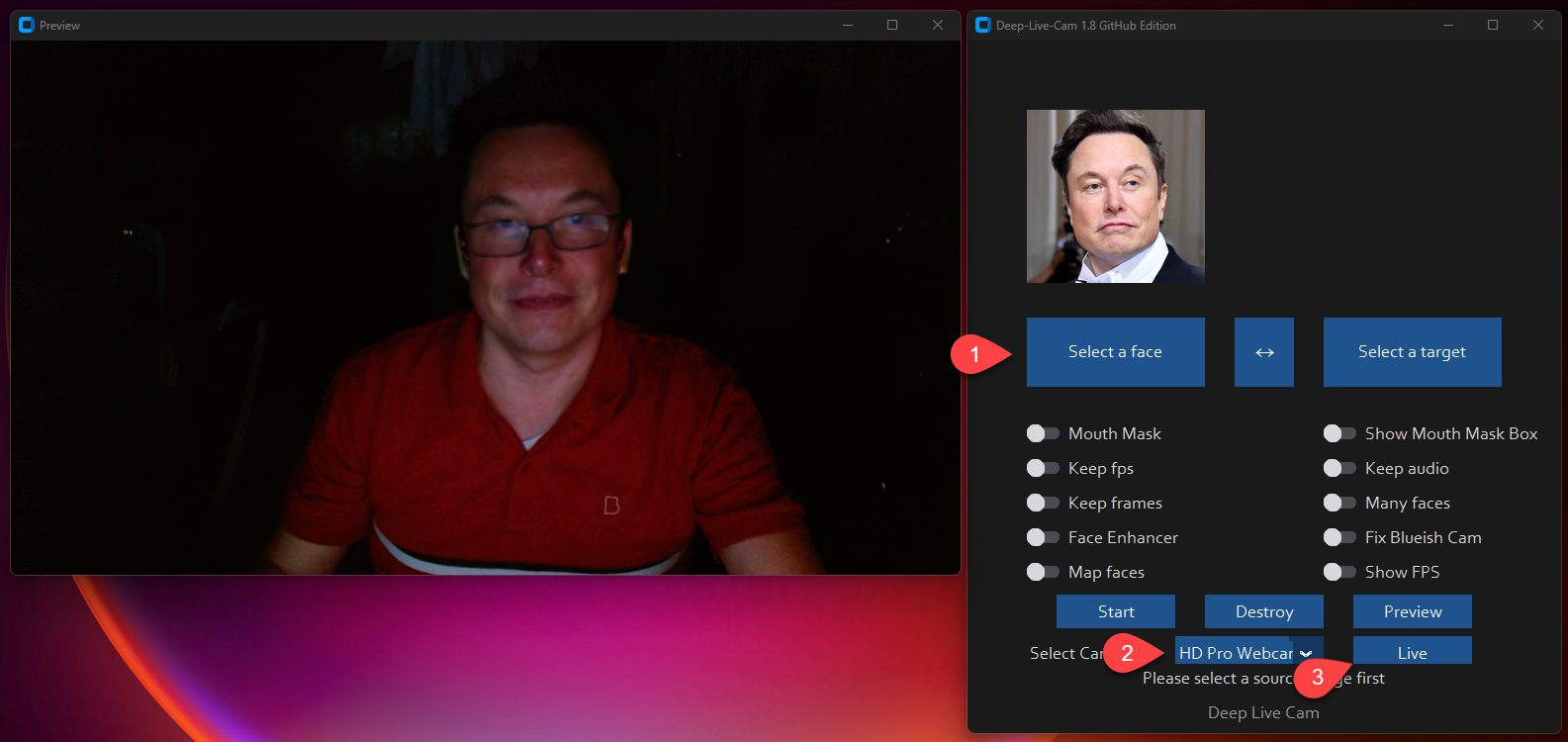
1. 选择一张人脸
2. 选择要使用的摄像头
3. 按下 live!
## 功能与用途 - 一切皆为实时
### 嘴部遮罩
**使用嘴部遮罩保留你原本的嘴部,以实现准确的动作**
<p align="center">
<img src="https://assets.kitploit.com/production/public/readmes/6640/ac57219d7b64849dcee23eff5782d7420db8eb791e953992d7ffbb1a184d563a.gif" alt="resizable-gif">
</p>
### 人脸映射
**在多个对象上同时使用不同的人脸**
<p align="center">
<img src="https://raw.githubusercontent.com/hacksider/deep-live-cam/HEAD/media/streamers.gif" alt="face_mapping_source">
</p>
### 你的电影,你的脸
**实时用任意人脸观看电影**
<p align="center">
<img src="https://raw.githubusercontent.com/hacksider/deep-live-cam/HEAD/media/movie.gif" alt="movie">
</p>
### 直播表演
**进行直播表演和演出**
<p align="center">
<img src="https://assets.kitploit.com/production/public/readmes/6640/67e6154c2836c1f9575e16f1516c46952ef0ed90ef8b332a72b8a7d1566b6a3e.gif" alt="show">
</p>
### 梗图
**创作你迄今为止最具病毒传播力的梗图**
<p align="center">
<img src="https://assets.kitploit.com/production/public/readmes/6640/f2e9a17dbc835a39a9318839866e688fd957757223e95c4af517a223990f538c.gif" alt="show" width="450">
<br>
<sub>使用 Deep-Live-Cam 中的 Many Faces 功能创建</sub>
</p>
### Omegle
**在 Omegle 上给人们带来惊喜**
<p align="center">
<video src="https://github.com/user-attachments/assets/2e9b9b82-fa04-4b70-9f56-b1f68e7672d0" width="450" controls></video>
</p>
## 安装(手动)
**请注意,安装需要技术技能,不适合初学者。请考虑下载快速启动版本。**
<details>
<summary>点击查看流程</summary>
### 安装
这种方式更有可能在你的计算机上运行成功,但由于使用 CPU,速度会较慢。
**1. 设置你的平台**
- Python(推荐 3.14;支持 3.11-3.14)
- pip
- git
- [ffmpeg](https://www.youtube.com/watch?v=OlNWCpFdVMA) - ```iex (irm ffmpeg.tc.ht)```
- [Visual Studio 2022 运行时(Windows)](https://visualstudio.microsoft.com/visual-cpp-build-tools/)
**2. 克隆仓库**
```bash
git clone --depth 1 https://github.com/hacksider/Deep-Live-Cam.git
cd Deep-Live-Cam
```
**3. 下载模型**
1. [gfpgan-1024.onnx](https://huggingface.co/hacksider/deep-live-cam/resolve/main/gfpgan-1024.onnx)
2. [inswapper\_128\_fp16.onnx](https://huggingface.co/hacksider/deep-live-cam/resolve/main/inswapper_128_fp16.onnx)
将这些文件放入“**models**”文件夹中。
**4. 安装依赖项**
我们强烈建议使用 `venv` 以避免出现问题。
对于 Windows:
```bash
python -m venv venv
venv\Scripts\activate
pip install -r requirements.txt
```
对于 Linux:
```bash
# Ensure you use the installed Python 3.14
python3 -m venv venv
source venv/bin/activate
pip install -r requirements.txt
```
**适用于 macOS:**
Apple Silicon(M1 至 M5)需要特定设置:
```bash
# Install Python 3.14
brew install [email protected]
# Install tkinter package (required for the GUI)
brew install [email protected]
# Create and activate virtual environment with Python 3.14
python3.14 -m venv venv
source venv/bin/activate
# Install dependencies
pip install -r requirements.txt
```
** 如果出现问题,你需要重新安装虚拟环境 **
```bash
# Deactivate the virtual environment
rm -rf venv
# Reinstall the virtual environment
python -m venv venv
source venv/bin/activate
# install the dependencies again
pip install -r requirements.txt
# gfpgan and basicsrs issue fix
pip install git+https://github.com/xinntao/BasicSR.git@master
pip uninstall gfpgan -y
pip install git+https://github.com/TencentARC/GFPGAN.git@master
```
**运行:** 如果没有 GPU,可以使用 `python run.py` 运行 Deep-Live-Cam。请注意,首次执行时会下载模型(约 300MB)。
### GPU 加速
**CUDA 执行提供程序(Nvidia)**
1. 安装 [CUDA Toolkit 12.8.0](https://developer.nvidia.com/cuda-12-8-0-download-archive)
2. 安装 [适用于 CUDA 12.x 的 cuDNN v8.9.7](https://developer.nvidia.com/rdp/cudnn-archive)(onnxruntime-gpu 所需):
- 下载适用于 CUDA 12.x 的 cuDNN v8.9.7
- 确保 cuDNN 的 bin 目录已添加到系统 PATH 中
3. 安装依赖项:
```bash
pip install -U torch torchvision torchaudio --index-url https://download.pytorch.org/whl/cu128
pip uninstall onnxruntime onnxruntime-gpu
pip install onnxruntime-gpu==1.26.0
```
3. 用法:
```bash
python run.py --execution-provider cuda
```
**CoreML 执行提供程序(Apple Silicon)**
Apple Silicon(M1 至 M5)专用安装:
1. 确保你已使用 Python 3.14 完成上述 macOS 设置。
2. 无需额外的安装步骤——`requirements.txt` 会拉取官方
`onnxruntime` 构建,其 macOS wheel 已内置 CoreML 执行提供程序。
如果你之前安装过已停止维护的 `onnxruntime-silicon` 分支,
请先将其移除,因为它会遮蔽真正的软件包:
```bash
pip uninstall onnxruntime-silicon
pip install -r requirements.txt
```
3. 用法:
```bash
python3.14 run.py --execution-provider coreml
```
**macOS 重要说明:**
- 最低要求 Python 3.11(onnxruntime 已放弃 3.10);推荐使用 3.14
- 如果安装了多个 Python 版本,请始终使用 `python3.14` 命令,而不仅仅是 `python`
- 如果遇到 `_tkinter` 缺失的错误,请重新安装 tkinter 包:`brew reinstall [email protected]`
- 如果遇到模型加载错误,请检查模型是否位于正确的文件夹中
- 如果遇到与其他 Python 版本的冲突,请考虑卸载它们:
```bash
# List all installed Python versions
brew list | grep python
# Uninstall conflicting versions if needed
brew uninstall --ignore-dependencies [email protected]
# Keep only Python 3.14
brew cleanup
```
**CoreML 执行提供程序(Apple 旧版)**
1. 安装依赖:
```bash
pip uninstall onnxruntime onnxruntime-coreml
pip install onnxruntime-coreml==1.21.0
```
2. 用法:
```bash
python run.py --execution-provider coreml
```
**DirectML 执行提供程序(Windows)**
1. 安装依赖项:
```bash
pip uninstall onnxruntime onnxruntime-directml
pip install onnxruntime-directml==1.21.0
```
2. 用法:
```bash
python run.py --execution-provider dml
```
**OpenVINO™ 执行提供程序(Intel)**
1. 安装依赖项:
```bash
pip uninstall onnxruntime onnxruntime-openvino
pip install onnxruntime-openvino==1.21.0
```
**注意:** 高于 1.21.0 的 `onnxruntime-openvino` 必须与 `openvino` 一同安装,且两者版本必须一一对应。支持的版本配对如下:
| onnxruntime-openvino | OpenVINO |
| --- | --- |
| 1.24.1 | 2025.4.1 |
| 1.23.0 | 2025.3 |
| 1.22.0 | 2025.1 |
```bash
# Example: onnxruntime-openvino 1.24.1 pairs with OpenVINO 2025.4.1
pip install openvino==2025.4.1
pip install onnxruntime-openvino==1.24.1
```
有关完整的版本映射详情,请参阅 [OpenVINO Execution Provider 要求](https://onnxruntime.ai/docs/execution-providers/OpenVINO-ExecutionProvider.html#requirements)。
2. 用法:
```bash
python run.py --execution-provider openvino
```
</details>
## 使用方法
**1. 图像/视频模式**
- 执行 `python run.py`。
- 选择一张源人脸图像和一张目标图像/视频。
- 点击“Start”。
- 输出将保存在以目标视频命名的目录中。
**2. 摄像头模式**
- 执行 `python run.py`。
- 选择一张源人脸图像。
- 点击“Live”。
- 等待预览出现(10-30 秒)。
- 使用 OBS 等屏幕捕获工具进行推流。
- 要更换人脸,请选择一张新的源图像。
## 在此 huggingface 链接中下载所有模型
- [**在此处下载模型**](https://huggingface.co/hacksider/deep-live-cam/tree/main)
## 命令行参数(不再维护)
```
options:
-h, --help show this help message and exit
-s SOURCE_PATH, --source SOURCE_PATH select a source image
-t TARGET_PATH, --target TARGET_PATH select a target image or video
-o OUTPUT_PATH, --output OUTPUT_PATH select output file or directory
--frame-processor FRAME_PROCESSOR [FRAME_PROCESSOR ...] frame processors (choices: face_swapper, face_enhancer, ...)
--keep-fps keep original fps
--keep-audio keep original audio
--keep-frames keep temporary frames
--many-faces process every face
--map-faces map source target faces
--mouth-mask mask the mouth region
--video-encoder {libx264,libx265,libvpx-vp9} adjust output video encoder
--video-quality [0-51] adjust output video quality
--live-mirror the live camera display as you see it in the front-facing camera frame
--live-resizable the live camera frame is resizable
--max-memory MAX_MEMORY maximum amount of RAM in GB
--execution-provider {cpu} [{cpu} ...] available execution provider (choices: cpu, ...)
--execution-threads EXECUTION_THREADS number of execution threads
-v, --version show program's version number and exit
```
想要使用 CLI 模式?使用 -s/--source 参数即可让程序以 cli 模式运行。
## 媒体报道
- [**Ars Technica**](https://arstechnica.com/information-technology/2024/08/new-ai-tool-enables-real-time-face-swapping-on-webcams-raising-fraud-concerns/) - *“Deep-Live-Cam 走红,让任何人都能成为数字替身”*
- [**Yahoo!**](https://www.yahoo.com/tech/ok-viral-ai-live-stream-080041056.html) - *“好吧,这款爆火的 AI 直播软件真的很吓人”*
- [**CNN Brasil**](https://www.cnnbrasil.com.br/tecnologia/ia-consegue-clonar-rostos-na-webcam-entenda-funcionamento/) - *“AI 能在网络摄像头上克隆人脸;了解其工作原理”*
- [**Bloomberg Technoz**](https://www.bloombergtechnoz.com/detail-news/71032/kenalan-dengan-teknologi-deep-live-cam-bisa-jadi-alat-menipu) - *“认识 Deep Live Cam 技术,它可能被用作欺骗工具。”*
- [**TrendMicro**](https://www.trendmicro.com/vinfo/gb/security/news/cyber-attacks/ai-vs-ai-deepfakes-and-ekyc) - *“AI 对抗 AI:深度伪造与 eKYC”*
- [**PetaPixel**](https://petapixel.com/2024/08/14/deep-live-cam-deepfake-ai-tool-lets-you-become-anyone-in-a-video-call-with-single-photo-mark-zuckerberg-jd-vance-elon-musk/) - *“深度伪造 AI 工具让你仅凭一张照片就能在视频通话中变成任何人”*
- [**SomeOrdinaryGamers**](https://www.youtube.com/watch?time_continue=1074&v=py4Tc-Y8BcY) - *“太疯狂了,天哪。这真是太诡异了,兄弟……这太离谱了,兄弟”*
- [**IShowSpeed**](https://www.youtube.com/live/mFsCe7AIxq8?feature=shared&t=2686) - *“好吧看好看好,现在看聊天室,我们可以变成任何我们想变成的脸,聊天室”*
- [**TechLinked (Linus Tech Tips)**](https://www.youtube.com/watch?v=wnCghLjqv3s&t=551s) - *“它们在匹配姿势、表情甚至光照方面做得相当不错”*
- [**IShowSpeed**](https://youtu.be/JbUPRmXRUtE?t=3964) - *“什么鬼!为什么我看起来像 Vinny Jr?我看起来和 Vinny Jr 一模一样!?不,这太疯狂了!兄弟,这太疯狂了!”*
## 致谢
- [ffmpeg](https://ffmpeg.org/):让视频相关操作变得简单
- [Henry](https://github.com/henryruhs):本仓库的主要贡献者之一
- [deepinsight](https://github.com/deepinsight):感谢他们的 [insightface](https://github.com/deepinsight/insightface) 项目,提供了制作精良的库和模型。请注意,[该模型仅用于非商业研究目的](https://github.com/deepinsight/insightface?tab=readme-ov-file#license)。
- [havok2-htwo](https://github.com/havok2-htwo):分享网络摄像头相关代码
- [GosuDRM](https://github.com/GosuDRM):提供 roop 的开源版本
- [pereiraroland26](https://github.com/pereiraroland26):支持多张人脸
- [vic4key](https://github.com/vic4key):对本项目的支持/贡献
- [kier007](https://github.com/kier007):改进用户体验
- [qitianai](https://github.com/qitianai):多语言支持
- [laurigates](https://github.com/laurigates):解耦各部分,让一切更快!
- [maxwbuckley](https://github.com/maxwbuckley):努力为 mac 进行优化!
- 以及本项目所用库背后的[所有开发者](https://github.com/hacksider/Deep-Live-Cam/graphs/contributors)。
- 脚注:请知悉,代码的原始作者是 [s0md3v](https://github.com/s0md3v/roop)
- 所有通过给仓库加星让本项目走红的优秀用户 ❤️
[](https://github.com/hacksider/Deep-Live-Cam/stargazers)
## 贡献
## 星标冲向月球 🚀
<a href="https://star-history.com/#hacksider/deep-live-cam&Date">
<picture>
<source media="(prefers-color-scheme: dark)" srcset="https://api.star-history.com/svg?repos=hacksider/deep-live-cam&type=Date&theme=dark" />
<source media="(prefers-color-scheme: light)" srcset="https://api.star-history.com/svg?repos=hacksider/deep-live-cam&type=Date" />
<img alt="Star 历史图表" src="https://api.star-history.com/svg?repos=hacksider/deep-live-cam&type=Date" />
</picture>
</a>