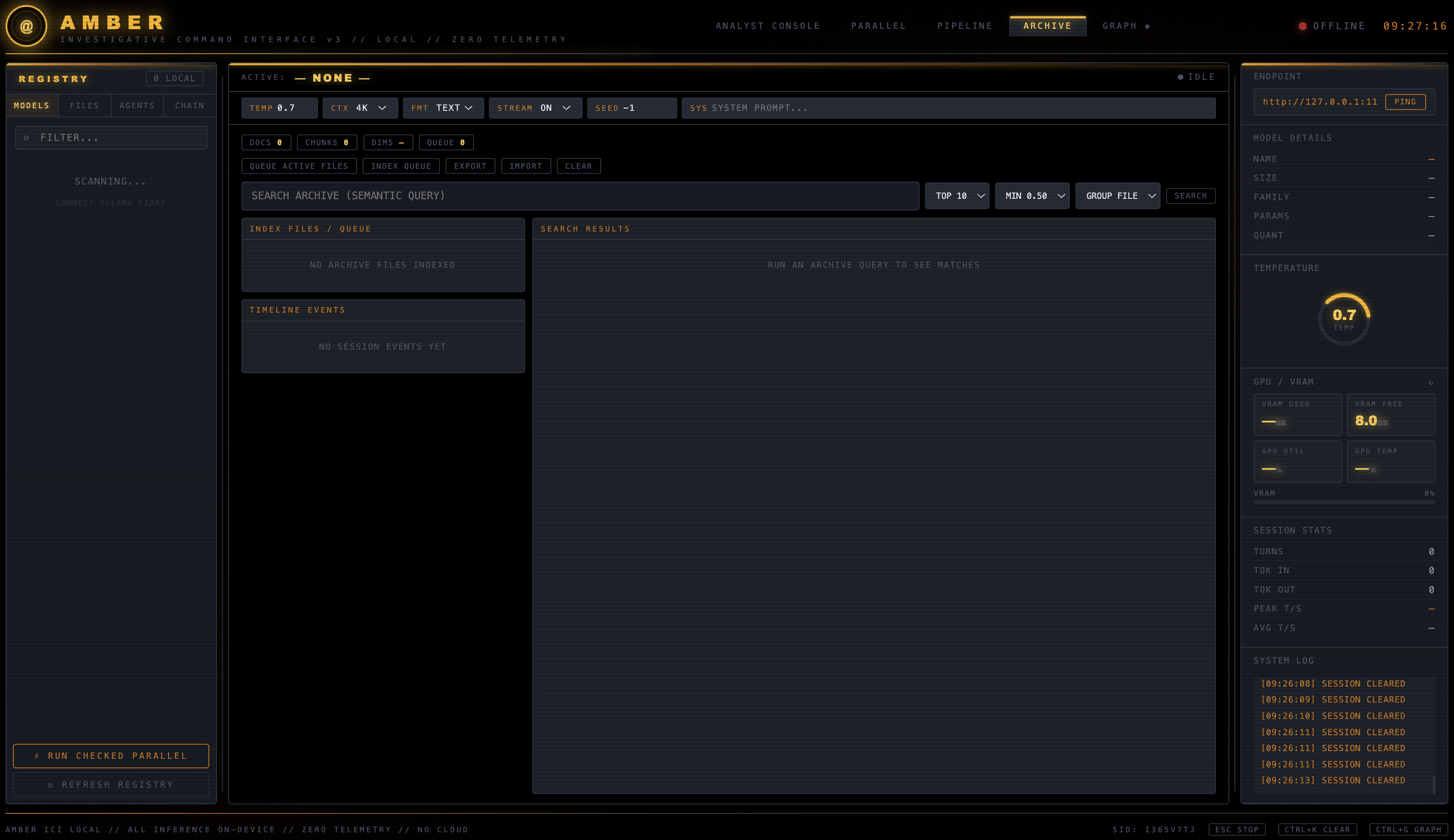
AMBER ICI v5: local-first Ollama investigative command center with case-scoped evidence, agent chains, hybrid retrieval, streaming analysis, graph and timeline views, OCR, controlled web research, and GPU telemetry.
AMBER ICI (AMBER Investigative Command Interface) is a local-first browser interface for investigative and analytical workflows powered by a local Ollama server.
It includes:
SEND buttonOllama inference is restricted by the UI to loopback endpoints (127.0.0.1, localhost, or ::1). AMBER does not include cloud inference or application telemetry, and no feature requires a login, API key, or account. The WEB pill is the master switch for all internet access: with it OFF, AMBER makes no outbound request of any kind.
STOP or EscThe console pill bar carries the execution controls:
Agents are user-defined and are the primary execution path. There is no built-in or fixed agent list; the Agents panel starts empty and you populate it two ways:
+ CREATE AGENT — define one by handGENERATE FROM PROMPT — describe an objective and a selected local planner model writes the agent set for youEach agent stores its own runtime configuration:
Running the chain. Set EXEC to AGENTS, type a prompt in the main terminal, and press SEND. AMBER reads the selected mode, the enabled agents, each agent's local model, the AGN count, and the LOOPS count, then executes: parallel agents concurrently, followed by sequential agents in card order, once per loop. Each sequential agent receives the previous agent's output as [UPSTREAM OUTPUT] plus that agent's handoff note. Progress and every agent's streamed output print into the main terminal, and the final answer is retained in conversation history. The Agents panel RUN button does the same thing using the panel's own LOOPS field.
In AGENTS mode SEND does not require an active model in the Models panel, because each agent carries its own. gated agents are excluded from the chain — run them individually with their card's RUN button.
Missing models are never substituted. Saving an agent or starting a chain with a model that Ollama does not have prints an actionable block in the terminal naming the requested model, the models actually installed, and the ollama pull <model> command needed, and the run does not start.
Saved agent sets can be stored and restored by name from the Agents panel.
The earlier
PIPELINE/CHAINstep-sequence mode was retired from the interface. Its engine andstate/pipeline_state.jsonremain in place for backward compatibility, but it is no longer a selectable mode; agents are the execution chain.
embeddinggemma:latestFAST, HYBRID, and DEEP retrieval profilesThe Archive now includes an optional case boundary without replacing its existing all-archive workflow:
NEW CASE creates local case metadata.ADD ACTIVE TO CASE records selected files as evidence, retains the existing raw upload, computes a streaming SHA-256 identity, and records ingestion provenance.REMEMBER LAST explicitly saves the latest assistant output as labeled case memory. Model output is never silently promoted to evidence or memory.ADD INVESTIGATION ROLES adds optional Director, Researcher, Investigator, Analyst, Documenter, and Critic templates to the existing user-defined agent registry. They use the operator-selected local model and do not run automatically.Case intelligence is stored atomically in one versioned standard-library JSON store and uses AMBER's existing Ollama client.
The header opens these tools in separate tabs:
http://127.0.0.1:8765/amber_graph.htmlhttp://127.0.0.1:8765/amber_timeline.htmlhttp://127.0.0.1:8765/amber_vectorstore.htmlCore runtime:
pip install is required to run AMBERembeddinggemma:latest for Archive indexing and semantic searchOptional capabilities:
ocrmypdf and Tesseract for PDF OCRpsutil, nvidia-smi, or osx-cpu-temp for additional system metrics; unavailable readings simply remain blankEverything above is local. No component requires an account, API key, or cloud service.
git clone https://github.com/gs-ai/AMBER-ICI.git
cd AMBER-ICI
In a separate terminal:
ollama serve
Pull the required embedding model and at least one generation model:
ollama pull embeddinggemma:latest
ollama pull qwen2.5-coder:7b
The generation model is only an example; AMBER discovers locally installed models from Ollama.
The core backend imports only the Python standard library, so a virtual environment is optional for a direct launch. Create one anyway if you want the npm scripts (which call venv/bin/python3) or optional Pillow support:
python3 -m venv venv
source venv/bin/activate # Windows: venv\Scripts\activate
python3 -m pip install --upgrade pip
There is no requirements.txt because nothing is required. Install optional extras into that environment only if you want them:
python3 -m pip install Pillow # optional: WebP conversion before OCR
Deactivate with deactivate. If a previous AMBER version left unused packages in venv/ (for example camoufox), they are not imported by the current code and can be ignored or removed.
python3 files/launch_amber_ici_gui.py
AMBER opens the browser automatically. To launch without opening a tab:
python3 files/launch_amber_ici_gui.py --no-browser
Then open http://127.0.0.1:8765/amber_ui.html.
Required only if you intend to turn the WEB pill on:
npm install # playwright, playwright-extra, stealth plugin
npx playwright install chromium # the browser binary itself
Verify the helpers are runnable — with AMBER running, this reports the helper paths, the resolved node binary, and any missing package:
curl -s http://127.0.0.1:8765/api/web/status
AMBER uses the Node/Chromium helper for JavaScript-rendered pages, with a plain Python HTTP fetch as a fallback for direct URLs. The records-search helper requires Node.js, the npm dependencies, and Chromium; it has no plain-HTTP fallback.
macOS with Homebrew:
brew install ocrmypdf tesseract
python3 -m pip install Pillow
Ubuntu/Debian:
sudo apt-get update
sudo apt-get install -y ocrmypdf tesseract-ocr
python3 -m pip install Pillow
Pillow is only needed for image formats that require conversion before Tesseract can process them. AMBER continues to run when any optional OCR dependency is absent.
The supplied npm scripts launch AMBER with venv/bin/python3, so create that environment first (step 3):
npm start # 127.0.0.1:8765, no browser tab
npm run start:browser # same, and opens the browser
Direct python3 launch is the most portable option.
git clone https://github.com/gs-ai/AMBER-ICI.git
cd AMBER-ICI
python3 -m venv venv # for the npm scripts
npm install # optional: WEB features
npx playwright install chromium # optional: WEB features
ollama serve & # in its own terminal
ollama pull embeddinggemma:latest # required for Archive
ollama pull qwen2.5-coder:7b # any generation model
npm start # → http://127.0.0.1:8765/amber_ui.html
python3 files/launch_amber_ici_gui.py --help
The browser UI intentionally accepts only loopback Ollama URLs even if the AMBER server is bound to another interface.
http://127.0.0.1:11434.PING to load locally installed models.SEND.embeddinggemma:latest before indexing files in Archive.To run the agent chain instead:
AGENTS tab in the left panel.+ CREATE AGENT, or describe an objective under GENERATE FROM PROMPT.EXEC to AGENTS in the console pill bar.AGN (how many agents; 0 = all) and LOOPS (how many passes).SEND.To let AMBER read the internet, set the WEB pill to ON first; it is OFF by default.
Uploads are limited to 100 MiB per file. The file picker and drag-and-drop path currently accept:
.txt, .md, .pdf, .docx, .rtf.csv, .xlsx, .json, .yaml, .yml, .toml, .ini, .cfg, .conf, .xml.py, , , , , , , , , , Extraction behavior:
ocrmypdf is installed, retaining the more useful result.<text> and <tspan> content.Uploaded raw bytes are stored in uploads/blobs/, extracted text in uploads/texts/, and metadata in uploads/manifest.json.
LINK DIRECTORY exposes supported, non-hidden files from one local directory to AMBER. The Files panel treats linked entries as read-only, and directory listing is non-recursive. The selected path is stored in state/linked_dir_state.json; file content remains in its original location and is read only when requested for context or extraction.
The native folder chooser uses Python's Tkinter. If it is unavailable, the UI prompts for a path manually. Unlinking the directory removes the saved link but does not delete source files.
The backend recognizes a few additional linked-file formats (.xls, .ods, .gif, .heic, .ico, .ppt, .pptx, and .zip). Formats without a text extractor contribute a metadata label rather than decoded content. Legacy .xls and .ods extraction is best-effort and may report that extraction is unavailable.
CTX options in the UI are 2K, 4K, 8K, 16K, and 32K and apply across Analyst, Parallel, and Agent calls.
trimMsgsToCtx() removes the oldest non-system messages until the request fits about 90% of the selected context budget, estimated at four characters per token.CTX × 2.6 characters in Fast, CTX × 3.2 in Hybrid, and CTX × 4.0 in Deep.none disables that recall.These are character-based guardrails, not exact tokenizer counts.
The vector Archive is durable, but the separate Fibonacci tree is session memory. It is built for a file when that file is indexed during the current page session and is not automatically reconstructed from state/vector_store.json after a reload; until rebuilt, active-file context uses the flat fallback.
The launcher stores durable application data as JSON under state/ using atomic temporary-file replacement. There is no active SQLite migration or database dependency.
Panel layout is stored in browser localStorage, so it is browser-profile specific. Runtime-only selections, statistics, and the in-memory fractal tree reset on page load.
If a state JSON file cannot be decoded, the launcher quarantines it with a .corrupt-<timestamp>.json suffix and returns an empty value so the affected panel can recover.
The WEB pill is the master switch, and it defaults to OFF.
With WEB off, AMBER makes no outbound request of any kind. The gate is enforced inside the fetch functions themselves, so prompt phrasing, injected file context, and agent tool calls (web_fetch, online_records_search) are all blocked equally. If a prompt asks for a fetch while the switch is off, the terminal says so and the request is not sent rather than failing silently.
With WEB on, AMBER checks the helper environment first, prints the helper path it will use, and then resolves the request in this order:
http:///https:// URL or recognized bare domain in the prompt or injected file context.Step 4 means that with WEB on, prompt text can reach a general search engine. Turn WEB off for prompts whose text should not leave the machine.
Every outcome is reported in the main terminal: the mode selected, the helper path used, the request sent, the engine that served it (playwright, urllib, or cache), the content size and where it was injected, or a failure block naming the missing dependency and the command that fixes it. Direct fetches are cached for one hour in state/web_cache.json.
Records search queries these sources and returns only matches whose page text corroborates both the subject and the requested location: casesearch.kscourts.gov, doc.ks.gov/offender-search, kbi.ks.gov/registeredoffender, DuckDuckGo, and Brave Search.
Network behavior is:
WEB on, the Playwright web fetch, its Python HTTP fallback, and records search make outbound requests to user-selected, search-provider, and public-record sites. With WEB off, none of these run.GET /api/web/status is a local-only preflight; it inspects the filesystem and PATH and makes no network request.Fetched pages are injected into the prompt as [WEB CONTEXT] and therefore become part of conversation history persisted in state/chat_history.json; agents whose output target is the scratchpad also append to state/scratch.json. Live web content lands in local case state.
The launcher sends a restrictive Content Security Policy, disables framing, sets no-referrer, blocks sensitive browser permissions, and disables HTTP caching. The backend's /api/task/execute contract can list, read, write, append, or create files within the linked root when explicitly called. It rejects paths that escape that root, hidden paths, unknown tools, and overwrites that were not explicitly authorized. Link only a directory whose visible contents the local application may access and modify.
Session counters update during Analyst, Parallel, and Agent execution and include turns, prompt/output tokens, peak token rate, average token rate, and a live token-rate sparkline.
VRAM/model residency comes from Ollama's local /api/ps endpoint. Temperature/utilization readings are best-effort: NVIDIA uses nvidia-smi, Apple Silicon attempts direct SMC reads, Linux checks thermal zones, and optional tools provide fallbacks.
Stop AMBER before cleanup.
Reset persisted state while preserving uploaded files:
rm -f state/*.json
Remove uploaded blobs, extracted text, and their manifest:
rm -rf uploads/blobs uploads/texts uploads/manifest.json
Linked source files are never removed by these commands. State and upload directories are recreated as needed.
ollama serve is running.http://127.0.0.1:11434.ollama list to verify that at least one generation model is installed.ollama pull embeddinggemma:latest.The terminal names the exact problem. Check the environment directly with AMBER running:
curl -s http://127.0.0.1:8765/api/web/status
Then install whatever it reports missing:
npm install
npx playwright install chromium
Direct web fetch may still succeed through its plain-HTTP fallback. Records search requires Playwright and may fail when a source changes markup, requires authentication/CAPTCHA, blocks automation, or is unavailable.
WEB IS OFFThe WEB pill is OFF, which blocks every outbound request by design. Set it to ON.
LOCAL MODEL NOT AVAILABLEThe agent's selected model is not installed in Ollama. The terminal prints the requested model, the models you do have, and the fix:
ollama pull <model-name>
ollama list
AMBER never silently substitutes a different model.
SEND is greyed outIn ANALYST mode, select exactly one model in the Models panel. In AGENTS mode, create at least one agent — no active model is needed there.
ocrmypdf and Tesseract.uploads/texts/.npm start cannot find PythonThe npm scripts expect venv/bin/python3. Run python3 -m venv venv, or launch directly with python3 files/launch_amber_ici_gui.py.
python3 files/launch_amber_ici_gui.py --port 8877
AMBER-ICI/
├── files/
│ ├── amber_graph.html
│ ├── amber_timeline.html
│ ├── amber_ui.html
│ ├── amber_vectorstore.html
│ ├── amber_intelligence/ # Standard-library case/evidence/memory service
│ ├── autogen_builder.py
│ ├── constrained_executor.py
│ ├── launch_amber_ici_gui.py
│ ├── records_search_playwright.mjs
│ └── web_fetch_playwright.mjs
├── image/README/
├── state/ # created/populated at runtime
├── uploads/ # created/populated at runtime
├── tests/ # Case-intelligence and ICI regression tests
├── package.json
├── spec.json
├── spec.schema.json
├── README.md
└── LICENSE
MIT. See LICENSE.
| Pill | Values | Purpose |
|---|
TEMP / CTX / MEM / FMT / STREAM / SEED / SYS | — | Analyst-mode inference settings |
WEB | OFF (default) / ON | Master switch for all internet access |
EXEC | ANALYST (default) / AGENTS | What SEND runs: the single active model, or the agent chain |
AGN | 0 = all | How many agents the chain runs, taken in card order |
LOOPS | 1+ | How many times the chain repeats; mirrored with the Agents panel LOOPS field |
| Field | Default | Notes |
|---|
| Agent name | — | Required |
| Agent purpose | — | Injected as [AGENT PURPOSE] |
| Agent system prompt | — | The agent's role instruction |
| Preferred local model | — | Required; must be installed in Ollama |
| Temperature | 0.35 | Per agent, independent of the console TEMP pill |
| Max output tokens | 0 (auto) | 0 uses AMBER's length heuristic |
| Loops | 1 | Passes this agent makes per chain loop, each refining its own previous output |
| Output format | plain text | JSON sets Ollama's JSON mode and skips length expansion |
| Handoff instructions | — | Passed to the next sequential agent as [HANDOFF FROM PREVIOUS AGENT] |
| Execution mode | sequential | sequential, parallel, or gated |
| Output target, memory scope, role, tool access, enabled, notes | — | Under ADVANCED |
| Flag | Default | Purpose |
|---|
--host HOST | 127.0.0.1 | Address on which the AMBER HTTP server listens |
--port PORT | 8765 | AMBER HTTP server port |
--no-browser | off | Do not open the default browser |
--gui PATH | auto-detected | Serve a specific GUI HTML file |
--version | — | Print the AMBER ICI release version and exit |
.js.ts.tsx.jsx.html.sql.sh.bash.zsh.log.png, .jpg, .jpeg, .bmp, .webp, .tif, .tiff, .svg| Path | Contents |
|---|
state/agents_state.json | Current agents, including each agent's model, temperature, token limit, loops, format, and handoff |
state/agent_sets.json | Saved agent presets |
state/agent_run_log.json | Last 100 agent executions: agent, model, duration, success, and context |
state/pipeline_state.json | Retired pipeline steps, retained for backward compatibility |
state/chain_sets.json | Saved chain presets |
state/step_run_log.json, state/tool_call_log.json, state/tool_registry_state.json | Step, tool-call, and tool-registry records |
state/chat_history.json | Last 100 conversation messages; the UI replays the latest 30 |
state/scratch.json | Last 20,000 scratchpad characters |
state/memory_profile.json | Fast, Hybrid, or Deep retrieval selection |
state/vector_store.json | Archive chunks and embeddings |
state/case_intelligence.json | Case metadata, evidence contracts and provenance, bounded explicit memory, and agent trace receipts; created on the first write |
state/graph_state.json, state/timeline_state.json | Graph and timeline data |
state/web_cache.json | Direct web-fetch results with a one-hour TTL |
state/linked_dir_state.json | Current linked-directory path |
uploads/manifest.json | Uploaded-file metadata |