ghosttroops/scan4all
官方仓库 vuls 扫描: 15000+ PoCs; 23种应用密码破解; 7000+ Web指纹; 146种协议和90000+条规则的端口扫描; 模糊测试, 硬件, 超棒的漏洞赏金( ͡° ͜ʖ ͡°)...
[](https://twitter.com/intent/follow?screen_name=Hktalent3135773) [](https://twitter.com/intent/follow?screen_name=Hktalent3135773) [](https://github.com/hktalent/)
<p align="center">
<a href="https://github.com/ghosttroops/scan4all/blob/main/README.md">README_EN</a> •
<a href="https://github.com/ghosttroops/scan4all/blob/main/static/Installation.md">编译/安装/运行</a> •
<a href="https://github.com/ghosttroops/scan4all/blob/main/static/usage.md">参数说明</a> •
<a href="https://github.com/ghosttroops/scan4all/blob/main/static/running.md">如何使用</a> •
<a href="https://github.com/ghosttroops/scan4all/blob/main/static/scenario.md">使用场景</a> •
<a href="https://github.com/ghosttroops/scan4all/blob/main/static/pocs.md">POC列表</a> •
<a href="https://github.com/ghosttroops/scan4all/blob/main/static/development.md">自定义扫描</a> •
<a href="https://github.com/ghosttroops/scan4all/blob/main/static/NicePwn.md">最佳实践</a>
</p>
# 特性
Vulnerabilities Scan;15000+PoC漏洞扫描;[ 23 ] 种应用弱口令爆破;7000+Web指纹;146种协议90000+规则Port扫描;Fuzz、HW打点、BugBounty神器...
<h1 align="center">
<img width="928" alt="image" src="https://assets.kitploit.com/production/public/readmes/671/95a5d1e53d64f2525e88bbc8a211014c6b2107357aae0bad9cea9238bedbfb08.png">
</h1>
- 什么是scan4all:集成 vscan、nuclei、ksubdomain、subfinder等,充分自动化、智能化
并对这些集成的项目进行代码级别优化、参数优化,个别模块,如 vscan filefuzz部分进行了重写
原则上不重复造轮子,除非存在bug、问题
- 跨平台:基于golang实现,轻量级、高度可定制、开源,支持Linux、windows、mac os等(go tool dist list)46种不同芯片架构、14种操作系统
- 支持[ 23 ] 种密码爆破,支持自定义字典, 通过 "priorityNmap": true 开启
* RDP
* VNC
* SSH
* Socks5
* rsh-spx
* Mysql
* MsSql
* Oracle
* Postgresql
* Redis
* FTP
* Mongodb
* SMB,同时检测 MS17-010(CVE-2017-0143、CVE-2017-0144、CVE-2017-0145、CVE-2017-0146、CVE-2017-0147、CVE-2017-0148)、SmbGhost(CVE-2020-0796)、DCOM(msrpc, port 135, Oxid Scan)
* Telnet
* Snmp
* Wap-wsp(Elasticsearch)
* RouterOs
* HTTP BasicAuth(HttpBasic,Authorization), contains Webdav、SVN(Apache Subversion) crack
* Weblogic,同时通过 enableNuclei=true 开启nuclei,支持T3、IIOP等检测
* Tomcat
* Jboss
* Winrm(wsman)
* POP3/POP3S
- 默认开启http密码智能爆破,需要 HTTP 密码时才会自动启动,无需人工干预
- 检测系统是否存在 nmap ,存在通过 priorityNmap=true 启用 nmap 进行快速扫描,默认开启,优化过的 nmap 参数比 masscan 快
使用 nmap 的弊端:网络不好的是否,因为流量网络包过大可能会导致结果不全
使用 nmap 另外需要将 root 密码设置到环境变量
```bash
export PPSSWWDD=yourRootPswd
```
更多参考:config/doNmapScan.sh
默认使用 naabu 完成端口扫描 -stats=true 可以查看扫描进度
能否不扫描端口 ? 跳过端口扫描,意外做基于端口指纹进行密码爆破的检测将失效,密码破解功能也一并被跳过
```bash
noScan=true ./scan4all -l list.txt -v
```
- 支持直接使用 nmap xml结果输入:
```bash
./scan4all -l nmapScanResults.xml -v
```
<img src="https://assets.kitploit.com/production/public/readmes/671/2965371dfaf3a2b17cbd501f6d156cdf888b3e573852263c9d70e029f768a187.gif" width="400">
- 快速 15000+ POC 检测功能,PoCs包含:
* nuclei POC
## Nuclei Templates Top 10 statistics
| TAG | COUNT | AUTHOR | COUNT | DIRECTORY | COUNT | SEVERITY | COUNT | TYPE | COUNT |
|-----------|-------|---------------|-------|------------------|-------|----------|-------|---------|-------|
| cve | 1430 | daffainfo | 631 | cves | 1407 | info | 1474 | http | 3858 |
| panel | 655 | dhiyaneshdk | 584 | exposed-panels | 662 | high | 1009 | file | 76 |
| edb | 563 | pikpikcu | 329 | vulnerabilities | 509 | medium | 818 | network | 51 |
| lfi | 509 | pdteam | 269 | technologies | 282 | critical | 478 | dns | 17 |
| xss | 491 | geeknik | 187 | exposures | 275 | low | 225 | | |
| wordpress | 419 | dwisiswant0 | 169 | misconfiguration | 237 | unknown | 11 | | |
| exposure | 407 | 0x_akoko | 165 | token-spray | 230 | | | | |
| cve2021 | 352 | princechaddha | 151 | workflows | 189 | | | | |
| rce | 337 | ritikchaddha | 137 | default-logins | 103 | | | | |
| wp-plugin | 316 | pussycat0x | 133 | file | 76 | | | | |
**281 directories, 3922 files**.
* vscan POC
* vscan POC包含了:xray 2.0 300+ POC、 go POC等;特别注意,xray POC检测需要有指纹命中后才会触发检测
* scan4all POC
- 支持 7000+ web 指纹扫描、识别:
* httpx 指纹
* vscan 指纹
* vscan 指纹:包含 eHoleFinger、 localFinger等
* scan4all 指纹
- 支持146种协议90000+规则port扫描
* 依赖nmap支持的协议、指纹
- 快速HTTP敏感文件检测,可以自定义字典
- 登陆页面检测
- 支持多种类型的输入 - STDIN/HOST/IP/CIDR/URL/TXT
- 支持多种输出类型 - JSON/TXT/CSV/STDOUT
- 高度可集成:可配置将结果统一存储到 Elasticsearch【强烈推荐】
- 智能SSL分析:
* 深入分析,自动关联SSL信息中域名的扫描,如*.xxx.com,并根据配置完成子域遍历,结果自动添加目标到扫描列表
* 支持开启智能SSL信息中*.xx.com子域遍历功能, export EnableSubfinder=true,或者在配置文件中调整
- 自动识别域(DNS)关联多个IP的情况,并自动扫描关联的多个IP
- 智能处理:
* 1、当列表中多个域名的ip相同时,合并端口扫描,提高效率
* 2、智能处理http异常页面、及指纹计算和学习
- 自动化供应链识别、分析和扫描
- 联动 python3 <a href=https://github.com/hktalent/log4j-scan>log4j-scan</a>
* <a href=https://github.com/fullhunt/log4j-scan/pull/128/files>该版本屏蔽你目标信息传递到 DNS Log Server 的bug,避免暴露漏洞</a>
* 增加了将结果发送到 Elasticsearch 的功能,便于批量、盲打
* 未来有时间了再实现golang版本
如何使用?
```bash
mkdir ~/MyWork/;cd ~/MyWork/;git clone https://github.com/hktalent/log4j-scan
```
- 智能识别蜜罐,并跳过目标,默认该功能是关闭的,可设置EnableHoneyportDetection=true开启
- 高度可定制:允许通过config/config.json配置定义自己的字典,或者控制更多细节,包含不限于:nuclei、httpx、naabu等
- 支持HTTP请求走私漏洞检测: CL-TE、TE-CL、TE-TE、CL_CL、BaseErr
<img width="968" alt="image" src="https://assets.kitploit.com/production/public/readmes/671/1f85b43e0d9b02f4f2b85718a54c0908765e0c17fcd07c6dc23721aa9fd8e37c.png">
- 支持 通过参数 Cookie='PHPSession=xxxx' ./scan4all -host xxxx.com, 兼容 nuclei、httpx、go-poc、x-ray POC、filefuzz、http Smuggling等
# 工作流程
<img src="https://assets.kitploit.com/production/public/readmes/671/24df265274d810d2d20b1ba4af652b915f704277eb21818b54d764363de9d900.jpg">
# 如何安装
download from
<a href=https://github.com/GhostTroops/scan4all/releases>Releases</a>
```bash
go install github.com/GhostTroops/[email protected]
scan4all -h
```
# 如何使用
To install libcap on Linux:
```bash
sudo apt install -y libpcap-dev
```
on Mac:
```bash
brew install libpcap
```
## docker ubuntu
```bash
apt update;apt install -yy libpcap0.8-dev
```
## centos
```bash
yum install -yy glibc-devel.x86_64
```
### linux
too many open files
查看当前打开的文件数
```
awk '{print $1}' /proc/sys/fs/file-nr
ulimit -a
ulimit -n 819200
```
- 1、启动 Elasticsearch, 当然你可以使用传统方式输出、结果
```bash
mkdir -p logs data
docker run --restart=always --ulimit nofile=65536:65536 -p 9200:9200 -p 9300:9300 -d --name es -v $PWD/logs:/usr/share/elasticsearch/logs -v $PWD/config/elasticsearch.yml:/usr/share/elasticsearch/config/elasticsearch.yml -v $PWD/config/jvm.options:/usr/share/elasticsearch/config/jvm.options -v $PWD/data:/usr/share/elasticsearch/data hktalent/elasticsearch:7.16.2
# 初始化es 索引,每种工具的结果结构不一样,分开存储
./config/initEs.sh
# 搜索语法,更多的查询方法,自己学 Elasticsearch
http://127.0.0.1:9200/nmap_index/_doc/_search?q=_id:192.168.0.111
其中92.168.0.111 是要查询的目标
```
- 使用前请自行安装nmap
<a href=https://github.com/GhostTroops/scan4all/discussions>使用帮助</a>
```bash
export GOPRIVATE=github.com/hktalent
go env |grep GOPRIVATE
go build
# 精准扫描 url列表 UrlPrecise=true
UrlPrecise=true ./scan4all -l xx.txt
# 关闭适应nmap,使用naabu端口扫描其内部定义的http相关端口
priorityNmap=false ./scan4all -tp http -list allOut.txt -v
```
# Work Plan
- 基于爬虫更多安全信息收集,解决、回答:
```
1、你知道一个url(Target)后端有多少个Server吗?
a、不同的端口,可能对应内部不同的内网ip
b、不同的上下文,可能对应内部不同的内网ip
c、不同的http响应server头,可能对应内部不同的内网ip
c、极端的情况下,不同的参数跳转后端不同的server,也就是对应内部不同的内网ip
```
- 重构 naabu、httpx的集成方式,解决vscan嵌入代码集成方式,导致无法升级依赖包的弊端
- 联动 metasploit-framework,在系统已经安装好对前提条件下,配合tmux,并以 macos 环境为最佳实践完成联动
- 整合 更多 fuzzer <!-- gryffin -->,如 联动 sqlmap
- 整合 chromedp 实现对登陆页面截图,以及对纯js、js架构前端登陆页面进行检测、以及相应爬虫(敏感信息检测、页面爬取)
- 整合 nmap-go 提高执行效率,动态解析结果流,并融合到当前任务瀑布流中
- 整合 ksubdomain 实现更快子域名爆破
- 整合 spider 以便发现更多漏洞
- 半自动化指纹学习,提高精准度;指定指纹名称,通过配置
- 加载osvdb 并驱动执行
# Q & A
- how use Cookie?
- libpcap related question
more see: <a href=https://github.com/GhostTroops/scan4all/discussions>discussions</a>
# 变更日志
- 2022-10-03 Pro版本:
* 优化了fuzz,http2.0下测试18秒可以完成6万的扫描,同时合并、去除冗余的结果
* 优化:所有的web扫描前,均做有效检测,避免无效扫描,提升了效率
* 增加了若干go-poc
* 实现了分布式功能server端功能,分布式客户端实现了部分被动扫描模式的封装、重构
- 2022-07-28 为 nuclei 添加 substr、 aes_cbc DSL 函数<a href="https://github.com/projectdiscovery/nuclei/releases/tag/v2.7.7">nuclei v2.7.7</a>
- 2022-08-03 fixed nuclei Multiple instances cache goroutine leaks PR<a href=https://github.com/projectdiscovery/nuclei/issues/2386>#2386</a>
- 2022-07-20 fix and PR nuclei <a href=https://github.com/projectdiscovery/nuclei/issues/2301>#2301</a> 并发多实例的bug
- 2022-07-20 add web cache vulnerability scanner
- 2022-07-19 PR nuclei <a href=https://github.com/projectdiscovery/nuclei/pull/2308>#2308</a> add dsl function: substr aes_cbc
- 2022-07-19 添加dcom Protocol enumeration network interfaces
- 2022-06-30 嵌入式集成私人版本nuclei-templates 共3000+个YAML POC;
1、集成Elasticsearch存储中间结果
2、嵌入整个config目录到程序中
- 2022-06-27 优化模糊匹配,提高正确率、鲁棒性;集成ksubdomain进度
- 2022-06-24 优化指纹算法;增加工作流程图
- 2022-06-23 添加参数ParseSSl,控制默认不深度分析SSL中的DNS信息,默认不对SSL中dns进行扫描;优化:nmap未自动加.exe的bug;优化windows下缓存文件未优化体积的bug
- 2022-06-22 集成 N 种协议弱口令检测、密码爆破:ftp、mongodb、mssql、mysql、oracle、postgresql、rdp、redis、smb、ssh、telnet,同时优化支持外挂密码字典
- 2022-06-21 决然做scan4all
<!--
- 2022-06-20 集成Subfinder,域名爆破,启动参数导出EnableSubfinder=true,注意启动后很慢; ssl证书中域名信息的自动深度钻取
允许通过 config/config.json 配置定义自己的字典,或设置相关开关
- 2022-06-17 优化一个域名多个IP的情况,所有IP都会被端口扫描,然后按照后续的扫描流程
- 2022-06-15 此版本增加了过去实战中获得的几个weblogic密码字典和webshell字典
- 2022-06-10 完成核的整合,当然包括核模板的整合
- 2022-06-07 添加相似度算法来检测 404
- 2022-06-07 增加http url列表精准扫描参数,根据环境变量UrlPrecise=true开启
-->
# 感谢捐赠
- <a href=https://github.com/freeload101 target=_blank>@freeload101</a>
- <a href=https://github.com/b1win0y target=_blank>@b1win0y</a>
- <a href=https://github.com/BL4CKR4Y target=_blank>@BL4CKR4Y</a>
# 交流群(微信、QQ、Tg)
| Wechat | Or | QQchat | Or | Tg |
| --- |--- |--- |--- |--- |
||||||
## 💖Star
[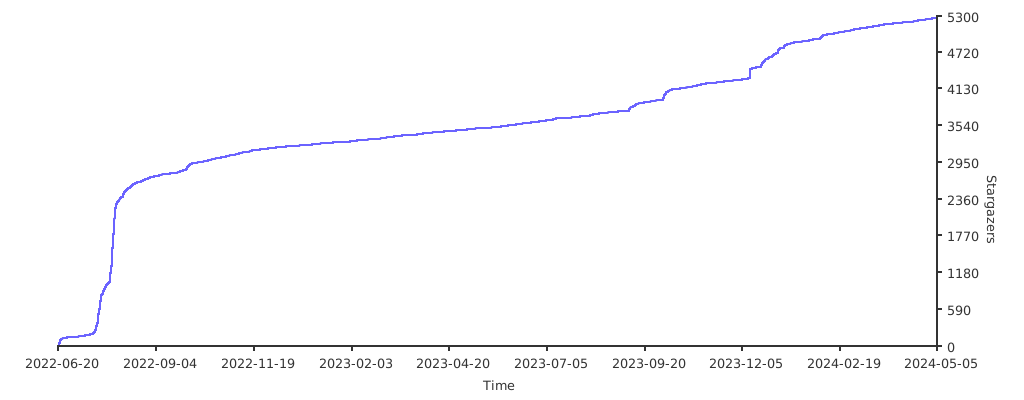](https://starchart.cc/hktalent/scan4all)
# Donation
| Wechat Pay | AliPay | Paypal | BTC Pay |BCH Pay |
| --- | --- | --- | --- | --- |
|||[paypal](https://www.paypal.me/pwned2019) **[email protected]**|||
<!--
export GOPRIVATE=github.com/hktalent
go env |grep GOPRIVATE
https://github.com/heartshare/go-wafw00f
git submodule add --force https://github.com/hktalent/nuclei-templates.git config/nuclei-templates
git submodule update --init --recursive
/usr/bin/git -c protocol.version=2 submodule update --init --force --recursive
-->