面向应用程序和 AI 代理的自托管网页抓取工具。通过原生 API 获取页面,或连接 MCP 客户端来读取干净的 Markdown、提取结构化数据、捕获截图并检查浏览器活动。
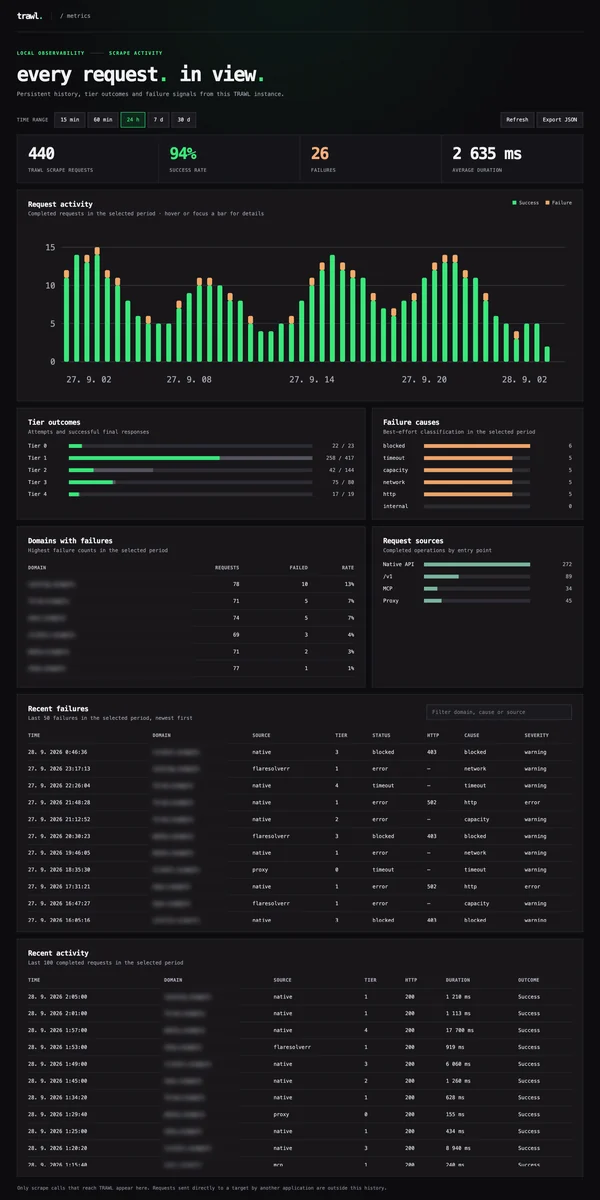
TRAWL 从快速的 HTTP 请求开始,复用已解决的浏览器会话,并在网站需要更多处理时升级到 Camoufox 和可选的住宅代理。它处理受支持的 JavaScript 挑战和 CAPTCHA,并提供一个本地仪表板,让你查看哪些请求成功、失败以及耗时情况。
对于现有的 FlareSolverr 用户,兼容的 /v1 端点可与 Prowlarr 及其他 *arr 工具配合使用。TRAWL 的自适应路由和会话复用旨在实现更快、更可靠的请求;选定的同机基准测试显示其响应速度比 FlareSolverr 和 Byparr 更快,具体结果因网站和会话状态而异。
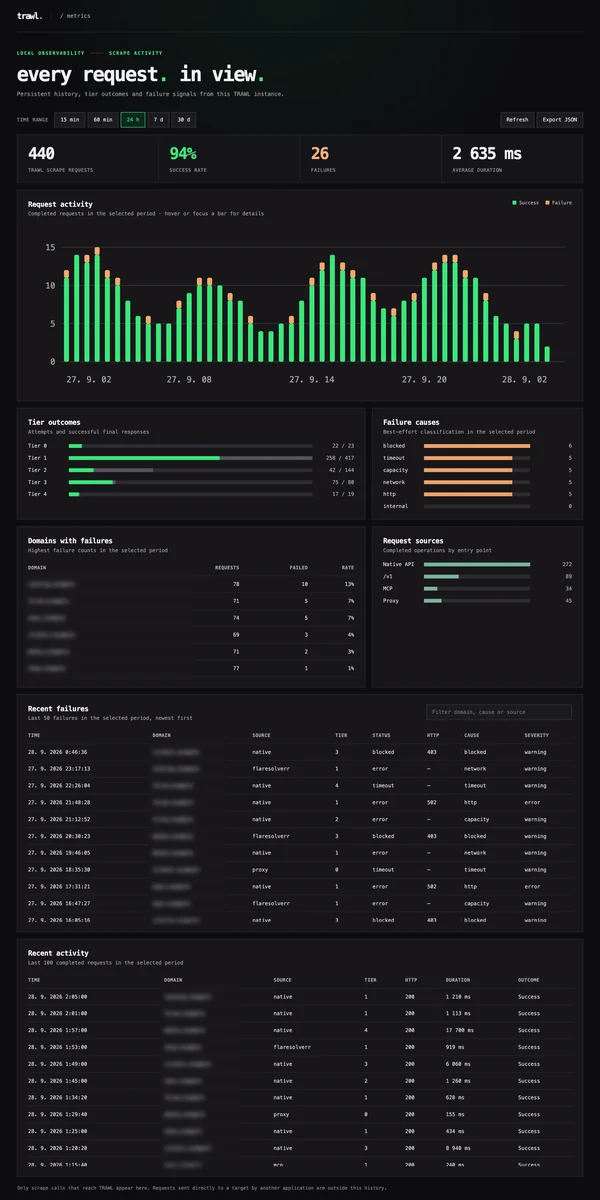
该截图使用示例流量。你在 http://localhost:8191/dashboard 的仪表板仅显示由你的 TRAWL 实例处理的请求。有关设置,请参阅指标指南。
git clone https://github.com/germondai/trawl cd trawl cp .env.example .env
docker compose up -d
curl http://localhost:8191/health
首次启动需要 15–30 秒,因为浏览器池需要预热。后续启动则很快。

### NAS 应用目录

更倾向于一键安装?TRAWL 已在 TrueNAS 和 Unraid 的社区应用目录中提供:

- [TrueNAS Community Apps](https://apps.truenas.com/catalog/trawl_community/) —
  打开 **Apps → Discover Apps** 并搜索 **TRAWL**。
- [Unraid Community Apps](https://ca.unraid.net/apps/trawl-1o4q23p06utr4h) —
  打开 **Apps** 标签页并搜索 **Trawl**。

感谢 TrueNAS 和 Unraid 社区贡献者打包并发布了这些集成。

## API

### 兼容 FlareSolverr(`/v1`)```bash
curl -X POST http://localhost:8191/v1 \
  -H 'Content-Type: application/json' \
  -d '{"cmd":"request.get","url":"https://nowsecure.nl","maxTimeout":60000}'
/scrape)返回更丰富的元数据:tier、timings、sessionCached、完整 cookie 列表。```bash
curl -X POST http://localhost:8191/scrape
-H 'Content-Type: application/json'
-d '{"url":"https://nowsecure.nl","maxTimeout":60000}'
### MCP 工具(`/mcp`)

设置 `MCP_ENABLED=true` 以将 TRAWL 的客户端无关 Streamable HTTP 工具暴露给任何
兼容 MCP 的 AI 应用程序或代理,用于可读内容、HTML、结构化提取、截图和浏览器诊断。它们加载已知的公共 URL;TRAWL 不
提供网页搜索或排名。请参阅
[MCP 集成指南](https://github.com/germondai/trawl/blob/dev/apps/docs/integrations/mcp.md)。

### 连接 Prowlarr / Jackett

将 FlareSolverr URL 设置为:```
http://localhost:8191        # running on the same host
http://trawl:8191            # running via Docker Compose on the same network
有些站点会将其 Cloudflare 通行凭证绑定到解题浏览器的完整连接指纹上。/v1 流程在这种情况下无能为力:Prowlarr 只保留 cookie + user-agent,并使用自己的 HTTP 客户端重新获取页面,而 Cloudflare 会再次发起挑战——cookie 无法移植。对于这些索引器,请启用 TRAWL 的转发代理,并将其作为 HTTP 代理添加到 Prowlarr 中:```env
MITM_ENABLED=true
MITM_PORT=8192
MITM_CA_DIR=/data/proxy-ca # persist the CA (mount a volume)
MITM_MAX_TIER=4 # cap escalation (e.g. 3 to stay off residential)
MITM_ALWAYS_SCRAPE=false # opt in to bypass the proxy's direct Tier 0 probe
默认情况下,监听器绑定 `0.0.0.0`,以便 Docker 桥接网络上的客户端可以访问它;在裸机主机上设置 `MITM_HOST=127.0.0.1` 可将其限制为仅回环地址。

1. 将代理的 CA 安装到客户端的信任存储中,使其接受按主机生成的证书:
   `curl http://<trawl-host>:8191/proxy-ca.crt` → 添加到 Prowlarr 容器的 CA 存储中
   (例如,一个 linuxserver `/custom-cont-init.d` 脚本,将其复制到
   `/usr/local/share/ca-certificates/` 并运行 `update-ca-certificates`)。
2. Prowlarr → Settings → Indexer Proxies → **HTTP**,主机 `<trawl-host>`,端口 `8192`。
   如果只有选定的索引器应使用它,请为其添加标签。

普通请求使用直接的 HTTP/TLS 路径。小型 HTML、JSON 和文本响应会被缓冲以进行挑战检测;检测到的挑战会通过与 `POST /scrape` 相同的层级管道升级。视频和大型二进制响应直接流式传输。范围请求被端到端转发,并且当其响应是检测到的挑战时可以升级;WebSocket 升级使用直接中继,不进行浏览器升级。

有关路由细节、支持的流量、限制、CA 安装和客户端示例,请参阅完整的[代理文档](https://github.com/germondai/trawl/blob/dev/apps/docs/proxy/overview.md)。

> ⚠️ MITM 代理可以向信任其 CA 的客户端冒充任何主机。仅将其暴露在私有接口(localhost / 私有 Docker 网络)上,切勿公开暴露。

### 安装代理 CA 证书

代理在首次运行时自行生成根 CA。其证书和私钥持久化在 `MITM_CA_DIR` 下(默认 `/data/proxy-ca`)。按主机生成的证书在 TRAWL 运行期间被铸造并缓存在内存中;它们不需要单独安装,因为它们由持久化根证书签名。每个使用代理的客户端都必须信任该根证书。否则,HTTPS 会失败并显示 `ERR_CERT_AUTHORITY_INVALID`(浏览器)或 `PKIX path building failed`(Java)。

为每个客户端下载一次 CA:```bash
curl http://<trawl-host>:8191/proxy-ca.crt -o trawl-ca.crt
# or in a Docker setup where the API isn't reachable from outside:
docker cp trawl:/data/proxy-ca/ca.crt ./trawl-ca.crt
sudo security add-trusted-cert -d -r trustRoot
-k /Library/Keychains/System.keychain ./trawl-ca.crt
security find-certificate -c "TRAWL MITM Proxy CA"
sudo security delete-certificate -c "TRAWL MITM Proxy CA"
/Library/Keychains/System.keychain
#### Linux(Debian/Ubuntu — 系统级,适用于 curl、wget、apt 等)```bash
sudo cp trawl-ca.crt /usr/local/share/ca-certificates/trawl-ca.crt
sudo update-ca-certificates
# Verify
awk '/BEGIN/{c++} c==2' /etc/ssl/certs/ca-certificates.crt | grep -c "TRAWL MITM"
sudo cp trawl-ca.crt /etc/pki/ca-trust/source/anchors/trawl-ca.crt sudo update-ca-trust
#### Firefox 和 NSS 信任存储

不使用操作系统根证书的 Firefox 安装需要按配置文件进行 NSS 导入:```bash
# Firefox 115+ uses a file-backed NSS DB; older versions use the legacy libnssdb format.
# The certutil command is the same either way.
certutil -A -n "TRAWL MITM" -t "CT,C,C" -i trawl-ca.crt \
  -d sql:$HOME/.mozilla/firefox/<profile-dir>
# Or via Firefox UI: Settings → Privacy & Security → Certificates → View Certificates →
# Authorities → Import… → check "Trust this CA to identify websites".
# Profile dir location: about:profiles in Firefox.
Chrome 在 macOS 和 Windows 上使用系统信任库,但在 Linux 上有自己的信任库:```bash
#### Java(包括 JDownloader)```bash
# Find the JRE cacerts file for your client.
#   JDownloader:    <install>/jre/lib/security/cacerts
keytool -importcert -alias trawl -file trawl-ca.crt \
  -keystore "<path-to-cacerts>" -storepass changeit
# If `keytool` reports "Certificate already exists in keystore", use -delete first:
#   keytool -delete -alias trawl -keystore "<path-to-cacerts>" -storepass changeit
Prowlarr、Sonarr 和 Radarr 是 .NET 应用程序,而非 Java 应用程序。对于它们的
基于 Docker 的安装,请将 CA 添加到容器的 Linux 系统信任存储中。一种常见的
LinuxServer 模式是使用 /custom-cont-init.d 脚本:```yaml
volumes:
- **`--no-verify`**:跳过验证步骤
- **`--no-color`**:禁用彩色输出
- **`--no-banner`**:禁用横幅显示
- **`--no-progress`**:禁用进度条
- **`--no-summary`**:禁用摘要输出
- **`--no-report`**:禁用报告生成
- **`--no-log`**:禁用日志记录
- **`--no-cache`**:禁用缓存
- **`--no-update`**:禁用自动更新
- **`--no-check`**:禁用检查
- **`--no-scan`**:禁用扫描
- **`--no-enum`**:禁用枚举
- **`--no-exploit`**:禁用漏洞利用
- **`--no-payload`**:禁用载荷
- **`--no-shell`**:禁用 shell
- **`--no-session`**:禁用会话
- **`--no-db`**:禁用数据库
- **`--no-api`**:禁用 API
- **`--no-web`**:禁用 Web 界面
- **`--no-cli`**:禁用 CLI
- **`--no-gui`**:禁用 GUI
- **`--no-tui`**:禁用 TUI
- **`--no-daemon`**:禁用守护进程
- **`--no-service`**:禁用服务
- **`--no-agent`**:禁用代理
- **`--no-proxy`**:禁用代理
- **`--no-tor`**:禁用 Tor
- **`--no-vpn`**:禁用 VPN
- **`--no-dns`**:禁用 DNS
- **`--no-icmp`**:禁用 ICMP
- **`--no-tcp`**:禁用 TCP
- **`--no-udp`**:禁用 UDP
- **`--no-http`**:禁用 HTTP
- **`--no-https`**:禁用 HTTPS
- **`--no-ftp`**:禁用 FTP
- **`--no-ssh`**:禁用 SSH
- **`--no-telnet`**:禁用 Telnet
- **`--no-smtp`**:禁用 SMTP
- **`--no-pop3`**:禁用 POP3
- **`--no-imap`**:禁用 IMAP
- **`--no-smb`**:禁用 SMB
- **`--no-rdp`**:禁用 RDP
- **`--no-vnc`**:禁用 VNC
- **`--no-ldap`**:禁用 LDAP
- **`--no-sql`**:禁用 SQL
- **`--no-nosql`**:禁用 NoSQL
- **`--no-redis`**:禁用 Redis
- **`--no-mongo`**:禁用 MongoDB
- **`--no-mysql`**:禁用 MySQL
- **`--no-pgsql`**:禁用 PostgreSQL
- **`--no-mssql`**:禁用 MSSQL
- **`--no-oracle`**:禁用 Oracle
- **`--no-sqlite`**:禁用 SQLite
- **`--no-elastic`**:禁用 Elasticsearch
- **`--no-kafka`**:禁用 Kafka
- **`--no-rabbit`**:禁用 RabbitMQ
- **`--no-mqtt`**:禁用 MQTT
- **`--no-coap`**:禁用 CoAP
- **`--no-rtsp`**:禁用 RTSP
- **`--no-sip`**:禁用 SIP
- **`--no-voip`**:禁用 VoIP
- **`--no-ipmi`**:禁用 IPMI
- **`--no-snmp`**:禁用 SNMP
- **`--no-ntp`**:禁用 NTP
- **`--no-tftp`**:禁用 TFTP
- **`--no-nfs`**:禁用 NFS
- **`--no-afp`**:禁用 AFP
- **`--no-ipp`**:禁用 IPP
- **`--no-lpd`**:禁用 LPD
- **`--no-rpc`**:禁用 RPC
- **`--no-netbios`**:禁用 NetBIOS
- **`--no-mdns`**:禁用 mDNS
- **`--no-upnp`**:禁用 UPnP
- **`--no-ssdp`**:禁用 SSDP
- **`--no-wsd`**:禁用 WSD
- **`--no-bonjour`**:禁用 Bonjour
- **`--no-zeroconf`**:禁用 Zeroconf
- **`--no-llmnr`**:禁用 LLMNR
- **`--no-nbtns`**:禁用 NBT-NS
- **`--no-wpad`**:禁用 WPAD
- **`--no-proxy`**:禁用代理自动发现
- **`--no-pac`**:禁用 PAC
- **`--no-js`**:禁用 JavaScript
- **`--no-css`**:禁用 CSS
- **`--no-html`**:禁用 HTML
- **`--no-xml`**:禁用 XML
- **`--no-json`**:禁用 JSON
- **`--no-yaml`**:禁用 YAML
- **`--no-csv`**:禁用 CSV
- **`--no-tsv`**:禁用 TSV
- **`--no-md`**:禁用 Markdown
- **`--no-txt`**:禁用纯文本
- **`--no-bin`**:禁用二进制
- **`--no-hex`**:禁用十六进制
- **`--no-b64`**:禁用 Base64
- **`--no-url`**:禁用 URL 编码
- **`--no-html`**:禁用 HTML 编码
- **`--no-unicode`**:禁用 Unicode
- **`--no-ascii`**:禁用 ASCII
- **`--no-utf8`**:禁用 UTF-8
- **`--no-utf16`**:禁用 UTF-16
- **`--no-latin1`**:禁用 Latin-1
- **`--no-cp1252`**:禁用 CP1252
- **`--no-ebcdic`**:禁用 EBCDIC
- **`--no-rot13`**:禁用 ROT13
- **`--no-xor`**:禁用 XOR
- **`--no-aes`**:禁用 AES
- **`--no-des`**:禁用 DES
- **`--no-3des`**:禁用 3DES
- **`--no-blowfish`**:禁用 Blowfish
- **`--no-rc4`**:禁用 RC4
- **`--no-rsa`**:禁用 RSA
- **`--no-dsa`**:禁用 DSA
- **`--no-ecc`**:禁用 ECC
- **`--no-dh`**:禁用 Diffie-Hellman
- **`--no-ecdh`**:禁用 ECDH
- **`--no-hash`**:禁用哈希
- **`--no-md5`**:禁用 MD5
- **`--no-sha1`**:禁用 SHA-1
- **`--no-sha256`**:禁用 SHA-256
- **`--no-sha512`**:禁用 SHA-512
- **`--no-hmac`**:禁用 HMAC
- **`--no-pbkdf2`**:禁用 PBKDF2
- **`--no-bcrypt`**:禁用 bcrypt
- **`--no-scrypt`**:禁用 scrypt
- **`--no-argon2`**:禁用 Argon2
- **`--no-jwt`**:禁用 JWT
- **`--no-oauth`**:禁用 OAuth
- **`--no-saml`**:禁用 SAML
- **`--no-oidc`**:禁用 OIDC
- **`--no-kerberos`**:禁用 Kerberos
- **`--no-ntlm`**:禁用 NTLM
- **`--no-ldap`**:禁用 LDAP 认证
- **`--no-radius`**:禁用 RADIUS
- **`--no-tacacs`**:禁用 TACACS+
- **`--no-8021x`**:禁用 802.1X
- **`--no-eap`**:禁用 EAP
- **`--no-peap`**:禁用 PEAP
- **`--no-eap-tls`**:禁用 EAP-TLS
- **`--no-eap-ttls`**:禁用 EAP-TTLS
- **`--no-mschapv2`**:禁用 MSCHAPv2
- **`--no-chap`**:禁用 CHAP
- **`--no-pap`**:禁用 PAP
- **`--no-ppp`**:禁用 PPP
- **`--no-pppoe`**:禁用 PPPoE
- **`--no-l2tp`**:禁用 L2TP
- **`--no-pptp`**:禁用 PPTP
- **`--no-ipsec`**:禁用 IPsec
- **`--no-ike`**:禁用 IKE
- **`--no-ikev1`**:禁用 IKEv1
- **`--no-ikev2`**:禁用 IKEv2
- **`--no-ssl`**:禁用 SSL
- **`--no-tls`**:禁用 TLS
- **`--no-tls1`**:禁用 TLS 1.0
- **`--no-tls1-1`**:禁用 TLS 1.1
- **`--no-tls1-2`**:禁用 TLS 1.2
- **`--no-tls1-3`**:禁用 TLS 1.3
- **`--no-ssl2`**:禁用 SSLv2
- **`--no-ssl3`**:禁用 SSLv3
- **`--no-dtls`**:禁用 DTLS
- **`--no-quic`**:禁用 QUIC
- **`--no-http2`**:禁用 HTTP/2
- **`--no-http3`**:禁用 HTTP/3
- **`--no-websocket`**:禁用 WebSocket
- **`--no-grpc`**:禁用 gRPC
- **`--no-graphql`**:禁用 GraphQL
- **`--no-rest`**:禁用 REST
- **`--no-soap`**:禁用 SOAP
- **`--no-xmlrpc`**:禁用 XML-RPC
- **`--no-jsonrpc`**:禁用 JSON-RPC
- **`--no-rpc`**:禁用 RPC 调用
- **`--no-rmi`**:禁用 RMI
- **`--no-jmx`**:禁用 JMX
- **`--no-jndi`**:禁用 JNDI
- **`--no-ldap-injection`**:禁用 LDAP 注入
- **`--no-xpath`**:禁用 XPath 注入
- **`--no-xquery`**:禁用 XQuery 注入
- **`--no-sql-injection`**:禁用 SQL 注入
- **`--no-nosql-injection`**:禁用 NoSQL 注入
- **`--no-command-injection`**:禁用命令注入
- **`--no-code-injection`**:禁用代码注入
- **`--no-template-injection`**:禁用模板注入
- **`--no-ssti`**:禁用 SSTI
- **`--no-ssrf`**:禁用 SSRF
- **`--no-csrf`**:禁用 CSRF
- **`--no-xss`**:禁用 XSS
- **`--no-sqli`**:禁用 SQLi
- **`--no-rce`**:禁用 RCE
- **`--no-lfi`**:禁用 LFI
- **`--no-rfi`**:禁用 RFI
- **`--no-xxe`**:禁用 XXE
- **`--no-idor`**:禁用 IDOR
- **`--no-open-redirect`**:禁用开放重定向
- **`--no-clickjacking`**:禁用点击劫持
- **`--no-cors`**:禁用 CORS 错误配置
- **`--no-csp`**:禁用 CSP 绕过
- **`--no-hsts`**:禁用 HSTS 绕过
- **`--no-x-frame-options`**:禁用 X-Frame-Options 绕过
- **`--no-content-type`**:禁用 Content-Type 绕过
- **`--no-host-header`**:禁用 Host 头注入
- **`--no-http-smuggling`**:禁用 HTTP 请求走私
- **`--no-request-splitting`**:禁用请求拆分
- **`--no-response-splitting`**:禁用响应拆分
- **`--no-crlf`**:禁用 CRLF 注入
- **`--no-header-injection`**:禁用头部注入
- **`--no-log-injection`**:禁用日志注入
- **`--no-email-injection`**:禁用邮件注入
- **`--no-ldapi`**:禁用 LDAP 注入
- **`--no-ldap-bind`**:禁用 LDAP 绑定
- **`--no-ldap-search`**:禁用 LDAP 搜索
- **`--no-ldap-enum`**:禁用 LDAP 枚举
- **`--no-ldap-dump`**:禁用 LDAP 转储
- **`--no-ldap-brute`**:禁用 LDAP 暴力破解
- **`--no-ldap-spray`**:禁用 LDAP 喷洒
- **`--no-ldap-relay`**:禁用 LDAP 中继
- **`--no-ldap-recon`**:禁用 LDAP 侦察
- **`--no-ldap-exploit`**:禁用 LDAP 漏洞利用
- **`--no-ldap-pwn`**:禁用 LDAP 攻陷
- **`--no-ldap-takeover`**:禁用 LDAP 接管
- **`--no-ldap-persistence`**:禁用 LDAP 持久化
- **`--no-ldap-privesc`**:禁用 LDAP 提权
- **`--no-ldap-lateral`**:禁用 LDAP 横向移动
- **`--no-ldap-exfil`**:禁用 LDAP 数据窃取
- **`--no-ldap-c2`**:禁用 LDAP C2
- **`--no-ldap-tunnel`**:禁用 LDAP 隧道
- **`--no-ldap-proxy`**:禁用 LDAP 代理
- **`--no-ldap-pivot`**:禁用 LDAP 跳板
- **`--no-ldap-shell`**:禁用 LDAP shell
- **`--no-ldap-backdoor`**:禁用 LDAP 后门
- **`--no-ldap-rootkit`**:禁用 LDAP rootkit
- **`--no-ldap-implant`**:禁用 LDAP 植入
- **`--no-ldap-beacon`**:禁用 LDAP 信标
- **`--no-ldap-agent`**:禁用 LDAP 代理
- **`--no-ldap-bot`**:禁用 LDAP 僵尸程序
- **`--no-ldap-botnet`**:禁用 LDAP 僵尸网络
- **`--no-ldap-malware`**:禁用 LDAP 恶意软件
- **`--no-ldap-ransomware`**:禁用 LDAP 勒索软件
- **`--no-ldap-wiper`**:禁用 LDAP 擦除器
- **`--no-ldap-stealer`**:禁用 LDAP 窃取程序
- **`--no-ldap-miner`**:禁用 LDAP 挖矿程序
- **`--no-ldap-keylogger`**:禁用 LDAP 键盘记录器
- **`--no-ldap-spyware`**:禁用 LDAP 间谍软件
- **`--no-ldap-adware`**:禁用 LDAP 广告软件
- **`--no-ldap-trojan`**:禁用 LDAP 木马
- **`--no-ldap-worm`**:禁用 LDAP 蠕虫
- **`--no-ldap-virus`**:禁用 LDAP 病毒
- **`--no-ldap-exploit-kit`**:禁用 LDAP 漏洞利用工具包
- **`--no-ldap-phishing`**:禁用 LDAP 钓鱼
- **`--no-ldap-spearphishing`**:禁用 LDAP 鱼叉式钓鱼
- **`--no-ldap-whaling`**:禁用 LDAP 鲸钓
- **`--no-ldap-vishing`**:禁用 LDAP 语音钓鱼
- **`--no-ldap-smishing`**:禁用 LDAP 短信钓鱼
- **`--no-ldap-pharming`**:禁用 LDAP 域欺骗
- **`--no-ldap-pharming`**:禁用 LDAP 域欺骗
- **`--no-ldap-watering-hole`**:禁用 LDAP 水坑攻击
- **`--no-ldap-drive-by`**:禁用 LDAP 驱动下载
- **`--no-ldap-clickjacking`**:禁用 LDAP 点击劫持
- **`--no-ldap-tabnabbing`**:禁用 LDAP 标签劫持
- **`--no-ldap-session-hijacking`**:禁用 LDAP 会话劫持
- **`--no-ldap-session-fixation`**:禁用 LDAP 会话固定
- **`--no-ldap-cookie-theft`**:禁用 LDAP Cookie 窃取
- **`--no-ldap-token-theft`**:禁用 LDAP 令牌窃取
- **`--no-ldap-credential-theft`**:禁用 LDAP 凭据窃取
- **`--no-ldap-password-theft`**:禁用 LDAP 密码窃取
- **`--no-ldap-hash-theft`**:禁用 LDAP 哈希窃取
- **`--no-ldap-ticket-theft`**:禁用 LDAP 票据窃取
- **`--no-ldap-key-theft`**:禁用 LDAP 密钥窃取
- **`--no-ldap-cert-theft`**:禁用 LDAP 证书窃取
- **`--no-ldap-data-theft`**:禁用 LDAP 数据窃取
- **`--no-ldap-info-theft`**:禁用 LDAP 信息窃取
- **`--no-ldap-intel-theft`**:禁用 LDAP 情报窃取
- **`--no-ldap-ip-theft`**:禁用 LDAP IP 窃取
- **`--no-ldap-identity-theft`**:禁用 LDAP 身份窃取
- **`--no-ldap-account-theft`**:禁用 LDAP 账户窃取
- **`--no-ldap-money-theft`**:禁用 LDAP 资金窃取
- **`--no-ldap-crypto-theft`**:禁用 LDAP 加密货币窃取
- **`--no-ldap-nft-theft`**:禁用 LDAP NFT 窃取
- **`--no-ldap-wallet-theft`**:禁用 LDAP 钱包窃取
- **`--no-ldap-private-key-theft`**:禁用 LDAP 私钥窃取
- **`--no-ldap-seed-phrase-theft`**:禁用 LDAP 助记词窃取
- **`--no-ldap-mnemonic-theft`**:禁用 LDAP 助记词窃取
- **`--no-ldap-passphrase-theft`**:禁用 LDAP 密码短语窃取
- **`--no-ldap-pin-theft`**:禁用 LDAP PIN 窃取
- **`--no-ldap-otp-theft`**:禁用 LDAP OTP 窃取
- **`--no-ldap-2fa-theft`**:禁用 LDAP 2FA 窃取
- **`--no-ldap-mfa-theft`**:禁用 LDAP MFA 窃取
- **`--no-ldap-totp-theft`**:禁用 LDAP TOTP 窃取
- **`--no-ldap-hotp-theft`**:禁用 LDAP HOTP 窃取
- **`--no-ldap-push-theft`**:禁用 LDAP 推送窃取
- **`--no-ldap-sms-theft`**:禁用 LDAP 短信窃取
- **`--no-ldap-email-theft`**:禁用 LDAP 邮件窃取
- **`--no-ldap-voice-theft`**:禁用 LDAP 语音窃取
- **`--no-ldap-biometric-theft`**:禁用 LDAP 生物特征窃取
- **`--no-ldap-fingerprint-theft`**:禁用 LDAP 指纹窃取
- **`--no-ldap-face-theft`**:禁用 LDAP 人脸窃取
- **`--no-ldap-iris-theft`**:禁用 LDAP 虹膜窃取
- **`--no-ldap-retina-theft`**:禁用 LDAP 视网膜窃取
- **`--no-ldap-voiceprint-theft`**:禁用 LDAP 声纹窃取
- **`--no-ldap-dna-theft`**:禁用 LDAP DNA 窃取
- **`--no-ldap-gait-theft`**:禁用 LDAP 步态窃取
- **`--no-ldap-keystroke-theft`**:禁用 LDAP 击键窃取
- **`--no-ldap-mouse-theft`**:禁用 LDAP 鼠标窃取
- **`--no-ldap-screen-theft`**:禁用 LDAP 屏幕窃取
- **`--no-ldap-camera-theft`**:禁用 LDAP 摄像头窃取
- **`--no-ldap-microphone-theft`**:禁用 LDAP 麦克风窃取
- **`--no-ldap-gps-theft`**:禁用 LDAP GPS 窃取
- **`--no-ldap-location-theft`**:禁用 LDAP 位置窃取
- **`--no-ldap-contact-theft`**:禁用 LDAP 联系人窃取
- **`--no-ldap-message-theft`**:禁用 LDAP 消息窃取
- **`--no-ldap-call-theft`**:禁用 LDAP 通话窃取
- **`--no-ldap-sms-theft`**:禁用 LDAP 短信窃取
- **`--no-ldap-mms-theft`**:禁用 LDAP 彩信窃取
- **`--no-ldap-email-theft`**:禁用 LDAP 电子邮件窃取
- **`--no-ldap-chat-theft`**:禁用 LDAP 聊天窃取
- **`--no-ldap-social-theft`**:禁用 LDAP 社交窃取
- **`--no-ldap-media-theft`**:禁用 LDAP 媒体窃取
- **`--no-ldap-photo-theft`**:禁用 LDAP 照片窃取
- **`--no-ldap-video-theft`**:禁用 LDAP 视频窃取
- **`--no-ldap-audio-theft`**:禁用 LDAP 音频窃取
- **`--no-ldap-document-theft`**:禁用 LDAP 文档窃取
- **`--no-ldap-file-theft`**:禁用 LDAP 文件窃取
- **`--no-ldap-folder-theft`**:禁用 LDAP 文件夹窃取
- **`--no-ldap-drive-theft`**:禁用 LDAP 驱动器窃取
- **`--no-ldap-disk-theft`**:禁用 LDAP 磁盘窃取
- **`--no-ldap-backup-theft`**:禁用 LDAP 备份窃取
- **`--no-ldap-archive-theft`**:禁用 LDAP 归档窃取
- **`--no-ldap-database-theft`**:禁用 LDAP 数据库窃取
- **`--no-ldap-server-theft`**:禁用 LDAP 服务器窃取
- **`--no-ldap-cloud-theft`**:禁用 LDAP 云窃取
- **`--no-ldap-container-theft`**:禁用 LDAP 容器窃取
- **`--no-ldap-vm-theft`**:禁用 LDAP 虚拟机窃取
- **`--no-ldap-host-theft`**:禁用 LDAP 主机窃取
- **`--no-ldap-network-theft`**:禁用 LDAP 网络窃取
- **`--no-ldap-infrastructure-theft`**:禁用 LDAP 基础设施窃取
- **`--no-ldap-iot-theft`**:禁用 LDAP IoT 窃取
- **`--no-ldap-ot-theft`**:禁用 LDAP OT 窃取
- **`--no-ldap-ics-theft`**:禁用 LDAP ICS 窃取
- **`--no-ldap-scada-theft`**:禁用 LDAP SCADA 窃取
- **`--no-ldap-plc-theft`**:禁用 LDAP PLC 窃取
- **`--no-ldap-rtu-theft`**:禁用 LDAP RTU 窃取
- **`--no-ldap-hmi-theft`**:禁用 LDAP HMI 窃取
- **`--no-ldap-dcs-theft`**:禁用 LDAP DCS 窃取
- **`--no-ldap-sis-theft`**:禁用 LDAP SIS 窃取
- **`--no-ldap-bms-theft`**:禁用 LDAP BMS 窃取
- **`--no-ldap-ems-theft`**:禁用 LDAP EMS 窃取
- **`--no-ldap-scada-theft`**:禁用 LDAP SCADA 窃取
- **`--no-ldap-ics-theft`**:禁用 LDAP ICS 窃取
- **`--no-ldap-ot-theft`**:禁用 LDAP OT 窃取
- **`--no-ldap-iot-theft`**:禁用 LDAP IoT 窃取
- **`--no-ldap-iiot-theft`**:禁用 LDAP IIoT 窃取
- **`--no-ldap-industry40-theft`**:禁用 LDAP 工业 4.0 窃取
- **`--no-ldap-digital-twin-theft`**:禁用 LDAP 数字孪生窃取
- **`--no-ldap-smart-city-theft`**:禁用 LDAP 智慧城市窃取
- **`--no-ldap-smart-grid-theft`**:禁用 LDAP 智能电网窃取
- **`--no-ldap-smart-home-theft`**:禁用 LDAP 智能家居窃取
- **`--no-ldap-smart-car-theft`**:禁用 LDAP 智能汽车窃取
- **`--no-ldap-smart-device-theft`**:禁用 LDAP 智能设备窃取
- **`--no-ldap-smart-meter-theft`**:禁用 LDAP 智能电表窃取
- **`--no-ldap-smart-sensor-theft`**:禁用 LDAP 智能传感器窃取
- **`--no-ldap-smart-actuator-theft`**:禁用 LDAP 智能执行器窃取
- **`--no-ldap-smart-controller-theft`**:禁用 LDAP 智能控制器窃取
- **`--no-ldap-smart-gateway-theft`**:禁用 LDAP 智能网关窃取
- **`--no-ldap-smart-router-theft`**:禁用 LDAP 智能路由器窃取
- **`--no-ldap-smart-switch-theft`**:禁用 LDAP 智能交换机窃取
- **`--no-ldap-smart-firewall-theft`**:禁用 LDAP 智能防火墙窃取
- **`--no-ldap-smart-ids-theft`**:禁用 LDAP 智能 IDS 窃取
- **`--no-ldap-smart-ips-theft`**:禁用 LDAP 智能 IPS 窃取
- **`--no-ldap-smart-siem-theft`**:禁用 LDAP 智能 SIEM 窃取
- **`--no-ldap-smart-soar-theft`**:禁用 LDAP 智能 SOAR 窃取
- **`--no-ldap-smart-xdr-theft`**:禁用 LDAP 智能 XDR 窃取
- **`--no-ldap-smart-edr-theft`**:禁用 LDAP 智能 EDR 窃取
- **`--no-ldap-smart-mdr-theft`**:禁用 LDAP 智能 MDR 窃取
- **`--no-ldap-smart-ndr-theft`**:禁用 LDAP 智能 NDR 窃取
- **`--no-ldap-smart-tdr-theft`**:禁用 LDAP 智能 TDR 窃取
- **`--no-ldap-smart-ueba-theft`**:禁用 LDAP 智能 UEBA 窃取
- **`--no-ldap-smart-threat-intel-theft`**:禁用 LDAP 智能威胁情报窃取
- **`--no-ldap-smart-threat-hunting-theft`**:禁用 LDAP 智能威胁狩猎窃取
- **`--no-ldap-smart-incident-response-theft`**:禁用 LDAP 智能事件响应窃取
- **`--no-ldap-smart-forensics-theft`**:禁用 LDAP 智能取证窃取
- **`--no-ldap-smart-malware-analysis-theft`**:禁用 LDAP 智能恶意软件分析窃取
- **`--no-ldap-smart-reverse-engineering-theft`**:禁用 LDAP 智能逆向工程窃取
- **`--no-ldap-smart-penetration-testing-theft`**:禁用 LDAP 智能渗透测试窃取
- **`--no-ldap-smart-red-teaming-theft`**:禁用 LDAP 智能红队窃取
- **`--no-ldap-smart-blue-teaming-theft`**:禁用 LDAP 智能蓝队窃取
- **`--no-ldap-smart-purple-teaming-theft`**:禁用 LDAP 智能紫队窃取
- **`--no-ldap-smart-cyber-range-theft`**:禁用 LDAP 智能网络靶场窃取
- **`--no-ldap-smart-simulation-theft`**:禁用 LDAP 智能模拟窃取
- **`--no-ldap-smart-emulation-theft`**:禁用 LDAP 智能仿真窃取
- **`--no-ldap-smart-training-theft`**:禁用 LDAP 智能培训窃取
- **`--no-ldap-smart-awareness-theft`**:禁用 LDAP 智能意识窃取
- **`--no-ldap-smart-education-theft`**:禁用 LDAP 智能教育窃取
- **`--no-ldap-smart-certification-theft`**:禁用 LDAP 智能认证窃取
- **`--no-ldap-smart-compliance-theft`**:禁用 LDAP 智能合规窃取
- **`--no-ldap-smart-governance-theft`**:禁用 LDAP 智能治理窃取
- **`--no-ldap-smart-risk-theft`**:禁用 LDAP 智能风险窃取
- **`--no-ldap-smart-audit-theft`**:禁用 LDAP 智能审计窃取
- **`--no-ldap-smart-assessment-theft`**:禁用 LDAP 智能评估窃取
- **`--no-ldap-smart-testing-theft`**:禁用 LDAP 智能测试窃取
- **`--no-ldap-smart-validation-theft`**:禁用 LDAP 智能验证窃取
- **`--no-ldap-smart-verification-theft`**:禁用 LDAP 智能校验窃取
- **`--no-ldap-smart-accreditation-theft`**:禁用 LDAP 智能认可窃取
- **`--no-ldap-smart-assurance-theft`**:禁用 LDAP 智能保证窃取
- **`--no-ldap-smart-security-theft`**:禁用 LDAP 智能安全窃取
- **`--no-ldap-smart-privacy-theft`**:禁用 LDAP 智能隐私窃取
- **`--no-ldap-smart-data-protection-theft`**:禁用 LDAP 智能数据保护窃取
- **`--no-ldap-smart-cyber-security-theft`**:禁用 LDAP 智能网络安全窃取
- **`--no-ldap-smart-cyber-defense-theft`**:禁用 LDAP 智能网络防御窃取
- **`--no-ldap-smart-cyber-resilience-theft`**:禁用 LDAP 智能网络弹性窃取
- **`--no-ldap-smart-cyber-hygiene-theft`**:禁用 LDAP 智能网络卫生窃取
- **`--no-ldap-smart-cyber-awareness-theft`**:禁用 LDAP 智能网络意识窃取
- **`--no-ldap-smart-cyber-education-theft`**:禁用 LDAP 智能网络教育窃取
- **`--no-ldap-smart-cyber-training-theft`**:禁用 LDAP 智能网络培训窃取
- **`--no-ldap-smart-cyber-exercise-theft`**:禁用 LDAP 智能网络演练窃取
- **`--no-ldap-smart-cyber-range-theft`**:禁用 LDAP 智能网络靶场窃取
- **`--no-ldap-smart-cyber-simulation-theft`**:禁用 LDAP 智能网络模拟窃取
- **`--no-ldap-smart-cyber-emulation-theft`**:禁用 LDAP 智能网络仿真窃取
- **`--no-ldap-smart-cyber-wargaming-theft`**:禁用 LDAP 智能网络兵棋推演窃取
- **`--no-ldap-smart-cyber-competition-theft`**:禁用 LDAP 智能网络竞赛窃取
- **`--no-ldap-smart-cyber-challenge-theft`**:禁用 LDAP 智能网络挑战窃取
- **`--no-ldap-smart-cyber-ctf-theft`**:禁用 LDAP 智能网络 CTF 窃取
- **`--no-ldap-smart-cyber-capture-the-flag```bash
#!/usr/bin/with-contenv bash
cp /config/trawl-ca.crt /usr/local/share/ca-certificates/trawl-ca.crt
update-ca-certificates
LinuxServer 在容器启动时会运行 /custom-cont-init.d/ 中的脚本。诸如
JDownloader 之类的 Java 客户端需要上文所述的单独 keytool 导入。
JDownloader 自带其自己的 JRE;必须将 CA 导入其中。
Settings → Advanced → Java Path(在 JDownloader 中)或查看安装目录:
C:\Program Files\JDownloader 2\jre\lib\security\cacerts/Applications/JDownloader 2.app/Contents/app/jre/lib/security/cacerts<install>/jre/lib/security/cacertskeytool -importcert 命令。Import-Certificate -FilePath .\trawl-ca.crt ` -CertStoreLocation Cert:\LocalMachine\Root
Get-ChildItem Cert:\LocalMachine\Root | Where-Object { $_.Subject -like "TRAWL MITM" } | Remove-Item
#### 移除 CA(清理)

每种安装方式都有对称的移除路径。在你的信任存储中搜索
`TRAWL MITM Proxy CA`(该 CA 的 CN)并删除该条目。CA 证书和密钥也位于
TRAWL 主机上的 `<MITM_CA_DIR>/ca.crt` 和 `ca.key`。删除其中任意一个都会导致 TRAWL
在下次启动时生成新的根证书,因此现有客户端必须安装新证书。

## 层级```
Request
  │
  ▼
Tier 1: Plain HTTP fetch ────── success ──→ return (< 100ms)
  │ blocked
  ▼
Tier 2: Cached session ─────── success ──→ return (~500ms)
  │ cache miss / expired
  ▼
Tier 3: Fresh challenge solve ─ success ──→ cache + return
  │ IP flagged
  ▼
Tier 4: Residential proxy ──── success ──→ cache + return (15–45s)
  │ failed
  ▼
  error
| 文件 | 描述 |
|---|---|
docker-compose.yml | 爬虫 + Redis(默认) |
docker-compose.minimal.yml | 仅爬虫,无 Redis |
docker-compose.prod.yml | 生产环境:restart: always、内存限制、健康检查 |
| 镜像标签 | 构建来源 | 运行时 | 使用场景 |
|---|---|---|---|
ghcr.io/germondai/trawl:latest |
所有标签都位于同一个 ghcr.io/germondai/trawl 包上 — 它们共享注册表,但 Dockerfile 来源或构建参数不同。选择适合你的硬件和输出的标签:```yaml
image: ghcr.io/germondai/trawl:latest
image: ghcr.io/germondai/trawl:baseline
Synology 说明:许多 Synology NAS 设备(DSM 7.x 运行在 J4125 / 较旧硬件上)搭载的是 4.4.x 内核,Bun 的现代运行时无法完全处理。标准 Bun 需要内核 5.1+(推荐 5.6+);baseline 构建可优雅降级至内核 3.10。`:baseline` 标签正是为此场景发布的——**已确认可在 Synology DS920+ 上运行**(Celeron J4125、DSM 7.3.2、内核 4.4.302):容器可正常启动,`/health` 报告健康状态,并能通过 `/v1` 解决实时 Cloudflare 挑战(参见 [#1](https://github.com/germondai/trawl/issues/1))。由独立的 GitHub Actions 工作流发布:推送诸如 `v1.7.0` 的发布标签会创建 `:1.7.0`、`:latest`、`:1.7.0-baseline` 和 `:baseline`;每日 02:00 UTC 的 nightly 构建会基于最新的 `dev` 提交创建 `:nightly` 和 `:nightly-<dev-sha>`。

## 发布与版本管理

TRAWL 遵循[语义化版本](https://semver.org/)。推送带 `v` 前缀的 git 标签(例如
`v1.0.0`)会触发 `publish.yml`,该工作流会构建并推送匹配的去掉前缀的 Docker 标签
(`ghcr.io/germondai/trawl:1.0.0`)以及 `:latest`。移动的 `:nightly` 标签和不可变的
`:nightly-<shortsha>` 标签每天 02:00 UTC 或手动触发时基于最新验证过的 `dev` 修订版构建;
分支推送不会发布镜像。
完整版本历史请参见[发布页面](https://github.com/germondai/trawl/releases),每个版本的具体变更请参见 [CHANGELOG.md](https://github.com/germondai/trawl/blob/dev/CHANGELOG.md)。

若要发布某个包含重大修复的特定历史提交,而无需等待下一个 `main` 顶端发布,请为该确切的 SHA 打标签并推送——`publish.yml` 基于标签引用构建,而非基于 `main` 的当前顶端:```bash
git tag -a v1.0.1 <sha> -m "..."
git push origin v1.0.1
TRAWL 支持 HTTP 代理、带认证的 HTTP 代理以及 SOCKS5 代理。标准 Compose
文件从本地 .env 文件读取代理设置:```ini
PROXY_URL=http://user:[email protected]:8080
RESIDENTIAL_PROXY_URL=socks5://user:[email protected]:1080
- **`--proxy`**:设置代理(例如 `http://127.0.0.1:8080`)
- **`--timeout`**:设置请求超时时间(秒)
- **`--user-agent`**:设置自定义 User-Agent 字符串
- **`--headers`**:添加自定义请求头(例如 `Header: Value`)
- **`--cookies`**:添加自定义 Cookie(例如 `name=value`)
- **`--follow-redirects`**:跟随 HTTP 重定向
- **`--verify-ssl`**:验证 SSL 证书
- **`--threads`**:设置并发线程数
- **`--delay`**:设置请求之间的延迟(秒)
- **`--random-agent`**:为每个请求使用随机 User-Agent
- **`--retries`**:设置失败请求的重试次数
- **`--output`**:将结果保存到文件
- **`--format`**:指定输出格式(`json`、`csv`、`txt`)
- **`--verbose`**:启用详细输出
- **`--silent`**:抑制所有输出
- **`--no-color`**:禁用彩色输出
- **`--config`**:从文件加载配置
- **`--update`**:检查更新
- **`--version`**:显示版本信息
- **`--help`**:显示帮助信息

### 示例

```bash
# 基本用法
python3 kitploit.py -u https://example.com

# 使用自定义请求头
python3 kitploit.py -u https://example.com -H "Authorization: Bearer token"

# 使用代理和超时
python3 kitploit.py -u https://example.com --proxy http://127.0.0.1:8080 --timeout 30

# 保存输出到文件
python3 kitploit.py -u https://example.com -o results.json -f json
本工具仅供教育和道德测试目的使用。未经授权访问系统是违法的。作者对任何滥用行为不承担责任。
本项目根据 MIT 许可证授权 - 详情请参阅 LICENSE 文件。
欢迎贡献!请随时提交 Pull Request。
免责声明:本工具仅供教育和道德测试目的使用。未经授权访问系统是违法的。作者对任何滥用行为不承担责任。```bash docker compose up -d
将任一值留空即可禁用该代理层级。多个端点可用逗号分隔;更大的代理池可使用对应的 `*_LIST_FILE` 变量。有关代理池和挂载文件示例,请参阅
[配置 → 代理](https://github.com/germondai/trawl/blob/dev/apps/docs/getting-started/configuration.md#proxies)。

| 变量                             | 默认值                   | 描述                                                                                |
| -------------------------------- | ------------------------ | ----------------------------------------------------------------------------------- |
| `BROWSER_POOL_SIZE`              | `1`                      | 预热 Camoufox Firefox 实例;提高该值以支持并发浏览器求解                            |
| `LOG_LEVEL`                      | `info`                   | 运行日志级别:`error`、`warn`、`info`、`debug` 或 `silent`                          |
| `METRICS_DASHBOARD_ENABLED`      | `false`                  | 无需令牌即可显式启用本地仪表盘;将其端口绑定到 `127.0.0.1`                          |
| `METRICS_DASHBOARD_TOKEN`        | —                        | 使用 32 个字符以上的令牌保护仪表盘、JSON 端点和实时流                               |
| `METRICS_DB_PATH`                | `/data/metrics/trawl.sqlite` | 本地指标历史记录的 SQLite 路径(持久挂载 `/data/metrics`)                      |
| `BROWSER_ACQUIRE_TIMEOUT_MS`     | `15000`                  | 在返回 HTTP 429 之前,`acquire()` 轮询空闲浏览器的时长                              |
| `BROWSER_RECYCLE_AFTER_CONTEXTS` | `8`                      | 在达到此数量的 Tier 3/4 上下文后进行滚动替换;设为 `0` 可禁用                       |
| `BROWSER_MAX_CONTENT_PROCESSES`  | `2`                      | 限制每个浏览器的 Firefox 内容进程数(`dom.ipc.processCount`);降低 RAM/CPU 占用    |
| `SCRAPE_MIN_TIER`                | `1`                      | 全局允许的最低层级(`1` HTTP、`2` 缓存浏览器、`3` 全新、`4` 住宅代理)              |
| `SESSION_CACHE_DRIVER`           | `redis`                  | 会话缓存后端:`redis` 或单进程 `memory`                                             |
| `REDIS_SESSION_TTL_SECONDS`      | `3600`                   | Redis 或内存会话 TTL(秒)                                                          |
| `MEMORY_SESSION_CACHE_MAX_ENTRIES` | `1000`                 | 内存驱动的 LRU 限制最大条目数                                                       |
| `REDIS_URL`                      | —                        | Redis 连接字符串;为空或未设置时禁用 Redis 缓存                                     |
| `REDIS_CONNECT_TIMEOUT_MS`       | `5000`                   | 每次 Redis 连接尝试的最长时间                                                       |
| `REDIS_RETRY_DELAY_MS`           | `5000`                   | 启动失败后重新连接前的延迟;`0` 禁用重试                                            |
| `SCRAPE_PROXY_SELECTION`         | `failover`               | 代理池策略:粘性 `failover`、按请求 `roundrobin` 或 `random`                        |
| `PROXY_URL`                      | —                        | 可选的 Tier 3 HTTP 或 SOCKS5 代理,或逗号分隔的代理池                               |
| `PROXY_LIST_FILE`                | —                        | 每行包含一个 Tier 3 代理 URL 的文件                                                 |
| `RESIDENTIAL_PROXY_URL`          | —                        | 启用 Tier 4 代理升级                                                                |
| `RESIDENTIAL_PROXY_LIST_FILE`    | —                        | 每行包含一个 Tier 4 代理 URL 的文件                                                 |
| `STT_URL`                        | —                        | 用于 reCAPTCHA 的本地 Whisper 端点(可选)                                          |
| `PORT`                           | `8191`                   | API 监听端口                                                                        |
| `MITM_ENABLED`                   | `false`                  | 启用绕过挑战的 HTTP/HTTPS 代理                                                      |
| `MITM_PORT`                      | `8192`                   | 正向代理监听端口                                                                    |
| `MITM_HOST`                      | `0.0.0.0`                | 绑定地址;`127.0.0.1` 表示仅限回环                                                   |
| `MITM_CA_DIR`                    | `/data/proxy-ca`         | 持久化根 CA 证书和私钥目录                                                          |
| `MITM_MAX_TIER`                  | `4`                      | 代理使用的升级上限(例如 `3` 表示不使用住宅代理)                                   |
| `MITM_ALWAYS_SCRAPE`             | `false`                  | 跳过代理 Tier 0;禁用直接媒体/大文件流式传输路径                                    |
| `MITM_DEBUG`                     | `false`                  | 每个代理请求记录一行日志(错误始终记录)                                            |

从早期版本升级需要重命名若干环境变量。有关完整的新旧映射和 Redis 选择启用行为,请参阅
[配置迁移指南](https://github.com/germondai/trawl/blob/dev/apps/docs/deployment/configuration-migration.md)。

## 技术栈

构建于现代、默认快速的栈之上:API 使用 Bun + Elysia,缓存使用 Redis,
浏览器自动化使用 Camoufox(加固的 Firefox),Web UI 使用 Nuxt —— 没有遗留的
Node/Express 包袱。

| 层级          | 技术                               |
| ------------- | ---------------------------------- |
| 运行时        | Bun                                |
| API           | Elysia                             |
| 浏览器        | Camoufox Firefox(通过 camoufox-js) |
| 会话缓存      | Redis 8.8                          |
| 落地页        | Nuxt 4                             |
| 文档          | VitePress                          |

## 许可证

[AGPL-3.0](https://github.com/germondai/trawl/blob/dev/LICENSE)

---

<p align="center">
    <span>Made with ❤️ by</span>
    <a href="https://github.com/germondai" target="_blank">@germondai</a>
</p>

|
Bright Data - 用于 Web Unlocker、SERP API 和网页抓取工具的最强大平台。 为什么选择 Bright Data? • Web Unlocker - 绕过任何反机器人保护 • SERP API - 实时 Google、Bing 及更多结果 • 抓取浏览器和专用抓取器 • 庞大的住宅代理网络 • 为规模和可靠性而构建 免费开始使用 Bright Data! |

|
NodeMaven - 用于网页抓取和自动化的最高效代理提供商,拥有市场上最高质量的 IP。 为什么选择 NodeMaven? • ZIP 定位 • 99.9% 正常运行时间 • IP 过滤:所有代理的欺诈评分 <97% • 无需 KYC • 独特的免费工具:代理带宽检查器、Meta 标签检查器、IP 查询等! TRAWL 用户专属优惠码: • TRAWL35 - 移动和住宅代理 35% 折扣• TRAWL40 - ISP(静态)代理 40% 折扣
|

|
Thordata - 用于数据收集的优质住宅代理。 Thordata 帮助开发者利用高质量住宅 IP 构建可靠的抓取、自动化和 AI 数据工作流。 🌍 1 亿+ 真实 IP | 195+ 个国家/地区 🔄 轮换和粘性会话 | 精确地理定位 ⚡ 高并发 | 稳定连接 减少封锁,放心地大规模收集数据。 🎁 TRAWL 用户: • 3 天免费试用 + 10% 折扣码: TRAWL10
|
apps/api/Dockerfile |
| Bun 1.4.2(现代,AVX2) |
| 紧凑默认 — Linux 指纹 |
ghcr.io/germondai/trawl:baseline | apps/api/Dockerfile.baseline | Bun 1.4.2 baseline(无 AVX2) | 较旧 CPU / 较旧内核(Synology NAS、J4125、Atom 时代) |