> [!WARNING]
> **此 GitHub 仓库(<https://github.com/Genymobile/scrcpy>)是本项目唯一的官方
来源。请勿从随机网站下载发布版本,即使
其名称包含 `scrcpy`。**
# scrcpy (v5.0.1)
<img src="https://raw.githubusercontent.com/genymobile/scrcpy/HEAD/app/data/scrcpy.svg" width="128" height="128" alt="scrcpy" align="right" />
_发音为 "**scr**een **c**o**py**"_
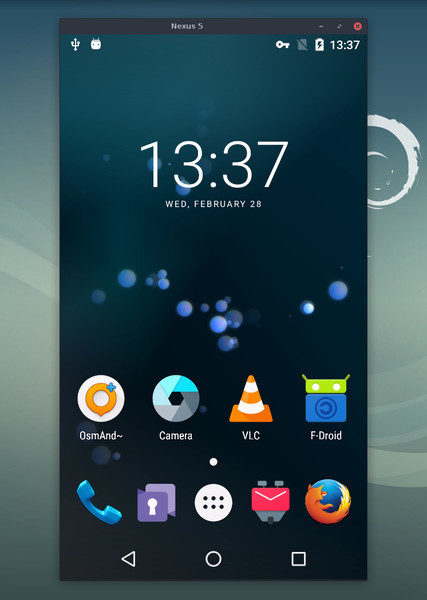
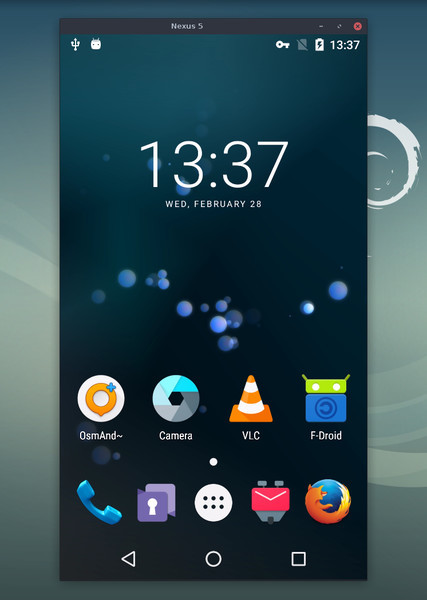
此应用程序可镜像通过 USB 或
[TCP/IP](https://github.com/genymobile/scrcpy/blob/master/doc/connection.md#tcpip-wireless) 连接的 Android 设备(视频和音频),并允许使用
计算机的键盘和鼠标进行控制。它不需要 _root_ 权限,也无需在设备上
安装应用。它可在 _Linux_、_Windows_ 和 _macOS_ 上运行。
[](doc/linux.md)
[](doc/windows.md)
[](doc/macos.md)
它专注于:
- **轻量**:原生,仅显示设备屏幕
- **性能**:30~120fps,取决于设备
- **质量**:1920×1080 或更高
- **低延迟**:[35~70ms][lowlatency]
- **低启动时间**:约 1 秒即可显示第一帧图像
- **无侵入性**:Android 设备上不会残留任何安装内容
- **用户受益**:无账户、无广告、无需互联网
- **自由**:免费且开源软件
[lowlatency]: https://github.com/Genymobile/scrcpy/pull/646
其功能包括:
- [音频转发](https://github.com/genymobile/scrcpy/blob/master/doc/audio.md)(Android 11+)
- [录制](https://github.com/genymobile/scrcpy/blob/master/doc/recording.md)
- [虚拟显示](https://github.com/genymobile/scrcpy/blob/master/doc/virtual-display.md)
- 在 [Android 设备屏幕关闭](https://github.com/genymobile/scrcpy/blob/master/doc/device.md#turn-screen-off) 的情况下镜像
- 双向[复制粘贴](https://github.com/genymobile/scrcpy/blob/master/doc/control.md#copy-paste)
- [可配置质量](https://github.com/genymobile/scrcpy/blob/master/doc/video.md)
- [摄像头镜像](https://github.com/genymobile/scrcpy/blob/master/doc/camera.md)(Android 12+)
- [作为网络摄像头镜像 (V4L2)](https://github.com/genymobile/scrcpy/blob/master/doc/v4l2.md)(仅限 Linux)
- 物理[键盘][hid-keyboard]和[鼠标][hid-mouse]模拟 (HID)
- [游戏手柄](https://github.com/genymobile/scrcpy/blob/master/doc/gamepad.md)支持
- [OTG 模式](https://github.com/genymobile/scrcpy/blob/master/doc/otg.md)
- 以及更多…
[hid-keyboard]: https://raw.githubusercontent.com/genymobile/scrcpy/master/doc/keyboard.md#physical-keyboard-simulation
[hid-mouse]: https://raw.githubusercontent.com/genymobile/scrcpy/master/doc/mouse.md#physical-mouse-simulation
## 先决条件
Android 设备至少需要 API 21(Android 5.0)。
[音频转发](https://github.com/genymobile/scrcpy/blob/master/doc/audio.md)支持 API >= 30(Android 11+)。
请确保您已在设备上[启用 USB 调试][enable-adb]。
[enable-adb]: https://developer.android.com/studio/debug/dev-options#enable
在某些设备上(尤其是小米),您可能会遇到以下错误:
```
Injecting input events requires the caller (or the source of the instrumentation, if any) to have the INJECT_EVENTS permission.
```
在这种情况下,你需要启用[一个额外的选项][control] `USB debugging
(Security Settings)`(这与 `USB debugging` 是不同的选项),才能使用键盘和鼠标控制它。设置该选项后需要重启设备。
[control]: https://github.com/Genymobile/scrcpy/issues/70#issuecomment-373286323
请注意,在 [OTG 模式](https://github.com/genymobile/scrcpy/blob/master/doc/otg.md)下运行 scrcpy 不需要 USB 调试。
## 获取应用
- [Linux](https://github.com/genymobile/scrcpy/blob/master/doc/linux.md)
- [Windows](https://github.com/genymobile/scrcpy/blob/master/doc/windows.md)(阅读[如何运行](https://github.com/genymobile/scrcpy/blob/master/doc/windows.md#run))
- [macOS](https://github.com/genymobile/scrcpy/blob/master/doc/macos.md)
## 必知技巧
- [降低分辨率](https://github.com/genymobile/scrcpy/blob/master/doc/video.md#size)可以大幅提升性能
(`scrcpy -m1024`)
- [_右键单击_](https://github.com/genymobile/scrcpy/blob/master/doc/mouse.md#mouse-bindings)触发 `BACK`
- [_中键单击_](https://github.com/genymobile/scrcpy/blob/master/doc/mouse.md#mouse-bindings)触发 `HOME`
- <kbd>Alt</kbd>+<kbd>f</kbd> 切换[全屏](https://github.com/genymobile/scrcpy/blob/master/doc/window.md#fullscreen)
- 还有许多其他[快捷键](https://github.com/genymobile/scrcpy/blob/master/doc/shortcuts.md)
## 用法示例
选项非常多,已在单独的页面中[记录](#user-documentation)。以下仅列出一些常见示例。
- 以 H.265(更高质量)捕获屏幕,将尺寸限制为 1920,将帧率限制为 60fps,禁用音频,并通过模拟物理键盘来控制设备:
```bash
scrcpy --video-codec=h265 --max-size=1920 --max-fps=60 --no-audio --keyboard=uhid
scrcpy --video-codec=h265 -m1920 --max-fps=60 --no-audio -K # 简短版本
```
- 在新的虚拟显示器中启动 VLC(与设备显示器分离):
```bash
scrcpy --new-display=1920x1080 --start-app=org.videolan.vlc
```
- 使用 H.265 和 16 Mbps 的比特率在新的 _flex_ 显示器中启动 VLC,同时保持显示器处于活动状态以免其关闭:
```bash
scrcpy --new-display -x --keep-active --start-app=org.videolan.vlc --video-codec=h265 -b16M
```
- 以 1920x1080 的 H.265 格式录制设备摄像头(以及麦克风)到 MP4 文件:
```bash
scrcpy --video-source=camera --video-codec=h265 --camera-size=1920x1080 --record=file.mp4
```
- 捕获设备前置摄像头并将其作为网络摄像头在计算机上暴露(在 Linux 上):
```bash
scrcpy --video-source=camera --camera-size=1920x1080 --camera-facing=front --v4l2-sink=/dev/video2 --no-playback
```
- 通过模拟物理键盘和鼠标在不镜像的情况下控制设备(不需要 USB 调试):
```bash
scrcpy --otg
```
- 使用插入计算机的游戏手柄控制设备:
```bash
scrcpy --gamepad=uhid
scrcpy -G # 简短版本
```
## 用户文档
该应用提供了大量功能和配置选项。它们记录在以下页面中:
- [连接](https://github.com/genymobile/scrcpy/blob/master/doc/connection.md)
- [视频](https://github.com/genymobile/scrcpy/blob/master/doc/video.md)
- [音频](https://github.com/genymobile/scrcpy/blob/master/doc/audio.md)
- [控制](https://github.com/genymobile/scrcpy/blob/master/doc/control.md)
- [键盘](https://github.com/genymobile/scrcpy/blob/master/doc/keyboard.md)
- [鼠标](https://github.com/genymobile/scrcpy/blob/master/doc/mouse.md)
- [游戏手柄](https://github.com/genymobile/scrcpy/blob/master/doc/gamepad.md)
- [设备](https://github.com/genymobile/scrcpy/blob/master/doc/device.md)
- [窗口](https://github.com/genymobile/scrcpy/blob/master/doc/window.md)
- [录制](https://github.com/genymobile/scrcpy/blob/master/doc/recording.md)
- [虚拟显示器](https://github.com/genymobile/scrcpy/blob/master/doc/virtual-display.md)
- [隧道](https://github.com/genymobile/scrcpy/blob/master/doc/tunnels.md)
- [OTG](https://github.com/genymobile/scrcpy/blob/master/doc/otg.md)
- [摄像头](https://github.com/genymobile/scrcpy/blob/master/doc/camera.md)
- [Video4Linux](https://github.com/genymobile/scrcpy/blob/master/doc/v4l2.md)
- [快捷键](https://github.com/genymobile/scrcpy/blob/master/doc/shortcuts.md)
## 资源
- [常见问题](https://github.com/genymobile/scrcpy/blob/master/FAQ.md)
- [翻译][wiki](不一定是最新的)
- [构建说明](https://github.com/genymobile/scrcpy/blob/master/doc/build.md)
- [开发者](https://github.com/genymobile/scrcpy/blob/master/doc/develop.md)
- [验证发布签名](https://github.com/genymobile/scrcpy/blob/master/doc/verify-release.md)
[wiki]: https://github.com/Genymobile/scrcpy/wiki
## 文章
- [Introducing scrcpy][article-intro]
- [Scrcpy now works wirelessly][article-tcpip]
- [Scrcpy 2.0, with audio][article-scrcpy2]
[article-intro]: https://blog.rom1v.com/2018/03/introducing-scrcpy/
[article-tcpip]: https://www.genymotion.com/blog/open-source-project-scrcpy-now-works-wirelessly/
[article-scrcpy2]: https://blog.rom1v.com/2023/03/scrcpy-2-0-with-audio/
## 联系方式
你可以针对错误报告、功能请求或一般性问题提交 [issue]。
对于错误报告,请先阅读[常见问题](https://github.com/genymobile/scrcpy/blob/master/FAQ.md),你可能会立即找到问题的解决方案。
[issue]: https://github.com/Genymobile/scrcpy/issues
你也可以使用:
- Reddit:[`r/scrcpy`](https://www.reddit.com/r/scrcpy)
- BlueSky:[`@scrcpy.bsky.social`](https://bsky.app/profile/scrcpy.bsky.social)
- Twitter:[`@scrcpy_app`](https://twitter.com/scrcpy_app)
## 捐赠
我是 [@rom1v](https://github.com/rom1v),_scrcpy_ 的作者和维护者。
如果你喜欢这个应用,可以[支持我的开源工作][donate]:
- [GitHub Sponsors](https://github.com/sponsors/rom1v)
- [Liberapay](https://liberapay.com/rom1v/)
- [PayPal](https://paypal.me/rom2v)
[donate]: https://blog.rom1v.com/about/#support-my-open-source-work
## 许可证
Copyright (C) 2018 Genymobile
Copyright (C) 2018-2026 Romain Vimont
Licensed under the Apache License, Version 2.0 (the "License");
you may not use this file except in compliance with the License.
You may obtain a copy of the License at
http://www.apache.org/licenses/LICENSE-2.0
Unless required by applicable law or agreed to in writing, software
distributed under the License is distributed on an "AS IS" BASIS,
WITHOUT WARRANTIES OR CONDITIONS OF ANY KIND, either express or implied.
See the License for the specific language governing permissions and
limitations under the License.