
Skip to content
KitploitKITPLOIT
工具博客
提交
工具博客
提交

黑客、渗透测试和网络安全工具,武装您的安全武器库!

Kitploit 是一个黑客、网络安全和渗透测试工具的目录。发现最新的项目更新,查找漏洞、分析系统、自动化测试并加强你的安全。

··订阅源·联系·隐私·© 2026 Kitploit

工具目录

分类

查看所有分类
Loading categories
metahub — 用于AWS的自动化安全发现增强与影响评估工具。通过资源上下文、关联关系和标签丰富漏洞数据,计算上下文影响评分,实现优先修复。 | Kitploit
工具/GitHubGitHub/gabrielsoltz/metahub
漏洞扫描器漏洞分析配置审计云安全威胁情报事件响应
GitHubgabrielsoltz/metahub

metahub

用于AWS的自动化安全发现增强与影响评估工具。通过资源上下文、关联关系和标签丰富漏洞数据,计算上下文影响评分,实现优先修复。

查看仓库
1771936个月前Kitploit 审核通过

最受欢迎

查看全部 →

发现我们社区最常用的工具。

探索所有工具

浏览我们的工具集合

查看所有工具 →
分享

MetaHub

MetaHub 是一个用于漏洞管理的自动化上下文安全发现丰富和影响评估工具。您可以将它与 AWS Security Hub 或任何兼容 ASFF 的安全扫描器一起使用。不再依赖无用的严重性等级,转而使用基于您自身环境的上下文影响评分定义。

AWS ECR Gallery

目录

  • 描述
  • 快速运行
  • 上下文
  • 影响
  • 高层架构
  • 使用场景
  • 配置
  • 使用 Python 运行
  • 使用 Docker 运行
  • 使用 Lambda 运行
  • 使用 Security Hub 自定义操作运行
  • AWS 认证
  • 配置 Security Hub
  • 配置上下文
  • 输入
  • 输出
  • 过滤器
  • Security Hub 操作
  • 贡献

描述

MetaHub 是一个用于基于影响上下文的漏洞管理的开源安全工具。它可以根据您的环境和需求自动完成安全发现的上下文化过程,即您的上下文,识别所有者,并据此计算影响评分,用于确定优先级(从何处开始?)以及自动化操作(如修复、告警或工单)。该工具适用于 AWS 环境,您可以将它与 AWS Security Hub 或任何兼容 ASFF 的扫描器(如 Prowler)一起使用。

ℹ️ 探索并扩展使用 Powerpipe 的新 MetaHub 看板!

MetaHub 通过连接到受影响账户中的受影响资源来描述您的上下文。它可以描述有关您的 AWS 账户和组织、受影响资源的标签、相关 CloudTrail 事件、受影响资源配置以及所有相关关联的信息:如果您正在对影响 EC2 实例的安全发现进行上下文化,MetaHub 不仅会连接到该实例本身,还会连接到其 IAM 角色;从那里,它将连接到与这些角色关联的 IAM 策略。它将连接到安全组并分析其所有规则,实例所在的 VPC 和子网、卷、自动伸缩组等。您可以应用过滤器来自动检测具有相同属性的其他资源,并进行深入调查。

获取了您的上下文中的所有信息后,MetaHub 将评估所有资源的影响条件:暴露、访问、加密、状态、环境、应用和所有者。基于这些计算结果,以及影响资源的安全发现的总体信息,MetaHub 将为每个发现和受影响资源生成一个评分。

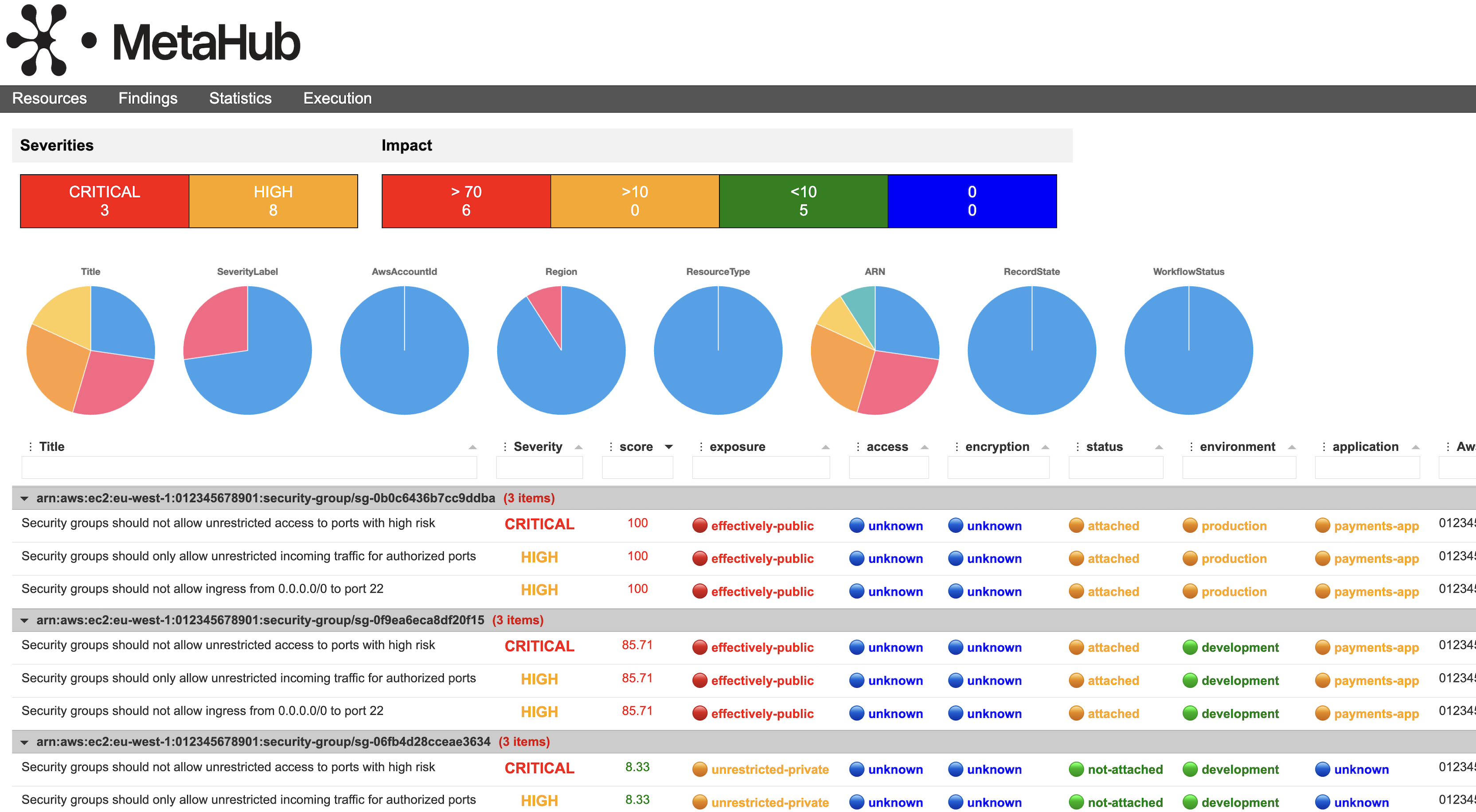
查看以下由 MetaHub 生成的看板。您可以看到受影响资源,其中汇总了影响它们的所有安全发现以及每个发现的原始严重性。之后是评分以及 MetaHub 用于生成该评分的所有评估标准。所有这些信息都可以过滤、排序、分组、下载和自定义。
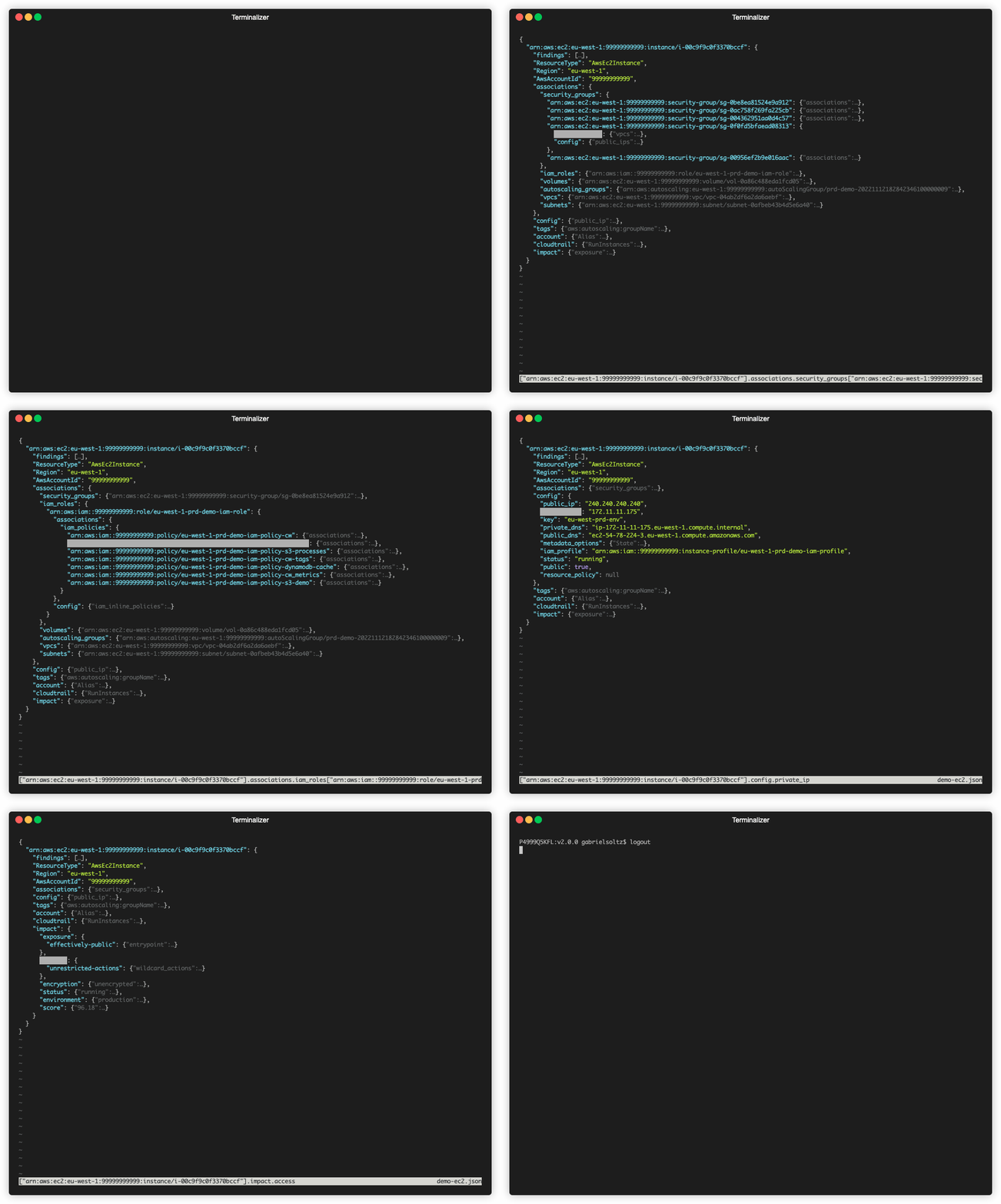
以下是针对 EC2 实例的 JSON 输出;请查看 MetaHub 如何将关于其上下文的所有信息组织在一起,位于 associations、config、tags、account和cloudtrail 之下,最后是带有评分以及用于生成该评分的所有评估标准的impact键。
Diagram

MetaHub 提供了一系列方法来列出、管理和输出安全发现,用于调查、抑制、更新以及与其他工具集成。它旨在作为 CLI 工具使用,或在自动化工作流(如 AWS Lambda 函数)中使用。它支持不同的输出,一些是程序化 json,但也有强大的 html、xlsx 和 csv 输出,您可以自定义。

如果您使用 AWS Security Hub,MetaHub 可以顺畅集成并扩展其功能。它可以作为 Security Hub 自定义操作 使用,支持 AWS Security Hub 过滤器,您可以管理发现的工作流状态,甚至可以直接在 AWS Security Hub 中丰富发现。

MetaHub 专为 AWS 环境设计,支持多账户设置。您可以从任何环境运行该工具,通过承担 AWS Security Hub master 和 child/service 账户中的角色来实现。这使得您可以使用 AWS Security Hub 多账户实现从多个账户获取聚合数据,同时从受影响资源所在的账户中获取并丰富这些发现。有关更多信息,请参阅配置 Security Hub。

快速运行

使用默认过滤器从 AWS Security Hub 读取安全发现,并执行默认的上下文选项:```bash ./metahub

root@kitploit:~
读取按ID过滤的特定AWS Security Hub安全发现,并执行默认上下文选项:```bash
./metahub --sh-filters Id=arn:aws:securityhub:us-east-1:123456789012:security-control/CloudFront.1/finding/8bd4d049-dcbc-445b-a5d1-595d8274b4c1

从 AWS Security Hub 中读取影响某个资源的所有处于 ACTIVE 状态的安全发现(通过 ResourceId 和 RecordState 过滤),并执行默认上下文选项:```bash ./metahub --sh-filters RecordState=ACTIVE ResourceId=arn:aws:ec2:eu-west-1:123456789012:subnet/subnet-0b7d243ff90ebc03e

root@kitploit:~
读取所有影响 AWS 账户且状态为 ACTIVE 的安全发现(通过 AwsAccountId 和 RecordState 筛选),这些发现针对带有标签 `Environment` 且值为 `stg` 的资源,并执行上下文选项 `config` 和 `tags`。```bash
./metahub --sh-filters RecordState=ACTIVE AwsAccountId=123456789012 --mh-filters-tags Environment=stg --context config tags

Quick Run (从输入的ASFF文件读取发现项)

从Prowler读取您的安全发现项作为输入文件,并执行默认的上下文选项:```bash python3 prowler.py aws -M json-asff -q ./metahub --inputs file-asff --input-asff /path/to/prowler-findings.json.asff

root@kitploit:~
从Powerpipe读取安全发现作为输入文件,并执行默认的上下文选项:```bash
powerpipe benchmark run aws_compliance.benchmark.all_controls --export asff
./metahub --inputs file-asff --input-asff /path/to/powerpipe-findings.json.asff

从 Trivy 读取安全发现作为输入文件,并执行默认上下文选项:```bash export AWS_REGION=us-west-1 export AWS_ACCOUNT_ID=012345678901 trivy image --format template --template "@contrib/asff.tpl" -o trivy-findings.json.asff public.ecr.aws/n2p8q5p4/metahub:stable ./metahub --inputs file-asff --input-asff /path/to/trivy-findings.json.asff

root@kitploit:~
# Context

在 **MetaHub** 中,**上下文**指的是受影响资源的相关信息,如**配置**、**关联关系**、**日志**、**标签**和**账户**。

MetaHub 不仅分析受影响资源本身,还会分析所有关联或附带的资源。例如,如果一个安全发现存在于安全组上,**MetaHub** 将分析该安全组及其关联的所有内容,比如使用该安全组的 EC2 实例。对于每个关联资源,**MetaHub** 会获取其上下文。如果安全组附加到了 EC2 实例,**MetaHub** 会分析该实例及其所有关联项,例如 IAM 角色和策略。仅凭安全组上的一个安全发现,**MetaHub** 就能获取安全组、EC2 实例、IAM 角色和 IAM 策略的上下文。这对于理解安全发现的影响至关重要。

**上下文**模块包含五个主要部分:[**config**](#config)(包括[**associations**](#associations))、[**tags**](#tags)、[**cloudtrail**](#cloudtrail) 和 [**account**](#account)。默认情况下仅启用 **config**、**tags** 和 **account**,但你可以通过 `--context` 选项更改此行为(例如,使用 `--context config tags cloudtrail account` 启用所有上下文键,或使用 `--context config` 仅启用 config 和 associations 键)。

## Config

在 `config` 键下,你可以找到受影响资源的重要配置信息。例如,如果受影响资源是 S3 存储桶,你将看到其存储桶策略、ACL、加密配置等信息。如果受影响资源是 EC2 实例,你将看到其密钥、公网和内网 IP、元数据等信息。**MetaHub** 获取的配置信息按资源类型定义。如果你想添加更多配置信息,请参阅[贡献指南](#contributing)。

你可以使用选项 `--mh-filters-config <key> {True/False}` 基于配置输出来过滤发现(请参阅[配置过滤器](#config-filters))。

<details>
  <summary>S3 存储桶配置键示例</summary>```json
"config": {
  "resource_policy": {
    "Version": "2012-10-17",
    "Statement": [
      {
        "Sid": "Test",
        "Effect": "Allow",
        "Principal": {
          "Service": "config.amazonaws.com"
        },
        "Action": "s3:GetBucketAcl",
        "Resource": "arn:aws:s3:::metahub-bucket",
        "Condition": {
          "StringEquals": {
            "AWS:SourceAccount": "123456789012"
          }
        }
      },
    ]
  },
  "website_enabled": false,
  "bucket_acl": [
    {
      "Grantee": {
        "DisplayName": "gabriel.soltz",
        "ID": "1234564bd76c6c64080717b68eafaa588b41706daaf22d3d0705b398bd7cbd57",
        "Type": "CanonicalUser"
      },
      "Permission": "FULL_CONTROL"
    }
  ],
  "cannonical_user_id": "1234564bd76c6c64080717b68eafaa588b41706daaf22d3d0705b398bd7cbd57",
  "public_access_block_enabled": {
    "BlockPublicAcls": true,
    "IgnorePublicAcls": true,
    "BlockPublicPolicy": true,
    "RestrictPublicBuckets": true
  },
  "account_public_access_block_enabled": false,
  "public": false,
  "bucket_encryption": [
    {
      "ApplyServerSideEncryptionByDefault": {
        "SSEAlgorithm": "AES256"
      },
      "BucketKeyEnabled": false
    }
  ]
},

关联

在 associations 键下,您将找到受影响资源的所有关联资源。例如,如果受影响资源是 EC2 实例,您将找到诸如:安全组、IAM 角色、卷、VPC、子网、自动伸缩组等资源。如果受影响资源是 IAM 角色,您将找到诸如 IAM 策略、IAM 用户、IAM 组等资源。每次 MetaHub 发现一个关联,它将再次连接到该关联资源并获取其自己的上下文。关联是理解安全发现上下文和影响的关键。

您可以使用选项基于关联输出来过滤您的发现:--mh-filters-config <key> {True/False}(参见 配置过滤器)。

EC2 实例关联键示例```json "associations": { "security_groups": { "arn:aws:ec2:eu-west-1:123456789012:security-group/sg-020cc749a58678e05": { "associations": { "vpcs": { "arn:aws:ec2:eu-west-1:123456789012:vpc/vpc-03cc56a1c2afb5760": { "associations": { "subnets": { "arn:aws:ec2:eu-west-1:123456789012:subnet/subnet-03d86f1ccd7729d85": {}, "arn:aws:ec2:eu-west-1:123456789012:subnet/subnet-0ccfb8dea658f49ec": {}, "arn:aws:ec2:eu-west-1:123456789012:subnet/subnet-05e85a7b0ec9e404c": {}, "arn:aws:ec2:eu-west-1:123456789012:subnet/subnet-0e177ea95bcc76256": {} } }, "config": { "cidr": "172.10.0.0/16", "default": false, "public": null } } }, "network_interfaces": { "arn:aws:ec2:eu-west-1:123456789012:network-interface/eni-041a6e5bb59c336ee": {} }, "instances": { "arn:aws:ec2:eu-west-1:123456789012:instance/i-018daeedcf06398c0": {} } }, "config": { "public_ips": [ "100.100.100.100" ], "managed_services": [], "its_referenced_by_a_security_group": false, "security_group_rules": [ { "SecurityGroupRuleId": "sgr-08cdc9fdac8fd1a5b", "GroupId": "sg-020cc749a58678e05", "GroupOwnerId": "123456789012", "IsEgress": true, "IpProtocol": "-1", "FromPort": -1, "ToPort": -1, "CidrIpv4": "0.0.0.0/0", "Tags": [] }, { "SecurityGroupRuleId": "sgr-0e6cd39169dc137ab", "GroupId": "sg-020cc749a58678e05", "GroupOwnerId": "123456789012", "IsEgress": false, "IpProtocol": "tcp", "FromPort": 22, "ToPort": 22, "CidrIpv4": "0.0.0.0/0", "Tags": [] } ], "public": true, "default": false, "attached": true, "resource_policy": null } }, }, "iam_roles": { "arn:aws:iam::123456789012:role/eu-west-1-stg-backend-iam-role": { "associations": { "iam_policies": { "arn:aws:iam::123456789012:policy/eu-west-1-stg-backend-iam-policy-cw": { "associations": { "iam_roles": { "arn:aws:iam::123456789012:role/eu-west-1-stg-backend-iam-role": {} }, "iam_groups": {}, "iam_users": {} }, "config": { "name": "eu-west-1-stg-backend-iam-policy-cw", "description": false, "customer_managed": true, "attached": true, "public": null, "resource_policy": { "Version": "2012-10-17", "Statement": [ { "Effect": "Allow", "Action": [ "logs:CreateLogGroup", "logs:CreateLogStream", "logs:PutLogEvents", "logs:DescribeLogStreams" ], "Resource": [ "arn:aws:logs:*:*:*" ] } ] } } }, } }, "config": { "iam_inline_policies": {}, "instance_profile": "arn:aws:iam::123456789012:instance-profile/eu-west-1-stg-backend-iam-profile", "trust_policy": { "Version": "2012-10-17", "Statement": [ { "Sid": "", "Effect": "Allow", "Principal": { "Service": "ec2.amazonaws.com" }, "Action": "sts:AssumeRole" } ] }, "permissions_boundary": false, "public": null, "resource_policy": null } } }, "volumes": { "arn:aws:ec2:eu-west-1:123456789012:volume/vol-0371a09e338f582da": { "associations": { "instances": { "arn:aws:ec2:eu-west-1:123456789012:instance/i-018daeedcf06398c0": {} } }, "config": { "encrypted": true, "attached": true, "public": null, "resource_policy": null } } }, "autoscaling_groups": { "arn:aws:autoscaling:eu-west-1:123456789012:autoScalingGroup/stg-backend-20201205160228428400000002": { "associations": { "instances": { "arn:aws:ec2:eu-west-1:123456789012:instance/i-018daeedcf06398c0": {} }, "launch_templates": { "arn:aws:ec2:eu-west-1:123456789012:launch-template/lt-06b73d2e77f10446f": {} }, "launch_configurations": {} }, "config": { "name": "stg-backend-20201205160228428400000002", "public": null, "resource_policy": null } } }, "vpcs": { "arn:aws:ec2:eu-west-1:123456789012:vpc/vpc-03cc56a1c2afb5760": { "associations": { "subnets": { "arn:aws:ec2:eu-west-1:123456789012:subnet/subnet-03d86f1ccd7729d85": {}, "arn:aws:ec2:eu-west-1:123456789012:subnet/subnet-0ccfb8dea658f49ec": {}, "arn:aws:ec2:eu-west-1:123456789012:subnet/subnet-05e85a7b0ec9e404c": {}, "arn:aws:ec2:eu-west-1:123456789012:subnet/subnet-0e177ea95bcc76256": {} } }, "config": { "cidr": "172.10.0.0/16", "default": false, "public": null } } }, "subnets": { "arn:aws:ec2:eu-west-1:123456789012:subnet/subnet-03d86f1ccd7729d85": { "associations": { "route_tables": { "arn:aws:ec2:eu-west-1:123456789012:route-table/rtb-0ebae6462f919943d": { "associations": {}, "config": { "default": false, "route_to_internet_gateway": [ { "DestinationCidrBlock": "0.0.0.0/0", "GatewayId": "igw-0790540d8d726f9d4", "Origin": "CreateRoute", "State": "active" } ], "route_to_nat_gateway": [], "route_to_transit_gateway": [], "route_to_vpc_peering": [], "public": null } } }, "network_interfaces": { "arn:aws:ec2:eu-west-1:123456789012:network-interface/eni-0e8918fa31d2acd55": {}, "arn:aws:ec2:eu-west-1:123456789012:network-interface/eni-0f6c936934fd9d6a6": {}, "arn:aws:ec2:eu-west-1:123456789012:network-interface/eni-041a6e5bb59c336ee": {}, "arn:aws:ec2:eu-west-1:123456789012:network-interface/eni-0e5f6cfdc7c286224": {} }, "instances": { "arn:aws:ec2:eu-west-1:123456789012:instance/i-018daeedcf06398c0": {} } }, "config": { "cidr": "172.11.11.0/24", "map_public_ip_on_launch_enabled": true, "default": false, "public": true, "resource_policy": null, "public_ips": [ "100.100.100.100", ], "managed_services": [ "ELB app/stg-alb-backend/3567d780bd062d75", "Interface for NAT Gateway nat-0805d9808347bba69" ], "attached": true } } }, } ```

标签

在 tags 键下,您将找到与受影响资源关联的所有标签。MetaHub 依赖 AWS Resource Groups Tagging API 来查询资源的标签。请注意,并非所有 AWS 资源类型都支持此 API。您可以查看支持的服务。

标签是理解上下文的关键部分。标签策略通常包括:

  • 环境(如生产、暂存、开发等)
  • 数据分类(如机密、受限等)
  • 所有者(如团队、小组、业务部门等)
  • 合规性(如 PCI、SOX 等)

如果您遵循适当的标签策略,可以过滤并生成有趣的输出。例如,您可以列出与特定团队相关的所有发现,并将其直接提供给该团队。

您可以使用选项 --mh-filters-tags TAG=VALUE 基于标签输出过滤您的发现(请参阅标签过滤器)。

EC2 实例标签键示例```json "tags": { "aws:autoscaling:groupName": "stg-backend-20201205160228428400000002", "environment": "stg", "terraform": "true", "aws:ec2launchtemplate:version": "8", "aws:ec2launchtemplate:id": "lt-06b73d2e77f10446f", "Name": "stg-backend" } ```

CloudTrail

在键 cloudtrail 下,您将找到与受影响资源相关的关键 CloudTrail 事件,例如创建事件。我们查找的 CloudTrail 事件按资源类型定义,您可以通过编辑配置文件 resources.py 来添加、删除或修改它们。例如,对于类型为安全组的受影响资源,MetaHub 将查找以下事件:CreateSecurityGroup(安全组创建事件)和 AuthorizeSecurityGroupIngress(安全组规则授权事件)。

EC2实例cloudtrail键的示例```json "cloudtrail": { "RunInstances": { "Username": "root", "EventTime": "2023-11-15 06:10:07+01:00", "EventId": "4f122d76-812d-4438-bc33-3585a9e863cf" } } ```
DynamoDB 表 cloudtrail 键的示例```json "cloudtrail": { "CreateTable": { "Username": "gabriel.soltz", "EventTime": "2023-12-05 14:34:25+01:00", "EventId": "7110e3ae-09a3-44b9-929a-1775e0fbedcf" } } ```

账户

在键 account 下,您可以找到受影响资源运行所在的账户信息,例如它是否属于 AWS Organizations、其联系人信息等。

账户键的示例```json "account": { "Alias": "metahub-demo", "AlternateContact": { "AlternateContactType": "SECURITY", "EmailAddress": "[email protected]", "Name": "Gabriel", "PhoneNumber": "+1234567890", "Title": "Security" }, "Organizations": { "Arn": "arn:aws:organizations::123456789012:organization/o-12349772jb", "Id": "o-12349772jb", "MasterAccountId": "123456789012", "MasterAccountEmail": "[email protected]", "FeatureSet": "ALL", "DelegatedAdministrators": {}, "Details": { "ParentId": "r-k123", "ParentType": "ROOT", "OU": "ROOT", "Policies": { "p-FullAWSAccess": { "Name": "FullAWSAccess", "Arn": "arn:aws:organizations::aws:policy/service_control_policy/p-FullAWSAccess", "Type": "SERVICE_CONTROL_POLICY", "Description": "Allows access to every operation", "AwsManaged": true, "Targets": [] } } } } }, ```

影响

MetaHub 中的影响模块专注于理解受影响资源的 7 个关键属性:暴露、访问、加密、状态、环境、应用 和 所有者,并将它们的值与影响同一资源的所有安全发现及其严重程度的值相结合,以生成一个评分。影响评分是一个介于 0 到 100 之间的数字,100 表示影响最高。


暴露

暴露评估受影响资源如何暴露于其他网络。例如,受影响资源是实际上公开还是仅限公开,是否属于 VPC 的一部分,是否有公共 IP,或者是否受防火墙或安全组保护。

例如一个实际上公开的资源```json "exposure": { --> The exposure key "effectively-public": { --> The exposure value, effectively-public "entrypoint": "66.66.66.66", --> The entrypoint to the resource from the Internet (Ip, Domain, etc.) "unrestricted_ingress_rules": [ --> The unrestricted ingress rules, if any { "SecurityGroupRuleId": "sgr-0553206714e321b87", "GroupId": "sg-0a15a46e47f07d139", "GroupOwnerId": "123456789012", "IsEgress": false, "IpProtocol": "tcp", "FromPort": 22, "ToPort": 22, "CidrIpv4": "0.0.0.0/0", "Tags": [] } ], "unrestricted_egress_rules": [ --> The unrestricted egress rules, if any { "SecurityGroupRuleId": "sgr-007b509667896ebe3", "GroupId": "sg-0a15a46e47f07d139", "GroupOwnerId": "123456789012", "IsEgress": true, "IpProtocol": "-1", "FromPort": -1, "ToPort": -1, "CidrIpv4": "0.0.0.0/0", "Tags": [] }, ], "resource_public_config": true --> The public configuration of the resource } } ```

访问

访问 评估资源策略层。MetaHub 检查所有可用的策略,包括:IAM 托管策略、IAM 内联策略、资源策略、存储桶 ACL,以及与其他资源(如 IAM 角色)的关联,其策略也会被分析。无限制策略不仅是该策略本身的问题,还会影响任何使用它的其他资源。

示例:未限制操作的资源```json "access": { --> The access key "unrestricted-actions": { --> The access value, unrestricted-actions "wildcard_actions": { --> The wildcard policies, if any "arn:aws:iam::123456789012:policy/eu-west-1-stg-iam-policy-dynamodb-cache": [ { "Action": [ "dynamodb:*" --> The wildcard action ], "Effect": "Allow", "Resource": [ "arn:aws:dynamodb:eu-west-1:123456789012:table/table", ] } ], } } ```

加密

加密根据每种资源类型评估不同的加密层。例如,对于某些资源,它会评估 at_rest 和 in_transit 加密配置是否均已启用。

可能的状态值描述
🔴 未加密100%资源未完全加密。
一个未加密资源的示例```json "encryption": { --> The encryption key "unencrypted": { --> The encryption value, unencrypted "unencrypted_resources": [ --> the unencrypted resources associated with the affected resource, if any "arn:aws:ec2:eu-west-1:012345678901:volume/vol-0ac713ec808a8d8bd" ], "resource_encryption_config": null --> The encryption configuration of the resource, if it has any } } ```

状态

状态评估受影响资源在附加或运行方面的状态。例如,对于 EC2 实例,我们评估资源是运行中、已停止或已终止;但对于 EBS 卷和安全组等资源,我们评估这些资源是否附加到其他资源。

运行中资源示例```json "status": { --> The status key "running": { --> The status value, running "status": "running", --> The status configuration of the resource, if it has any "attached": null --> The attachment configuration of the resource, if it has any } } ```

环境

环境评估受影响资源运行的环境。默认情况下,MetaHub 定义了三种环境:production、staging 和 development,但你可以根据需要添加、删除或修改这些环境。MetaHub 根据受影响资源的标签、账户 ID 或账户别名来评估环境。你可以在配置文件中自定义环境定义和策略(参见自定义配置)。

通过标签匹配的生产环境资源示例```json "environment": { --> The environment key "production": { --> The environment value, production "tags": { --> The parameters used for evaluating the environment, in this case tags "Env": "prod" --> The tag and key found used for evaluating the environment } } } ```

应用程序

应用程序 评估受影响资源所属的应用程序。MetaHub 依赖 AWS 的 myApplications 功能,该功能依赖于标签 awsApplication,但您可以根据自己的上下文扩展此功能,例如通过定义用于定义应用程序或服务的其他标签(如 Service 或任何其他标签),或依赖于账户 ID 或别名。您可以在配置文件中定义您的应用程序定义和策略(参见自定义配置)。

可能的状态值描述
🔵 未知-无法检查该资源所属的应用程序。
由 myApplication 标签匹配的资源的示例```json "application": { --> The application key "payments-app": { --> The application value, payments-app "tags": { --> The parameters used for evaluating the environment, in this case the tag awsApplication "awsApplication": "arn:aws:resource-groups:eu-west-1:123456789012:group/app1/0c8vpbjkzeeffsz2cqgxpae7b2" --> The tag and key found used for evaluating the environment } } } ```

所有者

所有者功能侧重于所有权检测。它可以以多种方式确定受影响资源的所有者。该信息可用于自动将安全发现分配给正确的所有者、升级处理或基于此信息做出决策。自动确定资源所有者对于安全团队至关重要。它使他们能够专注于最关键的问题,并在自动化工作流中尽快将其分配给正确的人员。您可以在配置文件中定义您的所有者定义和策略(请参见自定义配置)。

可能状态值描述
🔵 未知(unknown)-无法检查资源的所有者。
示例:通过账户ID匹配的资源```json "owner": { --> The owner key "payments-team": { --> The owner value, payments-app "account": { --> The parameters used for evaluating the environment, in this case the account "account_ids": ["123456789012"], --> The account ids found used for evaluating the environment "account_aliases": [], }, } } ```

发现

作为影响评分计算的一部分,我们还会评估影响该资源的安全发现总数及其严重程度。我们使用以下公式来计算该指标:```sh (SUM of all (Finding Severity / Highest Severity) with a maximum of 1)

root@kitploit:~
例如,如果受影响的资源有两个影响它的发现,一个严重性为 `HIGH`,另一个为 `LOW`,那么**影响发现评分**将是:```sh
SUM(HIGH (3) / CRITICAL (4) + LOW (0.5) / CRITICAL (4)) = 0.875

高层架构

MetaHub 读取来自 AWS Security Hub 或任何兼容 ASFF 的安全扫描器的安全发现。然后,它直接在被影响的账户中查询相关资源,以提供更多上下文信息。基于这些上下文,它计算影响程度。最后,根据你的需求生成不同的输出。

Diagram

使用场景

MetaHub 的一些使用场景包括:

  • MetaHub 与 Prowler 集成,作为本地扫描器进行上下文丰富
  • 基于标签自动解决 Security Hub 发现项的自动抑制
  • 将 MetaHub 直接作为 Security Hub 自定义操作,以便直接从 AWS 控制台使用
  • 为你的发现项创建丰富的 HTML 报告,支持过滤、排序、分组和下载
  • 基于 MetaHub 上下文创建 Security Hub 洞察

自定义配置

MetaHub 使用配置文件,让你自定义某些检查行为、默认过滤器等。配置文件位于 lib/config/。

你可以自定义的内容:

  • lib/config/configuration.py:此文件包含 MetaHub 的默认配置。你可以更改默认过滤器、默认输出模式、环境定义等。

  • lib/config/impact.py:此文件包含影响公式标准的值及其权重。你可以根据需要修改值和权重。

  • lib/config/resources.py:此文件包含每种资源类型的定义,例如要查找的 CloudTrail 事件。

使用 Python 运行

MetaHub 是一个 Python3 程序。你的系统需要安装 Python3 以及 requirements.txt 文件中描述的所需 Python 模块。

可以通过手动方式(使用 pip3)或使用 Python 虚拟环境(推荐方法)在系统中安装依赖项。

使用 Python 虚拟环境运行

  1. 克隆仓库:git clone [email protected]:gabrielsoltz/metahub.git
  2. 进入仓库目录:cd metahub
  3. 为此项目创建虚拟环境:python3 -m venv venv/metahub
  4. 激活刚创建的虚拟环境:source venv/metahub/bin/activate
  5. 安装 Metahub 依赖项:pip3 install -r requirements.txt
  6. 运行:./metahub -h
  7. 完成后退出虚拟环境:deactivate

下次使用时,只需步骤 4 和 6 即可使用该程序。

或者,你也可以使用 Docker 运行此工具。

使用 Docker 运行

MetaHub 也以 Docker 镜像形式提供。你可以直接从公共 Docker 镜像运行,或在本地构建。

MetaHub 容器可用的标签如下:

  • latest:与 master 分支同步
  • <x.y.z>:你可以在 这里 查找版本
  • stable:此标签始终指向最新版本。

要从公共注册表运行,可以执行以下命令:```sh docker run -ti public.ecr.aws/n2p8q5p4/metahub:latest ./metahub -h

root@kitploit:~
## AWS 凭证与 Docker

如果您已登录到 AWS 主机,就可以在 Docker 容器内无缝使用相同的凭证。您可以通过将必要的环境变量传递给容器,或者挂载凭证文件来实现这一点。

例如,您可以运行以下命令:```sh
docker run -e AWS_DEFAULT_REGION -e AWS_ACCESS_KEY_ID -e AWS_SECRET_ACCESS_KEY -e AWS_SESSION_TOKEN -ti public.ecr.aws/n2p8q5p4/metahub:latest ./metahub -h

另一方面,如果你未在主机上登录,则需要从容器内部重新登录。

Build and Run Docker locally

或者你也可以在本地构建它:```sh git clone [email protected]:gabrielsoltz/metahub.git cd metahub docker build -t metahub . docker run -ti metahub ./metahub -h

root@kitploit:~
# 使用 Lambda 运行

**MetaHub** 已为 Lambda/Serverless 做好准备了!您可以直接在 AWS Lambda 函数上运行 MetaHub,无需任何额外的基础设施。

在 Lambda 函数中运行 MetaHub 允许您根据定义的触发器自动执行它。例如,您可以:

- 每次出现新的安全发现时触发 MetaHub Lambda 函数,以在 AWS Security Hub 中丰富该发现。
- 每次出现新的安全发现时触发 MetaHub Lambda 函数,以基于上下文进行抑制。
- 触发 MetaHub Lambda 函数,根据上下文识别安全发现的影响所有者,并使用您的内部系统进行分配。
- 触发 MetaHub Lambda 函数,创建带有丰富上下文的工单。

## 部署 Lambda

部署 Lambda 函数的 Terraform 代码位于 `terraform/` 文件夹下。

只需运行以下命令:```sh
cd terraform
terraform init
terraform apply

代码将创建一个用于Lambda代码的zip文件和一个用于Python依赖的zip文件,这些依赖将作为Lambda层使用。它还会创建Lambda函数以及所有必需的资源。

Terraform代码还将创建一个Security Hub自定义操作和一个EventBridge规则,以便在执行自定义操作时触发Lambda函数。请参见下文。

自定义Lambda行为

您可以通过编辑文件lib/lambda.py来自定义Lambda的MetaHub选项。您可以更改MetaHub的默认选项,例如过滤器、Meta*选项等。

Lambda权限

Terraform将为Lambda函数创建在本地(同一账户内)运行所需的最低权限。如果您希望Lambda在其他账户中担任角色(例如,如果您在聚合其他账户发现结果的Security Hub主账户中执行Lambda,就需要这样做),您需要指定要担任的角色,在Lambda函数配置中添加--mh-assume-role选项(参见上一步),并在Lambda角色中添加相应的策略,允许Lambda担任该角色。

使用Security Hub自定义操作运行

MetaHub可以作为一个Security Hub自定义操作运行。这允许您直接从Security Hub控制台对选定的一个或一组发现项运行MetaHub。

custom_action

然后,该自定义操作将触发一个Lambda函数,该函数将为选定的发现项运行MetaHub。

当您使用Security Hub自定义操作触发Lambda时,Lambda将读取其上下文中的选定发现项,并对每个发现项执行一次。默认情况下,不会对发现项采取任何操作,但您可以更改此行为。请参见自定义Lambda行为。

Security Hub自定义操作将作为Terraform代码的一部分进行部署。有关更多信息,请参见部署Lambda。

如果您想手动部署,请按照以下步骤操作:
  1. 在Security Hub中,选择“设置”,然后选择“自定义操作”。
  2. 选择“创建自定义操作”。
  3. 为操作提供名称、描述和自定义操作ID。
  4. 选择“创建自定义操作”。(记下自定义操作ARN。在EventBridge中创建与此操作关联的规则时,需要使用该ARN。)
  5. 在EventBridge中,选择“规则”,然后选择“创建规则”。
  6. 输入规则的名称和描述。
  7. 对于“事件总线”,选择要与此规则关联的事件总线。如果您希望此规则匹配来自您账户的事件,请选择“default”。当您账户中的AWS服务发出事件时,它始终会发送到您账户的默认事件总线。
  8. 对于“规则类型”,选择“具有事件模式的规则”,然后按“下一步”。
  9. 对于“事件源”,选择“AWS事件”。
  10. 对于“创建方法”,选择“使用模式表单”。
  11. 对于“事件源”,选择“AWS服务”。
  12. 对于“AWS服务”,选择“Security Hub”。
  13. 对于“事件类型”,选择“Security Hub Findings - Custom Action”。
  14. 选择“特定自定义操作ARN”,并添加自定义操作ARN。
  15. 选择“下一步”。
  16. 在“选择目标”下,选择Lambda函数。
  17. 选择您为MetaHub创建的Lambda函数。

AWS认证

确保您已在本地机器(或您将运行MetaHub的位置)上设置了AWS凭证。

例如,您可以使用aws configure选项。```sh aws configure

root@kitploit:~
或者,您可以将您的凭据导出到环境中。```sh
export AWS_DEFAULT_REGION="us-east-1"
export AWS_ACCESS_KEY_ID= "ASXXXXXXX"
export AWS_SECRET_ACCESS_KEY= "XXXXXXXXX"
export AWS_SESSION_TOKEN= "XXXXXXXXX"

配置 Security Hub

  • 如果你为单个 AWS 账户设置了 MetaHub(AWS Security Hub 未聚合来自不同账户的发现),则无需使用任何额外选项;MetaHub 将使用你环境中的凭证。不过,如果你的 IAM 设计要求如此,你也可以在登录同一账户后登录并承担角色。只需使用 --sh-assume-role 选项指定角色,并使用 --sh-account 选项指定你登录的同一 AWS 账户 ID。

  • --sh-region:Security Hub 运行的 AWS 区域。如果你未指定区域,则将使用环境中配置的区域。如果你使用 AWS Security Hub 跨区域聚合,则应将该区域用作 --sh-region 选项,以便能够一起获取所有发现。

  • --sh-account 和 --sh-assume-role:Security Hub 运行的 AWS 账户 ID 以及要在该账户中承担的 AWS IAM 角色。当你在与 AWS Security Hub 运行所在 AWS 账户不同的账户中登录时,或者在多 AWS 账户设置中运行 AWS Security Hub 时,这些选项很有用。这两个选项必须一起使用。提供的角色需要具有足够的策略来获取和更新 AWS Security Hub 中的发现(如果需要)。如果你未指定 --sh-account,MetaHub 将假定为你登录的账户。

  • --sh-profile:你也可以提供你的 AWS 配置文件名称,用于 AWS Security Hub。使用此选项时,你无需指定 --sh-account 或 --sh-assume-role,因为 MetaHub 将使用该配置文件中的凭证。如果你使用了 --sh-account 和 --sh-assume-role,这些选项将优先于 。

Security Hub 的 IAM 策略

这是你读取和写入 AWS Security Hub 所需的最低 IAM 策略。如果你不想使用 MetaHub 更新你的发现,可以移除 securityhub:BatchUpdateFindings 操作。```sh { "Version": "2012-10-17", "Statement": [ { "Effect": "Allow", "Action": [ "security hub:GetFindings", "security hub:ListFindingAggregators", "security hub:BatchUpdateFindings", "iam:ListAccountAliases" ], "Resource": [ "*" ] } ] }

root@kitploit:~
# Configuring Context

如果你正在为多AWS账户环境运行MetaHub(AWS Security Hub正在聚合来自多个AWS账户的发现结果),你必须提供用于上下文查询的代入角色,因为受影响的资源与AWS Security Hub发现结果不在同一个AWS账户中。`--mh-assume-role` 将用于直接连接到受影响账户中的受影响资源。此角色需要拥有足够的策略来能够描述资源。

## IAM Policy for Context

上下文所需的最低策略包括托管策略 `arn:aws:iam::aws:policy/SecurityAudit` 以及以下操作:

- `tag:GetResources`
- `lambda:GetFunction`
- `lambda:GetFunctionUrlConfig`
- `cloudtrail:LookupEvents`
- `account:GetAlternateContact`
- `organizations:DescribeAccount`
- `iam:ListAccountAliases`

# Inputs

MetaHub可以直接通过其API从AWS Security Hub读取安全发现结果。如果你不使用Security Hub,你可以使用任何兼容ASFF的扫描工具。大多数云安全扫描工具都支持ASFF格式,例如Prolwer、Steampipe、Trivy等。

如果你想从输入的ASFF文件中读取数据,你需要使用选项(`--inputs file-asff`)并提供文件的路径。你可以提供多个文件,以空格分隔。:```sh
./metahub.py --inputs file-asff --input-asff path/to/the/file.json.asff path/to/the/file2.json.asff

您还可以将AWS Security Hub的发现与输入ASFF文件结合起来,同时指定两个输入(--inputs file-asff securityhub)。MetaHub将一起处理所有发现,最终得到一个单一的输出。:```sh ./metahub.py --inputs file-asff securityhub --input-asff path/to/the/file.json.asff

root@kitploit:~
当使用文件作为输入时,无法使用 `--sh-filters` 选项来筛选发现,因为该选项依赖于 AWS API 进行筛选。也无法使用 `--update-findings` 或 `--enrich-findings` 选项,因为这些发现不在 AWS Security Hub 中。如果同时从两种来源读取,只有来自 AWS Security Hub 的发现会被更新。

MetaHub 还为格式不正确的 ASFF 实现了一些**修复机制**。这是一种尽力而为的方法,旨在使 ASFF 尽可能有用,但并不完美,需要在源扫描器中修复。

- 如果资源和根级中缺少键 `Region`,MetaHub 将根据受影响资源的 ARN 计算区域。
- 如果 ASFF 文件未正确设置 ASFF 资源类型,MetaHub 将使用库 [aws-arn](https://github.com/gabrielsoltz/aws-arn) 根据受影响资源的 ARN 计算。
- 如果缺少任何其他字段,如 `SeverityLabel`、`Workflow`、`RecordState`、`Compliance`、`Id`、`ProductArn` 或 `StandardsControlArn`,MetaHub 会将它们设置为 `Unknown`。

# 输出

**MetaHub** 可以生成不同的程序化和可视化输出。默认情况下,所有输出模式均启用:`json-short`、`json-full`、`json-statistics`、`json-inventory`、`html`、`csv` 和 `xlsx`。如果只想生成特定的输出模式,可以使用 `--output-modes` 选项并指定所需的输出模式。输出将保存在 `outputs/` 文件夹中,并带有执行日期。

例如,如果只想生成输出 `json-short`,可以使用:```sh
./metahub.py --output-modes json-short

如果你想要生成 json-short、json-full 和 html 输出,你可以使用:```sh ./metahub.py --output-modes json-short json-full html

root@kitploit:~
**MetaHub** 将影响同一资源的安全发现组织在 `findings` 键下,以避免影子问题(两个检查指向同一问题,但一个比另一个更通用)和重复问题(使用多个扫描器时从多个来源获得相同问题)。你可以从 `json-short`、`json-full` 和 `html` 输出中清楚看到这种行为。

- [JSON](#json)
- [HTML](#html)
- [CSV](#csv)
- [XLSX](#xlsx)
- [SQLite](#sqlite)

## JSON

> :info: 要交互式地探索 JSON 输出,可以使用工具 [fx](https://github.com/antonmedv/fx)。

### JSON-Full

显示受影响的资源,使用其 ARN 作为键,将影响它的发现作为 `findings` 键下的列表。除了发现之外,还会获得以下键:`ResourceType`、`Region`、`AwsAccountId`、`associations`、`config`、`tags`、`account`、`cloudtrail` 和 `impact`。```json
"arn:aws:ec2:eu-west-1:1234567890:instance/i-0a40b2be25dbac0ac": {           --> The affected resource ARN
  "findings": [                                                              --> The findings affecting the resource
    {
      "EC2 instances should use Instance Metadata Service Version 2 (IMDSv2)": {   --> The finding title
        "SeverityLabel": "HIGH",                                                   --> The finding severity label
        "Workflow":{                                                               --> The finding workflow
          "Status": "NEW",
        },
        "RecordState": "ACTIVE",                                                   --> The finding record state
        "Compliance":{                                                             --> The finding compliance
          "Status": "FAILED",
        },
        "Id": "arn:aws:securityhub:eu-west-1:123456789012:security-control/EC2.8/finding/a1d4f19f-453e-4c3c-b486-8443c73e84f1",
        "ProductArn": "arn:aws:securityhub:eu-west-1::product/aws/securityhub",
      }
    },
    {"EC2 instances should be managed by AWS Systems Manager": {...}},        --> Another finding title
    {"EC2 instances should not have a public IPv4 address": {...}}          --> Another finding title
  ],
  "ResourceType": "AwsEc2Instance",                                         --> The affected resource type
  "Region": "eu-west-1",                                                    --> The affected resource region
  "AwsAccountId": "1234567890",                                             --> The affected resource account id
  "associations": {                                                         --> The associations of the affected resource
    "security_groups": {},                                                  --> The security groups associated with the affected resource
    "iam_roles": {},                                                        --> The IAM roles associated with the affected resource
    "volumes": {},                                                          --> The volumes associated with the affected resource
    "autoscaling_groups": {},                                               --> The autoscaling groups associated with the affected resource
    "vpcs": {},                                                             --> The VPCs associated with the affected resource
    "subnets": {},                                                          --> The subnets associated with the affected resource
  },
  "config": {                                                              --> The configuration of the affected resource (based on it's type)
    "public_ip": "200.200.200.200",                                       --> The public IP of the affected resource, if any
    "private_ip": "10.10.10.10",                                        --> The private IP of the affected resource, if any
    "key": "ssh-key",                                                  --> The key used for the affected resource, if any
    "metadata_options": {                                             --> The metadata options of the affected resource, if any
      "State": "applied",
      "HttpTokens": "required",
      "HttpPutResponseHopLimit": 1,
      "HttpEndpoint": "enabled",
      "HttpProtocolIpv6": "disabled",
      "InstanceMetadataTags": "disabled"
    },
  },
  "tags": {                                                            --> The tags of the affected resource
    "Name": "test",                                                  --> The tag key and value
    "Env": "prod",
    "awsApplication": "arn:aws:resource-groups:eu-west-1:1234567890:group/app1/0c8vpbjkzeeffsz2cqgxpae7b2"
  },
  "account": {                                                            --> The account of the affected resource
    "Alias": "prod",                                                --> The account alias
    "AlternateContact": {},                                        --> The alternate contact of the account, if any
    "Organizations": {                                            --> The organization of the account, if any
      "Id": "o-1234567890",
      "Arn": "arn:aws:organizations::1234567890:organization/o-1234567890/o-1234567890",
      "MasterAccountId": "1234567890",
      "MasterAccountArn": "arn:aws:organizations::1234567890:account/o-1234567890/1234567890",
      "MasterAccountEmail": "",
      "Details": {
        "ParentId": "p-k1234567890",
        "ParentType": "ROOT",
        "OU": "ROOT",
        "Policies": {                                           --> The policies of the account, if any
          "p-FullAWSAccess": {...}                              --> The policy name and policy
        }
      }
    },
  },
  "cloudtrail": {                                                     --> The CloudTrail events affecting the affected resource
    "RunInstances": {                                                --> The CloudTrail event name
      "Username": "test",                                            --> The username of the event, if any
      "EventTime": "2021-01-01T00:00:00Z",
      "EventId": "12345678-1234-1234-1234-123456789012",
    }
  },
  "impact": {                                                        --> The impact of the affected resource
    "exposure": {...},                                             --> The exposure impact
    "access": {...},                                              --> The access impact
    "encryption": {...},                                         --> The encryption impact
    "status": {...},                                            --> The status impact
    "environment": {...},                                      --> The environment impact
    "application": {...},                                     --> The application impact
    "owner": {...},                                          --> The owner impact
    "findings": {...},                                      --> The findings impact
    "score": {...}                                         --> The total impact score
  }
}

JSON-Short

显示受影响的资源,使用其ARN作为键,并将影响该资源的发现作为列表放在键findings下。除了这些发现,您还将获得以下键:ResourceType、Region、AwsAccountId、associations、config、tags、account、cloudtrail和impact。```json "arn:aws:ec2:eu-west-1:1234567890:instance/i-0a40b2be25dbac0ac": { --> The affected resource ARN "findings": [ --> The findings affecting the resource "EC2 instances should use Instance Metadata Service Version 2 (IMDSv2)", --> The finding title "EC2 instances should be managed by AWS Systems Manager", --> The finding title "EC2 instances should not have a public IPv4 address" --> The finding title ], "ResourceType": "AwsEc2Instance", --> The affected resource type "Region": "eu-west-1", --> The affected resource region "AwsAccountId": "1234567890", --> The affected resource account id "associations": { --> The associations of the affected resource "security_groups": {}, --> The security groups associated with the affected resource "iam_roles": {}, --> The IAM roles associated with the affected resource "volumes": {}, --> The volumes associated with the affected resource "autoscaling_groups": {}, --> The autoscaling groups associated with the affected resource "vpcs": {}, --> The VPCs associated with the affected resource "subnets": {}, --> The subnets associated with the affected resource }, "config": { --> The configuration of the affected resource (based on it's type) "public_ip": "200.200.200.200", --> The public IP of the affected resource, if any "private_ip": "10.10.10.10", --> The private IP of the affected resource, if any "key": "ssh-key", --> The key used for the affected resource, if any "metadata_options": { --> The metadata options of the affected resource, if any "State": "applied", "HttpTokens": "required", "HttpPutResponseHopLimit": 1, "HttpEndpoint": "enabled", "HttpProtocolIpv6": "disabled", "InstanceMetadataTags": "disabled" }, }, "tags": { --> The tags of the affected resource "Name": "test", --> The tag key and value "Env": "prod", "awsApplication": "arn:aws:resource-groups:eu-west-1:1234567890:group/app1/0c8vpbjkzeeffsz2cqgxpae7b2" }, "account": { --> The account of the affected resource "Alias": "prod", --> The account alias "AlternateContact": {}, --> The alternate contact of the account, if any "Organizations": { --> The organization of the account, if any "Id": "o-1234567890", "Arn": "arn:aws:organizations::1234567890:organization/o-1234567890/o-1234567890", "MasterAccountId": "1234567890", "MasterAccountArn": "arn:aws:organizations::1234567890:account/o-1234567890/1234567890", "MasterAccountEmail": "", "Details": { "ParentId": "p-k1234567890", "ParentType": "ROOT", "OU": "ROOT", "Policies": { --> The policies of the account, if any "p-FullAWSAccess": {...} --> The policy name and policy } } }, }, "cloudtrail": { --> The CloudTrail events affecting the affected resource "RunInstances": { --> The CloudTrail event name "Username": "test", --> The username of the event, if any "EventTime": "2021-01-01T00:00:00Z", "EventId": "12345678-1234-1234-1234-123456789012", } }, "impact": { --> The impact of the affected resource "exposure": {...}, --> The exposure impact "access": {...}, --> The access impact "encryption": {...}, --> The encryption impact "status": {...}, --> The status impact "environment": {...}, --> The environment impact "application": {...}, --> The application impact "owner": {...}, --> The owner impact "findings": {...}, --> The findings impact "score": {...} --> The total impact score } }

root@kitploit:~
### JSON-Inventory

显示所有资源及其ARN的列表。```json
[
  "arn:aws:sagemaker:us-east-1:ofuscated:notebook-instance/obfuscated",
  "arn:aws:sagemaker:eu-west-1:ofuscated:notebook-instance/obfuscated"
]

JSON-Statistics

显示每个字段/值的统计信息。在输出中,您将看到每个字段/值及其出现次数;例如,以下输出显示了六个发现的统计信息。```json { "Title": { "SageMaker.1 Amazon SageMaker notebook instances should not have direct internet access": 2, "SageMaker.2 SageMaker notebook instances should be launched in a custom VPC": 2, "SageMaker.3 Users should not have root access to SageMaker notebook instances": 2 }, "SeverityLabel": { "HIGH": 6 }, "Workflow": { "NEW": 6 }, "RecordState": { "ACTIVE": 6 }, "Compliance": { "FAILED": 6 }, "ProductArn": { "arn:aws:security hub:eu-west-1::product/aws/security hub": 3, "arn:aws:security hub:us-east-1::product/aws/security hub": 3 }, "ResourceType": { "AwsSageMakerNotebookInstance": 6 }, "AwsAccountId": { "obfuscated": 6 }, "Region": { "eu-west-1": 3, "us-east-1": 3 }, "ResourceId": { "arn:aws:sagemaker:eu-west-1:ofuscated:notebook-instance/obfuscated": 3, "arn:aws:sagemaker:us-east-1:ofuscated:notebook-instance/obfuscated": 3 } }

root@kitploit:~
## HTML

您可以创建丰富的HTML报告,并将您的上下文作为报告的一部分添加到其中。

HTML报告在多个方面具有交互性:

- 您可以添加/删除列。
- 您可以按任意列排序和筛选。
- 您可以按任意列自动筛选
- 您可以分组/取消分组发现结果
- 您还可以将该数据下载为xlsx、CSV、HTML和JSON格式。

<p align="center">
  <img src="https://assets.kitploit.com/production/public/readmes/6190/21d785d2413698ed7cb3e9dc7e9b51dc6550395a598d777abc9fc358f8a23573.png" alt="html示例"/>
</p>

## CSV

您可以创建CSV报告,并将您的上下文作为报告的一部分添加到其中。

<p align="center">
  <img src="https://assets.kitploit.com/production/public/readmes/6190/66f15350123702e1cc317e47938401853bdcb1d86dad0ad4e48e73f15e00dd76.png" alt="csv示例"/>
</p>

## XLSX

与CSV类似,但具有更多格式化选项。

<p align="center">
  <img src="https://assets.kitploit.com/production/public/readmes/6190/953a77917dc5b06e5185e6cb882ba7e711d785861e184599f10cd472efc42db9.png" alt="xlsx示例"/>
</p>

## 自定义HTML、CSV或XLSX输出

您可以使用选项`--output-tag-columns`和`--output-config-columns`(作为列列表)自定义在HTML、CSV和XLSX输出中展开哪些Context键作为列。如果您指定的键在受影响资源中不存在,则它们将为空。您还可以在配置文件中默认配置这些列(请参阅[自定义配置](#customizing-configuration))。

例如,您可以使用以下选项生成包含Tags的HTML输出,并将"Owner"和"Environment"作为列添加到报告中:```sh
./metahub --output-modes html --output-tag-columns Owner Environment

SQLite

MetaHub 可以将发现结果和上下文保存到 SQLite 数据库中。该数据库可用于进一步分析、报告以及与其他工具(如 Powerpipe)的集成。数据库将保存在 outputs/ 文件夹中,文件以执行日期命名并附带 .db 扩展名。

与 Powerpipe 一起使用

你可以将 MetaHub 生成的 SQLite 数据库与 Powerpipe 结合使用。MetaHub PowerPipe 模块位于 powerpipe/ 文件夹下。

要使用它,你需要在系统中 安装 Powerpipe。

安装完成后,你可以运行以下命令:```sh powerpipe server --database sqlite:../outputs/metahub-20240331-182942.db

root@kitploit:~
### 构建你自己的仪表盘

使用 Powerpipe 构建仪表盘非常简单且功能强大。你可以查看 [Powerpipe 文档](https://powerpipe.io/docs) 获取更多信息。

以下是在 SQLite 数据库中可用的表格。

#### 资源

| 列名                            | 数据类型 | 描述                                                                                        |
| ------------------------------- | --------- | ------------------------------------------------------------------------------------------- |
| resource_arn                    | VARCHAR   | 资源的 Amazon 资源名称 (ARN),作为主键。                                                    |
| resource_type                   | VARCHAR   | 资源的类型。                                                                                |
| resource_region                 | VARCHAR   | 资源所在的区域。                                                                            |
| resource_account_id             | VARCHAR   | 资源关联的账户 ID。外键,引用 accounts(account_id)。                                        |
| resource_account_alias          | VARCHAR   | 资源关联的账户别名。                                                                        |
| resource_tags                   | TEXT      | 资源关联的标签。                                                                            |
| resource_exposure               | VARCHAR   | 资源的暴露级别。                                                                            |
| resource_access                 | VARCHAR   | 资源的访问级别。                                                                            |
| resource_encryption             | VARCHAR   | 资源的加密状态。                                                                            |
| resource_status                 | VARCHAR   | 资源的当前状态。                                                                            |
| resource_application            | VARCHAR   | 资源关联的应用程序。                                                                        |
| resource_environment            | VARCHAR   | 资源所在的环境(例如,生产、预发布)。                                                      |
| resource_owner                  | VARCHAR   | 资源的所有者。                                                                              |
| resource_score                  | INTEGER   | 资源的相关评分。                                                                            |
| resource_findings_score         | INTEGER   | 基于资源关联发现项的评分。                                                                  |
| resource_findings_critical      | INTEGER   | 严重发现项的数量。                                                                          |
| resource_findings_high          | INTEGER   | 高危发现项的数量。                                                                          |
| resource_findings_medium        | INTEGER   | 中危发现项的数量。                                                                          |
| resource_findings_low           | INTEGER   | 低危发现项的数量。                                                                          |
| resource_findings_informational | INTEGER   | 信息性发现项的数量。                                                                        |

#### 发现项

| 列名                     | 数据类型 | 描述                                                                |
| ------------------------ | --------- | ------------------------------------------------------------------- |
| finding_id               | VARCHAR   | 发现项的唯一标识符,作为主键。                                      |
| finding_title            | VARCHAR   | 发现项的标题。                                                      |
| finding_severity         | VARCHAR   | 发现项的严重程度。                                                  |
| finding_workflowstatus   | VARCHAR   | 发现项的工作流状态。                                                |
| finding_recordstate      | VARCHAR   | 发现项的记录状态。                                                  |
| finding_compliancestatus | VARCHAR   | 发现项的合规状态。                                                  |
| finding_productarn       | VARCHAR   | 生成发现项的产品的 ARN。                                            |
| finding_resource_arn     | VARCHAR   | 关联资源的 ARN。                                                    |

#### 账户

| 列名                            | 数据类型 | 描述                                                                        |
| ------------------------------- | --------- | --------------------------------------------------------------------------- |
| account_id                      | INTEGER   | 账户的唯一标识符,作为主键。                                                |
| account_alias                   | VARCHAR   | 账户的别名。                                                                |
| account_organizations_id        | VARCHAR   | 账户所属组织的 ID。                                                         |
| account_organizations_arn       | VARCHAR   | 账户所属组织的 ARN。                                                        |
| account_master_account_id       | VARCHAR   | 主账户的 ID(如果此账户是 AWS 组织的一部分)。                              |
| account_master_account_email    | VARCHAR   | 主账户关联的电子邮件地址。                                                  |
| account_alternate_contact_type  | VARCHAR   | 备用联系人的类型(例如,账单、安全)。                                      |
| account_alternate_contact_name  | VARCHAR   | 备用联系人的姓名。                                                          |
| account_alternate_contact_email | VARCHAR   | 备用联系人的电子邮件地址。                                                  |
| account_alternate_contact_phone | VARCHAR   | 备用联系人的电话号码。                                                      |
| account_alternate_contact_title | VARCHAR   | 备用联系人的职务。                                                          |

# 过滤器

你可以通过多种方式过滤从数据源获取的安全发现项和资源,并将它们组合使用以精确获取所需信息,然后重复使用这些过滤器来创建自动化、告警、报告等。

- [Security Hub 过滤](#security-hub-过滤)
- [使用 YAML 模板进行 Security Hub 过滤](#使用-yaml-模板进行-security-hub-过滤)
- [Config 过滤器](#config-过滤器)
- [标签过滤器](#标签过滤器)
- [影响过滤器](#影响过滤器)

## Security Hub 过滤

MetaHub 支持以 `KEY=VALUE` 的形式对 AWS Security Hub 发现项进行过滤,使用选项 `--sh-filters`,类似于 AWS CLI 的过滤方式,但仅支持 `EQUALS` 比较。如果你需要其他比较方式,请使用选项 `--sh-template` [使用 YAML 模板进行 Security Hub 过滤](#使用-yaml-模板进行-security-hub-过滤)。

你可以在 [AWS 文档](https://boto3.amazonaws.com/v1/documentation/api/latest/reference/services/securityhub.html#SecurityHub.Client.get_findings) 中查看可用的过滤器。```sh
./metahub --sh-filters <KEY=VALUE>

如果你没有指定任何过滤器,将应用默认过滤器:RecordState=ACTIVE WorkflowStatus=NEW 使用此选项传递过滤器会重置默认过滤器。如果你想在默认过滤器基础上添加过滤器,你需要额外指定它们。例如,在默认过滤器上添加SeverityLabel:```sh ./metahub --sh-filters RecordState=ACTIVE WorkflowStatus=NEW

root@kitploit:~
如果值包含空格,应使用双引号指定:`"ProductName="Security Hub"`

你可以根据需要向查询添加任意数量的不同筛选条件,也可以使用相同的筛选键添加不同的值:

示例:

- 按严重性筛选(CRITICAL):```sh
./metaHub --sh-filters RecordState=ACTIVE WorkflowStatus=NEW SeverityLabel=CRITICAL
  • 按严重程度筛选(CRITICAL 和 HIGH):```sh ./metaHub --sh-filters RecordState=ACTIVE WorkflowStatus=NEW SeverityLabel=CRITICAL SeverityLabel=HIGH
root@kitploit:~
- 按严重程度和 AWS 账户过滤:```sh
./metaHub --sh-filters RecordState=ACTIVE WorkflowStatus=NEW SeverityLabel=CRITICAL AwsAccountId=1234567890
  • 按检查标题筛选:```sh ./metahub --sh-filters RecordState=ACTIVE WorkflowStatus=NEW Title="EC2.22 Unused EC2 security groups should be removed"
root@kitploit:~
- 按 AWS 资源类型过滤:```sh
./metahub --sh-filters RecordState=ACTIVE WorkflowStatus=NEW ResourceType=AwsEc2SecurityGroup
  • 按资源 ID 筛选:```sh ./metahub --sh-filters RecordState=ACTIVE WorkflowStatus=NEW ResourceId="arn:aws:ec2:eu-west-1:01234567890:security-group/sg-01234567890"
root@kitploit:~
- 按 Finding Id 过滤:```sh
./metahub --sh-filters Id="arn:aws:security hub:eu-west-1:01234567890:subscription/aws-foundational-security-best-practices/v/1.0.0/EC2.19/finding/01234567890-1234-1234-1234-01234567890"
  • 按合规状态筛选:```sh ./metahub --sh-filters ComplianceStatus=FAILED
root@kitploit:~
## 使用 YAML 模板进行 Security Hub 过滤

**MetaHub** 允许您使用 YAML 文件(模板)创建复杂过滤器,并在需要时重复使用。YAML 模板让您能够编写支持 AWS Security Hub 所支持的任意比较操作,例如 "EQUALS" | "PREFIX" | "NOT_EQUALS" | "PREFIX_NOT_EQUALS"。您可以通过 `--sh-template <<FILE>>` 选项调用您的 YAML 文件。

您可以在 [templates](https://github.com/gabrielsoltz/metahub/blob/main/templates) 文件夹下找到示例。

- 使用 YAML 模板 default.yml 进行过滤:```sh
./metaHub --sh-template templates/default.yml

Config Filters

MetaHub 支持 Config filters(以及关联),使用 KEY=VALUE 格式,其中值只能是 True 或 False,通过选项 --mh-filters-config 实现。您可以根据需要使用任意数量的过滤器,并用空格分隔。如果指定了多个过滤器,您将获得匹配 所有 过滤器的所有资源。

Config filters 仅支持 True 或 False 值:

  • 一个 Config filter 设置为 True 表示 True 或包含数据。
  • 一个 Config filter 设置为 False 表示 False 或不包含数据。

Config filters 在 AWS Security Hub 过滤器之后运行:

  1. MetaHub 根据您使用 --sh-filters(或默认过滤器)指定的过滤器获取 AWS Security Findings。
  2. MetaHub 根据之前的发现列表,对 AWS 受影响的资源执行 Context。
  3. MetaHub 仅显示与您的 --mh-filters-config 匹配的资源,因此这是第 1 点中资源的一个子集。

示例:

  • 获取所有安全组(ResourceType=AwsEc2SecurityGroup),这些组具有 ACTIVE 和 NEW 的 AWS Security Hub 发现(RecordState=ACTIVE WorkflowStatus=NEW),且仅当它们关联了网络接口(network_interfaces=True):```sh ./metahub --sh-filters RecordState=ACTIVE WorkflowStatus=NEW ResourceType=AwsEc2SecurityGroup --mh-filters-config network_interfaces=True
root@kitploit:~
- 获取所有S3存储桶(`ResourceType=AwsS3Bucket`),仅当它们是公共的(`public=True`)时:```sh
./metahub --sh-filters ResourceType=AwsS3Bucket --mh-filters-config public=False

Tags Filters

MetaHub 支持 标签过滤器,形式为 KEY=VALUE,其中 KEY 是标签名称,value 是标签值。你可以使用任意数量的过滤器,并用空格分隔它们。指定多个过滤器将返回匹配至少一个过滤器的所有资源。

标签过滤器在 AWS Security Hub 过滤器之后运行:

  1. MetaHub 根据你使用 --sh-filters 指定的过滤器(或默认过滤器)获取 AWS Security Findings。
  2. MetaHub 基于之前的安全发现列表,为受影响的 AWS 资源执行标签操作。
  3. MetaHub 仅显示与你 --mh-filters-tags 匹配的资源,因此它是从第 1 点资源中筛选出的子集。

示例:

  • 获取所有带有 AWS Security Hub 发现(状态为 ACTIVE 且 NEW)的安全组 (ResourceType=AwsEc2SecurityGroup),前提是它们被标记了标签 Environment,值为 Production:```sh ./metahub --sh-filters RecordState=ACTIVE WorkflowStatus=NEW ResourceType=AwsEc2SecurityGroup --mh-filters-tags Environment=Production
root@kitploit:~
## 影响过滤器

**MetaHub** 支持 **影响过滤器**,您可以根据 MetaHub 计算出的[影响键](#impact)进行过滤。您可以使用任意数量的过滤器,并用空格分隔。如果指定了多个过滤器,您将获得匹配**所有**过滤器的资源。

示例:

- 过滤所有影响资源的、曝光度计算为 effectively-public 的安全发现:```sh
./metahub --mh-filters-impact exposure=effectively-public
  • 筛选所有影响状态计算为未附加(not-attached)的资源的安全发现:```sh ./metahub --mh-filters-impact status=not-attached
root@kitploit:~
# Security Hub 操作

## 更新工作流状态

您可以使用 **MetaHub** 通过一条命令更新 AWS Security Hub 发现的工作流状态(`NOTIFIED`、`NEW`、`RESOLVED`、`SUPPRESSED`)。您将使用 `--update-findings` 选项来更新 MetaHub 查询中的所有发现。这意味着您只需一条命令即可更新一个、十个甚至数千个发现。AWS Security Hub API 每次更新最多限制 100 个发现。Metahub 会自动将结果分割成每 100 项一组,以绕过此限制,从而可以更新任意数量的发现。

例如,使用以下过滤器:`./metahub --sh-filters ResourceType=AwsSageMakerNotebookInstance RecordState=ACTIVE WorkflowStatus=NEW`,我发现了两个受影响资源,每个资源有三个发现,总共六个 Security Hub 发现。

执行以下更新命令会将这些发现的工单状态更新为 `NOTIFIED`,并附加一条备注:```sh
./metahub --update-findings Workflow=NOTIFIED Note="Enter your ticket ID or reason here as a note that you will add to the finding as part of this update."

update-findings

update-findings

--update-findings 会在更新您的结果前请求确认。您可以通过使用 --no-actions-confirmation 选项跳过此确认。

丰富结果

您可以使用 MetaHub 通过 --enrich-findings 选项,将上下文输出丰富回您的 AWS Security Hub 结果中。丰富结果意味着直接在 AWS Security Hub 中更新它们。MetaHub 为此使用 UserDefinedFields 字段。

通过在 AWS Security Hub 中直接丰富您的结果,您可以利用 Insights 和 Filters 等功能,使用之前 Security Hub 中没有的额外信息。

例如,您想丰富所有具有 WorkflowStatus=NEW、RecordState=ACTIVE 和 ResourceType=AwsS3Bucket 且 public=True 的 AWS Security Hub 结果,为其添加上下文输出:```sh ./metahub --sh-filters RecordState=ACTIVE WorkflowStatus=NEW ResourceType=AwsS3Bucket --mh-filters-checks public=True --enrich-findings

root@kitploit:~
<p align="center">
  <img src="https://assets.kitploit.com/production/public/readmes/6190/93a45d119a712b11ae5f23ea68e3a1f7d71e0e9511df7d7dadd2b462fcde71a2.png" alt="更新发现结果" width="850"/>
</p>

`--enrich-findings` 在丰富发现结果之前会要求您确认。您可以使用选项 `--no-actions-confirmation` 跳过此确认。

# 贡献

您可以按照本指南为 Context 模块做出贡献:[指南](https://github.com/gabrielsoltz/metahub/blob/main/docs/context.md)。
下载工具
可能的状态值描述
🔴 实际上公开100%该资源实际上对互联网公开。
🟠 受限公开40%该资源是公开的,但存在限制,例如安全组。
🟠 不受限私有30%该资源是私有的但不受限制,例如开放的安全组。
🟠 启动式公开10%这些资源可以将其他资源启动为公开。例如,自动缩放组或子网。
🟢 受限制0%该资源受到限制。
🔵 未知-无法检查该资源。
可能状态值描述
🔴 无限制100%主体无限制,无任何条件或限制。
🔴 非受信主体70%主体是一个 AWS 账户,不在受信账户列表中。
🟠 无限制主体40%主体未受限制,使用通配符定义。可能有限制条件或其他限制,如 S3 公共块。
🟠 跨账户主体30%主体来自另一个 AWS 账户。
🟠 未限制操作30%操作使用通配符定义。
🟠 危险操作30%此策略中定义了一些危险操作。
🟠 无限制服务10%策略允许一个 AWS 服务作为主体且无限制。
🟢 受限0%策略受限。
🔵 未知-无法检查策略。
🟢 已加密0%资源已完全加密,包括其所有关联。
🔵 未知-无法检查资源的加密状态。
可能状态值描述
🟠 已附加100%该资源支持附加且已附加。
🟠 运行中100%该资源支持运行且正在运行。
🟠 已启用100%该资源支持启用且已启用。
🟢 未附加0%该资源支持附加,但未附加。
🟢 未运行0%该资源支持运行,但未运行。
🟢 未启用0%该资源支持启用,但未启用。
🔵 未知-无法检查该资源的状态。
可能的状态值描述
🟠 production100%这是一个生产环境资源。
🟢 staging30%这是一个预发布环境资源。
🟢 development0%这是一个开发环境资源。
🔵 unknown-无法检查该资源的环境。
--sh-profile

