%20%7C%20Kali%202022.4%20(x64)%20%7C%20Kali%20NetHunter%202022.4%20(aarch64)-brightgreen)
Bluing(前身为 bluescan)是一个主要基于 Python 实现的蓝牙情报收集工具。它可以帮助我们窥探蓝牙这种复杂协议的内部结构或是 hack 蓝牙设备。其主要特性如下:
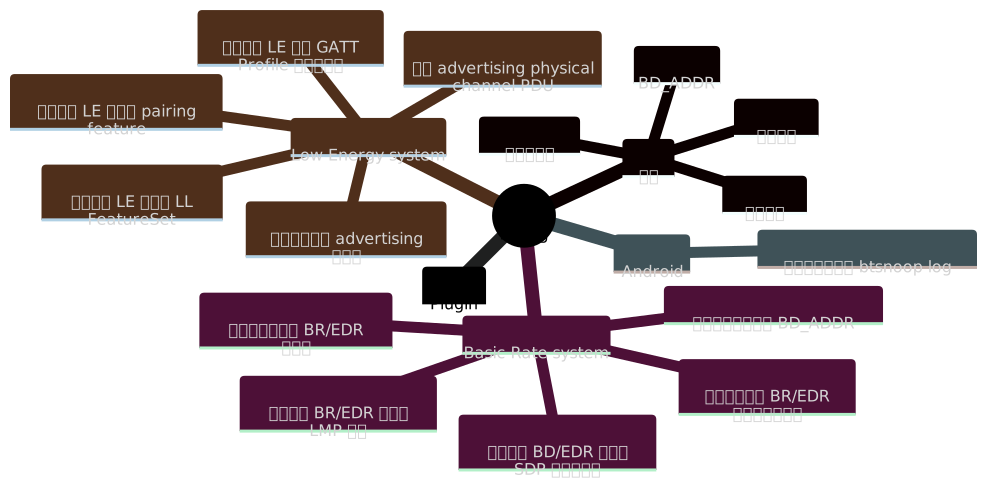
Bluing 部分依赖 Linux 官方的 BlueZ 蓝牙协议栈,因此它仅支持在 Linux 上运行。执行如下命令可安装依赖包:
sudo apt install python3-pip python3-dev libcairo2-dev libgirepository1.0-dev \
                 libbluetooth-dev libdbus-1-dev bluez-tools python3-cairo-dev \
                 rfkill meson patchelf bluez ubertooth adb python-is-python3
目前 bluing 的分发途径是 PyPI,且仅支持 Python 3.10。安装命令如下:
sudo pip3.10 install bluing
$ bluing --helpAn intelligence gathering tool for hacking Bluetooth
Usage:
bluing [-h | --help]
bluing (-v | --version)
bluing [-i <hci>] --clean BD_ADDR
bluing --flash-micro-bit
bluing <command> [<args>...]
Arguments:
BD_ADDR Bluetooth device address
Options:
-h, --help Print this help and quit
-v, --version Print version information and quit
-i <hci> HCI device
--clean Clean cached data of a remote device
--flash-micro-bit Download the dedicated firmware to micro:bit(s)
Commands:
br Basic Rate system, includes an optional Enhanced Data Rate (EDR) extension
le Low Energy system
android Android Bluetooth stack
spoof Spoof with new local device information
plugin Manage plugins
Run `bluing <command> --help` for more information on a command.
br 命令:Basic Rate system$ bluing br --helpUsage:
bluing br [-h | --help]
bluing br [-i <hci>] [--inquiry-len=<n>] --inquiry
bluing br [-i <hci>] --sdp BD_ADDR
bluing br [-i <hci>] --local --sdp
bluing br [-i <hci>] --lmp-features BD_ADDR
bluing br [-i <hci>] --local --lmp-features
bluing br [-i <hci>] --stack BD_ADDR
bluing br [-i <hci>] --local --stack
bluing br [-i <hci>] [--inquiry-scan] --mon-incoming-conn
bluing br --org=<name> --timeout=<sec> --sniff-and-guess-bd-addr
Arguments:
BD_ADDR BR/EDR Bluetooth device address
Options:
-h, --help Print this help and quit
-i <hci> HCI device
--local Target a local BR/EDR device instead of a remote one
--inquiry Discover other nearby BR/EDR controllers
--inquiry-len=<n> Maximum amount of time (added to --ext-inquiry-len=<n>)
specified before the Inquiry is halted.
Time = n * 1.28 s
Time range: 1.28 to 61.44 s
Range of n: 0x01 to 0x30 [default: 8]
--ext-inquiry-len=<n> Extended_Inquiry_Length measured in number of
Baseband slots.
Interval Length = n * 0.625 ms (1 Baseband slot)
Time Range: 0 to 40.9 s
Range of n: 0x0000 to 0xFFFF [default: 0]
--sdp Retrieve information from the SDP database of a
remote BR/EDR device
--lmp-features Read LMP features of a remote BR/EDR device
--stack Determine the Bluetooth stack type of a remote BR/EDR device
--mon-incoming-conn Print incoming connection from other nearby BR/EDR devices
--inquiry-scan Enable the Inquiry Scan
--sniff-and-guess-bd-addr Sniff SAPs of BD_ADDRs over the air, then guess the
address based on the organization name. Need at
least one Ubertooth device
--org=<name> An organization name in the OUI.txt
--timeout=<sec> Timeout in second(s)
--inquiry:发现附近其他的 BR/EDR 控制器$ sudo bluing br --inquiry[INFO] Discovering other nearby BR/EDR Controllers on hci0 for 10.24 sec BD_ADDR: B0:C9:52:45:33:13 (GUANGDONG OPPO MOBILE TELECOMMUNICATIONS CORP.,LTD) Page scan repetition mode: 1 (R1) Reserved: 0x02 CoD: 0x5a020c Service Class: 0b1011010000 Telephony Object Transfer Capturing Networking Major Device Class: 0b00010, Phone Clock offset: 0x50D5 RSSI: -61 Extended inquiry response: Complete Local Name: old man phone Complete List of 16-bit Service Class UUIDs 0x1105 OBEXObjectPush 0x110a AudioSource 0x110c A/V_RemoteControlTarget 0x110e A/V_RemoteControl 0x1112 Headset - Audio Gateway (AG) 0x1115 PANU 0x1116 NAP 0x111f HandsfreeAudioGateway 0x112d SIM_Access 0x112f Phonebook Access - PSE 0x1200 PnPInformation 0x1132 Message Access Server Complete List of 32-bit Service Class UUIDs None Complete List of 128-bit Service Class UUIDs A49EAA15-CB06-495C-9F4F-BB80A90CDF00 00000000-0000-0000-0000-000000000000 ... ...