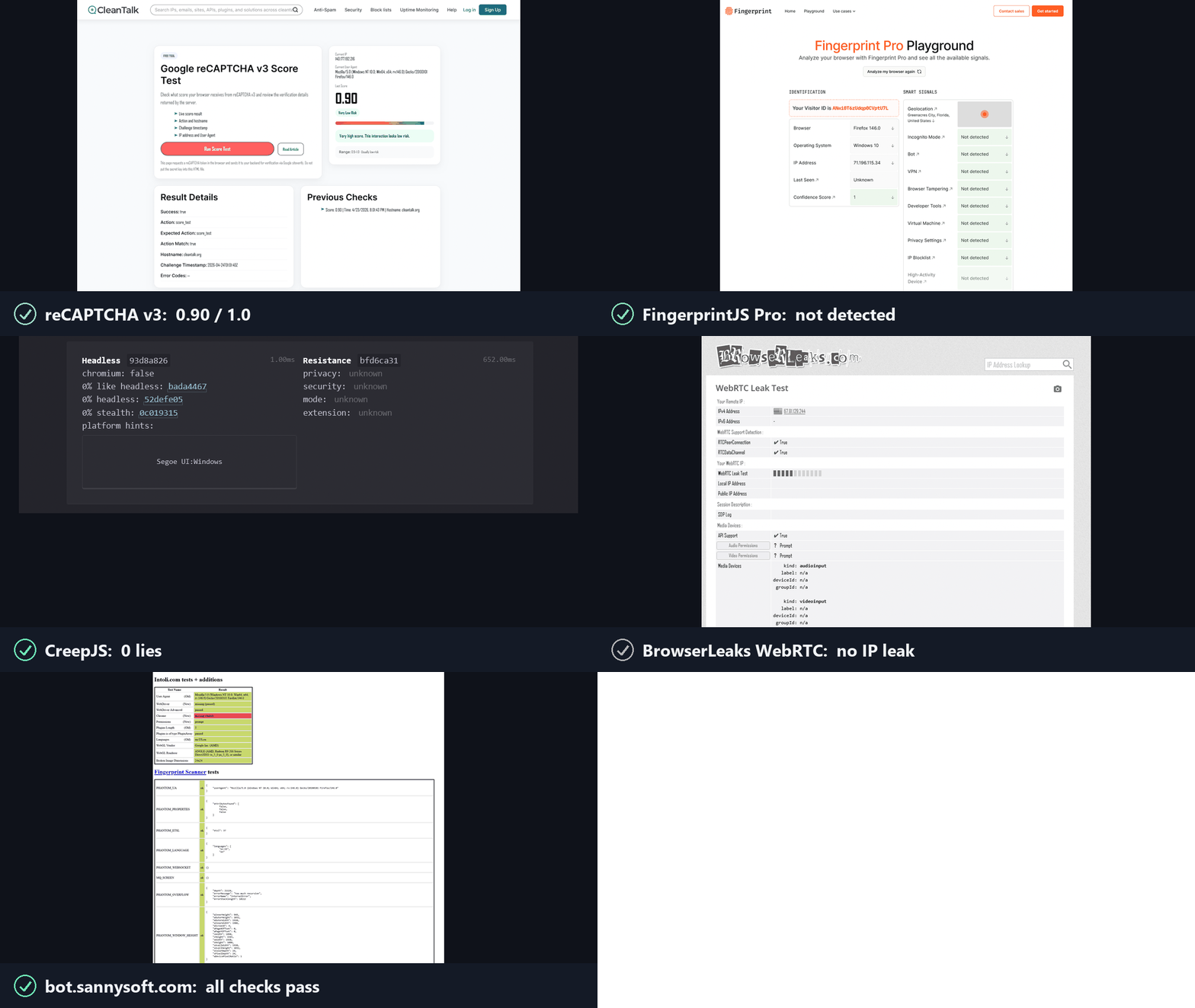
<div align="center">
<picture>
<source media="(max-width: 374px) and (prefers-color-scheme: dark)" srcset="https://raw.githubusercontent.com/feder-cr/invisible_playwright/main/docs/banner-small-dark.gif">
<source media="(max-width: 374px)" srcset="https://raw.githubusercontent.com/feder-cr/invisible_playwright/main/docs/banner-small-light.gif">
<source media="(max-width: 1239px) and (prefers-color-scheme: dark)" srcset="https://raw.githubusercontent.com/feder-cr/invisible_playwright/main/docs/banner-phone-dark.gif">
<source media="(max-width: 1239px)" srcset="https://raw.githubusercontent.com/feder-cr/invisible_playwright/main/docs/banner-phone-light.gif">
<source media="(prefers-color-scheme: dark)" srcset="https://raw.githubusercontent.com/feder-cr/invisible_playwright/main/docs/banner-dark.gif">
<img alt="invisible_playwright,运行在反检测 Firefox 上的 Playwright。一段动画:从 Playwright 切换的两行开关、引擎内部设置的指纹、像手一样移动的鼠标,以及它通过的各项机器人测试。" src="https://raw.githubusercontent.com/feder-cr/invisible_playwright/main/docs/banner-light.gif" width="100%">
</picture>
<h3 align="center">Playwright 会被反机器人机制和验证码识别出来。<br>
而这一款运行在带有未检测指纹的反检测 Firefox 上,兼容你现有的 Playwright 代码。</h3>
</div>
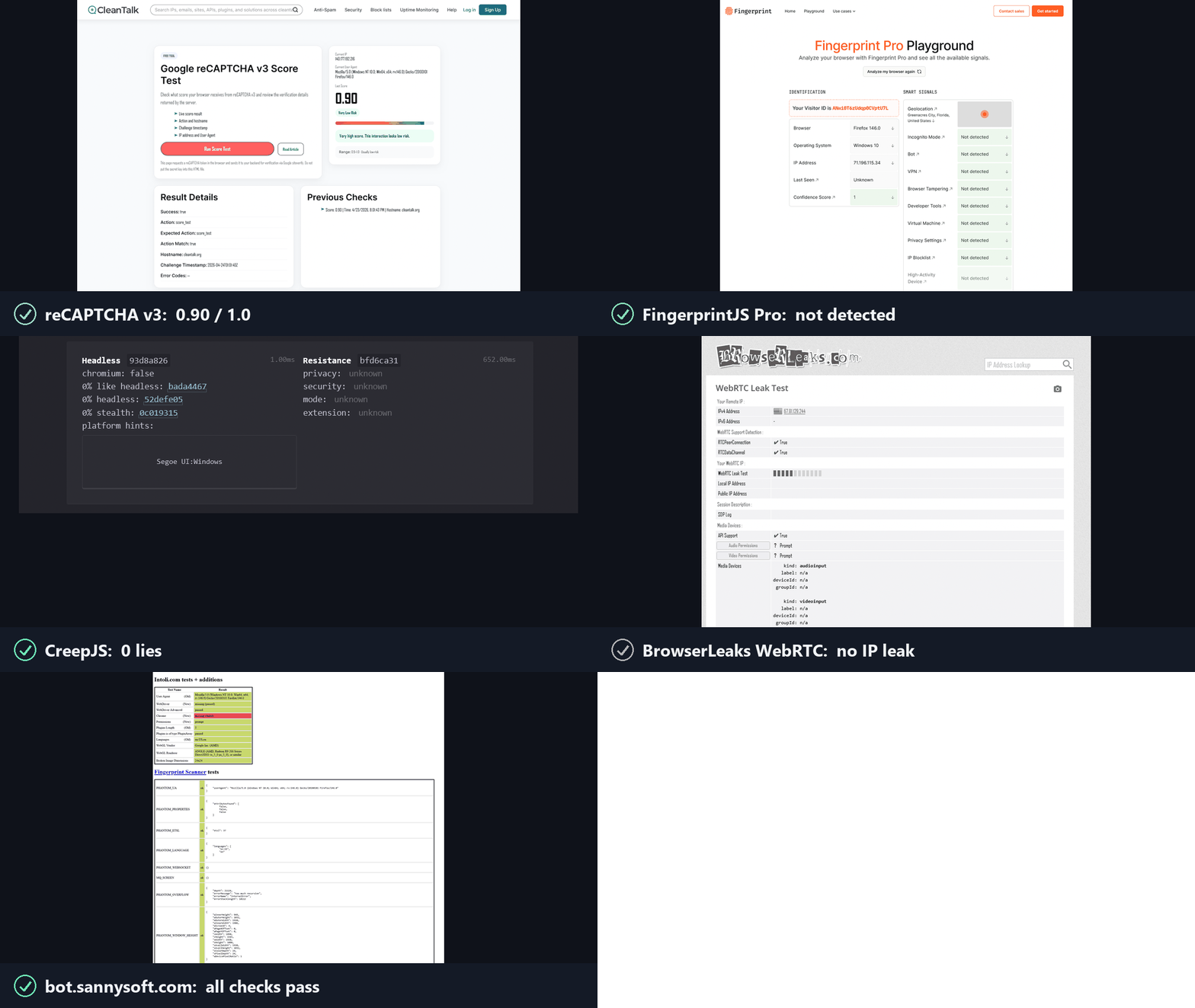
## 工作原理
反机器人机制会问两个问题,reCAPTCHA、hCaptcha 和 Cloudflare Turnstile 会对答案进行评分。invisible_playwright 对这两个问题都回答“是”。
**1. 这是真实浏览器吗?** 是的。它是 Firefox,在 C++ 源码层面进行了修补。
- 浏览器指纹在引擎内部设置,而不是注入到页面中:navigator、screen、GPU/WebGL、canvas、字体、音频、WebRTC、时区、网络。无论无头还是有头,两种模式下的值都相同。
- 没有 JS 垫片,没有覆盖,没有可被读取的接缝。
**2. 是真实的人在使用它吗?** 是的。操作在驱动层进行了拟人化处理。
- 每次点击、悬停和拖拽都遵循自然的鼠标轨迹和人类的时间节奏,光标不会瞬移。
- 每个输入都与真实鼠标逐字节一致:真实的输入源、压力、可信事件。
---
## 安装
Windows,在 PowerShell 中:
```powershell
powershell -ExecutionPolicy ByPass -c "irm https://astral.sh/uv/install.ps1 | iex"
$env:Path = "$env:USERPROFILE\.local\bin;$env:Path"
uv init --python ">=3.11" my-project
cd my-project
uv add invisible-playwright
uv run invisible-playwright fetch # one-time download, sha256-verified: 240 MB, about 550 MB unpacked
```
Linux:
```bash
curl -LsSf https://astral.sh/uv/install.sh | sh
source $HOME/.local/bin/env
uv init --python ">=3.11" my-project
cd my-project
uv add invisible-playwright
uv run invisible-playwright fetch # one-time download, sha256-verified: 262 MB (x86_64) / 253 MB (arm64), about 550 MB unpacked
```
支持的平台:**Windows x86_64**、**Linux x86_64 / arm64**。
然后将下面示例之一保存为 `my-project` 中的 `main.py`,并用 `uv run main.py` 运行它。
---
## 用法
### 每个会话随机指纹
**Playwright 的 API,同步和异步,无需更改代码。** 相同的对象、相同的调用、相同的返回值。少数接口不在支持范围内——tracing、HAR、CDP、API 请求上下文——每一个都会以一句话说明原因来拒绝,而不是悄悄地出错。如果你已经在使用 Playwright,切换只需两行:
```diff
- from playwright.sync_api import sync_playwright
- with sync_playwright() as p:
- browser = p.firefox.launch()
+ from invisible_playwright import InvisiblePlaywright
+ with InvisiblePlaywright() as browser:
```
每个会话都会获得一个独特的指纹(GPU、音频、字体、屏幕、约 200 个字段)以及贝塞尔曲线鼠标运动。
**同步**
```python
from invisible_playwright import InvisiblePlaywright
with InvisiblePlaywright(proxy={"server": "socks5://...", "username": "u", "password": "p"}) as browser:
page = browser.new_page()
page.goto("https://example.com")
page.click("#submit") # mouse arcs to the button on a Bezier curve
```
**异步**
```python
from invisible_playwright.async_api import InvisiblePlaywright
async with InvisiblePlaywright(proxy={"server": "socks5://...", "username": "u", "password": "p"}) as browser:
page = await browser.new_page()
await page.goto("https://example.com")
await page.click("#submit")
```
`browser` 对象是一个 `playwright.sync_api.Browser` / `playwright.async_api.Browser` —— 每个 Playwright 方法均可直接使用。
记录种子以重放一次运行:
```python
sf = InvisiblePlaywright()
with sf as browser:
print("seed =", sf.seed)
# ...
```
### 可复现指纹
```python
with InvisiblePlaywright(seed=42) as browser:
... # same GPU, same canvas hash, same audio context, every run
```
### 代理
```python
proxy = {
"server": "socks5://gate.example.com:1080",
"username": "user",
"password": "pass",
}
with InvisiblePlaywright(proxy=proxy) as browser:
...
```
支持的协议:`socks5`、`socks4`、`http`、`https`。DNS 默认通过代理路由,不会在本地泄露。
### 时区
浏览器时区跟随 `timezone=`:
```python
# default: timezone is auto-derived from the egress IP (proxy egress if a
# proxy is set, otherwise the host's own public IP)
with InvisiblePlaywright(proxy=proxy) as browser:
...
# explicit IANA zone always wins, the only way to force a specific zone
with InvisiblePlaywright(proxy=proxy, timezone="America/New_York") as browser:
...
```
### 固定特定指纹字段
默认情况下,所有内容都来自 `seed`。若要在其余部分仍由 seed 派生的情况下强制指定特定值:
```python
with InvisiblePlaywright(
seed=42,
pin={
"gpu.renderer": "ANGLE (AMD, Radeon R9 200 Series Direct3D11 vs_5_0 ps_5_0, D3D11)",
"gpu.vendor": "Google Inc. (AMD)",
"screen.width": 2560,
"screen.height": 1440,
"hardware.concurrency": 16,
},
) as browser:
...
```
GPU pin 会从已验证的 persona 中选择一个,而不是设置一个自由字符串,因为约 81 个 `getParameter` 值和扩展列表会随渲染器名称一起传递,并且检测器会将其与该名称进行交叉核对。如果池中不包含某个名称,则会引发错误,并且错误信息会列出池中确实包含的名称。
可固定键的完整列表、固定与贝叶斯采样器的交互方式以及常见模式,请参见 **[docs/pinning.md](https://github.com/feder-cr/invisible_playwright/blob/main/docs/pinning.md)**。
---
## CLI
安装后的命令是 `invisible-playwright`,带连字符。`python -m
invisible_playwright` 的作用完全相同,并且不需要 PATH 中有任何内容。
```bash
invisible-playwright fetch # download the engine if missing, check every cached
# one against the seal, print the path
invisible-playwright version # wrapper, core and engine versions, and where the
# engine is cached
```
## 文档、指南与对比
**如果你更愿意用提示词而不是写脚本。** 本页介绍的是作为 Python 库的引擎。有两种无需编写代码即可使用它的方式,都只需一行:从你已有的 MCP 客户端(Claude Code、Claude Desktop、Cursor)中,运行 `claude mcp add stealth -- uvx aihawk`,参见 [MCP 服务器页面](https://github.com/feder-cr/AIHawk/wiki/mcp-server);或者使用自带界面和模型的版本,只需一个 OpenRouter 密钥,运行 `uvx aihawk ui --openrouter-key sk-or-...`,参见 [AIHawk](https://github.com/feder-cr/AIHawk)。底层是同一个引擎,而后者是前者的客户端。
所有这些内容在 **[wiki](https://github.com/feder-cr/invisible_playwright/wiki)** 中阅读体验更好,并且可以搜索,它被组织为四个部分,而不是一个平铺的列表:
- **[文档](https://github.com/feder-cr/invisible_playwright/blob/main/docs/documentation.md)** - 安装、从普通 Playwright 切换的两行代码、代理/时区配置、固定特定字段、CLI。
- **[指南](https://github.com/feder-cr/invisible_playwright/blob/main/docs/guides.md)** - 检测实际上是如何工作的,分为七组:浏览器身份、canvas/WebGL/字体/音频、网络与 WebRTC、自动化层、AI 代理、从源码解释的检测器本身,以及测试。
- **[对比](https://github.com/feder-cr/invisible_playwright/blob/main/docs/comparisons.md)** - 与 Camoufox、Patchright、nodriver 和 playwright-stealth 的对比,以及总体上选择 Firefox 而非 Chromium 的理由。
- **[集成](https://github.com/feder-cr/invisible_playwright/blob/main/docs/integrations)** - Scrapy、Crawlee、Robot Framework、CodeceptJS、测试运行器、Playwright MCP,以及它不适用(按名称列出)的框架。
如果你不知道从哪里开始:[让 Playwright 不被检测的三种方式](https://github.com/feder-cr/invisible_playwright/blob/main/docs/playwright-stealth-levels.md) 是大多数其他页面都会链接回来的地图,[Playwright 在某个网站上被检测为机器人](https://github.com/feder-cr/invisible_playwright/blob/main/docs/playwright-detected-as-bot.md) 是排查顺序,而 [navigator.webdriver 并不是你以为的那个破绽](https://github.com/feder-cr/invisible_playwright/blob/main/docs/navigator-webdriver-explained.md) 解释了这个领域最著名的属性,以及为什么仅修补它几乎毫无用处。
检测器部分现在按名称涵盖了商业反机器人产品,每个都来自其自身文档或经过确认的逆向工程:[Cloudflare Bot Management](https://github.com/feder-cr/invisible_playwright/blob/main/docs/cloudflare-bot-management-explained.md) 和 [Turnstile](https://github.com/feder-cr/invisible_playwright/blob/main/docs/cloudflare-turnstile-explained.md)、[DataDome](https://github.com/feder-cr/invisible_playwright/blob/main/docs/datadome-explained.md)、[Kasada](https://github.com/feder-cr/invisible_playwright/blob/main/docs/kasada-explained.md)、[Akamai Bot Manager](https://github.com/feder-cr/invisible_playwright/blob/main/docs/akamai-bot-manager-explained.md)、[PerimeterX](https://github.com/feder-cr/invisible_playwright/blob/main/docs/perimeterx-explained.md)、[hCaptcha](https://github.com/feder-cr/invisible_playwright/blob/main/docs/hcaptcha-explained.md)、[Imperva](https://github.com/feder-cr/invisible_playwright/blob/main/docs/imperva-incapsula-explained.md),以及[其余部分](https://github.com/feder-cr/invisible_playwright/blob/main/docs/guides-detectors-explained.md)。
## 相关项目
**这个项目的其他组成部分。** 引擎是三者中的中间部分,而它前后的两个部分才是大多数人接触它的方式:
- **[invisible_core](https://github.com/feder-cr/invisible_core)** - 从种子到指纹再到偏好设置,外加代理和地理位置。本包固定依赖它。
- **[AIHawk](https://github.com/feder-cr/AIHawk)** - 将此引擎作为 MCP 服务器(`uvx aihawk`,适用于任何自带模型的客户端),并且在同一包中,还提供一个自带模型的界面,只需一条命令。该界面是服务器的客户端,没有通往浏览器的私有路径。
**开源邻居们。** 哪一个适合取决于你的问题处于哪一层,以及你需要 Firefox 还是 Chromium:[让 Playwright 不被检测的三种方式](https://github.com/feder-cr/invisible_playwright/blob/main/docs/playwright-stealth-levels.md) 梳理了每一层能触及什么,而 [AI 浏览器代理与隐身](https://github.com/feder-cr/invisible_playwright/blob/main/docs/ai-browser-agents-stealth.md) 涵盖了那些替你选择 Chromium 而非 CDP 的框架。
**在 Firefox 这一侧**
- **[Camoufox](https://github.com/daijro/camoufox)** - 同样会修补 C++,覆盖面更广,并且附带一个指纹数据库,而不是从种子推导指纹。[对比](https://github.com/feder-cr/invisible_playwright/blob/main/docs/vs-camoufox.md)。
- **[LibreWolf](https://librewolf.net)** - 一个默认注重隐私的 Firefox,用于浏览而非自动化。
- **[arkenfox/user.js](https://github.com/arkenfox/user.js)** - 通过偏好设置进行加固。只要偏好设置足够,就用它。
**在 Chromium 方面**
- **[Patchright](https://github.com/Kaliiiiiiiiii-Vinyzu/patchright)** - 一个打过补丁的 Playwright 分支:改动落在驱动层,而非二进制文件。 [对比](https://github.com/feder-cr/invisible_playwright/blob/main/docs/vs-patchright.md)。
- **[nodriver](https://github.com/ultrafunkamsterdam/nodriver)** - `undetected-chromedriver` 的继任者,通过 CDP 驱动 Chrome。 [对比](https://github.com/feder-cr/invisible_playwright/blob/main/docs/vs-nodriver.md)。
- **[rebrowser-patches](https://github.com/rebrowser/rebrowser-patches)** - 修复 `Runtime.enable` 的 CDP 泄漏。 [对比](https://github.com/feder-cr/invisible_playwright/blob/main/docs/vs-rebrowser-patches.md)。
- **[fingerprint-suite](https://github.com/apify/fingerprint-suite)** - 一个贝叶斯指纹生成器,随后注入到页面中。 [对比](https://github.com/feder-cr/invisible_playwright/blob/main/docs/vs-fingerprint-suite.md)。
- **[playwright-with-fingerprints](https://github.com/bablosoft/playwright-with-fingerprints)** - 取值来自付费远程服务,仅支持 Windows。 [对比](https://github.com/feder-cr/invisible_playwright/blob/main/docs/vs-playwright-with-fingerprints.md)。
- **[playwright-stealth](https://github.com/Mattwmaster58/playwright_stealth)** - 一个初始化脚本补丁;其维护者称其为概念验证。 [对比](https://github.com/feder-cr/invisible_playwright/blob/main/docs/vs-playwright-stealth.md)。
- **[puppeteer-extra-plugin-stealth](https://github.com/berstend/puppeteer-extra)** - 该谱系的鼻祖,最后一次实质性提交在 2024 年年中。 [这意味着什么](https://github.com/feder-cr/invisible_playwright/blob/main/docs/puppeteer-extra-stealth-unmaintained.md)。
- **[selenium-stealth](https://github.com/diprajpatra/selenium-stealth)** - 在 Selenium 上采用相同方法,最后一次提交在 2021 年 12 月。 [这意味着什么](https://github.com/feder-cr/invisible_playwright/blob/main/docs/selenium-stealth-unmaintained.md)。
- **[pyppeteer](https://github.com/pyppeteer/pyppeteer)** - 其自身的 README 已声明不再维护,并指向 `playwright-python`。 [该推荐意味着什么](https://github.com/feder-cr/invisible_playwright/blob/main/docs/pyppeteer-unmaintained-playwright.md)。
---
## 引擎中修补了什么
以下所有内容都遵循两条规则。每个值都在**页面能够询问之前**、在浏览器内部就已确定,因此没有可供发现的 JavaScript 垫片。并且每个值都来自**同一个配置文件**,因此不会出现两个表面相互矛盾的情况——而这正是伪造浏览器通常被识破的方式。来源:
[feder-cr/firefox_antidetect_patch](https://github.com/feder-cr/firefox_antidetect_patch)。
**身份**
- `navigator`、用户代理和客户端提示一起派生,因此它们不可能不一致:[Playwright 是否设置 navigator.webdriver](https://github.com/feder-cr/invisible_playwright/blob/main/docs/does-playwright-set-navigator-webdriver.md)、[客户端提示与 Sec-Fetch](https://github.com/feder-cr/invisible_playwright/blob/main/docs/client-hints-sec-fetch.md)。
- `navigator.languages` 和 `Accept-Language` 头是同一份声明,发送与读取一致:[Accept-Language 与 navigator.languages](https://github.com/feder-cr/invisible_playwright/blob/main/docs/accept-language-navigator-languages.md)。
- 屏幕几何、`devicePixelRatio` 以及暴露它的媒体查询都是声明出来的,而非从宿主机读取:[devicePixelRatio 与 Firefox 首选项](https://github.com/feder-cr/invisible_playwright/blob/main/docs/devicepixelratio-firefox-pref.md)、[CSS 媒体查询指纹识别](https://github.com/feder-cr/invisible_playwright/blob/main/docs/css-media-query-fingerprinting.md)。
**渲染**
- Canvas 回读对每个种子都是确定性的,并保留真实形状,而不是被屏蔽或加噪:[canvas 指纹噪声](https://github.com/feder-cr/invisible_playwright/blob/main/docs/canvas-fingerprint-noise.md)、[为什么 canvas 指纹每次运行都会变化](https://github.com/feder-cr/invisible_playwright/blob/main/docs/canvas-fingerprint-changes-every-run.md)。
- WebGL 报告一致的 GPU 画像:厂商、渲染器和参数限制经过交叉校验,而不是逐个单独设置:[WebGL 渲染器字符串](https://github.com/feder-cr/invisible_playwright/blob/main/docs/webgl-renderer-strings.md)、[WebGL 参数完全一致](https://github.com/feder-cr/invisible_playwright/blob/main/docs/webgl-parameters-are-identical.md)。
- 字体随浏览器一起分发,因此每个主机上都有相同的字体,平台字体引擎不再做出选择:[跨平台捆绑字体](https://github.com/feder-cr/invisible_playwright/blob/main/docs/bundled-fonts-cross-platform.md)、[为什么无头浏览器渲染出不同的字体](https://github.com/feder-cr/invisible_playwright/blob/main/docs/headless-fonts-differ.md)、[从 JavaScript 检测已安装字体](https://github.com/feder-cr/invisible_playwright/blob/main/docs/detect-installed-fonts-javascript.md)。
- 文本度量遵循这些字体:`measureText` 一次调用返回十多个数字,且没有权限提示:[measureText 与 TextMetrics](https://github.com/feder-cr/invisible_playwright/blob/main/docs/measuretext-textmetrics-fingerprinting.md)。
- 对于同一个种子,Canvas 和 WebGL 在不同操作系统上保持一致:[跨平台一致性](https://github.com/feder-cr/invisible_playwright/blob/main/docs/canvas-webgl-cross-platform-consistency.md)、[canvas 在不同操作系统上存在差异](https://github.com/feder-cr/invisible_playwright/blob/main/docs/canvas-differs-across-operating-systems.md)。
**音频与媒体**
- 音频栈从配置文件而非主机设备作答:[AudioContext 指纹识别](https://github.com/feder-cr/invisible_playwright/blob/main/docs/audiocontext-fingerprinting.md)、[采样率与延迟](https://github.com/feder-cr/invisible_playwright/blob/main/docs/audiocontext-samplerate-latency-fingerprint.md)。
- 编解码器表是声明式的,因此 Linux 主机不会用 Linux 的支持情况来回答一个 Windows 问题:[编解码器指纹识别](https://github.com/feder-cr/invisible_playwright/blob/main/docs/codec-fingerprinting.md)。
**网络**
- WebRTC 提供一个携带代理出口的合成候选,而不是泄露真实地址或一个都不提供(后者本身就是一种破绽):[WebRTC ICE 候选欺骗](https://github.com/feder-cr/invisible_playwright/blob/main/docs/webrtc-ice-candidate-spoofing.md)、[WebRTC IP 是否与代理出口匹配](https://github.com/feder-cr/invisible_playwright/blob/main/docs/webrtc-ip-match-proxy-exit.md)。
- DNS 通过代理解析,包括代理不在首选项中的情况:[代理是否会泄露 DNS](https://github.com/feder-cr/invisible_playwright/blob/main/docs/does-a-proxy-leak-dns-doh-explained.md)、[如何检查代理 IP 泄露](https://github.com/feder-cr/invisible_playwright/blob/main/docs/how-to-check-proxy-ip-leak.md)。
- 时区来自出口 IP,离线解析,因此与出口匹配:[时区与代理不匹配](https://github.com/feder-cr/invisible_playwright/blob/main/docs/timezone-proxy-mismatch.md)、[离线 GeoIP 时区](https://github.com/feder-cr/invisible_playwright/blob/main/docs/offline-geoip-timezone-proxy.md)。
**自动化层**
- 输入事件来自真实输入路径,因此 `isTrusted` 为 true 是因为它确实为 true:[Playwright 点击与 isTrusted](https://github.com/feder-cr/invisible_playwright/blob/main/docs/playwright-clicks-istrusted.md)。
- 指针遵循人类的路径和时序,以真实设备能够产生的节奏移动:[人类鼠标移动](https://github.com/feder-cr/invisible_playwright/blob/main/docs/human-mouse-movement.md)、[鼠标动态作为行为生物特征](https://github.com/feder-cr/invisible_playwright/blob/main/docs/mouse-dynamics-behavioural-biometrics.md)。
- 调试器接口不会回答那些暴露被驱动浏览器的时序问题:[调试器时序检测](https://github.com/feder-cr/invisible_playwright/blob/main/docs/debugger-timing-detection.md)。
- 闭合模式 shadow root 可被访问,这是原版 Playwright 在任一引擎中都无法做到的,而页面读取到的仍然是 `null`:[闭合 shadow root](https://github.com/feder-cr/invisible_playwright/blob/main/docs/closed-shadow-root-playwright.md)。
---
## 许可证
MIT - 参见 [LICENSE](https://github.com/feder-cr/invisible_playwright/blob/main/LICENSE)。修补后的 Firefox 二进制文件依据 MPL-2.0(Firefox 上游许可证)分发。生成该二进制文件的针对 mozilla-central 的 C++ 补丁位于 [feder-cr/firefox_antidetect_patch](https://github.com/feder-cr/firefox_antidetect_patch)。
---
## 免责声明
本项目仅供教育目的使用。按原样提供,不附带任何担保。我不对其使用方式承担任何责任。请自行承担风险,并遵守您所在司法管辖区的法律。
---
<p align="center">
由 <a href="https://it.linkedin.com/in/federico-elia-5199951b6">Federico Elia</a> 构建
<a href="https://it.linkedin.com/in/federico-elia-5199951b6"><img src="https://raw.githubusercontent.com/feder-cr/invisible_playwright/main/docs/badges/linkedin.svg" alt="LinkedIn"></a>
</p>
<p align="center">
<a href="https://github.com/feder-cr/invisible_playwright/actions/workflows/tests.yml"><img src="https://github.com/feder-cr/invisible_playwright/actions/workflows/tests.yml/badge.svg" alt="tests"></a>
<a href="https://github.com/feder-cr/invisible_playwright/blob/main/LICENSE"><img src="https://raw.githubusercontent.com/feder-cr/invisible_playwright/main/docs/badges/license.svg" alt="License: MIT"></a>
<a href="https://www.python.org/downloads/"><img src="https://raw.githubusercontent.com/feder-cr/invisible_playwright/main/docs/badges/python.svg" alt="Python 3.11+"></a>
<a href="https://github.com/feder-cr/firefox_antidetect_patch/releases"><img src="https://raw.githubusercontent.com/feder-cr/invisible_playwright/main/docs/badges/firefox.svg" alt="Firefox 151.0"></a>
<img src="https://raw.githubusercontent.com/feder-cr/invisible_playwright/badges/docs/badges/launches.svg" alt="browser launches">
<a href="https://github.com/feder-cr/invisible_playwright/stargazers"><img src="https://raw.githubusercontent.com/feder-cr/invisible_playwright/badges/docs/badges/stars.svg" alt="GitHub stars"></a>
</p>