自动进行外部资产发现,通过多源数据智能丰富,并利用集成机器学习预测和优先处理风险。将警报疲劳转化为可操作的情报。
ThreatSentry AI 通过智能风险优先级排序,消除安全警报疲劳,实现主动威胁狩猎。它结合了自动化资产发现、多源数据丰富和高级机器学习,将原始安全数据转化为可操作的情报。
项目负责人: EclipseManic
开发说明: 这个全面的企业安全平台由一位开发者在 AI 开发工具的协助下(用于代码生成、优化和文档)进行架构和开发——证明了 AI 增强的软件工程在复杂系统中的可行性。
现代安全团队面临着前所未有的挑战:
ThreatSentry AI 通过以下方式解决这些问题:
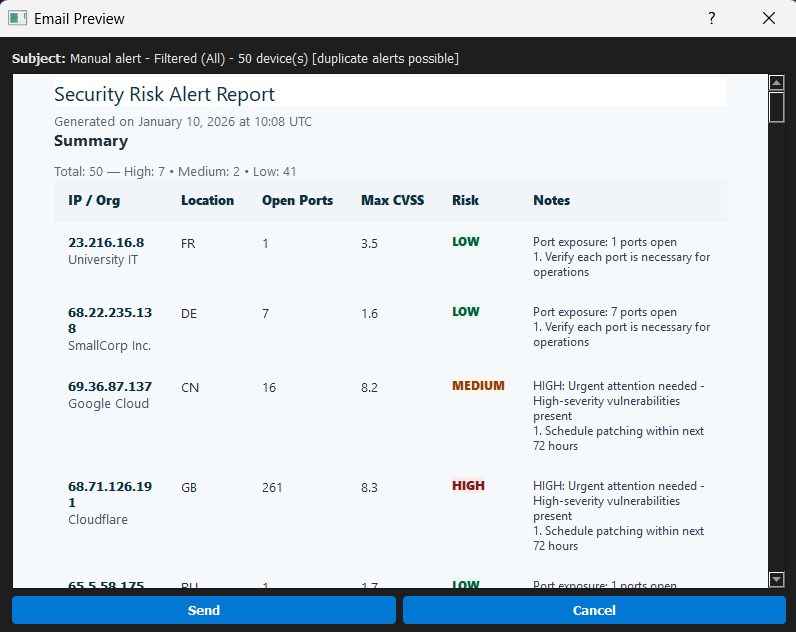
![Automated Security Alert Email Template]
通过 SendGrid 发送的 HTML 格式邮件,包含风险摘要、CVE 详情和修复指南
![ThreatSentry AI Dashboard - Main Threat Hunting Interface]
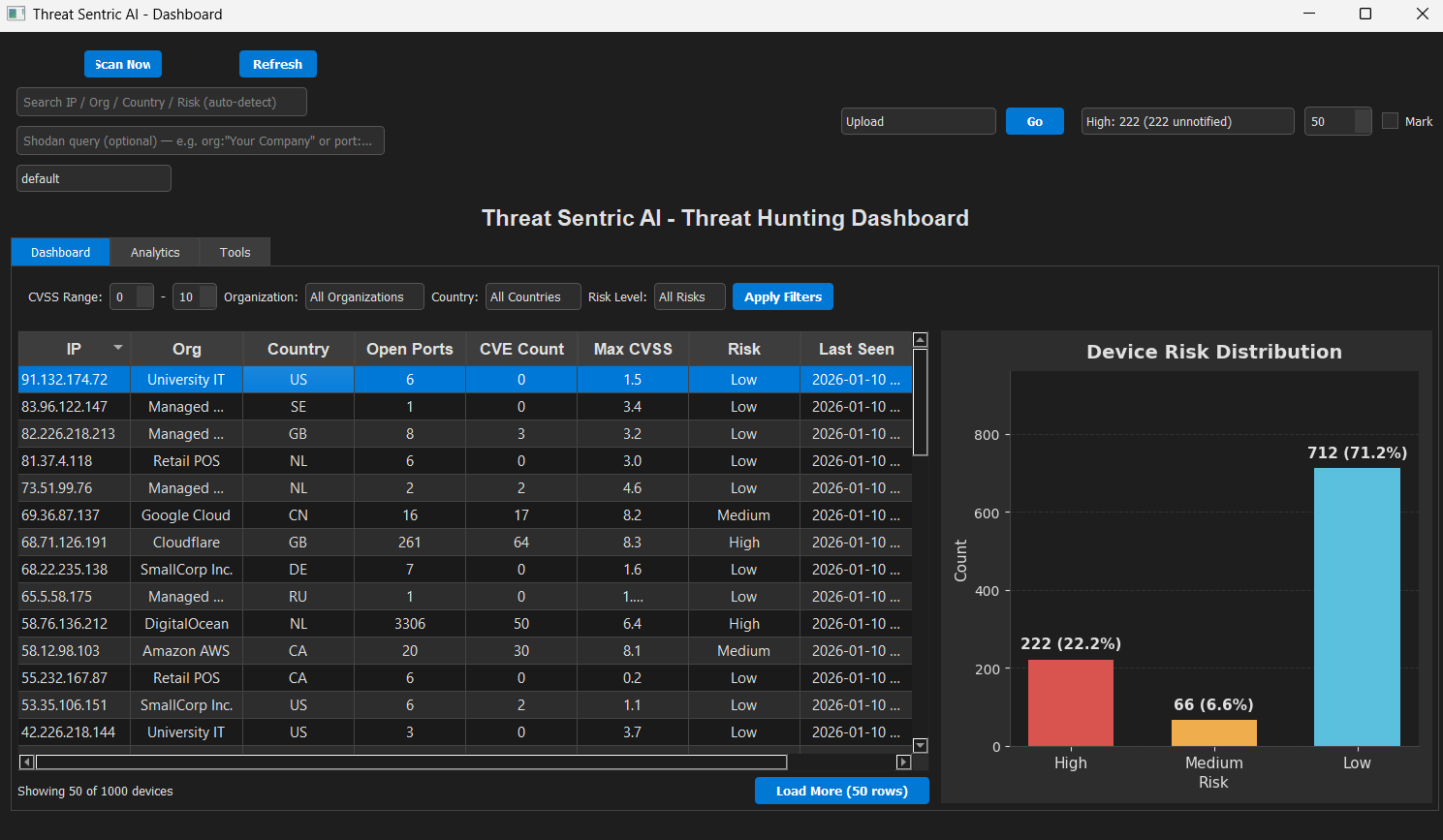
具有可排序设备表和风险分布条形图的实时风险可视化
![Device Table with Risk Indicators]
可排序和可过滤的设备列表,带有颜色编码的风险级别(绿色=低,黄色=中,红色=高)
![Advanced Filters - CVSS Range, Organization, Country, Risk Level]
强大的过滤控件,包含 CVSS 范围、组织、国家和风险级别过滤器,以及“清除全部”按钮
![Search Input - Multi-Column Search Across Entire Database]
智能搜索,跨越整个设备数据库,不仅限于当前显示的行
![Load More Button - Pagination Controls]
优化分页系统,高效处理数千台设备
![Analytics Tab - Risk Trends and CVE Analysis]
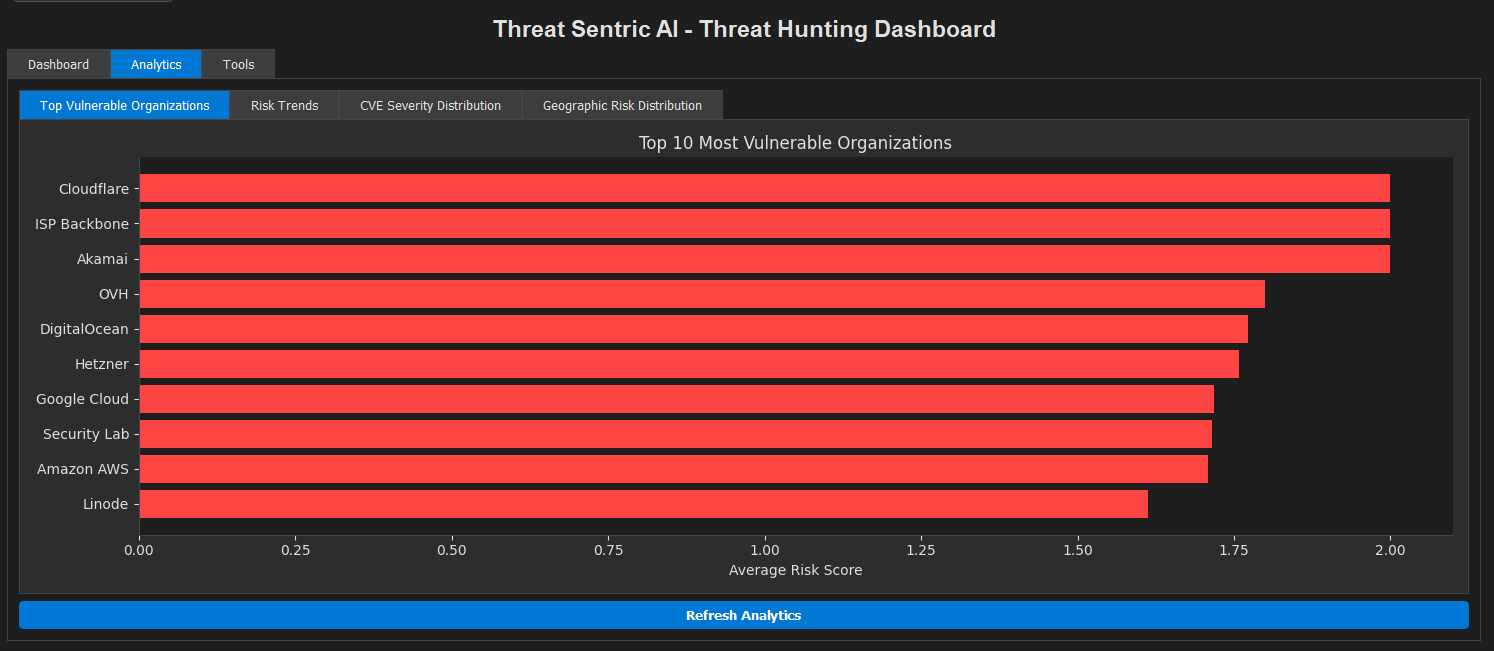
历史风险趋势、漏洞分析和按组织划分的安全指标
![Tools Tab - Model Status and Data Export]
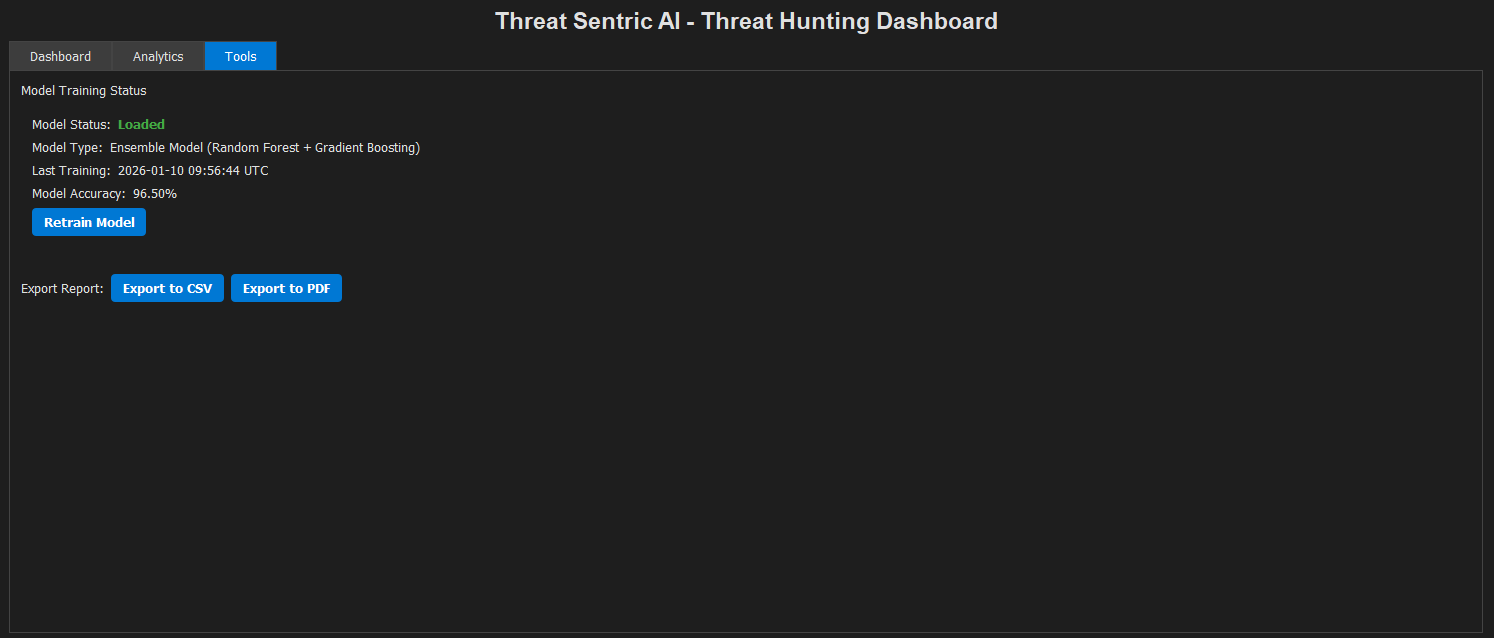
模型训练信息、性能指标、数据导出和高级过滤选项
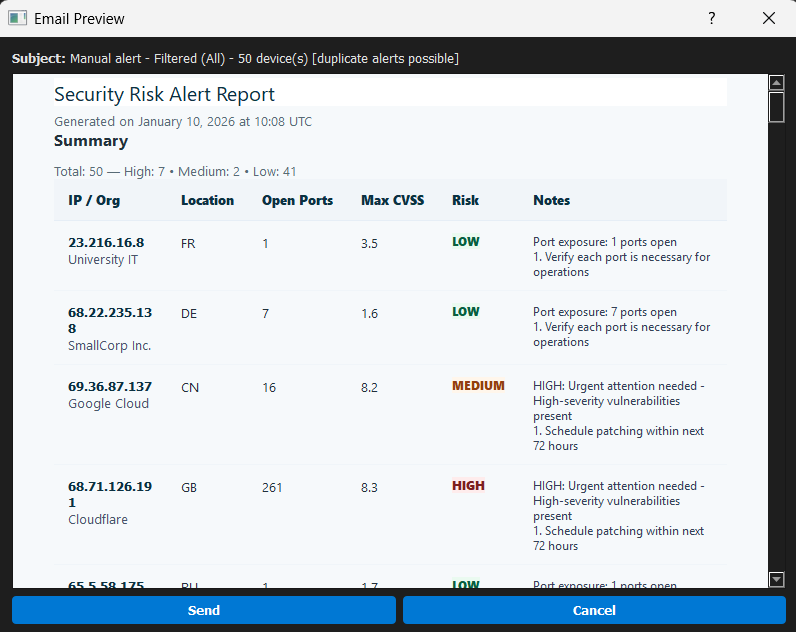
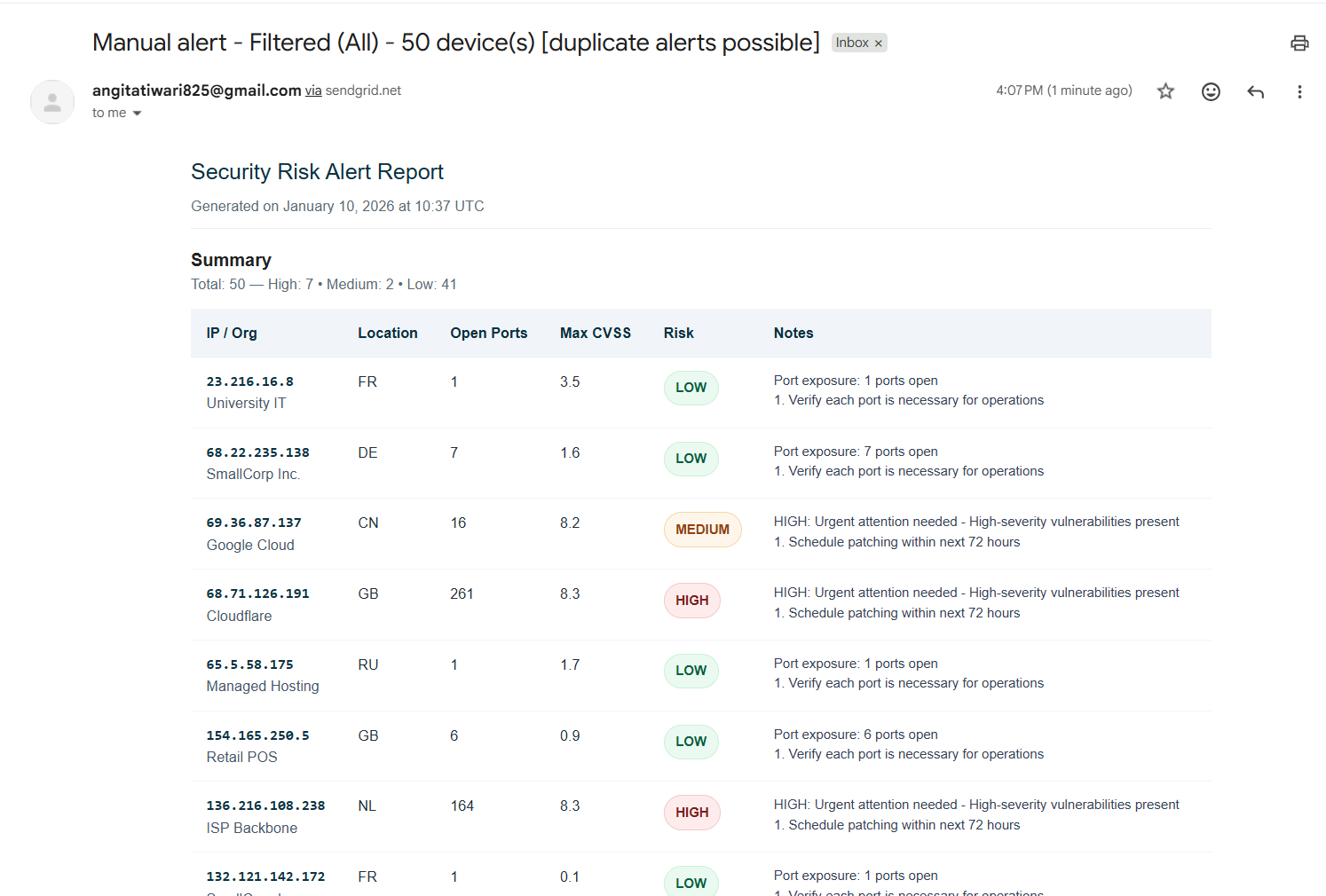
![Automated Security Alert Email]
HTML 格式邮件,包含高管摘要、漏洞详情和修复指南
![Scan Trigger Dialog]
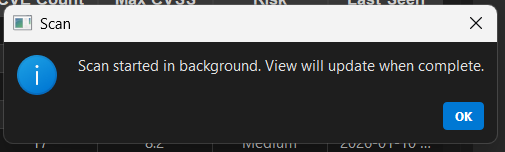
执行 Shodan + NVD 丰富操作,带有详细错误报告和进度指示
┌─────────────────────────────────────────────────────────────┐ │ ThreatSentry AI │ ├─────────────────────────────────────────────────────────────┤ │ Scheduler (APScheduler) │ ├──────────┬──────────────┬──────────────┬───────────┬─────────┤ │ │ │ │ │ │ ▼ ▼ ▼ ▼ ▼ ▼ Shodan NVD Lib CMDB SIEM Patch Network Collector Collector Collector Collector Mgmt Monitor
│ │ │ │ │
└──────────────┴──────────────┴───────────┴─────────┘
│
▼
┌─────────────────┐
│ SQLite DB │
│ (40+ Columns) │
└────────┬────────┘
│
┌──────────────────┼──────────────────┐
▼ ▼ ▼
Feature Engine Model Training Predictions │ │ │ └─────────┬───────┴──────────┬──────┘ ▼ ▼ ┌──────────────────────┐ │ Ensemble Model │ │ (RF + GB + MLP) │ └──────────┬───────────┘ │ ┌────────────┼────────────┐ ▼ ▼ ▼ PyQt5 GUI Email Alerts Analytics
### 数据处理流水线
1. **发现阶段**(可配置间隔,默认30分钟)
- Shodan扫描(可配置查询)
- NVD增强(含CVE关联)
- 内部系统增强(上下文信息)
2. **分析阶段**
- 基于40+属性的特征工程
- 集成模型预测(随机森林40% + 梯度提升40% + MLP 20%)
- 风险标签生成(0=低, 1=中, 2=高)
- 置信度评分
3. **告警阶段**
- 检查新增高风险资产
- 通过SendGrid生成并发送邮件告警
- 更新通知状态
4. **模型重新训练**(可配置间隔,默认60分钟)
- 加载所有历史数据
- 提取特征
- 使用平衡类别权重训练集成模型
- 验证性能指标
- 保存元数据用于审计
---
## 📋 快速开始
### 前提条件
- **Python**:3.9或更高版本
- **API密钥**(必需):
- Shodan API密钥(https://www.shodan.io/)
- SendGrid API密钥(https://sendgrid.com/)- 用于邮件告警
- **可选API密钥**(用于增强丰富化):
- CMDB端点及凭据
- SIEM端点及凭据
- 补丁管理系统端点及凭据
- 网络监控端点及凭据
### 安装
#### 步骤1:克隆仓库```bash
git clone https://github.com/EclipseManic/ThreatSentry-AI.git
cd ThreatSentry-AI
python -m venv .venv .venv\Scripts\activate
python3 -m venv .venv source .venv/bin/activate
#### 步骤3:安装依赖项```bash
pip install -r requirements.txt
在项目根目录创建一个 .env 文件:```bash
cp .env.example .env # If provided, or create new
使用你的凭据编辑 `.env`:```ini
# Required - Threat Discovery
SHODAN_API_KEY=your_shodan_api_key_here
SHODAN_QUERY= # Leave empty to use presets
SHODAN_QUERY_EMPTY_TO_PRESET=True # Use preset queries when SHODAN_QUERY is empty
# Optional - Email Alerts
SENDGRID_API_KEY=your_sendgrid_key_here
[email protected] # Must be verified in SendGrid
[email protected],[email protected]
# Optional - Internal Enrichment (Implement in collectors/)
CMDB_API_ENDPOINT=https://cmdb.internal/api
CMDB_API_KEY=your_cmdb_key
SIEM_API_ENDPOINT=https://siem.internal/api
SIEM_API_KEY=your_siem_key
# Configuration
SCAN_INTERVAL_MINUTES=30 # How often to scan for new assets
RETRAIN_INTERVAL_MINUTES=60 # How often to retrain the model
MAX_SHODAN_RESULTS=50 # Results per Shodan query
LOG_LEVEL=INFO # DEBUG, INFO, WARNING, ERROR
# Paths (Optional)
SQLITE_PATH=data/db/threat_sentric_ai.db
MODEL_PATH=data/models/rf_model.pkl
LOG_FILE_PATH=data/logs/threat_sentric_ai.log
python -c "from data import init_db; init_db()"
#### 步骤6:运行应用程序```bash
python run.py
仪表盘将在调度程序后台运行时启动。
![仪表盘主界面(包含所有选项卡)] 概览、分析和工具选项卡,用于全面的威胁评估
![组织与国家筛选器及设备列表] 可排序的设备表,带有颜色编码的风险指示器(绿色=低,黄色=中,红色=高)
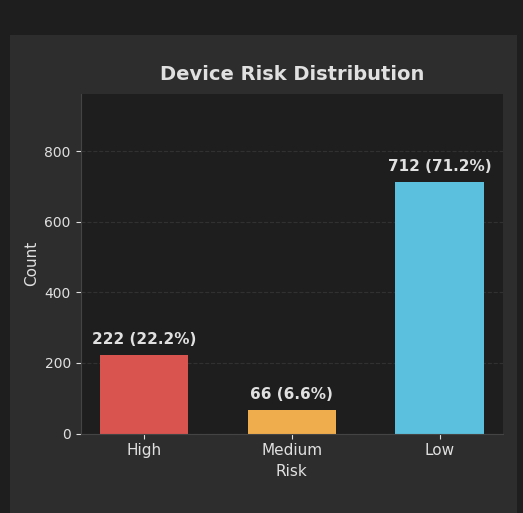
![风险分布柱状图] 总体安全态势可视化,显示各风险级别的设备数量
![分析面板 - 风险趋势与指标]
 了解指南。
可改进的领域:
- 新增收集器实现(Nessus、Tenable、Qualys集成)
- 提供程序化访问的Web API
- 基于角色的多用户支持
- 高级可视化(Grafana/ELK集成)
- Kubernetes部署支持
---
## 📄 许可证
本项目采用MIT许可证——详见 [LICENSE](https://github.com/eclipsemanic/threatsentry-ai/blob/main/LICENSE) 文件。
---
## 📞 支持与联系
- **问题反馈**:通过GitHub Issues提交Bug报告和功能请求
- **文档**:查看 [docs/](https://github.com/eclipsemanic/threatsentry-ai/blob/main/docs) 目录获取详细技术文档
- **邮箱**:维护者信息见 [CODE_OF_CONDUCT.md](https://github.com/eclipsemanic/threatsentry-ai/blob/main/CODE_OF_CONDUCT.md)
---
## 🙏 致谢
- **Shodan**:提供全面的互联网暴露设备发现
- **NVD/NIST**:提供权威的漏洞数据
- **Scikit-learn**:稳健的机器学习库及文档
- **PyQt5**:优秀的GUI框架
- **社区**:所有提供反馈的贡献者和用户
---
**由 EclipseManic 用 ❤️ 打造 | 守护今日基础设施,迎接明天安全**
pip install -r requirements.txt```
---
## 🔐 Configuration
### 1. Environment Variables (`.env` file)
Create a `.env` file in the root directory with the following structure:
```bash
# --- Shodan API 密钥(必需)---
SHODAN_API_KEY="YOUR_SHODAN_API_KEY"
# --- SendGrid 电子邮件警报(必需)---
SENDGRID_API_KEY="YOUR_SENDGRID_API_KEY"
SENDER_EMAIL="[email protected]"
ALERT_RECIPIENTS="[email protected],[email protected]"
# --- 数据库 ---
SQLITE_PATH="threat_sentric_ai.db"
# --- 模型 ---
MODEL_PATH="threatsentry_model.pkl"
# --- 调度器 ---
SCAN_INTERVAL_MINUTES="30"
RETRAIN_INTERVAL_MINUTES="60"
RETRAIN_ON_SCHEDULE="True"
# --- Shodan 查询行为控制 ---
SHODAN_QUERY=""
SHODAN_QUERY_EMPTY_TO_PRESET="True"
# --- 日志记录 ---
LOG_LEVEL="INFO" # DEBUG, INFO, WARNING, ERROR, CRITICAL
# --- 内部系统凭证(可选 - 根据您的收集器需要添加)---
# CMDB_API_ENDPOINT="..."
# CMDB_API_KEY="..."
# SIEM_API_ENDPOINT="..."
# SIEM_API_KEY="..."
# PATCH_API_ENDPOINT="..."
# PATCH_API_KEY="..."
# NETWORK_MONITOR_ENDPOINT="..."
# NETWORK_MONITOR_KEY="..."```
> The app loads environment variables via `os.getenv()` in `config.py`.
> Never commit this file to version control.
---
## 🔍 Shodan Query Presets (`config.py`)
Modify the `SHODAN_QUERIES` dictionary to define your custom query presets:
```python
SHODAN_QUERIES = {
"default": "product:apache",
"org": 'org:"Your Company Name"',
"net": 'net:"123.45.67.0/24"',
"ssl": 'ssl:"yourcompany.com"',
"hostname": 'hostname:".yourcompany.com"',
"rdp": 'port:3389 "remote desktop"',
"mongodb": 'port:27017 "mongodb"',
"ics_modbus": 'port:502 "modbus"',
"vuln_example": 'vuln:CVE-2024-12345',
"http_login": 'http.title:"Login" org:"Your Company"'
}```
If `SHODAN_QUERY` in `.env` is empty **and** `SHODAN_QUERY_EMPTY_TO_PRESET=True`,
the scheduler will automatically cycle through these presets.
---
## 🧠 Implementing Internal Collectors
> ⚠️ **Important:** The internal collectors (`cmdb_collector.py`, `siem_collector.py`, `patch_collector.py`, `network_monitor_collector.py`) are **placeholders**.
> Replace the placeholder logic with real integrations to your systems.
You’ll need to:
- Fetch internal data using APIs, databases, or SDKs.
- Map fetched data to the `Device` model attributes.
- Update the database session with this enriched information.
Without these integrations, the model will lack context for accurate predictions.
---
## 🧪 Running the Application
### (Optional) Generate Initial Training Data
```bash
python scripts/generate_realistic_training_data.py --count 1000```
Creates `scripts/my_training_data.json`.
You can upload this file through the GUI’s **Upload** option to initialize training data.
### Launch the Application
```bash
python run.py```
The GUI will open and the scheduler will start scanning, enriching, and predicting automatically.
---
## ⚡ Quick Demo with Generated Data
1. Complete installation (steps 1–3).
2. Set up your `.env` file (even with placeholder keys).
3. Optionally adjust Shodan presets in `config.py`.
4. Generate data:
```bash
python scripts/generate_realistic_training_data.py --count 500 ```
5. Launch the app:
```bash
python run.py ```
6. In the GUI:
- Select **Upload** → Choose `scripts/my_training_data.json`
- Click **Refresh** to view populated device data and risk levels.
---
## 🛠️ Scripts and Usage Guide
| Script | Description |
|--------|--------------|
| **run.py** | Main entry point. Starts DB, scheduler, and GUI. |
| **scheduler.py** | Handles periodic scanning, enrichment, prediction, and retraining. |
| **scripts/generate_realistic_training_data.py** | Generates realistic training data for testing or bootstrapping. |
| **scripts/clear_db_enhanced.py** | Interactively clean database or reset notification flags. |
| **scripts/reset_db.py** | Completely resets the database. Use with caution. |
### Example Commands
```bash
# 生成1000条记录
python scripts/generate_realistic_training_data.py --count 1000
# 查看清理选项
python scripts/clear_db_enhanced.py --help
# 删除所有设备和漏洞
python scripts/clear_db_enhanced.py --delete-devices --delete-vulns
# 重置通知标记
python scripts/clear_db_enhanced.py --reset-notified
# 危险的全量重置
python scripts/reset_db.py```
---
## 💬 Feedback & Suggestions
This project was developed by **EclipseManic**.
While code contributions are currently closed, your **feedback and bug reports** are highly appreciated.
Please open an [Issue](https://github.com/EclipseManic/ThreatSentry-AI/issues) to share your thoughts or report a problem.
---
## 📄 License
This project is licensed under the **MIT License**.
See the [LICENSE](https://github.com/eclipsemanic/threatsentry-ai/blob/main/LICENSE) file for details.
| 层 | 技术 |
|---|
| 后端 | Python 3.9+, SQLAlchemy ORM, APScheduler |
| 机器学习/人工智能 | Scikit-learn(随机森林、梯度提升、MLP)、NumPy、Joblib |
| 前端 | PyQt5、Matplotlib、自定义主题管理器 |
| 数据 | Pandas、NumPy、SQLite3 |
| API | Shodan、NVDLib、SendGrid、Requests |
| 工具类 | Python-dotenv、日志模块、配置管理 |