Skip to content
KitploitKITPLOIT
工具博客
提交
工具博客
提交

黑客、渗透测试和网络安全工具,武装您的安全武器库!

Kitploit 是一个黑客、网络安全和渗透测试工具的目录。发现最新的项目更新,查找漏洞、分析系统、自动化测试并加强你的安全。

··订阅源·联系·隐私·© 2026 Kitploit

工具目录

分类

查看所有分类
Loading categories
IPBan — 自动IP封禁服务,从事件日志和文件中检测失败的登录尝试,通过防火墙集成在Windows和Linux上阻止攻击者。 | Kitploit
工具/GitHubGitHub/digitalruby/ipban
防御工具网络安全入侵检测日志分析
GitHubdigitalruby/ipban

IPBan

自动IP封禁服务,从事件日志和文件中检测失败的登录尝试,通过防火墙集成在Windows和Linux上阻止攻击者。

查看仓库网站
2.2k39852个月前Kitploit 审核通过

最受欢迎

查看全部 →

发现我们社区最常用的工具。

探索所有工具

浏览我们的工具集合

查看所有工具 →
分享

IPBan - 在 Linux 和 Windows 上快速轻松阻止攻击者的免费软件

GitHub 赞助 捐赠 构建状态

有用链接

  • 访问 https://ipban.com/upgrade-to-ipban-pro/ 可获 IPBan Pro 折扣。
  • 将 IPBan 与 IPThreat 集成,IPThreat 是一个 100% 免费使用的网站和服务,社区提交恶意IP地址。帮助使互联网更安全,并加入其他数百名志同道合的用户。
  • 您也可以访问 IPBan Discord(https://discord.gg/GRmbCcKFNR)与其他 IPBan 用户交流。
  • 注册 IPBan 邮件列表

要求

  • IPBan 免费版需要 .NET 9 SDK 来构建和调试代码。对于 IDE,我建议在 Windows 上使用 Visual Studio Community,在 Linux 上使用 VS Code。所有都是免费的。您可以构建独立可执行文件,从而无需在服务器上安装 dotnet core,或者直接下载发布版中的预编译二进制文件。
  • 运行和/或调试代码需要以管理员或 root 身份运行您的 IDE 或终端。
  • 官方支持的平台:
    • Windows 10 或更新版本 (x86, x64)
    • Windows Server 2016 或更新版本 (x86, x64)
    • Windows Server 2025 或更新版本需要 IPBan 2.0.1 或更新版本。
    • Linux Ubuntu x64, arm, arm64(需要 firewalld、nftables 或 iptables)
    • Linux Debian x64, arm, arm64(需要 firewalld、nftables 或 iptables)
    • Linux CentOS x64, arm, arm64(需要 firewalld、nftables 或 iptables)
    • Linux RedHat x64, arm, arm64(需要 firewalld、nftables 或 iptables)
    • 目前不支持 Mac OS X

功能特性

  • 自动通过事件查看器和/或日志文件检测失败登录来封禁IP地址。在 Linux 上,默认监控 SSH。在 Windows 上,监控 RDP、OpenSSH、VNC、MySQL、SQL Server、Exchange、SmarterMail、MailEnable。更多应用程序可以通过配置文件轻松添加。
  • 事件查看器和日志文件的额外配置方案位于:https://github.com/DigitalRuby/IPBan/tree/master/Recipes
  • 高度可配置,有许多选项可确定失败登录计数阈值、封禁时间等。
  • 一定要查看 ipban.config 文件(原名为 DigitalRuby.IPBan.dll.config,参见 IPBanCore 项目)了解配置选项,每个选项都有注释说明。
  • 对于事件查看器,封禁基本是即时的。对于日志文件,您可以设置轮询更改的频率。
  • 非常快速——自2012年以来我一直在优化和调整这段代码。瓶颈几乎总是防火墙实现,而不是这段代码。
  • 通过将 unban.txt 文件放入服务文件夹,每行一个IP地址,即可轻松解封IP地址。
  • 在所有平台上支持 IPv4 和 IPv6。
  • 请访问 wiki https://github.com/DigitalRuby/IPBan/wiki 获取更多文档。

下载

  • 官方下载链接:https://github.com/DigitalRuby/IPBan/releases

安装

请注意,对于 IPBan Pro,可以在 https://ipban.com/ipban-pro-install-instructions/ 找到安装说明。此处的 GitHub 安装说明适用于免费版 IPBan。

Windows

  • IPBan 支持 Windows Server 2016、Windows 10 或更新版本。
  • 适用于 Windows 的 Fail2Ban!
  • 一键安装,以管理员身份打开 PowerShell 并运行:
root@kitploit:~
$ProgressPreference = 'SilentlyContinue'; [Net.ServicePointManager]::SecurityProtocol = [Net.SecurityProtocolType]::Tls12; iex ((New-Object System.Net.WebClient).DownloadString('https://raw.githubusercontent.com/DigitalRuby/IPBan/master/IPBanCore/Windows/Scripts/install_latest.ps1'))

注意:需要 PowerShell 5.1 或更高版本。

高级安装选项

安装脚本支持用于自定义的额外参数。由于最近更新中引入了 PowerShell 参数验证,在使用一行安装命令时必须显式指定 startupType 参数。

使用自定义启动类型安装:

root@kitploit:~
$ProgressPreference = 'SilentlyContinue'; [Net.ServicePointManager]::SecurityProtocol = [Net.SecurityProtocolType]::Tls12; iex "& { $((New-Object System.Net.WebClient).DownloadString('https://raw.githubusercontent.com/DigitalRuby/IPBan/master/IPBanCore/Windows/Scripts/install_latest.ps1')) } -startupType 'delayed-auto'"

如果您希望服务在启动时立即启动(提供即时保护但可能存在兼容性问题),请将 'delayed-auto' 替换为 'auto'。

可用参数:

  • -startupType:服务启动类型 - 'delayed-auto'(默认,更安全)或 'auto'(启动时立即保护)
  • -silent:$True 为非交互式安装,$False(默认)为交互模式
  • -autostart:$True(默认)在安装后立即启动服务,$False 保持停止
  • -uninstall:使用 'uninstall' 或 'u' 卸载 IPBan

多参数示例:

root@kitploit:~
$ProgressPreference = 'SilentlyContinue'; [Net.ServicePointManager]::SecurityProtocol = [Net.SecurityProtocolType]::Tls12; iex "& { $((New-Object System.Net.WebClient).DownloadString('https://raw.githubusercontent.com/DigitalRuby/IPBan/master/IPBanCore/Windows/Scripts/install_latest.ps1')) } -startupType 'auto' -silent `$True -autostart `$True"

注意: 'delayed-auto' 启动类型会等待更高优先级的服务先启动,导致系统在启动后短暂不受保护。'auto' 选项在启动时提供即时保护,但可能与某些系统配置存在兼容性问题。如果选择 'auto',请在重启后验证服务是否正确启动。

额外的 Windows 说明
  • 自 2023 年 10 月起不再支持 Windows Server 2012。请升级到微软实际支持的其他操作系统。
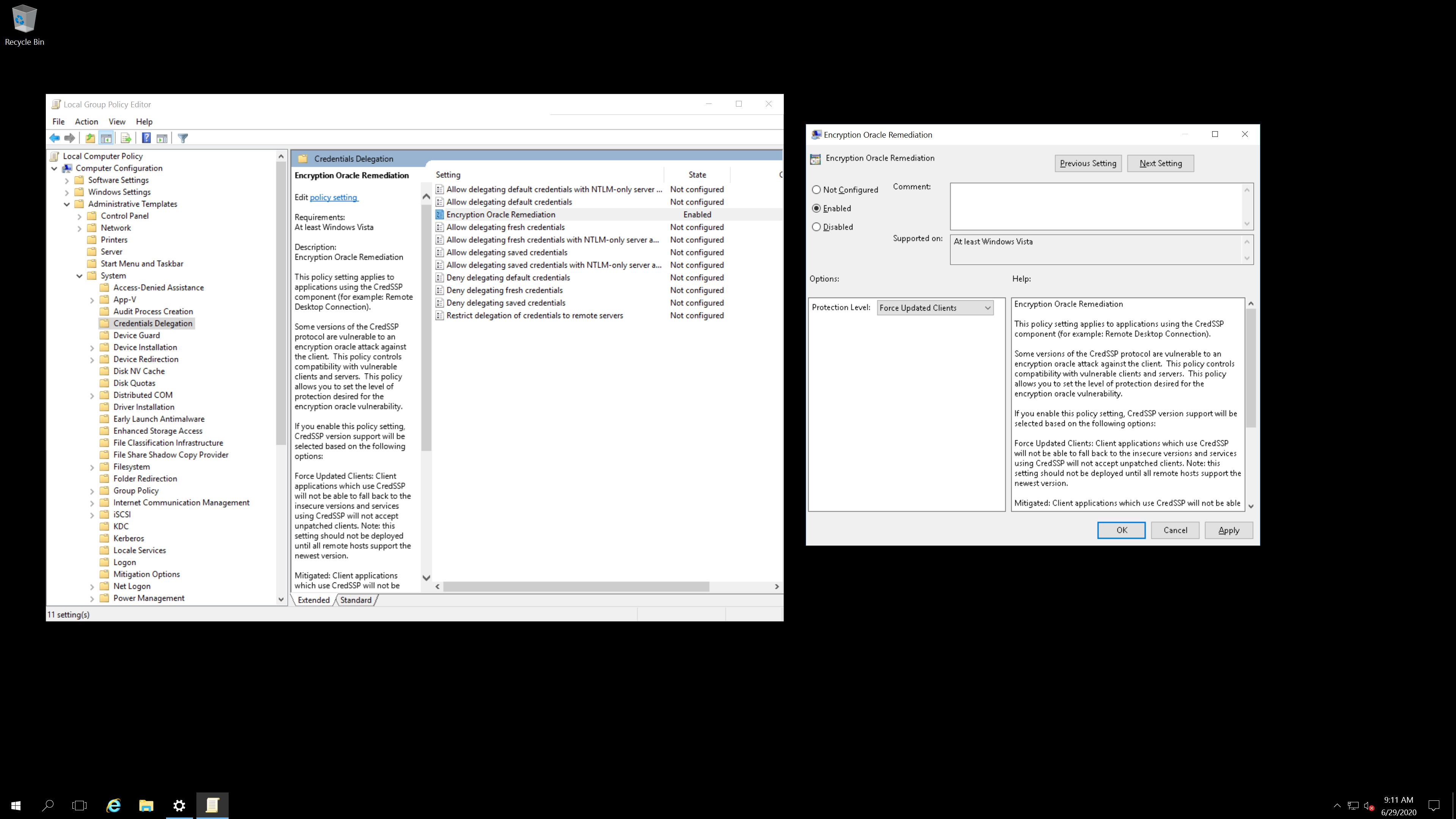
  • 请确保在进行上述更改之前已为服务器和客户端打补丁:https://support.microsoft.com/en-us/help/4093492/credssp-updates-for-cve-2018-0886-march-13-2018。您需要按照链接中的说明手动编辑组策略。
  • 在运行 Exchange 的 Windows Server 上,无法禁用 NTLM(在安全限制中拒绝所有客户端的传入 NTLM 流量),因为这样客户端计算机上的 Outlook 会永久要求用户输入用户名和密码。解决办法是将本地策略安全选项中的 LAN Manager 身份验证级别设置为“仅发送 NTLMv2 响应。拒绝 LM 和 NTLM”。有一个小问题——当有人尝试使用未定义的用户名登录时,日志中不包含 IP 地址。不确定为什么微软无法正确记录 IP 地址。
  • 如果使用 Exchange,禁用应用程序池 'MSExchangeServicesAppPool' 可以消除事件查看器中许多 IP 地址未记录的问题。
  • 卸载程序:https://github.com/DigitalRuby/IPBan/blob/master/IPBanCore/Windows/Scripts/uninstall.cmd

Linux

一键安装:

root@kitploit:~
sudo -i; bash <(wget -qO- https://raw.githubusercontent.com/DigitalRuby/IPBan/master/IPBanCore/Linux/Scripts/Install.sh)

卸载:sudo systemctl stop ipban; sudo systemctl disable ipban; sudo rm /opt/ipban -r

其他信息

注册 IPBan 邮件列表

升级

访问 https://ipban.com/upgrade-to-ipban-pro/ 可获 IPBan Pro 折扣。

其他服务

将 IPBan 与 IPThreat 集成,一个 100% 免费使用的网站和服务。与其他使用社区贡献数据的网站和服务不同,IPThreat 不收取订阅费。

分析

要禁用匿名发送已封禁IP地址到全局IPBan数据库,请在配置文件中将 UseDefaultBannedIPAddressHandler 设置为 false。

捐赠

如果免费版 IPBan 对您有帮助并且您愿意,请考虑捐赠...

捐赠

Jeff Johnson, CEO/CTO
Digital Ruby, LLC
https://ipban.com
[email protected]

下载工具