



Skip to content
KitploitKITPLOIT
工具博客
提交
工具博客
提交

黑客、渗透测试和网络安全工具,武装您的安全武器库!

Kitploit 是一个黑客、网络安全和渗透测试工具的目录。发现最新的项目更新,查找漏洞、分析系统、自动化测试并加强你的安全。

··订阅源·联系·隐私·© 2026 Kitploit

工具目录

分类

查看所有分类
Loading categories
工具/GitHubGitHub/dheerajmadhukar/karma_v2
OSINT (开源情报)侦察漏洞分析DNS和子域名枚举信息收集子域名枚举网络爬虫
GitHubdheerajmadhukar/karma_v2

karma_v2

⡷⠂𝚔𝚊𝚛𝚖𝚊 𝚟𝟸⠐⢾ 是一个被动开源情报(OSINT)自动化侦察(框架)。

查看仓库
1.0k18552年前Kitploit 审核通过

最受欢迎

查看全部 →

发现我们社区最常用的工具。

探索所有工具

浏览我们的工具集合

查看所有工具 →
分享
网站

karma_v2

⡷⠂𝚔𝚊𝚛𝚖𝚊 𝚟𝟸⠐⢾

𝚔𝚊𝚛𝚖𝚊 𝚟𝟸 是一个被动开源情报(OSINT)自动化侦察(框架)

Follow on Twitter Version Build Build Donate

𝚔𝚊𝚛𝚖𝚊 𝚟𝟸 可供信息安全研究人员、渗透测试人员、漏洞猎手使用,用于查找深度信息、更多资产、绕过WAF/CDN的IP、内部/外部基础设施、公开暴露的泄露等更多关于目标的信息。使用此自动化需要Shodan Premium API密钥。𝚔𝚊𝚛𝚖𝚊 𝚟𝟸 的输出会显示在屏幕上并保存到文件/目录中。

ℹ 关于Premium Shodan API,请参阅Shodan网站了解更多信息。

Shodan网站:Shodan Website API:开发者 API

特性

  • 通过Shodan Dorks获得强大且灵活的结果
  • SSL SHA1校验和/指纹搜索
  • 仅命中范围内IP
  • 使用SSL/TLS证书颁发者匹配正则表达式验证每个IP
  • 提供范围外IP
  • 发现所有端口,包括常见、不常见、动态端口
  • 抓取与CVE相关的所有目标漏洞
  • 对每个IP进行Banner抓取,包括产品、操作系统、服务和组织等
  • 抓取网站图标(favicon)
  • 使用python3 mmh3模块生成网站图标哈希
  • 使用nuclei自定义模板进行网站图标技术检测
  • ASN扫描
  • BGP邻居
  • ASN的IPv4和IPv6 Profixes
  • 有趣的泄露,如索引、NDMP、SMB、登录、注册、OAuth、SSO、状态401/403/500、VPN、Citrix、Jfrog、仪表盘、OpenFire、控制面板、Wordpress、Laravel、Jetty、S3存储桶、Cloudfront、Jenkins、Kubernetes、Node Exports、Grafana、RabbitMQ、容器、GitLab、MongoDB、Elastic、匿名FTP、Memcached、DNS递归、Kibana、Prometheus、默认密码、受保护对象、Moodle、Spring Boot、Django、Jira、Ruby、密钥等...

安装

1. 克隆仓库

root@kitploit:~
# git clone https://github.com/Dheerajmadhukar/karma_v2.git

2. 安装shodan和mmh3 Python模块

root@kitploit:~
# python3 -m pip install shodan mmh3

3. 安装JSON解析器[JQ]

root@kitploit:~
# apt install jq -y

4. 安装httprobe @tomnomnom 用于探测请求

root@kitploit:~
# go install -v github.com/tomnomnom/httprobe@master

5. 安装Interlace @codingo 用于多线程 [按照codingo interlace仓库的说明]

root@kitploit:~
# git clone https://github.com/codingo/Interlace.git & install accordingly. 

6. 安装nuclei @projectdiscovery

root@kitploit:~
# go install -v github.com/projectdiscovery/nuclei/v2/cmd/nuclei@latest

7. 安装lolcat

root@kitploit:~
# apt install lolcat -y

8. 安装anew

root@kitploit:~
# go install -v github.com/tomnomnom/anew@master

好的,如何使用它?

root@kitploit:~
# cat > .token
SHODAN_PREMIUM_API_HERE

用法

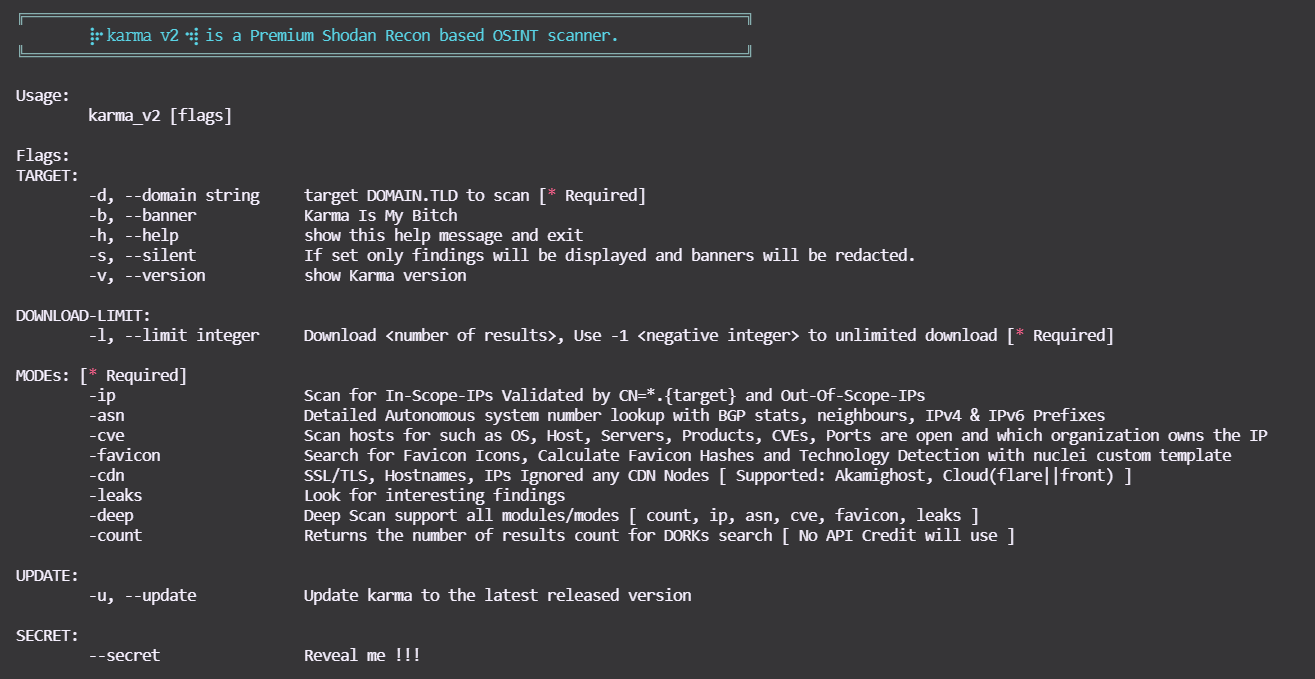
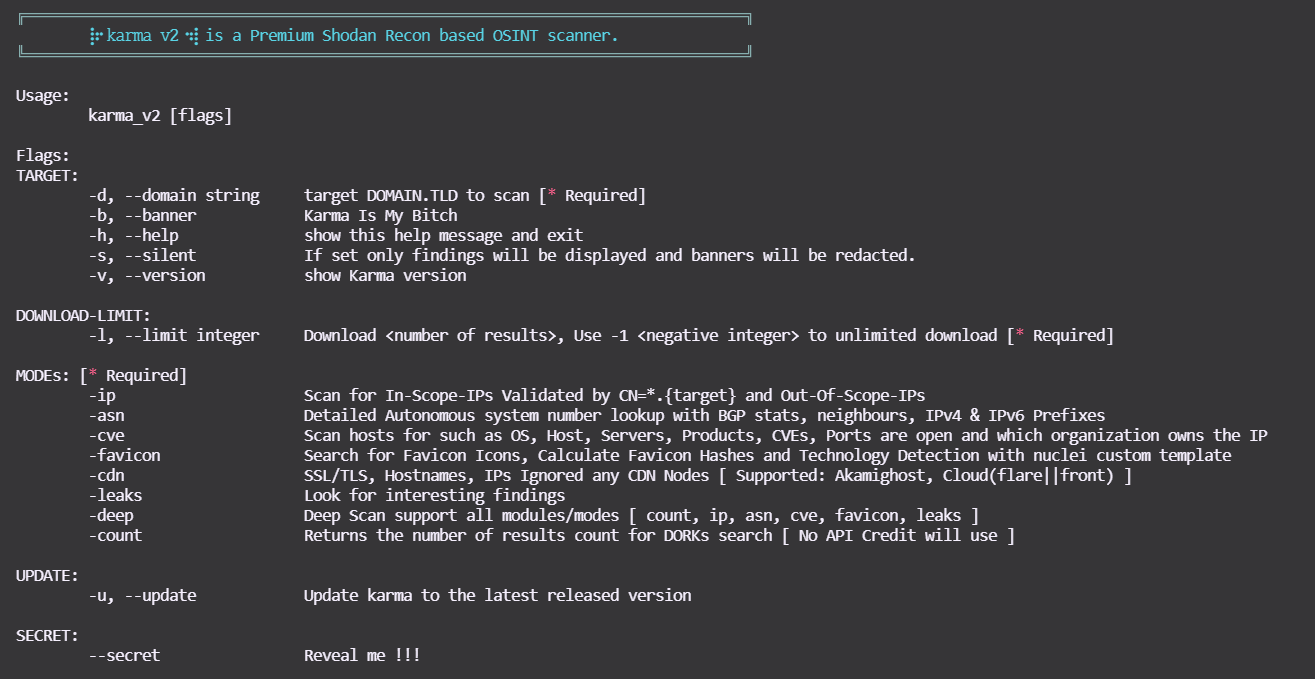
你可以使用以下命令查看帮助:

root@kitploit:~
$ bash karma_v2 -h
karma_v2

模式

演示

  • karma_v2 [模式 -ip] asciicast

  • karma_v2 [模式 -asn] asciicast

  • karma_v2 [模式 -cve] asciicast

  • karma_v2 [模式 -favicon] asciicast

  • karma_v2 [模式 -leaks]

asciicast


  • karma_v2 [模式 -deep]

-deep 支持以上所有模式,例如 -count、-ip、-asn、-favicon、-cve、-leaks!


输出

root@kitploit:~
output/bugcrowd.com-YYYY-MM-DD/ 

.
├── ASNs_Detailed_bugcrowd.com.txt
├── Collect
│   ├── host_domain_domain.tld.json.gz
│   ├── ssl_SHA1_12289a814...83029f8944b6088d60204a92e_domain.tld.json.gz
│   ├── ssl_SHA1_17537bf84...73cb1d684a495db7ea5aa611b_domain.tld.json.gz
│   ├── ssl_SHA1_198d6d4ec...681b77585190078b07b37c5e1_domain.tld.json.gz
│   ├── ssl_SHA1_26a9c5618...d60eae2947b42263e154d203f_domain.tld.json.gz
│   ├── ssl_SHA1_3da3825a2...3b852a42470410183adc3b9ee_domain.tld.json.gz
│   ├── ssl_SHA1_4d0eab730...68cf11d2db94cc2454c906532_domain.tld.json.gz
│   ├── ssl_SHA1_8907dab4c...12fdbdd6c445a4a8152f6b7b7_domain.tld.json.gz
│   ├── ssl_SHA1_9a9b99eba...5dc5106cea745a591bf96b044_domain.tld.json.gz
│   ├── ssl_SHA1_a7c14d201...b6fd4bc4e95ab2897e6a0bsfd_domain.tld.json.gz
│   ├── ssl_SHA1_a90f4ddb0...85780bdb06de83fefdc8a612d_domain.tld.json.gz
│   ├── ssl_domain_domain.tld.json.gz
│   ├── ssl_subjectCN_domain.tld.json.gz
│   └── ssl_subject_domain.tld.json.gz
|   └── . . .
├── IP_VULNS
│   ├── 104.x.x.x.json.gz
│   ├── 107.x.x.x.json.gz
│   └── 99.x.x.x.json.gz
|   └── . . .
├── favicons_domain.tld.txt
├── host_enum_domain.tld.txt
├── ips_inscope_domain.tld.txt
├── main_domain.tld.data
├── . . . 

karma_v2 新增的Shodan Dorks

  • SonarQube
  • Apache hadoop node
  • Directory Listing
  • Oracle Business intelligence
  • Oracle Web Login
  • Docker Exec
  • Apache Status
  • Apache-Coyote/1.1 Tomcat-5.5
  • Swagger UI
  • H-SPHERE
  • Splunk
  • JBoss
  • phpinfo
  • ID_VC
  • Confluence
  • TIBCO_Jaspersoft
  • Shipyard_Docker_management
  • Symfony PHP info AWS creds
  • Ignored-by_CDNs
  • Django_Exposed
  • Cluster_Node_etcd
  • SAP_NetWeaver_Application

𝚔𝚊𝚛𝚖𝚊 𝚟𝟸 支持的Shodan Dorks

𝚔𝚊𝚛𝚖𝚊 𝚟𝟸 新增的Shodan Dorks

支持

如果你喜欢 ⡷⠂𝚔𝚊𝚛𝚖𝚊 𝚟𝟸⠐⢾ 并且它在工作、奖金/赏金、渗透测试、侦察中帮助了你,或者只是给你带来了快乐,请展示你的支持! 🛑 请避免为支持请求或问题打开GitHub issues! 请我喝杯啤酒让我保持动力 :)

Buy Me A Beer

下载工具
模式示例
-ip bash karma_v2 -d <DOMAIN.TLD> -l <INTEGER> -ip
-asn bash karma_v2 -d <DOMAIN.TLD> -l <INTEGER> -asn
-cve bash karma_v2 -d <DOMAIN.TLD> -l <INTEGER> -cve
-cveid bash karma_v2 -d <DOMAIN.TLD> -l <INTEGER> -cveid CVE-2021-34473
-favicon bash karma_v2 -d <DOMAIN.TLD> -l <INTEGER> -favicon
-leaks bash karma_v2 -d <DOMAIN.TLD> -l <INTEGER> -leaks
-deep bash karma_v2 -d <DOMAIN.TLD> -l <INTEGER> -deep
-count bash karma_v2 -d <DOMAIN.TLD> -l <INTEGER> -count
DORKsDORKsDORKs
ssl.cert.fingerprinthttp.status:"302" oauth"Server: Jetty"
sslhttp.status:"302" ssoX-Amz-Bucket-Region
orgtitle:"401 Authorization Required""development" org:"Amazon.com"
hostnamehttp.html:"403 Forbidden""X-Jenkins" "Set-Cookie: JSESSIONID" http.title:"Jenkins [Jenkins]"
ssl.cert.issuer.cnhttp.html:"500 Internal Server Error"http.favicon.hash:81586312 200
ssl.cert.subject.cnssl.cert.subject.cn:*vpn*product:"Kubernetes" port:"10250, 2379"
ssl.cert.expired:truetitle:"citrix gateway"port:"9100" http.title:"Node Exporter"
ssl.cert.subject.commonNamehttp.html:"JFrog"http.title:"Grafana"
http.title:"Index of /""X-Jfrog"http.title:"RabbitMQ"
ftp port:"10000"http.title:"dashboard"HTTP/1.1 307 Temporary Redirect "Location: /containers"
"Authentication: disabled" port:445 product:"Samba"http.title:"Openfire Admin Console"http.favicon.hash:1278323681
title:"Login - Adminer"http.title:"control panel""MongoDB Server Information" port:27017 -authentication
http.title:"sign up"http.html:"* The wp-config.php creation script uses this file"port:"9200" all:"elastic indices"
http.title:"LogIn"clockwork"220" "230 Login successful." port:21
port:"11211" product:"Memcached""port: 53" Recursion: Enabledtitle:"kibana"
port:9090 http.title:"Prometheus Time Series Collection and Processing Server""default password"title:protected
http.component:Moodlehttp.favicon.hash:116323821html:"/login/?next=" title:"Django"
html:"/admin/login/?next=" title:"Django"title:"system dashboard" html:jirahttp.component:ruby port:3000
html:"secret_key_base"我很快会添加更多. . .
DORKsDORKsDORKs
"netweaver"port:"2379" product:"etcd"http.title:"DisallowedHost"
ssl:"${target}" "-AkamaiGHost" "-GHost"ssl:"${target}" "-Cloudflare"ssl:"${target}" "-Cloudfront"
"X-Debug-Token-Link" port:443http.title:"shipyard" HTTP/1.1 200 OK Accept-Ranges: bytes Content-Length: 5664http.title:"TIBCO Jaspersoft:" port:"443" "1970"
"Confluence"http.title:"SonarQube"html:"jmx?qry=Hadoop:*"
http.title:"Directory Listing"http.title:"H-SPHERE"http.title:"Swagger UI - "
Server: Apache-Coyote/1.1 Tomcat-5.5"port:2375 product:"Docker"http.title:"phpinfo()"
http.title:"ID_VC_Welcome""x-powered-by" "jboss"jboss http.favicon.hash:-656811182
http.title:"Welcome to JBoss"port:"8089, 8000" "splunkd"http.favicon.hash:-316785925
title:"splunkd" org:"Amazon.com"http.title:"oracle business intelligence sign in"http.title:"Oracle WebLogic Server Administration Console"
http.title:"Apache Status"我很快会添加更多. . .