Popeye 是一款实用工具,用于扫描实时 Kubernetes 集群,并报告已部署资源和配置中存在的潜在问题。 随着 Kubernetes 生态系统的增长,人类要跟踪编排集群的大量清单和策略变得越来越困难。 Popeye 基于集群中实际部署的内容进行扫描,而非磁盘上的文件。通过对集群进行代码审查,它能够检测配置错误、过时的资源,并帮助您确保遵循最佳实践,从而预防未来的问题。 它旨在减轻操作 Kubernetes 集群时面临的认知超载。 此外,如果您的集群使用了 metrics-server,它会报告潜在的资源配置过分配或欠分配问题,并在集群可能耗尽容量时尝试发出警告。
Popeye 是一个只读工具,不会以任何方式更改您的任何 Kubernetes 资源!
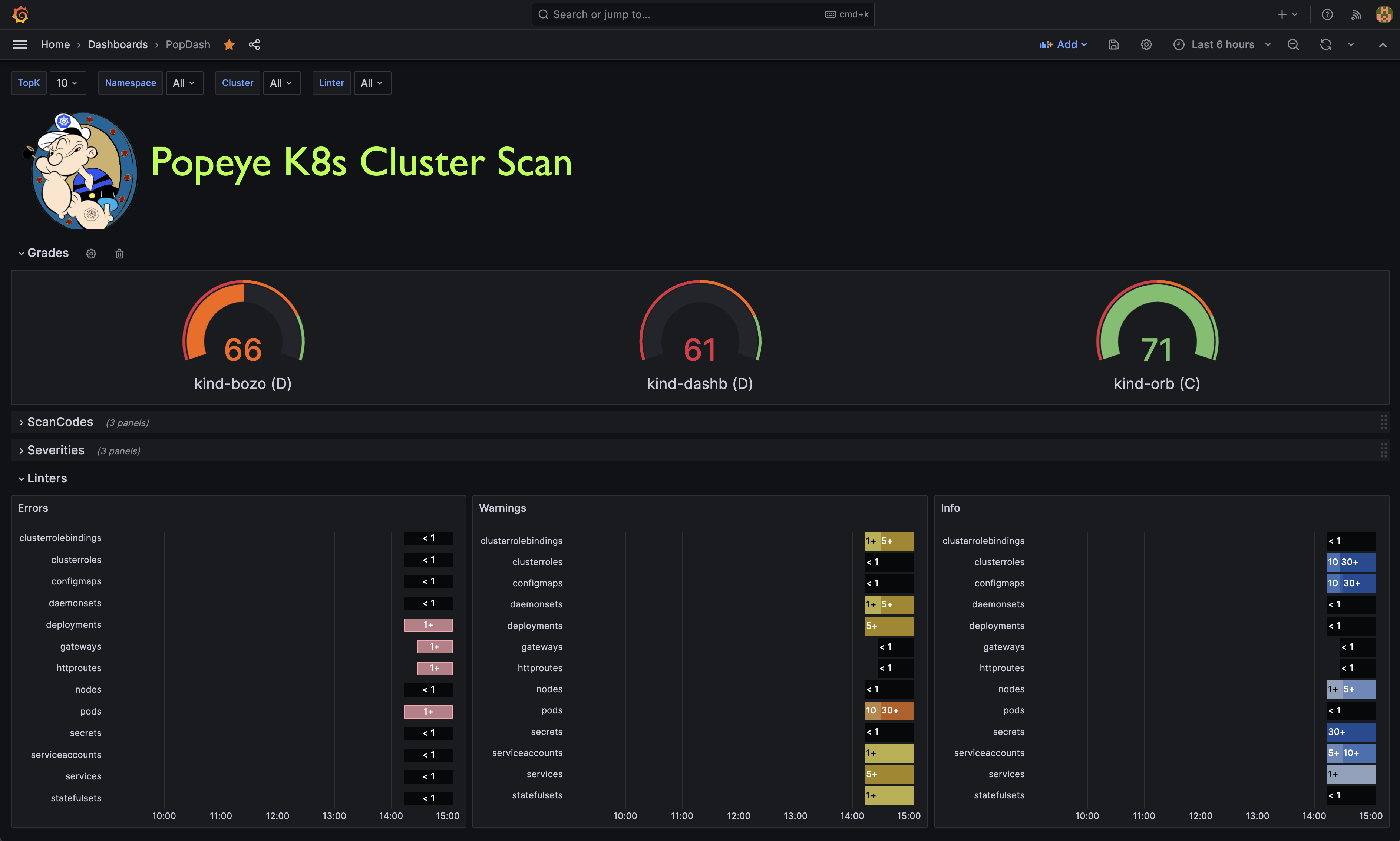
Popeye 发布 Prometheus 指标。我们在本仓库中提供了一个示例 Popeye 仪表盘,供您快速上手。
Popeye 支持 Linux、OSX 和 Windows 平台。
适用于 Linux、Windows 和 Mac 的二进制文件以 tarball 形式发布在 release 页面。
对于 OSX/Unit 用户,可使用 Homebrew/LinuxBrew ```shell brew install derailed/popeye/popeye
使用 go install
go install github.com/derailed/popeye@latest
从源码构建 Popeye 是使用 go 1.21+ 构建的。要从源码构建 Popeye,你必须:
克隆仓库
在你的 go.mod 文件中添加以下命令
replace (
github.com/derailed/popeye => MY_POPEYE_CLONED_GIT_REPO
)
构建并运行可执行文件
go run main.go
对于没有耐心的用户,快速操作指南: ```shell
git clone https://github.com/derailed/popeye cd popeye
make build
popeye
Popeye 使用 256 色终端模式。在 `Nix 系统上,请确保 TERM 已相应设置。
export TERM=xterm-256color
你可以直接使用 Popeye,也可以通过 spinach yaml 配置文件来调整你的检查器。关于 Popeye 配置文件的详细信息如下。```shell
popeye version
popeye
fred namespacepopeye -n fred
popeye -A
popeye -f spinach.yaml
popeye --context olive
popeye -n ns1 -s pod,svc --logs none
popeye -n ns1 --logs /tmp/fred.log -v4
popeye help
---
## 代码检查器
Popeye 会检查你的集群,找出最佳实践和潜在问题。
目前,Popeye 只针对一组特定的 Kubernetes 资源进行检查。
更多资源即将加入!
我们希望 Kubernetes 的朋友们能贡献代码,让 Popeye 变得更好。
代码检查器的目标是发现配置错误,比如端口不匹配、死资源或未使用的资源、指标利用率、探针、容器镜像、RBAC 规则、裸资源等等。
Popeye 不是另一个静态分析工具。它会在实际集群上运行并检查 Kubernetes 资源,审计资源在野外的真实状态!
以下是部分可用代码检查器的列表:
| | Resource | Linters | Aliases |
|----|-------------------------|-------------------------------------------------------------------------|------------|
| 🛀 | Node | | no |
| | | 条件:例如未就绪、内存/磁盘不足、网络、PID 等 | |
| | | Pod 容忍度是否引用了节点污点 | |
| | | CPU/内存利用率指标,超出限制时触发(默认 CPU/内存 80%) | |
| 🛀 | Namespace | | ns |
| | | 非活跃状态 | |
| | | 死命名空间 | |
| 🛀 | Pod | | po |
| | | Pod 状态 | |
| | | 容器状态 | |
| | | ServiceAccount 是否存在 | |
| | | 容器上 CPU/内存超过设定限制(默认 CPU/内存 80%) | |
| | | 没有标签的容器镜像 | |
| | | 使用 `latest` 标签的容器镜像 | |
| | | 资源请求/限制是否存在 | |
| | | 存活/就绪探针是否存在 | |
| | | 命名端口及其引用 | |
| 🛀 | Service | | svc |
| | | Endpoints 是否存在 | |
| | | 匹配 Pod 标签 | |
| | | 命名端口及其引用 | |
| 🛀 | ServiceAccount | | sa |
| | | 未使用,检测可能未使用的 SA | |
| 🛀 | Secrets | | sec |
| | | 未使用,检测可能未使用的 Secret 或关联的键 | |
| 🛀 | ConfigMap | | cm |
| | | 未使用,检测可能未使用的 ConfigMap 或关联的键 | |
| 🛀 | Deployment | | dp, deploy |
| | | 未使用,Pod 模板验证,资源利用率 | |
| 🛀 | StatefulSet | | sts |
| | | 未使用,Pod 模板验证,资源利用率 | |
| 🛀 | DaemonSet | | ds |
| | | 未使用,Pod 模板验证,资源利用率 | |
| 🛀 | PersistentVolume | | pv |
| | | 未使用,检查卷是否绑定或卷错误 | |
| 🛀 | PersistentVolumeClaim | | pvc |
| | | 未使用,检查是否绑定或卷挂载错误 | |
| 🛀 | HorizontalPodAutoscaler | | hpa |
| | | 未使用,利用率,最大突发检查 | |
| 🛀 | PodDisruptionBudget | | |
| | | 未使用,检查 minAvailable 配置 | pdb |
| 🛀 | ClusterRole | | |
| | | 未使用 | cr |
| 🛀 | ClusterRoleBinding | | |
| | | 未使用 | crb |
| 🛀 | Role | | |
| | | 未使用 | ro |
| 🛀 | RoleBinding | | |
| | | 未使用 | rb |
| 🛀 | Ingress | | |
| | | 有效性 | ing |
| 🛀 | NetworkPolicy | | |
| | | 有效性,过期,是否受防护 | np |
| 🛀 | PodSecurityPolicy | | |
| | | 有效性 | psp |
| 🛀 | Cronjob | | |
| | | 有效性,是否暂停,运行状态 | cj |
| 🛀 | Job | | |
| | | Pod 检查 | job |
| 🛀 | GatewayClass | | |
| | | 有效性,未使用 | gwc |
| 🛀 | Gateway | | |
| | | 有效性,未使用 | gw |
| 🛀 | HTTPRoute | | |
| | | 有效性,未使用 | gwr |
你也可以查看 [完整的代码列表](https://github.com/derailed/popeye/blob/master/docs/codes.md)
---
## 保存扫描
将 Popeye 报告保存到文件中,请给命令传递 `--save` 标志。
默认情况下,它会在 tmp 目录中创建并存储你的扫描报告。
tmp 目录的路径会打印到 STDOUT。
如果你需要指定报告的输出目录,可以使用环境变量 `POPEYE_REPORT_DIR`。最终路径为 <POPEYE_REPORT_DIR>/<cluster>/<context>。
默认情况下,输出文件的名称遵循以下格式:`lint_<cluster-name>_<time-UnixNano>.<output-extension>`(例如:"lint-mycluster-1594019782530851873.html")。
如果你还想指定报告的输出文件名,可以传递 `--output-file` 标志并带上你想要的文件名作为参数。
示例:将报告保存到工作目录中:```shell
POPEYE_REPORT_DIR=$(pwd) popeye --save
示例:将报告以HTML格式保存到工作目录,文件名为"report.html":```shell POPEYE_REPORT_DIR=$(pwd) popeye --save --out html --output-file report.html
### 保存到S3对象存储
或者,你可以通过提供`--s3-bucket`标志将生成的报告推送到AWS S3或Minio对象存储。
对于参数,你需要提供要存储报告的S3存储桶的名称。
要保存在存储桶的子目录中,请将存储桶参数设置为`bucket/path/to/report`。
保存报告到S3的示例:```shell
# AWS S3
# NOTE: You must provide env vars for AWS_ACCESS_KEY_ID and AWS_SECRET_ACCESS_KEY
# This will create bucket my-popeye if not present and upload a popeye json report to /fred/scan.json
popeye --s3-bucket s3://my-popeye/fred --s3-region us-west-2 --out json --save --output-file scan.json
# Minio Object Store
# NOTE: You must provide env vars for AWS_ACCESS_KEY_ID and AWS_SECRET_ACCESS_KEY and a minio server URI
# This will create bucket my-popeye if not present and upload a popeye json report to /fred/scan.json
popeye --s3-bucket minio://my-popeye/fred --s3-region us-east --s3-endpoint localhost:9000 --out json --save --output-file scan.json
您也可以通过直接从 Quay 上的官方 Docker 仓库运行 Popeye 来在容器中运行它。
运行 Docker 容器时的默认命令是 popeye,因此您可以通过使用支持的 CLI 标志来自定义扫描。
要访问您的集群,请使用 -v 将本地的 kubeconfig 目录映射到容器中:```shell
docker run --rm -it -v $HOME/.kube:/root/.kube quay.io/derailed/popeye --context foo -n bar
使用 `--rm` 运行上述 Docker 命令意味着当 Popeye 退出时容器会被删除。
当您使用 `--save` 时,它会将输出写入容器中的 /tmp 目录,然后在 Popeye 退出时删除容器,这意味着您会丢失输出 ;(
要解决此问题,请将 /tmp 映射到容器的 /tmp。
> 注意:您可以通过设置 `POPEYE_REPORT_DIR` 环境变量来覆盖默认的输出目录位置。```shell
docker run --rm -it \
-v $HOME/.kube:/root/.kube \
-e POPEYE_REPORT_DIR=/tmp/popeye \
-v /tmp:/tmp \
quay.io/derailed/popeye --context foo -n bar --save --output-file my_report.txt
# Docker has exited, and the container has been deleted, but the file
# is in your /tmp directory because you mapped it into the container
cat /tmp/popeye/my_report.txt
<snip>
Popeye 可以以多种格式生成检查报告。你可以使用 -o 选项选择你想要的格式。
Popeye 可以直接从扫描结果发布 Prometheus 指标。你需要有权访问 Prometheus Pushgateway 和凭据。
注意!这些内容可能会根据用户反馈和使用情况进行更改!!
为了发布指标,必须提供额外的 CLI 参数。```shell
popeye --push-gtwy-url http://localhost:9091
popeye -o html --save --push-gtwy-url http://localhost:9091
### PopProm 指标
以下 Popeye Prometheus 指标会发布:
* `popeye_severity_total` [gauge] 根据严重性跟踪各种计数。
* `popeye_code_total` [gauge] 按 Popeye 的 linter 代码跟踪计数。
* `popeye_linter_tally_total` [gauge] 按每个 linter 跟踪计数。
* `popeye_report_errors_total` [gauge] 跟踪扫描错误总数。
* `popeye_cluster_score` [gauge] 跟踪扫描报告评分。
### PopGraf
此仓库提供了一个示例 [Grafana](https://grafana.com) 仪表板,供您快速上手。
> 注意!此为开发中内容,如果您擅长 UX/Grafana/PromQL,欢迎贡献。
---
## SpinachYAML
可以通过 `-f` 选项指定一份 spinach YAML 配置文件,以进一步配置 linter。该文件可以指定容器利用率阈值、具体的 linter 配置,以及将从 linter 中排除的资源和代码。
> 注意!此文件将随 Popeye 的成熟而变更!
在 `excludes` 键下,您可以配置跳过某些资源或 linter 代码。
Popeye 的 linter 以 k8s 资源名称命名。
例如,PodDisruptionBudget linter 被命名为 `poddisruptionbudgets`,并扫描 `policy/v1/poddisruptionbudgets`。
> 注意!linter 使用复数的资源 `kind` 形式,且所有字母小写。
Spintach 文件中使用资源完全限定名(即 `FQN`)来标识资源名称,格式为 `namespace/resource_name`。
例如,命名空间 `blee` 中名为 `fred-1234` 的 Pod 的 FQN 将是 `blee/fred-1234`。这有助于区分 `fred/p1` 和 `blee/p1`。
对于集群级资源,FQN 等同于名称本身。
排除规则既可以是直接的字符串匹配,也可以是正则表达式。使用正则表达式时,需通过 `rx:` 前缀指定。
> 注意!请谨慎编写正则表达式,因为使用 *宽松* 的正则规则可能导致预期之外更多资源被排除。
> 当集群资源发生变化时,这可能导致次优的扫描结果。
> 因此,我们建议偶尔“完全开放”地运行 Popeye,以确保能捕获集群中可能出现的新问题。
以下是本版本中一个示例 spinach 文件。
此仓库的 `spinach` 目录下还有更完整的基于 eks 和 aks 的 spinach 文件。
(顺便一提:对于项目新手,添加特定集群的 spinach 文件 PR 可能是很好的贡献方式……)```yaml
# spinach.yaml
# A Popeye sample configuration file
popeye:
# Checks resources against reported metrics usage.
# If over/under these thresholds a linter warning will be issued.
# Your cluster must run a metrics-server for these to take place!
allocations:
cpu:
underPercUtilization: 200 # Checks if cpu is under allocated by more than 200% at current load.
overPercUtilization: 50 # Checks if cpu is over allocated by more than 50% at current load.
memory:
underPercUtilization: 200 # Checks if mem is under allocated by more than 200% at current load.
overPercUtilization: 50 # Checks if mem is over allocated by more than 50% usage at current load.
# Excludes excludes certain resources from Popeye scans
excludes:
# [NEW!] Global exclude resources and codes globally of any linters.
global:
fqns: [rx:^kube-] # => excludes all resources in kube-system, kube-public, etc..
# [NEW!] Exclude resources for all linters matching these labels
labels:
app: [bozo, bono] #=> exclude any resources with labels matching either app=bozo or app=bono
# [NEW!] Exclude resources for all linters matching these annotations
annotations:
fred: [blee, duh] # => exclude any resources with annotations matching either fred=blee or fred=duh
# [NEW!] Exclude scan codes globally via straight codes or regex!
codes: ["300", "206", "rx:^41"] # => exclude issue codes 300, 206, 410, 415 (Note: regex match!)
# [NEW!] Configure individual resource linters
linters:
# Configure the namespaces linter for v1/namespaces
namespaces:
# [NEW!] Exclude these codes for all namespace resources straight up or via regex.
codes: ["100", "rx:^22"] # => exclude codes 100, 220, 225, ...
# [NEW!] Excludes specific namespaces from the scan
instances:
- fqns: [kube-public, kube-system] # => skip ns kube-pulbic and kube-system
- fqns: [blee-ns]
codes: [106] # => skip code 106 for namespace blee-ns
# Skip secrets in namespace bozo.
secrets:
instances:
- fqns: [rx:^bozo]
# Configure the pods linter for v1/pods.
pods:
instances:
# [NEW!] exclude all pods matching these labels.
- labels:
app: [fred,blee] # Exclude codes 102, 105 for any pods with labels app=fred or app=blee
codes: [102, 105]
resources:
# Configure node resources.
node:
# Limits set a cpu/mem threshold in % ie if cpu|mem > limit a lint warning is triggered.
limits:
# CPU checks if current CPU utilization on a node is greater than 90%.
cpu: 90
# Memory checks if current Memory utilization on a node is greater than 80%.
memory: 80
# Configure pod resources
pod:
# Restarts check the restarts count and triggers a lint warning if above threshold.
restarts: 3
# Check container resource utilization in percent.
# Issues a lint warning if about these threshold.
limits:
cpu: 80
memory: 75
# [New!] overrides code severity
overrides:
# Code specifies a custom severity level ie critical=3, warn=2, info=1
- code: 206
severity: 1
# Configure a list of allowed registries to pull images from.
# Any resources not using the following registries will be flagged!
registries:
- quay.io
- docker.io
Popeye 已容器化,可直接在您的 Kubernetes 集群中作为一次性任务或 CronJob 运行。
以下是一个示例设置,请根据您的需求/意愿进行修改。这些清单位于此仓库的 k8s 目录中。```shell
kubectl apply -f k8s/popeye
Please provide the Markdown content to translate.```yaml
---
apiVersion: v1
kind: Namespace
metadata:
name: popeye
---
apiVersion: batch/v1
kind: CronJob
metadata:
name: popeye
namespace: popeye
spec:
schedule: "* */1 * * *" # Fire off Popeye once an hour
concurrencyPolicy: Forbid
jobTemplate:
spec:
template:
spec:
serviceAccountName: popeye
restartPolicy: Never
containers:
- name: popeye
image: derailed/popeye:vX.Y.Z
imagePullPolicy: IfNotPresent
args:
- -o
- yaml
- --force-exit-zero
resources:
limits:
cpu: 500m
memory: 100Mi
应设置 --force-exit-zero。否则,Pod 将进入错误状态。
注意!如果检测到任何 lint 错误,Popeye 将以非零错误码退出。
为了让 Popeye 正常工作,登录用户必须有足够的 RBAC 权限来获取/列出上述资源。
示例 Popeye RBAC 规则(请注意,这些规则可能会更改。)
注意!请根据您的集群策略审查和调整。```yaml
apiVersion: v1 kind: ServiceAccount metadata: name: popeye namespace: popeye
apiVersion: rbac.authorization.k8s.io/v1 kind: ClusterRole metadata: name: popeye rules:
apiVersion: rbac.authorization.k8s.io/v1 kind: ClusterRoleBinding metadata: name: popeye subjects:
---
## 报告形态
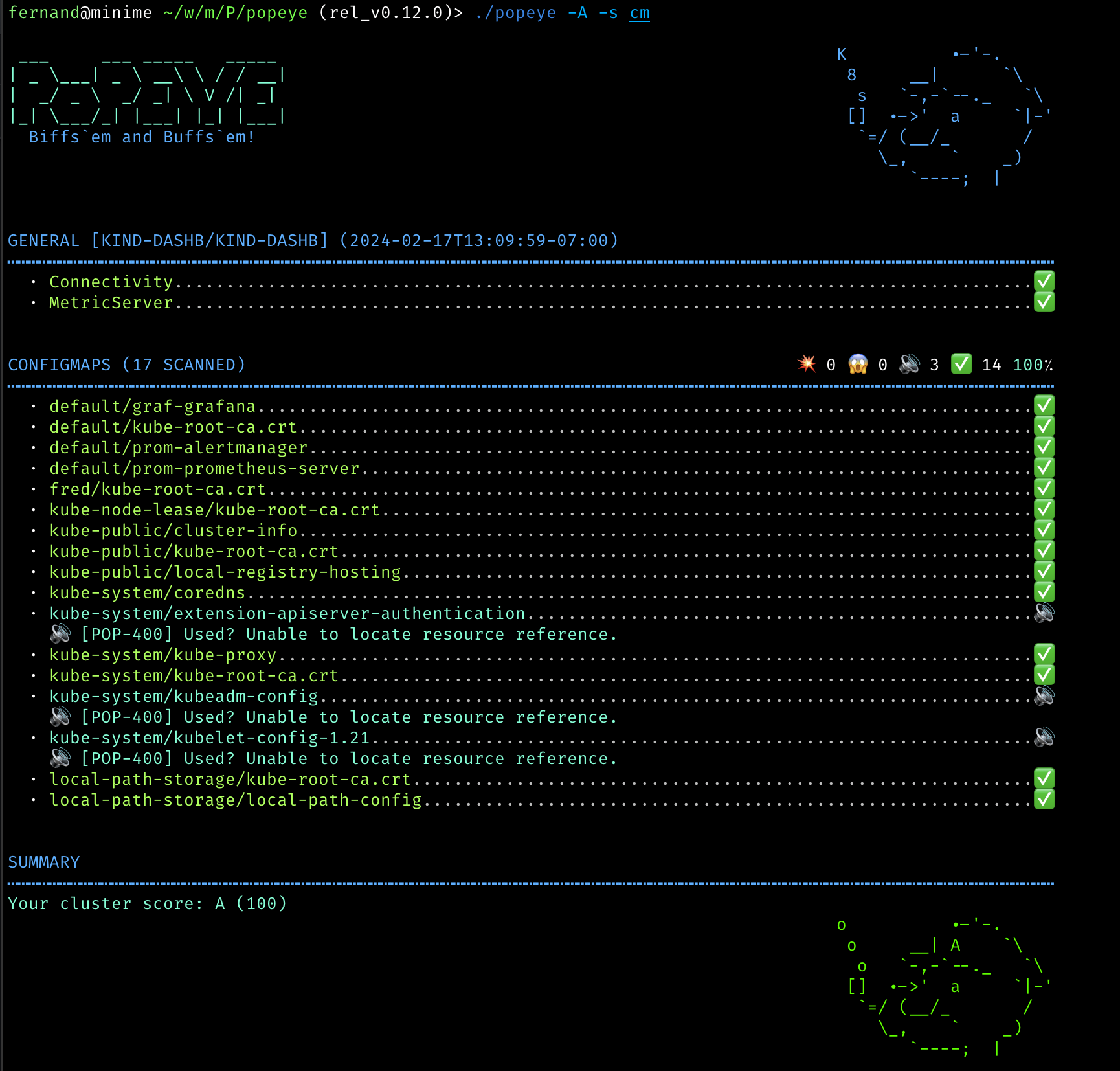
lint 报告会输出每个扫描的资源组及其潜在问题。
报告根据 linter 严重级别使用颜色/表情符号进行编码:
| 级别 | 图标 | 侏罗纪 | 颜色 | 描述 |
|---------|------|--------|-----------|------------------|
| 通过 | ✅ | OK | 绿色 | 一切正常! |
| 信息 | 🔊 | I | 蓝绿色 | 仅供参考 |
| 警告 | 😱 | W | 黄色 | 潜在问题 |
| 错误 | 💥 | E | 红色 | 需要采取行动 |
每个扫描的 Kubernetes 资源的标题部分会提供上述各个类别的摘要计数。
“摘要”部分会根据在给定集群上执行的 linter 检查提供一个 **Popeye 评分**。
---
## 已知问题
此初始版本较为脆弱。Popeye 很可能在以下情况下出现问题……
* 您运行的 Kubernetes 版本较旧。Popeye 在 Kubernetes 1.25.X 上运行最佳。
* 您没有足够的 RBAC 权限来管理集群(请参阅 RBAC 部分)
---
## 免责声明
此项目仍在开发中!如果 Kubernetes 社区对此有足够兴趣,
我们将根据您的建议/贡献进行增强。
此外,如果您喜欢这个项目,也请告诉我们!
---
## 致谢(ATTA 女孩/男孩们!)
Popeye 建立在许多开源项目和库的基础之上。我们*衷心*感谢所有在夜晚和周末
辛勤工作的开源贡献者,没有你们就没有这个项目!
### 联系方式
1. **电子邮件**: [email protected]
2. **推特**: [@kitesurfer](https://twitter.com/kitesurfer?lang=en)
---
<img src="https://raw.githubusercontent.com/derailed/popeye/master/assets/imhotep_logo.png" width="32" height="auto"/> © 2025 Imhotep Software LLC.
所有材料均根据 [Apache v2.0](http://www.apache.org/licenses/LICENSE-2.0) 许可。
| 格式 | 描述 | 默认 | 致谢 |
|---|
| standard | 带图标和颜色的完整输出 | 是 | |
| jurassic | 无图标无颜色,如同回到1979年 | ||
| yaml | YAML 格式 | ||
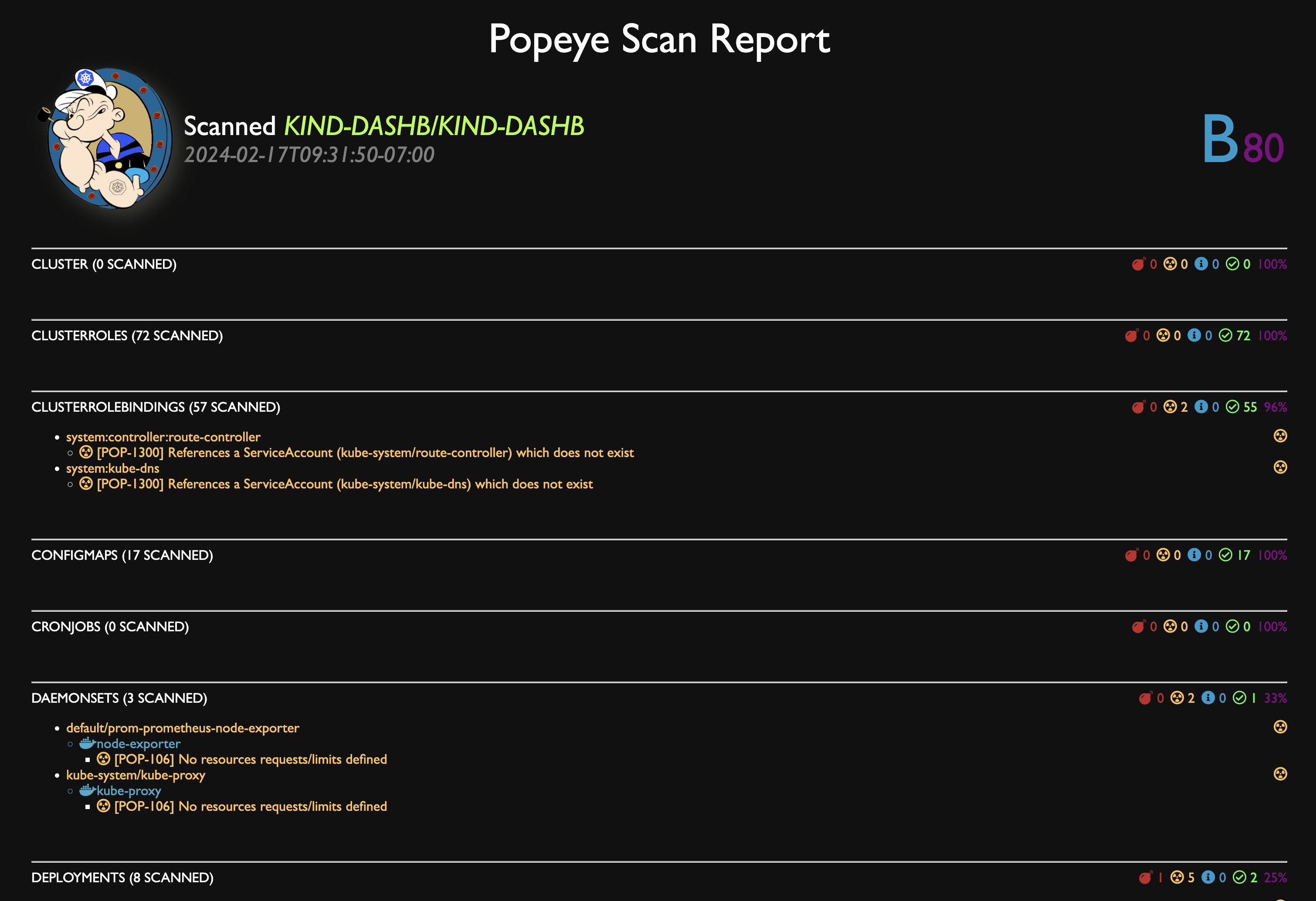
| html | HTML 格式 | ||
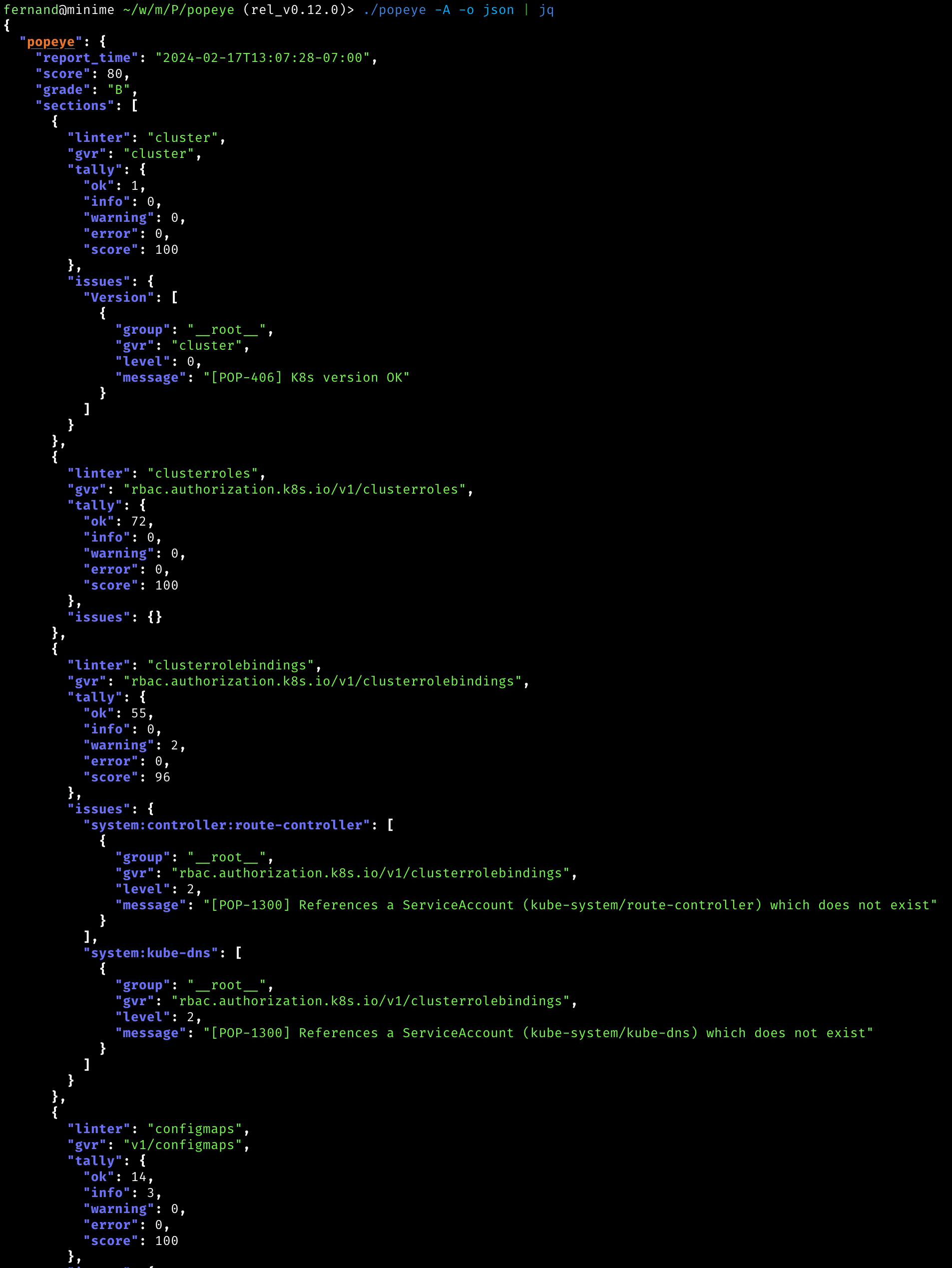
| json | JSON 格式 | ||
| junit | 给怀旧的 Java 开发者 | ||
| prometheus | 以 Prometheus 指标格式导出报告 | dardanel | |
| score | 返回单个集群的 linter 评分值(0-100) | kabute |