Skip to content
KitploitKITPLOIT
工具漏洞利用博客
Log in
提交
工具漏洞利用博客
提交

黑客、渗透测试和网络安全工具,武装您的安全武器库!

Kitploit 是一个黑客、网络安全和渗透测试工具的目录。发现最新的项目更新,查找漏洞、分析系统、自动化测试并加强你的安全。

订阅源联系隐私© 2026 Kitploit

工具目录

分类

查看所有分类
Loading categories
工具/GitHubGitHub/corelight/corelightforsecops
防御工具网络安全云安全实用工具与框架入侵检测日志分析
GitHubcorelight/corelightforsecops

CorelightForSecOps

用于 CORELIGHT 及相关信息的 Chronicle 解析器。

查看仓库
541039天前尚未审核
分享

收集 Corelight Sensor 日志

本文档介绍如何通过配置 Corelight Sensor 和 Chronicle 转发器来收集 Corelight Sensor 日志。本文档还列出了支持的日志类型和受支持的 Corelight 版本。

有关更多信息,请参阅将数据注入到 Chronicle。

准备工作

  • 验证 Corelight Sensor 的版本。Corelight Google SecOps 解析器是为 27.13 及更早版本设计的。更高版本的 Corelight Sensor 可能包含解析器无法识别的额外日志,这些日志可能只能获得有限或没有字段解析。不过,日志内容仍会以原始日志格式在 Google SecOps 中提供。
  • 确保部署架构中的所有系统都配置为 UTC 时区。

部署和日志注入方法

以下部署架构图展示了如何将 Corelight Sensor 设置为使用两种不同的注入架构向 Google Security Operations 发送日志。需要注意的是,每个客户的部署可能与此表示有所不同,并且可能更加复杂。

注入标签用于标识将原始日志数据规范化为结构化 UDM 格式的解析器。本文档中的信息适用于带有 CORELIGHT 注入标签的解析器。
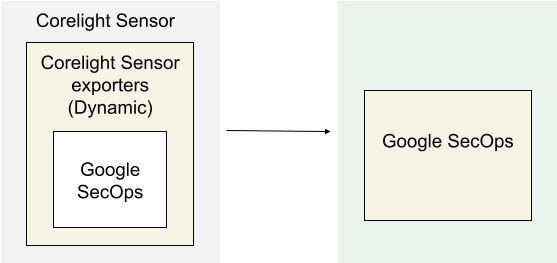
使用 Corelight 导出器将日志注入 Google SecOps

部署架构

该架构图展示了以下组件:

  • Corelight Sensor:运行 Corelight Sensor 的系统。

  • Corelight Sensor 导出器:Corelight Sensor 导出器从 Sensor 收集日志数据,并将其转发到 Google Security Operations。

  • Google Security Operations:Google Security Operations 保留并分析来自 Corelight Sensor 的日志。

在 Corelight 中配置 Google SecOps 导出器

使用 Sensor 或 Fleet Manager Web 界面配置 Google SecOps 导出器。此配置使用 Google SecOps 实例中的 API 凭据来建立安全连接。

  1. 以管理员身份登录 Corelight Sensor 的 Fleet Manager 或 Sensor Web 界面。

  2. 导航到导出器配置区域:

    • Fleet Manager:导航到 Policies,选择一个策略,然后点击 Export 标签页。
    • 独立 Sensor:导航到 Configuration | Export | Export Configuration。
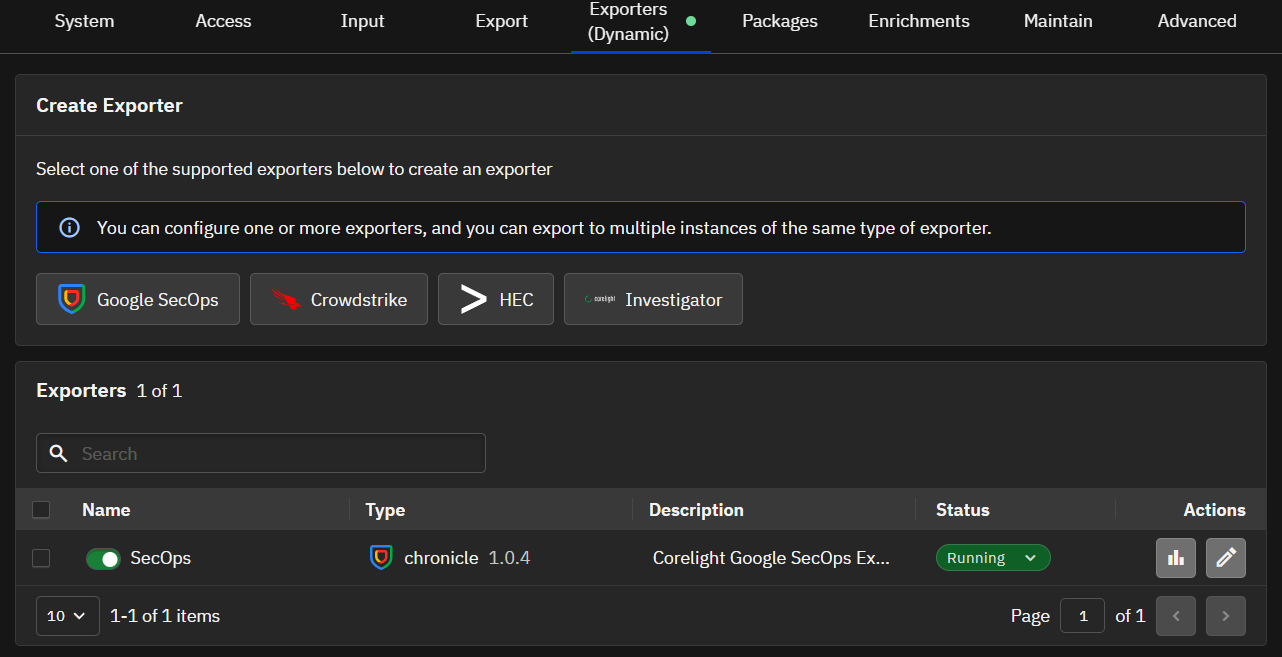
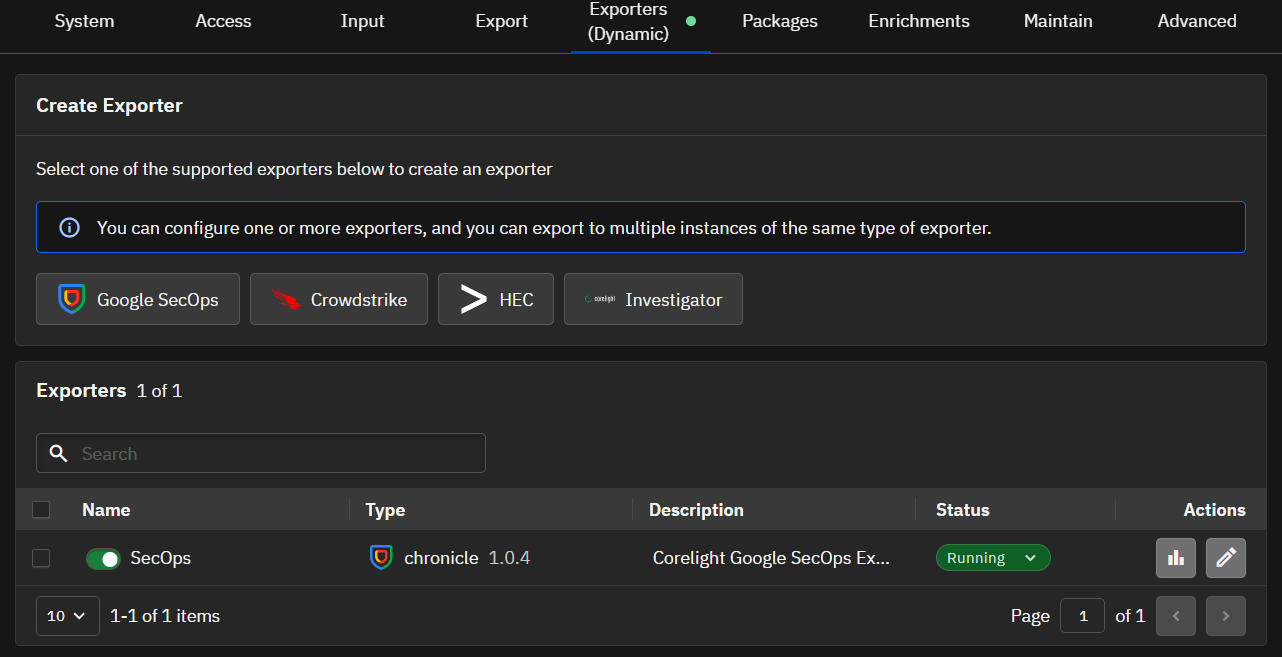
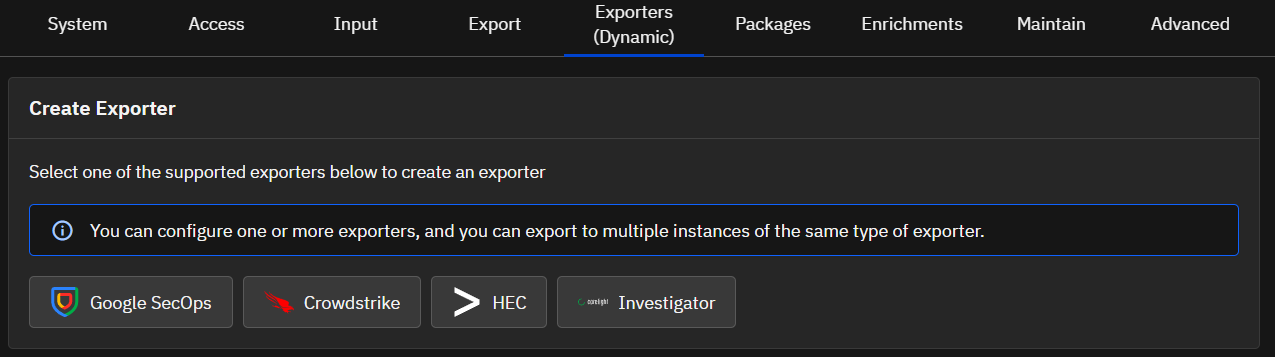
  3. 在 Create Exporter 部分,点击 Google SecOps。
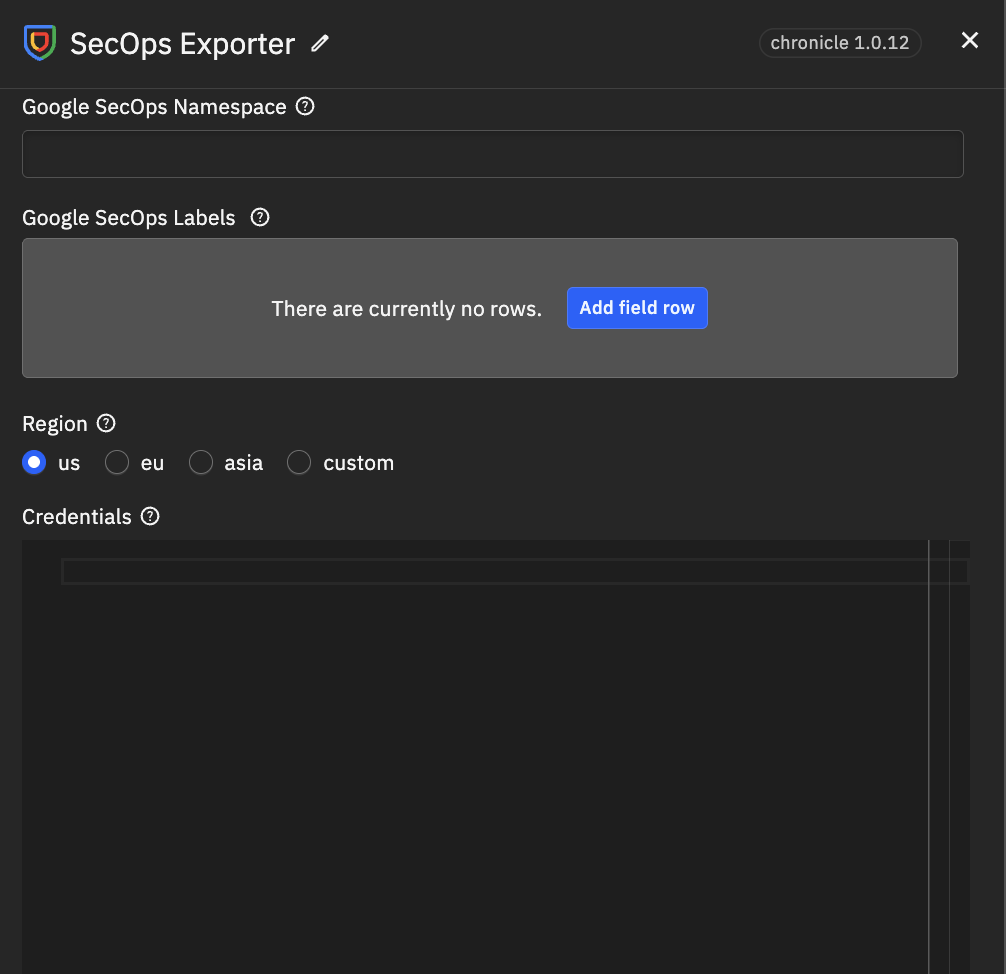
部署架构

  1. 配置以下输入参数:
  • Name*:此导出器实例的唯一名称(例如 SecOps)。
  • Google SecOps Customer ID*:由 Google 提供的唯一客户标识符。
  • Google SecOps Namespace:Google SecOps 中 Sensor 日志的逻辑命名空间。
  • Credentials*:Google SecOps 服务账号凭据(JSON)。(粘贴完整的 JSON 内容)。
  • Google SecOps Labels:用户配置的用于标识数据域的标签。
  • Region*:Google SecOps 使用的 GCP 区域名称。
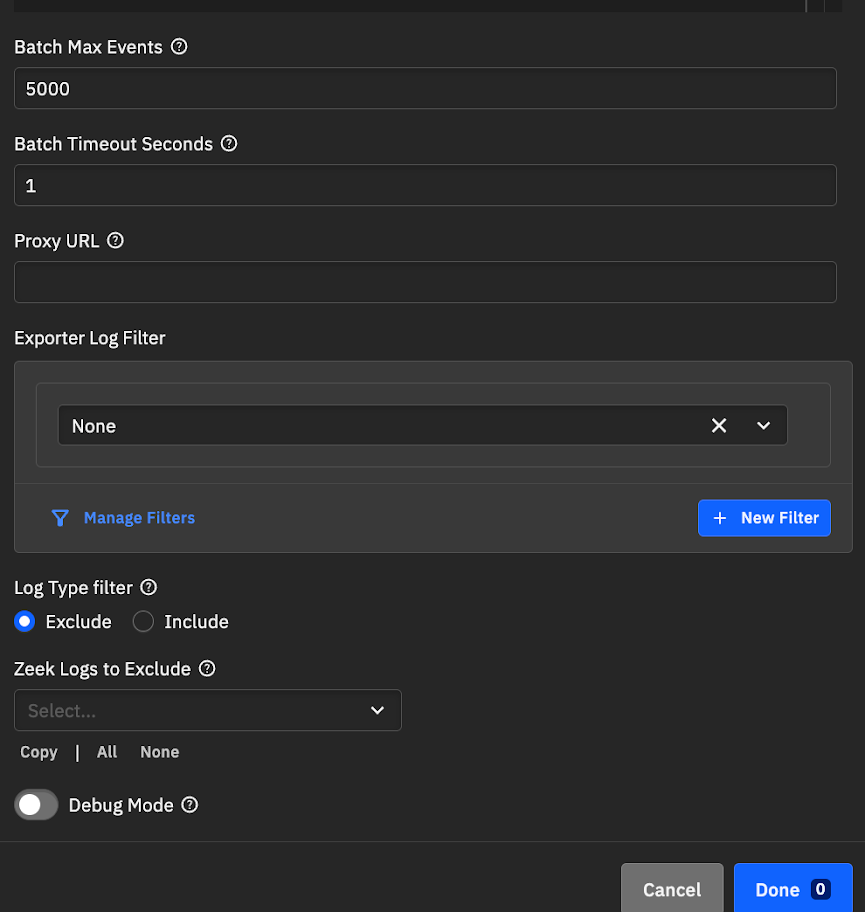
  • Batch Max Events:最大批处理大小。
  • Batch Timeout Seconds:批次的最大存在时间。
  • Proxy URL:网络代理 URL(如需要)。
  • Exporter Log Filter:选择要应用于此导出器实例的过滤器。
  • Log Type Filter:按名称包含或排除特定日志文件。
    • Exclude:移除指定的日志。新的日志类型(例如来自软件包的日志)仍会被导出。
    • Include:仅导出指定的日志。除非手动添加,否则新的日志类型将不会被导出。

部署架构 部署架构

  1. 点击 Done。

部署架构

  1. 点击 Apply Changes。

使用转发器将日志摄取到 Google SecOps

部署架构

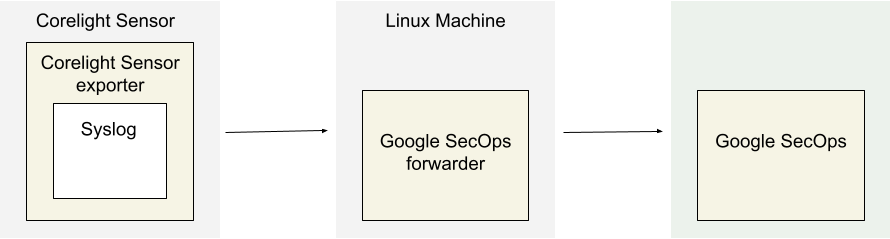
架构图展示了以下组件:

  • Corelight Sensor:运行 Corelight Sensor 的系统。

  • Corelight Sensor 导出器:Corelight Sensor 导出器从 Sensor 收集日志数据,并将其转发到 Google Security Operations 转发器。

  • Google Security Operations 转发器:Google Security Operations 转发器是一个轻量级软件组件,部署在客户网络中,支持 syslog。Google Security Operations 转发器将日志转发到 Google Security Operations。

  • Google Security Operations:Google Security Operations 保留并分析来自 Corelight Sensor 的日志。

配置 Google Security Operations 转发器

要配置 Google Security Operations 转发器,请执行以下操作:

  1. 设置 Google Security Operations 转发器。请参阅在 Linux 上安装和配置转发器。

  2. 配置 Google Security Operations 转发器以将日志发送到 Google Security Operations。

  collectors:
    - syslog:
        common:
          enabled: true
          data_type:  CORELIGHT
          data_hint:
          batch_n_seconds: 10
          batch_n_bytes: 1048576
        tcp_address: <Chronicle forwarder listening IP:Port>
        tcp_buffer_size: 524288
        udp_address: <Chronicle forwarder listening IP:Port>
        connection_timeout_sec: 60
配置 Corelight Sensor 导出器

  1. 以管理员身份登录 Corelight Sensor。
  2. 选择 Export 选项卡。
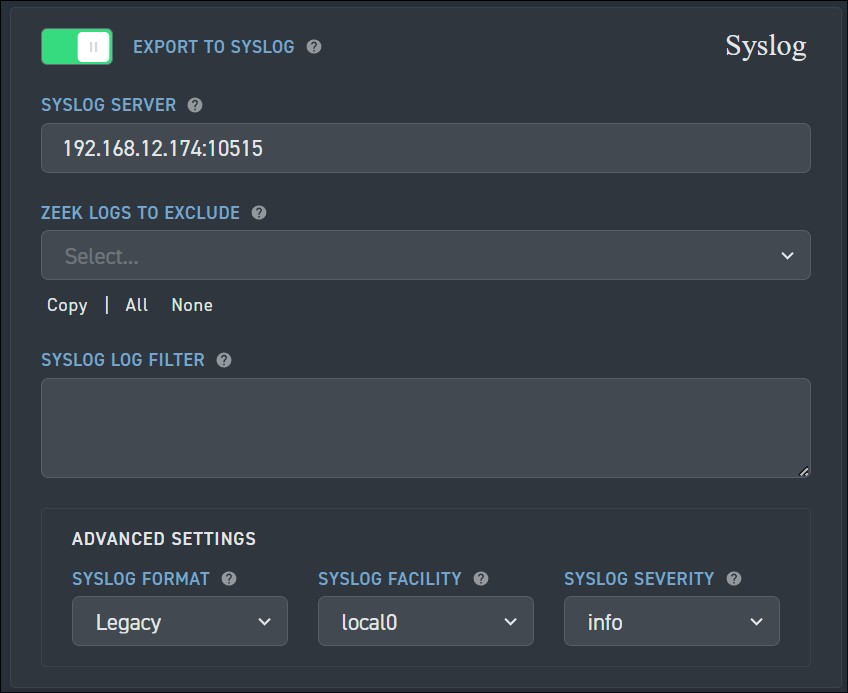
  3. 找到并启用 EXPORT TO SYSLOG 选项。
  4. 在 EXPORT TO SYSLOG 下,配置以下字段:
  • SYSLOG SERVER:指定 Google Security Operations 转发器 syslog 监听器的 IP 地址和端口。
  • 导航到 Advanced Settings > SYSLOG FORMAT,并将设置更改为 Legacy。

Corelight Sensor Configuration

  1. 单击 Apply Changes。

支持的 Corelight 日志类型

Corelight 解析器支持以下日志类型:

Log Type

  • asset_classification
  • conn
  • conn_long
  • conn_red
  • conn_agg
  • dce_rpc
  • dns
  • dns_red
  • files
  • files_red
  • http
  • http2
  • http_red
  • intel
  • irc
  • notice
  • rdp
  • sip
  • smb_files
  • smb_mapping
  • smtp
  • smtp_links
  • ssh
  • ssl
  • ssl_red
  • suricata_corelight
  • bacnet
  • cip
  • corelight_burst
  • corelight_metrics_bro
  • corelight_metrics_disk
  • corelight_metrics_iface
  • corelight_metrics_memory
  • corelight_metrics_system
  • corelight_metrics_zeek_doctor
  • corelight_overall_capture_loss
  • corelight_profiling
  • datared
  • dga
  • dhcp
  • dnp3
  • dpd
  • encrypted_dns
  • enip
  • enip_debug
  • enip_list_identity
  • etc_viz
  • ftp
  • generic_dns_tunnels
  • generic_icmp_tunnels
  • icmp_specific_tunnels
  • ipsec
  • iso_cotp
  • kerberos
  • known_certs
  • known_devices
  • known_domains
  • known_hosts
  • known_names
  • known_remotes
  • known_services
  • known_users
  • ldap
  • ldap_search
  • local_subnets
  • local_subnets_dj
  • local_subnets_graphs
  • log4shell
  • modbus
  • mqtt_connect
  • mqtt_publish
  • mqtt_subscribe
  • mysql
  • napatech_shunting
  • ntlm
  • ntp
  • pe
  • profinet
  • profinet_dce_rpc
  • profinet_debug
  • radius
  • reporter
  • rfb
  • s7comm
  • smartpcap
  • snmp
  • socks
  • software
  • specific_dns_tunnels
  • stepping
  • stun
  • stun_nat
  • suricata_eve
  • suricata_stats
  • syslog
  • tds
  • tds_rpc
  • tds_sql_batch
  • traceroute
  • tunnel
  • unknown-smartpcap
  • vpn
  • weird
  • weird_red
  • wireguard
  • x509
  • x509_red
  • dns_agg
  • files_agg
  • http_agg
  • ssl_agg
  • weird_agg
  • analyzer
  • anomaly
  • ssdp
  • telnet
  • websocket
  • first_seen

字段映射参考

本节说明 Google Security Operations 解析器如何将 Google Security Operations 字段映射到 Google Security Operations 统一数据模型(UDM)字段。

字段映射参考:CORELIGHT - 通用字段

下表列出了 CORELIGHT 日志的通用字段及其对应的 UDM 字段。

下载工具

最受欢迎

查看全部 →

发现我们社区最常用的工具。

暂无热门数据。

探索所有工具

浏览我们的工具集合

查看所有工具 →