Skip to content
KitploitKITPLOIT
工具博客
提交
工具博客
提交

黑客、渗透测试和网络安全工具,武装您的安全武器库!

Kitploit 是一个黑客、网络安全和渗透测试工具的目录。发现最新的项目更新,查找漏洞、分析系统、自动化测试并加强你的安全。

··订阅源·联系·隐私·© 2026 Kitploit

工具目录

分类

查看所有分类
Loading categories
JShunter — jshunter 是一款命令行工具,专为分析 JavaScript 文件并提取端点而设计。该工具专注于识别敏感数据,例如 API 端点和潜在的安全漏洞,使其成为渗透测试人员和漏洞赏金猎人的必备资源。 | Kitploit
工具/GitHubGitHub/cc1a2b/jshunter
侦察静态代码分析 (SAST)漏洞分析动态代码分析 (DAST)WAF绕过Web安全渗透测试秘密检测API 安全
GitHubcc1a2b/jshunter

JShunter

jshunter 是一款命令行工具,专为分析 JavaScript 文件并提取端点而设计。该工具专注于识别敏感数据,例如 API 端点和潜在的安全漏洞,使其成为渗透测试人员和漏洞赏金猎人的必备资源。

52959101个月前Kitploit 审核通过

最受欢迎

查看全部 →

发现我们社区最常用的工具。

探索所有工具

浏览我们的工具集合

查看所有工具 →
分享
查看仓库

JSHunter

License Go Version Release GitHub stars Platform

专业 JavaScript 安全分析工具

为安全专业人员提供完整的端点发现、敏感数据检测和高级代码分析

关于

JSHunter 是一款全面的 JavaScript 安全分析与端点发现命令行工具。专为安全专业人员、渗透测试人员和开发人员打造,提供企业级分析能力、高精度检测算法和专业报告功能。

https://github.com/user-attachments/assets/5a5f60fa-f8dc-4aac-bd06-2e93779f9af4

JSHunter 实际运行效果 — CLI 的真实终端截图(所有显示的密钥均为虚假测试数据)


目录

  • 关于
  • 功能特性
  • 安装
  • 快速开始
  • 使用示例
  • 命令参考
  • 高级用法
  • 贡献
  • 许可证
  • 支持

功能特性

核心能力

  • 全面端点发现:自动从 JavaScript 文件中提取 URL、API 端点和隐藏参数
  • 高级安全分析:高精度识别 API 密钥、JWT 令牌、凭据和潜在漏洞
  • 灵活输入方式:支持 URL、文件列表、本地文件、标准输入管道和递归发现
  • 高性能架构:多线程并发处理,内置智能速率限制
  • 专业隐蔽特性:代理支持、自定义请求头、User-Agent 轮换和绕过检测

智能检测引擎

企业级精度,先进分析算法

  • 智能 Base64 检测:高精度过滤,消除媒体内容和编码数据的误报
  • 专业界面:企业级术语、文档和全面的报告格式
  • 上下文感知分析:先进算法区分真实安全令牌与编码媒体数据
  • 熵分析:数学算法精准识别真实安全令牌和凭据

专业 HTTP 与网络套件

企业级网络配置

认证与请求头:

  • 自定义请求头(-H):可重复的认证请求头和自定义请求头
  • Cookie 管理(-c):用于访问受保护资源的会话 Cookie
  • User-Agent 控制(-U):自定义 UA 字符串或基于文件的轮换以实现隐蔽性

性能与可靠性:

  • 速率限制(-R):可配置的请求延迟(毫秒),避免被检测
  • 智能超时(-T):针对不同网络条件的自定义超时设置
  • 智能重试(-y):失败请求的自动重试机制,采用指数退避策略

专业集成:

  • 代理支持(-p):完整支持 Burp Suite 和自定义代理集成(HTTP/HTTPS/SOCKS5)
  • TLS 灵活性(-k):可选证书验证绕过,适用于测试环境
  • 线程控制(-t):可配置的并发请求处理,实现最佳性能

安全专业功能:专为渗透测试和安全评估设计 示例:jshunter -l targets.txt -p 127.0.0.1:8080 -H "Authorization: Bearer token" -R 1000

高级 JavaScript 分析

完整代码分析与反混淆套件

核心分析工具:

  • 反混淆引擎(-d):解包压缩和混淆的 JavaScript 以进行深入分析
  • 源码映射解析器(-m):从 source map 中提取和分析原始源代码
  • 混淆检测(-z):识别和分类混淆技术与模式

动态分析:

  • Eval 分析(-e):分析动态代码执行(eval()、Function()、运行时生成)

代码智能:

  • 模式识别:识别常见 JavaScript 框架和库
  • 代码结构分析:映射应用架构和数据流
  • 上下文感知检测:理解代码上下文以减少误报

专业用法:将分析工具与安全检测结合使用,实现最大覆盖率 示例:jshunter -u target.js -d -m -e -s -g(完整反混淆 + 安全分析)

安全分析套件

完整安全评估工具包

核心安全检测:

  • 密钥检测(-s):API 密钥、访问令牌、密码和硬编码凭据
  • JWT 令牌分析(-x):认证令牌提取、验证和载荷检查
  • Firebase 安全(-F):配置分析、API 密钥和数据库 URL 检测

高级分析:

  • 参数发现(-P):隐藏表单参数、变量和配置键
  • URL 参数提取(-PU):带完整 URL 上下文的高级参数分析
  • GraphQL 分析(-g):Schema 检测、查询提取和端点发现
  • WAF 绕过检测(-B):安全绕过模式和规避技术

范围与上下文:

  • 内部端点过滤(-i):私有/内部资源识别与分类
  • 链接分析(-L):全面 URL 提取和关系映射

专业提示:组合使用标志进行综合分析(例如:jshunter -u target.js -s -x -F -g)

范围与发现

智能爬取与目标定位
  • 递归发现:多层级 JavaScript 文件爬取
  • 域名范围限定:聚焦特定域名的分析
  • 扩展名过滤:定位特定 JavaScript 文件类型

专业报告与导出套件

企业级输出与集成

核心输出格式:

  • 控制台显示:彩色终端输出,专业格式化和清晰分类
  • 文件导出(-o):将全面结果保存到自定义文件位置
  • JSON 导出(-j):结构化数据格式,适用于自动化和程序化处理
  • CSV 导出(-C):电子表格兼容格式,适用于管理层报告和分析

专业集成:

  • Burp Suite 导出(-n):直接集成 Burp Suite Professional,可立即进行测试
  • 正则过滤(-r):自定义模式匹配,实现针对性结果过滤
  • 详细分析(-v):包含调试信息和上下文的详细分析输出

结果管理:

  • 干净模式(--found-only):隐藏空结果,实现聚焦的安全报告
  • 静默模式(-q):抑制横幅显示,适用于自动化脚本和 CI/CD 集成

报告工作流:使用 JSON 进行自动化,CSV 用于管理报告,Burp 导出用于立即测试 示例:jshunter -l targets.txt -s -j -o security-findings.json(结构化安全报告)


安装

Go 安装(推荐)```bash

Install JSHunter

go install -v github.com/cc1a2b/jshunter/cmd/jshunter@latest

Verify installation

jshunter --help

root@kitploit:~
### 从源码构建```bash
git clone https://github.com/cc1a2b/jshunter.git
cd jshunter
go build -o jshunter ./cmd/jshunter

系统要求

  • Go 1.22.5+(用于从源码构建)
  • Linux、macOS 或 Windows(64 位架构)
  • 网络连接(用于远程 JavaScript 分析)

快速开始

基本分析```bash

Analyze a single JavaScript file

jshunter -u "https://example.com/app.js"

Scan multiple URLs from file

jshunter -l urls.txt

Analyze local JavaScript file

jshunter -f app.js

root@kitploit:~
### 完整的安全分析```bash
# Find API keys, secrets, and credentials
jshunter -u "https://target.com/app.js" -s

# Full analysis with deobfuscation, GraphQL, and Firebase detection
jshunter -u "https://target.com/app.js" -d -s -g -F -x -L

# Professional security assessment with all tools
jshunter -u "https://target.com/app.js" -d -m -e -s -x -P -g -F -B -L

# Export comprehensive results for reporting
jshunter -l targets.txt -s -g -F -j -o security_findings.json

使用示例

---```bash

Analyze single URL

jshunter -u "https://example.com/app.js"

Analyze multiple URLs from file

jshunter -l urls.txt

Pipe URLs from stdin

cat urls.txt | grep ".js" | jshunter

Complete security analysis - find secrets, API keys, and credentials

jshunter -u "https://example.com/app.js" -s -x -F

Full analysis suite with deobfuscation and all security tools

jshunter -u "https://target.com/app.js" -d -m -e -s -x -P -g -F -B -L

Professional assessment with source map analysis

jshunter -u "https://target.com/bundle.js" -d -m -s -g -F

Export comprehensive results to structured formats

jshunter -l targets.txt -s -x -F -g -j -o security_findings.json

Stealth scanning with Burp Suite integration

jshunter -l targets.txt -p 127.0.0.1:8080 -s -g -F -n -o burp_findings.txt

Scanning through SOCKS5 proxy (Tor, SSH tunnel, etc.)

jshunter -l targets.txt -p socks5://127.0.0.1:9050 -s -x -F

Rate-limited professional scanning with authentication

jshunter -l urls.txt -R 2000 -H "Authorization: Bearer token" -s -x -F -g -q

Complete endpoint and parameter discovery

jshunter -l urls.txt -ep -P -PU -L -w 2

Advanced obfuscation analysis with context detection

jshunter -f obfuscated.js -d -z -e -s -v

root@kitploit:~
---

## 命令参考

随时通过 `jshunter --help` 获取完整帮助```
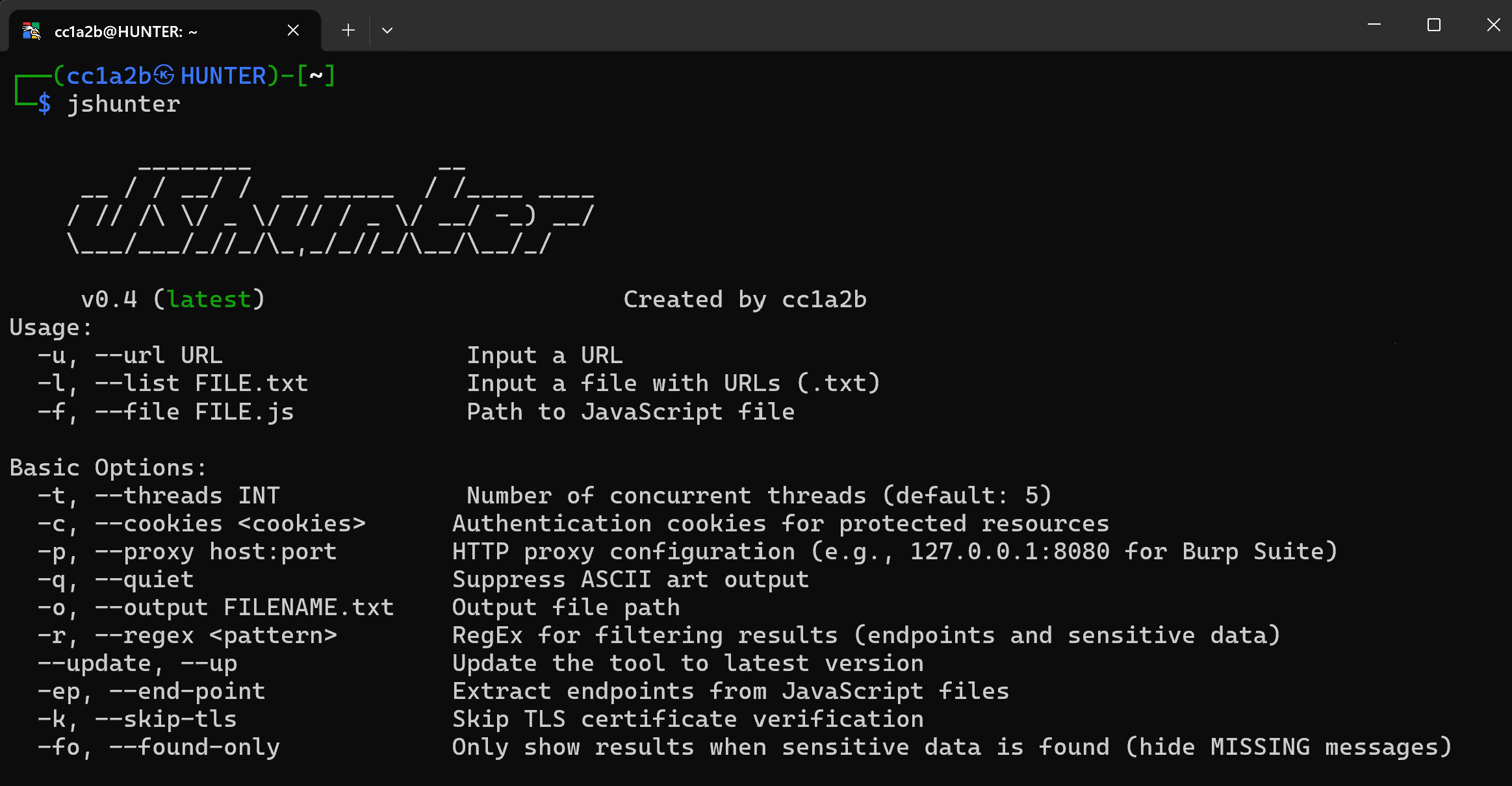
Usage:
  -u,  --url URL                Input a URL
  -l,  --list FILE.txt          Input a file with URLs (.txt)
  -f,  --file FILE.js           Path to JavaScript file
       --har FILE               Ingest a Chrome DevTools HAR archive

Basic Options:
  -t,  --threads INT            Number of concurrent threads (default: 5)
  -c,  --cookies <cookies>      Authentication cookies for protected resources
  -p,  --proxy host:port        HTTP/SOCKS5 proxy (e.g., 127.0.0.1:8080 for Burp Suite)
  -q,  --quiet                  Suppress ASCII art output
       --no-color               Disable ANSI color (auto-off when not a TTY)
  -o,  --output FILENAME        Output file path
  -r,  --regex <pattern>        RegEx for filtering results
       --update, --up           Update the tool to latest version
  -ep, --end-point              Extract endpoints from JavaScript files
  -k,  --skip-tls               Skip TLS certificate verification
  -fo, --found-only             Only show results when sensitive data is found

HTTP Configuration:
  -H,  --header "Key: Value"    Custom HTTP headers (repeatable, including Auth)
  -U,  --user-agent UA          Custom User-Agent string or file path
  -R,  --rate-limit MS          Request rate limiting delay (milliseconds)
  -T,  --timeout SEC            HTTP request timeout (seconds)
  -y,  --retry INT              Retry attempts for failed requests (default: 2)
       --per-host INT           Per-host outbound concurrency cap (default: 4)
       --max-bytes N            Cap response body read in bytes (default: 32MiB)
       --allow-internal         Permit localhost / RFC1918 / link-local targets
       --cache-dir DIR          Persist responses on disk; revalidate via ETag

JavaScript Analysis:
  -d,  --deobfuscate            Deobfuscate minified and obfuscated JavaScript
  -m,  --sourcemap              Fetch and parse source maps + sourcesContent[]
  -e,  --eval                   Analyze dynamic code execution (eval, Function)
  -z,  --obfs-detect            Detect code obfuscation patterns and techniques
       --inline-html            Scan inline <script> tags + SRI/CSP in HTML responses
       --csp-origins            Emit CSP-allowed origins as candidate endpoints

Security Analysis:
  -s,  --secrets                Detect API keys, tokens, and credentials
  -x,  --tokens                 Extract JWT and authentication tokens
  -P,  --params                 Discover hidden parameters and variables
  -PU, --param-urls             Advanced parameter extraction with URL context
  -i,  --internal               Filter for internal/private endpoints
  -g,  --graphql                Analyze GraphQL endpoints and queries
  -B,  --bypass                 Detect WAF bypass patterns and techniques
  -F,  --firebase               Analyze Firebase configurations and keys
  -L,  --links                  Extract and analyze all embedded links

Detection Tuning:
  -mc, --min-confidence FLOAT   Minimum confidence (0.0-1.0) for a finding (default: 0.50)
  -sc, --show-confidence        Print [conf=X.XX] alongside each finding
       --no-fp-filter           Disable the false-positive filter (debug)
       --ignore-file FILE       Permanent suppressions (.jshunterignore)
       --diff PREVIOUS.json     Report only NEW findings vs previous JSON envelope
       --rules-file FILE.json   Load an external JSON rule pack
       --only-rules id,glob     Run only matching rules (supports * glob)
       --disable-rule id,glob   Disable matching rules (supports * glob)

Verification:
       --verify                 Probe findings against provider read-only endpoints
       --verify-timeout SEC     Timeout per verification probe (default: 10)
       --verify-workers INT     Concurrent verifier worker pool (default: 8)

Scope & Discovery:
  -w,  --crawl DEPTH            Recursive JavaScript discovery depth (default: 1)
  -D,  --domain DOMAIN          Limit analysis to specific domain
  -E,  --ext                    Filter by JavaScript file extensions
       --robots                 Fetch /robots.txt for each input host and exit

Output Formats:
  -j,  --json                   Structured JSON output (schema_version 2)
       --ndjson                 Newline-delimited JSON (jq / SIEM streaming)
       --sarif                  SARIF 2.1.0 (GitHub code-scanning compatible)
  -C,  --csv                    CSV format for spreadsheet analysis
  -v,  --verbose                Detailed analysis and debug output
  -n,  --burp                   Burp Suite compatible export format
       --stats                  Per-stage counters on stderr at end of run

Registry:
       --list-rules             Print the rule registry as a table and exit
       --explain RULE_ID        Print full rule details and exit
       --self-test              Run rule registry against built-in TP/FP fixtures

  -h,  --help                   Display this help message

置信度模型

每个机密类匹配的得分范围为 [0.0, 1.0]。得分从每条规则的先验值开始,并根据以下因素进行调整:

默认的 --min-confidence 0.50 会过滤掉仅基于模式匹配的长尾结果。使用 --min-confidence 0.80 进行高精度分类,使用 --no-fp-filter 获取原始、未过滤的输出。

提供商验证器

验证器是每条规则的一致性检查,在正则表达式匹配之后运行。 它是抵御误报的最强防线:一个恰好符合形状的随机字符串 在报告之前仍然必须通过校验和、结构解码或 长度/字符集验证(并且通过一项验证会增加 +0.10)。

提供商覆盖范围

精选注册表包含 85+ 个检测器,涵盖云与密钥管理器 (AWS、Azure、GCP/PKCS#8、HashiCorp Vault、Terraform、Fly.io、Tailscale)、版本 控制与 CI/CD(GitHub、GitLab、Docker Hub、Atlassian、Sentry、CircleCI、 Buildkite)、支付(Stripe、Square、Braintree、Plaid)、AI/LLM 提供商 (OpenAI、Anthropic、Groq、Perplexity、Replicate、OpenRouter、Fireworks、 HuggingFace)、消息传递(Slack、Discord、Telegram、Twilio、Intercom、SendGrid、 Mailgun)、SaaS 与数据库(Notion、Airtable、Figma、Postman、Databricks、 PlanetScale、Grafana、New Relic、Dropbox、RubyGems、Supabase)以及 PKI 材料 (RSA/EC/DSA/OpenSSH/PGP/PKCS#8 私钥、PuTTY .ppk、数据库连接 URI)。运行 jshunter --list-rules 获取权威表,运行 jshunter --explain <rule_id> 查看任何单条规则的模式、验证器和 测试夹具。无前缀的“裸哈希”形状仅在结构 验证器或强制上下文门控能够保持其无误报时才提供。


高级用法

专业安全评估```bash

Complete security analysis with all tools

jshunter -l targets.txt -d -m -e -z -s -x -P -PU -g -F -B -L -j -v -o complete_assessment.json

Advanced deobfuscation and analysis pipeline

jshunter -l targets.txt -d -m -z -e -s -g -F --found-only -o deobfuscated_findings.json

Stealth reconnaissance with rate limiting and custom headers

jshunter -l targets.txt -R 2000 -U "Mozilla/5.0..." -H "X-Forwarded-For: 1.1.1.1" -s -x -F -q

Professional penetration testing through proxy

jshunter -l targets.txt -p 127.0.0.1:8080 -s -x -g -F -B -n -o burp_comprehensive.txt

Deep parameter and endpoint discovery

jshunter -l targets.txt -ep -P -PU -L -w 3 -i -j -o endpoint_discovery.json

root@kitploit:~
### 企业与自动化集成```bash
# CI/CD Security Pipeline Integration
jshunter -f dist/bundle.js -d -s -x -F -j --found-only > security-scan.json

# Comprehensive automated security reporting
jshunter -l production-js.txt -d -s -x -P -g -F -B -C -o enterprise-security-report.csv

# Source map analysis for development security
jshunter -f app.js -m -s -x -F -v -o sourcemap-analysis.json

# Firebase and GraphQL focused assessment
jshunter -l targets.txt -g -F -L -j -o api_security_findings.json

参与贡献

我们欢迎各种贡献!以下是你可以提供帮助的方式:

  • 报告 Bug:通过 GitHub Issues
  • 建议新功能或改进
  • 完善文档
  • 提交拉取请求以带来增强功能

开发环境搭建```bash

git clone https://github.com/cc1a2b/jshunter.git cd jshunter go mod tidy go build -o jshunter ./cmd/jshunter

root@kitploit:~
## 许可证

JSHunter 根据 **MIT 许可证** 发布。详情请参阅 [LICENSE](https://github.com/cc1a2b/jshunter/blob/master/LICENSE)。```
Copyright (c) 2024-2026 Hussain Alsharman
Licensed under MIT License - free for commercial and personal use

支持

如果 JSHunter 对您的安全研究或专业工作有所帮助:

为这个仓库点星 • 关注 @cc1a2b • 分享给其他人


JSHunter - 专业 JavaScript 安全分析

由 cc1a2b 为安全社区构建

下载工具
信号效果
源路径看起来像供应商/代码块捆绑包−0.15
周围上下文包含测试夹具措辞−0.30
特定提供商的验证器通过+0.10
必需的上下文关键字存在(通用规则)+0.05
香农熵 ≥ 4.5+0.05
字符类别多样性 ≥ 3+0.05
匹配项位于供应商噪声黑名单中评分前丢弃
长度/熵低于规则下限评分前丢弃
行是 //# sourceMappingURL= 标记评分前丢弃
提供商验证器
AWS前缀族(AKIA/ASIA/A3T…)+ 16 字符 base32 主体
Stripe密钥族(sk/rk/pk_live/test_)和 whsec_ webhook base62 主体
GitHubCRC32 base62 校验和与随机主体验证
OpenAI族前缀 + 长度窗口(sk-/sk-proj-/sk-svcacct-)
Slack连字符分段形状(数字内段,字母数字尾部)
JWTbase64url 解码的 JSON 头部,包含 alg 字段 + JSON 载荷
Twilio32 十六进制主体 + 熵门控
AzureAccountKey= base64 主体解码后恰好为 64 字节;AD …<digit>Q~…
Telegram<8-10 位数字 id>:AA… 拆分,base64url 密钥 + 熵门控
Intercombase64 解码为 tok: 前缀的载荷
Sentrysntrys_ 组织令牌载荷 base64 解码为携带 url 声明的 JSON
Terraform<14>.atlasv1.<60-70> 三段结构
Squaresq0atp-/sq0csp-/sq0idp- 族 + 精确主体长度 + 熵
Braintreeaccess_token$<env>$<16 base36>$<32 hex> 四段结构
Airtablepat<14>.<64 hex> 两段拆分
PostmanPMAK-<24 hex>-<34 hex> 段长度 + 熵
Database如果连接 URI 密码是模板化/默认/低熵则拒绝